
ComfyUI-Civitai-LoRA-Rack
ComfyUI-Civitai-LoRA-Rack
Civitai LoRA Rack (CLR)
A LoRA manager for ComfyUI — manage a whole stack of LoRAs on one node, tweak per-LoRA weights, and pull in metadata, sample images and trigger words from Civitai without leaving the canvas.
This project is AI-generated — the code was written by AI.
Why another LoRA loader?
ComfyUI's built-in Load LoRA node handles one file. Once a workflow needs six LoRAs, you end up chaining nodes, remembering which weight belongs to which file, and digging through folders to find the trigger words.
And if you have dozens or hundreds of LoRAs downloaded, just finding the right one — let alone remembering what each of them is actually good for — becomes a chore of its own.
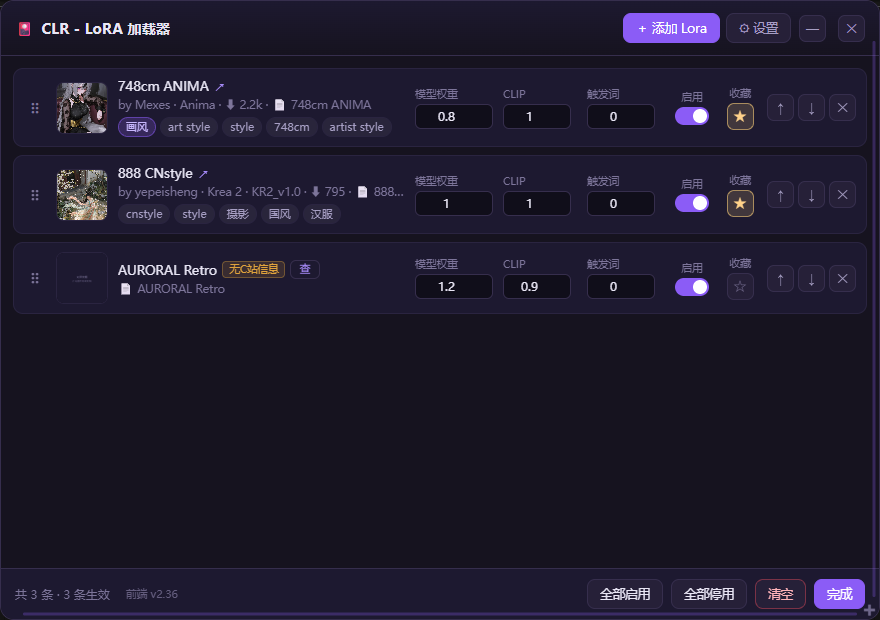
CLR puts the whole stack on one node:
- Reorder, enable/disable and weight each LoRA without re-wiring
- See Civitai metadata next to each file (author, base model, downloads, sample images)
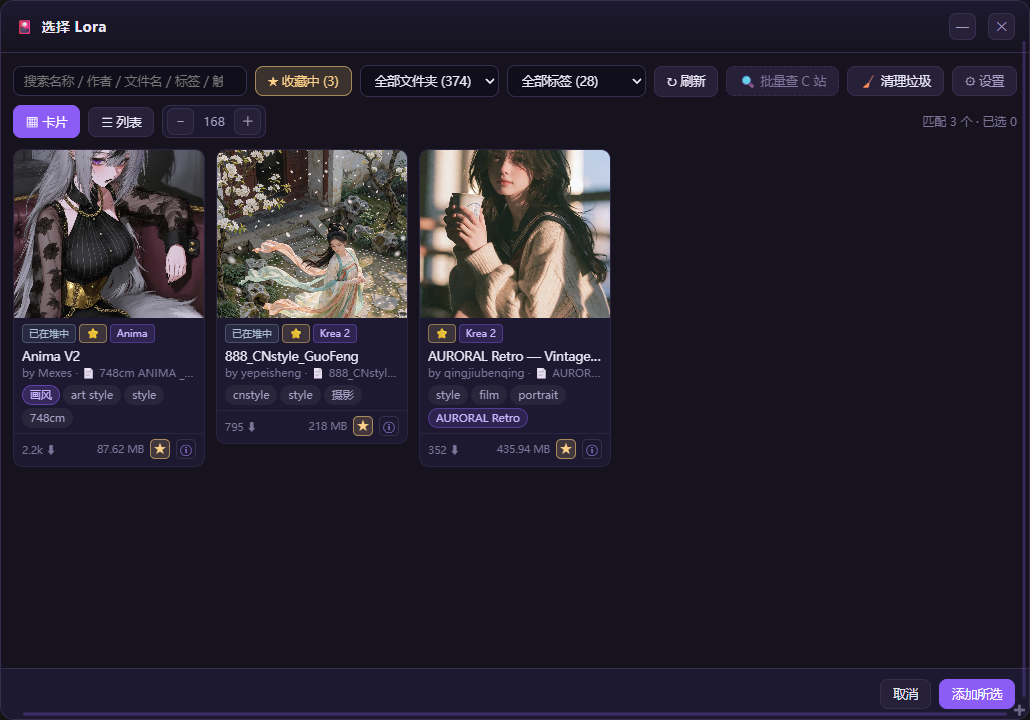
- Find LoRAs by name, author, tag or trigger word instead of browsing folders
- Write your own tags and notes on each LoRA, so a glance tells you what it does for your workflow
Features
| | |
|---|---|
| Stack node | Multiple LoRAs in one node, per-LoRA model / clip / trigger weights, drag to reorder, per-LoRA enable/disable (plus one-click disable all), favourites |
| Picker | Search across name, author, filename, tags and trigger words; filter by folder and tag; grid or list view |
| Detail view | Author, base model, version, downloads, favourites, file size, SHA256, sample images, trained words, training params |
| Batch lookup | One click fills in author / tags / trigger words for every LoRA in the list that has no Civitai metadata yet |
| Garbage cleanup | Finds orphaned previews / metadata sidecars / partial downloads / empty files, moves them to a quarantine folder (restorable) |
| Your own notes | Custom tags, description and cover image per LoRA — stored locally and never overwritten by a Civitai refresh |
| Bilingual UI | 中文 / English, switchable in settings and remembered per browser |
Nodes
| Node | Display name | What it does |
|---|---|---|
| CFTLoraStack | CLR - LoRA 加载器 / Civitai LoRA Rack | Apply a stack of LoRAs, outputs MODEL / CLIP / trigger words |
| CFTLoraLoader | CLS - 单条 LoRA 加载 / Civitai LoRA Slot | A single-LoRA loader |
Node type names keep the historical
CFTprefix for workflow compatibility. Existing workflows keep working.
lora_stack input accepts a JSON array (the same shape most LoRA-stack nodes use), so workflows can be moved between tools:
[
  {
    "lora": "Anima/xxx.safetensors",
    "weight": 1.0,
    "text_encoder_weight": 1.0,
    "trigger_weight": 0.0,
    "hidden": false
  }
]
path / file are accepted as aliases of lora; clip_weight as an alias of text_encoder_weight.
Installation
ComfyUI-Manager — search for Civitai LoRA Rack and install, then restart.
Manual
cd ComfyUI/custom_nodes
git clone https://github.com/Hakaki/ComfyUI-Civitai-LoRA-Rack
Restart ComfyUI. The only dependency is requests, which ComfyUI already bundles.
Configuration
Click the ⚙ button on the node (or the gear in the picker) and paste your Civitai API key.
- Key is stored locally at
ComfyUI/user/default/Civitai-LoRA-Rack/config.json - It is never uploaded, never logged, and the HTTP API only ever returns a masked value (
********abcd) - Get a key at https://civitai.com/user/account → API Keys
Optional fields in the same file:
{
  "api_key": "",
  "site_domain": "civitai.com",
  "proxy_enabled": false,
  "proxy_address": "http://127.0.0.1:7890",
  "extra_loras_dirs": []
}
site_domain— point at a mirror ifcivitai.comis unreachable from your networkproxy_enabled/proxy_address— route only CLR's requests through a proxyextra_loras_dirs— extra folders to scan, if your LoRAs live outsideComfyUI/models/loras
You do not need an API key to use the node. Without one you still get everything that lives on disk — it only disables "refresh from Civitai" for files that have no local metadata.
Where metadata comes from
Read in this order, so it works fully offline:
<file>.civitai.info— full model-version JSON saved next to the file<file>.info.json— compact version- safetensors header —
ss_*/modelspec.*keys inside the file - Civitai API — only when you press Refresh from Civitai, matched by SHA256; the result is written back as
.civitai.info
Preview images are found as <name>.preview.png, <name>.preview.jpg, <name>.png, …
FAQ
Does it download models? No. CLR only manages LoRAs you already have on disk.
Will it delete my files? Never automatically. The cleanup tool only lists candidates; nothing moves until you confirm, and everything goes to ComfyUI/models/loras/.cft_trash/ with a manifest so it can be restored.
Where are my notes stored? In a sidecar next to the LoRA file, so they survive moving the model folder.
ComfyUI 1.5x Vue nodes — supported. The lora_stack field is hidden in both the legacy canvas and the Vue renderer.
Development
# backend (no ComfyUI runtime needed)
python tests/test_metadata.py
python tests/test_plugin.py
python tests/test_cleanup.py

# frontend DOM sandbox (needs a local Chrome)
node tests/run_sandbox.mjs
License
MIT — see LICENSE.