
Experimental DLSS Neural Rendering
Experimental Windows bridge for NVIDIA DLSS Super Resolution, neural rendering, and Frame Generation in ComfyUI.
Nodes (15)
The depth map that tells DLSS where things are
Pick the Depth Model, Then Watch It Not Make You Real-Time
The one-node on-ramp to DLSS5 — no wiring diagram required
FlashDepth, in a box — for depth when the frame is huge
DLSS SR + neural rendering, with the video controls the Easy node hides
The neural-render pass alone, for when you don't want the upscale
Motion vectors for free — no model, no download
Real motion vectors, RAFT's way — the quality video path
The one-click installer that makes the whole pack exist
Is the runtime actually installed? This node tells you
Stop framewise depth from strobing through your video
Video depth that stays consistent, straight out of the model
Real NVIDIA DLSS Frame Generation inside ComfyUI — 24 fps in, 48 fps out
The DLSS frame-gen check engine light you run before you waste an hour
Actual NVIDIA DLSS Super Resolution, pointed at your own footage
Experimental DLSS Neural Rendering for ComfyUI
v0.5.0 Experimental Preview: selectable guide models and optional persistent NR execution. The measured 4K output throughput remains below 30 source FPS; see measurements and limits.
<p align="center"> <img src="docs/images/icon.png" width="160" alt="Experimental DLSS Neural Rendering project icon"> </p>An unofficial Windows-only ComfyUI extension for NVIDIA DLSS Super Resolution, experimental DLSS Neural Rendering, and optional DLSS Frame Generation. It connects ComfyUI image or video batches to VapourSynth and D3D12 bridge wrappers.
[!WARNING] This is an experimental alpha project. It is not affiliated with NVIDIA, ComfyUI, RenoDX, or VapourKit. The repository contains native runtime DLLs; review runtime sources and licenses before using or redistributing them.
First run: install, check, make an image
Use a working Windows ComfyUI installation with an NVIDIA RTX GPU.
- Install the extension. Use ComfyUI Manager and search for
Experimental DLSS Neural Rendering. If Manager has not refreshed the
Registry yet, install from
https://github.com/HECer/ComfyUI-DLSS5. A manual clone needs Git LFS:git lfs installfollowed bygit lfs pull. Manager installs this custom node package and its declared dependencies. - Restart ComfyUI so it loads the declared Python dependencies.
- Install the base runtime. Add DLSS Runtime Setup (One Click),
queue
Check location, then queue Install verified VapourKit withconfirm_downloadenabled. This installs the pinned isolated VapourKit runtime, NumPy, the bundled wrappers, and the SR/NR DLLs. Existing working configuration is preserved. - Check the runtime. Run DLSS 5 Runtime Status.
PRESENTmeans a file exists; Python, VapourSynth/NumPy imports, and plugin probes should bePASS.Inference: UNTESTEDis expected until an image is processed. - Run the Easy workflow. Import
workflows/00_easy_one_node_2x.json,
choose an image in Load Image, and keep
Auto (recommended),Upscale + neural rendering,2x,Quality, andNeutral / faithfulfor the first run. Queue the workflow, inspect the preview at 100%, and use Save Image for the result.
The first guide-model run downloads Depth Anything V2 Small on first use. A still uses zero
motion; video presets use optical flow or RAFT. Easy uses DA-V2 by default, while
the temporally consistent VDA model is the separate workflow 04. Optional Easy
overrides and the new DLSS Depth Guide (Model Selection) add YOLO26 Nano/Small,
model explanations, FP16 and inference-size controls. See
fast depth selection and benchmarks. Optional
persistent NR execution reuses matching NR initialization;
SR remains isolated and the existing process mode stays the default. Use the
troubleshooting guide when a status probe reports
FAIL, MISSING, or LFS POINTER.
The optional Frame Generation feature has a separate setup action. Select
Install verified Frame Generation only for workflow 06, then run DLSS
Frame Generation Runtime Status before processing a clip.
What this extension does
- DLSS Super Resolution at 2x, 3x, or 4x.
- Experimental Neural Rendering at the current resolution, or after SR in the Full Pipeline node.
- Easy one-node presets for stills, short video, long video, and fast previews.
- Depth Anything V2, Video Depth Anything Small, RAFT motion, and temporal depth stabilization guides.
- Persistent full-sequence processing and bounded overlap-add processing.
- Optional FlashDepth in its own Python environment for high-resolution video.
- Optional DLSS Frame Generation through the open-source DLSSG-Stream-Worker.
Depth and motion are estimated from pixels. A game integration can provide geometry, material buffers, exposure, jitter, and engine-authored motion that this extension cannot recover from an ordinary image or video.
Choose a workflow
| Workflow | Use it for | Main dependency or note | | --- | --- | --- | | 00 — Easy one-node 2x | First still or simple clip | One node selects the preset and operation | | 01 — Guided still 2x | Explicit depth, motion, and Full Pipeline controls | No VideoHelperSuite required | | 02 — Persistent video 2x | Short or medium clips that fit in memory | VideoHelperSuite loader and encoder | | 03 — Bounded video 2x | Lower native working-set video processing | Full ComfyUI batches still use RAM | | 04 — VDA-S temporal 2x | Recommended temporally consistent depth | Add an encoder for export | | 05 — FlashDepth 2x | Optional high-resolution depth | Isolated environment; see setup | | 06 — DLSS-G 24→48 | Optional frame generation | Separate worker; match source and output FPS |
All supplied video workflows use ComfyUI-VideoHelperSuite for loading. Workflows 02, 03, and 06 include an encoder; workflows 04 and 05 end at Preview Image.
See workflows/README.md for defaults, dependency notes, and import guidance.
Visual examples
These examples show the intended comparison layout and representative output. They are single-run examples, not a universal quality guarantee. Pixel differences measure changed pixels, not whether the change is better.
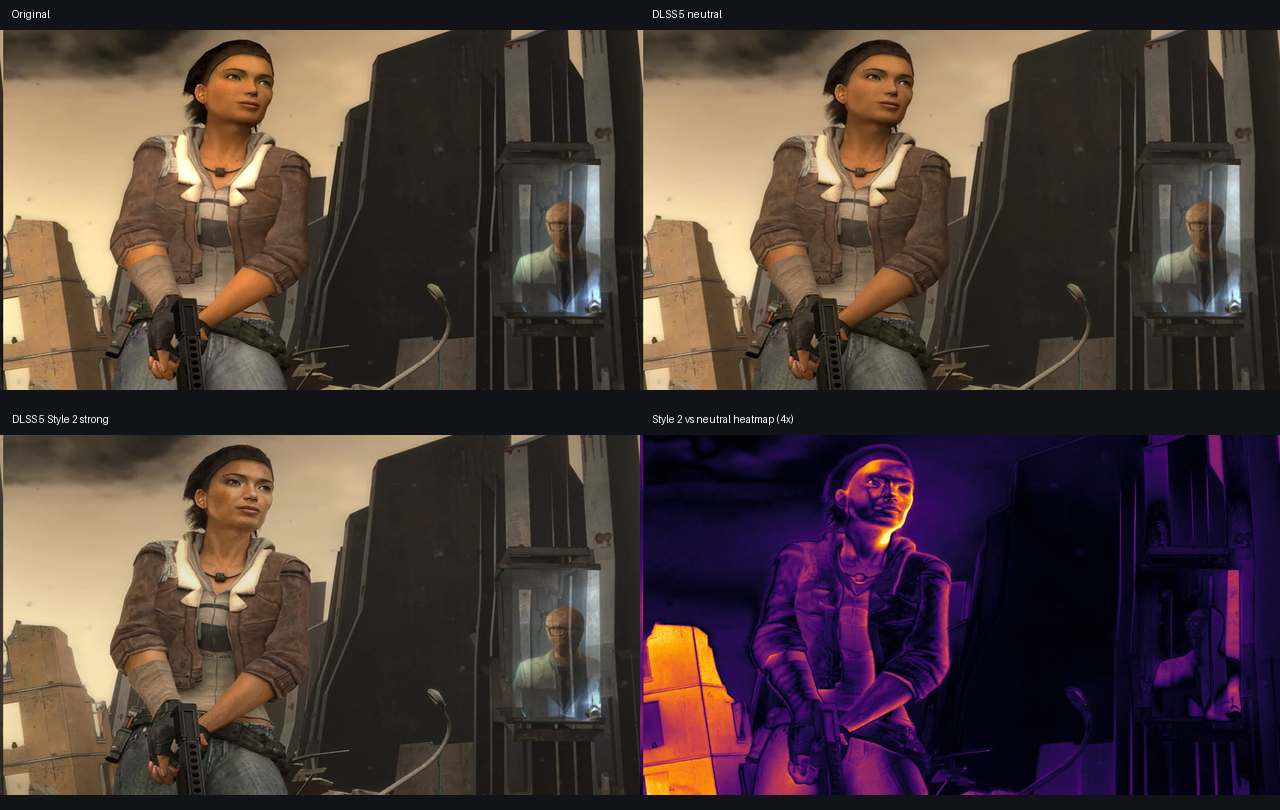
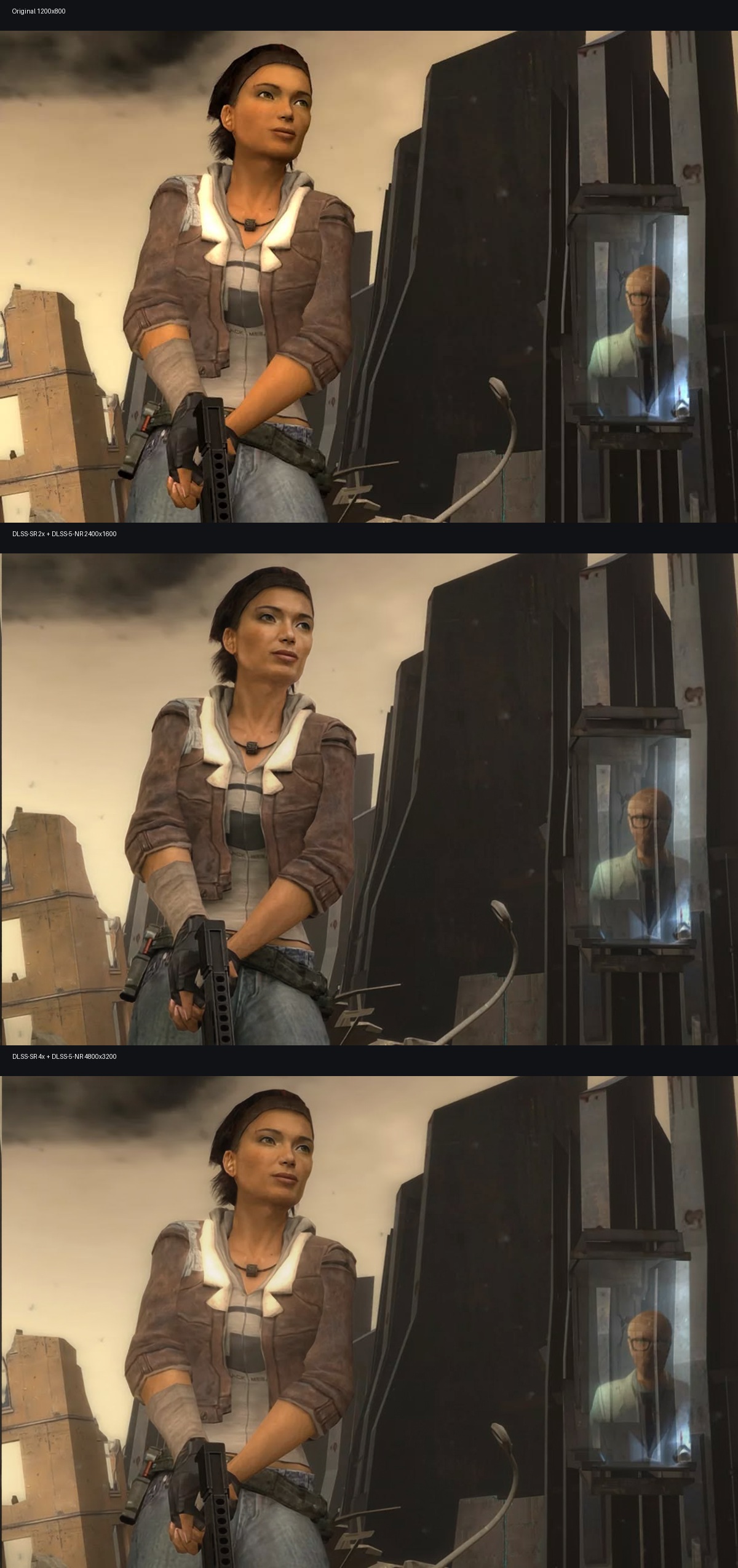
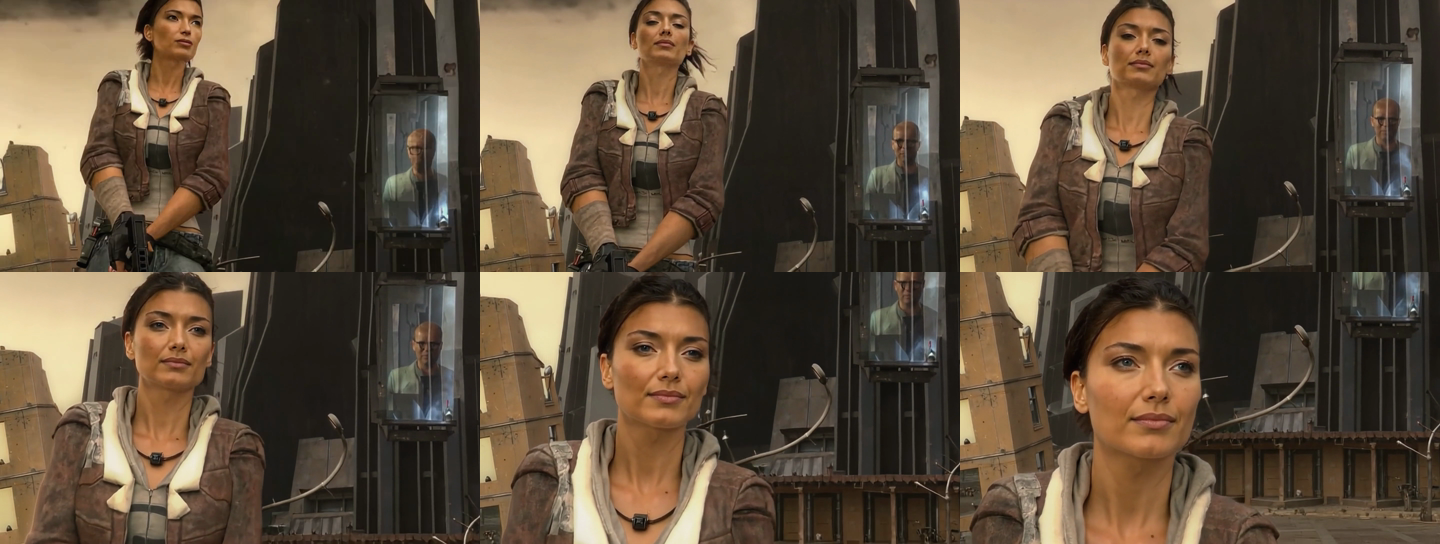
ComfyUI screenshots
These captures come from the current ComfyUI 0.32.0 production frontend with the current node package loaded. They show layout and controls, not rendered quality results.
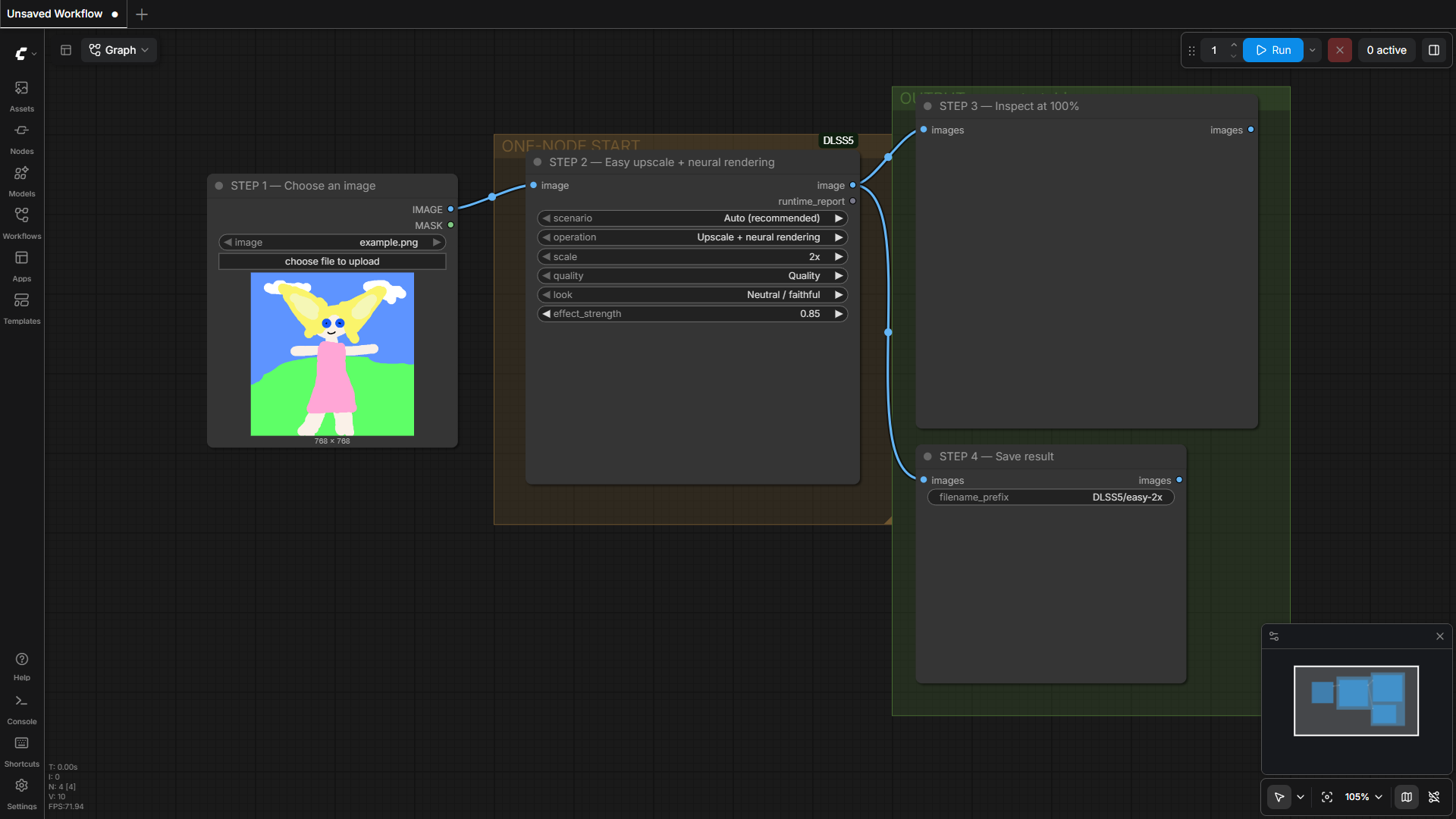
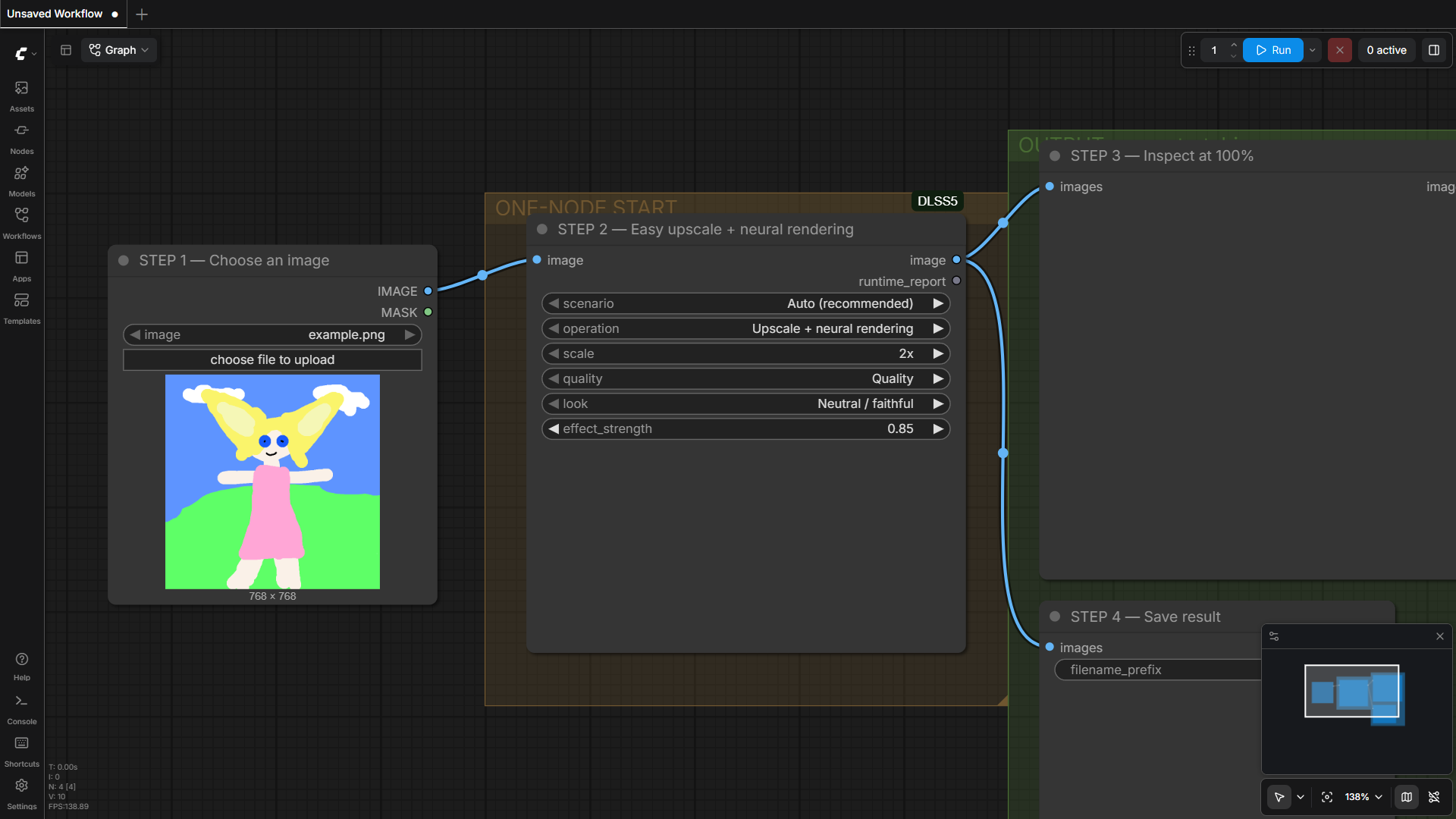
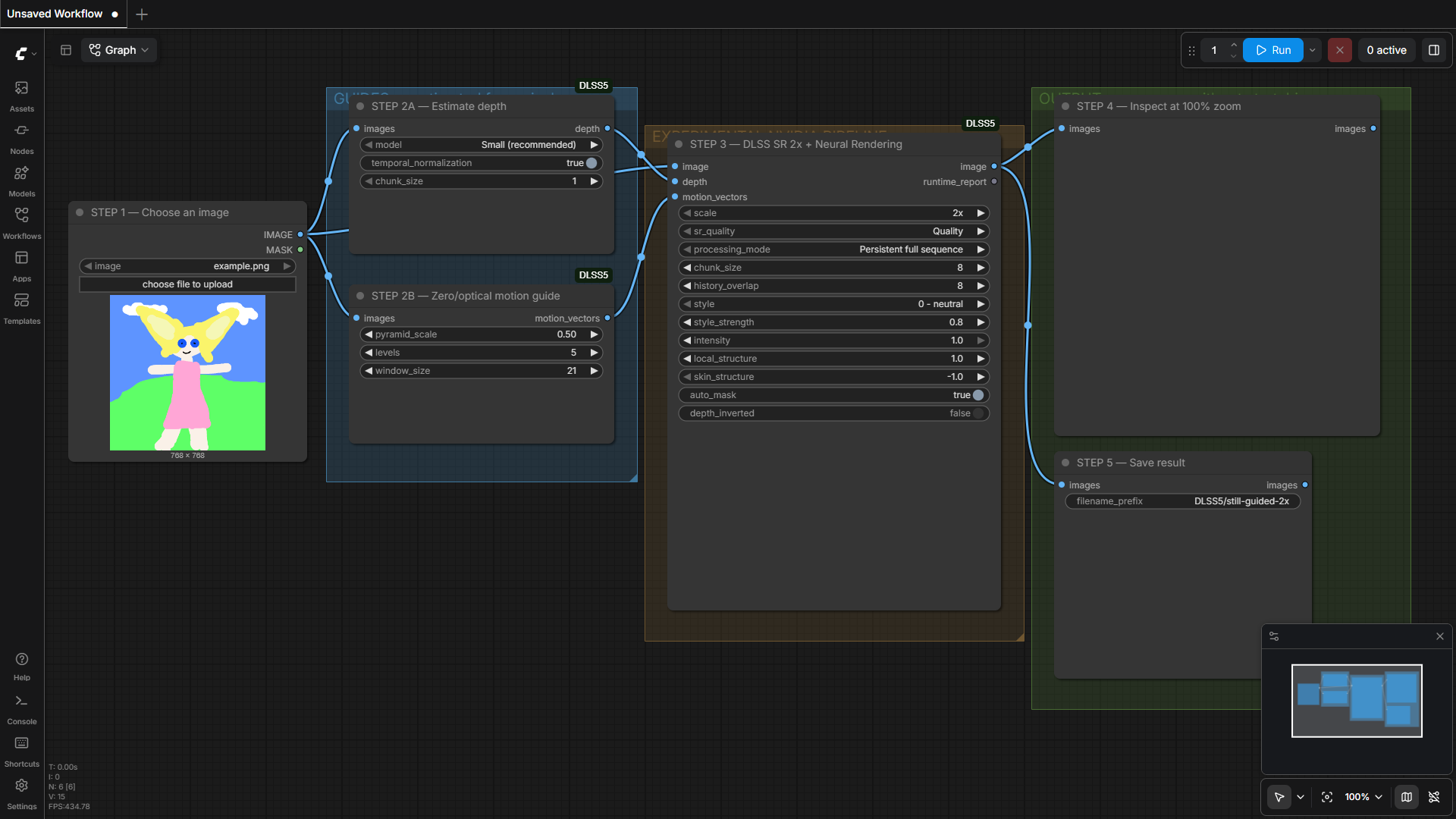
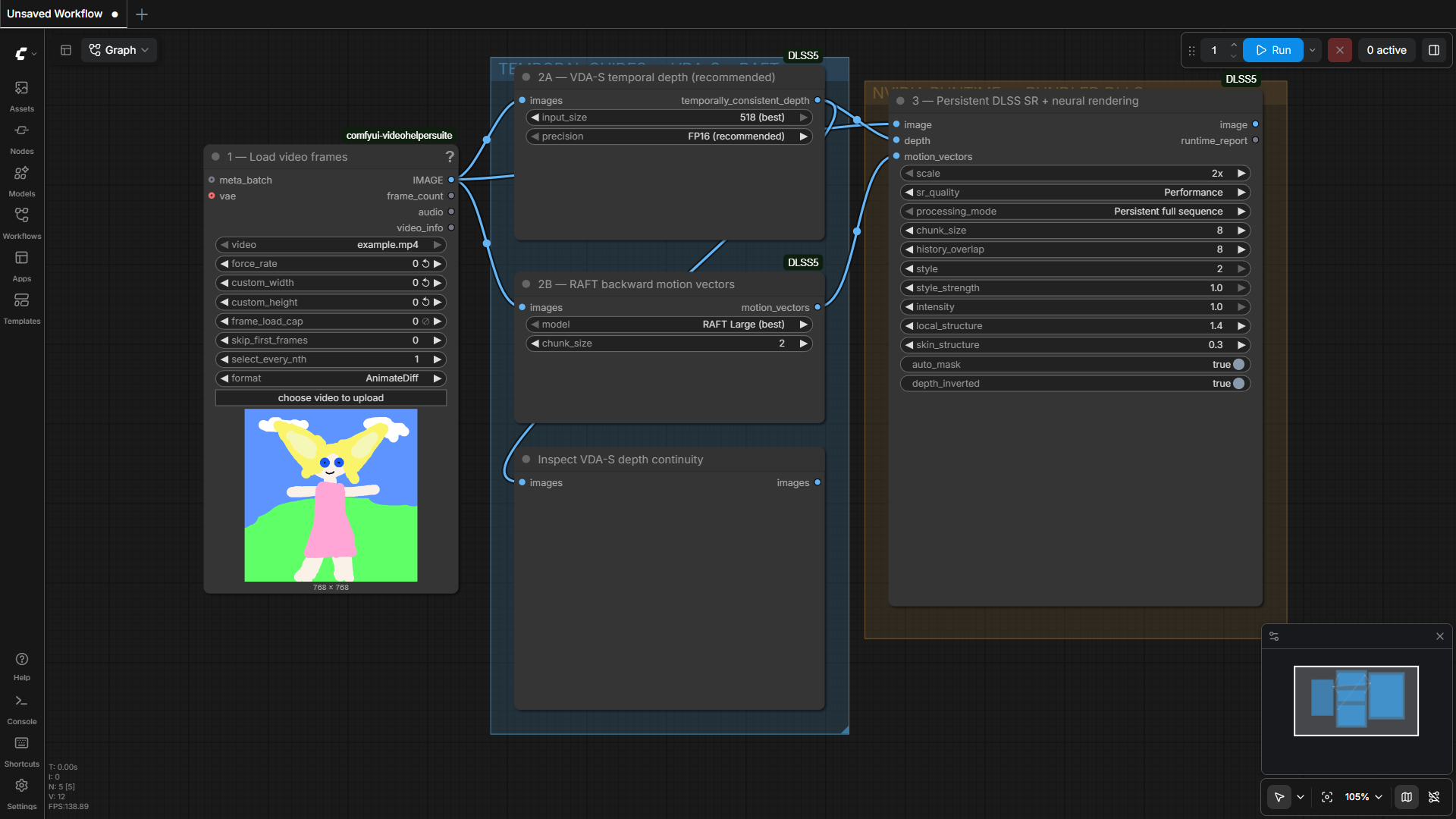
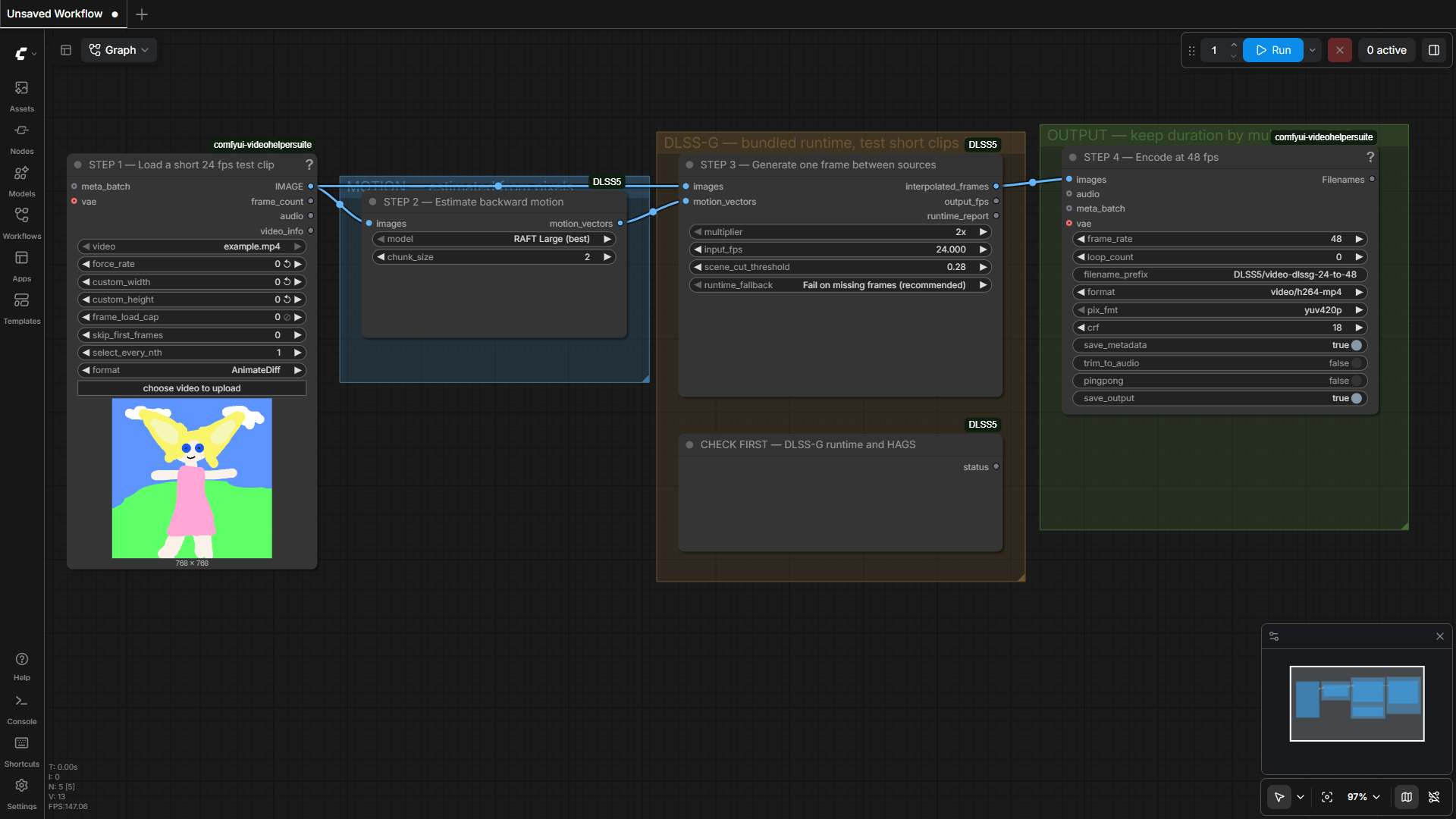
The complete production capture set, including FlashDepth and other detail views, is in docs/images/. Asset history is recorded in docs/ASSET_PROVENANCE.md.
Requirements and runtime files
- Windows 10 or 11, 64-bit, with a recent NVIDIA driver and supported RTX GPU.
- A working ComfyUI installation with PyTorch/CUDA.
- At least 16 GB system RAM; 32 GB or more is recommended for video.
- Fast temporary storage with room for native bridge arrays and video batches.
- The pinned VapourKit runtime, installed by the setup node.
The package contains vsdlssnr.dll, vsdlsssr.dll, nvngx_dlss.dll,
nvngx_dlssnr.dll, and the optional runtime/dlssg/nvngx_dlssg.dll. Setup
verifies the bundled hashes and keeps downloaded VapourKit, worker files, and
runtime/config.json machine-local. Read runtime/README.md
for exact hashes, manual setup, and the separate Frame Generation install.
The runtime sources document lists upstream source links, licenses, model downloads, wrapper provenance, and components that are deliberately not dependencies. Do not download a DLL merely because its filename matches.
Processing modes and limits
Persistent full sequence keeps one native context for the complete batch and
avoids native chunk resets. Use it when the full ComfyUI input and output fit in
RAM. The complete ComfyUI IMAGE input and output still reside in memory.
Bounded overlap-add limits native windows to
chunk_size + history_overlap frames and blends their overlap; it still keeps
the complete ComfyUI IMAGE batch in memory.
Easy's long-video and fast-preview presets apply bounded windows to all selected operations. The runtime report includes the resolved scenario, active settings, dimensions, frame counts, and an advisory temporary-storage estimate. The estimate excludes model weights, extra copies, and file overhead.
Progress, cancellation and storage advice
ComfyUI progress covers guide work, native windows, and native frames. Model downloads and VDA/FlashDepth calls may have long gaps between updates. Cancel with ComfyUI's interrupt control; SR/NR child processes are stopped before temporary files are cleaned up. Optional VDA and FlashDepth cancellation is checked at stage boundaries, so an active model call may finish first.
Use a shorter clip, lower resolution, more temporary disk space, or bounded mode when a persistent run exceeds memory. See Troubleshooting for ghosting, depth trails, runtime diagnostics, and stuck-process guidance.
Node overview
| Node | Purpose | | --- | --- | | DLSS Super Resolution | 2x–4x native SR with color, depth, and motion guides | | Experimental Neural Rendering | 1:1 neural pass with style and structure controls | | DLSS SR + Neural Rendering | SR followed by NR with persistent or bounded routing | | Easy Upscale & Render | Preset-based image and video entry point | | Depth Anything V2 Guide | Pixel-estimated depth with optional temporal normalization | | Depth Guide (Model Selection) | DA-V2, optional YOLO26 Nano/Small or VDA-S with model explanations and precision/size controls | | Video Depth Anything | Temporally consistent depth for video windows | | RAFT Motion Guide | Current-to-previous dense motion for reprojection | | Temporal Depth Stabilizer | Reprojects and blends depth across frames | | FlashDepth | Optional external high-resolution depth backend | | DLSS Frame Generation | Inserts generated frames through the separate worker | | Runtime Status nodes | File, interpreter, plugin, worker, and HAGS diagnostics |
For control names and serialized defaults, inspect the example workflows and the workflow notes. Runtime status is a diagnostic, not a certification of GPU inference or image quality.
Models, privacy, and security
Depth Anything V2, VDA-S, and RAFT weights download on first use from their respective model sources. Review each model card and license before redistribution.
ComfyUI video outputs can embed workflows, prompts, filenames, model names, and
paths as media metadata. Inspect metadata before sharing output and keep source
attributions and AI disclosures with public examples. Never publish
runtime/config.json.
Workflows and native DLLs execute with ComfyUI's permissions. Review imported workflows, verify hashes and provenance where possible, and report security issues through GitHub's private security advisory feature.
Tests and troubleshooting
Run the full suite with:
python -m pytest -q -p no:cacheprovider tests
The tests validate setup/configuration preservation, node schemas, all seven workflow graphs, routing, progress, cancellation, and synthetic bridge journeys. They do not certify model quality or every GPU/driver combination.
Start with Troubleshooting. For a bug report, attach a redacted Runtime Status report, console traceback, workflow JSON, expected and actual frame count/resolution/FPS, and runtime hashes. Do not attach proprietary DLLs or private media.
License and credits
Extension source code is GPL-3.0. NVIDIA components, VapourKit, VapourSynth, ComfyUI, model weights, worker binaries, and example media retain their own licenses; see runtime sources.
The project credits ComfyUI, VapourSynth, VapourKit, NVIDIA DLSS runtime components, TorchVision RAFT, Depth Anything, Video Depth Anything, FlashDepth, ComfyUI-VideoHelperSuite, and the DLSSG-Stream-Worker project.
“DLSS5” is the historical project name for this experimental runtime and does not imply an official NVIDIA DLSS 5 SDK integration. DLSS and NVIDIA are trademarks of NVIDIA Corporation.