
PG Nodes
Pragmatic utilities for ComfyUI: Lazy Prompt (history + randomizer), Unified Loader (+ mini), Just Save Image (+ passthrough).
Nodes (43)
A dropdown that hands the filename over
One dropdown for your text-encoder files
Pick the vision encoder by name
Name your ControlNet, wire it everywhere
A/B two full model stacks with one boolean
One hook, both paths, two strengths
Prompt-side strength, left adjustable
UNet-only, still adjustable
Pick your UNet/DiT by filename
The filename dropdown for reference-image conditioning
A save node that only saves when you say so
Save when you want, keep the image flowing
Save, search, and reuse every prompt you've ever run
The Lazy Prompt node that hands you back your own text
The prompt history without the garnish
One loader, four LoRAs, zero loader spam
A dropdown that hands a LoRA filename to whatever loader you like
Bake a LoRA into both paths in one step
When you'd rather bake than hook
Bake a LoRA into the model path, the old-school way
Turn a 0–100 integer into a 0–1 float
Pick a sampler by name, wire a real sampler object out
One dropdown to rule every sampler in your graph
The scheduler dropdown that hands over a real SCHEDULER object
The same dropdown, but it outputs the string
Non-destructive LoRA on your text encoder
Give your LoRA a strength curve that fades in and out mid-run
Where your LoRA hooks actually get applied
Front-load structure, relax the details
A filename dropdown made for the Unified Loader
Pick a text encoder by name, hand the name along
Name your vision encoder, let the loader load it
Pick the model file, keep the loader clean
Name a UNet file for the modern model era
Every model in one node, with a VRAM escape hatch
A slimmed-down loader that frees VRAM for the sampler
Name your IP-Adapter model, let the loader load it
The Uni-flavored way to name a LoRA
Name your upscaler for the Unified Loader
The VAE dropdown that knows how to say no
Use the Dropdown
Grey Images? Vae Select Is the Dropdown That Fixes Them
One Checkbox, Two Opposite Booleans
PG Nodes
A suite of ComfyUI nodes focused on fast setup, clean UIs and practical utilities. The repo currently includes:
Demo video of prompt history:
<a href="https://youtu.be/6tFyui_DCDs?si=nSgm8S6JPIJ4ZqNn" target="_blank"> <img src="./examples/PG_nodes.png" alt="Demo video" /> </a>Table of Contents
Workflows
Text-to-Image Workflows, ergonomic, 'ready to use' graphs that let you focus on creating - not hunting scattered knobs.
Each preset includes the key nodes for its model family, a Dual-CFG implementation,
and a custom LoRA hooks system for CLIP/UNet paths.
Presets:
- SD-Master
- SD3-Master
- FLUX-Master
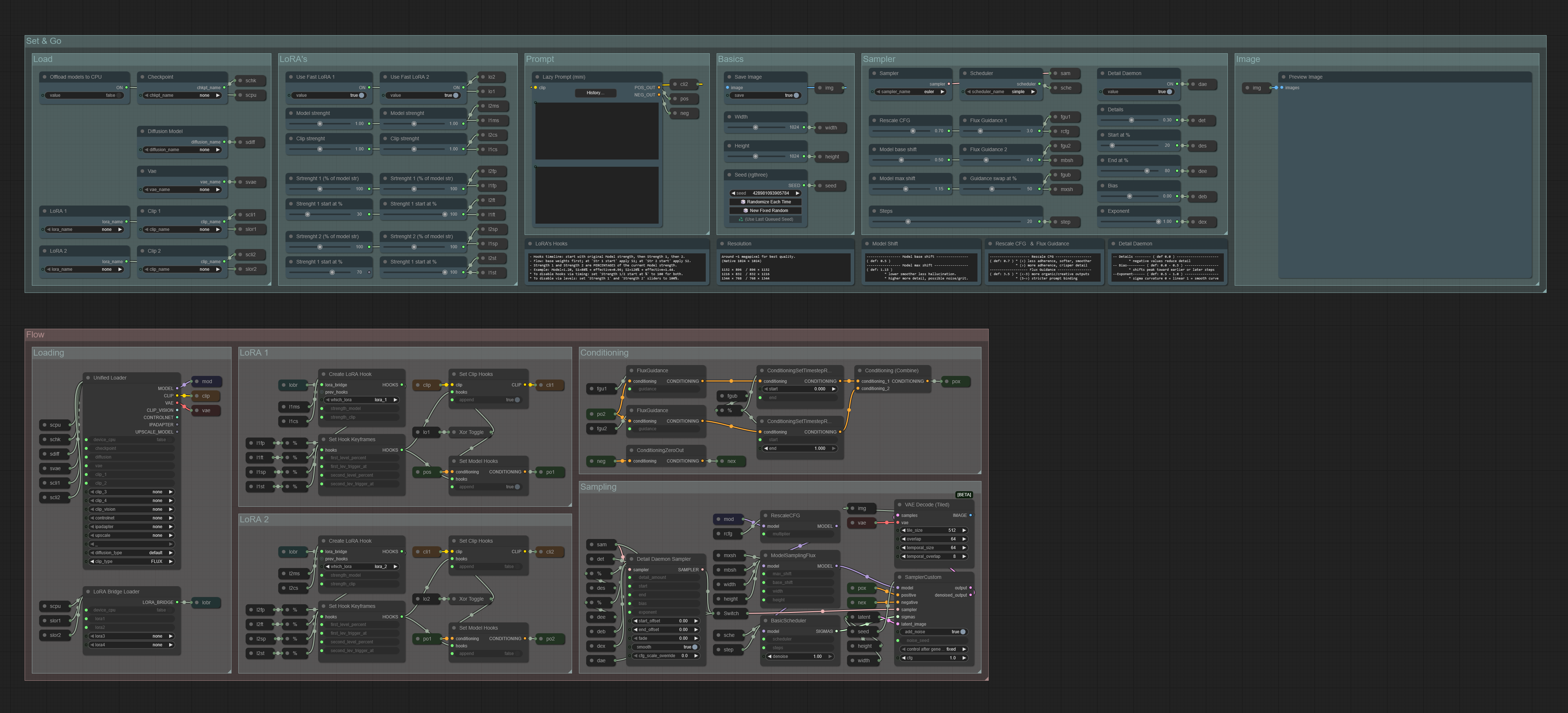
- Swap CFG - Switch CFG from value A/B at a chosen point in the run.
- Fast LoRA - Toggle LoRA on the CLIP path (fast) or Conditioning/UNet (classic), while keeping synchronized LoRA strength on both paths.
- Low VRAM friendly - Optionally load models to CPU to free VRAM for sampling.
- Comfort sliders - Safe default ranges; adjust step/min/max via the context menu.
- Mini tips - Small hints for the most important nodes.
- Lazy Prompt - Prompt panel with searchable history of your past prompts.
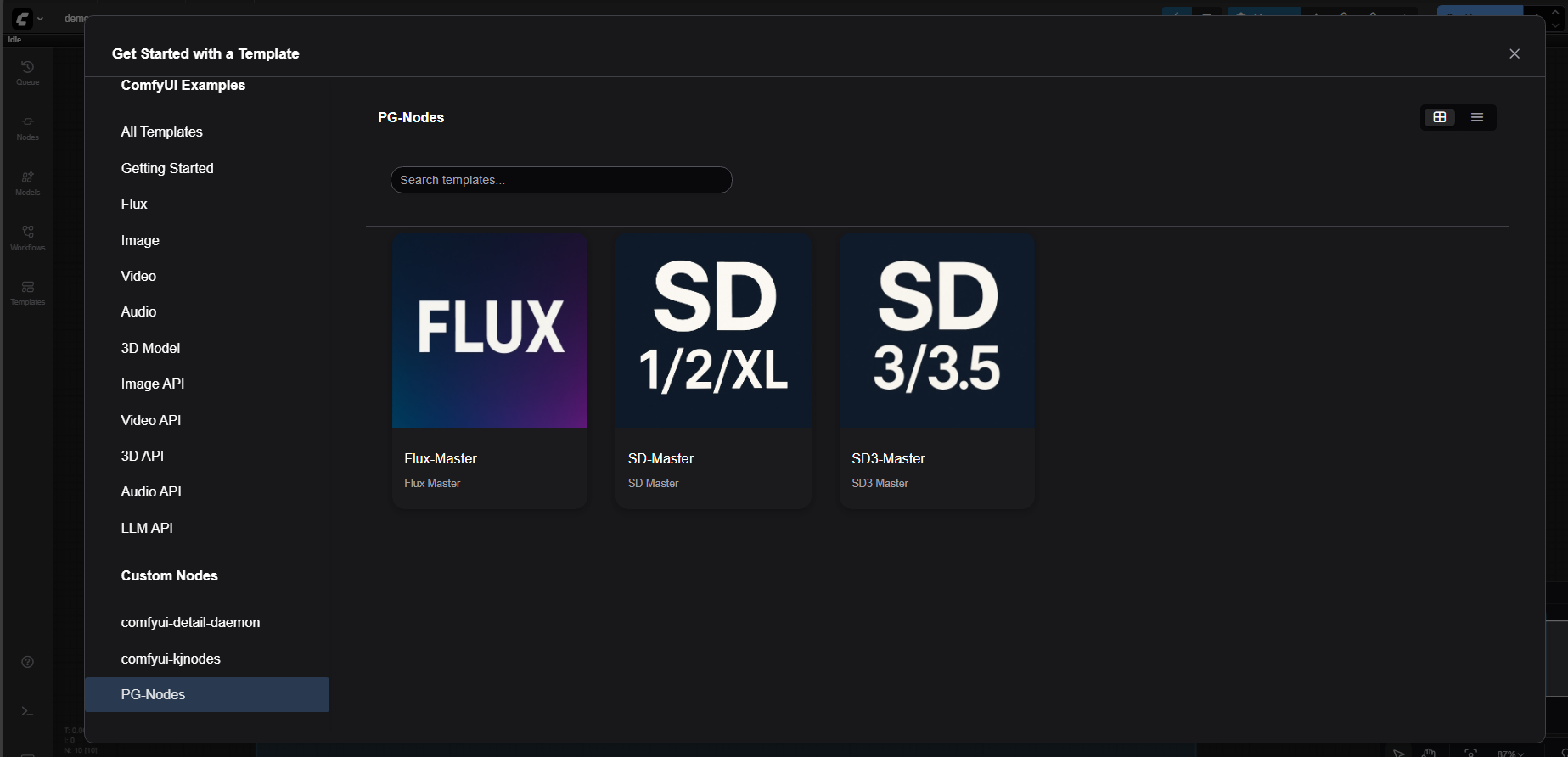
After installing PG Nodes, the workflows are available under Templates → PG-Nodes.
Nodes
- Lazy Prompt
- LoRA, Bridge & Hooks
- Unified Loader
- Swap CFG Guidance
- Select Nodes
- Just Save Image
- Checkpoint Switch
- XOR Toggle
- Percent
- Installation
Lazy Prompt
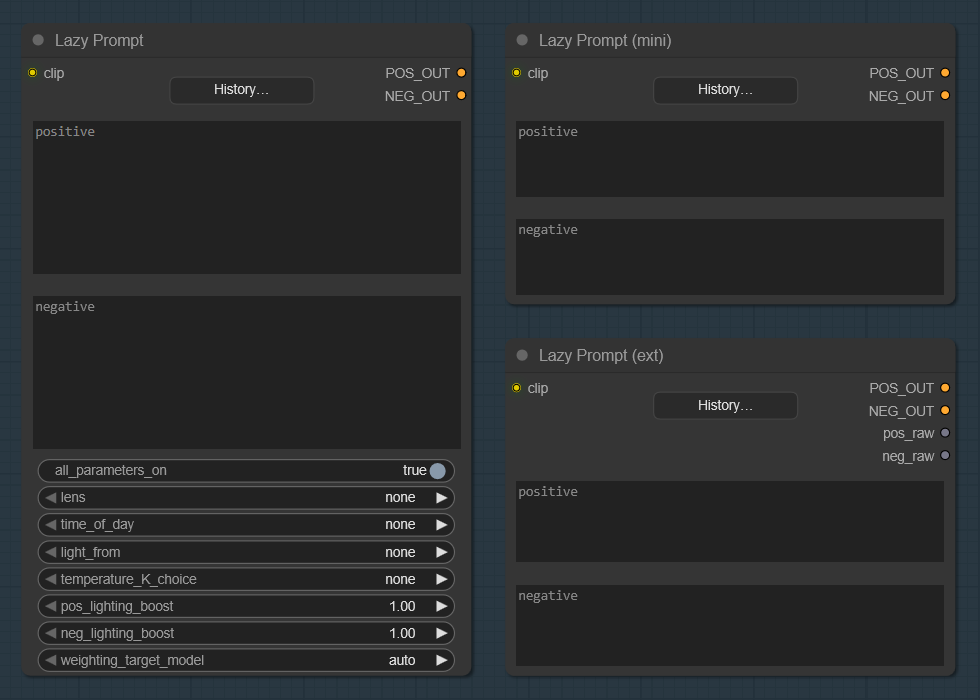
Save → Recall → Iterate The core idea of Lazy Prompt is comfort: write a prompt once, and bring it back instantly next time. The node keeps a compact on‑disk prompt history (positive & negative) and lets you quickly save, search, and re‑use past prompts like a mini prompt library. Optional add-ons (lens, time of day, lighting, color temperature).
- Saves every run to history and lets you load any previous entry with a couple of clicks.
- Inline randomizer
{red|green|blue}for quick variations. - Optional helpers: camera/lens phrases, time‑of‑day, lighting direction, white balance temperature.
Details
- Default history file:
custom_nodes\prompt_history.json. - Default cap:
max_entries = 500. - Tip: right‑click the node (⋯) to open the context menu and tweak the history file path or the maximum number of stored entries.
Lazy Prompt (ext)
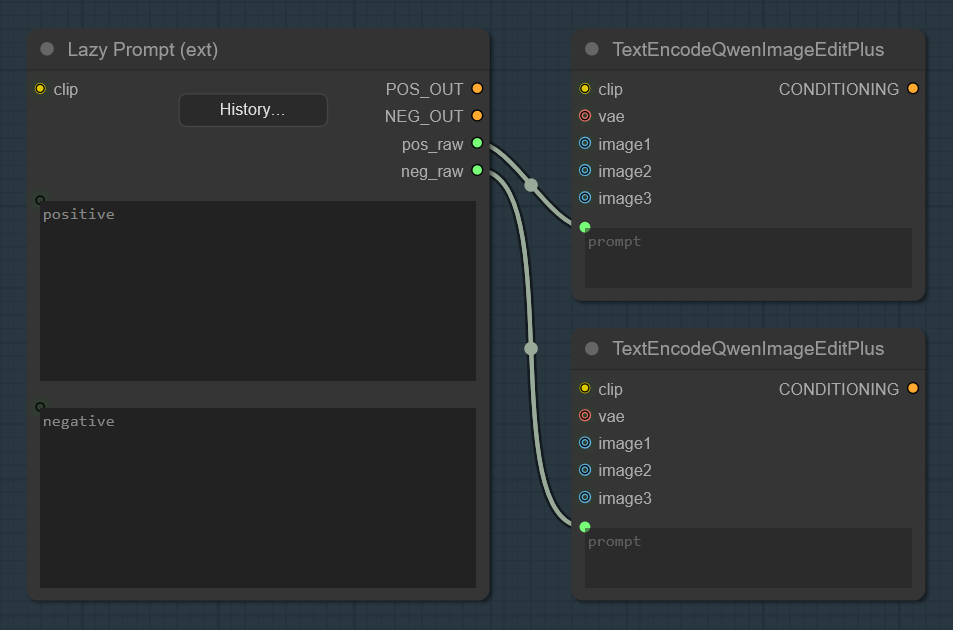
- Starting with version 1.5.0, I added “Lazy Prompt (ext)”, which includes outputs for interoperability with other nodes:
Lazy Prompt maps
- Default config file:
PG_Lazy_Prompt_Config.json. - Typical location: inside this repo folder (when installed via Manager/Manual).
- You can change the config file path anytime from the node’s context menu.
- Maps include examples like:
POS_LIGHT_MAP,NEG_LIGHT_MAP- direction‑dependent phrases.LENS_CHOICES- lens list (includesnone).TIME_MAP- time‑of‑day phrases.
History storage
- Defaults at runtime:
history_path = custom_nodes\prompt_history.json,max_entries = 500. - You can adjust history path and max entries from the node’s context menu.
Lora Bridge and Hooks
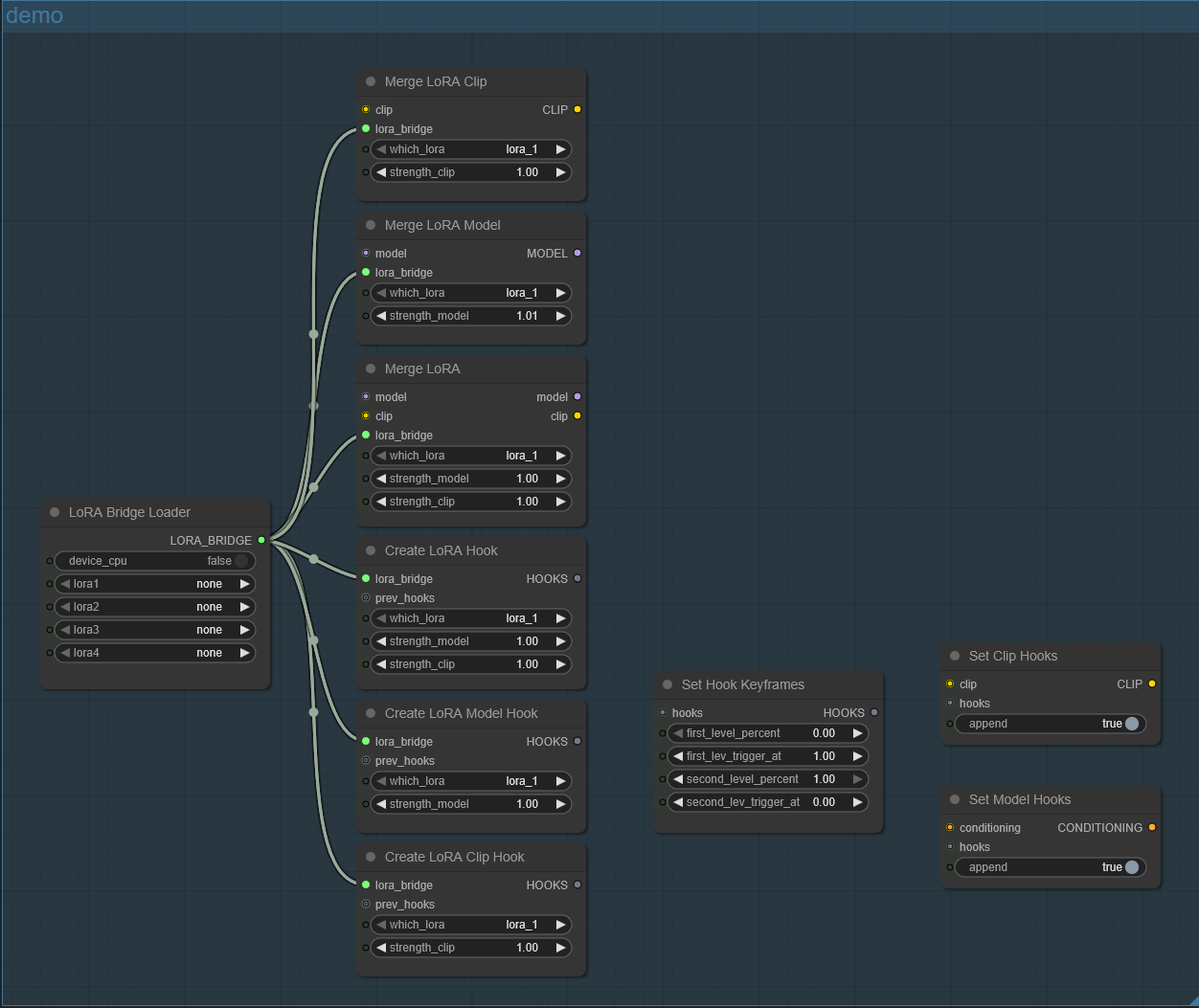
- Connection Patterns
- LoRA Bridge Loader
- Merge LoRA Clip
- Merge LoRA Model
- Merge LoRA
- Create LoRA Clip Hook
- Create LoRA Model Hook
- Create LoRA Hook
- Set Hook Keyframes
- Set Clip Hooks
- Set Model Hooks
Connection Patterns
-
“Old-school” (baked-in):
LoRA Bridge Loader → Merge LoRA Clip/Model/Both → downstream
Weights are merged into CLIP/UNet (destructive bake). Fast at runtime, fixed strength. -
CLIP path (non-destructive):
LoRA Bridge Loader → Create LoRA Clip Hook → [optional: Set Hook Keyframes] → Set Clip Hooks
Hooks modify the text encoder live; keyframes let you change LoRA strength over time. -
MODEL/Conditioning path (non-destructive):
LoRA Bridge Loader → Create LoRA Model Hook → [optional: Set Hook Keyframes] → Set Model Hooks
Hooks patch the UNet path; keyframes control the strength timeline.
LoRA Bridge Loader
- Loads up to four LoRA files once and outputs a single LORA_BRIDGE bundle, ready for hook creation or merge nodes.
Merge LoRA Clip
- Merges (bakes) the selected LoRA into CLIP. Destructive; no runtime toggling.
Merge LoRA Model
- Merges (bakes) the selected LoRA into the MODEL/UNet. Destructive.
Merge LoRA
- Bakes the selected LoRA into both MODEL and CLIP in one step.
Create LoRA Clip Hook
- Builds a HOOKS group targeting CLIP from the chosen slot in LORA_BRIDGE, with its own strength control.
Create LoRA Model Hook
- Builds a HOOKS group targeting the MODEL/UNet path, with independent strength.
Create LoRA Hook
- Builds a HOOKS group that targets both CLIP and MODEL simultaneously, exposing separate strengths for each path.
Set Hook Keyframes
- Defines a two-point strength curve for a HOOKS group (percent of “model strength”).
Use to fade in/out or swap strengths at specific progress points.
Set Clip Hooks
- Applies a HOOKS group to CLIP (append/merge). Non destructive; respects keyframes.
Set Model Hooks
- Applies a HOOKS group to CONDITIONING/MODEL (append/merge). Non destructive; works with keyframed strengths.
Unified Loader
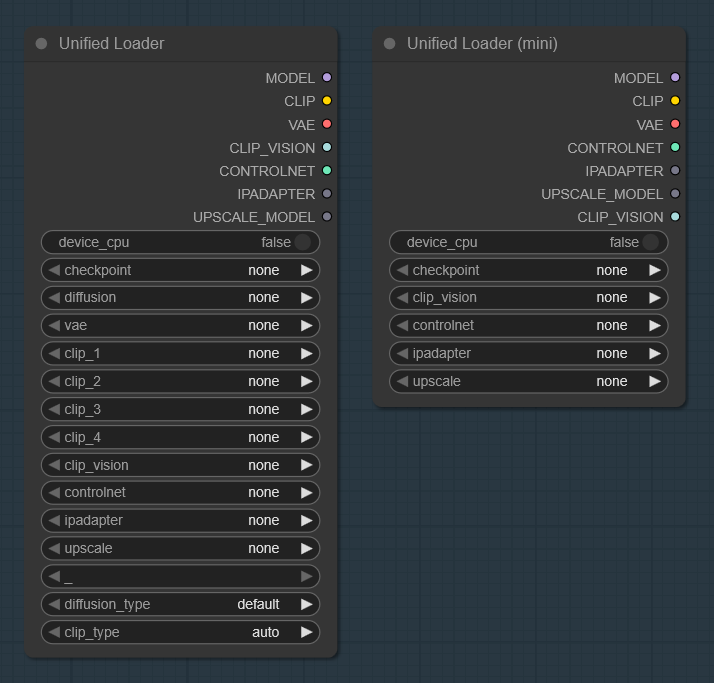
One loader, more VRAM for sampling Unified Loader of Checkpoint, Diffusion UNet, VAE/TAESD, CLIP/CLIP-Vision, ControlNet, IP-Adapter, and Upscale models-with a simple CPU switch. Offloading parts of the stack to CPU often frees up valuable VRAM for the sampler (KSampler/DiT).
- Checkpoint →
CP_MODEL,CP_CLIP,CP_VAE - Diffusion UNet (incl. FP8 variants where available)
- VAE and TAESD shortcuts:
taesd,taesdxl,taesd3,taef1 - CLIP (multi‑file), CLIP‑Vision
- ControlNet, IP‑Adapter, Upscale models
Tip: The CPU switch is best‑effort. Depending on your setup and model family, not everything can be moved off-GPU, but when it works, the sampler gets more VRAM.
Swap CFG Guidance
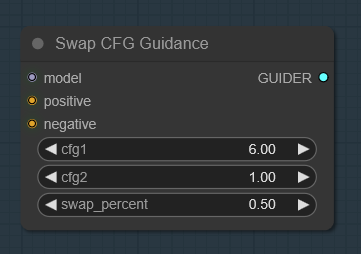
Set two CFG values and switch between them at a chosen progress (%). Early steps use CFG 1, then at the trigger point, sampling continues with CFG 2.
Great for front-loading structure (higher CFG) and then relaxing detail (lower CFG),or the opposite.
Parameters: cfg1, cfg2, and swap_percent (0–100%).
Select Nodes
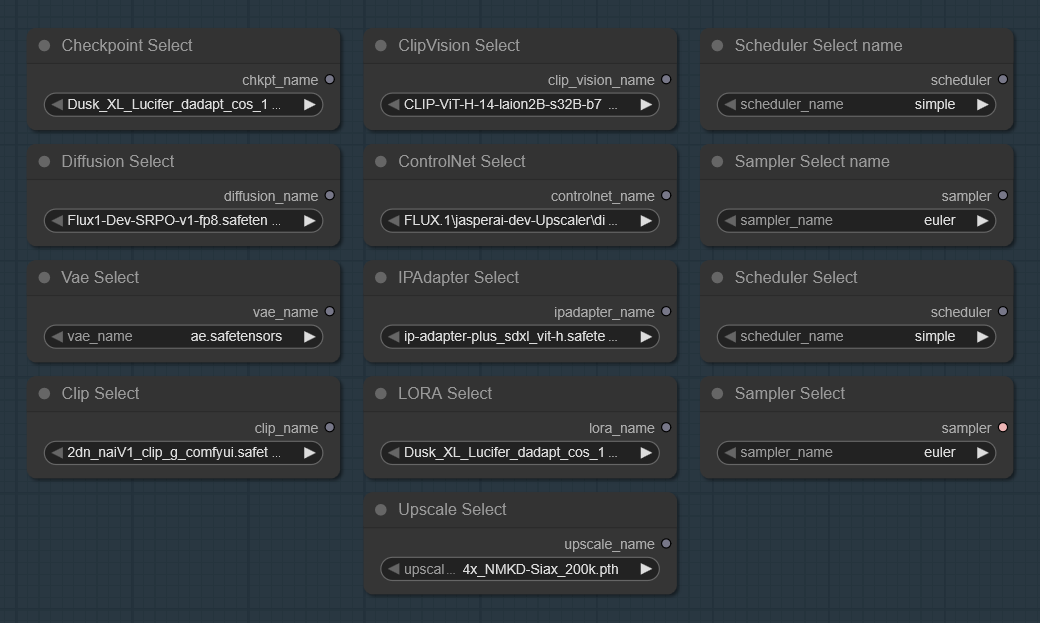
A compact suite of selectors for different model families. In the UniLoader/ subfolder you’ll also find variants compatible with the Unified Loader.
Available selectors: MODEL, CLIP, VAE, CLIP_VISION, CONTROL_NET,
IPADAPTER, UPSCALE_MODEL, Sampler, and Scheduler.
Just Save Image
Nodes
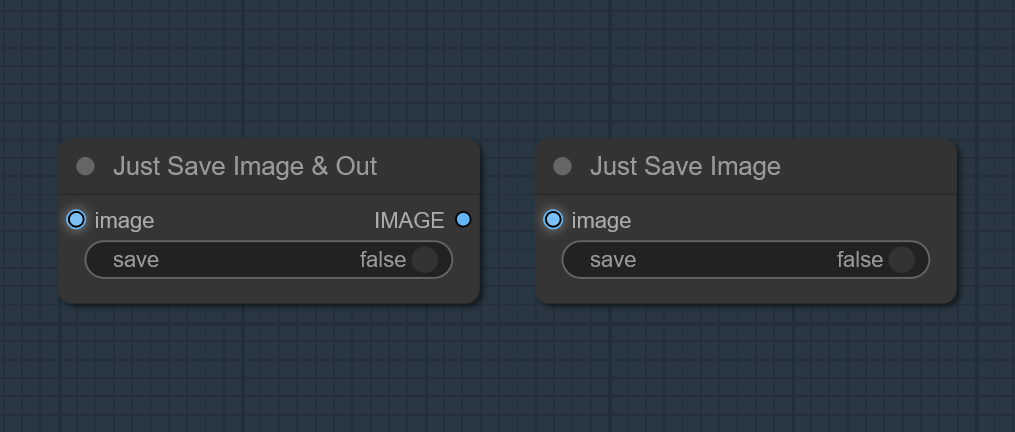
Minimal nodes that save images in an IMAGE batch to ComfyUI’s output directory when a boolean toggle is ON. Saves without preview.
- Just Save Image - output node (no outputs).
- Just Save Image & Out - passthrough version that returns the input
IMAGE.
Checkpoint Switch
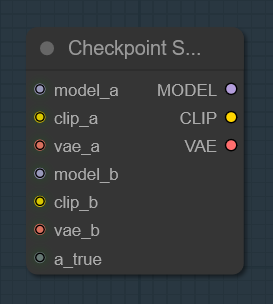
A simple boolean controlled switch, between two (MODEL/CLIP/VAE) triplets.
Flip the input to route either set A or set B downstream.
XOR Toggle
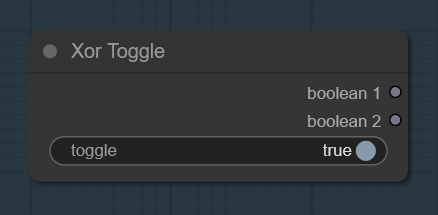
A boolean switch, that flips two outputs in opposition.
When toggle = TRUE → Boolean 1 = TRUE, Boolean 2 = FALSE.
When toggle = FALSE → Boolean 1 = FALSE, Boolean 2 = TRUE.
Percent
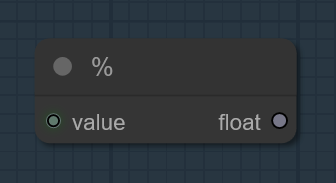
Converts an INT input to a FLOAT by dividing by 100.
Installation
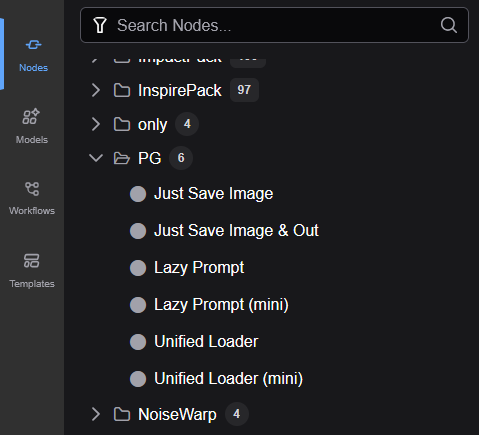
Via ComfyUI Manager
- Open ComfyUI Manager.
- Search for “PG Nodes”.
- Install and restart ComfyUI.
Manual
- Go to the repo Code → Download ZIP.
- Extract the ZIP.
- Rename the extracted folder to
PG-nodes.- Move that folder to your ComfyUI custom nodes directory:
- Windows (typical):
C:\Users\<you>\Documents\ComfyUI\custom_nodes\PG-nodes- Or wherever your
ComfyUIroot lives →custom_nodes/PG-nodes- Restart ComfyUI.
- In the node search, look for the PG category (e.g., Lazy Prompt, Unified Loader).
Versioning & Updates
[2.0.0]
 Added
- Workflows: SD-Master, SD3-Master, Flux-Master
- LoRA Hooks bundle: compact toolkit for LoRA on MODEL/CLIP
- Select Nodes: set of selector helper nodes used to pick model file names
- Checkpoint Switch: two‑way switch for (MODEL, CLIP, VAE) triplets.
- Swap CFG Guidance: two‑phase CFG guider (CFG1 → early, CFG2 → late).
- Percent: INT 0..100 → FLOAT 0..1 helper.
- XOR Toggle:
- Checkpoint Switch:

[1.5.5]
 Fix
- Unified Loader, DIFFUSION_MODEL output fix and Class name.

[1.5.0]
 Added
- Lazy Prompt (ext).

[1.0.0]
 Added
- Initial public release.
- Nodes: Lazy Prompt (+mini), Unified Loader (+mini), Just Save Image (+Out).
- Prompt history JSON + config file `PG_Lazy_Prompt_Config.json`.