
ComfyUI Extension
My_sample-scheduler_GATTO
Lightweight ComfyUI custom node pack to manage reusable sampler/scheduler presets with configuration and selection separated in two nodes.
Gattopeloso/My_sample-scheduler_GATTO
Nodes2
On cloudLocal install
Categorysampling
Stars0
Updated7 months ago
Nodes (2)
Readme
My Sampler+scheduler (GATTO)
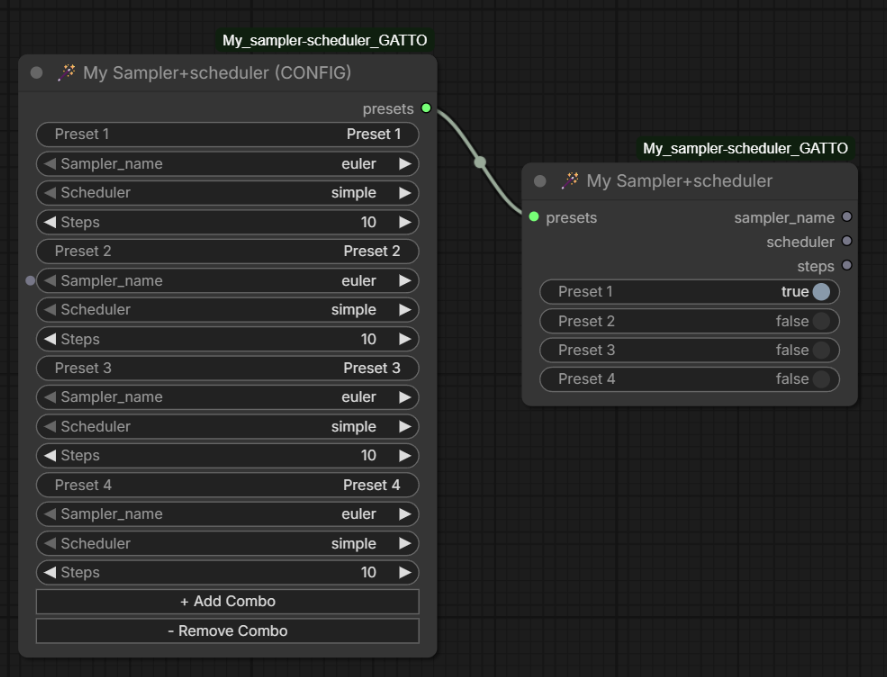
A lightweight ComfyUI custom node pack to manage reusable sampler/scheduler presets.
It provides two nodes:
- 🪄 My Sampler+scheduler (CONFIG)
- 🪄 My Sampler+scheduler
The goal is simple: configure multiple sampler/scheduler/steps combinations once, then select one preset quickly in a separate node.
Features
- Create multiple named presets (Sampler + Scheduler + Steps)
- Keep configuration and selection separated in two nodes
- Selector UI uses a legacy-style simple toggle list
- One active preset at a time
- Clean workflow wiring via a single
presetsoutput from the config node
Nodes
1) 🪄 My Sampler+scheduler (CONFIG)
Use this node to define your preset list.
For each preset:
- Preset name (editable)
sampler_nameschedulersteps
Buttons:
+ Add Combo- Remove Combo
Output:
presets(custom packed data used by the selector node)
2) 🪄 My Sampler+scheduler
Use this node to pick the active preset.
Inputs:
presets(from config node)
Outputs:
sampler_nameschedulersteps
Behavior:
- Shows preset names from the config node
- Only one preset can be active at a time
Installation
- Go to your ComfyUI
custom_nodesfolder. - Clone this repository:
git clone https://github.com/Gattopeloso/My_sample-scheduler_GATTO.git
- Restart ComfyUI completely.
How to Use
- Add 🪄 My Sampler+scheduler (CONFIG)
- Define your presets and names
- Add 🪄 My Sampler+scheduler
- Connect
presetsoutput from CONFIG topresetsinput of Selector - Connect selector outputs (
sampler_name,scheduler,steps) to your sampling flow
Compatibility
- Designed for recent ComfyUI versions
- Includes frontend JS extensions for widget behavior
Contributing
Issues and pull requests are welcome.
If you report a bug, please include:
- ComfyUI version
- Steps to reproduce
- Expected vs actual behavior
- Console/terminal errors (if any)
License
Do whatever you want haha, i made this just because i'm LAZY!