
DeepGHS_ImageRestore
This is a node that applies deepGHS's image restoration model within ComfyUI (original project link: https://huggingface.co/deepghs/image_restoration).
Nodes (1)
DeepGHS Image Restore — ComfyUI 节点
这是将deepGHS的图像修复模型运用与ComfyUI中的节点(原项目链接:https://huggingface.co/deepghs/image_restoration)
This is a node that applies deepGHS's image restoration model within ComfyUI (original project link: https://huggingface.co/deepghs/image_restoration)
功能特点
- 五种模型:NAFNet-REDS(通用,官方推荐)/ NAFNet-GoPro(去模糊)/ NAFNet-SIDD(去噪)/ SCUNet-GAN(GAN 感知质量)/ SCUNet-PSNR(PSNR 优化)
- 模型缓存目录:模型首次使用时自动下载到节点目录下
models/文件夹 (可改),不占用系统默认 Hugging Face 缓存目录 - 进程级模型缓存:同一模型在 ComfyUI 进程生命周期内只加载一次, 后续执行直接复用,不重复下载
- RGBA 透明通道:透明 PNG 输入输出保留 alpha 通道
- 多帧支持:输入 IMAGE 张量含多帧时逐帧全部处理,输出 batch 与输入一致
- GPU 自动检测:安装
onnxruntime-gpu且 CUDA 可用时自动使用 GPU, 否则回退 CPU(每次执行在控制台打印诊断信息) - 高分辨率分块推理:tile_size / tile_overlap / batch_size 可调, 大图或低内存环境可调小
Features
1、Five models: NAFNet-REDS (general-purpose, officially recommended) / NAFNet-GoPro (deblurring) / NAFNet-SIDD (denoising) / SCUNet-GAN (GAN-based perceptual quality) / SCUNet-PSNR (PSNR-optimised).
2、Model cache directory: Models are automatically downloaded to the models/ folder under the node directory (configurable) on first use, without occupying the system-wide default Hugging Face cache.
3、Process-level model caching: Each model is loaded only once during the ComfyUI process lifecycle; subsequent executions reuse the already-loaded model, avoiding repeated downloads.
4、RGBA transparency support: Transparent PNG inputs and outputs preserve the alpha channel.
5、Multi-frame support: When the input IMAGE tensor contains multiple frames, all frames are processed sequentially; the output batch size matches the input.
6、Automatic GPU detection: If onnxruntime-gpu is installed and CUDA is available, the GPU is used automatically; otherwise it falls back to the CPU (diagnostic info is printed to the console on each execution).
7、High-resolution tiled inference: Parameters tile_size, tile_overlap, and batch_size are adjustable, allowing smaller values for large images or low-memory environments.
安装 setup
1、通过git clone https://github.com/GHOSTLXH/DeepGHS_ImageRestore.git 将节点文件安装到ComfyUI的custom_nodes文件夹中。
1、Install the node files into the custom_nodes folder of ComfyUI by running git clone https://github.com/GHOSTLXH/DeepGHS_ImageRestore.git.
-
在 ComfyUI 的 Python 环境中安装依赖(首次约 100–200 MB 下载):
cd D:\ComfyUI   :: 便携版为 D:\ComfyUI\python_embeded
python -m pip install -r custom_nodes\DeepGHS_ImageRestore\requirements.txt
GPU 加速(可选):卸载
onnxruntime,安装onnxruntime-gpu(需匹配 CUDA 版本),节点启动时会自动检测。 -
重启 ComfyUI。
使用
在 ComfyUI 工作流中添加节点:image/restore → DeepGHS Image Restore
(搜索 "DeepGHS" 或 "Restore")。
Load Image → DeepGHS Image Restore → Save Image
-
Install dependencies in ComfyUI's Python environment (first-time download about 100–200 MB). Example: Change to your ComfyUI directory (for portable version, use D:\ComfyUI\python_embeded), then run: cd D:\ComfyUI python -m pip install -r custom_nodes\DeepGHS_ImageRestore\requirements.txt Optional GPU acceleration: Uninstall "onnxruntime" and install "onnxruntime-gpu" (matching your CUDA version). The node will auto-detect GPU at startup.
-
Restart ComfyUI.
Usage:
Add the node in your ComfyUI workflow: under "image/restore" → "DeepGHS Image Restore" (search for "DeepGHS" or "Restore").
A typical pipeline: Load Image → DeepGHS Image Restore → Save Image
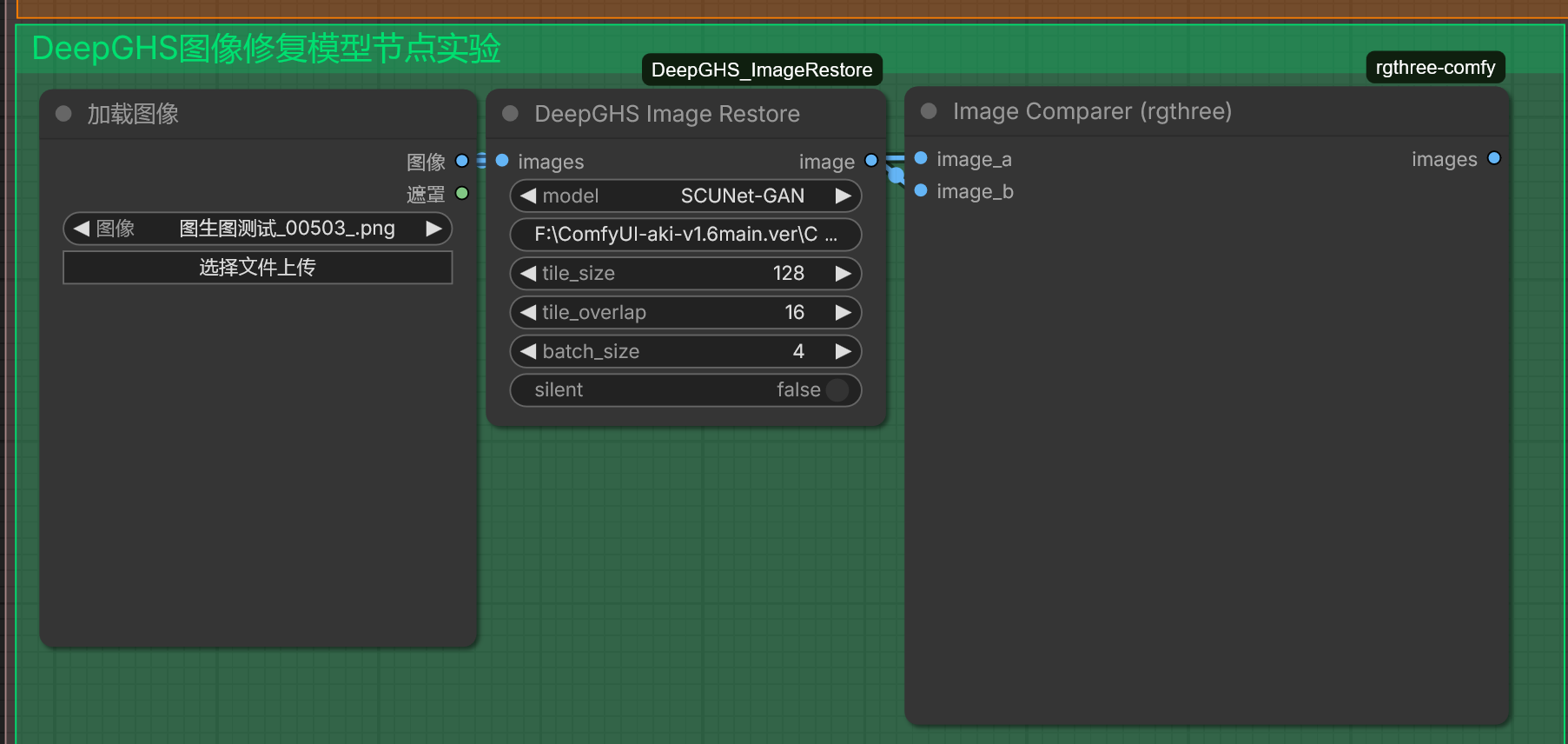
| Widget | 默认值 | 说明 |
| --- | --- | --- |
| model | SCUNet-GAN | 可选用的修复模型,具体见下表模型说明 |
| model_dir | <节点目录>/models | 模型下载缓存文件夹(不存在自动创建),默认保存至节点文件夹的model子文件夹内 |
| tile_size | 0 | 分块大小; 模型官方默认(NAFNet 256 / SCUNet 128) |
| tile_overlap | 0 | 分块重叠;** 模型官方默认**(16) |
| batch_size | 0 | 推理批大小;** 模型官方默认**(4) |
| silent | False | True 时不显示模型推理进度条 |
| Widget | Default | Description |
| --- | --- | --- |
| model | SCUNet-GAN | Optional restoration model; see the model description table below for details. |
| model_dir | <node_directory>/models | Model download cache folder (created automatically if missing); by default saved to the models subfolder under the node directory. |
| tile_size | 0 | Tile size; official defaults: 256 for NAFNet, 128 for SCUNet. |
| tile_overlap | 0 | Tile overlap; official default is 16. |
| batch_size | 0 | Inference batch size; official default is 4. |
| silent | False | When set to True, the model inference progress bar is hidden. |
模型说明
| 模型 | 类型 | 适用场景 | 首次下载大小 |
| --- | --- | --- | --- |
| NAFNet-REDS | NAFNet | 通用图像修复(官方推荐) | ~275 MB |
| NAFNet-GoPro | NAFNet | 运动/失焦模糊去除 | ~275 MB |
| NAFNet-SIDD | NAFNet | 传感器噪声去除 | ~468 MB |
| SCUNet-GAN | SCUNet | 综合修复,GAN 感知质量(默认) | ~91 MB |
| SCUNet-PSNR | SCUNet | 综合修复,PSNR 客观指标优化 | ~91 MB |
NAFNet 对高斯噪声图像效果不佳(官方已知问题),此类图像建议使用 SCUNet 系列模型。
Model Descriptions
| Model | Type | Use Case | First-time Download Size |
| --- | --- | --- | --- |
| NAFNet-REDS | NAFNet | General-purpose image restoration (officially recommended) | ~275 MB |
| NAFNet-GoPro | NAFNet | Motion/defocus blur removal | ~275 MB |
| NAFNet-SIDD | NAFNet | Sensor noise removal | ~468 MB |
| SCUNet-GAN | SCUNet | Comprehensive restoration with GAN-based perceptual quality (default) | ~91 MB |
| SCUNet-PSNR | SCUNet | Comprehensive restoration optimised for PSNR objective metric | ~91 MB |
NAFNet performs poorly on images with Gaussian noise (known official issue); for such images, it is recommended to use the SCUNet series models.
常见问题
Q: 首次执行很慢/像卡住了?
首次执行需下载所选模型(91–468 MB)到 model_dir,下载期间界面会等待,
属正常现象(控制台可见下载进度)。下载完成后会缓存,之后直接复用。
下载失败可重试,Hugging Face Hub 支持断点续传。
Q: 修复很慢?
CPU 推理大图较慢。可调小 tile_size/batch_size 减少内存占用,或安装
onnxruntime-gpu 使用 GPU(每次执行控制台打印后端诊断信息)。
Q: 透明 PNG 输出后透明没了?
NAFNet/SCUNet 官方支持 RGBA(alpha 通道),本节点输出张量保留 4 通道
alpha;但保存时请使用 Save Image 输出 PNG(JPEG 格式本身不支持透明)。
Q: 修复时内存不足?
推理峰值内存与图像总像素成正比(分块只降低单次推理开销)。内存不足时
节点报错中止,请调小 tile_size(如 128)与 batch_size(如 1),
或先对图像降采样/裁剪。
Q: 输出图片被旋转了?
本节点输入为 IMAGE 张量,方向信息由 ComfyUI 的 Load Image 节点
(已内置 EXIF Orientation 矫正)处理;请从 Load Image 输入本节点。
Q: 换了 model_dir 但不生效?
HF_HUB_CACHE 在进程内只设置一次:ComfyUI 进程内首次执行时的 model_dir
即为整个进程的模型缓存目录,之后修改该 widget 不会生效(控制台会打印提示)。
如需更换,重启 ComfyUI 后再改。
Q: 显示"缺少依赖库 dghs-imgutils"?
在 ComfyUI 的 Python 环境中执行 python -m pip install dghs-imgutils,
然后重启 ComfyUI。
以下是英文翻译,保留原有的 Markdown 格式(标题、加粗、引用、换行),直接输出:
Frequently Asked Questions
Q: The first execution is very slow / seems stuck?
The first execution requires downloading the selected model (91–468 MB) to model_dir. The UI will wait during the download, which is normal (you can see the download progress in the console). Once downloaded, it is cached and reused afterwards. If the download fails, you can retry; Hugging Face Hub supports resuming interrupted downloads.
Q: Restoration is very slow?
CPU inference on large images is slow. You can reduce tile_size/batch_size to lower memory usage, or install onnxruntime-gpu to use the GPU (diagnostic backend info is printed to the console on each execution).
Q: The transparency is lost after outputting a transparent PNG?
NAFNet/SCUNet officially support RGBA (alpha channel), and this node preserves the 4‑channel alpha in the output tensor. However, when saving, please use Save Image to output PNG (JPEG format does not support transparency).
Q: Out of memory during restoration?
Peak memory usage during inference is proportional to the total pixels of the image (tiling only reduces the per‑tile overhead). If you run out of memory, the node will abort with an error. Please reduce tile_size (e.g., 128) and batch_size (e.g., 1), or downsample/crop the image beforehand.
Q: The output image is rotated?
This node takes an IMAGE tensor as input; orientation is handled by ComfyUI's Load Image node (which already corrects EXIF Orientation). Please feed the image from Load Image into this node.
Q: I changed model_dir but it doesn't take effect?
HF_HUB_CACHE is set only once within the process: the model_dir used during the first execution in the ComfyUI process becomes the model cache directory for the entire process. Changing this widget afterwards will not take effect (a prompt will be printed in the console). To change it, restart ComfyUI and then modify it.
Q: It says "missing dependency library dghs-imgutils"?
Run python -m pip install dghs-imgutils in ComfyUI's Python environment, then restart ComfyUI.