
ComfyUI's ControlNet Auxiliary Preprocessors
Plug-and-play ComfyUI node sets for making ControlNet hint images.
Nodes (64)
Every ControlNet preprocessor behind one dropdown
OpenPose, but for animals
Region maps for anime faces, plus a free character mask
Clean line extraction for anime and illustration
The high-detail line extractor for MistoLine
The reliable standard normal estimator, zero knobs
The dead-simple threshold preprocessor for scribble ControlNet
The workhorse edge detector for ControlNet
The T2I-Adapter color-scheme preprocessor
Burn a text label onto an image
The dropdown that picks a preprocessor by name
Per-pixel body maps for pose and animation control
The v1 depth node (and why you probably want v2)
The depth map you actually want
The sharpest edge maps in the pack, if your VRAM can take it
The sharp, modern normal estimator for relighting workflows
The pose detector for OpenPose ControlNet
The swatch board for picking a preprocessor
Turn face keypoints into a colored region map
Turn a photo into a rough scribble for control_scribble
The forgiving edge detector for organic subjects
Fit a control map to your render dimensions
Read a reference's dimensions into width/height ints
Pull pixel width/height out of a latent
The other grayscale hint for Recolor ControlNet
The grayscale hint that drives Recolor ControlNet
Prep an image and mask for an inpaint ControlNet
Scene depth with foreground/background cleanup knobs
Natural outlines for photo-based ControlNet
The no-download, all-purpose line extractor
Clean lines out of noisy manga and screenshots
Restrict a motion field to a region for DragNUWA
Control faces and expressions with ControlNet
The node that fixes mangled AI hands
Bring your own hand detector
Metric depth from a single photo, camera intrinsics and all
The camera-aware normal estimator with size options
The original depth estimator, still holding up
The old normal estimator where a and bg_threshold finally matter
The straight-line preprocessor for architecture and interiors
The higher-quality segmentation map for seg ControlNet
Label every pixel by object for seg ControlNet
Pose skeletons for ControlNet
The softedge preprocessor I'd actually reach for
Stop your ControlNet maps from getting rescaled
Fooocus's pyramid Canny for ComfyUI
Turn animal keypoints back into a skeleton image
Turn edited pose keypoints back into an OpenPose image
MobileSAM auto-segmentation as a ControlNet hint
Dump OpenPose JSON to disk for editing and pipelines
Cleaner scribble extraction via PiDiNet edges
The plain base scribble preprocessor (and when to skip it)
Fast, model-free scribble extraction with one knob
The legacy alias that's really UniFormer under the hood
The T2I-Adapter style preprocessor (and a sneaky variety trick)
The clean, modern edge preprocessor for ControlNet
The preprocessor behind faithful detail-adding upscales
The tile preprocessor for realistic detail upscaling
The blur-and-degrade step for tiled upscaling
Paint-by-category layout maps for seg ControlNet
Motion vectors for DragNUWA, the pack's odd one out
Pose keypoints into InstanceDiffusion tracking boxes
Zoe's structure with a Depth Anything brain
The old depth default, and when it still fits
ComfyUI's ControlNet Auxiliary Preprocessors
Plug-and-play ComfyUI node sets for making ControlNet hint images
"anime style, a protest in the street, cyberpunk city, a woman with pink hair and golden eyes (looking at the viewer) is holding a sign with the text "ComfyUI ControlNet Aux" in bold, neon pink" on Flux.1 Dev
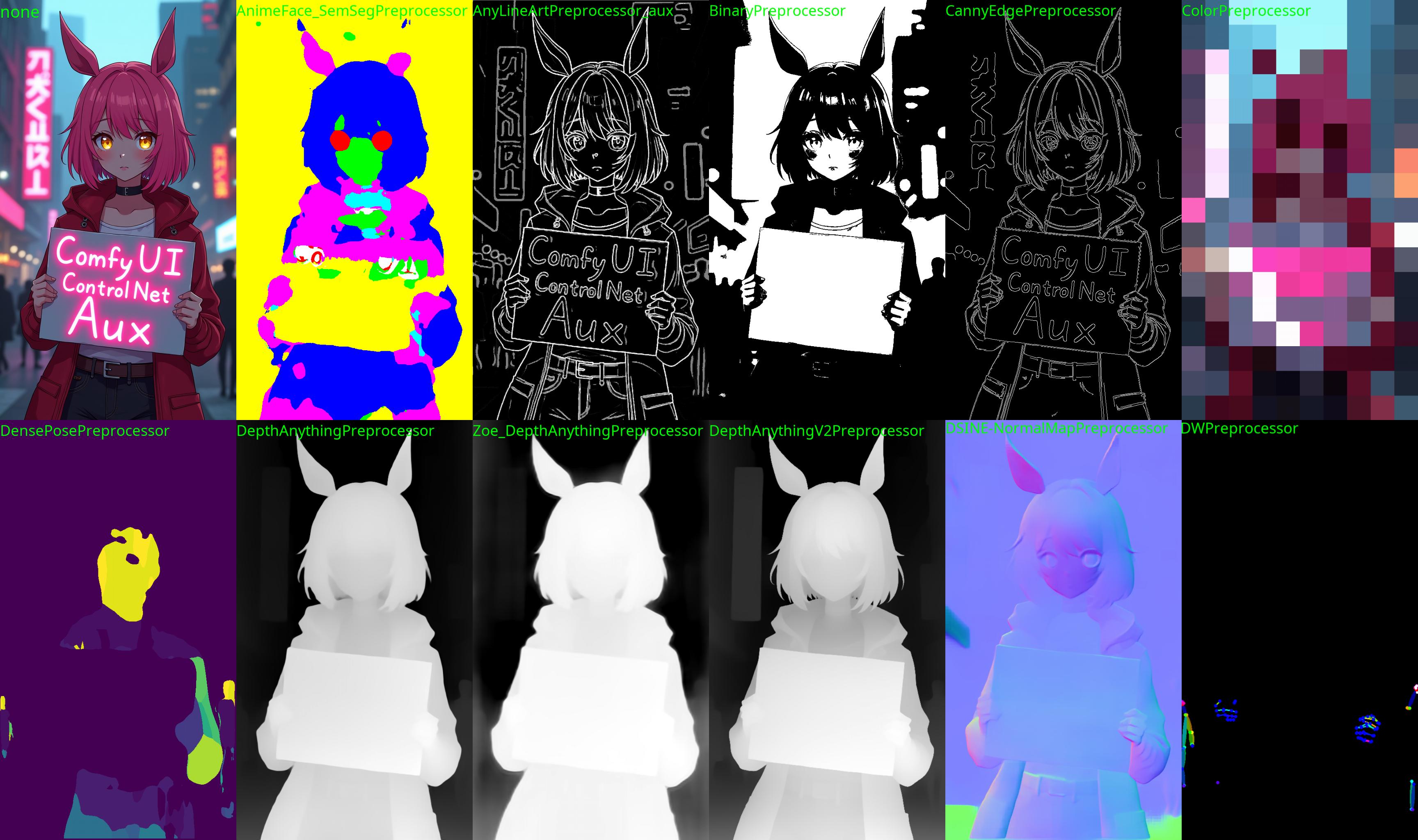
The code is copy-pasted from the respective folders in https://github.com/lllyasviel/ControlNet/tree/main/annotator and connected to the 🤗 Hub.
All credit & copyright goes to https://github.com/lllyasviel.
Updates
Go to Update page to follow updates
Installation:
Using ComfyUI Manager (recommended):
Install ComfyUI Manager and do steps introduced there to install this repo.
Alternative:
If you're running on Linux, or non-admin account on windows you'll want to ensure /ComfyUI/custom_nodes and comfyui_controlnet_aux has write permissions.
There is now a install.bat you can run to install to portable if detected. Otherwise it will default to system and assume you followed ConfyUI's manual installation steps.
If you can't run install.bat (e.g. you are a Linux user). Open the CMD/Shell and do the following:
- Navigate to your
/ComfyUI/custom_nodes/folder - Run
git clone https://github.com/Fannovel16/comfyui_controlnet_aux/ - Navigate to your
comfyui_controlnet_auxfolder- Portable/venv:
- Run
path/to/ComfUI/python_embeded/python.exe -s -m pip install -r requirements.txt
- Run
- With system python
- Run
pip install -r requirements.txt
- Run
- Portable/venv:
- Start ComfyUI
Nodes
Please note that this repo only supports preprocessors making hint images (e.g. stickman, canny edge, etc).
All preprocessors except Inpaint are intergrated into AIO Aux Preprocessor node.
This node allow you to quickly get the preprocessor but a preprocessor's own threshold parameters won't be able to set.
You need to use its node directly to set thresholds.
Nodes (sections are categories in Comfy menu)
Line Extractors
| Preprocessor Node | sd-webui-controlnet/other | ControlNet/T2I-Adapter |
|-----------------------------|---------------------------|-------------------------------------------|
| Binary Lines | binary | control_scribble |
| Canny Edge | canny | control_v11p_sd15_canny <br> control_canny <br> t2iadapter_canny |
| HED Soft-Edge Lines | hed | control_v11p_sd15_softedge <br> control_hed |
| Standard Lineart | standard_lineart | control_v11p_sd15_lineart |
| Realistic Lineart | lineart (or lineart_coarse if coarse is enabled) | control_v11p_sd15_lineart |
| Anime Lineart | lineart_anime | control_v11p_sd15s2_lineart_anime |
| Manga Lineart | lineart_anime_denoise | control_v11p_sd15s2_lineart_anime |
| M-LSD Lines | mlsd | control_v11p_sd15_mlsd <br> control_mlsd |
| PiDiNet Soft-Edge Lines | pidinet | control_v11p_sd15_softedge <br> control_scribble |
| Scribble Lines | scribble | control_v11p_sd15_scribble <br> control_scribble |
| Scribble XDoG Lines | scribble_xdog | control_v11p_sd15_scribble <br> control_scribble |
| Fake Scribble Lines | scribble_hed | control_v11p_sd15_scribble <br> control_scribble |
| TEED Soft-Edge Lines | teed | controlnet-sd-xl-1.0-softedge-dexined <br> control_v11p_sd15_softedge (Theoretically)
| Scribble PiDiNet Lines | scribble_pidinet | control_v11p_sd15_scribble <br> control_scribble |
| AnyLine Lineart | | mistoLine_fp16.safetensors <br> mistoLine_rank256 <br> control_v11p_sd15s2_lineart_anime <br> control_v11p_sd15_lineart |
Normal and Depth Estimators
| Preprocessor Node | sd-webui-controlnet/other | ControlNet/T2I-Adapter | |-----------------------------|---------------------------|-------------------------------------------| | MiDaS Depth Map | (normal) depth | control_v11f1p_sd15_depth <br> control_depth <br> t2iadapter_depth | | LeReS Depth Map | depth_leres | control_v11f1p_sd15_depth <br> control_depth <br> t2iadapter_depth | | Zoe Depth Map | depth_zoe | control_v11f1p_sd15_depth <br> control_depth <br> t2iadapter_depth | | MiDaS Normal Map | normal_map | control_normal | | BAE Normal Map | normal_bae | control_v11p_sd15_normalbae | | MeshGraphormer Hand Refiner (HandRefinder) | depth_hand_refiner | control_sd15_inpaint_depth_hand_fp16 | | Depth Anything | depth_anything | Depth-Anything | | Zoe Depth Anything <br> (Basically Zoe but the encoder is replaced with DepthAnything) | depth_anything | Depth-Anything | | Normal DSINE | | control_normal/control_v11p_sd15_normalbae | | Metric3D Depth | | control_v11f1p_sd15_depth <br> control_depth <br> t2iadapter_depth | | Metric3D Normal | | control_v11p_sd15_normalbae | | Depth Anything V2 | | Depth-Anything |
Faces and Poses Estimators
| Preprocessor Node | sd-webui-controlnet/other | ControlNet/T2I-Adapter | |-----------------------------|---------------------------|-------------------------------------------| | DWPose Estimator | dw_openpose_full | control_v11p_sd15_openpose <br> control_openpose <br> t2iadapter_openpose | | OpenPose Estimator | openpose (detect_body) <br> openpose_hand (detect_body + detect_hand) <br> openpose_faceonly (detect_face) <br> openpose_full (detect_hand + detect_body + detect_face) | control_v11p_sd15_openpose <br> control_openpose <br> t2iadapter_openpose | | MediaPipe Face Mesh | mediapipe_face | controlnet_sd21_laion_face_v2 | | Animal Estimator | animal_openpose | control_sd15_animal_openpose_fp16 |
Optical Flow Estimators
| Preprocessor Node | sd-webui-controlnet/other | ControlNet/T2I-Adapter | |-----------------------------|---------------------------|-------------------------------------------| | Unimatch Optical Flow | | DragNUWA |
How to get OpenPose-format JSON?
User-side
This workflow will save images to ComfyUI's output folder (the same location as output images). If you haven't found Save Pose Keypoints node, update this extension
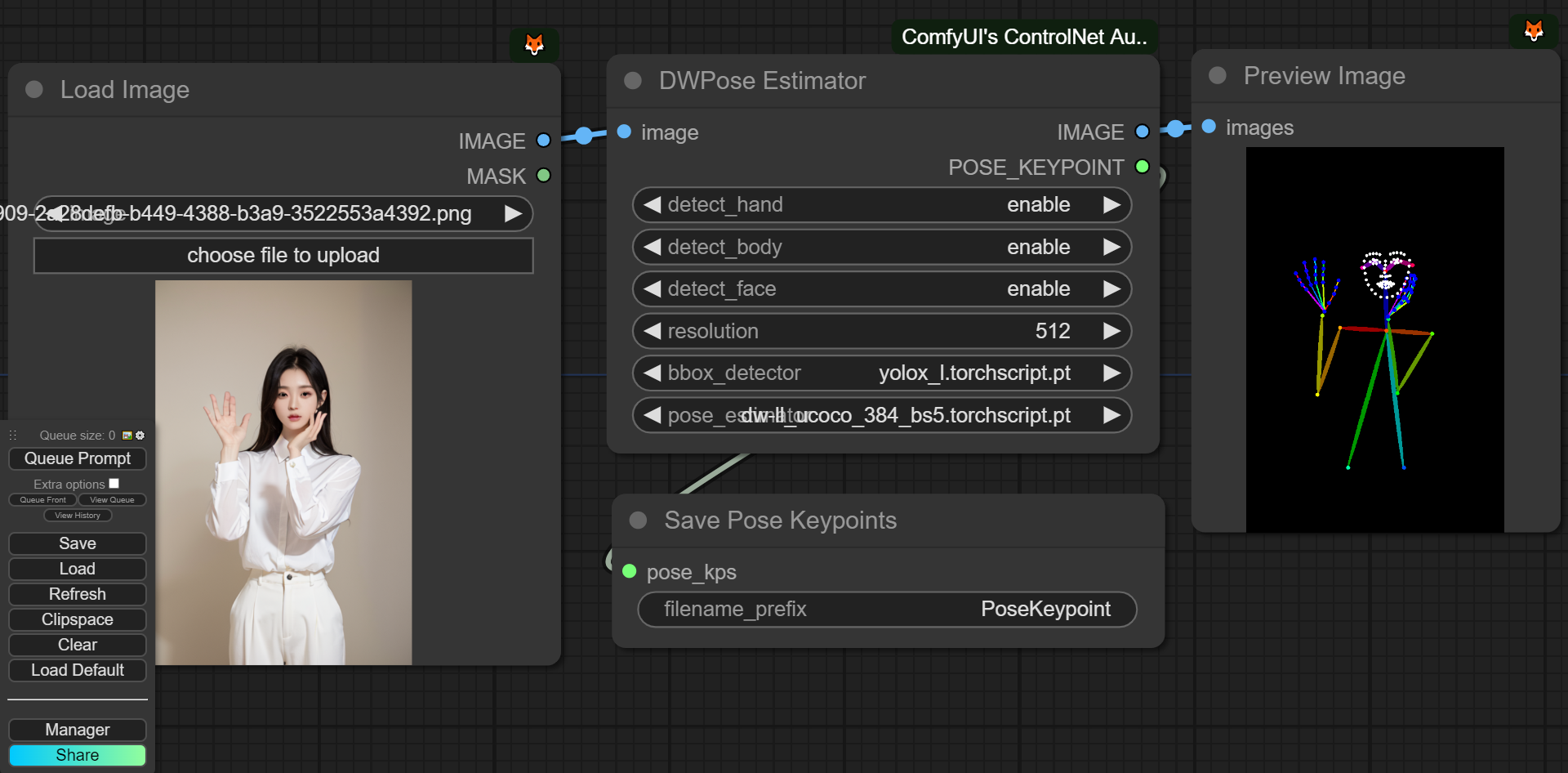
Dev-side
An array of OpenPose-format JSON corresponsding to each frame in an IMAGE batch can be gotten from DWPose and OpenPose using app.nodeOutputs on the UI or /history API endpoint. JSON output from AnimalPose uses a kinda similar format to OpenPose JSON:
[
    {
        "version": "ap10k",
        "animals": [
            [[x1, y1, 1], [x2, y2, 1],..., [x17, y17, 1]],
            [[x1, y1, 1], [x2, y2, 1],..., [x17, y17, 1]],
            ...
        ],
        "canvas_height": 512,
        "canvas_width": 768
    },
    ...
]
For extension developers (e.g. Openpose editor):
const poseNodes = app.graph._nodes.filter(node => ["OpenposePreprocessor", "DWPreprocessor", "AnimalPosePreprocessor"].includes(node.type))
for (const poseNode of poseNodes) {
    const openposeResults = JSON.parse(app.nodeOutputs[poseNode.id].openpose_json[0])
    console.log(openposeResults) //An array containing Openpose JSON for each frame
}
For API users: Javascript
import fetch from "node-fetch" //Remember to add "type": "module" to "package.json"
async function main() {
    const promptId = '792c1905-ecfe-41f4-8114-83e6a4a09a9f' //Too lazy to POST /queue
    let history = await fetch(`http://127.0.0.1:8188/history/${promptId}`).then(re => re.json())
    history = history[promptId]
    const nodeOutputs = Object.values(history.outputs).filter(output => output.openpose_json)
    for (const nodeOutput of nodeOutputs) {
        const openposeResults = JSON.parse(nodeOutput.openpose_json[0])
        console.log(openposeResults) //An array containing Openpose JSON for each frame
    }
}
main()
Python
import json, urllib.request

server_address = "127.0.0.1:8188"
prompt_id = '' #Too lazy to POST /queue

def get_history(prompt_id):
    with urllib.request.urlopen("http://{}/history/{}".format(server_address, prompt_id)) as response:
        return json.loads(response.read())

history = get_history(prompt_id)[prompt_id]
for o in history['outputs']:
    for node_id in history['outputs']:
        node_output = history['outputs'][node_id]
        if 'openpose_json' in node_output:
            print(json.loads(node_output['openpose_json'][0])) #An list containing Openpose JSON for each frame
Semantic Segmentation
| Preprocessor Node | sd-webui-controlnet/other | ControlNet/T2I-Adapter | |-----------------------------|---------------------------|-------------------------------------------| | OneFormer ADE20K Segmentor | oneformer_ade20k | control_v11p_sd15_seg | | OneFormer COCO Segmentor | oneformer_coco | control_v11p_sd15_seg | | UniFormer Segmentor | segmentation |control_sd15_seg <br> control_v11p_sd15_seg|
T2IAdapter-only
| Preprocessor Node | sd-webui-controlnet/other | ControlNet/T2I-Adapter | |-----------------------------|---------------------------|-------------------------------------------| | Color Pallete | color | t2iadapter_color | | Content Shuffle | shuffle | t2iadapter_style |
Recolor
| Preprocessor Node | sd-webui-controlnet/other | ControlNet/T2I-Adapter | |-----------------------------|---------------------------|-------------------------------------------| | Image Luminance | recolor_luminance | ioclab_sd15_recolor <br> sai_xl_recolor_256lora <br> bdsqlsz_controlllite_xl_recolor_luminance | | Image Intensity | recolor_intensity | Idk. Maybe same as above? |
Examples
A picture is worth a thousand words
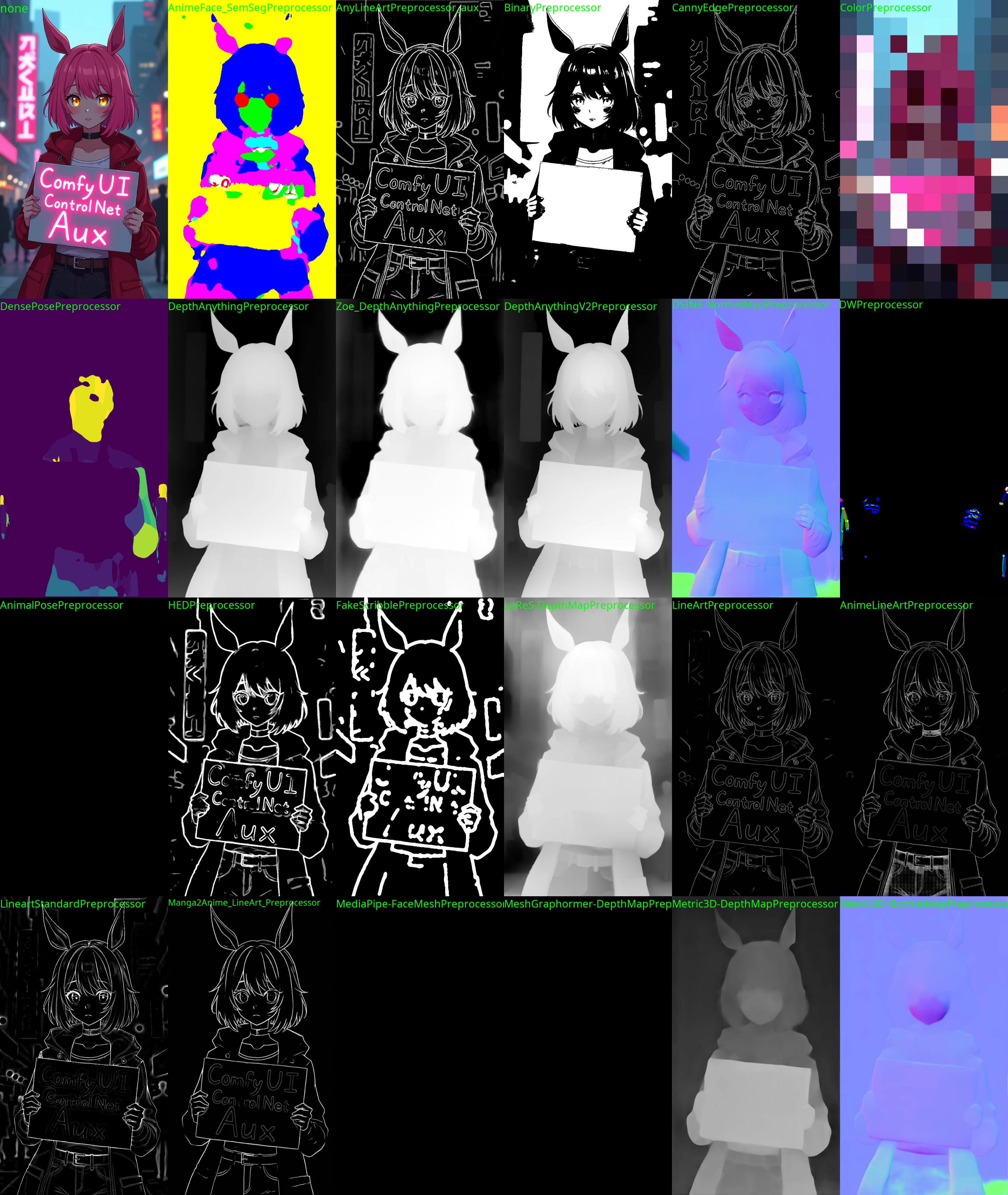
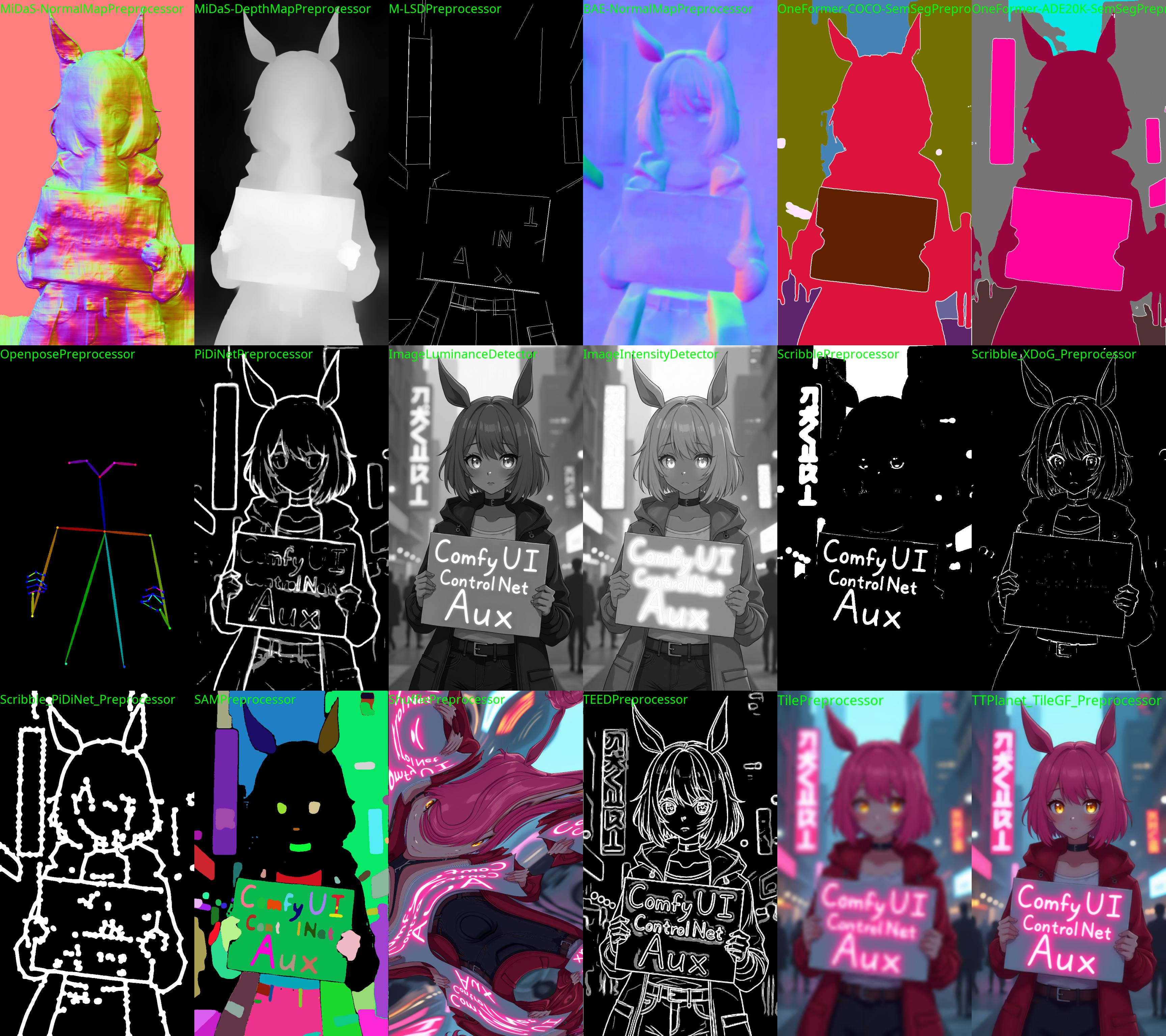
Testing workflow
https://github.com/Fannovel16/comfyui_controlnet_aux/blob/main/examples/ExecuteAll.png Input image: https://github.com/Fannovel16/comfyui_controlnet_aux/blob/main/examples/comfyui-controlnet-aux-logo.png
Q&A:
Why some nodes doesn't appear after I installed this repo?
This repo has a new mechanism which will skip any custom node can't be imported. If you meet this case, please create a issue on Issues tab with the log from the command line.
DWPose/AnimalPose only uses CPU so it's so slow. How can I make it use GPU?
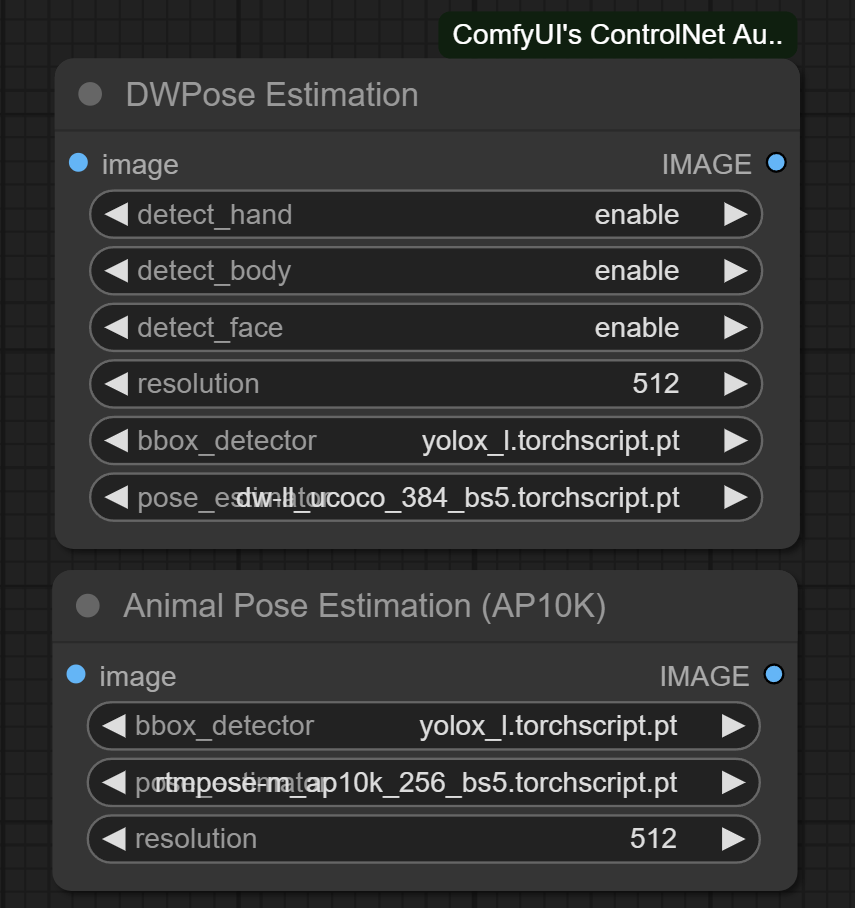
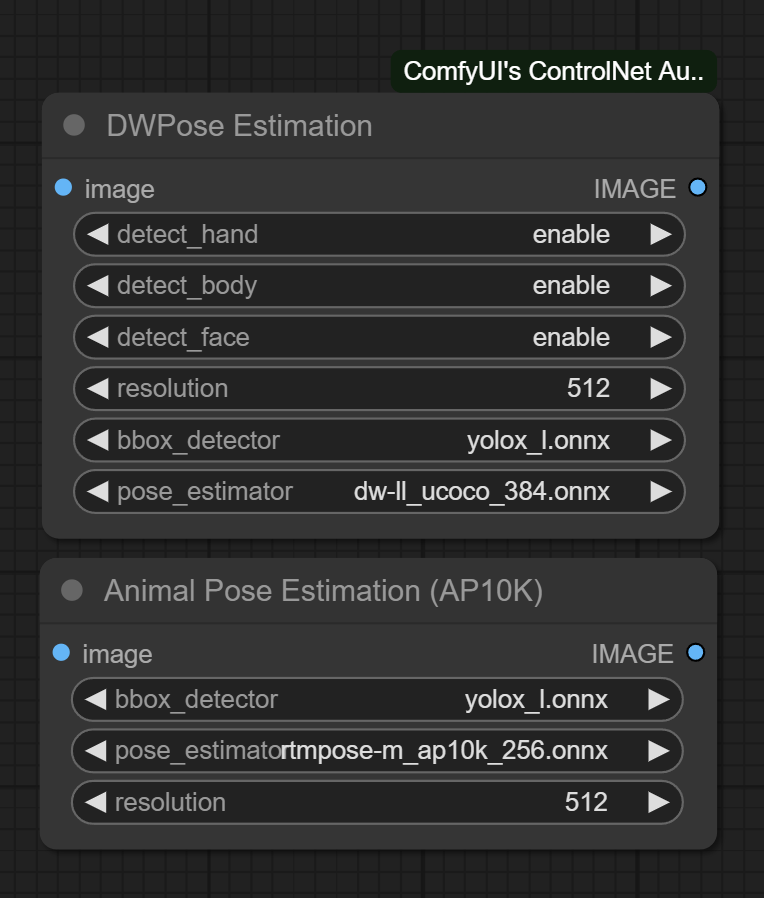
There are two ways to speed-up DWPose: using TorchScript checkpoints (.torchscript.pt) checkpoints or ONNXRuntime (.onnx). TorchScript way is little bit slower than ONNXRuntime but doesn't require any additional library and still way way faster than CPU.
A torchscript bbox detector is compatiable with an onnx pose estimator and vice versa.
TorchScript
Set bbox_detector and pose_estimator according to this picture. You can try other bbox detector endings with .torchscript.pt to reduce bbox detection time if input images are ideal.
ONNXRuntime
If onnxruntime is installed successfully and the checkpoint used endings with .onnx, it will replace default cv2 backend to take advantage of GPU. Note that if you are using NVidia card, this method currently can only works on CUDA 11.8 (ComfyUI_windows_portable_nvidia_cu118_or_cpu.7z) unless you compile onnxruntime yourself.
- Know your onnxruntime build:
-
- NVidia CUDA 11.x or bellow/AMD GPU:
onnxruntime-gpu
- NVidia CUDA 11.x or bellow/AMD GPU:
-
- NVidia CUDA 12.x:
onnxruntime-gpu --extra-index-url https://aiinfra.pkgs.visualstudio.com/PublicPackages/_packaging/onnxruntime-cuda-12/pypi/simple/
- NVidia CUDA 12.x:
-
- DirectML:
onnxruntime-directml
- DirectML:
-
- OpenVINO:
onnxruntime-openvino
- OpenVINO:
Note that if this is your first time using ComfyUI, please test if it can run on your device before doing next steps.
-
Add it into
requirements.txt -
Run
install.bator pip command mentioned in Installation
Assets files of preprocessors
- anime_face_segment: bdsqlsz/qinglong_controlnet-lllite/Annotators/UNet.pth, anime-seg/isnetis.ckpt
- densepose: LayerNorm/DensePose-TorchScript-with-hint-image/densepose_r50_fpn_dl.torchscript
- dwpose:
- animal_pose (ap10k):
- hed: lllyasviel/Annotators/ControlNetHED.pth
- leres: lllyasviel/Annotators/res101.pth, lllyasviel/Annotators/latest_net_G.pth
- lineart: lllyasviel/Annotators/sk_model.pth, lllyasviel/Annotators/sk_model2.pth
- lineart_anime: lllyasviel/Annotators/netG.pth
- manga_line: lllyasviel/Annotators/erika.pth
- mesh_graphormer: hr16/ControlNet-HandRefiner-pruned/graphormer_hand_state_dict.bin, hr16/ControlNet-HandRefiner-pruned/hrnetv2_w64_imagenet_pretrained.pth
- midas: lllyasviel/Annotators/dpt_hybrid-midas-501f0c75.pt
- mlsd: lllyasviel/Annotators/mlsd_large_512_fp32.pth
- normalbae: lllyasviel/Annotators/scannet.pt
- oneformer: lllyasviel/Annotators/250_16_swin_l_oneformer_ade20k_160k.pth
- open_pose: lllyasviel/Annotators/body_pose_model.pth, lllyasviel/Annotators/hand_pose_model.pth, lllyasviel/Annotators/facenet.pth
- pidi: lllyasviel/Annotators/table5_pidinet.pth
- sam: dhkim2810/MobileSAM/mobile_sam.pt
- uniformer: lllyasviel/Annotators/upernet_global_small.pth
- zoe: lllyasviel/Annotators/ZoeD_M12_N.pt
- teed: bdsqlsz/qinglong_controlnet-lllite/7_model.pth
- depth_anything: Either LiheYoung/Depth-Anything/checkpoints/depth_anything_vitl14.pth, LiheYoung/Depth-Anything/checkpoints/depth_anything_vitb14.pth or LiheYoung/Depth-Anything/checkpoints/depth_anything_vits14.pth
- diffusion_edge: Either hr16/Diffusion-Edge/diffusion_edge_indoor.pt, hr16/Diffusion-Edge/diffusion_edge_urban.pt or hr16/Diffusion-Edge/diffusion_edge_natrual.pt
- unimatch: Either hr16/Unimatch/gmflow-scale2-regrefine6-mixdata.pth, hr16/Unimatch/gmflow-scale2-mixdata.pth or hr16/Unimatch/gmflow-scale1-mixdata.pth
- zoe_depth_anything: Either LiheYoung/Depth-Anything/checkpoints_metric_depth/depth_anything_metric_depth_indoor.pt or LiheYoung/Depth-Anything/checkpoints_metric_depth/depth_anything_metric_depth_outdoor.pt
2000 Stars 😄
<a href="https://star-history.com/#Fannovel16/comfyui_controlnet_aux&Date"> <picture> <source media="(prefers-color-scheme: dark)" srcset="https://api.star-history.com/svg?repos=Fannovel16/comfyui_controlnet_aux&type=Date&theme=dark" /> <source media="(prefers-color-scheme: light)" srcset="https://api.star-history.com/svg?repos=Fannovel16/comfyui_controlnet_aux&type=Date" /> <img alt="Star History Chart" src="https://api.star-history.com/svg?repos=Fannovel16/comfyui_controlnet_aux&type=Date" /> </picture> </a>Thanks for yalls supports. I never thought the graph for stars would be linear lol.