
ETERNAL Nodes
ETERNAL nodes for ComfyUI: Panorama 360 Viewer Eternal (interactive equirectangular 360 viewer), Flat Shade Eternal (GPU flat shading via split/crease modes), Mesh Bridge (Types.MESH <- trimesh), Trimesh to Model3D a tile pipeline for high-res outpainting, Video Sizes and Aspect Ratio Size Picker.
ComfyUI-ETERNAL-Nodes
<p align="center"> <a href="https://github.com/EternalShade3D/ComfyUI-ETERNAL-Nodes/releases/latest"><img src="https://img.shields.io/github/v/release/EternalShade3D/ComfyUI-ETERNAL-Nodes?style=for-the-badge&labelColor=26282e&label=release&color=000000" alt="Latest release"></a> <a href="https://github.com/EternalShade3D/ComfyUI-ETERNAL-Nodes/blob/main/pyproject.toml"><img src="https://img.shields.io/badge/Python-3.10%2B-3776AB?style=for-the-badge&labelColor=26282e&logo=python&logoColor=white" alt="Python 3.10+"></a> <img src="https://img.shields.io/badge/ComfyUI-node%20pack-000000?style=for-the-badge&labelColor=26282e&logo=comfyui&logoColor=white" alt="ComfyUI node pack"> <a href="https://registry.comfy.org/publishers/eternal/eternal-nodes"><img src="https://img.shields.io/badge/Comfy%20Registry-published-000000?style=for-the-badge&labelColor=26282e&logo=comfyui&logoColor=white" alt="Comfy Registry, published"></a> <a href="https://github.com/EternalShade3D/ComfyUI-ETERNAL-Nodes/blob/main/LICENSE"><img src="https://img.shields.io/badge/License-MIT-yellow?style=for-the-badge&labelColor=26282e" alt="License: MIT"></a> </p>Custom ComfyUI nodes by EternalShade3D — a single library pack for interactive 360° panorama inspection, 3D mesh repair/bridging, flat-shade control, a tile pipeline for high-resolution outpainting, and image-size picking.
Category prefix on canvas: ⚡ ETERNAL ● ↩ / ...
Nodes spawn with brand colors: title #4a3fcf, body #2a283e (recolorable
with any node-color picker afterwards).
Nodes
| Node | Category | In → Out | Purpose |
|------|----------|----------|---------|
| Panorama 360 Viewer Eternal | 🌐 360 | image → image | Live WebGL 360 sphere inside the node — drag, zoom, fov writes back. Full details below. |
| Mesh Bridge Eternal | 🧊 3D | mesh+trimesh → mesh+trimesh | Bridges core Types.MESH ↔ trimesh.Trimesh — feed one side, get both. |
| Flat Shade Eternal | 🧊 3D | mesh+trimesh → mesh+trimesh | Bakes flat shading (split or crease mode). |
| Trimesh to Model3D Eternal | 🧊 3D | TRIMESH → FILE_3D_GLB | Mesh → GLB in one node. |
| Video Sizes Eternal | 🔢 Sizes | → sizes | Aspect-ratio + long-edge picker for latent sizing. |
| Aspect Ratio Size Picker | 🔢 Sizes | → width, height | Ratio dropdown + long-edge slider, snapped to ×8. |
| TILE PREPARE ETERNAL | 🧩 Tiles | IMAGE → whole IMAGE + tiles | Plans the grid, emits the crop plus a per-tile list. |
| TILE STITCH ETERNAL | 🧩 Tiles | tile list → IMAGE | Reassembles tiles, blending overlaps. |
| TILE PROMPT PANEL ETERNAL | 🧩 Tiles | IMAGE → STRING + overlay | Per-tile prompt panel. |
| PROMPT FOR TILE #N ETERNAL | 🧩 Tiles | index → STRING | Picks the prompt for tile #N. |
Full details for each node in the sections below.
Repository layout
Structure inspired by the Pixaroma pack (not a copy of it): a thin root, every node in nodes/, every front-end file in js/.
| Path | What lives there |
|------|------------------|
| __init__.py | Registrar only — imports the modules and merges NODE_CLASS_MAPPINGS |
| nodes/ | One module per node (viewer360.py, tile_prepare.py, flat_shade.py, ...) |
| nodes/_tile_common.py | Shared tile math (grid planning, positions, overlap) |
| js/ | Front-end extensions, served to the browser as WEB_DIRECTORY |
| js/shared/ | Reusable UI helpers (panel, settings, node sizing) |
| docs/ | Reference images kept with the pack |
| icon.svg | Pack icon — its URL is published in pyproject.toml, so it stays in the root |
Panorama 360 Viewer Eternal
The node that makes this release: inspect a 360° panorama without leaving your workflow or opening a browser tab.
See it in action
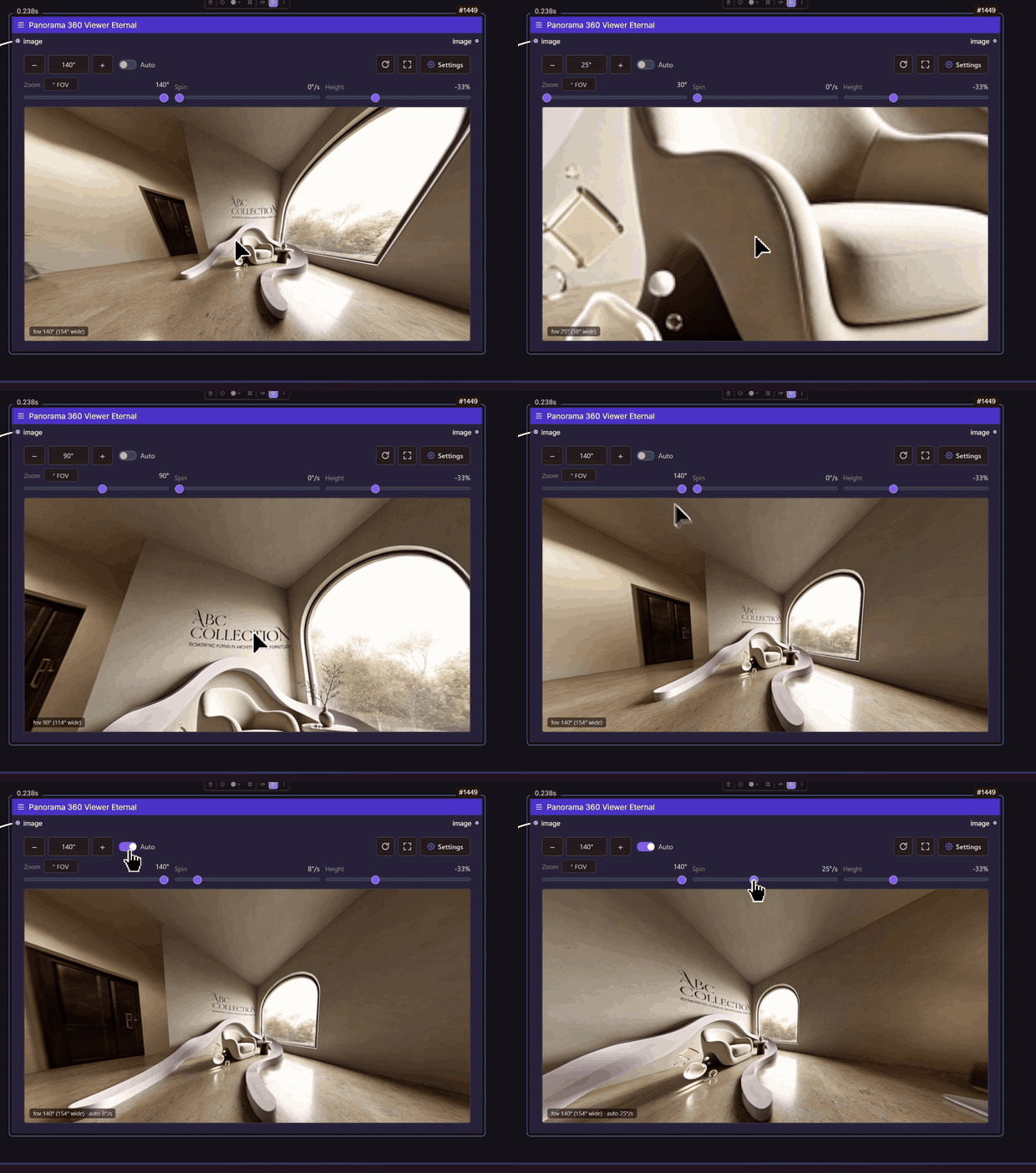
Live preview — drag the sphere, scroll to zoom. The node title, FOV,
Spin and Height controls are all real, not a mock-up.
📥 Full 60-second recording (1080p):
download panorama360_viewer_demo.mp4
— also attached to the v1.1.0 release.
Why a GIF and not the video? GitHub strips
<video>tags from READMEs and serves committed files as plain downloads, so an mp4 can never play on the repo page — an animated GIF is the only thing that actually plays, so that is what leads here. The MP4 above is the full-quality version if you want the whole minute.
How to use
- Wire any image into
image(it must be equirectangular, 2:1). - Run the workflow — the sphere builds inside the node.
- Drag to look around, scroll to zoom, set
auto_rotateto drift. - The gear button opens settings: start yaw/pitch, camera height, exposure, zoom range, wheel/drag speed, horizon guide, background, reset.
Controls
| Control | Type | Notes |
| --- | --- | --- |
| image | IMAGE | Equirectangular 360 image (2:1). |
| frame_index | INT | Which image of a batch to view (0 = first). |
| fov | INT | 30–140, default 100. The zoom it opens at: bigger = wider = further away. The wheel changes it live and writes it back. |
| auto_rotate | FLOAT | Degrees per second (0 = off), 0–60. Pauses while you drag. |
| background | COMBO | dark / black / grey / light — the colour behind the sphere. |
| exposure | FLOAT | 0.2–3.0, default 1.0. Viewer brightness only; never touches the image on the wire. |
| start_yaw | FLOAT | 0–360, default 180. Where it opens horizontally (0/360 = left edge, 180 = middle). |
| start_pitch | FLOAT | −90–90, default 0. 0 = horizon centred, negative = looking down. |
| z_offset | FLOAT | −99–99. Camera height on the vertical axis, as a % of the sphere radius. A translation, not a tilt. |
Notes
- Needs internet once to fetch three.js (~600 KB), browser-cached after.
- The image passes through to
imageoutput, so the viewer can sit in the middle of a graph instead of ending it. - Search aliases:
360,panorama,equirectangular,sphere,vr.
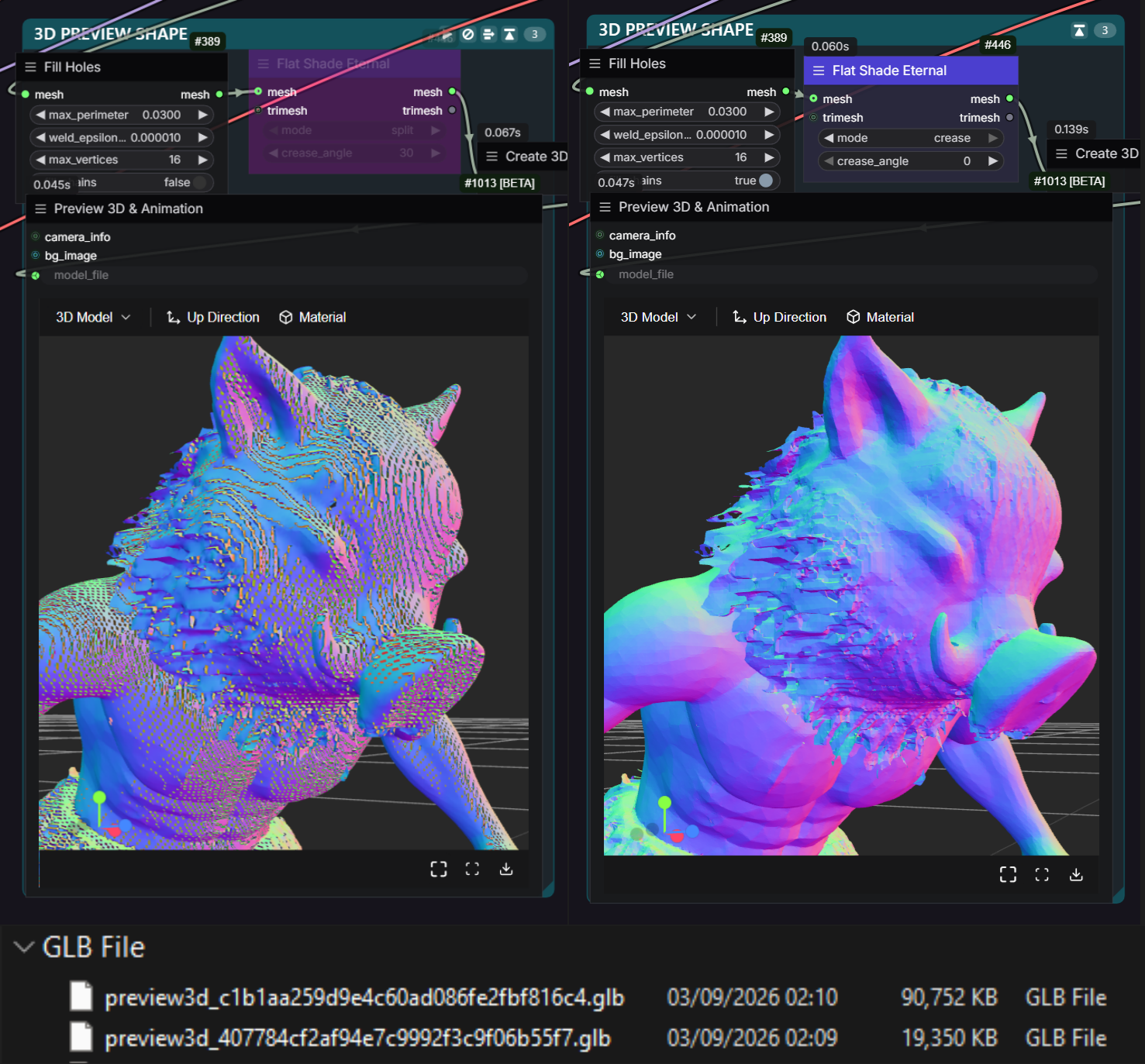
Flat Shade Eternal — mode comparison
Same mesh, same workflow. split bakes per-face geometry (flat everywhere,
more vertices); crease only splits edges above the angle threshold
(lighter file, flat hard edges).
Aspect Ratio Size Picker
Pick a target canvas size for an Empty Latent Image node from three controls.
Controls
| Control | Type | Notes |
| --- | --- | --- |
| Aspect Ratio | Dropdown | 1:1 (Square), 4:3 (Standard), 3:2 (Classic 35mm Film), 5:4 (Large Format), 16:9 (Widescreen), 16:10 (Widescreen) |
| Long Edge | Slider (INT) | 64–8192, step 8. Always maps to the larger dimension. |
| Invert | Toggle | Swaps the ratio (e.g. 4:3 → 3:4, 16:9 → 9:16). |
Outputs
width(INT)height(INT)
Both snapped to a multiple of 8 for ComfyUI latent alignment. Wire into an
Empty Latent Image node's width/height.
Example
Aspect Ratio Size Picker ──width──▶ Empty Latent Image
                       └─height─┘
🗄 _archive — kept only so old workflows still load
Five nodes are superseded. They stay registered on purpose, under 🗄 _archive,
and each one's name points at its replacement, so you can see the migration
at the point of confusion:
| Archived node | Use instead |
| --- | --- |
| (old) TILE GRID | TILE PREPARE |
| (old) TILE SPLIT | TILE PREPARE |
| (old) TILES → VL | TILE PREPARE (it has a tile output) |
| (old) PER-TILE PROMPT | PROMPT FOR TILE #N |
| (old) VL PROMPTS → PANEL | TILE PROMPT PANEL (wire auto_prompts) |
| Preview 3D Eternal | core Preview 3D (Advanced) — dev cancelled, kept only so old workflows load |
Install
ComfyUI Manager (recommended)
Search for ETERNAL Nodes (publisher eternal) — the pack is live on the Comfy Registry, so Manager installs it with its dependency (trimesh) handled for you.
Manual
cd ComfyUI/custom_nodes
git clone https://github.com/EternalShade3D/ComfyUI-ETERNAL-Nodes.git
# restart ComfyUI
License
MIT © EternalShade3D