
Eric
Semantic image, video, and document search for ComfyUI using Qwen3-VL multimodal embeddings
Nodes (21)
The one-time grind that makes search instant forever
Union, intersection, or concat — merge two search sets
Sweep the dead vectors out of your FAISS index
The polite way to say 'only the good matches, please'
The dashboard for your semantic search library
Turn a search into a list of file paths you can actually use
The one node every Semantic-Search workflow starts with
Your searchable photo library lives in an index — this node opens it
The second, sharper brain behind two-stage search
Pull the full-resolution files out of a search
See your search results as a grid before you commit to anything
Convert your index's engine without re-embedding everything
Take a folder back out of search without touching your files
The expensive model that fixes the ranking
Search your whole library by 'a page from this PDF'
Find every shot that looks like this one
Find any photo by describing it — no tags, no filenames
Find clips like this clip, without watching your whole library
One query, four libraries, one merged result set
Semantic search's answer to 'but not the beach one'
Your Semantic Search Index Is Rotting — This Node Tells You
Eric's Semantic Search for ComfyUI
A powerful two-stage multimodal retrieval pipeline for ComfyUI, enabling semantic image search using natural language queries or image similarity. Built on the Qwen3-VL foundation model from Alibaba.


Table of Contents
- Overview
- How It Works
- Credits & References
- Installation
- Node Reference
- Usage Examples
- Configuration
- Troubleshooting
- Future Roadmap
Overview
This node set provides semantic image, video, and document search capabilities within ComfyUI, allowing you to:
- Search by text: Find images matching natural language descriptions like "woman in red dress standing by the ocean"
- Search by image: Find visually or semantically similar images to a reference image
- Search by video: Find content similar to a reference video
- Search by document: Find content similar to a PDF page
- Rerank results: Use a more powerful model to refine and improve search accuracy
- Build persistent indexes: Index your image, video, and document libraries once, search instantly forever
- Multiple index types: Choose between exact search (Flat), fast approximate (IVF), or very fast (HNSW)
Unlike traditional filename or tag-based search, semantic search understands the meaning and content of images, enabling searches like:
- "sunset over mountains with orange sky"
- "portrait with dramatic lighting"
- "minimalist product photography"
- "vintage film aesthetic"
Video Overview
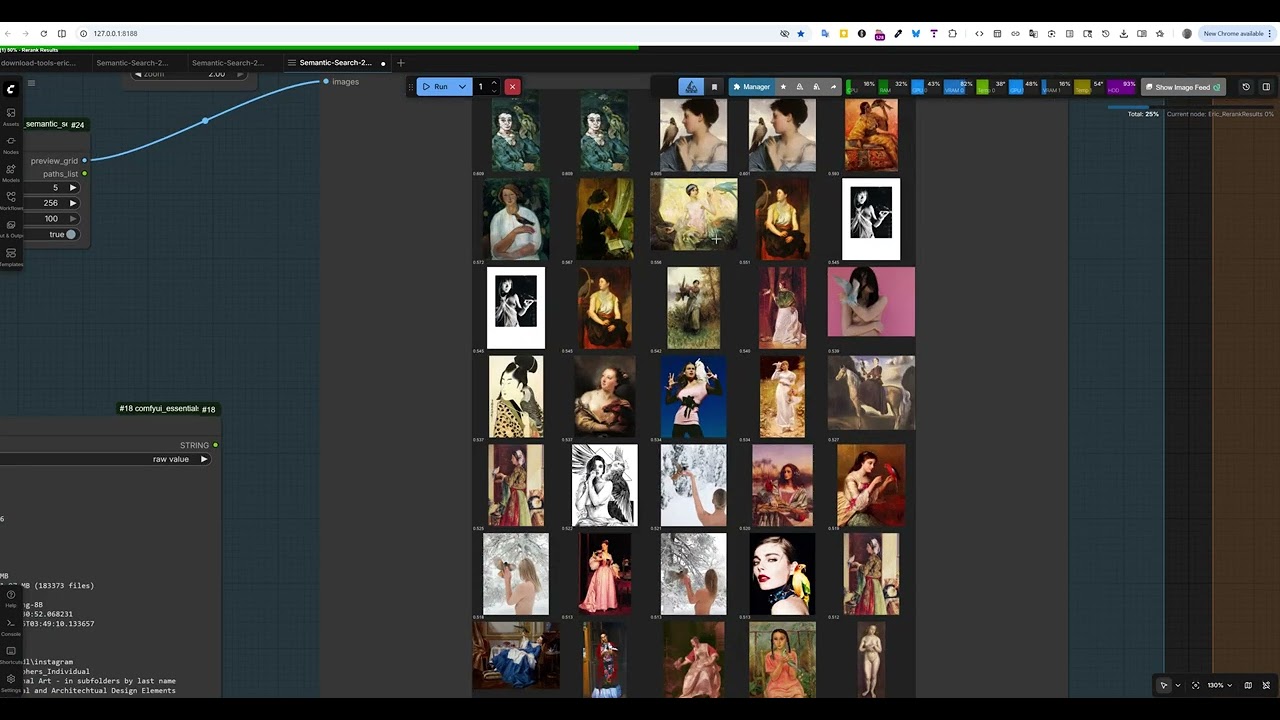
📹 Click the image above to watch the full video overview showing semantic search in action within ComfyUI.
How It Works
Two-Stage Multimodal Retrieval Pipeline
This implementation uses a two-stage retrieval architecture, a well-established pattern in modern information retrieval systems that balances speed and accuracy:
┌─────────────────────────────────────────────────────────────────────┐
│                        INDEXING PHASE (One-time)                    │
├─────────────────────────────────────────────────────────────────────┤
│                                                                     │
│  Images → [Vision Encoder] → [Language Model] → Dense Embeddings   │
│              (ViT)              (Qwen3)           (4096-dim)        │
│                                                                     │
│  Embeddings stored in FAISS index for fast similarity search        │
│                                                                     │
└─────────────────────────────────────────────────────────────────────┘

┌─────────────────────────────────────────────────────────────────────┐
│                        SEARCH PHASE (Real-time)                     │
├─────────────────────────────────────────────────────────────────────┤
│                                                                     │
│  STAGE 1: Fast Retrieval (Embedding Model)                         │
│  ─────────────────────────────────────────                         │
│  Query → Embed → FAISS Approximate Nearest Neighbor → Top-K        │
│                                                                     │
│  * Speed: ~1000s of candidates per second                          │
│  * Purpose: Quickly narrow down to promising candidates            │
│                                                                     │
│  STAGE 2: Precise Reranking (Reranker Model)                       │
│  ───────────────────────────────────────────                       │
│  Top-K Candidates → Cross-Attention Scoring → Reordered Results    │
│                                                                     │
│  * Speed: ~10-50 candidates per second                             │
│  * Purpose: Fine-grained relevance scoring for final ranking       │
│                                                                     │
└─────────────────────────────────────────────────────────────────────┘
Why Two Stages?
-
Stage 1 (Embedding + FAISS): Uses dense vector representations to quickly find the ~100 most promising candidates from millions of images. This is fast because it uses approximate nearest neighbor search with pre-computed embeddings.
-
Stage 2 (Reranker): Performs expensive cross-attention between the query and each candidate image. This is much more accurate but too slow to run on the entire database, so we only apply it to Stage 1's candidates.
This architecture achieves both high recall (finding all relevant images) and high precision (ranking the best ones highest).
The Qwen3-VL Foundation
Qwen3-VL (Qwen3 Vision-Language) is a state-of-the-art multimodal large language model that can understand both images and text in a unified representation space. Key components:
- Vision Encoder: A Vision Transformer (ViT) that processes images into patch embeddings
- Language Model: Qwen3 decoder that processes text and integrates visual information
- Multimodal Fusion: Cross-attention mechanisms that align visual and textual representations
The Embedding variant is fine-tuned to produce dense vectors optimized for retrieval, while the Reranker variant is fine-tuned for pairwise relevance scoring.
Credits & References
Model Authors
Qwen Team at Alibaba Group
The Qwen3-VL models are developed by Alibaba's Qwen team, building on their extensive work in large language models and multimodal AI.
Models Used
| Model | Parameters | Embedding Dim | HuggingFace | |-------|------------|---------------|-------------| | Qwen3-VL-Embedding-2B | 2B | 2048 | Qwen/Qwen3-VL-Embedding-2B | | Qwen3-VL-Embedding-8B | 8B | 4096 | Qwen/Qwen3-VL-Embedding-8B | | Qwen3-VL-Reranker-2B | 2B | - | Qwen/Qwen3-VL-Reranker-2B | | Qwen3-VL-Reranker-8B | 8B | - | Qwen/Qwen3-VL-Reranker-8B |
Related Papers
- Qwen2-VL: Qwen2-VL: Enhancing Vision-Language Model's Perception of the World at Any Resolution
- Qwen Technical Report: Qwen Technical Report
- Dense Passage Retrieval: Dense Passage Retrieval for Open-Domain Question Answering
Libraries & Dependencies
- Transformers - Model loading and inference
- FAISS - Facebook AI Similarity Search
- qwen-vl-utils - Qwen vision-language utilities
- SageAttention - Optional optimized attention (if installed)
Installation
Prerequisites
- ComfyUI installed and working
- Python 3.10+
- CUDA-capable GPU with 8GB+ VRAM (16GB+ recommended for 8B models)
- ~20GB disk space for models
Step 1: Install the Node Set
Clone or copy this repository to your ComfyUI custom nodes folder:
cd ComfyUI/custom_nodes
git clone https://github.com/EricRollei/Semantic-Search.git
Step 2: Install Dependencies
# Navigate to your ComfyUI python environment
cd /path/to/ComfyUI

# Install required packages
pip install faiss-gpu  # or faiss-cpu if no GPU
pip install qwen-vl-utils>=0.0.14
pip install transformers>=4.45.0
pip install accelerate
pip install pillow
For portable ComfyUI installations:
# Windows example
ComfyUI_windows_portable\python_embeded\python.exe -m pip install faiss-gpu qwen-vl-utils>=0.0.14 transformers>=4.45.0 accelerate pillow --break-system-packages
Step 3: Download Models
Models are downloaded automatically on first use, or you can pre-download them:
# Using huggingface-cli
pip install huggingface_hub

# Download embedding model (choose one)
huggingface-cli download Qwen/Qwen3-VL-Embedding-2B --local-dir /path/to/models/Qwen3-VL-Embedding-2B
huggingface-cli download Qwen/Qwen3-VL-Embedding-8B --local-dir /path/to/models/Qwen3-VL-Embedding-8B

# Download reranker model (optional, for Stage 2)
huggingface-cli download Qwen/Qwen3-VL-Reranker-2B --local-dir /path/to/models/Qwen3-VL-Reranker-2B
huggingface-cli download Qwen/Qwen3-VL-Reranker-8B --local-dir /path/to/models/Qwen3-VL-Reranker-8B
Step 4: Configure Paths (Optional)
Edit core/config.py to set your preferred storage locations:
# Default paths
INDEXES_PATH = Path("H:/semantic_search/indexes")  # Where indexes are stored
MODELS_PATH = Path("H:/semantic_search/models")    # Where models are stored
Step 5: Restart ComfyUI
Restart ComfyUI and look for nodes under Eric/SemanticSearch category.
Optional: SageAttention for Faster Inference
If you have a compatible GPU and want faster attention:
pip install sageattention
Then select "sage" in the attention_type dropdown when loading models.
Node Reference
Model Nodes
Load Embedding Model
Loads a Qwen3-VL-Embedding model for encoding images and text into dense vectors.
| Parameter | Type | Default | Description | |-----------|------|---------|-------------| | model_name | dropdown | Qwen3-VL-Embedding-8B | Model to load (2B or 8B) | | device | dropdown | auto | GPU device selection | | max_resolution | dropdown | 1024x1024 (1MP) | Maximum image resolution for encoding | | attention_type | dropdown | sdpa | Attention implementation (sdpa/eager/sage) | | embedding_dim | dropdown | Full (4096/2048) | Matryoshka dimension reduction |
Outputs: EMBEDDING_MODEL
Resolution Guidelines:
256x256: Fastest, lowest accuracy512x512: Fast, good for thumbnails1024x1024: Recommended - good balance1536x1536: Highest accuracy, slowest
Embedding Dimension (Matryoshka):
Full: 4096 for 8B model, 2048 for 2B (best accuracy)2048/1024/512/256: Reduced dimensions for smaller/faster indexes- Lower dimensions = smaller index, faster search, slightly less accuracy
Load Reranker Model
Loads a Qwen3-VL-Reranker model for precise relevance scoring.
| Parameter | Type | Default | Description | |-----------|------|---------|-------------| | model_name | dropdown | Qwen3-VL-Reranker-8B | Model to load | | device | dropdown | auto | GPU device | | max_resolution | dropdown | 512x512 | Max resolution (lower OK since uses thumbnails) | | attention_type | dropdown | sdpa | Attention implementation |
Outputs: RERANKER_MODEL
Index Nodes
Load/Create Index
Loads an existing semantic index or creates a new one.
| Parameter | Type | Default | Description | |-----------|------|---------|-------------| | index_name | string | "my_index" | Unique name for the index | | embedding_dim | int | 4096 | Embedding dimension (4096 for 8B, 2048 for 2B) | | index_type | dropdown | Flat (Exact) | FAISS index type: Flat, IVF-Flat, or HNSW |
Index Types:
Flat (Exact): 100% recall, best for <10K imagesIVF-Flat (Fast): ~95-99% recall, 6x faster search, needs training on 1000+ vectorsHNSW (Very Fast): ~95-99% recall, fastest search, no training needed
Outputs: SEMANTIC_INDEX
Rebuild Index
Convert an existing index to a different type.
| Parameter | Type | Default | Description | |-----------|------|---------|-------------| | index | SEMANTIC_INDEX | - | Index to rebuild | | target_type | dropdown | HNSW (Very Fast) | New index type |
Outputs: SEMANTIC_INDEX, status (string)
Compact Index
Remove deleted vectors and reclaim space in the FAISS index.
When you remove images or folders from an index, the database records are deleted but the FAISS vectors remain (FAISS doesn't support true deletion). Over time this wastes space. Compaction rebuilds the index keeping only active vectors.
| Parameter | Type | Default | Description | |-----------|------|---------|-------------| | index | SEMANTIC_INDEX | - | Index to compact | | new_index_type | dropdown | Keep Current | Optionally change index type during compaction |
Outputs: SEMANTIC_INDEX, status (string with before/after stats)
When to compact:
- The node shows current wasted space percentage
- Recommended when wasted space > 10%
- Or after deleting many images/folders
Add Folder to Index
Indexes all images, videos, and documents in a folder and adds them to the index.
| Parameter | Type | Default | Description | |-----------|------|---------|-------------| | index | SEMANTIC_INDEX | - | Index to add media to | | model | EMBEDDING_MODEL | - | Model for encoding | | folder_path | string | - | Path to folder containing media | | recursive | boolean | True | Include subfolders | | batch_size | int | 8 | Images per batch | | include_videos | boolean | True | Also index video files | | include_documents | boolean | True | Also index PDF documents |
Outputs: SEMANTIC_INDEX, status (string with counts)
Supported image formats: jpg, jpeg, png, webp, bmp, tiff, gif, heic, heif, raw formats
Supported video formats: mp4, mkv, avi, mov, webm, wmv, flv, m4v
Supported document formats: pdf (each page indexed separately)
Remove Folder from Index
Removes all images from a specific folder from the index.
| Parameter | Type | Default | Description | |-----------|------|---------|-------------| | index | SEMANTIC_INDEX | - | Index to modify | | folder_path | string | - | Folder to remove |
Validate Index
Checks index integrity and removes entries for deleted files.
| Parameter | Type | Default | Description | |-----------|------|---------|-------------| | index | SEMANTIC_INDEX | - | Index to validate | | remove_missing | boolean | True | Remove entries for missing files |
Get Index Info
Returns statistics about an index.
| Parameter | Type | Default | Description | |-----------|------|---------|-------------| | index | SEMANTIC_INDEX | - | Index to inspect |
Outputs: info (string with image count, folders, storage size)
Search Nodes
Search by Text
Find images matching a natural language query.
| Parameter | Type | Default | Description | |-----------|------|---------|-------------| | index | SEMANTIC_INDEX | - | Index to search | | model | EMBEDDING_MODEL | - | Model for encoding query | | query | string | - | Natural language query | | top_k | int | 20 | Maximum results to return | | min_score | float | 0.0 | Minimum similarity score (0-1) | | result_type | dropdown | all | Filter results by type (all/images/videos/documents/media) | | instruction | string | "" | Optional custom instruction |
Outputs: SEARCH_RESULTS
Result Type Options:
all: Return all matching contentimages: Only image files (jpg, png, webp, etc.)videos: Only video files (mp4, mkv, avi, etc.)documents: Only document pages (PDF)media: Images and videos (no documents)
Example queries:
- "woman with red hair in vintage dress"
- "dramatic portrait with rim lighting"
- "minimalist product on white background"
- "landscape with mountains and lake at sunset"
Search by Image
Find images similar to a reference image.
| Parameter | Type | Default | Description | |-----------|------|---------|-------------| | index | SEMANTIC_INDEX | - | Index to search | | model | EMBEDDING_MODEL | - | Model for encoding | | image | IMAGE | - | ComfyUI image tensor | | image_path | string | "" | Alternative: path to image file | | top_k | int | 20 | Maximum results | | min_score | float | 0.0 | Minimum score threshold | | result_type | dropdown | all | Filter results by type |
Outputs: SEARCH_RESULTS
Search by Video
Find content similar to a reference video.
| Parameter | Type | Default | Description | |-----------|------|---------|-------------| | index | SEMANTIC_INDEX | - | Index to search | | model | EMBEDDING_MODEL | - | Model for encoding | | video_path | string | - | Path to query video file | | top_k | int | 20 | Maximum results | | min_score | float | 0.0 | Minimum score threshold | | result_type | dropdown | all | Filter results by type | | max_frames | int | 32 | Maximum frames to extract from video |
Outputs: SEARCH_RESULTS
Search by Document
Find content similar to a PDF page.
| Parameter | Type | Default | Description | |-----------|------|---------|-------------| | index | SEMANTIC_INDEX | - | Index to search | | model | EMBEDDING_MODEL | - | Model for encoding | | pdf_path | string | - | Path to PDF file | | page_number | int | 1 | Page to use as query (1-indexed) | | top_k | int | 20 | Maximum results | | min_score | float | 0.0 | Minimum score threshold | | result_type | dropdown | all | Filter results by type | | instruction | string | "" | Optional custom instruction |
Outputs: SEARCH_RESULTS
Search with Exclusion
Search by text while excluding results similar to specified terms.
| Parameter | Type | Default | Description | |-----------|------|---------|-------------| | index | SEMANTIC_INDEX | - | Index to search | | model | EMBEDDING_MODEL | - | Model for encoding | | query | string | - | Main search query | | exclude | string | - | Comma-separated terms to exclude | | top_k | int | 20 | Maximum results | | exclusion_threshold | float | 0.3 | Similarity threshold for exclusion (higher = stricter) | | min_score | float | 0.0 | Minimum score threshold | | result_type | dropdown | all | Filter results by type |
Outputs: SEARCH_RESULTS
Example: Query "sunset over ocean", Exclude "beach, sand" → finds ocean sunsets without beaches
Search Multi-Index
Search across multiple indexes simultaneously, merging and deduplicating results.
| Parameter | Type | Default | Description | |-----------|------|---------|-------------| | model | EMBEDDING_MODEL | - | Model for encoding query | | query | string | - | Text query | | index_1 | SEMANTIC_INDEX | - | First index (required) | | index_2 | SEMANTIC_INDEX | - | Second index (optional) | | index_3 | SEMANTIC_INDEX | - | Third index (optional) | | index_4 | SEMANTIC_INDEX | - | Fourth index (optional) | | top_k | int | 20 | Total results across all indexes | | normalize_scores | boolean | True | Normalize scores per index before merging | | min_score | float | 0.0 | Minimum score threshold | | result_type | dropdown | all | Filter results by type |
Outputs: SEARCH_RESULTS
Note: Results are deduplicated by file path - if the same image appears in multiple indexes, only the highest score is kept.
Rerank Results
Apply the reranker model to improve result ordering.
| Parameter | Type | Default | Description | |-----------|------|---------|-------------| | results | SEARCH_RESULTS | - | Results from Stage 1 search | | reranker | RERANKER_MODEL | - | Reranker model | | query_text | string | "" | Override query (optional) | | top_k | int | 10 | Results to keep after reranking | | min_score | float | 0.0 | Minimum reranker score | | instruction | string | "Retrieve images..." | Reranking instruction |
Outputs: SEARCH_RESULTS
Filter by Score
Filter results by minimum similarity score.
| Parameter | Type | Default | Description | |-----------|------|---------|-------------| | results | SEARCH_RESULTS | - | Results to filter | | min_score | float | 0.1 | Minimum score threshold | | max_results | int | 100 | Maximum results to keep |
Outputs: SEARCH_RESULTS
Combine Results
Merge two result sets using union, intersection, or concatenation.
| Parameter | Type | Default | Description | |-----------|------|---------|-------------| | results_a | SEARCH_RESULTS | - | First result set | | results_b | SEARCH_RESULTS | - | Second result set | | mode | dropdown | union | Combine mode | | max_results | int | 100 | Maximum combined results |
Modes:
union: All unique results, keeping highest scoresintersection: Only results in both sets (averaged scores)concat: Simple concatenation
Output Nodes
Preview Results
Creates a visual thumbnail grid of search results.
| Parameter | Type | Default | Description | |-----------|------|---------|-------------| | results | SEARCH_RESULTS | - | Results to preview | | columns | int | 5 | Grid columns | | thumbnail_size | int | 256 | Thumbnail size in pixels | | max_images | int | 25 | Maximum images to show | | show_scores | boolean | True | Display similarity scores |
Outputs: IMAGE (grid), paths_list (string)
Load Result Images
Load full-resolution images from search results.
| Parameter | Type | Default | Description | |-----------|------|---------|-------------| | results | SEARCH_RESULTS | - | Results to load | | max_images | int | 4 | Maximum images to load | | max_dimension | int | 1024 | Resize limit |
Outputs: IMAGE (batch tensor)
Get Result Paths
Extract file paths from search results.
| Parameter | Type | Default | Description | |-----------|------|---------|-------------| | results | SEARCH_RESULTS | - | Results | | max_results | int | 50 | Maximum paths | | include_scores | boolean | False | Include scores in output |
Outputs: paths_list (comma-separated), paths_newline (newline-separated)
Usage Examples
Basic Text Search
LoadEmbeddingModel (8B, 1024x1024, sdpa)
         ↓
LoadOrCreateIndex ("my_photos")
         ↓
SearchByText ("portrait with dramatic lighting", top_k=20, min_score=0.15)
         ↓
PreviewResults
Two-Stage Search with Reranking
LoadEmbeddingModel ──────┬──→ SearchByText (top_k=50) ──→ RerankResults (top_k=10, min_score=0.3)
                         │                                       ↑
LoadRerankerModel ───────┴───────────────────────────────────────┘
         ↓
LoadOrCreateIndex
         ↓
PreviewResults
Image Similarity Search
LoadImage
    ↓
LoadEmbeddingModel → SearchByImage → FilterByScore (min_score=0.2) → LoadResultImages
    ↓
LoadOrCreateIndex
Indexing a New Folder
LoadEmbeddingModel (1024x1024 for accuracy)
         ↓
LoadOrCreateIndex ("photography_archive")
         ↓
AddFolderToIndex ("D:/Photos/2024", recursive=True, batch_size=8)
         ↓
GetIndexInfo → [displays: "12,847 images indexed, 3 folders, 52MB"]
Configuration
Storage Paths
Edit core/config.py:
# Index storage location
INDEXES_PATH = Path("H:/semantic_search/indexes")

# Model storage location
MODELS_PATH = Path("H:/semantic_search/models")

# Thumbnail size for index
THUMBNAIL_SIZE = 512
Performance Tuning
| Setting | Impact | Recommendation |
|---------|--------|----------------|
| max_resolution | Higher = more accurate, slower | 1024x1024 for indexing, 512x512 for reranking |
| batch_size | Higher = faster indexing, more VRAM | 8 for 24GB VRAM, 4 for 12GB |
| attention_type | sage > sdpa > eager | Use sage if available |
| Model size | 8B more accurate than 2B | 8B if you have 16GB+ VRAM |
Troubleshooting
Very slow indexing (< 1 img/s)
- PyTorch version: PyTorch 2.9.x has a known 3D convolution performance regression (issue #166122). Upgrade to PyTorch 2.10+ for optimal performance.
- Check GPU utilization (should be >90%)
- Ensure
qwen-vl-utils>=0.0.14for batch processing - Try
sageattention type - Reduce
max_resolutionfor speed
"CUDA out of memory"
- Reduce
batch_sizein AddFolderToIndex - Use 2B models instead of 8B
- Lower
max_resolution - Close other GPU applications
"qwen-vl-utils version" warning
pip install qwen-vl-utils==0.0.14 --upgrade
Low search accuracy
- Increase
max_resolutionto 1280x1280 or higher - Use the 8B model instead of 2B
- Enable reranking (Stage 2)
- Try different query phrasings
Flash attention errors
- Use
sdpaoreagerattention type - Flash attention 2 is not supported on Blackwell (sm120) GPUs
Future Roadmap
The following features are planned or under consideration for future releases:
Completed ✅
- [x] Video indexing: Full video support with frame extraction and search
- [x] Multiple FAISS index types: Flat, IVF-Flat, HNSW with auto-training
- [x] Index rebuilding: Convert between index types
- [x] Performance optimization: 5x reranker speedup via resize fix
- [x] PDF document support: Page-by-page indexing and search
- [x] Negative queries: Search with exclusion terms
- [x] Multi-index search: Search across multiple indexes simultaneously
- [x] Matryoshka embeddings: Dimension reduction for smaller/faster indexes
- [x] Result type filtering: Filter results by media type (images/videos/documents)
Near-term
- [ ] Hybrid search: Combine semantic search with metadata/tag filtering
- [ ] Batch search: Process multiple queries efficiently
- [ ] Index merging: Combine multiple indexes into one
- [ ] Incremental updates: Detect new/changed files automatically
- [ ] GPU memory optimization: Dynamic batching based on available VRAM
Medium-term
- [ ] Text-in-image search: OCR integration for searching text within images
- [ ] Face search: Dedicated face embedding and clustering
- [ ] Style search: Artistic style similarity (separate from content)
- [ ] Query expansion: Automatic synonym and related term expansion
Long-term
- [ ] Audio/music search: Extend to audio modalities
- [ ] Distributed indexing: Split large indexes across machines
- [ ] Web UI: Standalone search interface outside ComfyUI
- [ ] API server: REST API for external integrations
- [ ] Fine-tuning support: Custom model training on user data
Integration Ideas
- [ ] ComfyUI workflow integration: Auto-tag generated images
- [ ] Lightroom/Capture One plugins: Search from photo editors
- [ ] Dataset curation: Build training datasets from search results
- [ ] Duplicate detection: Find near-duplicate images
- [ ] Content moderation: Flag potentially problematic content
License
This project is dual-licensed:
- Non-Commercial Use: Creative Commons Attribution-NonCommercial 4.0 (CC BY-NC 4.0)
- Commercial Use: Contact Eric Hiss for a commercial license
The underlying Qwen3-VL models are subject to their own license terms. Please review the Qwen model license before commercial use.
Contributing
Contributions are welcome! Please feel free to submit issues, feature requests, or pull requests.
Acknowledgments
- Alibaba Qwen Team for the incredible Qwen3-VL models
- Meta AI for FAISS
- Hugging Face for Transformers
- ComfyUI community for the amazing platform
Built with ❤️ for the ComfyUI community