
Eric's Alice T2V
ComfyUI custom nodes for Alice T2V 14B MoE text-to-video generation
Nodes (2)
Eric_Alice_t2v
ComfyUI custom nodes for Alice T2V 14B MoE - an open-source text-to-video model by Mirage that achieves state-of-the-art quality in 4 inference steps via score-regularized consistency distillation (rCM).
Example Output

Click the image to watch the sample video on YouTube.
Example Workflow
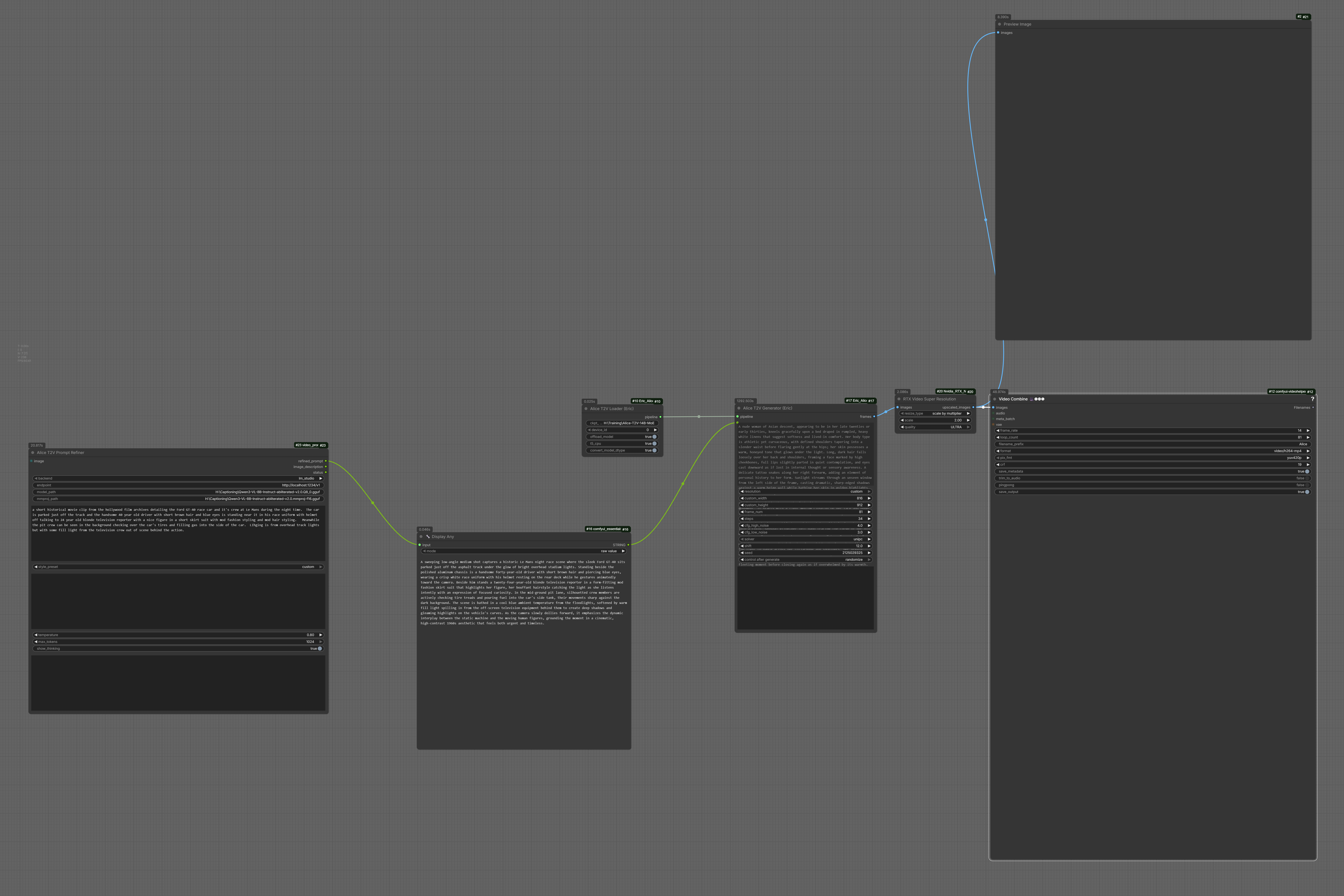
📥 Download the example workflow JSON - Drag and drop into ComfyUI to get started quickly!
Nodes
| Node | Description | |------|-------------| | Alice T2V Loader (Eric) | Loads and caches the Alice pipeline (T5 + 2× DiT + VAE) | | Alice T2V Generator (Eric) | Generates video frames from a text prompt |
Quick Start Setup
Follow these steps in order to get Alice T2V running in ComfyUI.
Step 1: Download the Model Weights from HuggingFace
The model weights (~27GB) are hosted on HuggingFace. Download them to a folder you'll remember:
Option A - Using huggingface-cli (recommended):
# Install huggingface-cli if you don't have it
pip install huggingface_hub

# Download to your preferred location (change the path as needed)
huggingface-cli download gomirageai/Alice-T2V-14B-MoE --local-dir "D:/models/Alice-T2V-14B-MoE"
Option B - Manual download:
- Go to: https://huggingface.co/gomirageai/Alice-T2V-14B-MoE
- Click "Files and versions"
- Download all files into a folder, e.g.
D:/models/Alice-T2V-14B-MoE
Important: Remember this folder path! You'll need to enter it in the Alice T2V Loader node's
ckpt_dirfield.
Step 2: Download the Alice Source Code from GitHub
The Alice Python code needs to be "vendored" (copied) into this node package. This is a one-time setup.
-
Download or clone the Alice repo:
- Download ZIP: Go to https://github.com/mirage-video/Alice → Click green "Code" button → "Download ZIP" → Extract somewhere (e.g.
C:/temp/Alice-main) - Or clone with git:
git clone https://github.com/mirage-video/Alice.git C:/temp/Alice
- Download ZIP: Go to https://github.com/mirage-video/Alice → Click green "Code" button → "Download ZIP" → Extract somewhere (e.g.
-
Note the path where you extracted/cloned it (e.g.
C:/temp/AliceorC:/temp/Alice-main)
Step 3: Run the Vendor Setup Script
This copies the necessary Python files into the node's vendor/ folder.
-
Open a terminal/command prompt
-
Navigate to this node's folder:
cd ComfyUI/custom_nodes/Eric_Alice_t2v -
Run the setup script, pointing to where you downloaded Alice:
python setup_vendor.py --alice-src "C:/temp/Alice"(Adjust the path to match where you extracted/cloned the Alice repo)
-
You should see:
Copying ...alice/ -> ...vendor/alice
✓ Vendor install verified - alice imports OK.
Troubleshooting: If you see an error about missing
alicesubfolder, make sure you're pointing to the repo root (the folder containingalice/,scripts/,configs/, etc.), not a subfolder.
Step 4: (Optional) Delete the Downloaded Alice Repo
The setup script copied everything needed into vendor/alice/. You can now safely delete the GitHub repo you downloaded in Step 2 to free up disk space:
- Delete
C:/temp/Alice(or wherever you extracted it)
The node will work without it.
Step 5: Install the Extra Dependency
Only one extra Python package is needed:
pip install easydict
All other dependencies (torch, transformers, diffusers, etc.) are already present in a standard ComfyUI installation.
Usage in ComfyUI
-
Add the Alice T2V Loader node
- Set
ckpt_dirto your HuggingFace model folder from Step 1
(e.g.D:/models/Alice-T2V-14B-MoE)
- Set
-
Add the Alice T2V Generator node
- Connect the
pipelineoutput from the Loader to the Generator - Enter your text prompt
- Connect the
-
Save the output
- Connect
framesoutput to VHS_VideoCombine (VideoHelperSuite) or SaveAnimatedWEBP
- Connect
Recommended settings
| Parameter | Value | Notes | |-----------|-------|-------| | steps | 4 | Distilled for 4 steps - fast and high quality | | cfg_high_noise | 4.0 | Structure phase guidance | | cfg_low_noise | 3.0 | Detail phase guidance | | shift | 8.0 | Timestep shift | | solver | unipc | Best for low step counts | | frame_num | 81 | 5 seconds at 16 fps | | offload_model | True | Safe default; disable on 96GB+ VRAM for speed | | t5_cpu | True | Keeps VRAM free for DiT experts |
VRAM requirements
| Config | Approx. VRAM | |--------|-------------| | offload_model=True, t5_cpu=True, convert_model_dtype=False | ~28 GB | | offload_model=False, t5_cpu=True | ~56 GB (both experts loaded) | | offload_model=False, t5_cpu=False | ~70+ GB |
Output format
frames is a standard ComfyUI IMAGE tensor: [T, H, W, C] float32 in [0, 1].
Plug directly into any node that accepts an IMAGE batch.
Links
| Resource | URL | |----------|-----| | Model Weights (HuggingFace) | https://huggingface.co/gomirageai/Alice-T2V-14B-MoE | | Alice Source Code (GitHub) | https://github.com/mirage-video/Alice | | Mirage AI | https://gomirage.ai |
License
This ComfyUI wrapper is released under the MIT License - see LICENSE for details.
Alice Model License
The Alice T2V model and source code by Mirage AI are licensed under the Apache License 2.0.
- Model: https://huggingface.co/gomirageai/Alice-T2V-14B-MoE
- Source: https://github.com/mirage-video/Alice
Credits
- Alice T2V model by Mirage AI - Apache 2.0 License
- ComfyUI wrapper by Eric Hiss ([email protected])
This is an unofficial community wrapper and is not affiliated with or endorsed by Mirage AI.