
ComfyUI-A1111-cond
A custom ComfyUI node that implements A1111-style prompt handling with proper isolation and emphasis math.
Nodes (2)
A1111 Prompt Node
A custom ComfyUI node that implements A1111-style prompt handling with proper isolation, emphasis math, scheduling, and alternation.
Installation
Requires lark for full nested syntax support:
pip install lark
Features
Positive prompt node
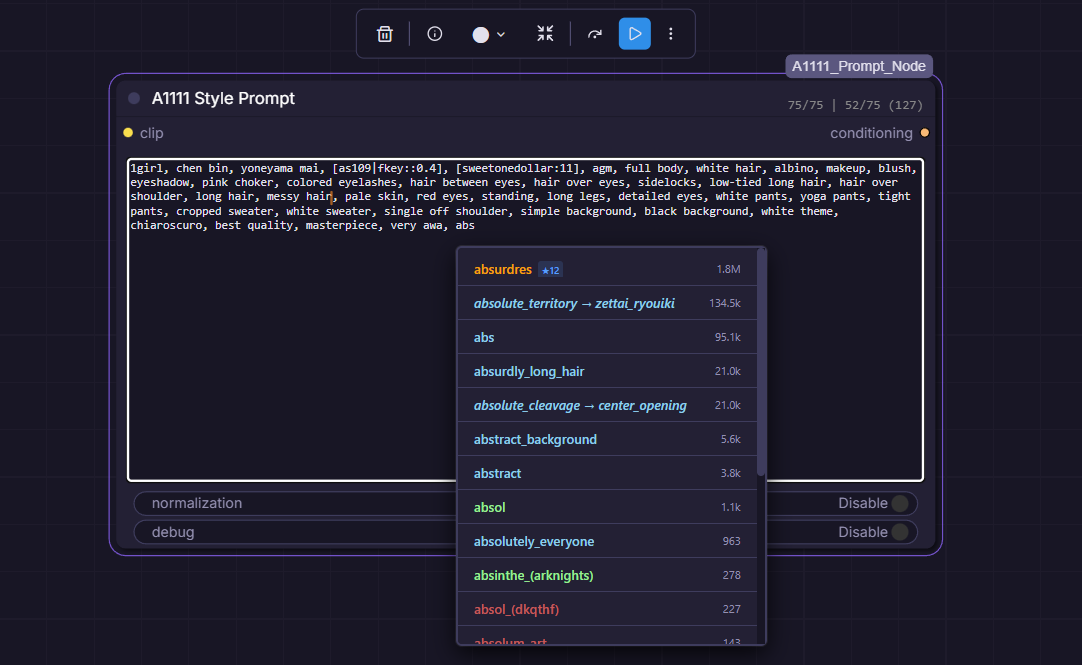
Negative prompt node
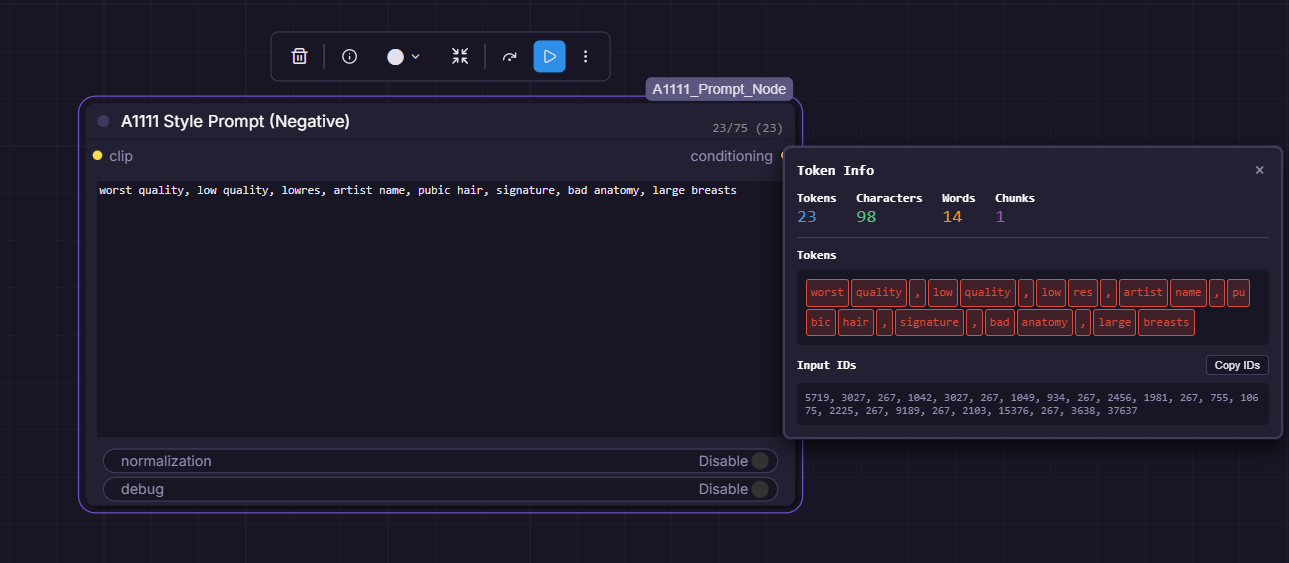
Autocomplete/Wildcards
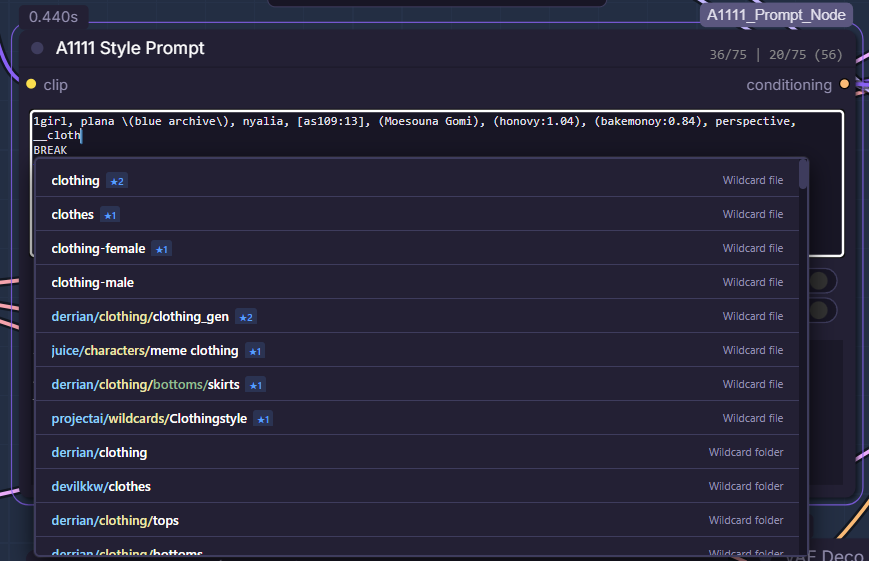
Full setup with optional TIPO support
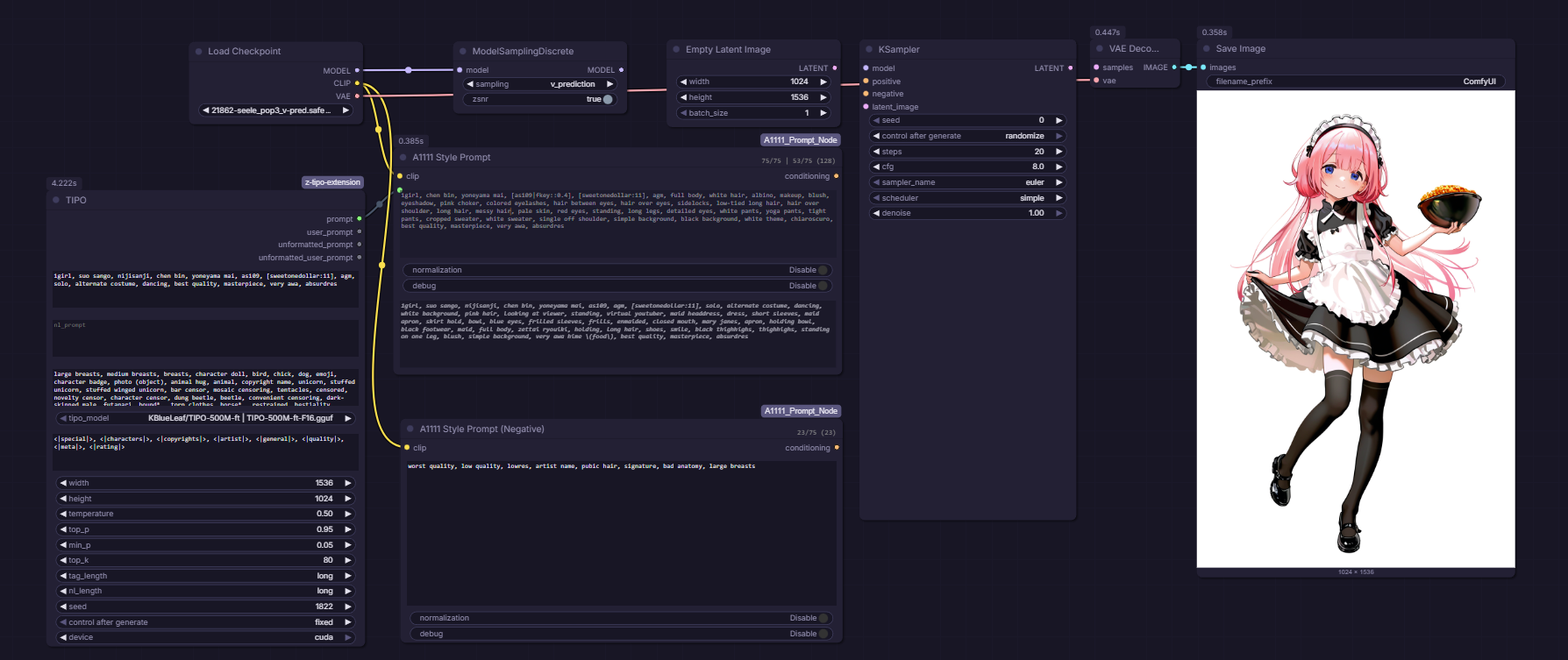
Core Features
- Hard Chunking (The Sandbox): Tokens split into 75-token chunks with padding, preventing concept bleeding
- Direct Scaling (Anti-Burn): Uses
z * weightinstead of Comfy's interpolation, avoiding artifacts at high weights - BREAK Support: Fully isolated context windows - each BREAK segment is tokenized separately
- Emphasis:
(text:1.2),(text),[text] - Wildcard support: Resolves
__wildcard__files fromdata/wildcards, including nested wildcard chains and dynamic prompt choices inside wildcard files - TIPO support: TIPO prompt output can connect directly into the node, which shows the generated prompt it receives. Use my fork to expand connected A1111 wildcards before the single TIPO generation pass and preserve weighting emphasis in A1111 syntax.
Token Counter
The node displays a live token count in the header, showing tokens per 77-token sequence:
45/75 | 32/75
- Each number shows tokens in that sequence (max 75 usable per sequence)
- BREAK creates new sequences:
dog, cat BREAK bird→6/75 | 1/75 - Updates in real-time as you type
- Uses ComfyUI's native tokenizer for accurate counts
- Clickable for breakdown and input ids
Warning Colors:
- Gray (default): Normal prompt length
- Yellow/Orange: 300+ total tokens (4+ chunks) - getting long
- Red: 450+ total tokens (6+ chunks) - may impact quality/memory
Boundary Markers:
- Orange vertical bars appear in the text where 75-token chunk boundaries fall
- Blue vertical bars mark BREAK positions
- Markers align with word boundaries and update in real-time
Tag Autocomplete
The node includes A1111-style tag autocomplete functionality:
- Trigger: Start typing any tag (2+ characters)
- Database: Uses
danbooru.csvby default (~140k tags), with additional Danbooru/E621 databases bundled. - Search: Matches tag names and aliases
- Navigation: Use ↑/↓ arrows, Tab/Enter to select, Escape to close
- Color coding: Tags are colored by type (general, artist, character, etc.)
- Post counts: Shows tag popularity for better selection
- Frequency sorting: Your frequently used tags appear first with a ★ indicator
- Theme support: Automatically adapts to ComfyUI's theme (dark/light/custom)
Features:
- Alias support: Type
sole_female→ suggests1girl - Smart insertion: Automatically adds commas and handles spacing
- Parenthesis escaping:
name_(artist)→name_\(artist\) - Real-time search with 50ms debouncing
- Usage tracking: Tags you use often are prioritized in results
- Quality tags: Automatically includes
extra-quality-tags.csvfor common quality/style tags - Theme-aware: Respects your ComfyUI color scheme
Wildcard Support
The node supports A1111-style wildcard files stored in data/wildcards/.
- Basic syntax:
__outfits__ - Nested folders:
__characters/anime__ - Nested expansion: wildcard files can reference other wildcard files
- Dynamic prompt choices inside wildcard files:
{red|blue}{1-2$$ring|necklace|bracelet}{20%hat|scarf}
Autocomplete integration:
- Type
__to browse wildcard folders and files - Selecting a wildcard file inserts the concise
__leaf__name when it is unique, or the full__path/to/file__when needed to disambiguate duplicate leaf names - After selecting a wildcard file, the popup stays open and can show the file's contents for quick follow-up selection
- The complete wildcard path list is loaded once and filtered locally for consistent typing latency
Notes:
- Wildcard files are plain
.txtfiles underdata/wildcards/ - Blank lines and
#comment lines are ignored - Prompt spacing is normalized after expansion so optional empty branches do not leave doubled spaces behind
Bundled tag databases:
danbooru.csv- Default Danbooru database (~140k tags)e621.csv- E621 database (furry-focused)danbooru_e621_merged_*.csv- Larger merged Danbooru/E621 databasesextra-quality-tags.csv- Quality and style tags (auto-loaded)- Custom CSV files can be added to
data/tags/; the current autocomplete UI uses the configured backend default and does not expose a database selector
Frequency Management: Open browser console and use:
window.A1111Autocomplete.getStats()- View your most used tagswindow.A1111Autocomplete.resetFrequency()- Clear usage datawindow.A1111Autocomplete.exportFrequency()- Backup your data
Scheduling
| Syntax | Meaning | Auto-detects? |
| --------------- | --------------------------------- | ------------- |
| [cat:dog:0.5] | Switch from "cat" to "dog" at 50% | Yes |
| [cat:dog:10] | Switch at step 10 (literal count) | Yes |
| [glasses:0.5] | Add "glasses" at 50% | Yes |
| [glasses:10] | Add at step 10 | Yes |
| [hat::0.7] | Remove "hat" at 70% | Yes |
| [hat::15] | Remove at step 15 | Yes |
Note: The node automatically detects the total step count from your connected Sampler or Scheduler.
Important:
- Steps are automatic: You do not need to manually set a step count; the node traverses the workflow graph to find the connected Sampler/Scheduler.
- Scaling:
- Percentages (e.g.,
0.5) scale proportionally to any sampler step count. - Integers (e.g.,
10) are tied to the detected step count. If the sampler steps are changed after encoding, the node automatically scales the transition point to maintain the same relative timing.
- Percentages (e.g.,
Nested syntax supported:
[honovy, exsys:chen bin, [as109|fkey], [sweetonedollar:11]:0.4]
Alternation
| Syntax | Meaning |
| ---------------- | ------------------------------------------------- |
| [white\|black] | Switches per-step (step 1=white, step 2=black...) |
| [A\|B\|C] | Cycles through options each step |
| [A\|] | Alternates between A and nothing |
Scheduled Alternation (Extension)
Control when alternation starts or stops:
| Syntax | Meaning |
| -------------------- | ----------------------------------------- |
| [as109\|fkey::0.6] | Alternate until 60%, then as109 |
| [as109\|fkey:0.4] | as109 until 40%, then start alternating |
| [as109\|fkey::15] | Alternate until step 15, then as109 |
[!TIP] Matching A1111/Forge multi-evaluation sampler behavior: A1111/Forge can advance prompt scheduling once per denoiser evaluation rather than once per displayed sampler step. With a sampler that performs two evaluations per step, a 28-step alternation can therefore end around displayed step 14 and settle on its first option. To reproduce that effective result here, use a scheduled cutoff such as
[A|B::0.5]: alternate for the first half, then keepA. A plain[A|B]continues across the full ComfyUI denoising schedule.
Combining with scheduling to lock to a value:
[as109|fkey::0.6][:as109:0.6]
This alternates until 60%, then switches to just "as109".
Model Support
- SDXL: Dual CLIP (clip_l + clip_g) with independent weight scaling
- SD1.5: Full support
What is Normalization?
This node always uses A1111-style "Direct Scaling" (multiplication) instead of ComfyUI's standard interpolation. This is what provides the core "A1111 look" and prevents the default ComfyUI color burn.
The normalization toggle specifically controls A1111's Mean Rescaling (Norm vs No Norm):
When normalization is enabled (True):
- Match A1111 "Norm": Rescales the final conditioning so its mathematical "energy" (mean) matches the original.
- Effect: Prevents saturation shifts at very high weights.
- Commonly used with: SD1.5 and models sensitive to high prompt energy.
When normalization is disabled (False - Default):
- Match A1111 "No Norm": Applies weights exactly as written without any rescaling.
- Effect: Emphasized words "punch" through more aggressively.
- Commonly used with: SDXL and modern models that handle high energy well.
Usage
This pack provides two nodes:
| Node | Use Case | | --------------------------------- | ------------------------------------------------- | | A1111 Style Prompt | Positive prompt (supports alternation/scheduling) | | A1111 Style Prompt (Negative) | Negative prompt (no alternation support) |
A1111 Style Prompt (Positive)
Inputs
| Input | Type | Required | Description | | ------------- | ------ | -------- | ------------------------------------------------ | | clip | CLIP | Yes | The CLIP model | | text | STRING | Yes | Prompt with A1111 syntax | | normalization | BOOL | No | EmphasisOriginal/EmphasisOriginalNoNorm toggle | | debug | BOOL | No | Show detailed schedule information |
Outputs
| Output | Type | Description | | ------------ | ------------ | ------------------------ | | conditioning | CONDITIONING | The encoded conditioning |
Important:
- Auto-detection: The node detects steps from the downstream sampler. If no sampler is connected, step-based syntax (
[a:b:10]) will raise an error. - Flexibility: Use percentage syntax (
[a:b:0.5]) for the most portable prompts. - Effective prompt preview: When TIPO or wildcards expand the text, the node shows the resolved prompt in the UI so you can see what was actually encoded. Its compact toggle preserves the expanded or collapsed state between executions.
A1111 Style Prompt (Negative)
Inputs
Same as positive, but without MODEL input.
Outputs
| Output | Type | Description | | ------------ | ------------ | ------------------------ | | conditioning | CONDITIONING | The encoded conditioning |
Note: If scheduling/alternation syntax is used in the negative node, it will use the first step's prompt only and log an informational message.
Workflow
The node works with any standard ComfyUI workflow:
        ┌─────────────────────────────┐
CLIP  ──┤  [A1111 Style Prompt]       ├──► CONDITIONING ──► Sampler (positive)
        └─────────────────────────────┘

        ┌─────────────────────────────┐
CLIP  ──┤  [A1111 Style Prompt (Neg)] ├──► CONDITIONING ──► Sampler (negative)
        └─────────────────────────────┘
Alternation and scheduling work automatically - no MODEL connection needed! The node uses ComfyUI's hook system to access step information during sampling.
Examples
# Basic emphasis
a (beautiful:1.3) landscape

# BREAK for isolation
artist name BREAK character name, wearing a hat

# Step-based scheduling (with steps=28)
[mountains:ocean:14] at sunset

# Alternation (no MODEL connection needed)
1girl, [as109|fkey], detailed

# Add element at specific step
1girl, [sweetonedollar:11], high quality

# Nested scheduling with alternation
1girl, [honovy:chen bin, [as109|fkey]:0.4]

# Scheduled alternation - stop at 60%
1girl, [as109|fkey::0.6], detailed

# Combined
(epic:1.2) [forest:city:0.3] BREAK detailed background
Debug Mode
Enable the debug input to see detailed information:
[A1111 Prompt] Unique prompts: 4 (will encode each once)
[A1111 Prompt] Step transitions: 27 across 28 steps
[A1111 Prompt] Alternation pattern sample:
  Step 0: 1girl, chen bin, yoneyama mai, as109, , agm...
  Step 1: 1girl, chen bin, yoneyama mai, fkey, , agm...
  Step 2: 1girl, chen bin, yoneyama mai, as109, , agm...
Technical Notes
How Scheduling Works
The node uses ComfyUI's TransformerOptionsHook system to swap conditioning per-step:
- All unique prompts are encoded once (efficient caching)
- Per-step embeddings are stored in a hook attached to the conditioning
- During sampling, the hook receives
sample_sigmasfrom the sampler - The hook calculates the current step and swaps to the appropriate embedding
- This works with any sampler/scheduler automatically
Hidden Inputs (used for auto-detection)
prompt: Receives the full workflow graph structure.unique_id: Receives the node's unique ID used to traverse the graph starting from itself.
Step Parameter Behavior
The node's INPUT_TYPES exposes only clip, text, normalization, and debug. Step-based syntax and timing are managed as follows:
- Auto-detection: The node automatically detects the total step count from the connected sampler/scheduler downstream.
- Step-based syntax: Syntax like
[thing:10](using integers) is relative to the detected count. The node scales these points automatically if the sampler step count changes during sampling to ensure consistent timing. - Percentage-based syntax: Syntax like
[thing:0.5](using decimals) is the recommended way to ensure your prompt behaves identically across different step counts.
Known Limitations
-
Alternation is positive-only: Only the main node supports alternation. The negative node will use the first step's prompt if scheduling syntax is present.
-
Automatic Scaling: Unlike A1111 (where steps are manual), this node provides automatic scaling. If you write
[thing:10]for a 20-step run but later change it to 30 steps, the node will automatically move the transition to step 15 to preserve the 50% relative timing. Use percentage syntax[thing:0.5]for the most explicit control. -
Visual parity: This node follows ComfyUI's denoising progress, while A1111/Forge can advance prompt scheduling per denoiser evaluation on multi-evaluation samplers. Plain schedules can therefore differ when A1111/Forge exhausts them early. Use a scheduled cutoff such as
[a|b::0.5]when you intentionally want that halfway behavior. The visual effect may still differ due to architectural differences:- A1111 applies conditioning at the CFGDenoiser level (before model call)
- This node applies conditioning through ComfyUI's hook system during sampling
Use the scheduled alternation syntax ([a|b::0.6]) if you need to control exactly when alternation stops.
Performance
- Shared Wildcard Catalog: Wildcard paths are scanned once during startup and reused by autocomplete and runtime expansion.
- Efficient encoding: Unique prompts are encoded only once and cached using composite keys (CLIP + text + normalization).
- GPU Pre-Allocation: All embeddings are pre-moved to the GPU (
intermediate_device) during encoding to eliminate device-transfer latency during the sampling loop. - Shared Hook Caching: The step-swapping hook uses a structural result cache that persists when the hook is cloned, avoiding repeated conditioning tensor construction across sampling calls.
- Optimized Padding: Tensors are padded only to the lengths used within the current generation, preventing global cache bloat.
- Direct Memory Swapping: If prompts have identical sequence lengths, the hook uses a zero-math "fast-path" to swap embeddings instantly.
- Batch Processing: Multiple BREAK segments are batched into a single encoding pass.
