
Auto_Metadata_Ksampler_Stamp by Steve Lasmin
A ComfyUI custom node that automatically extracts KSampler metadata and stamps it onto generated images.
Auto_Metadata_Ksampler_Stamp by Steve Lasmin
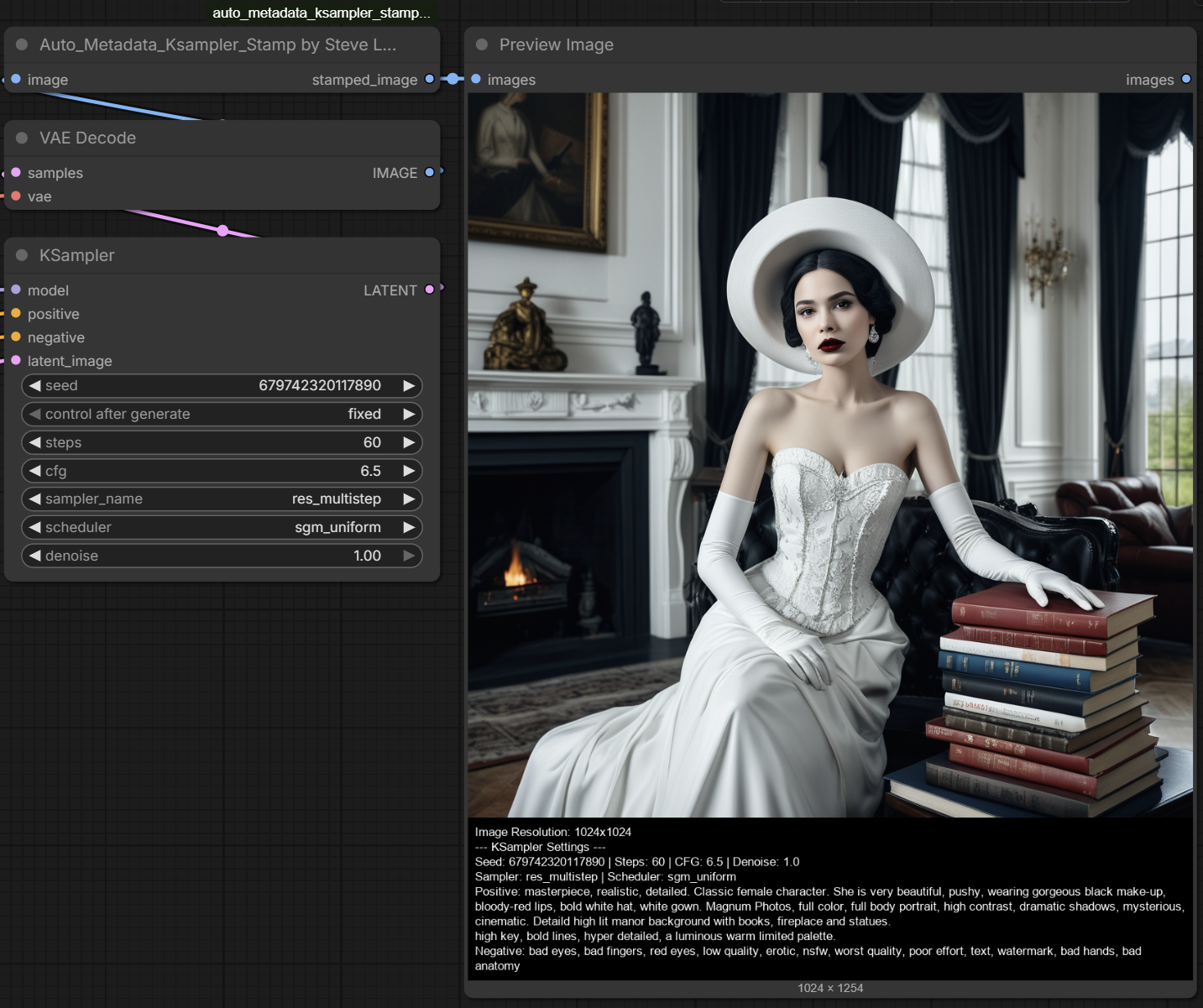
A ComfyUI custom node that automatically extracts KSampler metadata from your workflow JSON and stamps it onto the bottom of your generated image as clean, readable text.
What It Does
Ever wanted to know exactly what settings and prompts were used to generate an image — without digging through the workflow JSON? This node does it automatically:
- Captures the full workflow via ComfyUI's hidden
PROMPTinput - Finds all KSampler nodes in your workflow (including
KSampler,KSamplerAdvanced,KSampler (Efficient), and many custom variants) - Traces prompt connections back to
CLIPTextEncodenodes to retrieve the actual positive and negative prompts - Stamps metadata onto a black padding bar at the bottom of the image with white text
Metadata Extracted
- Image Resolution
- Seed, Steps, CFG, Denoise
- Sampler and Scheduler names
- Positive Prompt
- Negative Prompt
Works with multiple KSamplers in a single workflow — each one gets its own labeled section.
Installation
Method 1: Git Clone (Recommended)
cd ComfyUI/custom_nodes
git clone https://github.com/Eklipsis/auto_metadata_ksampler_stamp_by_steve_lasmin.git
Restart ComfyUI.
Method 2: Manual Download
- Download the latest release
- Extract the folder into
ComfyUI/custom_nodes/ - Restart ComfyUI
Requirements
- ComfyUI (any recent version)
- Pillow (usually already installed with ComfyUI)
- No additional Python dependencies required
Usage
- Add the node: image/stamping → Auto_Metadata_Ksampler_Stamp by Steve Lasmin
- Connect your
IMAGEoutput from a VAE Decode or Save Image Preview node - The node will automatically read the workflow metadata and stamp it onto the image
- Connect the output to a
Save Imagenode or preview it directly
Note: The node uses the hidden
PROMPTinput (provided automatically by ComfyUI) to access the workflow JSON. No manual configuration needed.
Supported Samplers
The node detects and extracts metadata from:
KSamplerKSamplerAdvancedKSampler (Efficient)KSampler SDXL,KSampler Tiled,KSampler InpaintSamplerCustom,SamplerEuler,SamplerEulerAncestralSamplerDPMPP2M,SamplerDPMPP2SAncestral,SamplerDPMPPSDE- And any custom node whose class name starts with
KSampler
Also supports SDXL dual-text encoders (text_g / text_l) and conditioning mix nodes.
Credits
- Author: Steve Lasmin (Eklipsis)
- GitHub: https://github.com/Eklipsis
- Support: https://boosty.to/stevelasmin
- Email: [email protected]
If you find this node useful, consider supporting development on Boosty!
License
Free to use for personal and commercial purposes.
Modification, redistribution of modified versions, or inclusion in
other projects without explicit written approval from the author
is strictly prohibited.

Copyright (c) 2026 Steve Lasmin. All rights reserved.
Changelog
v1.0.1
- Fixed false-positive KSampler detection (removed overly broad "Sampler" string match)
- Added validation: real KSamplers must have
stepsandcfginputs - Updated all repo links to live GitHub URL
- Added
pyproject.tomlComfy Registry metadata - Added
.comfyignorefor clean registry publishing
v1.0.0
- Initial release
- Automatic KSampler detection and metadata extraction
- Multi-sampler workflow support
- SDXL dual-text encoder support
- Dynamic font scaling and word-wrapping
- Cross-platform font fallback (Windows, Linux, macOS)