
ComfyUI-Model-Librarian
ComfyUI model manager for Stability Matrix shared folders, built to work alongside LoRA Manager: missing-model downloads, CivitAI library, base-model organizer, recipes from images, dedupe, metadata sync and SSD/HDD storage tiers.
A model manager for ComfyUI built around a shared models folder — Stability Matrix's, or the one Comfy Desktop uses — and designed to work hand in hand with LoRA Manager. It finds and downloads whatever a workflow is missing, files your models by base model, turns images into recipes, keeps the SSD for the models you actually use — and makes Stability Matrix and LoRA Manager share what they know. Open it from Library in the ComfyUI toolbar.
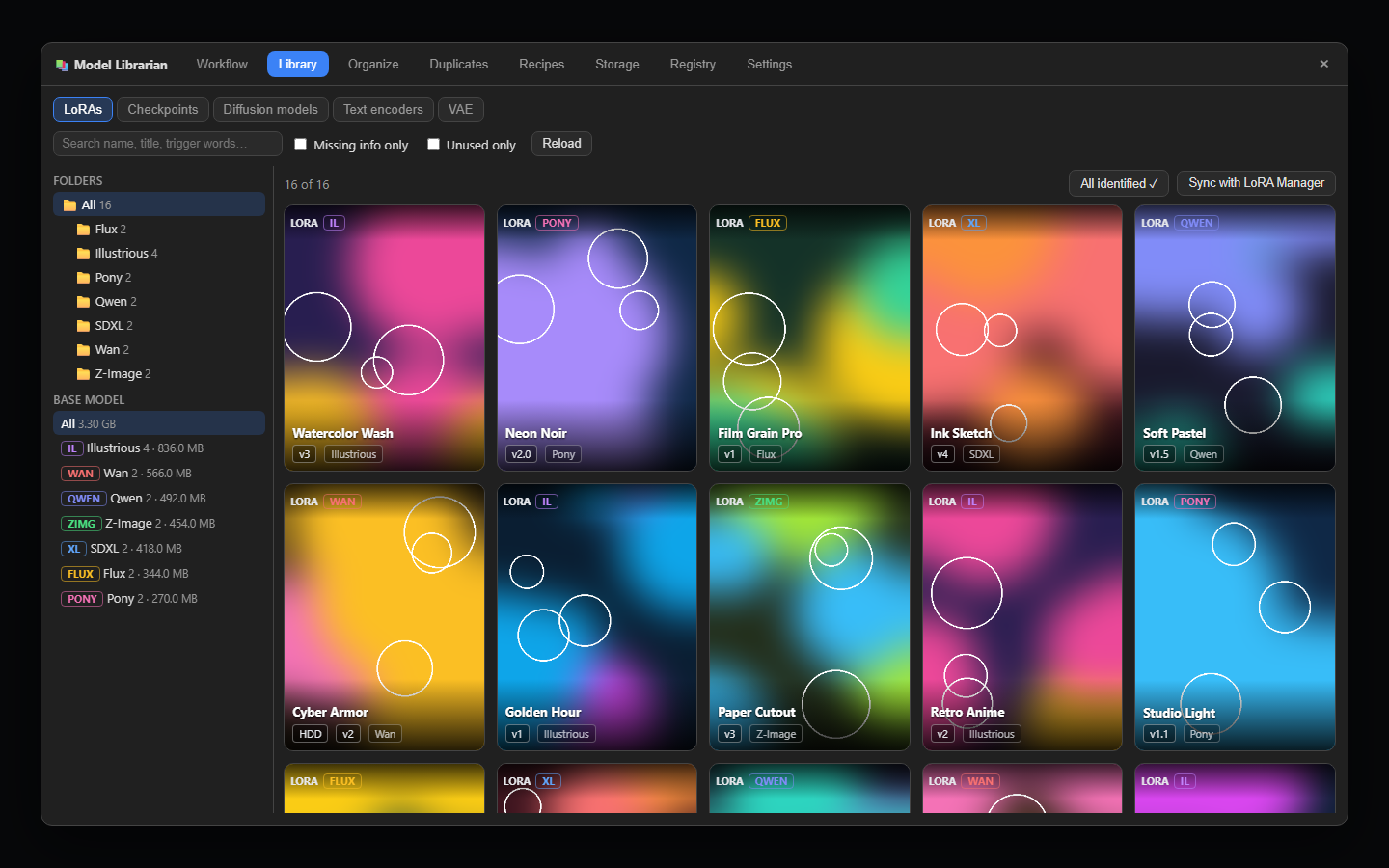
⚠ CivitAI downloads and metadata lookups need your CivitAI API key (civitai.com → Account settings → API Keys). Add it in Settings — it's stored server-side and never sent to the browser. Gated HuggingFace models (e.g. FLUX.1-dev) need a HuggingFace token too.
✨ Key Features
- 🔍 Missing-model finder — scans the open workflow (subgraphs, rgthree and LoRA Manager nodes included) and finds sources in order of trust: links embedded in the workflow → your download history → ComfyUI-Manager's list → HuggingFace → CivitAI → CivArchive (only for files CivitAI doesn't have). Downloads are SHA256-verified, resume after interruptions and survive restarts.
- 📤 Share a workflow with its models — every model gets its download link and SHA256: embed them in the workflow (ComfyUI's own missing-models dialog offers them too), save a copy with them, or copy a ready-to-post model list.
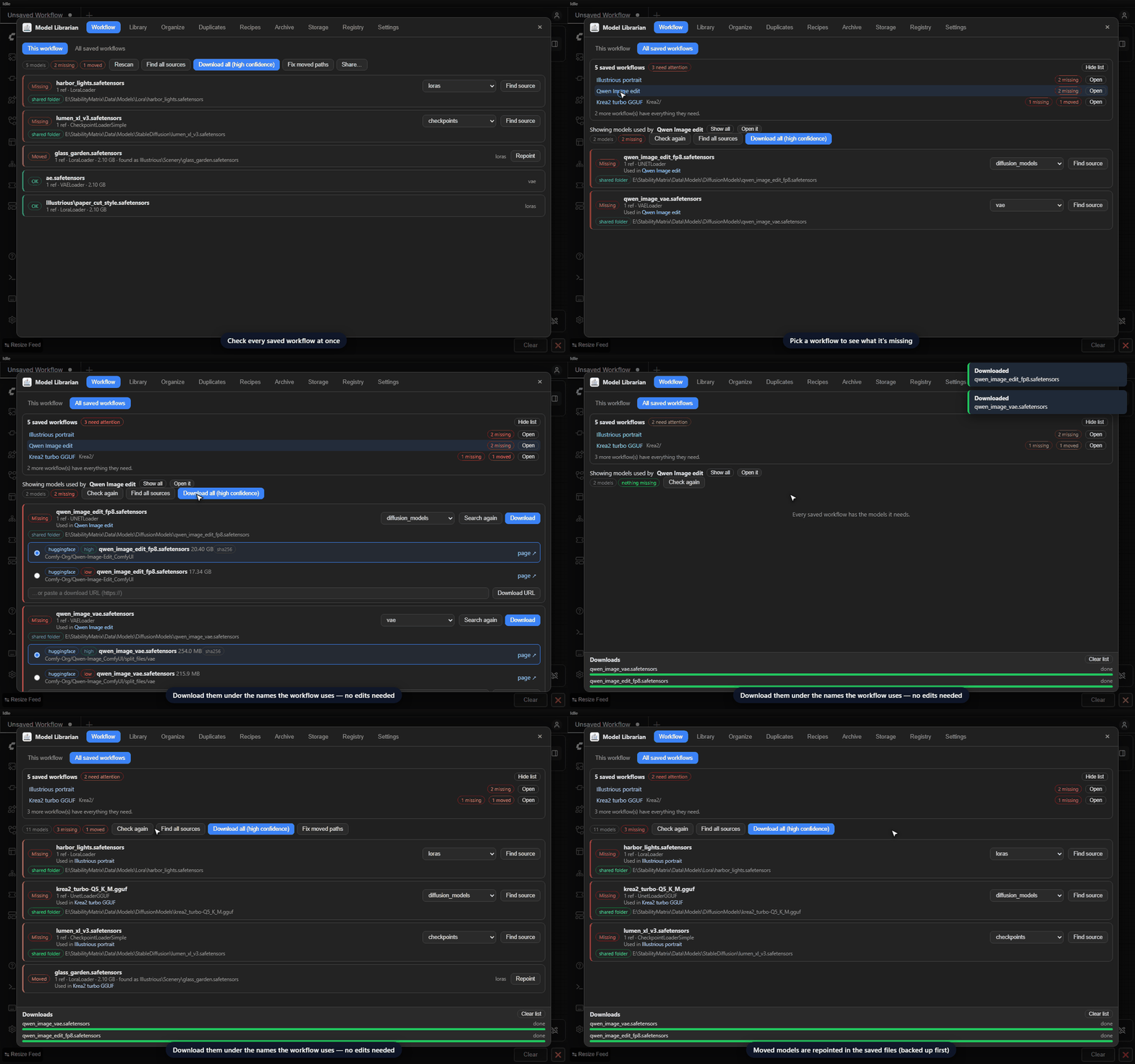
- 🩺 Workflow health — checks every saved workflow (and subgraph blueprint) at once: which ones are missing models, which models moved, and one click to find and download them all. Saved files keep working without edits.
- 🖼️ Library — a gallery of your models with CivitAI previews, base-model badges, trigger words, search, size per base model and an Unused filter. Sort by most used or recently used, rate models, and keep your own notes and tags on them. Models from HuggingFace show their license, tags and model card.
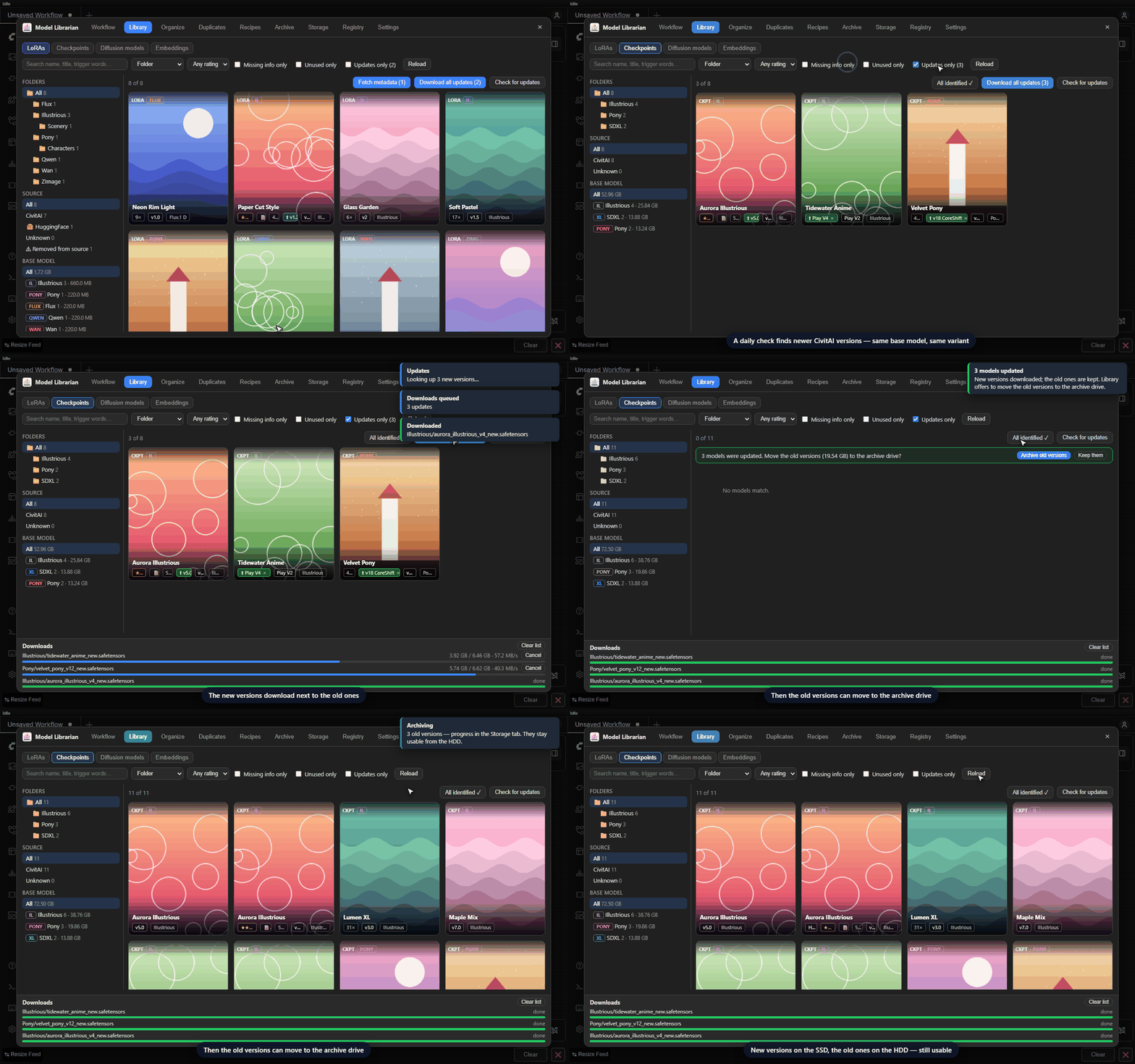
- ⬆️ Update alerts — a daily check for newer CivitAI versions of every model type, with a badge on the card, an Updates only filter and Download all updates. Compare a new version with yours first (changelog, size, trigger words, sample images); the old versions are kept, or moved to the archive drive in one click.
- 🗄️ Removed models — the same check notices models taken down from CivitAI (or HuggingFace) and marks them, since your copy may be the only one left. Their details are looked up on CivArchive, which also knows of surviving copies to share or download.
- 🗂️ Base-model organizer — sorts models into
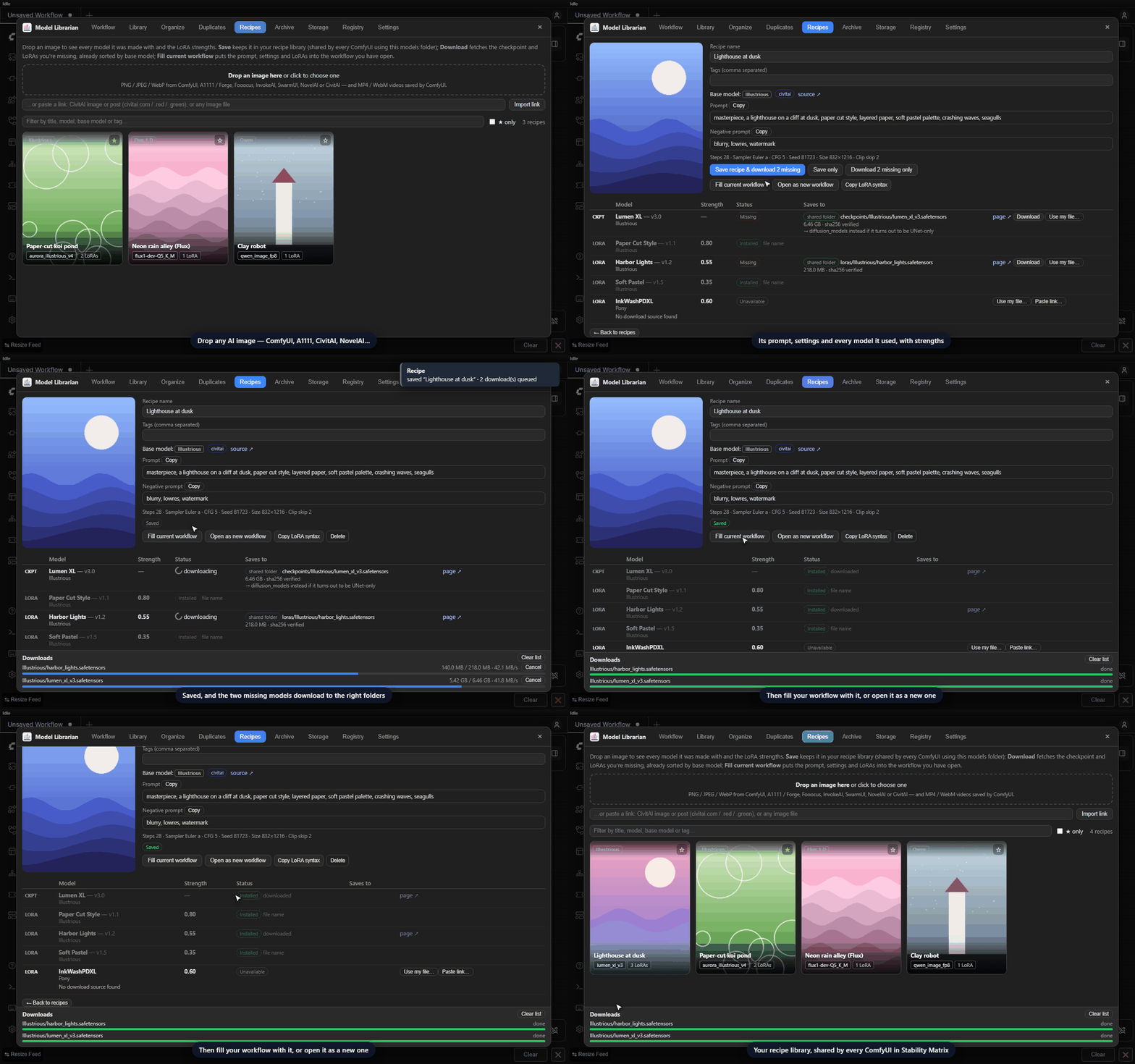
Illustrious/,Pony/,Flux/,Qwen/… using CivitAI data, LoRA training metadata and the tensor layout itself. Preview first, undo anytime, and saved workflows are repointed automatically. - 🧬 Recipes from images and videos — drop an image or a ComfyUI video (MP4 / WebM), or paste a link (CivitAI image, video or post, or any image file) to see its prompt, settings, checkpoint and LoRAs with their strengths. Save it to your recipe library, download everything you're missing (a model you have under another name is matched, or linked by hand once), then fill the open workflow with it, open it as a new one, or send it to Prompto. Reads ComfyUI, A1111/Forge, CivitAI, Fooocus, InvokeAI, SwarmUI and NovelAI images; no LoRA Manager needed (with LM installed, recipes are saved there too).
- 🗃️ Archive a folder of images — keep what made every image without keeping the images: point it at a folder (subfolders included) and get a report grouped by prompt, where prompts that differ by a few words become variants of one family, plus a CSV, every recipe, one workflow per prompt variant and small WebP thumbnails that carry their image's workflow — drop one onto ComfyUI to get that exact image back. Re-runs only read new images.
- 🔗 Stability Matrix ↔ LoRA Manager — understands LM's loader nodes, writes SM's own metadata so models show as connected, syncs metadata between the two offline, and tells LM to rescan after every change.
- 💾 SSD / HDD storage tiers — models unused for a while are suggested for an archive drive, stay usable under the same names, and come back to the SSD after a workflow uses them. Set a free-space goal and the least recently used models are suggested whenever the SSD runs low; a history chart shows free space on each drive over time.
- ♻️ Duplicates and leftovers — finds byte-identical copies under any name (quarantine them or replace them with hard links so every path keeps working), plus unfinished downloads from any app and model files that were cut short.
- 🎛️ VRAM advice — models too big for your GPU get fp8 and GGUF alternatives, with one-click download and swap.
- 🤝 Shared across installs — every ComfyUI package in Stability Matrix (and ComfyUI Desktop) shares one registry, hash cache, history and usage data.
🎬 See it in action
A workflow needs models you don't have — find every source at once, download them verified into Stability Matrix's folders, and repoint a model that moved.
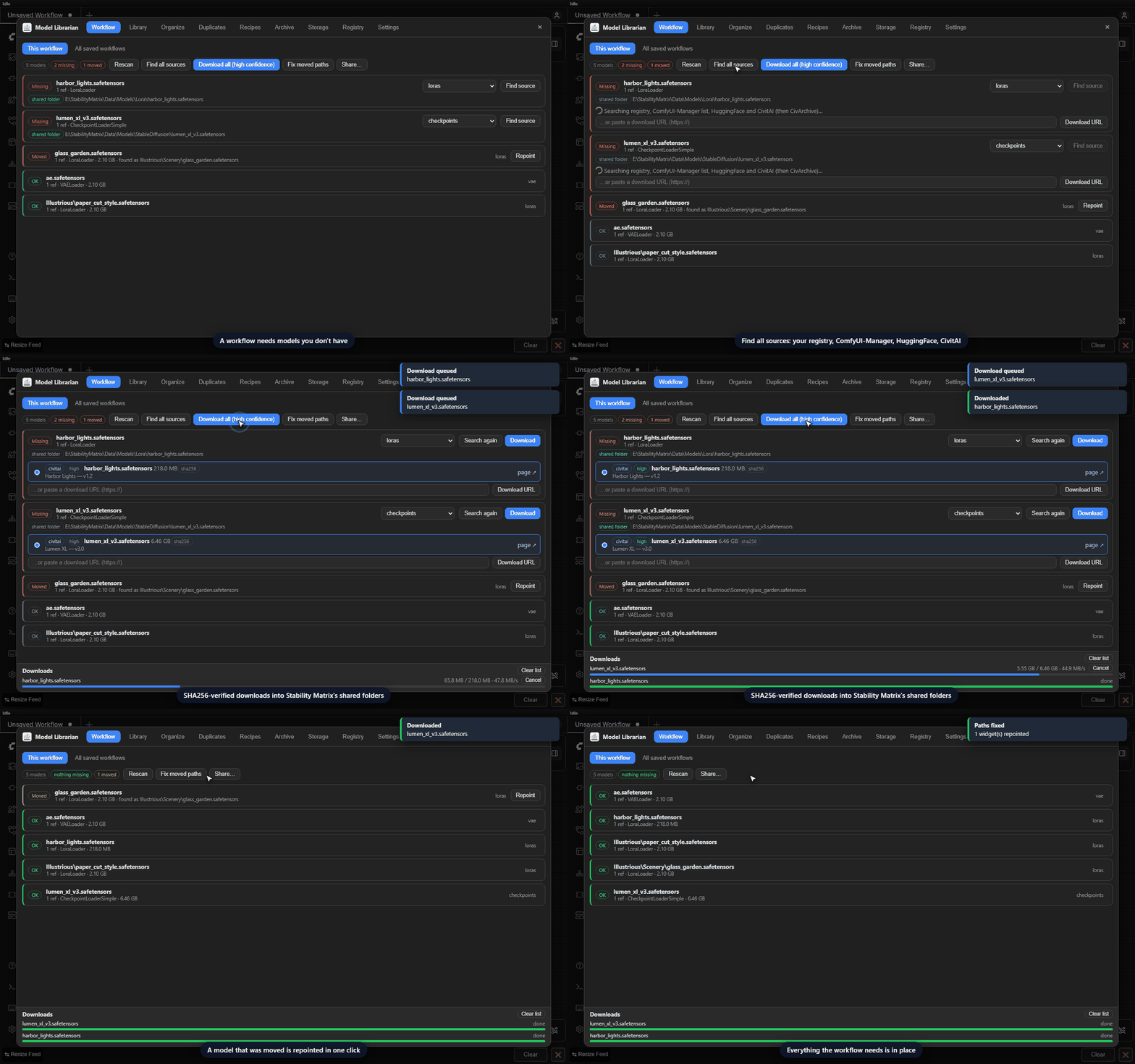
Every saved workflow, checked at once — see which ones are missing models, fetch them under the names the workflows use, and repoint moved models in the saved files.
A recipe from any AI image — drop it in to see the prompt, settings and every model it used; save it and download what's missing.
Update alerts — newer CivitAI versions download next to the old ones, which can then move to the archive drive.
📸 Screenshots
| | |
|---|---|
| 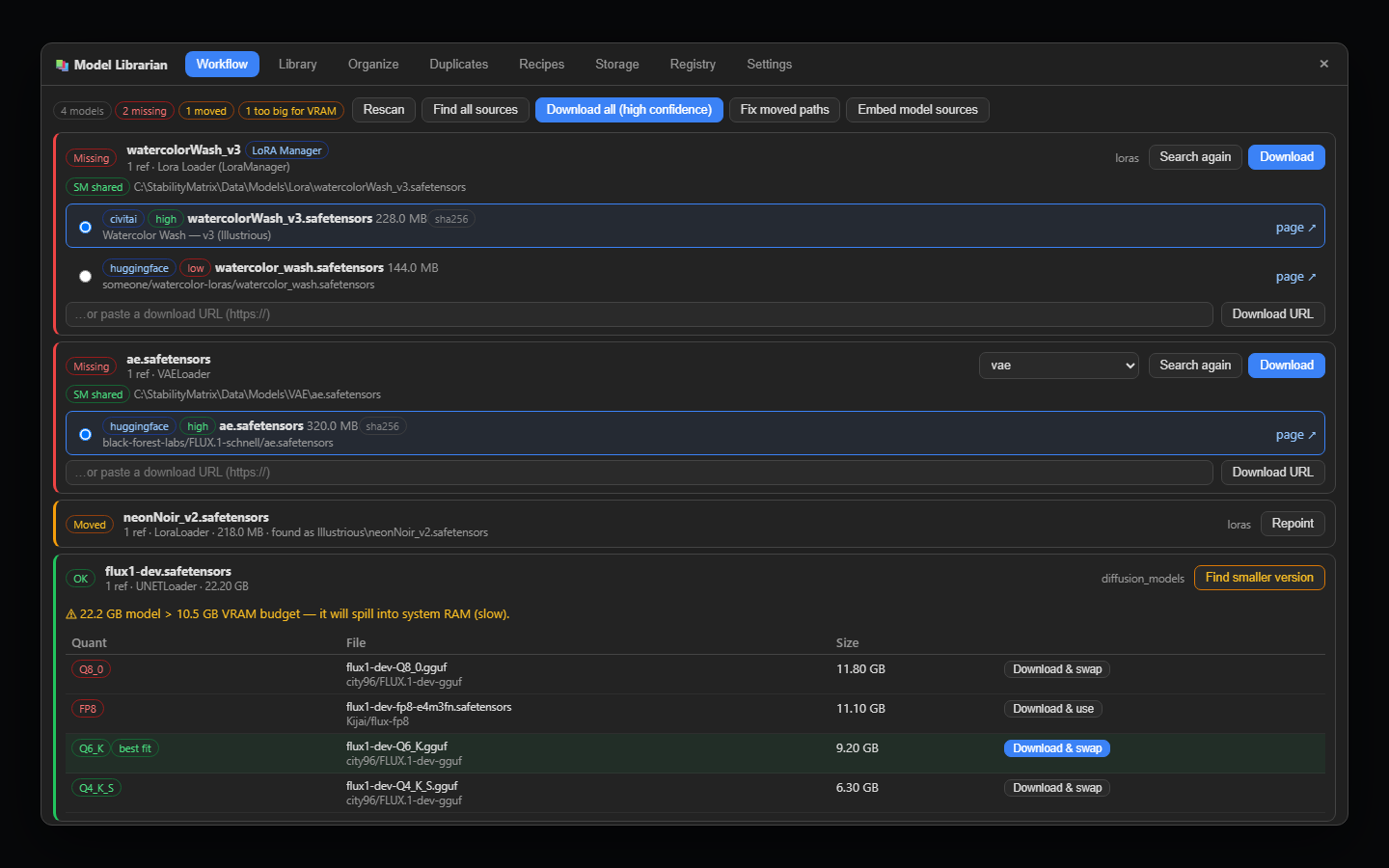 Workflow — missing, moved and too-big models with sources and smaller versions |
 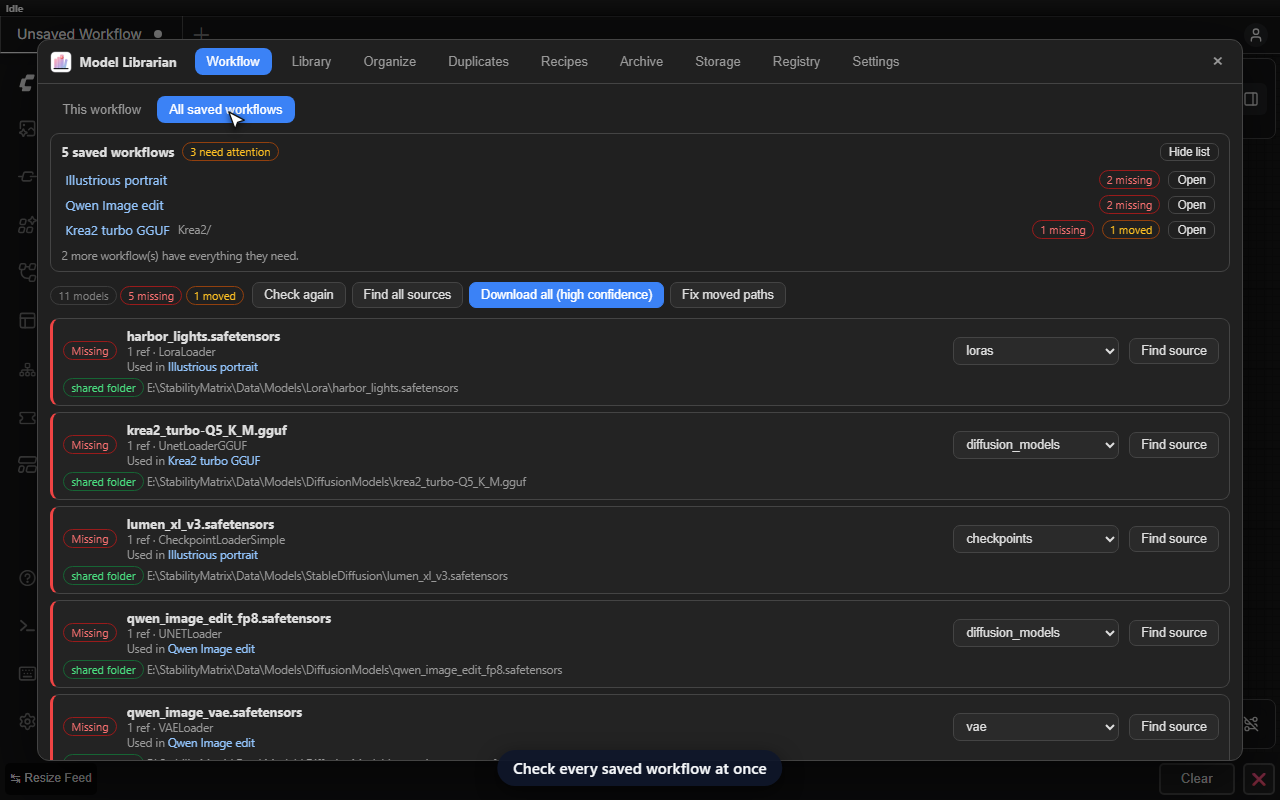 All saved workflows — which ones need models, at a glance |
| Library — previews, base-model badges, update alerts and source filters |
All saved workflows — which ones need models, at a glance |
| Library — previews, base-model badges, update alerts and source filters | 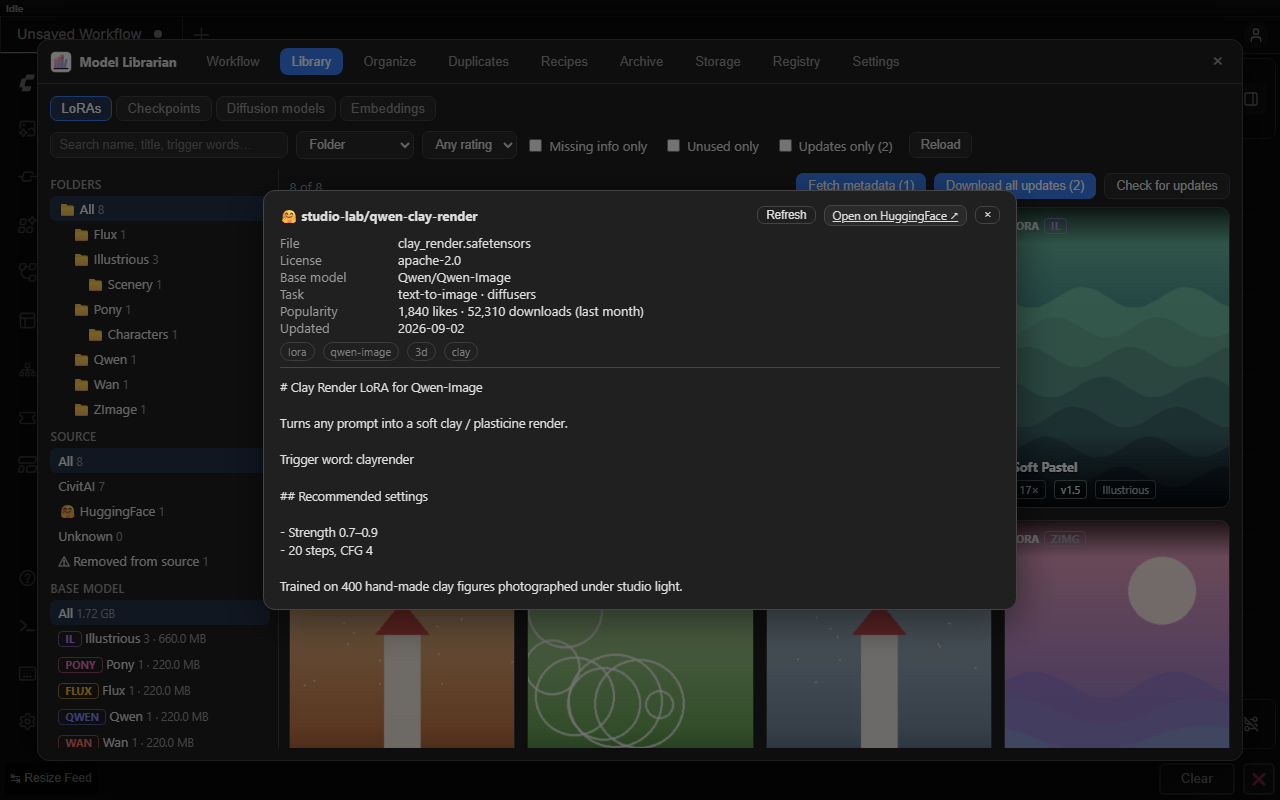 HuggingFace details — license, base model, tags and model card |
|
HuggingFace details — license, base model, tags and model card |
| 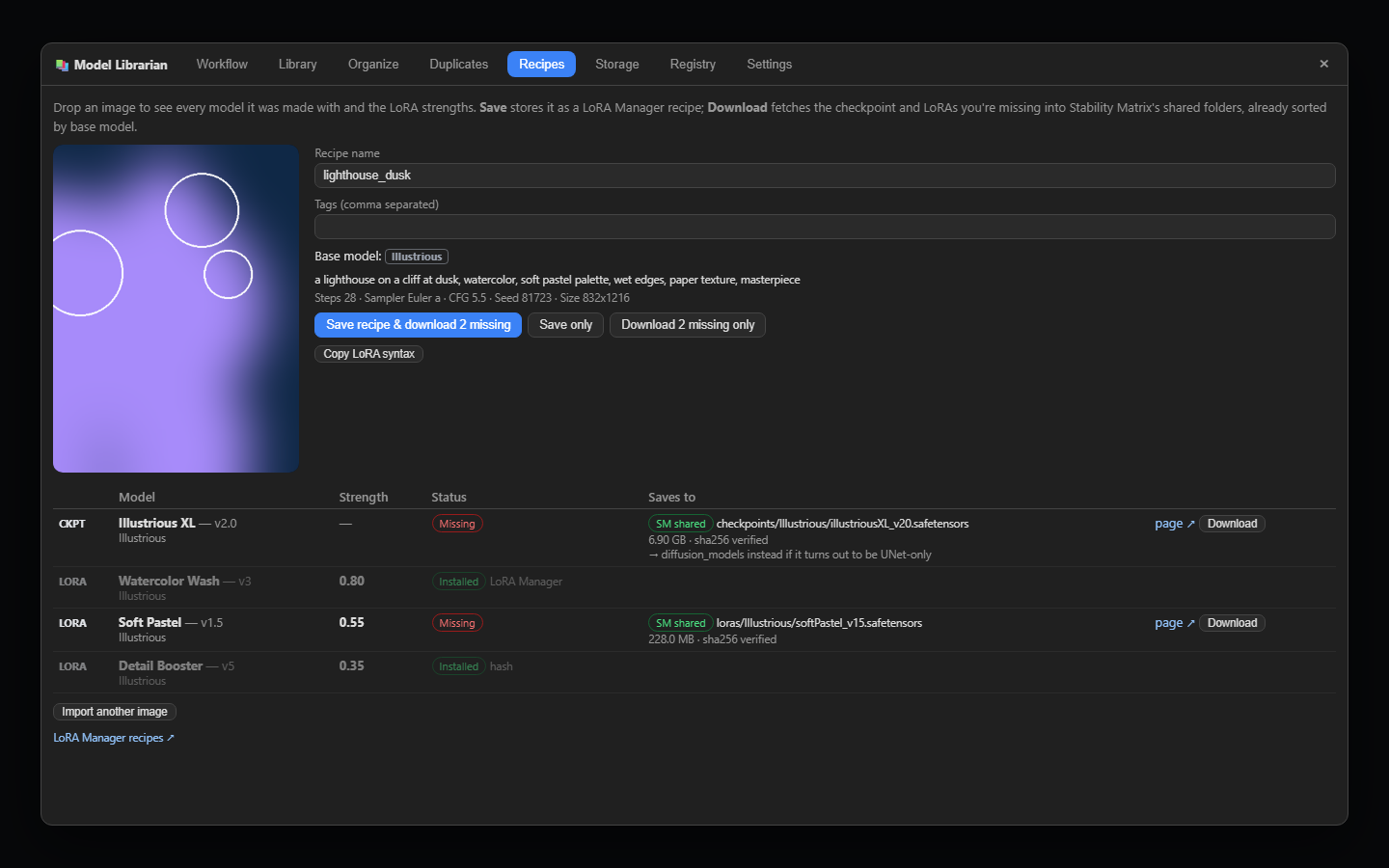 Recipes — every model an image used, with strengths, ready to download and apply |
 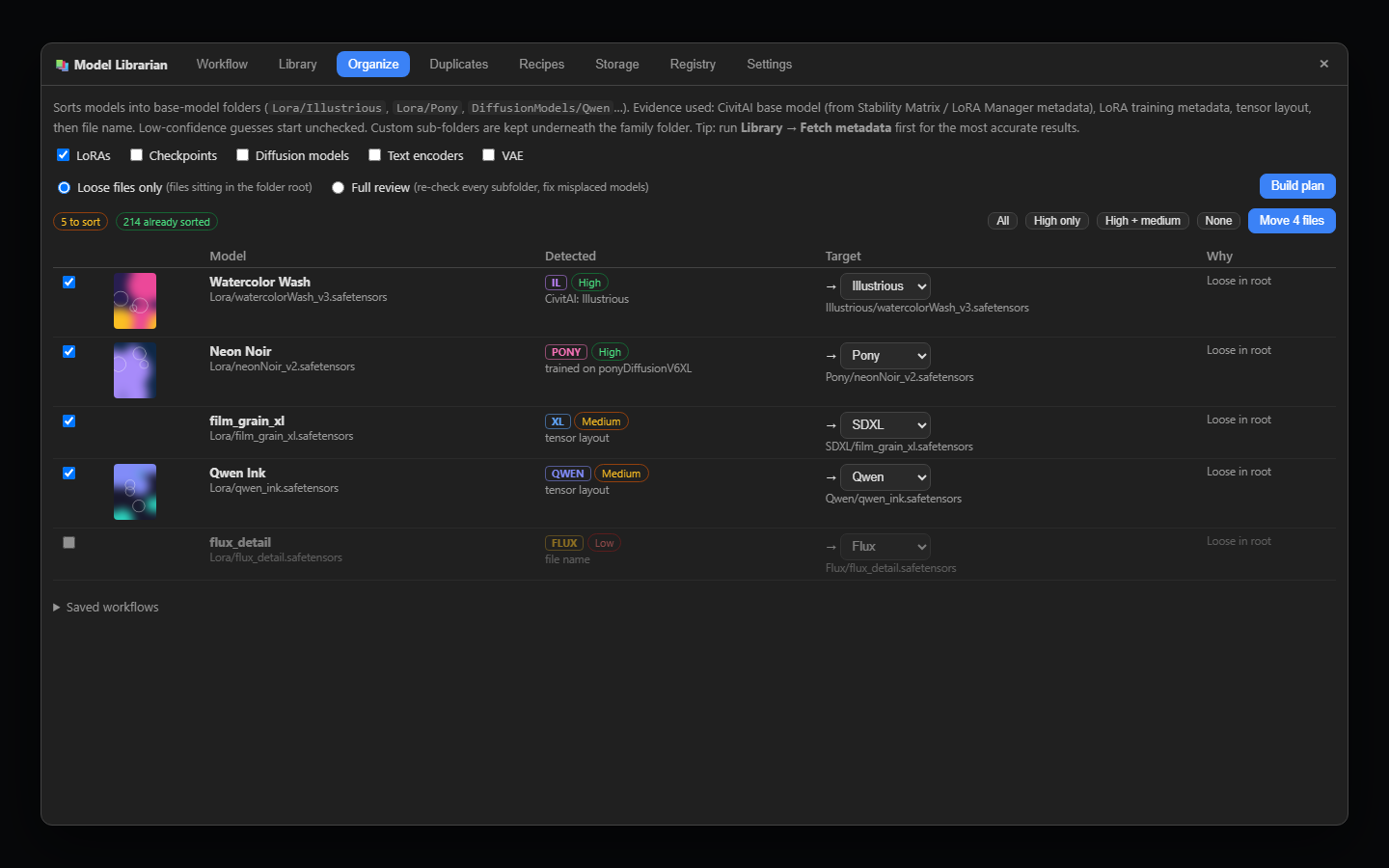 Organize — base-model sorting with evidence and confidence |
|
Organize — base-model sorting with evidence and confidence |
| 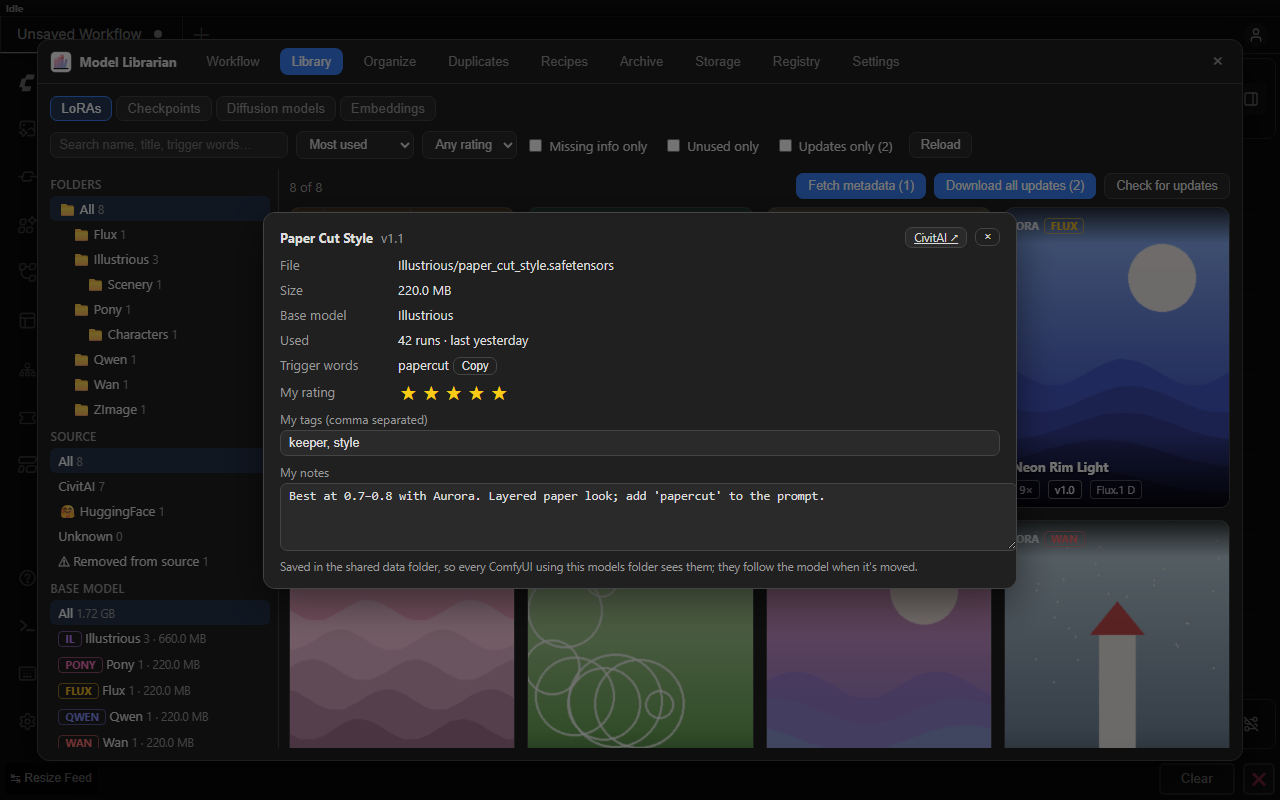 Your notes — most used first; rate a model, tag it and note what works |
 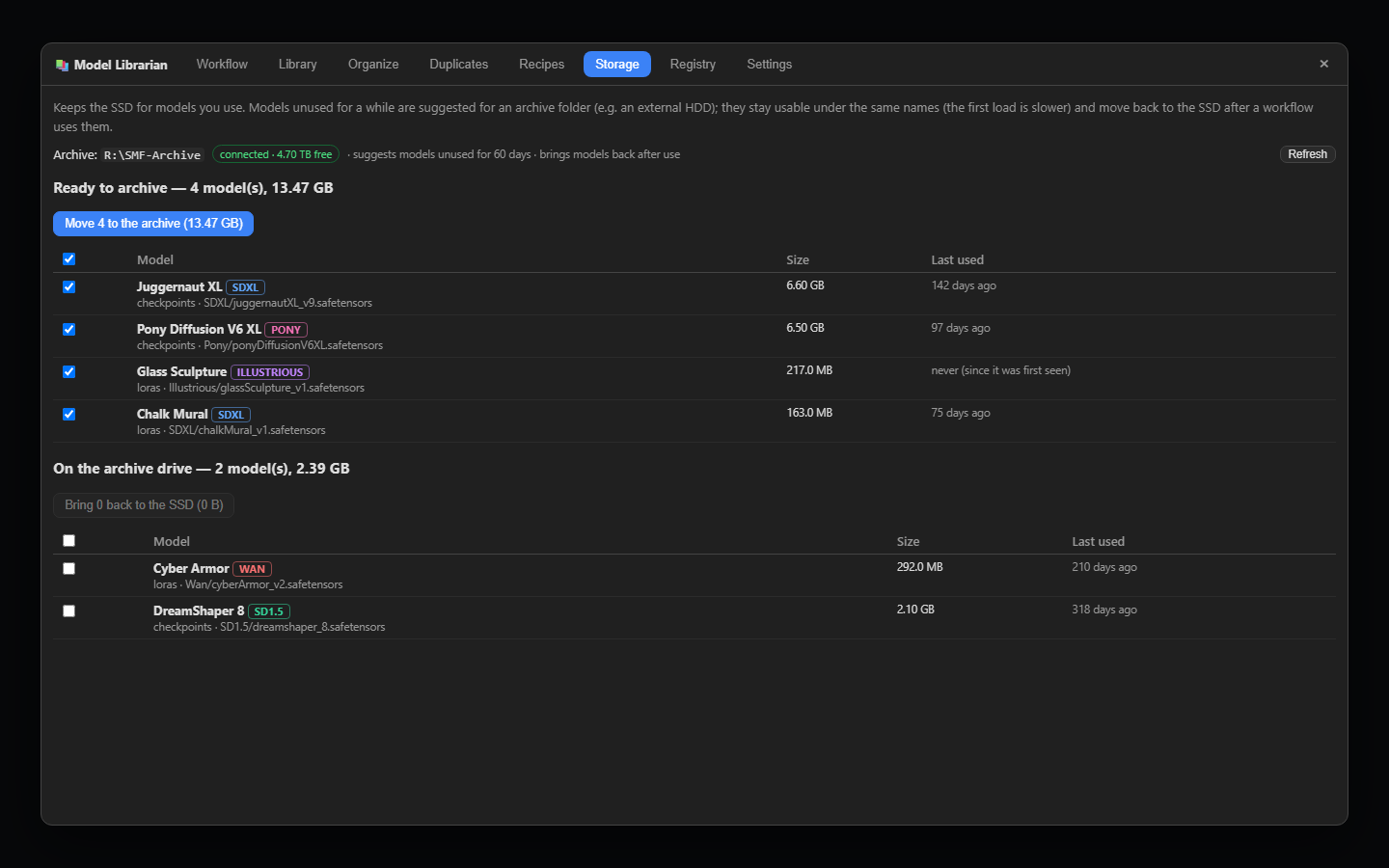 Storage — archive what you don't use, with a free-space goal for the SSD |
|
Storage — archive what you don't use, with a free-space goal for the SSD |
| 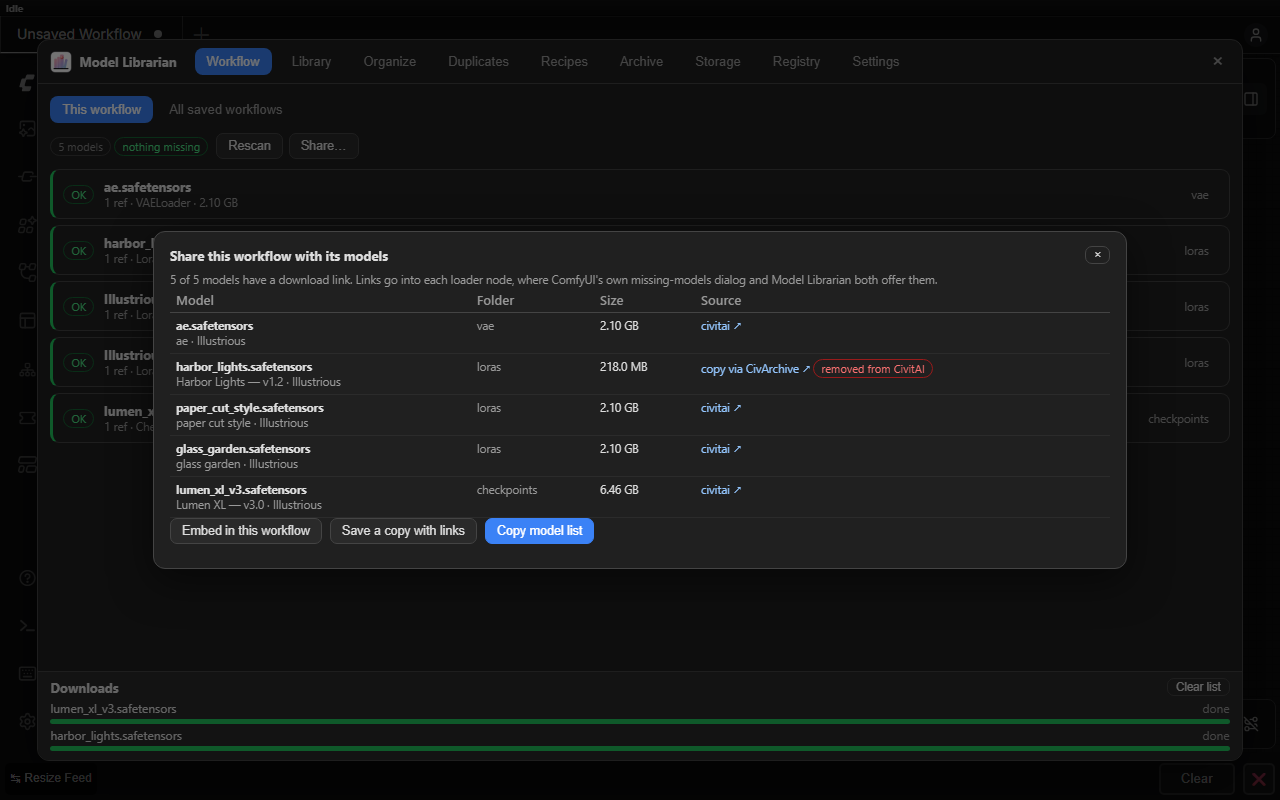 Share — a download link for every model, to embed in the workflow or post |
 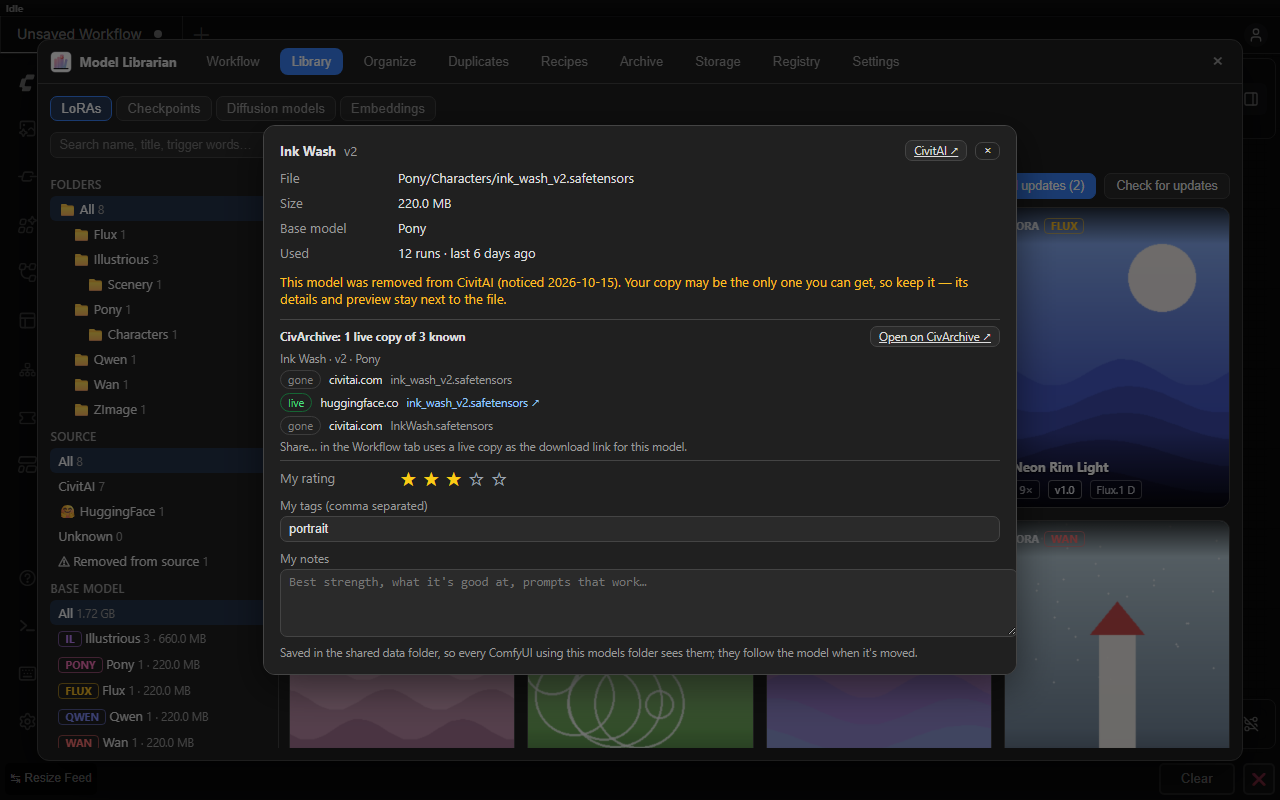 Removed models — marked in the Library, with CivArchive's surviving copies |
|
Removed models — marked in the Library, with CivArchive's surviving copies |
| 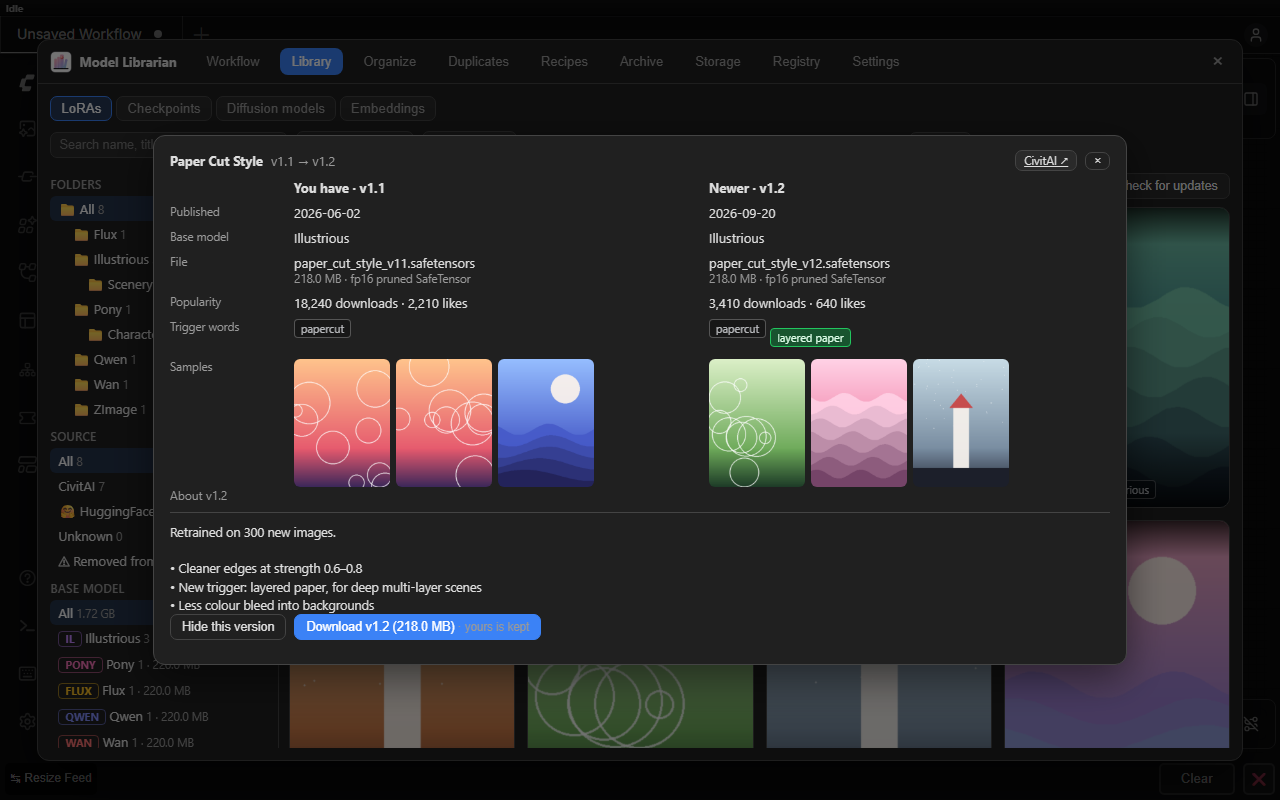 Compare — a new version next to yours before you download it |
 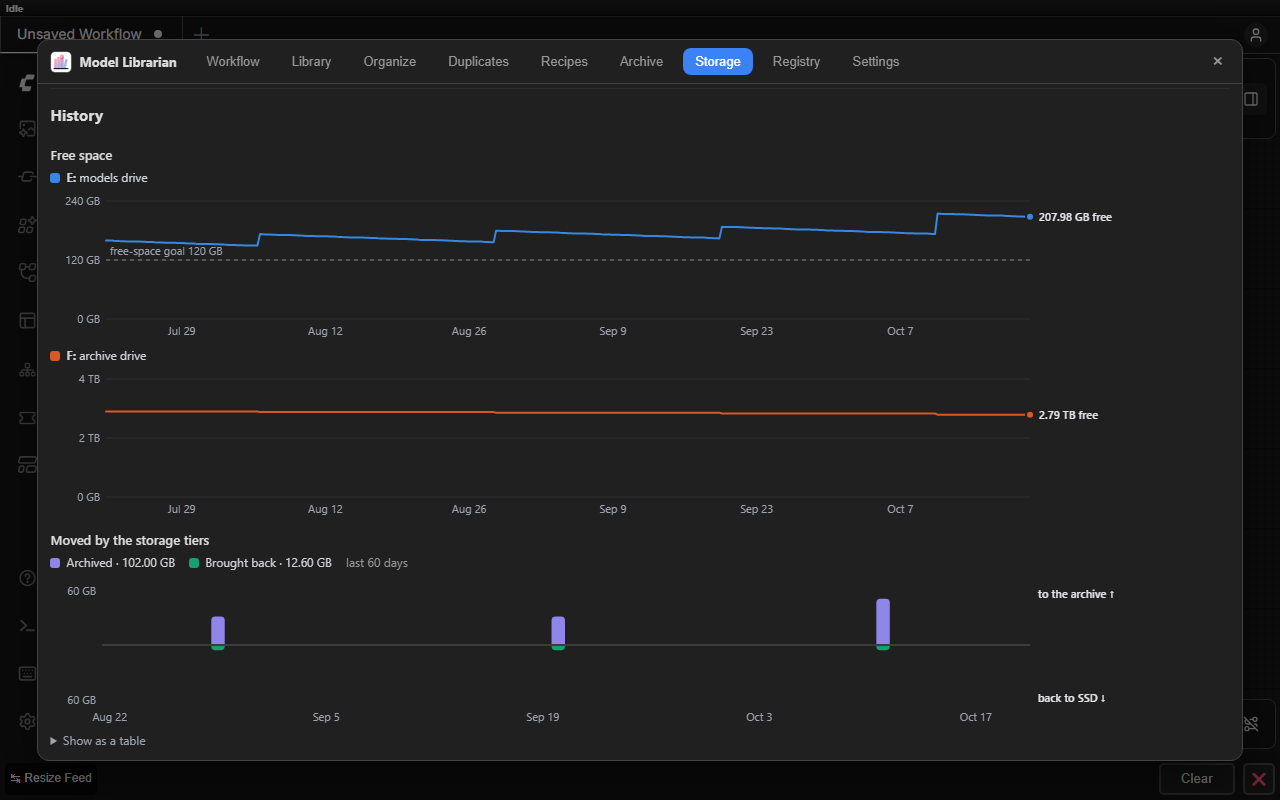 History — free space per drive over time, and what the tiers moved |
|
History — free space per drive over time, and what the tiers moved |
| 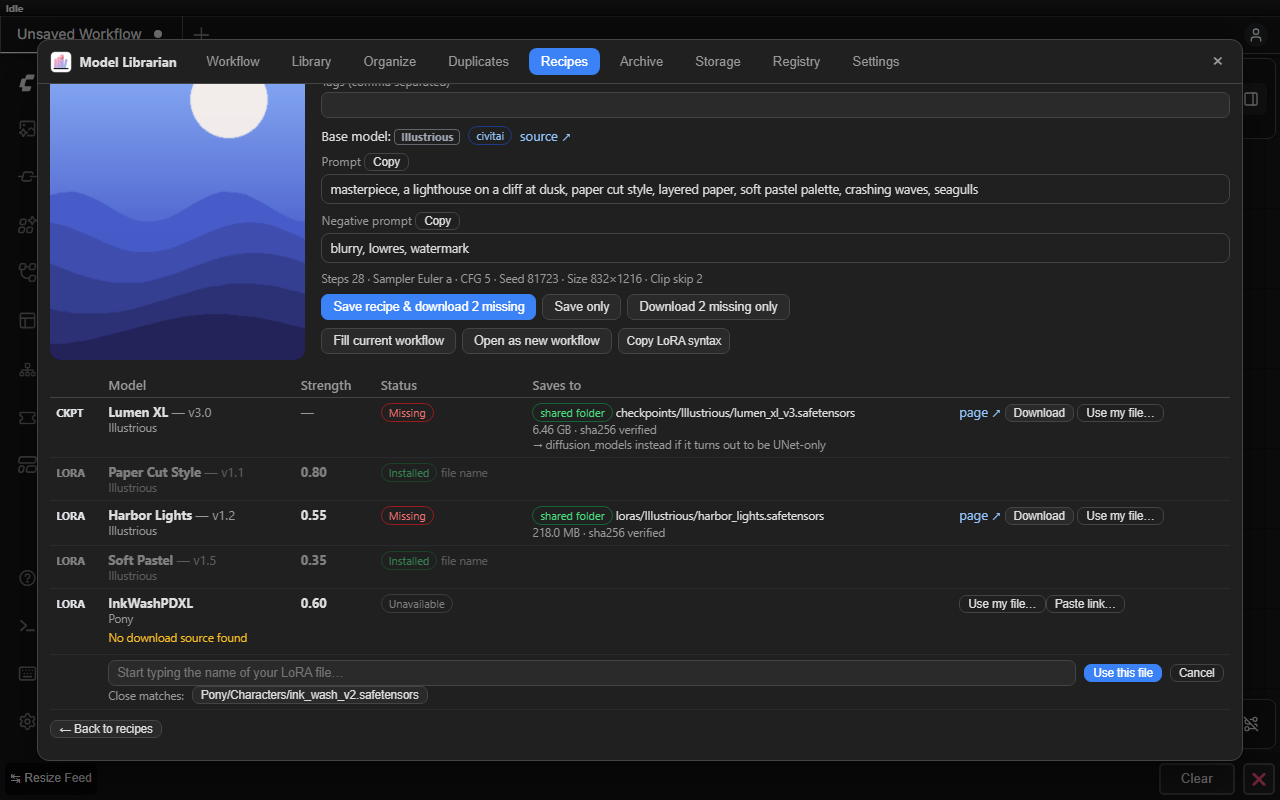 Your file, another name — link a recipe's model to the file you have, once |
 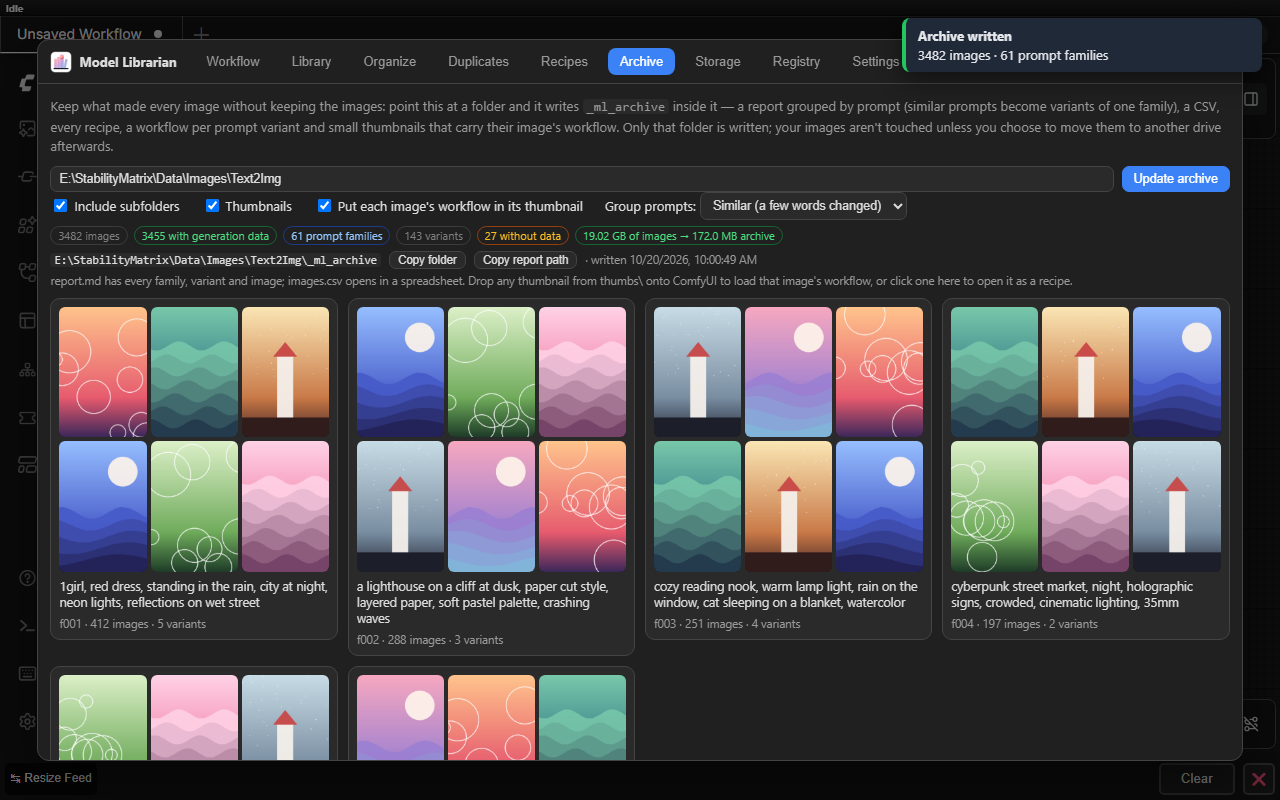 Archive — a folder of images as prompt families, with thumbnails that carry their workflow |
<sub>Screenshots and walkthroughs use sample data; they're rebuilt by <code>tools/readme_media/make_media.py</code>.</sub>
📦 Installation
Option 1: ComfyUI-Manager (Recommended)
- Open ComfyUI → Manager → Custom Nodes Manager.
- Search for
Model Librarian. - Click Install and restart ComfyUI.
Option 2: Comfy CLI
comfy node install comfyui-model-librarian
Option 3: Manual Installation
cd ComfyUI/custom_nodes
git clone https://github.com/EY4O/ComfyUI-Model-Librarian.git
No extra Python packages are needed. GGUF swaps use ComfyUI-GGUF, and LoRA Manager is optional — both available from ComfyUI-Manager.
<details> <summary><b>Using it with Stability Matrix / Comfy Desktop</b></summary>Stability Matrix packages are detected automatically (its extra_model_paths.yaml or symlinked model folders).
Comfy Desktop: the models folder set in its settings is used automatically, with ComfyUI's own folder names (checkpoints, loras, diffusion_models, …). If Model Librarian doesn't find your shared folder, set it in Settings → Shared models and data (per install).
ComfyUI Desktop with Stability Matrix's folders (Stability Matrix's own names: StableDiffusion, Lora, …) needs a section in its extra_model_paths.yaml pointing at Stability Matrix's models folder (change the path), then a restart:
stability_matrix:
  base_path: C:/StabilityMatrix/Data/Models
  checkpoints: StableDiffusion
  diffusion_models: DiffusionModels
  loras: |
    Lora
    LyCORIS
  text_encoders: TextEncoders
  clip_vision: ClipVision
  vae: VAE
  controlnet: ControlNet
  upscale_models: ESRGAN
  embeddings: Embeddings
  ipadapter: IpAdapter
Any section whose paths look like .../Models/<StableDiffusion|Lora|...> is recognised, whatever its name.
🚀 Getting Started
- Settings → add your CivitAI API key (and HuggingFace token).
- Open a workflow — missing models show up as a notice; Workflow → Find all sources → Download.
- Library → Fetch metadata to identify your existing models on CivitAI (previews, trigger words, base models).
- Organize → Build plan to sort them into base-model folders.
- Optional: set an archive folder in Settings → Storage tiers to start tiering.
📖 How It Works
<details> <summary><b>🔗 Working with Stability Matrix and LoRA Manager</b></summary>| | Owns | Model Librarian's part |
|---|---|---|
| Stability Matrix | Shared Data/Models folders, .cm-info.json + .preview.* sidecars | Downloads into SM's folders; writes SM's sidecars so models show as connected in its Checkpoint Manager; keeps its own data next to the models so every package shares it |
| LoRA Manager | LoRA library, .metadata.json, recipes, loader nodes | Reads LM's loader nodes (LoRA lists and <lora:name:strength> text); fills them when applying a recipe; mirrors saved recipes into LM's recipe list (optional); asks LM to rescan after downloads and moves; syncs metadata with SM's sidecars |
Metadata sync (Library → Sync with LoRA Manager) fills SM's .cm-info.json and preview from LM's metadata and vice versa, without any API calls. A new LM entry is only created when its SHA256 is verified, because LoRA Manager trusts that value.
- CivitAI
baseModel— from SM / LM /.civitai.infometadata or a hash lookup. High confidence. - LoRA training metadata —
ss_sd_model_name,modelspec.architecture,ss_base_model_version. This separates Illustrious, Pony and NoobAI from plain SDXL. - Tensor layout — read from the safetensors header (weights are never loaded): SD1.5/2/XL/3, Flux, Flux.2, Chroma, Qwen-Image, Wan, HunyuanVideo, LTXV, Lumina, Z-Image, Anima, HiDream and more. Medium confidence.
- File name — low confidence; these moves start unchecked.
Models already in a matching family folder are left alone, and custom sub-folders are kept (Characters/x → Illustrious/Characters/x).
- Usage tracking — every queued prompt records which models it loads. Models never seen in a run count from when they were first seen, so nothing is suggested on day one.
- Archiving (you approve) — the Storage tab lists models unused for N days (60 by default). Each is copied to
<archive>/<SM folder>/<same path>, the copy's SHA256 is verified, sidecars move with it, and only then is the SSD file removed. Runs can be undone from Organize → History. - Still usable — archive folders are registered with ComfyUI, so archived models keep their exact names; workflows don't change, they just load more slowly. Use Settings → Add archive folders to LoRA Manager once so LM's loaders see them.
- Coming back — after a prompt uses an archived model, it's copied back to the SSD once the queue is idle. A different file is never deleted.
- Free-space goal — Settings → Storage tiers → Keep free on the SSD: when the drive holding your Stability Matrix models has less free space than that, the Storage tab also suggests the least recently used models (oldest first) until archiving them would meet the goal, marked for free-space goal. Models used in the last 14 days (adjustable) are never suggested. If the goal can't be reached that way, it says so. You get one notice per session while the SSD is below the goal.
Click any model in the Library for its details: file, size, base model, trigger words, and how often it's been used (every queued prompt is counted). Rate it with up to five stars, give it your own tags and write notes — what strength works, what it's good at. They're kept in the shared data folder, so every ComfyUI using your Stability Matrix folders sees them, and they follow the model when Organize or the storage tiers move it. The Library sorts by folder, name, most used, recently used, your rating, size or newest file, filters by minimum rating, and its search covers your notes and tags.
</details> <details> <summary><b>🤗 HuggingFace details</b></summary>Models downloaded from HuggingFace (through Model Librarian, so their source is known) get a 🤗 HF chip in the Library with their license. Click it for the base model, task, likes and downloads, gating, tags and the start of the model card, cleaned up for reading, with a link to the repository. Details are fetched after the download and by Fetch metadata, cached for a week in the shared data folder, and can be refreshed from the popup. The Library's Source filter separates CivitAI, HuggingFace and unknown models.
</details> <details> <summary><b>🩺 Workflow health and update alerts</b></summary>Workflow → All saved workflows reads every workflow and subgraph blueprint in ComfyUI's user folder, without opening them. Models are found in loader widgets, rgthree and LoRA Manager nodes, subgraphs and the sources embedded in a workflow; their folders come from each node's own inputs. The list shows the workflows that need something first; click one to see just its models, or Open it. Find all sources and Download all work as for the open workflow, and downloads keep the file name the workflows use, so they work without edits. Fix moved paths repoints saved files when exactly one file with that name exists (each file is backed up first). Models a node offers itself (frame-interpolation models it downloads on first use) aren't counted as missing.
Clicking the ⬆ chip compares the newer version with yours, side by side: dates, base model, file and size, downloads and likes, trigger words (new ones highlighted), sample images and what the author wrote about it. Download saves it next to yours; Hide this version stops the alert.
Update alerts: once a day (Settings → Behaviour), and from Library → Check for updates, each model with CivitAI metadata is looked up once per CivitAI model and cached for a day. A newer version counts only for the same base model and the same variant: a low-noise file isn't offered the high-noise version, and 4-step isn't an update of 8-step. Older copies kept next to a newer one aren't flagged. The ⬆ chip on a card downloads the new version next to the old one (with a version suffix if the author reused the file name); its × hides that version. Download all updates gets every flagged model in a section after one confirmation with the total size. Once updates finish, the Library offers to move the versions they replaced to the archive drive, where they stay usable.
</details> <details> <summary><b>📤 Sharing, removed models and CivArchive</b></summary>Workflow → Share… looks up every installed model the open workflow uses: your download history, then the CivitAI version recorded next to the file, then CivitAI by SHA256. Each link goes into its loader node as ComfyUI's own properties.models (LoRA Manager LoRAs on their LoRA Manager node), so whoever opens the workflow gets download buttons from ComfyUI's missing-models dialog, or from Model Librarian with the hash checked. Embed in this workflow changes the open workflow (save it afterwards), Save a copy with links downloads a copy and leaves yours alone, and Copy model list gives a Markdown list with pages, sizes and hashes to post next to it.
Removed models: the daily update check also notices when CivitAI no longer lists a model, or the version you have, and HuggingFace details notice deleted repositories. The Library marks them with Removed, the Source list filters them, and a notice says when it happens. Nothing is deleted; keep them, since they can't be downloaded again from there.
CivArchive indexes copies of models by SHA256 (CivitAI re-uploads, HuggingFace mirrors and other hosts) and remembers the CivitAI details of removed ones. Model Librarian only asks it about files CivitAI doesn't have: the missing-model finder when nothing else found the file, Fetch metadata when CivitAI answers "not found" (the details are written next to the file as usual), Share… for removed models, and the Find copies on CivArchive button in a model's details. Live copies on CivitAI or HuggingFace download like any source, SHA256-verified; copies on other hosts are links you open yourself. Lookups are cached in the shared data folder, and Settings → Behaviour turns CivArchive off.
</details> <details> <summary><b>📈 Storage history</b></summary>Storage → History charts the free space on the drive with your models and on the archive drive over the last 90 days, with the free-space goal as a line, and below it how much the storage tiers moved to the archive and back each day. A sample is taken every 6 hours while any ComfyUI sharing the data folder runs, kept for a year in storage_history.json; hover for the numbers, or open the table view.
Archive reads the generation data of every image and video in a folder and its subfolders (ComfyUI, A1111/Forge, CivitAI and the other formats Recipes reads) and writes _ml_archive/ inside that folder. Nothing else in the folder is changed.
| File | What's in it |
|---|---|
| report.md | Prompt families → variants → one row per image. Settings every image in a variant shares are listed once; the table only has the columns that differ (seed, model, …). A variant shows what it changed against the family's base prompt: + umbrella − city at night, or playing guitar → reading a book. |
| images.csv | One row per image: prompt, negative, seed, model and hash, LoRAs with strengths, sampler, scheduler, steps, CFG, size, denoise, VAE, date, thumbnail and workflow. |
| recipes.jsonl | The full recipe of every image in the shared recipe/1 format. |
| workflows/ | One ComfyUI workflow per prompt variant. |
| thumbs/ | A 512 px WebP per image (about 20 KB, about 50 KB with the workflow) carrying that image's ComfyUI workflow and prompt, its recipe and any A1111 text. Drop one onto ComfyUI and it opens that exact image's workflow, seed included. |
Group prompts decides what counts as one family: Similar (the default: prompts that share most of their phrases or words), Loose, or Exact only. LoRA tags and (word:1.2) weights are ignored when comparing. Images without generation data are listed at the end of the report.
The first run reads every file (four at a time); later runs only read new or changed files and drop the thumbnails of deleted ones, so you can archive a folder you keep adding to. A cancelled run carries on where it stopped.
</details> <details> <summary><b>🧬 Recipes</b></summary>Model Librarian reads the generation data itself — PNG text chunks, JPEG/WebP EXIF, ComfyUI videos (Save Video and Save WEBM, Video Helper Suite's MP4/WebM, animated WebP), ComfyUI graphs (including Flux-style custom samplers, rgthree and LoRA Manager loaders), A1111/Forge text with its hashes, CivitAI's image API, Fooocus, InvokeAI, SwarmUI and NovelAI. A CivitAI post link shows its images to choose from.
- Library — saved recipes live in the shared data folder (
recipes/), so every ComfyUI using your Stability Matrix folders sees them. Filter, favourite, rename, tag; deleting moves them torecipes/_deleted/. - Your files — models you already have are matched by hash, file name, the name the image uses, or a similar name (case, punctuation and a version suffix ignored:
ILFF7TifafindsILFF7_Tifa_v2). When it can't tell, Use my file… links the model to a file you pick and Paste link… takes the page or download link where it's found; both are remembered, so the next recipe naming it resolves on its own. - Download — each model's exact CivitAI file is found by version ID or hash and saved into the matching base-model folder. "Checkpoints" that turn out to be UNet-only go to
DiffusionModels. Models found only by file-name search are never bulk-downloaded. - Fill current workflow — sets the prompts, seed, steps, CFG, sampler, scheduler, size, clip skip, model and LoRAs in the workflow that's open. LoRA Manager's loader gets the whole list; plain LoRA loaders are filled in order, extra ones are added to the chain, and unused ones are bypassed.
- Open as new workflow — opens the ComfyUI workflow saved in the image, or builds a simple text-to-image workflow for checkpoint models.
- LoRA Manager — with it installed, new recipes are also saved to LM's recipe list (Settings → Behaviour), and LM's own recipes appear under yours, read-only: open one to download its models, fill a workflow or save a copy. Recipes already mirrored from Model Librarian aren't shown twice.
- Prompto — recipes captured with the Prompto Chrome extension keep their model hashes and Civitai version ids. When one is loaded into ComfyUI with ComfyUI-Prompto and its models aren't installed, Get them with Model Librarian opens it here. Prompto's share cards carry the recipe too, so dropping one here finds the exact files. The other way, Send to Prompto puts a recipe in Prompto's inbox (ComfyUI-Prompto 0.8.1 or newer).
The format is documented in docs/RECIPE_FORMAT.md. Dropping an image on the window never replaces your open workflow.
</details> <details> <summary><b>🛡️ Safety</b></summary>- Downloads are verified against the source's SHA256 and resume after interruptions; credentials only go to their own service, never to CDN redirect hosts.
- Moves never overwrite; a model ComfyUI has loaded is skipped; every run can be undone; moves never run alongside metadata fetches or duplicate scans.
- Duplicates are quarantined or hard-linked, never deleted — hard links only when size, timestamp and sampled bytes still match.
- Saved workflows are backed up before they're repointed. API keys stay in each install's user folder, never in the shared data folder.
So you know exactly what you're installing:
- Online: it talks to CivitAI and HuggingFace (model details, previews, downloads, update checks), reads ComfyUI-Manager's public model list from GitHub, and asks CivArchive about files CivitAI doesn't have (can be turned off). Downloads only start when you click; the update check runs once a day and can be turned off in Settings. API keys are only sent to the service they belong to.
- On disk: it writes models into your model folders, moves files when you run Organize or the storage tiers, and keeps its own data (registry, hash cache, recipes, notes, settings) in the shared data folder. Duplicate copies are hard-linked only when you click Replace with hard links and confirm, and leftover downloads are deleted only when you tick them and confirm.
- Never: it doesn't run downloaded code, install packages, execute other programs or send your files or library anywhere. Everything is plain Python and JavaScript in this repository.
With a shared models folder found (Stability Matrix's or Comfy Desktop's), the registry, hash cache, undo history, usage data, recipes and settings live in .sm_model_fetcher/ inside it, shared by every ComfyUI that uses that folder (several can run at once). Turn it off in Settings → Shared models and data.
Formerly SM Model Fetcher — internal names are unchanged, so existing data carries over.
</details>🧪 Development
Tests, the safe installer and the publishing workflow are described in docs/DEVELOPMENT.md.
🤝 Contributing
Issues and pull requests are welcome — please run the test suite before opening a PR.
🙏 Credits
- Stability Matrix — shared model folders and the
.cm-info.jsonformat - LoRA Manager — recipes, metadata and loader nodes this integrates with
- ComfyUI-GGUF and city96's GGUF quantizations
- ComfyUI-Manager's model list, and the CivitAI and HuggingFace APIs
☕ Support
If Model Librarian saves you time (or disk space), you can support its development:
