
Powder Nodes
FLUX-safe ComfyUI conditioning cache nodes with prompt, LoRA, styler and grid utilities.
Nodes (8)
The Powder Clear Conditioning Cache
The diagnostic your LoRA grid testing needed
One CLIP encoder that finally assembles your whole prompt
Labeled LoRA comparison grids, the easy way (Powder Grid Saver)
Stack or compare LoRAs without the spaghetti
Batch several scenes without duplicating the graph
One line, one prompt, zero fuss
Your SDXL style library, without the prompt-styler sprawl
E2GO Nodes for ComfyUI
<a id="english"></a>
A set of optimized nodes for ComfyUI designed for convenient work with LoRA, styles, prompts, and grid assembly. Compatible with ComfyUI v0.17+.
[!NOTE] Tested with: ComfyUI 0.17.2 | Frontend 1.41.20 | Python 3.12 | PyTorch 2.10 + CUDA 13.0 | Windows 11 | NVIDIA RTX 5090
May work with other versions, but these are the only ones verified. If you encounter issues on a different setup, please open an issue.
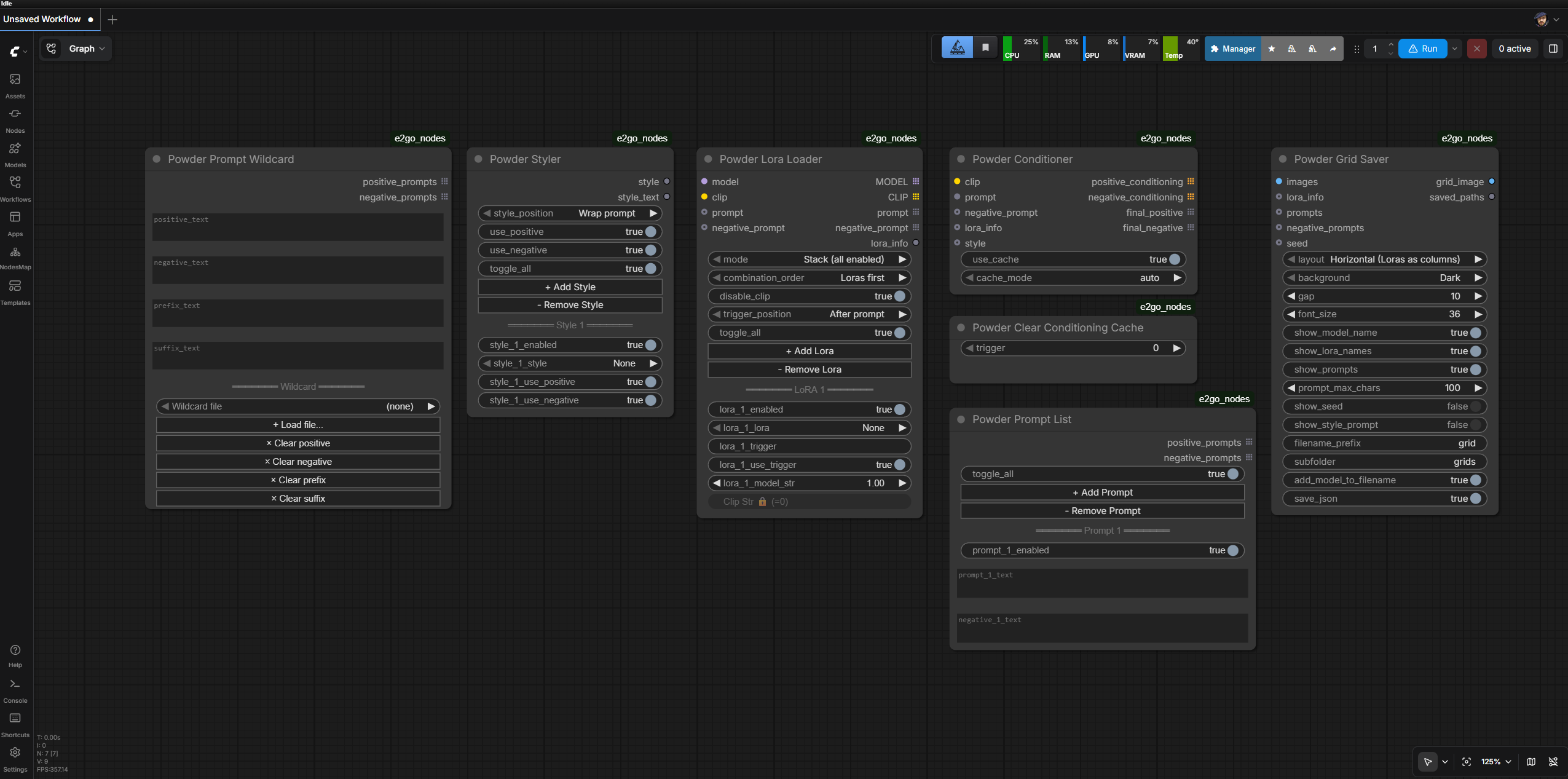
Installation
Option 1: Git Clone (recommended)
cd ComfyUI/custom_nodes
git clone https://github.com/E2GO/e2go-comfyui-nodes.git e2go_nodes
Restart ComfyUI.
Option 2: ComfyUI Manager
- Open ComfyUI Manager
- Click "Install Custom Nodes"
- Search for
e2go_nodesorE2GO - Click Install, restart ComfyUI
Option 3: Manual
Download the latest release, extract to ComfyUI/custom_nodes/e2go_nodes/, restart ComfyUI.
Nodes
- Powder Lora Loader — loading and combining LoRA
- Powder Styler — applying styles from a library
- Powder Prompt List — managing a list of prompts
- Powder Prompt Wildcard — batch prompts from text or .txt file (one line = one prompt)
- Powder Conditioner — assembling and encoding the final prompt
- Powder Grid Save — assembling images into a labeled grid
- Powder Clear Conditioning Cache — clearing the encoding cache
- Powder Cache Stats — diagnostic snapshot of all internal caches
Powder Lora Loader
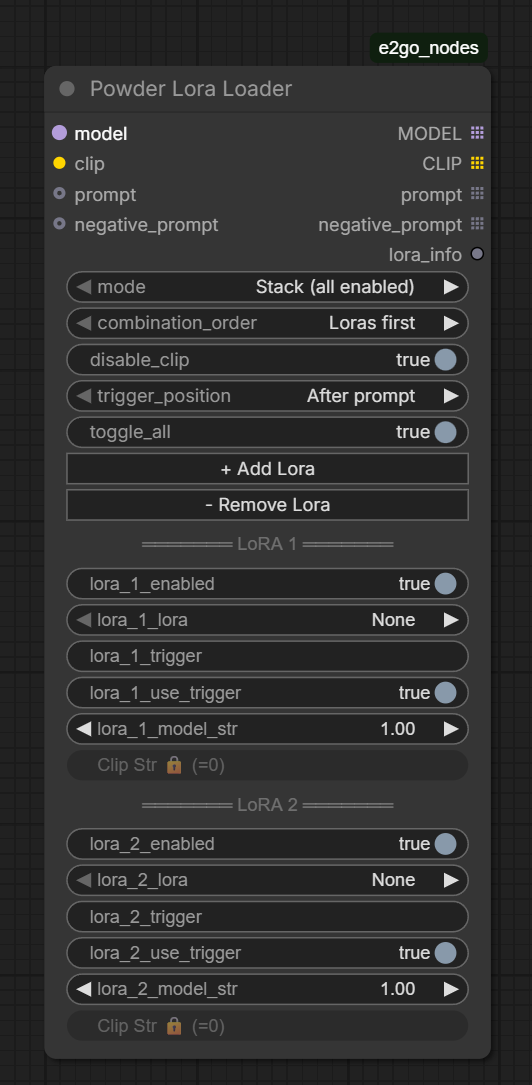
Loads one or more LoRAs with caching, trigger support, and two operating modes.
Inputs
| Input | Type | Required | Description |
|-------|------|:---:|-------------|
| model | MODEL | yes | Base model |
| clip | CLIP | yes | CLIP model for text encoding |
| mode | combo | yes | Stack (all enabled) — all LoRAs into one model. Single — each LoRA separately (for comparison) |
| combination_order | combo | yes | Loras first — LoRAs first, then prompts. Prompts first — reverse. Affects output combination order in Single mode |
| disable_clip | boolean | yes | Skip CLIP weights when loading LoRA (faster for testing) |
| trigger_position | combo | yes | After prompt / Before prompt — where to place LoRA trigger text |
| prompt | STRING | no | Input prompt (connected via wire) |
| negative_prompt | STRING | no | Negative prompt (connected via wire) |
Dynamic Slots (on the node)
Use + Add Lora / - Remove Lora buttons to add slots (up to 20). Each slot:
- Enabled — on/off
- LoRA — select LoRA file
- Trigger — trigger text (auto-loaded from
.txtfile next to the LoRA) - Use Trigger — whether to use the trigger
- Model Str / Clip Str — application strength
Outputs
| Output | Type | List | Description | |--------|------|:---:|-------------| | MODEL | MODEL | yes | Model(s) with applied LoRAs | | CLIP | CLIP | yes | CLIP with applied LoRAs (or original when disable_clip is on) | | prompt | STRING | yes | Prompts (one per combination) | | negative_prompt | STRING | yes | Negative prompts | | lora_info | STRING | no | JSON with metadata: LoRA names, strengths, triggers, order |
Modes
Stack — all enabled LoRAs are applied sequentially to one model. Output is one model repeated for each prompt.
Single — each LoRA creates its own model copy. Output is N_loras x N_prompts combinations. Great for style comparison via Grid.
Powder Styler
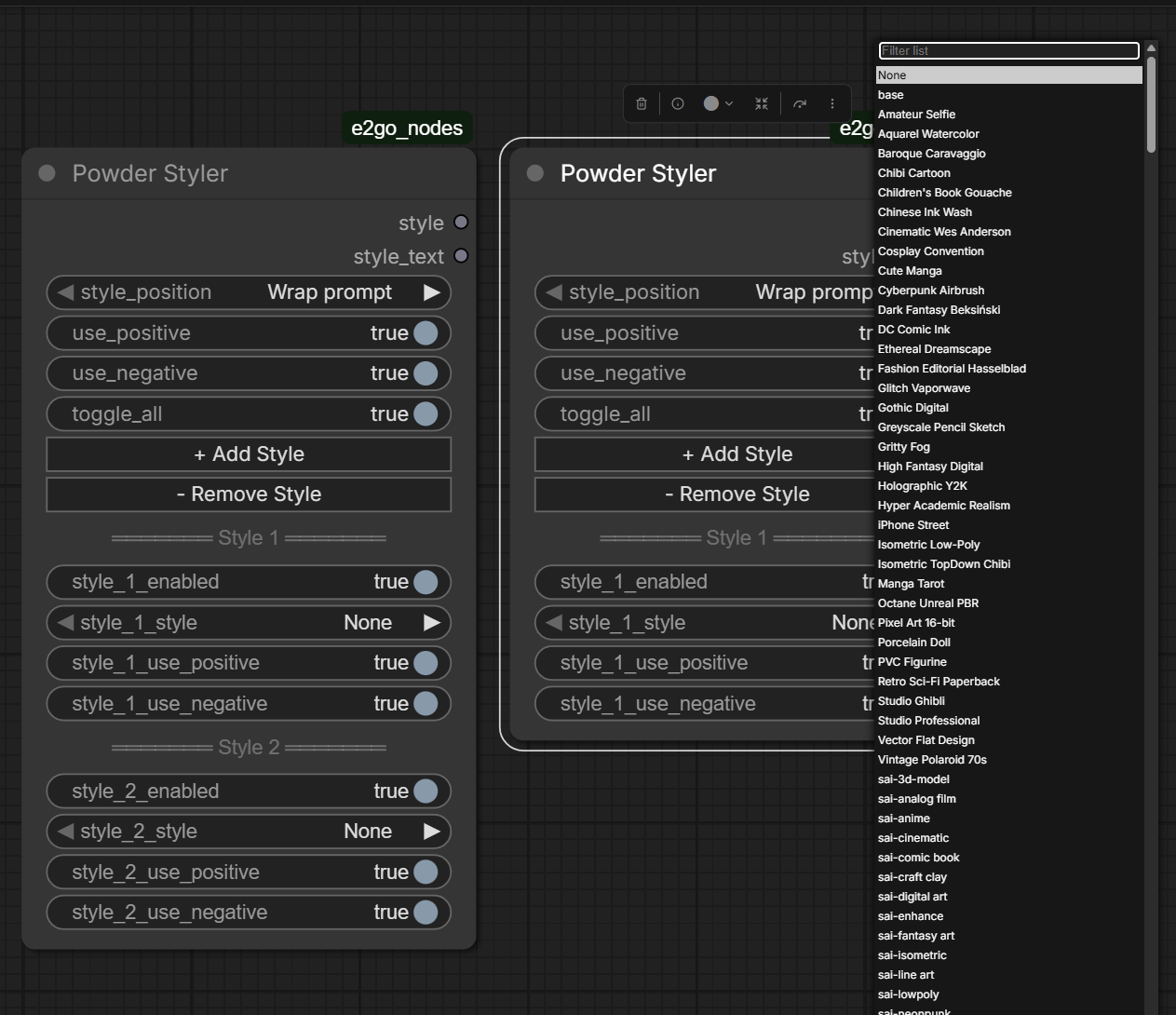
Applies styles from a library of JSON files. Each style contains a prefix (added before the prompt), suffix (after), and negative (added to the negative prompt).
Inputs
| Input | Type | Required | Description |
|-------|------|:---:|-------------|
| style_position | combo | yes | Wrap prompt — prefix + prompt + suffix. Before prompt — prefix + suffix + prompt. After prompt — prompt + prefix + suffix |
| use_positive | boolean | yes | Apply positive part of styles |
| use_negative | boolean | yes | Apply negative part of styles |
Dynamic Slots (on the node)
Use + Add Style / - Remove Style buttons to add slots (up to 20). Each slot:
- Enabled — on/off
- Style — select style from the library
- Use Positive / Use Negative — use positive/negative for this slot
Outputs
| Output | Type | Description | |--------|------|-------------| | style | STRING | JSON with prefix, suffix, negative, and position — connect to Conditioner | | style_text | STRING | Combined style text (prefix + suffix) |
Adding Custom Styles
Create a JSON file in the e2go_nodes/styles/ folder. Format:
[
  {
    "name": "My Cool Style",
    "prefix": "text before prompt",
    "suffix": "text after prompt",
    "negative": "added to negative prompt"
  },
  {
    "name": "Another Style",
    "prefix": "",
    "suffix": "in style of impressionism, oil on canvas",
    "negative": "digital, 3d, photorealistic"
  }
]
The old SDXL Prompt Styler format is also supported:
[
  {
    "name": "Old Format Style",
    "prompt": "prefix text, {prompt} . suffix text",
    "negative_prompt": "negative tags"
  }
]
The file is automatically picked up within ~2 seconds of saving — no ComfyUI restart needed. The filename doesn't matter — any .json in the styles/ folder works. Both Powder Styler and Powder Grid Save share a single styles cache, so updates are visible to both nodes simultaneously.
Powder Prompt List
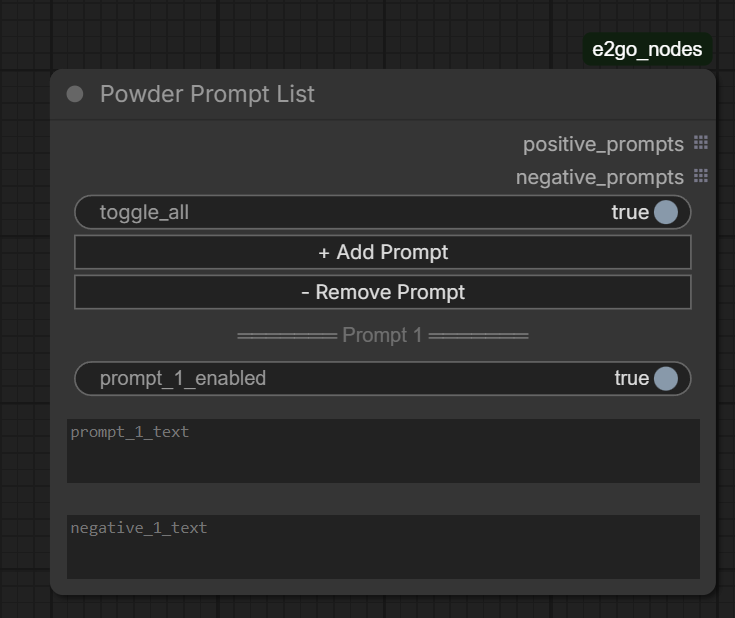
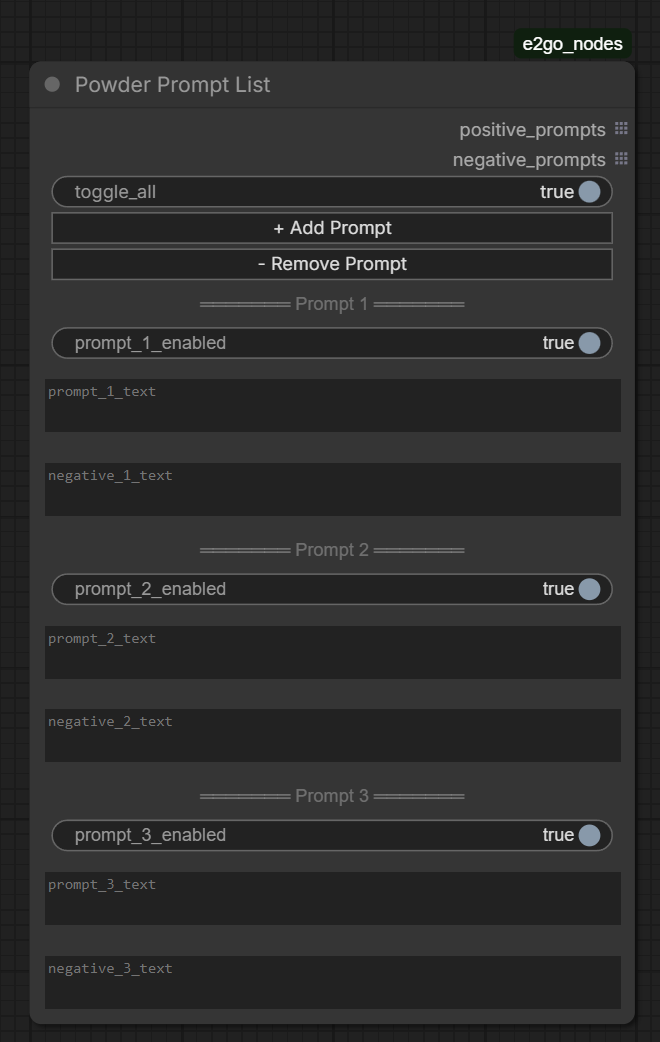
Manages a list of prompts with the ability to enable/disable each slot. Useful for batch generation of multiple scenes.
Inputs
Only dynamic slots on the node.
Dynamic Slots (on the node)
Use + Add Prompt / - Remove Prompt buttons to add slots (up to 20). Each slot:
- Enabled — on/off
- Prompt text — prompt text (multiline)
- Negative text — negative prompt (multiline)
Outputs
| Output | Type | List | Description | |--------|------|:---:|-------------| | positive_prompts | STRING | yes | List of enabled prompts | | negative_prompts | STRING | yes | List of negative prompts |
Powder Prompt Wildcard
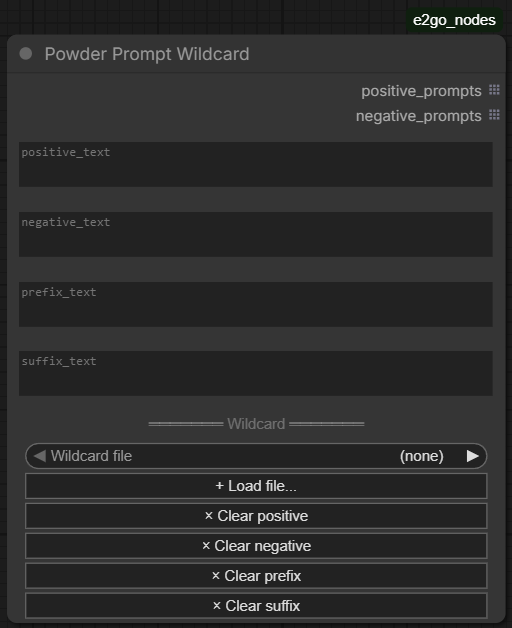
Treats each non-empty line of the input as a separate prompt. Useful for pasting a long list, or for loading a .txt wildcard file from a library.
Inputs
| Input | Type | Required | Description |
|-------|------|:---:|-------------|
| positive_text | STRING (multiline) | yes | One prompt per line. Empty lines and lines starting with # are skipped. |
| negative_text | STRING (multiline) | yes | Single global negative prompt — applied to every positive line. |
| prefix_text | STRING (multiline) | no | Common base text prepended to every positive line. Joined with , . Empty/whitespace = skipped. |
| suffix_text | STRING (multiline) | no | Common base text appended to every positive line. Joined with , . Empty/whitespace = skipped. |
For each non-empty wildcard line the output is <prefix>, <line>, <suffix> (missing parts dropped). If positive_text is empty but a prefix or suffix is set, one prompt with just the base is emitted.
UI extras (on the node)
- Wildcard file combo — lists
.txtfiles frome2go_nodes/wildcards/and<ComfyUI>/wildcards/. Selecting a file populatespositive_text(confirms before overwriting non-empty content). - + Load file... button — opens a local file picker. Selected
.txtis uploaded toe2go_nodes/wildcards/and its content placed intopositive_text. - × Clear positive / × Clear negative / × Clear prefix / × Clear suffix buttons — wipe the respective text field. Each confirms before clearing non-empty content.
Clear positivealso resets the combo to(none).
Outputs
| Output | Type | List | Description |
|--------|------|:---:|-------------|
| positive_prompts | STRING | yes | One element per non-empty/non-comment line. |
| negative_prompts | STRING | yes | negative_text replicated to match positive count. |
Wildcard files
A wildcard file is a .txt with one prompt per line. Lines starting with # are comments. Drop files into either:
e2go_nodes/wildcards/— package-local (created on first upload, ignored by git).<ComfyUI>/wildcards/— shared with other custom node packs.
The combo dropdown shows files from both, prefixed with [e2go] or [comfy]. Newly added files appear after the node is recreated (or page reload).
Powder Conditioner
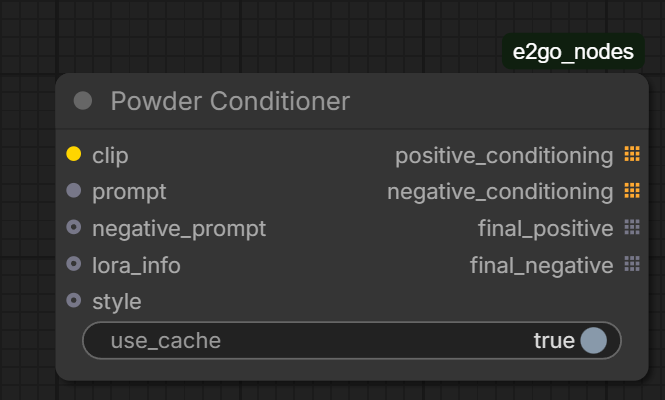
Central node: assembles the prompt, LoRA triggers, and styles into the final text, then encodes via CLIP. Caches results for repeated runs.
Inputs
| Input | Type | Required | Description |
|-------|------|:---:|-------------|
| clip | CLIP | yes | CLIP model (usually from Lora Loader) |
| prompt | STRING | yes | Prompt(s) — connected via wire |
| negative_prompt | STRING | no | Negative prompt(s) — connected via wire |
| lora_info | STRING | no | JSON from Lora Loader — contains triggers and their position |
| style | STRING | no | JSON from Styler — contains prefix, suffix, negative |
| use_cache | boolean | no | Master switch (default: yes). When false, bypasses cache regardless of cache_mode. Kept for backward compatibility. |
| cache_mode | combo | no | Cache policy when use_cache=true. See modes below. Default: auto. |
Cache modes
auto(default, recommended) — caches conditioning for stable text encoders (SDXL, SD 1.5). Automatically disables cache for FLUX, T5, and mixed-precision quantised CLIPs, where cache identity tracking is not reliable. Safe choice for mixed workloads.aggressive— caches everything, including FLUX. Use only when you've verified your workflow doesn't trigger CLIP state changes (no AIMDO offloading pressure, no model reloads). Risk: stale conditioning across reload boundaries.disabled— equivalent touse_cache=false. Never caches.
The UI greys out cache_mode when use_cache=false, since cache is fully disabled by the master switch.
Outputs
| Output | Type | List | Description | |--------|------|:---:|-------------| | positive_conditioning | CONDITIONING | yes | Encoded positive prompt | | negative_conditioning | CONDITIONING | yes | Encoded negative prompt | | final_positive | STRING | yes | Final positive prompt text (for debugging) | | final_negative | STRING | yes | Final negative prompt text (for debugging) |
Prompt Assembly
The Conditioner assembles the final prompt from parts:
- Style (prefix / suffix) — from the
styleinput - Prompt — from the
promptinput - Trigger — from the
lora_infoinput
Order is determined by settings:
trigger_position(from lora_info): before/after — trigger at the beginning or endstyle_position(from style): wrap/before/after — how the style wraps the prompt
Example with wrap + after: style_prefix, prompt, style_suffix, trigger
Powder Grid Save
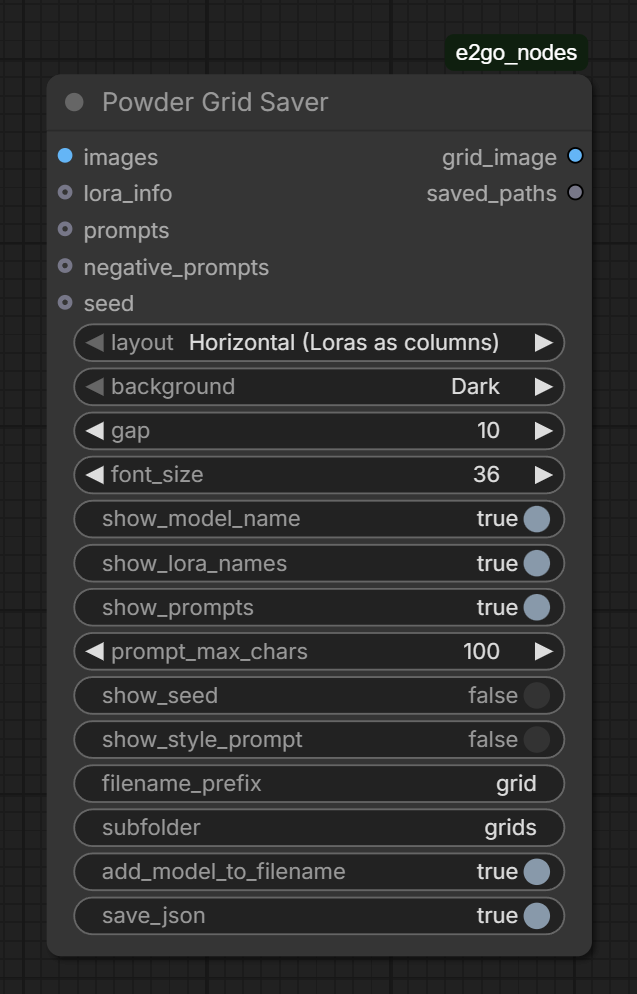
Assembles images into a grid with labels (model, LoRA, prompts). Saves to file.
Inputs
| Input | Type | Required | Description |
|-------|------|:---:|-------------|
| images | IMAGE | yes | Images for the grid |
| layout | combo | yes | Horizontal (Loras as columns) or Vertical (Loras as rows) |
| background | combo | yes | Dark / Light |
| gap | INT | yes | Gap between cells (px) |
| font_size | INT | yes | Font size (12–100) |
| show_model_name | boolean | yes | Show model name |
| show_lora_names | boolean | yes | Show LoRA names |
| show_prompts | boolean | yes | Show prompts |
| prompt_max_chars | INT | yes | Max prompt length in label |
| show_seed | boolean | yes | Show seed per cell. With batch > 1 displays Seed: N [i/batch] |
| show_style_prompt | boolean | yes | OFF — append style name to prompt label (e.g. [Cinematic]). ON — append full style text (prefix + prompt + suffix). Style is auto-detected from PowderStyler in the workflow, no extra wires needed |
| filename_prefix | STRING | yes | Filename prefix |
| subfolder | STRING | yes | Subfolder in output |
| add_model_to_filename | boolean | yes | Prepend model name to filename |
| save_json | boolean | yes | Save JSON with metadata |
| lora_info | STRING | no | JSON from Lora Loader |
| prompts | STRING | no | Prompts for labels |
| negative_prompts | STRING | no | Negative prompts |
| seed | INT | no | Seed value (connected via wire). With batch > 1, individual seeds and batch indices are computed automatically |
Outputs
| Output | Type | Description | |--------|------|-------------| | grid_image | IMAGE | Assembled grid as tensor | | saved_paths | STRING | Paths to saved files |
Style in Grid
Grid Saver automatically detects the PowderStyler node in the workflow (via ComfyUI's hidden prompt graph) — no additional wires needed. The show_style_prompt switch controls how the style appears in prompt labels:
- OFF (default): style name is appended —
"a portrait of a warrior [Cinematic, Dark Fantasy]" - ON: full style text is assembled —
"cinematic lighting, a portrait of a warrior, film grain"
Style metadata (style_names, style_text, style_negative, style_position) is always written to the JSON file regardless of the switch.
JSON Metadata
Generation settings (sampler, scheduler, steps, cfg, seed) are automatically extracted from any sampler/scheduler node in the workflow — including Flux split nodes (KSamplerSelect, Flux2Scheduler, RandomNoise, CFGGuider, etc.). No configuration needed.
When a seed input is connected, the JSON includes batch_size, per-image seeds array, and batch_indices — useful for reproducing specific images from a batch.
Fonts
For a custom font, place a .ttf file in the e2go_nodes/fonts/ folder. The node automatically picks up the first TTF file found. If no fonts are present, the system default is used.
Powder Clear Conditioning Cache
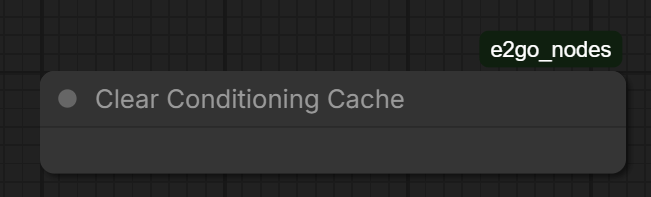
Utility node for clearing the Powder Conditioner encoding cache. Useful when switching models or to free memory.
Inputs
| Input | Type | Required | Description | |-------|------|:---:|-------------| | trigger | INT | yes | Increment this value to fire the clear. Cache clears only when the value changes. Default: 0. |
The node executes only when trigger changes. This prevents the cache from being wiped on every queue when the node is left in the graph. To clear, edit the value or click the Clear now button on the node (auto-increments).
Outputs
None (output node).
Powder Cache Stats
Diagnostic node that reports the current state of all internal caches. Useful for debugging cache behaviour, tuning sizes, or verifying that fixes have taken effect.
Inputs
None.
Outputs
| Output | Type | Description | |--------|------|-------------| | stats | STRING | JSON snapshot of cache sizes (also written to log). |
Output shape
{
  "lora_raw_cache":     {"size": int, "maxsize": 16, "ttl": 1800},
  "lora_patcher_cache": {"size": int, "raw_entries": int, "maxsize": 32},
  "conditioning_cache": {"size": int, "maxsize": 64, "ttl": null},
  "clip_dim_cache":     {"size": int, "maxsize": 64, "ttl": null},
  "clip_hash_refs":     int,
  "styles_loaded":      int
}
lora_raw_cache— raw safetensors data, TTL=30 min.sizeis current entries.lora_patcher_cache— model patcher results.size= live entries,raw_entries= total before pruning dead weakrefs (gap = pending cleanup).conditioning_cache— encoded conditioning (CPU-stored).clip_dim_cache— learned conditioning dimensions per CLIP hash.clip_hash_refs— number of live weakrefs to CLIP objects.styles_loaded— total styles in memory after last directory scan.
The node always runs when queued (IS_CHANGED returns NaN). Drop it into any graph during debugging; remove for production.
Typical Connection Diagram
+--------------------+
| Powder Prompt List |
|                    |
|  prompt_1: "..."   |
|  prompt_2: "..."   |
+--+-------------+---+
   | prompts     | negatives
   v             v
+--------------------+    +-----------------+
| Powder Lora Loader |<---| UNETLoader      | model
|                    |<---| CLIPLoader      | clip
|  LoRA 1: style_x  |    +-----------------+
|  LoRA 2: style_y  |
+--+--+--+--+--+----+
   |  |  |  |  | lora_info
   |  |  |  |  v
   |  |  |  |  +----------------------+
   |  |  |  |  | Powder Conditioner   |<-- style (from Styler)
   |  |  |  +--| prompt               |
   |  |  +-----| negative_prompt      |
   |  +---------| clip                |
   |            +--+--------------+---+
   |               | positive     | negative
   |               v              v
   |            +----------------------+
   +----------->| CFGGuider /          |
      model     | KSampler            |
                +----------------------+

+-----------------+
| Powder Styler   |
|                 |
|  Style 1: ...   |---- style --> Conditioner
+-----------------+
Usage Scenarios
See Usage Guide for detailed scenarios: simple generation with styles, LoRA comparison grids, batch prompts, wildcard-file batch generation, cache optimization, and more.
Example Workflow
The examples/ folder contains powder_nodes_test_workflow.json — import it into ComfyUI via the Load menu. It demonstrates the standard pipeline (Prompt List → Lora Loader → Conditioner ← Styler) and includes a muted Powder Prompt Wildcard node showing an alternative prompt source — unmute it and rewire to the Lora Loader to use the wildcard path.
<a id="русский"></a>
E2GO Nodes для ComfyUI
Набор оптимизированных нод для ComfyUI, разработанный для удобной работы с LoRA, стилями, промптами и grid-сборкой. Совместим с ComfyUI v0.17+.
[!NOTE] Протестировано на: ComfyUI 0.17.2 | Frontend 1.41.20 | Python 3.12 | PyTorch 2.10 + CUDA 13.0 | Windows 11 | NVIDIA RTX 5090
Может работать с другими версиями, но проверены только указанные. При проблемах на другой конфигурации — создайте issue.
Установка
Вариант 1: Git Clone (рекомендуется)
cd ComfyUI/custom_nodes
git clone https://github.com/E2GO/e2go-comfyui-nodes.git e2go_nodes
Перезапустите ComfyUI.
Вариант 2: ComfyUI Manager
- Откройте ComfyUI Manager
- Нажмите "Install Custom Nodes"
- Найдите
e2go_nodesилиE2GO - Нажмите Install, перезапустите ComfyUI
Вариант 3: Вручную
Скачайте последнюю версию, распакуйте в ComfyUI/custom_nodes/e2go_nodes/, перезапустите ComfyUI.
Ноды
- Powder Lora Loader — загрузка и комбинирование LoRA
- Powder Styler — применение стилей из библиотеки
- Powder Prompt List — управление списком промптов
- Powder Prompt Wildcard — batch-промпты из текста или .txt файла (одна строка = один промпт)
- Powder Conditioner — сборка и кодирование финального промпта
- Powder Grid Save — сборка изображений в grid с подписями
- Powder Clear Conditioning Cache — очистка кэша кодирования
- Powder Cache Stats — диагностический снимок всех внутренних кэшей
Powder Lora Loader
Загружает одну или несколько LoRA с кэшированием, поддержкой триггеров и двумя режимами работы.
Входы
| Вход | Тип | Обязательный | Описание |
|------|-----|:---:|----------|
| model | MODEL | да | Базовая модель |
| clip | CLIP | да | CLIP-модель для кодирования текста |
| mode | combo | да | Stack (all enabled) — все LoRA в одну модель. Single — каждая LoRA отдельно (для сравнения) |
| combination_order | combo | да | Loras first — сначала LoRA, потом промпты. Prompts first — наоборот. Влияет на порядок выходных комбинаций в Single-режиме |
| disable_clip | boolean | да | Пропустить CLIP-веса при загрузке LoRA (быстрее для тестирования) |
| trigger_position | combo | да | After prompt / Before prompt — куда поставить триггер-текст LoRA |
| prompt | STRING | нет | Входной промпт (подключается проводом) |
| negative_prompt | STRING | нет | Негативный промпт (подключается проводом) |
Динамические слоты (на ноде)
Кнопками + Add Lora / - Remove Lora добавляются слоты (до 20). Каждый слот:
- Enabled — вкл/выкл
- LoRA — выбор файла LoRA
- Trigger — триггер-текст (автозагрузка из
.txtрядом с файлом LoRA) - Use Trigger — использовать триггер
- Model Str / Clip Str — сила применения
Выходы
| Выход | Тип | Список | Описание | |-------|-----|:---:|----------| | MODEL | MODEL | да | Модель(и) с применёнными LoRA | | CLIP | CLIP | да | CLIP с применёнными LoRA (или оригинальный при disable_clip) | | prompt | STRING | да | Промпты (один на комбинацию) | | negative_prompt | STRING | да | Негативные промпты | | lora_info | STRING | нет | JSON с метаданными: имена LoRA, силы, триггеры, порядок |
Режимы
Stack — все включённые LoRA применяются последовательно к одной модели. На выходе одна модель, повторённая для каждого промпта.
Single — каждая LoRA создаёт свою копию модели. На выходе N_loras x N_prompts комбинаций. Удобно для сравнения стилей через Grid.
Powder Styler
Применяет стили из библиотеки JSON-файлов. Каждый стиль содержит prefix (добавляется перед промптом), suffix (после) и negative (добавляется к негативному промпту).
Входы
| Вход | Тип | Обязательный | Описание |
|------|-----|:---:|----------|
| style_position | combo | да | Wrap prompt — prefix + prompt + suffix. Before prompt — prefix + suffix + prompt. After prompt — prompt + prefix + suffix |
| use_positive | boolean | да | Применять положительную часть стилей |
| use_negative | boolean | да | Применять негативную часть стилей |
Динамические слоты (на ноде)
Кнопками + Add Style / - Remove Style добавляются слоты (до 20). Каждый слот:
- Enabled — вкл/выкл
- Style — выбор стиля из библиотеки
- Use Positive / Use Negative — использовать позитив/негатив этого слота
Выходы
| Выход | Тип | Описание | |-------|-----|----------| | style | STRING | JSON с prefix, suffix, negative и position — подключается к Conditioner | | style_text | STRING | Объединённый текст стиля (prefix + suffix) |
Добавление собственных стилей
Создайте JSON-файл в папке e2go_nodes/styles/. Формат:
[
  {
    "name": "My Cool Style",
    "prefix": "текст перед промптом",
    "suffix": "текст после промпта",
    "negative": "то что добавится в негатив"
  },
  {
    "name": "Another Style",
    "prefix": "",
    "suffix": "in style of impressionism, oil on canvas",
    "negative": "digital, 3d, photorealistic"
  }
]
Также поддерживается старый формат SDXL Prompt Styler:
[
  {
    "name": "Old Format Style",
    "prompt": "prefix text, {prompt} . suffix text",
    "negative_prompt": "negative tags"
  }
]
Файл автоматически подхватывается в течение ~2 секунд после сохранения — перезапуск ComfyUI не требуется. Имя файла не важно, главное — .json в папке styles/. Powder Styler и Powder Grid Save используют общий кэш стилей, поэтому изменения видны обоим нодам одновременно.
Powder Prompt List
Управляет списком промптов с возможностью включения/выключения каждого слота. Удобно для batch-генерации нескольких сцен.
Входы
Только динамические слоты на ноде.
Динамические слоты (на ноде)
Кнопками + Add Prompt / - Remove Prompt добавляются слоты (до 20). Каждый слот:
- Enabled — вкл/выкл
- Prompt text — текст промпта (multiline)
- Negative text — негативный промпт (multiline)
Выходы
| Выход | Тип | Список | Описание | |-------|-----|:---:|----------| | positive_prompts | STRING | да | Список включённых промптов | | negative_prompts | STRING | да | Список негативных промптов |
Powder Prompt Wildcard
Каждая непустая строка ввода — отдельный промпт. Удобно для вставки длинного списка или загрузки .txt-файла из библиотеки wildcards.
Входы
| Вход | Тип | Обязательный | Описание |
|------|-----|:---:|----------|
| positive_text | STRING (multiline) | да | Один промпт на строку. Пустые строки и строки, начинающиеся с #, пропускаются. |
| negative_text | STRING (multiline) | да | Один глобальный негативный промпт — применяется ко всем позитивным строкам. |
| prefix_text | STRING (multiline) | нет | Общая основа, добавляется перед каждой позитивной строкой. Объединяется через , . Пустые/пробельные значения игнорируются. |
| suffix_text | STRING (multiline) | нет | Общая основа, добавляется после каждой позитивной строки. Объединяется через , . Пустые/пробельные значения игнорируются. |
Для каждой непустой строки wildcard на выход идёт <prefix>, <line>, <suffix> (отсутствующие части пропускаются). Если positive_text пуст, но задан prefix или suffix — выдаётся один промпт с одной только базой.
Доп. UI (на ноде)
- Wildcard file combo — список
.txtфайлов изe2go_nodes/wildcards/и<ComfyUI>/wildcards/. При выборе файл заполняетpositive_text(запрашивает подтверждение, если поле непусто). - + Load file... кнопка — открывает локальный file picker. Выбранный
.txtзагружается вe2go_nodes/wildcards/, содержимое вставляется вpositive_text. - × Clear positive / × Clear negative / × Clear prefix / × Clear suffix кнопки — очищают соответствующее поле. Каждая запрашивает подтверждение, если поле непусто.
Clear positiveдополнительно сбрасывает combo в(none).
Выходы
| Выход | Тип | Список | Описание |
|-------|-----|:---:|----------|
| positive_prompts | STRING | да | По одному элементу на непустую/некомментарийную строку. |
| negative_prompts | STRING | да | negative_text, повторённый по числу позитивных. |
Файлы wildcards
Wildcard-файл — это .txt с одним промптом на строку. Строки, начинающиеся с #, считаются комментариями. Кладите файлы в одну из двух папок:
e2go_nodes/wildcards/— внутри пакета (создаётся при первой загрузке, не tracked в git).<ComfyUI>/wildcards/— общая папка для всех custom node паков.
Combo показывает файлы из обеих, с префиксом [e2go] или [comfy]. Новые файлы появляются после пересоздания ноды (или перезагрузки страницы).
Powder Conditioner
Центральная нода: собирает промпт, триггеры LoRA и стили в финальный текст, затем кодирует через CLIP. Кэширует результаты для повторных запусков.
Входы
| Вход | Тип | Обязательный | Описание |
|------|-----|:---:|----------|
| clip | CLIP | да | CLIP-модель (обычно из Lora Loader) |
| prompt | STRING | да | Промпт(ы) — подключается проводом |
| negative_prompt | STRING | нет | Негативный промпт(ы) — подключается проводом |
| lora_info | STRING | нет | JSON от Lora Loader — содержит триггеры и их позицию |
| style | STRING | нет | JSON от Styler — содержит prefix, suffix, negative |
| use_cache | boolean | нет | Главный выключатель (по умолчанию: да). При false обход кэша независимо от cache_mode. Оставлен для обратной совместимости. |
| cache_mode | combo | нет | Политика кэша при use_cache=true. См. режимы ниже. По умолчанию: auto. |
Режимы кэша
auto(по умолчанию, рекомендуется) — кэширует conditioning для стабильных текстовых энкодеров (SDXL, SD 1.5). Автоматически отключает кэш для FLUX, T5 и mixed-precision-квантизованных CLIP, где идентичность кэша ненадёжна. Безопасный выбор для смешанных воркфлоу.aggressive— кэширует всё, включая FLUX. Использовать только если воркфлоу не вызывает изменений состояния CLIP (нет AIMDO offloading, нет перезагрузок модели). Риск: устаревший conditioning на границах перезагрузки.disabled— эквивалентuse_cache=false. Никогда не кэширует.
UI делает cache_mode неактивным при use_cache=false — кэш всё равно полностью отключён главным выключателем.
Выходы
| Выход | Тип | Список | Описание | |-------|-----|:---:|----------| | positive_conditioning | CONDITIONING | да | Закодированный положительный промпт | | negative_conditioning | CONDITIONING | да | Закодированный негативный промпт | | final_positive | STRING | да | Финальный текст положительного промпта (для отладки) | | final_negative | STRING | да | Финальный текст негативного промпта (для отладки) |
Сборка промпта
Conditioner собирает финальный промпт из частей:
- Стиль (prefix / suffix) — из
styleвхода - Промпт — из
promptвхода - Триггер — из
lora_infoвхода
Порядок определяется настройками:
trigger_position(из lora_info): before/after — триггер в начале или концеstyle_position(из style): wrap/before/after — как стиль оборачивает промпт
Пример при wrap + after: style_prefix, prompt, style_suffix, trigger
Powder Grid Save
Собирает изображения в grid с подписями (модель, LoRA, промпты). Сохраняет в файл.
Входы
| Вход | Тип | Обязательный | Описание |
|------|-----|:---:|----------|
| images | IMAGE | да | Изображения для grid |
| layout | combo | да | Horizontal (Loras as columns) или Vertical (Loras as rows) |
| background | combo | да | Dark / Light |
| gap | INT | да | Отступ между ячейками (px) |
| font_size | INT | да | Размер шрифта (12–100) |
| show_model_name | boolean | да | Показывать имя модели |
| show_lora_names | boolean | да | Показывать имена LoRA |
| show_prompts | boolean | да | Показывать промпты |
| prompt_max_chars | INT | да | Макс. длина промпта в подписи |
| show_seed | boolean | да | Показывать seed под каждой ячейкой. При batch > 1 отображает Seed: N [i/batch] |
| show_style_prompt | boolean | да | OFF — к промпту дописывается имя стиля (например [Cinematic]). ON — полный текст стиля (prefix + prompt + suffix). Стиль определяется автоматически из PowderStyler в воркфлоу, дополнительные провода не нужны |
| filename_prefix | STRING | да | Префикс имени файла |
| subfolder | STRING | да | Подпапка в output |
| add_model_to_filename | boolean | да | Добавить имя модели в имя файла |
| save_json | boolean | да | Сохранить JSON с метаданными |
| lora_info | STRING | нет | JSON от Lora Loader |
| prompts | STRING | нет | Промпты для подписей |
| negative_prompts | STRING | нет | Негативные промпты |
| seed | INT | нет | Значение seed (подключается проводом). При batch > 1 индивидуальные seed и batch-индексы вычисляются автоматически |
Выходы
| Выход | Тип | Описание | |-------|-----|----------| | grid_image | IMAGE | Собранный grid как тензор | | saved_paths | STRING | Пути к сохранённым файлам |
Стиль в Grid
Grid Saver автоматически находит ноду PowderStyler в воркфлоу (через скрытый граф ComfyUI) — дополнительные провода не нужны. Переключатель show_style_prompt управляет отображением стиля в подписях:
- OFF (по умолчанию): дописывается имя стиля —
"портрет воина [Cinematic, Dark Fantasy]" - ON: собирается полный текст стиля —
"cinematic lighting, портрет воина, film grain"
Метаданные стиля (style_names, style_text, style_negative, style_position) всегда записываются в JSON-файл независимо от переключателя.
JSON-метаданные
Настройки генерации (sampler, scheduler, steps, cfg, seed) автоматически извлекаются из любых нод сэмплера/шедулера в воркфлоу — включая split-ноды Flux (KSamplerSelect, Flux2Scheduler, RandomNoise, CFGGuider и т.д.). Настройка не требуется.
При подключённом seed входе JSON включает batch_size, массив seeds для каждого изображения и batch_indices — полезно для воспроизведения конкретного изображения из батча.
Шрифты
Для пользовательского шрифта положите .ttf файл в папку e2go_nodes/fonts/. Нода автоматически найдёт первый TTF-файл. Если шрифтов нет — используется системный.
Powder Clear Conditioning Cache
Вспомогательная нода для очистки кэша кодирования Powder Conditioner. Полезно при смене модели или для освобождения памяти.
Входы
| Вход | Тип | Обязательный | Описание | |------|-----|:---:|----------| | trigger | INT | да | Инкрементируйте значение, чтобы запустить очистку. Кэш очищается только при изменении значения. По умолчанию: 0. |
Нода выполняется, только когда trigger изменился. Это предотвращает очистку кэша на каждой постановке в очередь, когда нода оставлена в графе. Чтобы очистить — измените значение или нажмите кнопку Clear now на ноде (авто-инкремент).
Выходы
Нет (output-нода).
Powder Cache Stats
Диагностическая нода, выводящая текущее состояние всех внутренних кэшей. Полезна для отладки поведения кэша, тюнинга размеров или проверки, что фиксы сработали.
Входы
Нет.
Выходы
| Выход | Тип | Описание | |-------|-----|----------| | stats | STRING | JSON-снимок размеров кэша (также пишется в лог). |
Формат вывода
{
  "lora_raw_cache":     {"size": int, "maxsize": 16, "ttl": 1800},
  "lora_patcher_cache": {"size": int, "raw_entries": int, "maxsize": 32},
  "conditioning_cache": {"size": int, "maxsize": 64, "ttl": null},
  "clip_dim_cache":     {"size": int, "maxsize": 64, "ttl": null},
  "clip_hash_refs":     int,
  "styles_loaded":      int
}
lora_raw_cache— сырые данные safetensors, TTL=30 минут.lora_patcher_cache— патчеры моделей.size= живые записи,raw_entries= всего до удаления мёртвых weakref'ов (разница = ожидающая очистка).conditioning_cache— закодированный conditioning (хранится на CPU).clip_dim_cache— выученные размерности conditioning по hash'у CLIP.clip_hash_refs— количество живых weakref'ов на CLIP-объекты.styles_loaded— стилей в памяти после последнего сканирования директории.
Нода всегда срабатывает при постановке в очередь (IS_CHANGED возвращает NaN). Подключите при отладке, уберите для продакшена.
Типичная схема подключения
+--------------------+
| Powder Prompt List |
|                    |
|  prompt_1: "..."   |
|  prompt_2: "..."   |
+--+-------------+---+
   | prompts     | negatives
   v             v
+--------------------+    +-----------------+
| Powder Lora Loader |<---| UNETLoader      | model
|                    |<---| CLIPLoader      | clip
|  LoRA 1: style_x  |    +-----------------+
|  LoRA 2: style_y  |
+--+--+--+--+--+----+
   |  |  |  |  | lora_info
   |  |  |  |  v
   |  |  |  |  +----------------------+
   |  |  |  |  | Powder Conditioner   |<-- style (от Styler)
   |  |  |  +--| prompt               |
   |  |  +-----| negative_prompt      |
   |  +---------| clip                |
   |            +--+--------------+---+
   |               | positive     | negative
   |               v              v
   |            +----------------------+
   +----------->| CFGGuider /          |
      model     | KSampler            |
                +----------------------+

+-----------------+
| Powder Styler   |
|                 |
|  Style 1: ...   |---- style --> Conditioner
+-----------------+
Сценарии использования
Подробные сценарии — в Гайде по использованию: простая генерация со стилями, сравнительные grid LoRA, batch-промпты, batch-генерация из wildcard-файлов, оптимизация кэша и другое.
Пример workflow
В папке examples/ есть powder_nodes_test_workflow.json — импортируйте его в ComfyUI через меню Load. Демонстрирует стандартный пайплайн (Prompt List → Lora Loader → Conditioner ← Styler), а также содержит muted-ноду Powder Prompt Wildcard как альтернативный источник промптов — снимите mute и перекиньте провода на Lora Loader чтобы использовать wildcard-путь.
Development
Running tests
pip install -r requirements-dev.txt
pytest
Tests cover pure-Python helpers (cache, styles, validators, prompt assembly, cache keys, weakref-aware patcher cache) and run without ComfyUI installed. Tests that require live model loading or comfy.* runtime are out of scope; they're validated manually in a live ComfyUI instance.
To run a specific test file:
pytest tests/test_cache.py -v
To get coverage:
pytest --cov=. --cov-report=term-missing
See docs/lora_info_schema.md for the cross-node lora_info JSON contract.
Logging
Powder Nodes log at three levels controlled by E2GO_LOG_LEVEL:
quiet— only warnings and errorsinfo(default) — one summary line per node invocation, warnings, errorsdebug— verbose: per-step timings, cache HIT/MISS, slot details
Set in PowerShell (Windows):
$env:E2GO_LOG_LEVEL = "debug"
Or persistently (User scope):
[Environment]::SetEnvironmentVariable("E2GO_LOG_LEVEL", "debug", "User")
Restart ComfyUI after changing the value (read once at module load).
For cache-specific debugging, also set E2GO_CACHE_DEBUG=1. This adds clip_hash and HIT/MISS lines, but only takes effect when E2GO_LOG_LEVEL=debug (the messages route through the debug-level log() API).