
ComfyUI-MOSSImagePrompt
MOSS-Image prompt with up to 4 reference images read by the text encoder, each with its own strength slider, plus one for the prompt's words. No VAE or LoRA needed.
ComfyUI-MOSSImagePrompt
A copy of ComfyUI's Text Encode MOSS-Image Edit node (no-VAE path) that gives each reference image its own strength slider, plus one for the prompt's words.
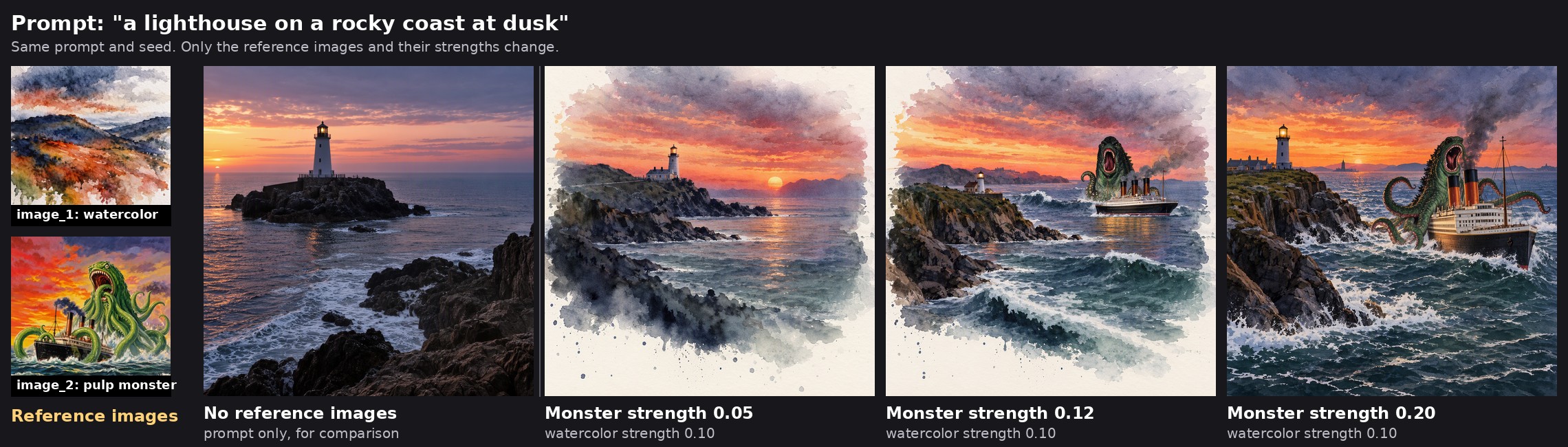
The watercolor reference stays at 0.10 and sets the medium. Raising only the monster's strength brings its subject in, until at 0.20 it takes over and the watercolor fades.
Why
MOSS-Image's text encoder (Qwen3.5) is a vision-language model: give it images without a VAE and it reads them alongside your prompt. Each image becomes about 144 tokens, while a prompt might be 10, so the images drown out your words. Core's single image_strength turns all images down together. This node lets you weight them separately and choose which one leads.
Base MOSS was never trained on reference images, so this works as a semantic image prompt, not a style copier. It carries over what's in the picture (subjects, themes, a vibe), usually rendered in MOSS's own look. Style transfers only when style is the image's dominant trait (e.g. a watercolor wash). Several images blend their concepts.
Install
Via ComfyUI-Manager: "Install via Git URL" → https://github.com/Dragon7108/ComfyUI-MOSSImagePrompt
Manual:
cd ComfyUI/custom_nodes
git clone https://github.com/Dragon7108/ComfyUI-MOSSImagePrompt
Restart ComfyUI. No extra dependencies.
Requires a ComfyUI version that includes MOSS-Image's context_attention_bias (PR #17320, the one that added image_strength to the core node). On older versions the sliders silently do nothing.
Example workflow
example_workflows/MOSS_Image_Prompt.json reproduces the image above. It also shows up in ComfyUI's Templates browser under this pack's name.
- Load it (drag the JSON onto the canvas, or open it from Templates).
- Get the three model files from Comfy-Org/MOSS-Image:
moss_image_sft_int8_convrot.safetensors(diffusion_models),qwen3.5_9b_w4a8_gptq.safetensors(text_encoders),flux2-vae_small.safetensors(vae). The loaders carry download links. - Drag
example_watercolor.jpgandexample_pulp_monster.jpgfromexample_workflows/into the two Load Image nodes (or copy them toComfyUI/input). - Run, then move
strength_2(the monster) and watch it come and go.
Both reference images were generated with MOSS-Image for this example.
Usage
Use it in place of Text Encode MOSS-Image Edit, on the positive prompt:
Load CLIP (MOSS-Image text encoder) ─┐
Load Image ── image_1 ───────────────┼─ MOSS Image Prompt ── positive ── KSampler
Load Image ── image_2 ───────────────┘
Keep the negative on a plain CLIP Text Encode: with no VAE there are no reference latents for the negative to mirror. There's no VAE input.
Found under model/conditioning/moss_image, next to the core node.
Settings
| Input | Default | What it does |
|---|---|---|
| prompt | | Your text prompt. |
| text_strength | 1.0 | Weight of the prompt's words. Above 1 (2–3) lets the words push back against the images. |
| vision_size | 384 | Each image is downscaled to at most this many pixels squared before the encoder reads it (core uses 384). Bigger = more tokens = more detail and more pull; lower its strength to match. Also slower, since every sampling step attends to every token (see below). |
| image_1…image_4 | | Optional reference images. Only the first frame of a batch is used. |
| strength_1…strength_4 | 0.05 | Each image's weight. 1 = unweighted (swamps the prompt), ~0.01–0.05 = a hint (the sweet spot), 0 = image left out. |
The info output (wire it to a Preview Any) lists each image's token count and bias, the prompt's, and the template's. Images are numbered Picture 1, 2, … in the order they're used, so with image_1 left out, image_2 becomes Picture 1; info shows both.
vision_size and speed: tokens per image grow with its pixel count (about 144 at 384, 576 at 768, 1024 at 1024), and the diffusion model attends to all of them on every step. Measured with two images and a 1024×1024 output on an RTX 5090, 25 steps:
| vision_size | context tokens | sampling time |
|---|---|---|
| 384 | 321 | 6.2 s |
| 768 | 1185 | 6.8 s (+10%) |
| 1024 | 2081 | 7.7 s (+25%) |
Changing the setting also re-encodes the images once (a second or two). More images add up the same way.
Tips: start images around 0.02–0.05 and nudge from there. Strengths are relative multipliers, not percentages: compare two images' strengths directly, and use text_strength to balance images against text. The numbers above are typical observations, not guarantees; results depend on the image.
Limitations
- Combine is fine, Concat is not.
Conditioning (Combine)and timestep-range nodes keep the bias working.Conditioning (Concat)lengthens the tokens but not the bias, so the sampler fails with a shape error (or, with this node on theconditioning_fromside, the bias is silently dropped). Core's own node has the same limitation. - No
(word:1.2)weighting. MOSS's text encoder reads parentheses as literal text;text_strengthis the only text weighting here. - Don't supply your own chat template. Prompts starting with
<|im_start|>bypass MOSS's template and aren't supported.
How it works
ComfyUI's MOSS-Image model accepts context_attention_bias: one value per conditioning token, added to that token's attention logits in the diffusion model. Core's node puts log(image_strength) on every vision token. This node fills the bias per segment instead: log(strength_i) on image i's tokens, log(text_strength) on the prompt's words, and 0 on the chat template and the Picture N: labels. At matching settings it builds the same inputs as the core node, and in testing the renders were pixel-identical.
License
GPL-3.0 — ComfyUI is GPL-3.0 and this node imports its APIs, so it matches the ecosystem.