
ComfyUI-DonutNodes
Block-weighted LoRA stacking with CivitAI metadata, hash resolution, and browser integration; Donut Detailer for per-block model tuning; TeaCache acceleration; tiled upscaling; CFG sampling with 18 curve types; and reference-based spectral sharpening.
Nodes (76)
DMC Face Detailer — Give Every Face in the Frame Its Own Prompt
The apply half of the best-known Z-Image LoRA stack in ComfyUI
Four ways to auto-correct exposure, from fast mean-shift to histogram science
Industry-standard white balance, from gray world to Photoshop-style
The answer to 'which of my 76 detailer sliders should I even touch'
The pack's own stethoscope for cache-invalidation bugs
AMD's game sharpener, ported to your diffusion output
A save node with no workflow baggage — and now no menu presence either
An SDXL text encoder that knows the resolution it's drawing at
Your Nodes Vanished? This Diagnostic Tells You Why — Without Breaking Anything
Not that kind of detailer — a per-block model patch in a detailer's clothing
The K/S1/S2 flavor of the Donut model patch — and why it's on the way out
Direct weight and bias multipliers
A detailer that patches the LoRA itself, not the model
The one detailer node that finally merges the three formulas
Per-block weight and bias control over every SDXL block — all 76 knobs
Tuning Z-Image Turbo's 30 layers by what they actually do
Save a merged model without the workflow sludge (or accidental fp8)
The LoRA Stack With No Row Limit — Edit a JSON Array Instead of 3 Dropdowns
Two reference slots, one crop, no API key
Turn a patched model back into a portable LoRA
The crowd-of-clones fix
A fake model and a fake CLIP, for when a merge needs an empty seat
A do-nothing CLIP for the merge graph that wants every socket wired
A placeholder that makes merge graphs stay wired
A spectral 'is this AI?' diagnostic that's honest about what it can tell you
A gamma slider with a dither knob — and a nod to a Linux image viewer
The Clarity slider, as a ComfyUI node
The auto-levels fix for flat renders
The dev node that's intentionally disabled
Six tone and color fixes, one node
The WAS save node without the WAS install
The one node that makes a Krea 2 area edit actually stay an area edit
Fine-tune how Krea 2 fuses text, without a single LoRA
Mix three reference images into Krea 2 with per-image strength
1.4) — This Node Makes It Bite
The metadata node that got folded into a better one
Identify any LoRA (or any hash) without leaving the graph
Resolve a bare SHA256 to a model page
Your CivitAI metadata cache, managed
The One-Stop Dynamic LoRA Loader — Block Weights, a Krea2 Safety Rail, and a Fast Path
The block-weighted LoRA stacker the pack is built around
Splice two LoRA stacks into one
The 'free my VRAM and reset caches' button
Merge Krea 2 checkpoints component-by-component, without rebuilding quantized weights
Export a checkpoint without the metadata baggage
Sample with three models and a CFG that slides
Jump from a LoRA in your folder to its CivitAI page
One CLIP Encode, Four Conditionings — the Face Pass and the Zeroed Negative
A style directory you can actually navigate
Hand Krea 2 an image without touching your LoRA
A KSampler with a CFG that changes as it denoises
The CFG-curve sampler, pinned to full control
Bake a full checkpoint with no workflow embedded
Skip the UNet steps that barely change
See what TeaCache actually did to your SDXL model
Three Seeds, One Workflow — Stop Your Wildcards Reshuffling Every Time You Retry
The pass you add *after* the upscale you already ran
Still loads old workflows, no longer in the menu
The reference-based Donut sharpener
Fix a merged SDXL model's magnitude drift, the lazy way
Spectral sharpening with a reference
Not a node you wire up, the job that computes your cutout
Wildcards That Reference Other Wildcards — Recursive Prompt Expansion Without the Blowup
Tiled img2img that works on any model
A 2,883-weight model that fixes flat gamma, not another diffusion pass
An experimental leash on Krea 2's text-fusion blocks
Decode your latents, then subtract the VAE's own damage
The loader that stops a 2x VAE from doubling your image
Scale LoRA block weights without nuking the neutral layers
Merge text encoders the same way you merge the UNet
Merge checkpoints by importance, not by blind averaging
Crank prompt adherence without CFG
A text-encode for Z-Image that blends every encoder layer, not just the last
Blend 30 transformer layers by hand
The old per-layer Z-Image merge node (folded into ModelMergeZIT)
DonutNodes + Donut Workflow V5

Donut Workflow is the main workflow for this node pack. DonutNodes is built around its Krea2 model setup, LoRA controls, editing, prompting, generation and saving. You can also use the individual nodes in your own ComfyUI workflows.
Start with Donut Workflow V5
Download the workflow · Setup and usage · Workflow changelog
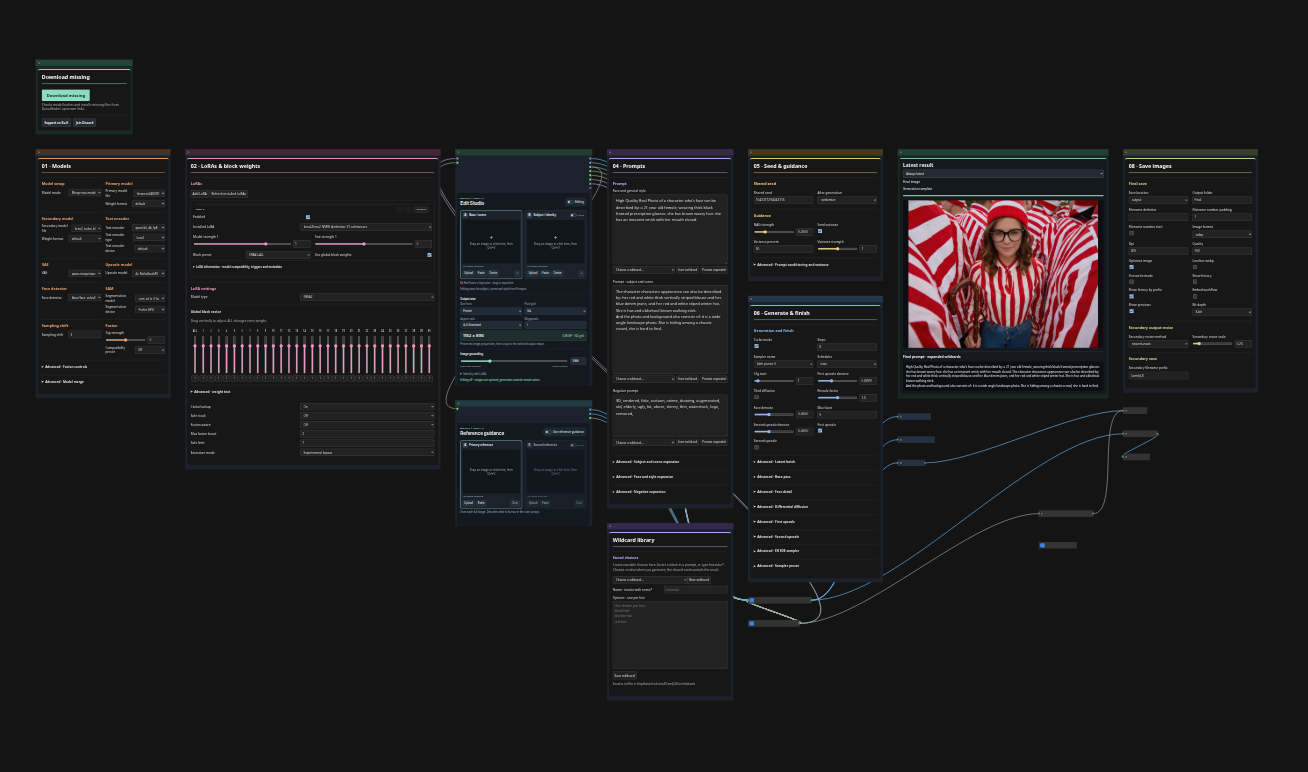
New look, you will be shook. V5 replaces V3's spread-out controls with numbered cards, collapsible Advanced settings and inspectable source/generation subgraphs. Everyday controls stay accessible in Graph and App Mode.
- Edit Studio: base and optional identity images, paste/drop/upload, visual crop controls and output sizing in one place.
- Reference guidance: optional image references for native Krea2 generation conditioning, separate from the edit-LoRA path.
- Wildcard library: create reusable prompt choices, insert tokens and inspect the final expanded prompt.
- Model downloads: check selected models against a reviewed catalog and download missing files with size/hash verification.
- Latest result: follow generation stages and view intermediate/final images.
- Donut Image Save: numbered filenames and configurable formats, including WebP, without a WAS dependency.
V3 already included face detailing, editing, model merging, LoRA stacking and upscaling. The changelog separates those existing capabilities from V5's additions and installation fixes.
Installation
- Install or update DonutNodes to the code accompanying V5. In ComfyUI
Manager, search for DonutNodes. If the installed release does not yet
contain
DonutImageSaveandDonutEditStudio, use the matching beta source; an older package is not sufficient. - Restart ComfyUI and refresh the browser, then download the workflow JSON using GitHub's Download raw file button and open it in ComfyUI.
- Use Install Missing Nodes → Install All, then Apply Changes/restart. Leave the collapsed Required node packs subgraph in place for dependency detection. No WAS version selection is needed.
- Select your models/LoRAs, use Download missing for catalogued files, review the prompts and save settings, and click Run.
See the workflow README for model filenames, companion packs, editing, wildcard files, saving and migration from V3.
Manual node installation
cd ComfyUI/custom_nodes
git clone https://github.com/DonutsDelivery/ComfyUI-DonutNodes.git donutnodes
cd donutnodes
python -m pip install -r requirements.txt
Use the Python interpreter that launches ComfyUI, then restart and refresh. For an existing checkout, update it rather than creating a duplicate node folder. The workflow release name V5 is separate from the DonutNodes package version. These documents and the bundled JSON are prepared with the current source; this is not a claim that an older registry release contains the beta.
Beta test status
The current development code passed a fresh Linux/Python 3.12.7 installation with default missing-node installs → restart → full generation on an RTX 4070. No WAS installation, manual version selection or dependency repair was required. The tested path includes base generation, first upscale, two face refinements and a 1728 × 1344 WebP save.
That run reused models and had editing and the second upscale off. Other modes, platforms and GPU configurations still need beta coverage. See the validation report for exact scope and remaining warnings. For errors, include the workflow, versions, OS/GPU and full traceback; Donut Dependency Check helps diagnose dependencies.
Using the nodes independently
The pack also includes block-weighted LoRA stacking, Krea2 model merging and Fusion Control, CFG sampling curves, detailers, tiled upscaling, SDXL TeaCache and spectral sharpening. Experimental execution modes remain optional.
- Node guide and advanced settings
- Dependency diagnostics and compatibility
- Third-party licenses and attribution
Optional companion packages
- ComfyUI-DonutLocalAutomation: local Prompt Receiver and Image Reporter nodes.
- ComfyUI-DonutCivitaiLocal: local CivitAI library and workflow-recovery tools.
These are separate from the seven companion packs required by V5. Install
DonutLocalAutomation to retain DonutPromptReceiver and DonutImageReporter
when using older personal workflows that contain them.
Third-party attribution
See THIRD_PARTY_NOTICES.md for incorporated code and its licenses.