
X-Dub Lip Sync
ComfyUI custom nodes for Kling X-Dub single-person audio-driven lip sync.
Nodes (3)
ComfyUI X-Dub
ComfyUI custom nodes for KlingAIResearch/X-Dub, a single-person audio-driven visual dubbing model based on Wan 2.2 TI2V-5B.
This is a community ComfyUI integration, not an official KlingAIResearch repository. The bundled inference source is adapted from the upstream X-Dub release and runs in an isolated Python environment so its pinned packages do not replace packages in ComfyUI.
[!IMPORTANT] Upstream inference typically needs about 21 GB of NVIDIA GPU VRAM. X-Dub currently supports one target person and may be slow: long audio is split into overlapping diffusion clips and every clip runs the selected number of denoising steps.
Workflow preview
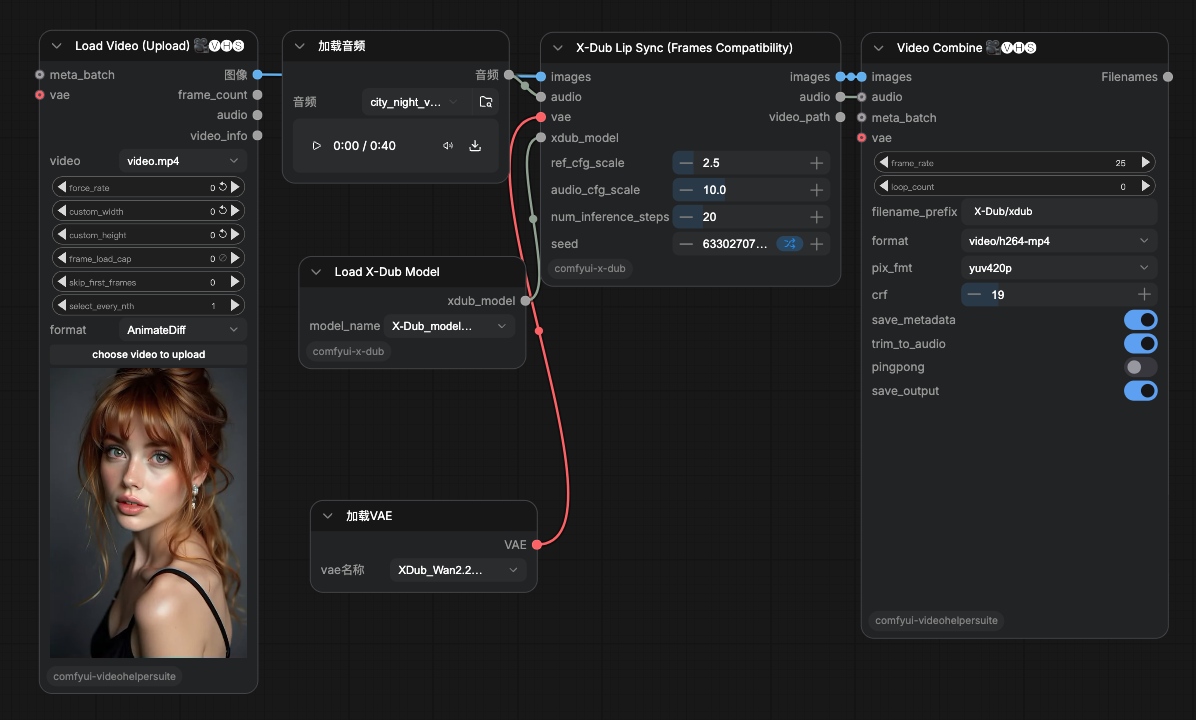
This example uses the frames compatibility node with Video Helper Suite to load a video, connect the official X-Dub model and Wan 2.2 VAE, drive lip sync from an audio track, and render the result as H.264 MP4.
Nodes
| Node | Purpose |
| --- | --- |
| Load X-Dub Model | Selects and validates X-Dub_model.safetensors from ComfyUI/models/diffusion_models. |
| X-Dub Lip Sync (Video) | Preferred path using ComfyUI's standard VIDEO and AUDIO types. Returns a VIDEO and the rendered MP4 path. |
| X-Dub Lip Sync (Frames Compatibility) | Compatibility path for IMAGE batches, including Video Helper Suite workflows. Returns frames, the original audio, and the rendered MP4 path. |
Both inference nodes use a standard ComfyUI VAE input. The connected Wan 2.2 VAE must have 48 latent channels.
Both inference nodes also report native ComfyUI progress from preprocessing through final encoding. Denoising progress is accumulated across all overlapping clips, while detailed per-step messages remain available in the terminal log.
Requirements
- Linux with an NVIDIA CUDA GPU; upstream reports about 21 GB VRAM for inference.
- A working ComfyUI installation.
ffmpegandffprobeavailable onPATH.uvavailable onPATHor at~/.local/bin/uv.- Python 3.10, which
uvcan provision for the isolated runtime. - Video Helper Suite only when using the included legacy frames example.
Installation
Clone the repository into ComfyUI/custom_nodes, then install the isolated runtime:
cd ComfyUI/custom_nodes
git clone https://github.com/DarkNoah/comfyui-x-dub.git
cd comfyui-x-dub
bash install_runtime.sh
The script creates comfyui-x-dub/.venv and installs the X-Dub runtime there. It does not modify ComfyUI's Python environment. Restart ComfyUI after installation.
Models
Download the official public model bundle from KlingTeam/X-Dub on Hugging Face, then arrange the required files in one of the supported locations:
ComfyUI/
├── models/
│   ├── diffusion_models/
│   │   └── X-Dub_model.safetensors
│   ├── vae/
│   │   └── Wan2.2_VAE.safetensors
│   ├── text_encoders/
│   │   ├── models_t5_umt5-xxl-enc-bf16.safetensors
│   │   └── umt5-xxl/
│   ├── audio_encoders/
│   │   ├── whisper/
│   │   │   └── large-v2.pt
│   │   └── wav2vec2-base-960h/
│   └── dwpose/
│       ├── yolox_l.onnx
│       └── dw-ll_ucoco_384.onnx
└── custom_nodes/
    └── comfyui-x-dub/
The text encoder, tokenizer, Whisper, Wav2Vec2, and DWPose files may instead be placed under the plugin's models/ folder using the same names. The two ONNX pose models are available from the DWPose model repository. The original X-Dub bundle's PyTorch DWPose files are not interchangeable with these ONNX files.
Select the DiT with Load X-Dub Model and load Wan2.2_VAE.safetensors with ComfyUI's standard Load VAE node.
Example workflow
Use example_workflows/xdub_frames_vhs_25fps.json for the Video Helper Suite compatibility path. Before queuing it:
- Upload or select
video.mp4andaudio.wav. - Select
X-Dub_model.safetensorsand the 48-channel Wan 2.2 VAE. - Keep Video Combine at 25 FPS and Trim to audio enabled.
X-Dub produces 25 FPS output. An IMAGE batch carries no frame-rate metadata, so a downstream video node can otherwise fall back to 8 FPS. For example, 1,013 frames play for about 40.5 seconds at 25 FPS but about 126.6 seconds (2:07) at 8 FPS. That changes playback speed; it does not mean X-Dub generated three times more speech.
Runtime behavior
Long inputs are processed as overlapping chunks. The upstream public pipeline uses 77-frame clips with 5 motion-overlap frames, so the effective stride is 72 frames. A roughly 40-second, 25 FPS input therefore needs about 14 diffusion clips; with 30 inference steps, that is roughly 420 denoising iterations before VAE decoding and compositing.
Repeated messages such as the following are expected when VRAM management moves models between CPU and GPU for each pipeline stage or clip:
[VRAM] text_encoder: not in target model_names, try offload.
[VRAM] vae: not in target model_names, try offload.
[VRAM] dit: in target model_names, try onload.
They are informational unless followed by an exception or CUDA out-of-memory error. The Whisper and Wav2Vec processor messages may say that VRAM management is disabled; those processor wrappers do not expose the same offload mechanism.
Comfy Registry publication
This repository includes the official Registry metadata in pyproject.toml, exclusions in .comfyignore, and a manual GitHub Action at .github/workflows/publish-comfy-registry.yml.
For the first Registry release, the repository owner must:
- Create the globally unique lowercase
darknoahpublisher at Comfy Registry. - Create a Registry publishing API key for that publisher.
- Add it to this GitHub repository as the Actions secret
REGISTRY_ACCESS_TOKEN. - Run Publish to Comfy Registry from the repository's Actions tab.
The workflow is deliberately manual so cloning or updating the repository cannot publish a release unexpectedly.
Limitations and responsible use
- Single-person videos only; fast head motion can make face tracking unstable.
- The public Wan-based model can show flicker, identity/color drift, or occasional noisy frames.
- Generated or edited media should be disclosed clearly. Do not use this project for impersonation, fraud, harassment, or deceptive content.
Attribution and license
The X-Dub method, model, and adapted inference implementation come from KlingAIResearch/X-Dub. The inference framework also builds on DiffSynth-Studio, and the model backbone comes from Wan2.2.
This repository is distributed under the Apache License 2.0, matching the upstream X-Dub code release. Model weights may have their own terms; review the upstream model card before use.