
jlc-comfyui-nodes
Custom workflow-oriented nodes for ComfyUI
Nodes (25)
Pass the object, keep the chain
A ControlNet Apply that loads its own model and chains cleanly
Stack five ControlNets without the recursive slowdown
Every ControlNet in one node, no Apply-chain spaghetti
Multi-ControlNet without the chain
One image in, ten ControlNet hints out
One LoRA on the hair layers, another on the rest — per-slot block weights
Per-LoRA block weights, no CLIP to babysit
Stack ten LoRAs in one node and actually see what you're doing
Ten LoRAs on one node — and it won't touch your CLIP
One block-weight profile for your whole LoRA stack, CLIP included
Ten LoRAs, one block profile, no CLIP patching
Grab any value from across your workflow without drawing a single wire
Twenty-four reroutes in one node, without the spaghetti
Publish any value to a named channel and never route it by hand again
A pause button between stages that doesn't touch your VRAM
The image loader that ends 'latent size mismatch' errors
Keep it for old workflows only
This LoRA Stack Is Retired — But It's Why Your Old Workflows Still Open
The Inpaint/Outpaint Canvas Builder People Actually Share
Outpaint without the tape measure
A Resize Node That Doesn't Break Dynamic Workflows
One resize policy, five images, zero math on your part
The Seed Node That Stops Your Base Seed From Walking Away
A Deliberate 'Free the VRAM Between Stages' Switch — Handle With Care
JLC ComfyUI Nodes
<p align="center"> <img src="assets/icons/jlc-comfyui-nodes_Logo-0512.png" width="120"> <img src="assets/icons/jlc-comfyui-nodes_Logo-Dark-0512.png" width="120"> </p> <p align="center"> <a href="https://registry.comfy.org/packages/jlc-comfyui-nodes"> <img src="https://img.shields.io/badge/Available%20on-ComfyUI%20Registry-blue" alt="ComfyUI Registry"> </a> <img src="https://img.shields.io/badge/ComfyUI-Custom%20Nodes-blue" alt="ComfyUI Custom Nodes"> <img src="https://img.shields.io/badge/license-MIT-green" alt="MIT License"> <img src="https://img.shields.io/badge/status-active-brightgreen" alt="Status: active"> </p>JLC ComfyUI Nodes is a custom-node collection built around Non-Recursive ControlNet Composition, a method introduced by this project to replace recursively nested multi-ControlNet evaluation with a flattened composition path whose execution cost scales approximately linearly with the number of applied ControlNets, rather than accumulating the severe repeated work, runtime growth, and memory pressure of native recursive chains.
The collection also includes supporting tools for padded inpainting and outpainting, dynamic ControlNet auxiliary preprocessing, dynamic LoRA loading, stage-boundary VRAM cleanup, GPU cooldown gates, multi-image resizing, compact wireless connections, compact multi-lane rerouting, and frontend workflow control.
Release 2.1.0 expanded the utility family with JLC Resize Multiple Images, the production-ready JLC Multi Set/Get pair, and JLC Boolean Logic (Frontend), which replaced the earlier dedicated AND prototype. A subsequent minor update adds JLC Multi Reroute and hardens JLC Multi Set/Get virtual-link handling for ComfyUI subgraphs.
Developed by J. L. Córdova, the project is especially focused on Flux-oriented image-generation pipelines, ControlNet-heavy workflows, multi-stage inference, LoRA experimentation, and advanced inpainting and outpainting.
The current ControlNet Composition, Orchestrator, Orchestrator Advanced, Apply Advanced, shared composition core, and dynamic slot-visibility paths were audited and validated against ComfyUI commit 2a610155 from June 22, 2026, with frontend package 1.45.19. Validation included demanding Flux workflows with multiple LoRAs, Union ControlNet models, repeated ControlNet use, and as many as four ControlNet slots. See the detailed ControlNet guide for the full compatibility baseline, benchmark context, and runtime recommendations.
Release 2.3.0
Release 2.3.0 adds JLC GPU Cooldown, an interruptible generic passthrough gate with timer, NVIDIA temperature, and combined modes. It pauses only the dependency path wired through it and performs no implicit VRAM cleanup, model unloading, tensor copying, or device transfers. Multiple gates can define separate boundaries in one workflow.
This release also packages the Seed Generator work added to main after the
2.2.0 tag: -1 passes through unchanged as an intentionally unseeded sentinel,
and the frontend keeps fixed/increment/decrement/randomize plus random-seed
record/replay behavior from mutating that sentinel. The downstream consumer
must itself support -1.
See the utility-node guide and 2.3.0 changelog.
Start Here: Release 2.0 Showcase Workflows
These showcase workflows demonstrate the breadth of the node pack and provide practical starting points for exploring Release 2.0.
The JLC ControlNet Orchestrator (Advanced) workflow serves both as an approachable starting point for new users and as a reference implementation of the package’s non-recursive ControlNet composition system.
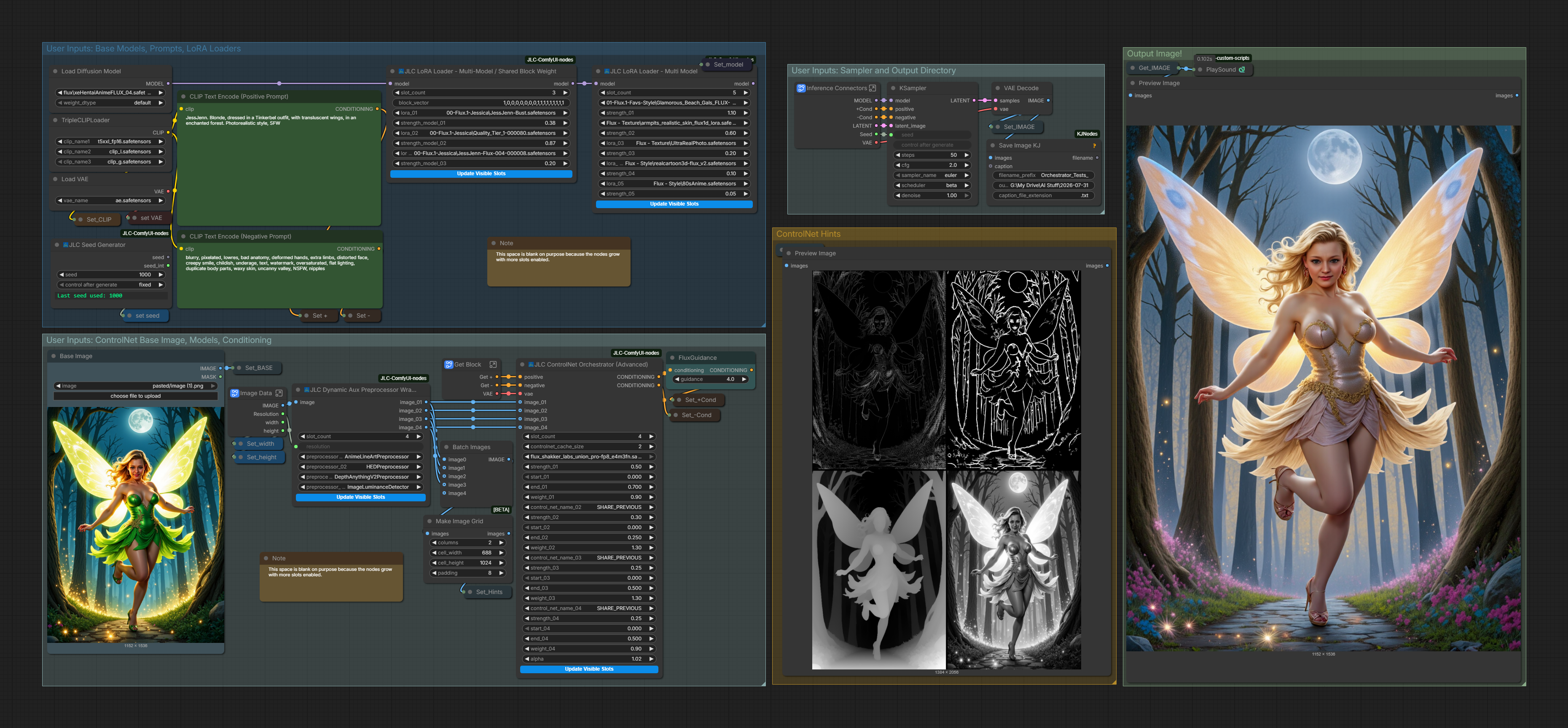
Download PNG workflow · Download JSON workflow

The JLC All-In-One Workflow presents the collection as a complete working toolchain rather than a set of isolated nodes. It combines ControlNet with representative nodes from the ControlNet Aux, Dynamic LoRA Loader, padded-image and padded-latent, and utility families.
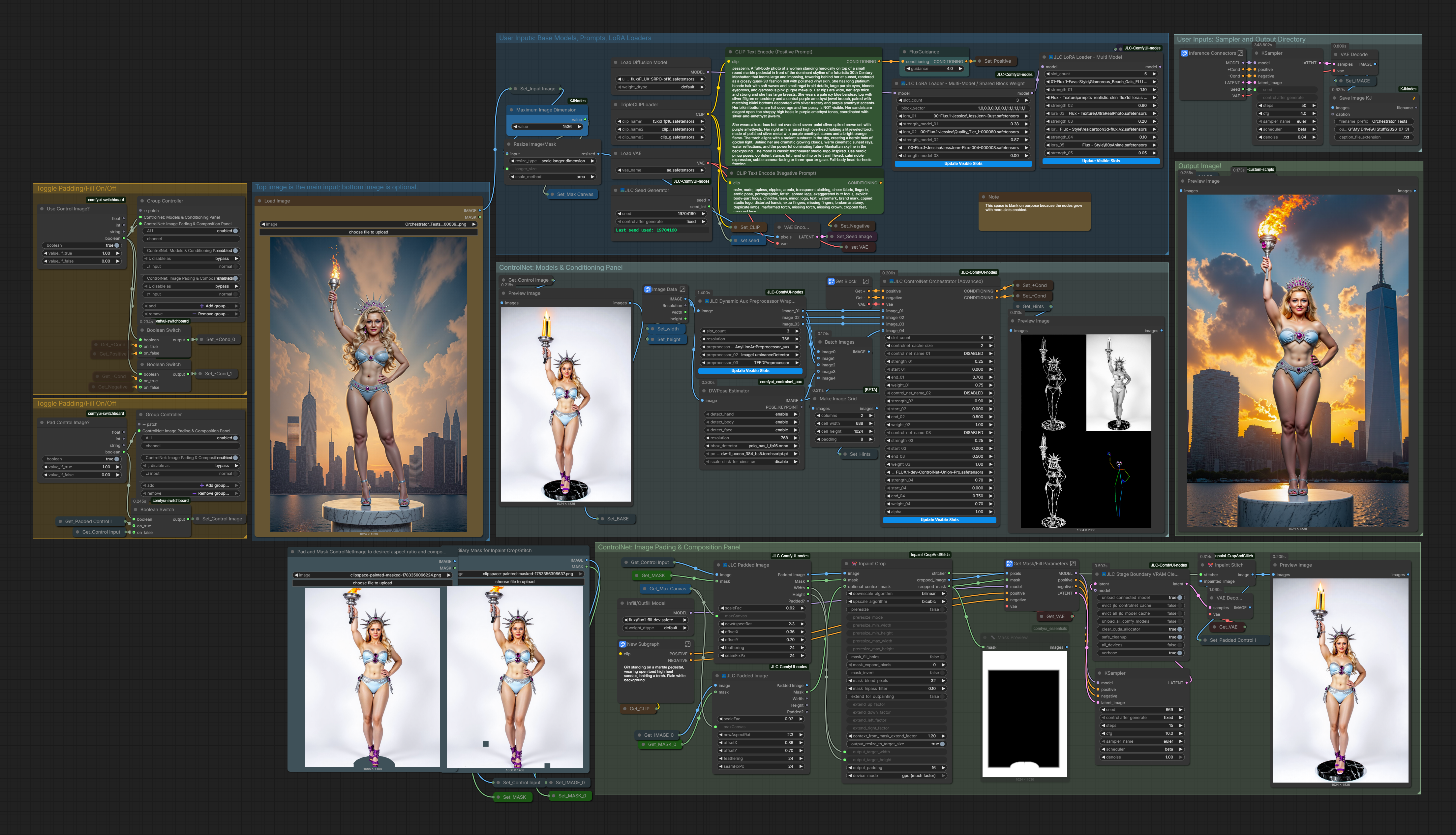
Download PNG workflow · Download JSON workflow

As with the other workflows included in this documentation, each example is provided both as a PNG with an embedded workflow for direct drag-and-drop into ComfyUI and as a JSON file for standard workflow loading.
Documentation
This README is the front page for the repository. Detailed documentation is organized by node family:
- ControlNet Composition and Orchestration
- Padded Image / Padded Latent
- ControlNet Aux Preprocessor Wrappers
- Dynamic LoRA Loaders
- Utility Nodes
Node Families
1. ControlNet Composition and Orchestration
A family of nodes for native ControlNet application, modular chain construction, and explicit linearized non-recursive weighted fusion.
This family includes:
- JLC ControlNet Composition
- JLC ControlNet Orchestrator
- JLC ControlNet Orchestrator (Advanced)
- JLC ControlNet Apply
- JLC ControlNet Apply (Advanced)
The central design treats prepared ControlNets as independent operators evaluated against the same sampler state and combines their outputs through explicit weighted addition. The modular Apply Advanced → Composition workflow and the integrated Orchestrator Advanced workflow use the same validated fusion core.
- Orchestrator Advanced is the recommended integrated interface for most new multi-ControlNet workflows.
- Apply Advanced → Composition is a first-class modular interface when explicit chaining, pass-through wiring, or separate model sourcing is useful.
- Orchestrator remains the specialized external-input interface for ControlNet objects supplied by standard, third-party, custom, or nonstandard-location loaders.
2. Padded Image / Padded Latent
Nodes for padded-canvas workflows, especially inpainting and outpainting.
This family includes:
- JLC Padded Image
- JLC Inpaint-Conditioned Padded Latent
Use Padded Image when you want image, mask, and canvas preparation while keeping VAE encoding and inpaint conditioning separate. Use Padded Latent when you want a more integrated node that prepares the padded canvas and also injects inpaint-conditioning metadata.
Read the Padded Image / Padded Latent guide
3. ControlNet Aux Preprocessor Wrappers
A dynamic convenience wrapper for simple image-in/image-out preprocessors provided by Fannovel16's comfyui_controlnet_aux package.
This family currently includes:
- JLC Dynamic Aux Preprocessor Wrapper
The wrapper does not replace Fannovel16's nodes and does not claim ownership of the underlying preprocessors. It provides a compact multi-slot interface for JLC workflows that need several simple ControlNet hint images from the same source image. Parameter-heavy preprocessors should still be used through their native ControlNet Aux nodes.
comfyui_controlnet_aux must be installed for non-disabled preprocessor slots to run.
4. Dynamic LoRA Loaders
Dynamic LoRA loader nodes for MODEL-only and MODEL+CLIP workflows, including shared and per-slot block-weight variants.
This family includes:
- JLC LoRA Loader - Multi Model
- JLC LoRA Loader - Multi-Model / CLIP
- JLC LoRA Loader - Multi-Model / Shared Block Weight
- JLC LoRA Loader - Multi Model / Shared Block Weight + CLIP
- JLC LoRA Loader - Multi-Model / Block Weight
- JLC LoRA Loader - Multi-Model / CLIP + Block Weight
These nodes predeclare up to ten LoRA slots and use frontend visibility controls to expose only the active rows. Hidden slot values remain serialized in workflow JSON, while the backend treats slot_count as authoritative. MODEL-only variants intentionally avoid CLIP/text-encoder patching; MODEL+CLIP variants expose independent MODEL and CLIP strengths.
5. Utility Nodes
Workflow-support nodes for seed discipline, stage-boundary memory hygiene, deliberate cooldown pauses, image resizing, compact wireless connections, compact visible rerouting, and frontend Switchboard control.
This family includes:
- JLC Seed Generator — shared seed source that keeps the visible base seed stable, supports an explicit
-1intentionally-unseeded sentinel for compatible consumers, and can record and replay randomized seed sequences for repeatable parameter trials. - JLC GPU Cooldown — generic, list-aware passthrough gate with timer, NVIDIA temperature, and combined modes. It pauses the connected dependency boundary without freeing memory or modifying the value.
- JLC Stage Boundary VRAM Cleanup — experimental, type-agnostic and list-aware stage-boundary cleanup passthrough. It can target a connected ComfyUI
MODEL,CLIP, orVAE-compatible managed patcher (including clones/additional models), optionally unload all ComfyUI models or JLC-managed resident caches, run allocator cleanup, and passSTRING,LATENT,IMAGE, or other ComfyUI values through unchanged. - JLC Resize Multiple Images — applies one shared aspect-ratio-preserving resize policy to one through five images, with separate outputs and a convenience normalized batch output.
- JLC Multi Set and JLC Multi Get — production-ready virtual nodes that replace groups of individual wireless Set/Get nodes with up to twenty-four independently named, dynamically typed channels. Rows grow and compact automatically while preserving stable channel identities and physical links.
- JLC Multi Reroute — frontend virtual node providing one through twenty-four independent visible reroute lanes in a single compact node. Lanes grow automatically, compact when fully disconnected, preserve normal fan-out, and use ComfyUI's standard socket/link colors for their resolved data types.
- JLC Boolean Logic (Frontend) — pure client-side two-input logic for ComfyUI-Switchboard controllers, supporting AND, OR, XOR, NAND, NOR, XNOR, and the two directional AND-NOT operations. It is a Switchboard companion, not a standalone backend Boolean node.
Installation
Install through the ComfyUI Registry:
https://registry.comfy.org/packages/jlc-comfyui-nodes
Manual install:
cd ComfyUI/custom_nodes
git clone https://github.com/Damkohler/jlc-comfyui-nodes.git
Restart ComfyUI after installation or update.
To update manually:
cd ComfyUI/custom_nodes/jlc-comfyui-nodes
git pull
Optional dependency: ControlNet Aux preprocessors
The JLC Dynamic Aux Preprocessor Wrapper requires Fannovel16's comfyui_controlnet_aux package when any non-disabled preprocessor slot is used.
Install it through ComfyUI Manager, or follow the upstream installation instructions:
https://github.com/Fannovel16/comfyui_controlnet_aux
Some upstream preprocessors may download or load large auxiliary models the first time they are used.
Optional dependency: GPU temperature cooldown
The JLC GPU Cooldown timer mode has no telemetry dependency. Temperature
and combined modes require nvidia-ml-py, which is imported as pynvml, and
an NVIDIA GPU visible to NVML. Install it in ComfyUI's Python environment if it
is not already supplied by another custom node:
python -m pip install nvidia-ml-py
Compatibility Notes
The nodes are designed for ComfyUI custom-node workflows and have been developed primarily around:
- Flux-based image generation
- ControlNet-heavy pipelines
- LoRA experimentation
- inpainting and outpainting
- multi-stage inference graphs
The current ControlNet family is aligned with the ComfyUI sampler, ControlNet, model-management, hook, and lifecycle interfaces present at the tested baseline documented in the ControlNet guide. Later ComfyUI revisions may require renewed testing if those interfaces change.
For the validated 16 GB RTX 4090 Laptop workflow, use normal ComfyUI VRAM behavior with DynamicVRAM where desired. Forced --lowvram is not recommended for the benchmarked Flux and multi-ControlNet configurations because it caused destructive partial unload/reload cycles and severe execution-time regression.
Real MultiGPU ControlNet cloning is not implemented by the JLC composed wrapper. The compatibility attributes present in the wrapper are single-device shunts, not a claim of MultiGPU support.
Repository Structure
The current repository includes these main areas:
nodes/
  controlnet_aux_nodes/
  engines/
  lora_loader_nodes/
  util_nodes/
web/
assets/
  icons/
  workflows/
docs/
A generated repository map is also included:
jlc-comfyui-nodes-structure.txt
License
MIT License.
Author
J. L. Córdova
GitHub: Damkohler
Contributions
Suggestions, bug reports, and improvements are welcome through GitHub issues or pull requests.