
ComfyUI-SmartQueue
GPU-aware queue autopilot (NVIDIA) plus a cross-GPU pause/cooldown/notify node for ComfyUI
Smart Queue
GPU-aware queue autopilot for ComfyUI, plus a Smart Cooldown & Pause node: for anyone running long batch renders on a single GPU who wants the queue to look after itself.
ComfyUI removed its native pause button and has no built-in way to gate the queue on live GPU state. Smart Queue fills that gap: it watches your GPU (temperature, VRAM headroom, job count) and automatically pauses/resumes the queue, on top of a full persistent queue/history panel with drag-reorder, rename, search, and bulk actions.
GPU support: temperature- and VRAM-based autopilot need an NVIDIA GPU and driver, read via NVML. The manual pause button, the queue/history panel, drag-reorder, and the job-count autopilot rule all work on any GPU (or CPU-only) — see Compatibility & known limitations for the full breakdown.
Use Cases
- Unattended overnight batch renders: queue 100 jobs and leave it alone. Smart Queue will auto-pause when your GPU hits 75°C (or whatever you set), resume once it cools to 65°C, and keep rendering without you watching.
- Prevent thermal throttling: if your GPU throttles after 30 minutes of back-to-back rendering, use the "job count" autopilot rule to pause for 2 minutes after every 5 jobs. The queue picks back up on its own.
- Shared GPU hardware: run ComfyUI on a workstation that also does other work. Set a VRAM threshold; if someone launches a game or another app and VRAM drops below your limit, the queue auto-pauses instead of crashing the job or competing for memory.
- Approval workflows: drop the Cooldown node with
wait_for_click: oninto your graph. Every render stops and waits for you to hit ▶ Continue before it saves: great for reviewing outputs step-by-step or gating multi-step pipelines. - Quick interruptions: you queued 50 renders and halfway through realize you need to test a different checkpoint or model settings. One click pauses the queue (everything still pending stays in the same order), you queue your test render, run it, then resume the original batch right where it left off.
- Queue management without tabs: persistent history with thumbnails, searchable job names, drag-to-reorder, and multi-select right-click context menus. Rename a job mid-queue, move it to the front, or cancel a batch without leaving ComfyUI.
Features
- Autopilot: three independent, opt-in rules that pause the queue when your GPU gets too hot, VRAM gets too tight, or too many jobs have run back-to-back. Each has hysteresis (a resume threshold below the pause threshold) so it never flaps. Never interrupts a job that's already running: it only holds back what hasn't started yet.
- Manual pause: one click in the toolbar. Holds every not-yet-running job out of ComfyUI's own queue (not just new submissions) and puts it back in the same order on resume. Survives a ComfyUI restart.
- Persistent queue & history panel (left sidebar): survives restarts, shows readable job names (read from the workflow itself, no extra node needed), thumbnails in history with click-to-restore, per-job duration, an estimate of the time left for the whole queue, and a live GPU temp/VRAM readout (hidden automatically if you already have Crystools installed, so you don't get two gauges).
- Rename, filter/search, auto-archive: double-click to rename a job, search box above each list, and automatic history cleanup after N days (configurable, off by default).
- Bulk actions & drag-reorder: ctrl/shift-click to multi-select, right-click for a context menu (rename / cancel / cancel & requeue), and drag-and-drop priority reordering that actually changes ComfyUI's real execution order.
- Pause/resume toast notifications: so an autopilot-triggered pause doesn't go unnoticed just because you weren't looking at the toolbar.
- Smart Cooldown & Pause node: an in-graph node for per-workflow control: fixed delay, wait-for-temperature, unload models / clear VRAM cache before waiting, and a manual "wait for click" gate with on-node Continue/Cancel buttons: plus sound and popup notifications when it's done waiting.
- Fail-open everywhere. No NVIDIA GPU, no NVIDIA driver, a bad setting, an exception in the rule engine: the affected feature disables itself and logs a warning. A bug in this pack is never allowed to hang your render queue.
Installation
Clone (or use ComfyUI Manager) into your custom_nodes folder:
cd ComfyUI/custom_nodes
git clone https://github.com/CraftopiaStudio/ComfyUI-SmartQueue.git
One dependency, nvidia-ml-py, installed automatically by ComfyUI-Manager or pip install -r requirements.txt. It is a binding onto the driver's own library, so nothing is downloaded at runtime. Restart ComfyUI.
The sidebar panel
Open it from the left toolbar icon (Smart Queue: GPU autopilot + render queue). It shows two lists: Pending/Running and History: each with its own search box, plus a status row with the estimated time left (the median of your recent job durations times what is still queued), the live GPU readout and a shortcut into Settings → Smart Queue. The toolbar also gets its own pause button (next to Run), highlighted blue while paused:
<img src="docs/images/toolbar_pause_button.png" alt="Smart Queue toolbar pause button, highlighted blue while paused" width="420">Screenshots below are from a real paused queue (job names are placeholders I renamed for the screenshot: everything else, including the thumbnails, badges and history, is live):
<img src="docs/images/panel_real.png" alt="Smart Queue sidebar panel: held jobs and history with thumbnails" width="420">- Click a row to select it, ctrl/cmd-click to add to the selection, shift-click to select a range.
- Right-click a row (or a multi-selection) for Rename / Cancel / Cancel & Requeue.
- Drag a pending row to reorder it: this changes the real execution order, not just the display.
- A red HELD badge marks a job pulled out of the queue by a pause; a green RUNNING badge marks the one actually executing right now.
The Smart Cooldown & Pause node
Drop it anywhere in a graph: typically right before your Save node: and wire an image (or anything else) through its passthrough socket so it sits in the execution path. It has two independent passthrough lanes, so one pause point can carry e.g. an image and its mask together.
The node's OPTIONS and NOTIFICATIONS sections are collapsible, so the node stays small until you need them:
| Collapsed (default) | Expanded |
|---|---|
| 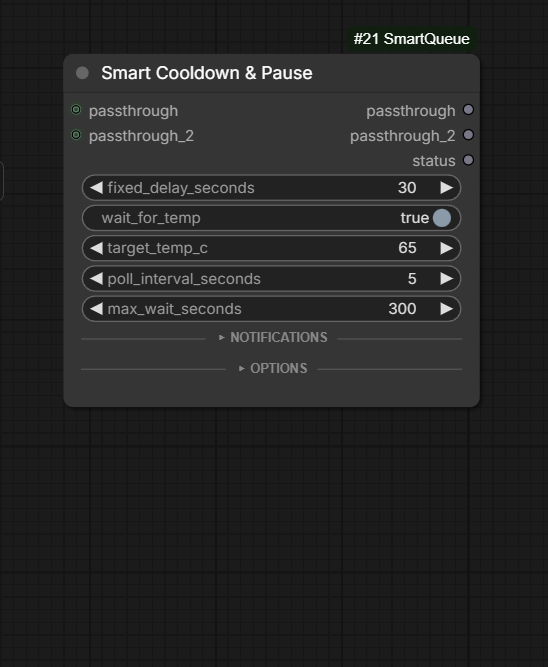 |
| 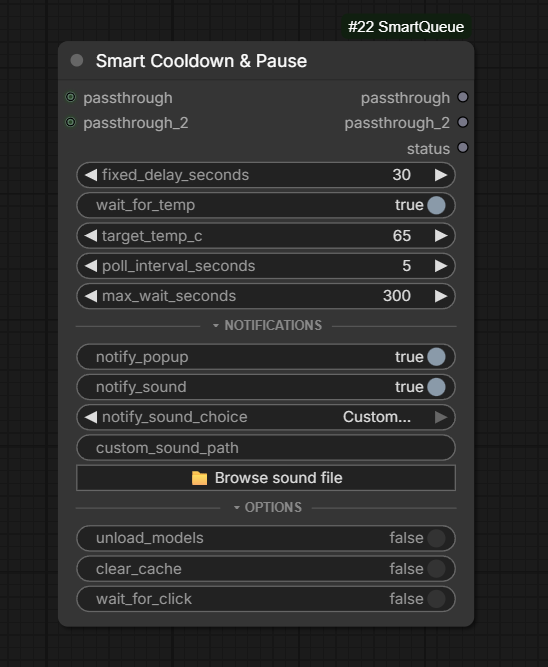 |
|
| Input | Default | What it does |
|---|---|---|
| fixed_delay_seconds | 30 | Always-applied delay before continuing |
| wait_for_temp | on | Polls GPU temperature until it drops under target_temp_c (capped by max_wait_seconds) |
| target_temp_c | 65 | Target temperature for the wait above |
| poll_interval_seconds | 5 | How often to re-check the temperature |
| max_wait_seconds | 300 | Safety cap so a stuck GPU reading can't wait forever |
| notify_popup | off | ComfyUI popup when the node finishes waiting |
| notify_sound | off | Plays a short tone (Default / Chime / Alert, or a custom file you place in web/sounds/custom/) |
| unload_models | off | Drops model references from VRAM before waiting |
| clear_cache | off | Actually reclaims that VRAM back to the OS/driver (pairs with unload_models: this is the step that moves the needle in Task Manager or any GPU monitor) |
| wait_for_click | off | Blocks after the cooldown behind on-node ▶ Continue / ✕ Cancel buttons |
| passthrough, passthrough_2 |: | Two independent pass-through sockets (any type) so the node can sit in-line without breaking your graph |
Autopilot settings
Under Settings → Smart Queue, grouped into sections:
- Autopilot: master on/off. Turning this off is a true node-only mode: the sidebar panel and toolbar pause button are removed entirely (not just hidden), and all background queue tracking stops — only the Smart Cooldown & Pause node keeps working. Flip it back on here and everything returns within ~10 seconds, no restart needed.
- Temperature: pause above N °C, resume below a lower threshold (hysteresis).
- VRAM: pause when free VRAM drops under a threshold.
- Job count: pause for a configurable cooldown break after N jobs have run back-to-back.
- History: auto-archive completed jobs after N days (0 = never).
- Cooldown Node:
AlwaysToastOnWait, a fallback popup for a Cooldown node waiting somewhere off-screen.
Every individual rule defaults to off: installing this pack for the queue panel alone won't make your renders start pausing themselves without you opting in. The master Autopilot toggle stays on by default so the GPU readout works out of the box.
Workflow templates
Two ready-to-load examples live in workflow-templates/: drag either .json straight onto the ComfyUI canvas (or use Workflows → Open):
cooldown-between-renders.json: a standard txt2img graph with the Cooldown node betweenVAE DecodeandSave Image, set to wait for the GPU to drop under 68°C before finishing. Good for long unattended batches.manual-pause-wait-for-click.json: the same graph withwait_for_clickenabled instead, so every render stops and waits for you to hit ▶ Continue on the node before it's considered done: useful for reviewing an output before it gets saved, or gating a batch step by step.
Both reference a placeholder checkpoint: swap the Load Checkpoint node for your own model after loading.
Architecture
- Everything rides on ComfyUI's existing aiohttp server: no separate REST server, no hijacking of native routes. The queue-pause mechanism is a middleware registered additively on
POST /prompt; it's a no-op with zero overhead when autopilot is turned off. - State (queue, history, held items, manual pause) is kept in a local SQLite database (
smart_queue.sqlite3), stored under ComfyUI's ownuser/directory (folder_paths.get_system_user_directory("smart_queue")) so it survives a restart, an extension update, or a git pull: with a one-time automatic migration from the pre-existing in-extension location if it finds one. - GPU metrics come from NVML via
nvidia-ml-py, an in-process ctypes binding onto the driver's own library: no subprocess, no GPU vendor lock-in beyond what NVML itself requires.
Compatibility & known limitations
- ComfyUI version. Built and tested against a current (2026) ComfyUI checkout. The autopilot and queue-hold logic read ComfyUI's in-memory
PromptQueuedirectly (get_current_queue_volatile(), tuple-shaped queue/history entries) because ComfyUI has no stable public API for queue introspection: a future core refactor of that internal shape could break hold/reorder behavior. Smart Queue checks this shape once at startup and logs a specific warning if it no longer matches, instead of failing silently: if autopilot or the sidebar panel stop reflecting the real queue after a ComfyUI update, check the ComfyUI console log for a[Smart Queue]warning first. - GPU vendor and selection. NVIDIA-only (via NVML). On a multi-GPU machine, Smart Queue asks torch which device ComfyUI itself is running on and matches it to the NVML device by UUID, so both agree on which card is "the" GPU without either side reading an environment variable; it falls back to the first NVML device whenever torch, CUDA, or the UUID match is unavailable. AMD, Intel, and CPU-only installs have no NVML device to find: autopilot's temperature/VRAM rules disable themselves (fail-open) rather than erroring; job-count-based autopilot still works since it doesn't need GPU metrics.
- A custom notification sound needs one manual step. Drop your audio file (wav, mp3, ogg, flac, m4a, aac, opus or webm) into the extension's
web/sounds/custom/folder, press R in ComfyUI to refresh node definitions, then pick it from the node'scustom_sound_pathdropdown. It has to live underweb/because a page served over http:// is not allowed to load afile://subresource, so a raw path from elsewhere on disk can never play. There is no Browse button, because a native file dialog needs an HTTP endpoint that spawns a system process, which security scanners flag. The built-in Default / Chime / Alert sounds need no setup. - The cooldown node blocks its branch of the graph while waiting (fixed delay, temperature-wait, or the manual continue/cancel gate). That's the intended behavior for a gate node, but it means a workflow shouldn't rely on other work happening on that same branch concurrently while it waits.
Testing
230 unit tests cover the autopilot rule engine, persistence, queue-hold logic, routes, and the Smart Cooldown node's frozen widget/socket order, as pure functions with no GPU or running ComfyUI instance required:
pytest tests/ -q -p no:warnings
Pure frontend logic (currently formatDuration and formatEta) has automated tests via Node's built-in test runner, no npm dependency required:
node --test tests_web/test_format_duration.js
The rest of the frontend (the panel, drag-reorder, the node's widgets, notifications) is verified by hand against a running ComfyUI instance.
License
See LICENSE.