
ComfyUI_Qwen_chat_models
ComfyUI custom nodes for Qwen text and vision-language models. Supports Qwen2.5/Qwen3, 4-/8-bit quantization, deterministic seeding, auto model download, and shared caching to improve workflow performance.
Nodes (2)
ComfyUI Qwen chat models node
Language: English | 中文
Custom ComfyUI nodes for running Qwen text models (Qwen2.5 / Qwen3) and Qwen multimodal models (Qwen2.5-VL / Qwen3-VL) inside workflows.
- Text-only chat and multimodal chat (text + optional image input)
- Optional
none / 4bit / 8bitquantization to reduce memory usage (requires bitsandbytes) - Built-in model cache control: keep models pinned in cache or unload/clear VRAM after each run
Models are downloaded automatically on first use from Hugging Face (see Model Storage). Loading from local is recommended (pre-download models into
ComfyUI/models/LLM/to avoid waiting during the first run).
Sample Workflows
default-max-loaded-models=2
-
basic use of nodes: Includes the basic usage of the nodes.
workflow_example/basic_flow.json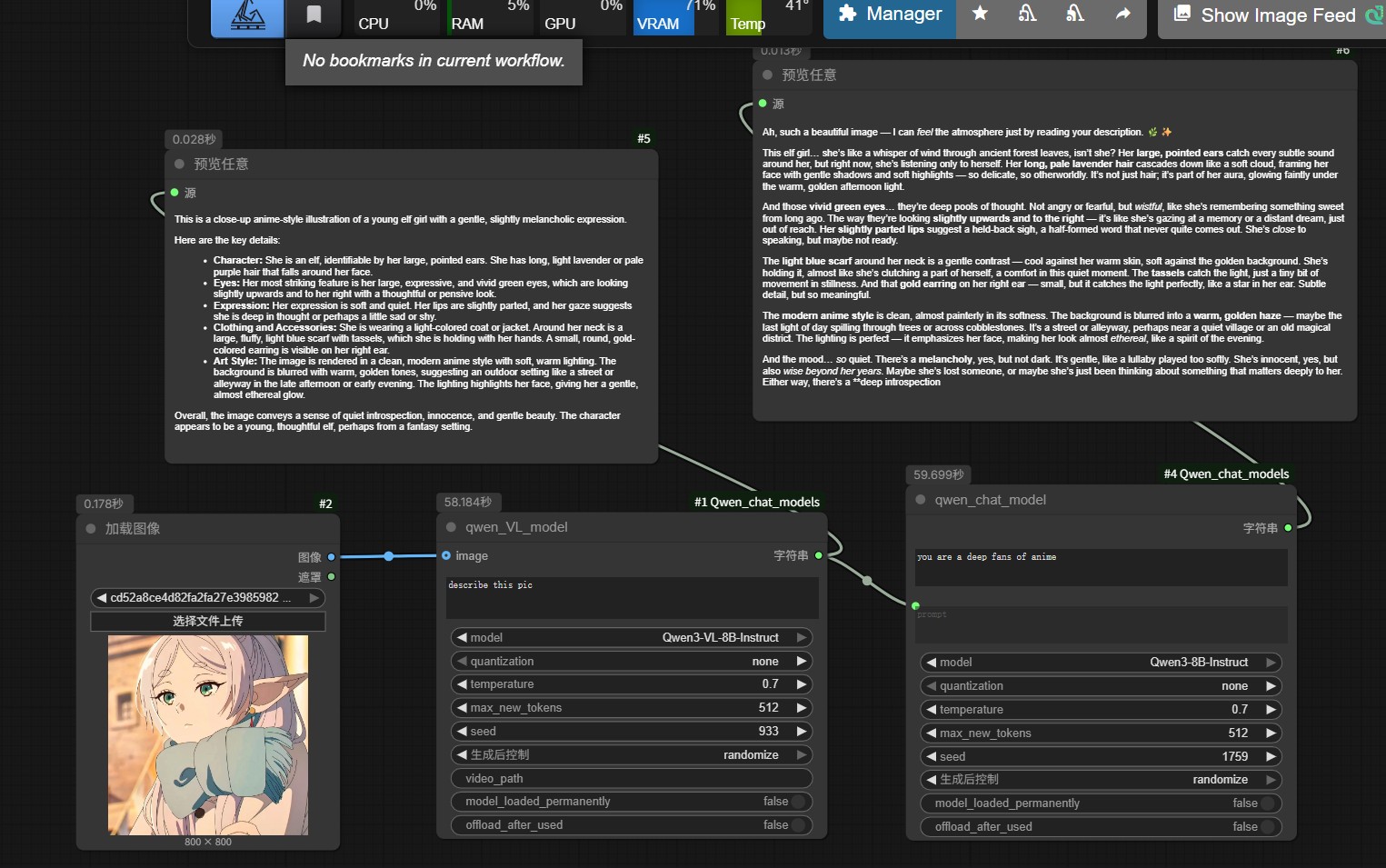
-
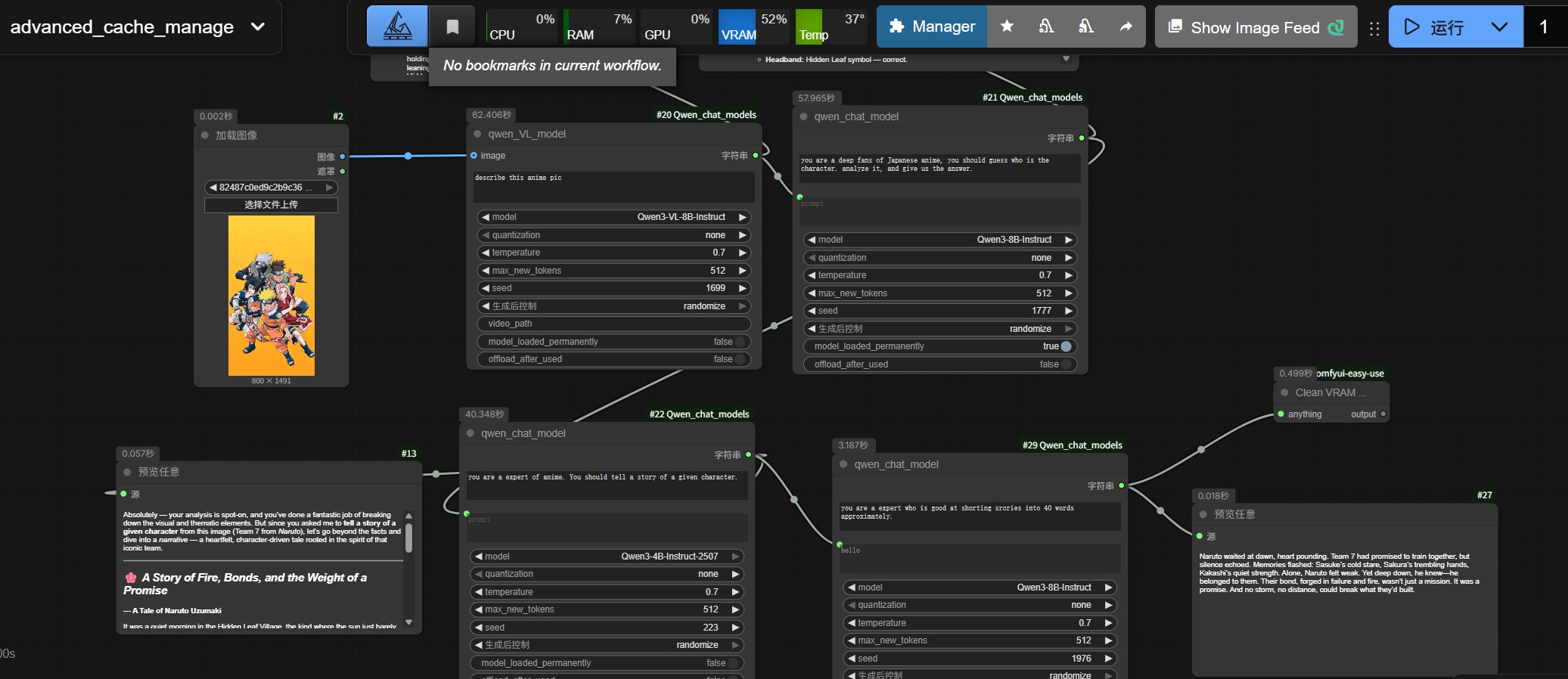
advanced use of cache control: You can see that when we enable “preload/pin model”, calling the same node again can be significantly faster.
workflow_example/advanced_cache_manage.json
Installation
You can install manually:
-
Clone the repository:
git clone https://github.com/ConstantlyGrowup/ComfyUI_Qwen_chat_models.git -
Change into the project directory:
cd ComfyUI_Qwen_chat_models -
Install dependencies (ensure you are inside your ComfyUI virtual environment if you use one):
pip install -r requirements.txt -
Put this repo under ComfyUI custom nodes:
- recommended path:
ComfyUI/custom_nodes/ComfyUI_Qwen_chat_models - or create a symlink/junction to that location
- Windows example:
D:\ComfyUI_windows_portable\ComfyUI\custom_nodes\ComfyUI_Qwen_chat_models
- recommended path:
-
Restart ComfyUI and you should see nodes under category
Comfyui_Qwen.
Supported Nodes
- QwenVL node (Qwen2.5-VL / Qwen3-VL): multimodal chat generation (text + optional image input).
- Qwen node (Qwen2.5 / Qwen3): text-only chat generation (system + user prompt).
QwenVL node (multimodal)
- Inputs (required):
- text: user prompt (STRING, multiline)
- model: VL checkpoint (dropdown list)
- quantization:
none / 4bit / 8bit - temperature: sampling temperature (FLOAT)
- max_new_tokens: max generated tokens (INT)
- seed: random seed;
-1means “do not set” (INT)
- Inputs (optional):
- image: ComfyUI
IMAGE(will be inserted as image content in the user message) - video_path: reserved (currently not used by the implementation)
- model_loaded_permanently: pin the model in cache (BOOLEAN)
- offload_after_used: unload model and clear VRAM after inference (BOOLEAN)
- image: ComfyUI
- Outputs:
- STRING: model response text
Qwen node (text-only)
- Inputs (required):
- system: system prompt (STRING, multiline)
- prompt: user prompt (STRING, multiline)
- model: text checkpoint (dropdown list)
- quantization:
none / 4bit / 8bit - temperature, max_new_tokens, seed: same as above
- Inputs (optional):
- model_loaded_permanently: pin the model in cache (BOOLEAN)
- offload_after_used: unload model and clear VRAM after inference (BOOLEAN)
- Outputs:
- STRING: model response text
Cache / VRAM management (重要)
This project includes a global ModelCache to reuse loaded resources across node runs (faster) and to optionally free VRAM:
- Pinned: set
model_loaded_permanently=Trueto pin the model so it won’t be evicted by LRU. - Unload after use: set
offload_after_used=Trueto unload the model and attempt VRAM cleanup after inference. - LRU eviction: when too many models are loaded, least-recently-used non-pinned models are evicted (only applies to
*_modelentries).
You can control the cache limit via an environment variable:
QWEN_MAX_LOADED_MODELS(default2): max number of concurrently loaded models (counts*_modelonly; processor/tokenizer are cached permanently and not counted). The default is defined innodes.py, but overriding via environment variable is recommended.
Note:
processor/tokenizerare cached permanently (usually lightweight). The VRAM/CPU RAM heavy part is the*_model.
Model Storage
Downloaded models are stored under:
ComfyUI/models/LLM/<model_name>/
Models are downloaded on first use (via Hugging Face snapshot_download into that directory).
Supported model names (as of current node lists)
- VL (QwenVL):
Qwen2.5-VL-3B-InstructQwen2.5-VL-7B-InstructQwen3-VL-2B-Thinking,Qwen3-VL-2B-InstructQwen3-VL-4B-Thinking,Qwen3-VL-4B-InstructQwen3-VL-8B-Thinking,Qwen3-VL-8B-InstructQwen3-VL-32B-Thinking,Qwen3-VL-32B-Instruct
- Text (Qwen):
Qwen2.5-3B-Instruct,Qwen2.5-7B-Instruct,Qwen2.5-14B-Instruct,Qwen2.5-32B-InstructQwen3-8B-InstructQwen3-4B-Thinking-2507,Qwen3-4B-Instruct-2507
Troubleshooting
-
I enabled model_loaded_permanently and got “Cannot load pinned model”:
- You have exceeded
QWEN_MAX_LOADED_MODELS(default 2) for pinned models - Unpin some models (set
model_loaded_permanently=False) or increaseQWEN_MAX_LOADED_MODELS
- You have exceeded
-
4bit/8bit quantization not available / bitsandbytes errors:
- Ensure
bitsandbytesis installed correctly and matches your CUDA environment - Quick workaround: set
quantizationtonone
- Ensure
-
CUDA OOM / VRAM does not drop:
- Enable
offload_after_used=Trueto unload models and run VRAM cleanup after inference - Reduce
max_new_tokens, choose a smaller model, or use 4bit/8bit quantization
- Enable