
Kiko Prompt Builder
A visual prompt builder ComfyUI custom node for structured JSON prompt generation. Build photography-style prompts with camera settings, lighting, composition, and color palettes. Compatible with FLUX (Black Forest Labs), z-image, and other JSON-prompt models.
🎨 Kiko Prompt Builder
A visual prompt builder ComfyUI custom node for structured JSON prompt generation. Build photography-style prompts with camera settings, lighting, composition, and color palettes.
Compatible with: FLUX (by Black Forest Labs), z-image, and any other image generation model that accepts structured JSON prompts.
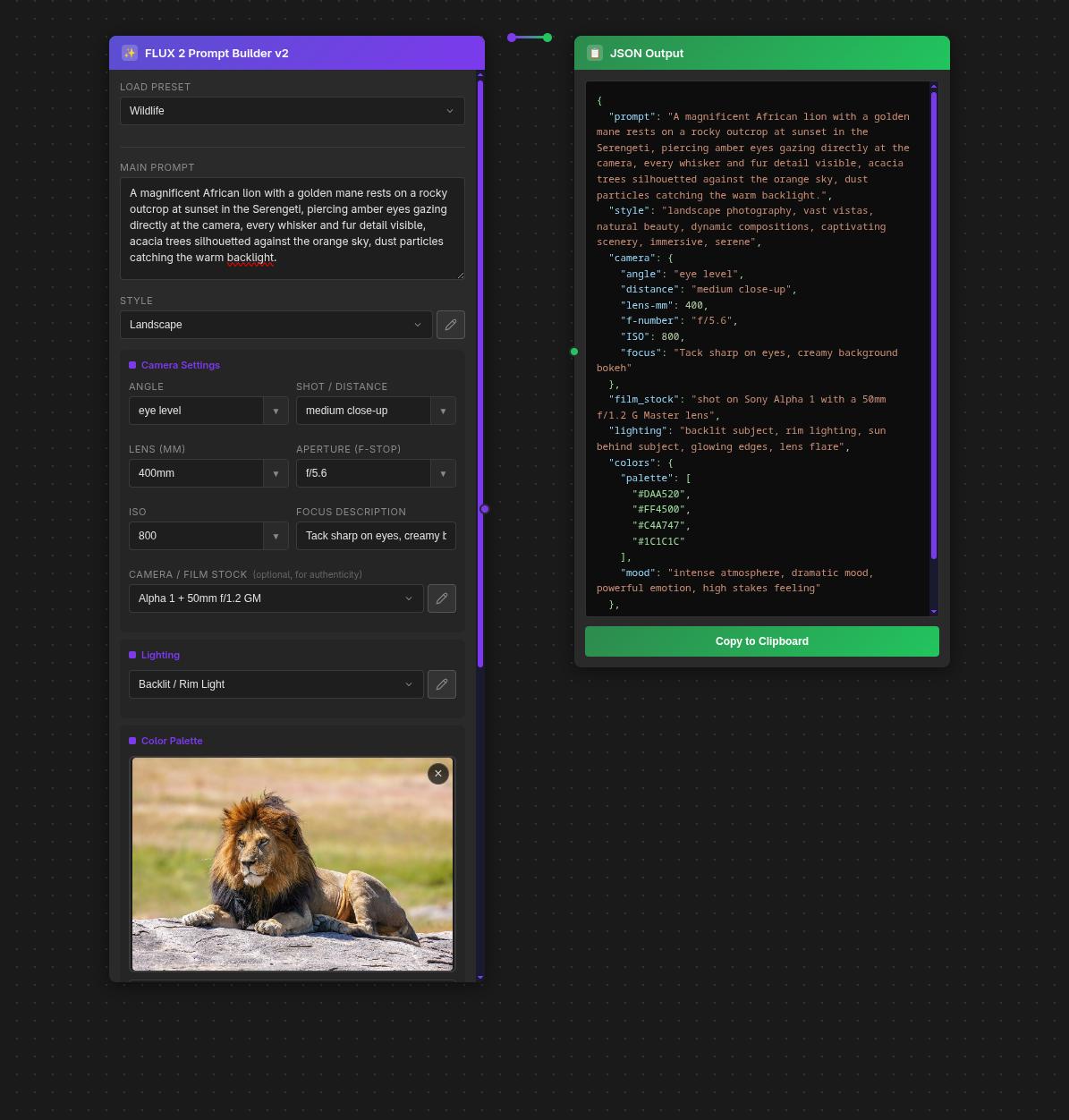
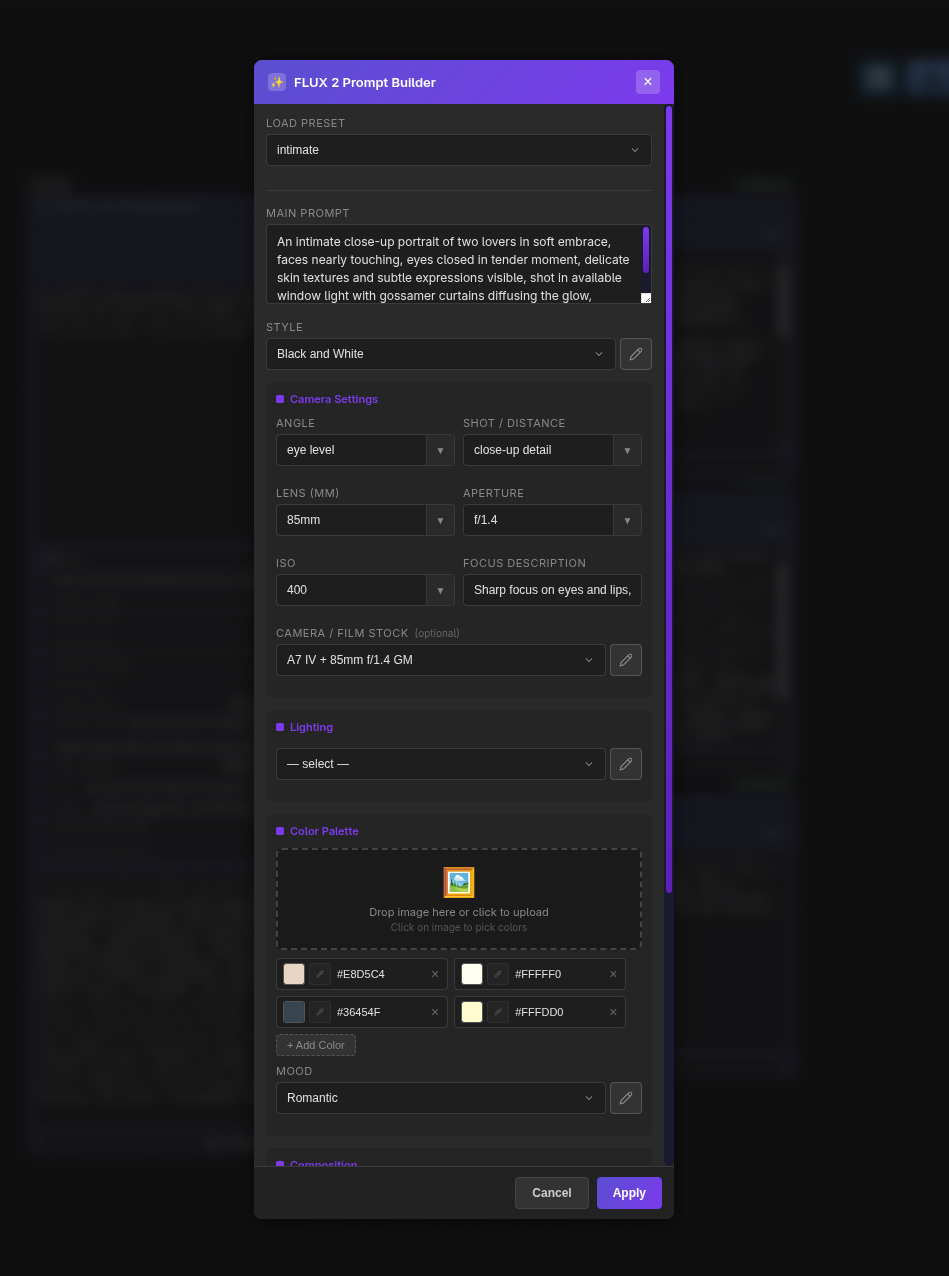
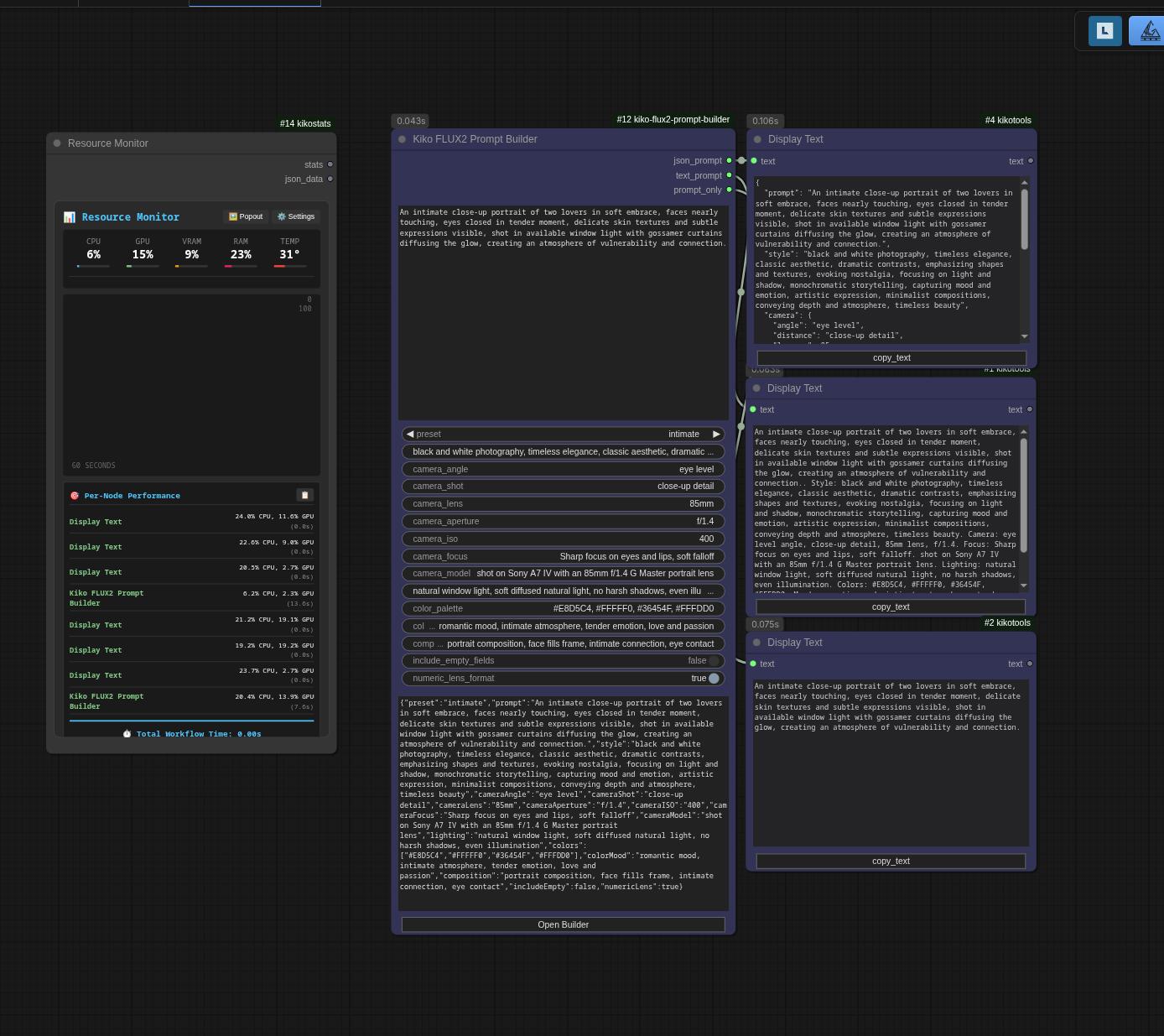
✨ Features
- 20+ Photography Presets: Intimate portraits, landscapes, street photography, product shots, architectural, wildlife, and more
- Complete Camera Settings: Angle, shot distance, lens focal length, aperture, ISO, focus description
- Camera/Film Stock Database: Authentic camera models and film stocks for realistic rendering
- Professional Lighting Presets: Natural light, studio setups, dramatic/cinematic options
- Composition Guidelines: Rule of thirds, golden ratio, leading lines, symmetrical, and more
- Color Palette Builder: Visual color swatches with hex support
- Mood Presets: Emotional tones and visual aesthetics
- Dual Output: Structured JSON and flattened text prompt formats
- Context Menu: Quick preset access, copy JSON, reset to defaults
🔌 Model Compatibility
This node outputs structured JSON and flattened text prompts compatible with:
| Model | Compatibility | Notes |
|-------|---------------|-------|
| FLUX | ✅ Full | Primary target; supports all JSON fields |
| z-image | ✅ Full | Supports structured JSON prompts |
| Other JSON models | ✅ Varies | Any model accepting JSON prompt format |
| Standard CLIP | ✅ Text output | Use text_prompt output for CLIP encoders |
📦 Installation
Method 1: ComfyUI Manager (Recommended)
- Open ComfyUI Manager
- Search for "Kiko FLUX2 Prompt Builder"
- Click Install
Method 2: Manual Installation
cd ComfyUI/custom_nodes
git clone https://github.com/ComfyAssets/kiko-flux2-prompt-builder.git
# Restart ComfyUI
Method 3: Download ZIP
- Download the latest release
- Extract to
ComfyUI/custom_nodes/kiko-flux2-prompt-builder - Restart ComfyUI
🚀 Usage
- Add the node: Right-click → Add Node → 🎨 Kiko → Prompting → FLUX2 Prompt Builder
- Select a preset or build from scratch
- Customize camera settings, lighting, colors, and composition
- Connect outputs to your workflow:
json_prompt→ Advanced workflows requiring structured datatext_prompt→ Standard CLIP text encoderprompt_only→ Just the main scene description
📤 Outputs
JSON Prompt
Structured JSON perfect for advanced workflows:
{
  "prompt": "A weathered fisherman...",
  "style": "documentary photography...",
  "camera": {
    "angle": "eye level",
    "distance": "medium close-up",
    "lens-mm": 85,
    "f-number": "f/1.8",
    "ISO": 200,
    "focus": "Sharp focus on eyes"
  },
  "film_stock": "shot on Canon EOS 5D Mark IV...",
  "lighting": "golden hour lighting...",
  "colors": {
    "palette": ["#8B4513", "#4169E1", "#B0C4DE"],
    "mood": "moody atmosphere..."
  },
  "composition": "rule of thirds"
}
Text Prompt
Flattened text for standard CLIP encoding:
A weathered fisherman... Style: documentary photography... Camera: eye level angle, medium close-up, 85mm lens, f/1.8. Shot on Canon EOS 5D Mark IV... Lighting: golden hour lighting... Colors: #8B4513, #4169E1, #B0C4DE. Mood: moody atmosphere... Composition: rule of thirds.
🎬 Presets
| Category | Presets | |----------|---------| | People & Portraits | Intimate, Boudoir, Fashion, Portrait | | Nature & Outdoors | Landscape, Wildlife, Macro, Underwater, Astro | | Action & Events | Sports, Street, Theatrical, Culinary | | Commercial | Product, Automotive, Architectural | | Artistic | Cinematic, Vintage, Minimalist |
📷 Camera Settings
| Setting | Options | |---------|---------| | Angle | Eye level, Low/High angle, Bird's-eye, Dutch, Over-the-shoulder | | Shot | Extreme close-up to Ultra wide, Macro, Action shots | | Lens | 14mm - 400mm, Macro, Fisheye, Tilt-shift | | Aperture | f/1.2 - f/16 | | ISO | 100 - 6400 |
🔧 Development
Project Structure
kiko-flux2-prompt-builder/
├── __init__.py              # ComfyUI entry point
├── nodes/
│   ├── __init__.py
│   └── prompt_builder_node.py
├── web/js/
│   ├── kikoPromptBuilder.js # Frontend extension
│   └── data/                # JSON preset data
├── app/                     # Standalone MVP (reference)
├── pyproject.toml
└── requirements.txt
Building from Source
# Clone the repository
git clone https://github.com/ComfyAssets/kiko-flux2-prompt-builder.git
cd kiko-flux2-prompt-builder

# Link to ComfyUI
ln -s $(pwd) /path/to/ComfyUI/custom_nodes/kiko-flux2-prompt-builder

# Install dev dependencies (optional)
pip install -e ".[dev]"

# Run tests
pytest -v
🤝 Contributing
Contributions welcome! Feel free to:
- Add new presets
- Improve the UI
- Add new features
- Report bugs
- Submit pull requests
📄 License
MIT License - Feel free to use, modify, and distribute.
🙏 Acknowledgments
- ComfyUI - The powerful node-based workflow platform
- Black Forest Labs - Creators of the FLUX family of image generation models
- All contributors and users
Built with ❤️ for the AI art community by ComfyAssets