
comfyui-prompt-matrix
A ComfyUI custom node that runs N×M prompt-variation grids through the full sampling pipeline in a single node with labeled output, flexible axes, and optional node batching.
Nodes (1)
comfyui-prompt-matrix
A ComfyUI custom node that runs N×M prompt-variation grids through the full sampling pipeline in a single node. Perfect for rapid iteration on prompt variations with consistent seeds.
Features
- Grid Sampling: Run N×M prompt variations through the full sampling pipeline in a single node
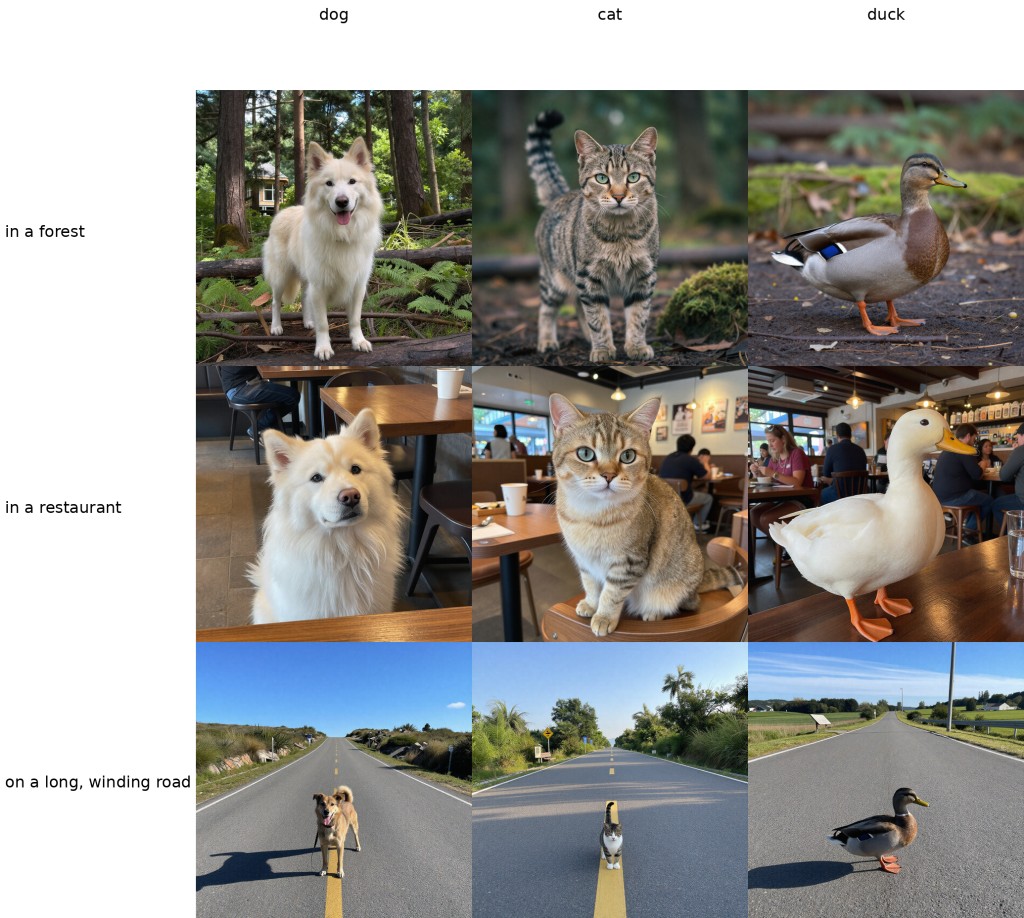
- Labeled Output: Get both a labeled composite grid (a1111 X/Y Plot style) and a flat batch of individual cells
- Flexible Axes: Configure X and Y axes with comma-separated prompt substitutions
- Frontend Seed Control: Uses ComfyUI's native "control after generate" widget (fixed/increment/decrement/randomize) to vary the seed across queued runs
- Optional Node Batching: Flip
batch_in_nodeto generate multiple grids with incrementing seeds inside a single execution - Node-parameter Axes: Use magic keys (
<seed>,<cfg>,<steps>,<denoise>) as an axis key to vary a sampling parameter across one dimension of the grid instead of substituting text
Installation
Clone this repository into your ComfyUI custom_nodes directory:
cd ComfyUI/custom_nodes
git clone https://github.com/ColKernel0x8E/comfyui-prompt-matrix.git
Then restart ComfyUI.
Usage
Basic Setup
- Connect a PromptMatrix node in your workflow
- Wire up model, clip, and vae from your pipeline
- Set positive_prompt and negative_prompt
- Configure x_axis and y_axis with comma-separated values
Example Workflow
Positive Prompt:
a beautiful photo of a SUBJECT SETTING
X-Axis (style variations):
SUBJECT, dog, cat, duck
Y-Axis (setting variations):
SETTING, in a forest, in a restaurant, "on a long, winding road"
This creates a 3×3 grid starting with dog in a forest and continuing through the remaining X/Y combinations.
Inputs
Required:
- model (MODEL): Diffusion model
- clip (CLIP): Text encoder
- vae (VAE): Image decoder
- positive_prompt (STRING): Base positive prompt
- negative_prompt (STRING): Base negative prompt
- x_axis (STRING): Comma-separated X-axis values (first is search key)
- y_axis (STRING): Comma-separated Y-axis values (first is search key)
- seed (INT): Seed value. The "control after generate" dropdown on this widget lets the frontend vary the seed across queued runs (fixed / increment / decrement / randomize).
- batch_in_node (BOOLEAN): When off (default), the frontend controls seed variation and the node produces one matrix per execution. When on, the node internally generates
seed_countmatrices with incremental seedsseed, seed+1, seed+2…in a single execution. - seed_count (INT): Number of matrices to generate internally (1–256). Only used when
batch_in_nodeis on. - steps (INT): Sampling steps (1-200, default 20)
- cfg (FLOAT): Classifier-free guidance (0.0-30.0, default 7.0)
- sampler_name (ENUM): Sampler algorithm
- scheduler (ENUM): Noise scheduler
- width (INT): Image width in pixels if no latent image is provided (64-8192, step 8, default 512)
- height (INT): Image height in pixels if no latent image is provided (64-8192, step 8, default 512)
- denoise (FLOAT): Denoising strength (0.0-1.0, default 1.0)
- max_composite_width (INT): Maximum composite grid width (512-16384, default 2048)
Optional:
- latent_image (LATENT): Pre-made latent; if omitted, a blank one is generated
Outputs
- composite: Labeled grid image
[1, H_grid, W_grid, 3]per execution (or[seed_count, …]whenbatch_in_nodeis on) - cells: Flat batch of individual cells
[N×M, H, W, 3]per execution (or[seed_count×N×M, …]whenbatch_in_nodeis on)
Axis Parsing
Axes are parsed as comma-separated values. The first value is the search key; only the following values are used as replacements.
Valid examples:
prompt, variation1, variation2— replacespromptwith each variationkey,— trailing comma creates an empty final entrykey, value1, value2— preserves order and duplicatesSETTING, "a long, winding road"— double-quoted values can contain commaskey, it's fine— single quotes are always literal (safe for contractions)key, long\, winding— backslash escapes the following character;\,is a literal comma- `` (empty) — axis is skipped
,key, value— leading comma causes axis to be skipped
Quoting:
- Only
"(double-quote) acts as a quoting character; wrap a value in"…"to include commas inside it. - A
"with no matching closing"is treated as a literal character rather than opening a quoted span. \escapes the next character anywhere — inside or outside quotes. Use\\for a literal backslash,\"for a literal double-quote.
Special cases:
- If both X and Y are skipped, the prompt renders as a single unlabelled cell with no substitution
- A single-entry axis (search key only, no values) is treated as inactive — same as leaving the field blank
- Substitution is case-sensitive and uses Python's
str.replace()
Node-parameter Axes (Magic Keys)
Instead of a text-substitution key, an axis can vary one of the node's own sampling parameters. Use a magic key as the first entry:
| Magic key | Controls | Valid values |
|---|---|---|
| <seed> | Noise seed | Integers in [0, 2⁶⁴−1] |
| <steps> | Sampling steps | Integers in [1, 200] |
| <cfg> | CFG scale | Floats in [0.0, 30.0] |
| <denoise> | Denoising strength | Floats in [0.0, 1.0] |
The magic key column/row varies the named parameter; everything else continues to work as normal, including text substitution on the other axis.
Example — compare CFG scales across columns, prompt styles down rows:
X-axis:
<cfg>, 5.0, 7.5, 10.0
Y-axis:
style, photorealistic, oil painting
This produces a 3×2 grid where each column runs at a different CFG scale and each row uses a different style prompt.
Seed axis
The <seed> magic key has two modes:
Explicit seeds — list the seeds directly:
<seed>, 245263, 362345, 981022
Each column (or row) uses the specified seed. The node's seed input and the frontend's "control after generate" setting are both ignored. Works with batch_in_node on or off.
Auto-generate — provide the key alone with no values:
<seed>
The node generates seed_count seeds automatically, starting from the seed input: seed, seed+1, seed+2, … Requires batch_in_node to be on (so seed_count is active).
Validation
Magic key values are validated before sampling begins. The node raises an error if:
- A value cannot be parsed as the expected type (e.g.
"abc"for<seed>) - A value is outside the allowed range
- Both axes use the same magic key
<seed>is used in auto-generate mode withoutbatch_in_nodeenabled
Seed Control
The seed input exposes ComfyUI's native "control after generate" dropdown. Queue multiple runs and let the frontend handle seed variation:
- fixed — every run uses the same seed
- increment — each run increments the seed by 1
- decrement — each run decrements the seed by 1
- randomize — each run picks a new random seed
For within-execution batching (multiple grids in one call), enable batch_in_node and set seed_count. Seeds increment from the base seed: seed, seed+1, seed+2, …
To vary the seed across cells within a single grid, use the <seed> magic key on an axis — see Node-parameter Axes above.
Known Limitations
- The sampling loop is single-threaded; large grids may take time
- Graph customization (e.g., per-cell VAE quantization) is not supported; this node hardcodes the pipeline
- Label text may be truncated if very long
Inspiration
This node is inspired by the X/Y Plot node from stable-diffusion-webui (AUTOMATIC1111).
License
MIT