
ComfyUI-ToriiGate-Reforged
A ComfyUI custom node pack for image captioning and text generation with ToriiGate-0.5, a fine-tuned Qwen3.5-4B model.
Nodes (3)
A \"CLIP\" node that actually writes you a caption — ToriiGate Caption Reforged
The caption node that does nothing — ToriiGate Grounding Builder Reforged
ToriiGate Text Generate Reforged does text only
ComfyUI-ToriiGate-Reforged
A ComfyUI custom node pack for image captioning and text generation with ToriiGate-0.5, a fine-tuned Qwen3.5-4B model.
This is a Reforged version of litch230/comfyui_toriigate. It removes the bundled Transformers loader and llama.cpp API nodes, and uses ComfyUI's native CLIP/Qwen3.5 loading, image understanding and generation instead.
Changes
- Removed the custom model loader, automatic download and llama.cpp backend.
- Uses ComfyUI's native
Load CLIPnode and model/offload management. - Uses the visual encoder included in the ToriiGate/Qwen3.5 CLIP model; no separate vision input is required.
- Keeps the original ToriiGate prompt formats, disables thinking before generation, and aligns the original image-size and visual-normalization behavior.
Old workflows must replace the legacy ToriiGate nodes with the Reforged nodes.
Installation
Clone this repository into ComfyUI/custom_nodes/, then restart ComfyUI:
cd ComfyUI/custom_nodes
git clone https://github.com/CocyNoric/ComfyUI-ToriiGate-Reforged.git
Model
Recommended model downloads:
- Hugging Face: Ronysoc/ToriiGate-0.5-Int8-ConvRot
- ModelScope: CocyNoric/ToriiGate-0.5-Int8-ConvRot — recommended for users in China
Alternatively, obtain and merge the weights from the original ToriiGate repository.
Put a ComfyUI-compatible ToriiGate .safetensors weight, such as ToriiGate-0.5_int8_convrot.safetensors, in:
ComfyUI/models/clip/
In Load CLIP select:
clip_name: your ToriiGate weighttype:stable_diffusiondevice:default
Usage and connections
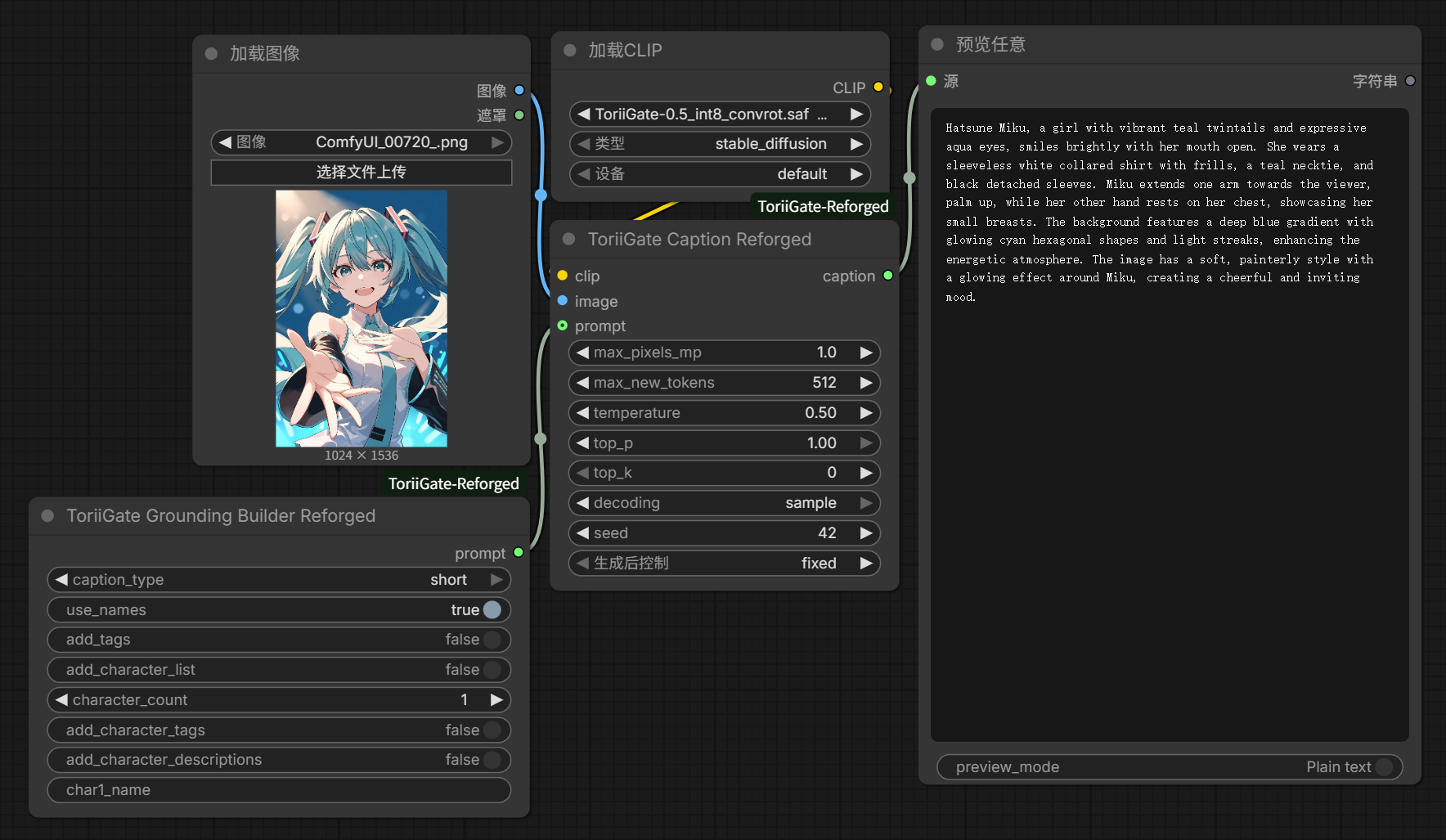
You can drag the example workflow into ComfyUI, or connect the nodes manually:
Load CLIP.CLIP ────────────────> ToriiGate Caption Reforged.clip
Load Image.IMAGE ──────────────> ToriiGate Caption Reforged.image
Grounding Builder.prompt ──────> ToriiGate Caption Reforged.prompt (optional)
ToriiGate Caption.caption ─────> Preview Any.source
For text-only generation, connect Load CLIP.CLIP to ToriiGate Text Generate Reforged.clip, then provide a prompt.
Nodes
ToriiGate Grounding Builder Reforged
Builds ToriiGate prompts and optional tags/character information.
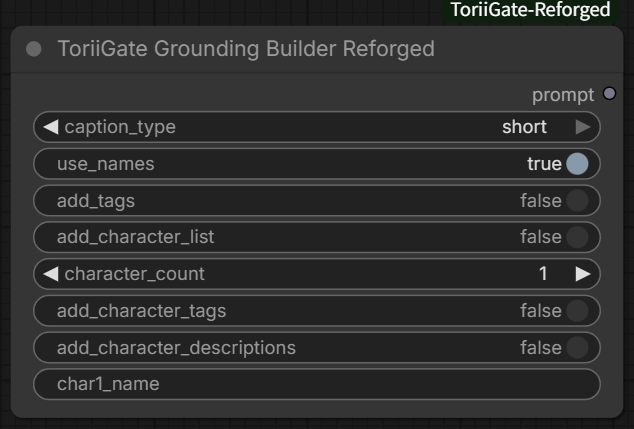
Caption types
caption_type controls the output format and detail level:
Tip: The
longmode is recommended for general use.
Warning: Testing found that character identification accuracy may not always be ideal, with either the quantized or original weights.
| Mode | Output |
| --- | --- |
| short | Short caption covering the main subjects and details. |
| long | Detailed natural-language caption in 2–5 paragraphs. |
| long_thoughts | Structured character analysis, general description, individual parts, visible text, background and effects. |
| long_thoughts_v2 | Detailed character identification, key details, long description and per-character descriptions. |
| json | JSON-style description of characters/main content, background, effects, text and atmosphere. |
| min_structured_md | Shorter Markdown structure for key details, general content, characters and image effects. |
| min_structured_json | Compact JSON-style general, character, effect, text and watermark fields. |
| json_comic | Comic-focused JSON with frame descriptions, characters and overall meaning. |
| md_comic | Comic-focused Markdown with layout and per-frame descriptions. |
| chroma-style | Four views: regular summary, item list, Midjourney-style summary and commission description. |
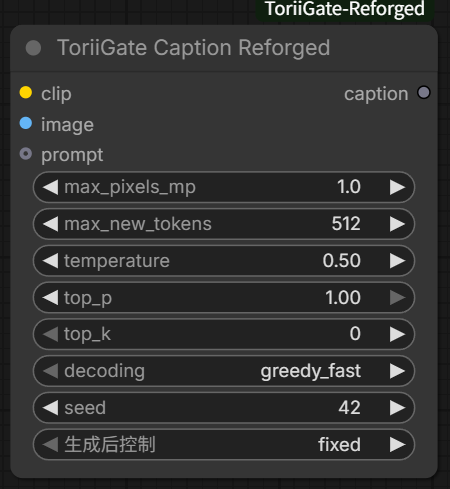
ToriiGate Caption Reforged
Generates a caption from the connected CLIP model, image and optional grounding prompt.
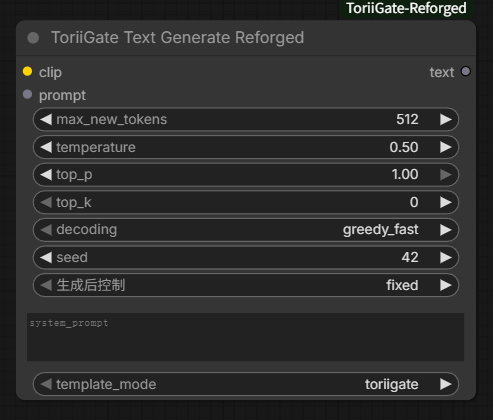
ToriiGate Text Generate Reforged
Performs text-only generation with the connected CLIP model.
Acknowledgements
- Original ComfyUI extension: litch230/comfyui_toriigate
- ToriiGate model, prompt formats and inference reference: Minthy/ToriiGate-0.5
License
Original modifications and newly written code authored specifically for this repository are licensed under the Apache License 2.0.
Portions derived from litch230/comfyui_toriigate are excluded from this license and remain copyright of their original author(s). The upstream project currently provides no explicit license, and no additional rights are granted for those portions by this repository.
See License Scope for details.