
ComfyUI-Anima-TeaCache
TeaCache acceleration for the native ComfyUI implementation of circlestone-labs/Anima.
ComfyUI-Anima-TeaCache
Tip: This node is still experimental. The current coefficients were fitted using pure-tag prompts, and performance may be poor with natural-language prompts. Please evaluate the results carefully and use this node at your own discretion. Be sure to read this entire README before use. LLLite patch hooks are supported on a best-effort basis, but the current coefficients were not fitted specifically for LLLite, so TeaCache effectiveness and image quality with LLLite are not guaranteed.
简体中文 | English
TeaCache acceleration for the native ComfyUI implementation of circlestone-labs/Anima.
Introduction
ComfyUI-Anima-TeaCache compares the modulated input of the first Transformer block between adjacent sampling steps. When the change is sufficiently small, it reuses a previously computed residual and skips part of the Transformer computation.
Depending on the sampler, settings, number of steps, resolution, and hardware, the node can typically provide approximately 1.3×–2.0× faster inference.
The speedup is not constant or guaranteed. A higher cache threshold usually increases the cache hit rate and improves speed, but it may also increase the risk of visual quality degradation.
The fitted Anima coefficients, coefficient transfer process, signal selection, sampler tests, and parameter research are documented in:
Installation
Place this repository in the ComfyUI custom_nodes directory as ComfyUI-Anima-Teacache:
ComfyUI/
└── custom_nodes/
    └── ComfyUI-Anima-Teacache/
If you use Git, replace the placeholder below with the clone URL shown on this repository page:
git clone <repository-url> ComfyUI-Anima-Teacache
Restart ComfyUI. The Anima TeaCache node will appear under the TeaCache category.
Usage
Connect the Anima TeaCache node between the Anima model loader and the sampler:
Load Diffusion Model / LoRA
            ↓
      Anima TeaCache
            ↓
         KSampler
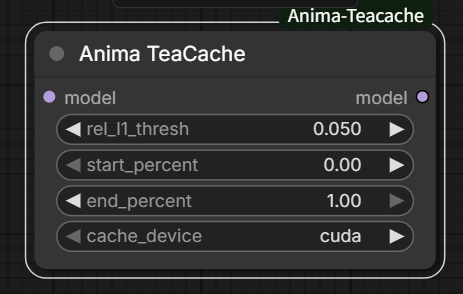
You can drag the included workflow directly into ComfyUI:
This node only supports ComfyUI's native Anima model. It is not intended for other model architectures.
Node Parameters
| Parameter | Description |
|---|---|
| model | The native ComfyUI Anima model. If you use a LoRA, connect TeaCache after applying the LoRA. |
| rel_l1_thresh | The accumulated relative-L1 threshold. Higher values generally produce more cache hits and greater speedups, but also increase quality risk. Set it to 0 to disable TeaCache. |
| start_percent | The point in the sampling process at which TeaCache starts. Increasing it protects early composition and structure. |
| end_percent | The point in the sampling process at which TeaCache stops, also referred to as stop percent. Decreasing it protects late-stage details. |
| cache_device | Device used to store cached tensors. cuda is usually faster but consumes more VRAM; cpu saves VRAM, but tensor transfers may reduce the speedup. |
Recommended Settings
These settings are practical starting points rather than universal optima. Results can vary with prompts, resolution, sampling steps, and hardware. Start with the Conservative or Balanced preset, then adjust it based on the output.
Sampler: euler a
| Preset | L1 Rel Threshold | Start Percent | Stop Percent | |---|---:|---:|---:| | Conservative | 0.75 | 0 | 0.75 | | Balanced | 0.85 | 0 | 0.75 | | Aggressive | 0.85 | 0 | 1 |
Sampler: er sde
| Preset | L1 Rel Threshold | Start Percent | Stop Percent | |---|---:|---:|---:| | Conservative | 0.150 | 0 | 1 | | Balanced | 0.2 | 0 | 1 | | Aggressive | 0.35 | 0 | 1 |
Sampler: euler
| Preset | L1 Rel Threshold | Start Percent | Stop Percent | |---|---:|---:|---:| | Conservative | 0.05 | 0 | 1 | | Balanced | 0.075 | 0.3 | 1 | | Aggressive | 0.075 | 0.1 | 1 |
Tuning Your Own Settings
You can tune the parameters beyond the recommended presets. Change one parameter at a time and compare outputs with the same prompt, seed, sampler, number of steps, CFG, and resolution.
- If you see major structural errors, such as incorrect anatomy, perspective, object placement, proportions, or composition:
- Lower
rel_l1_threshfirst. - If the issue remains, increase
start_percentso that more early sampling steps use full computation.
- Lower
- If the overall structure is correct but the image is not detailed enough, has weak textures, or loses small details:
- Decrease
end_percentso that late sampling steps return to full computation.
- Decrease
- If image quality is stable but the speedup is limited:
- Gradually increase
rel_l1_thresh, or widen the interval in which TeaCache is active.
- Gradually increase
For reliable comparisons, keep a fixed-seed baseline generated without TeaCache and compare it against the Conservative, Balanced, and Aggressive presets.
Examples
All comparisons use the same generation settings and seed within each sampler group. Click an image to view it at full resolution.
euler a
<table>
<tr><th>Original</th><th>Conservative</th><th>Balanced</th><th>Aggressive</th></tr>
<tr>
<td><a href="assets/Euler_A_Original_00002_.png"><img src="assets/Euler_A_Original_00002_.png" alt="Euler A Original" width="220"></a></td>
<td><a href="assets/Euler_A_Conservative_00002_.png"><img src="assets/Euler_A_Conservative_00002_.png" alt="Euler A Conservative" width="220"></a></td>
<td><a href="assets/Euler_A_Balanced_00002_.png"><img src="assets/Euler_A_Balanced_00002_.png" alt="Euler A Balanced" width="220"></a></td>
<td><a href="assets/Euler_A_Aggressive_00002_.png"><img src="assets/Euler_A_Aggressive_00002_.png" alt="Euler A Aggressive" width="220"></a></td>
</tr>
</table>
er sde
<table>
<tr><th>Original</th><th>Conservative</th><th>Balanced</th><th>Aggressive</th></tr>
<tr>
<td><a href="assets/Er_Sde_Original_00001_.png"><img src="assets/Er_Sde_Original_00001_.png" alt="ER SDE Original" width="220"></a></td>
<td><a href="assets/Er_Sde_Conservative_00001_.png"><img src="assets/Er_Sde_Conservative_00001_.png" alt="ER SDE Conservative" width="220"></a></td>
<td><a href="assets/Er_Sde_Balanced_00001_.png"><img src="assets/Er_Sde_Balanced_00001_.png" alt="ER SDE Balanced" width="220"></a></td>
<td><a href="assets/Er_Sde_Aggressive_00001_.png"><img src="assets/Er_Sde_Aggressive_00001_.png" alt="ER SDE Aggressive" width="220"></a></td>
</tr>
</table>
euler
<table>
<tr><th>Original</th><th>Conservative</th><th>Balanced</th><th>Aggressive</th></tr>
<tr>
<td><a href="assets/Euler_Original_00002_.png"><img src="assets/Euler_Original_00002_.png" alt="Euler Original" width="220"></a></td>
<td><a href="assets/Euler_Conservative_00002_.png"><img src="assets/Euler_Conservative_00002_.png" alt="Euler Conservative" width="220"></a></td>
<td><a href="assets/Euler_Balanced_00002_.png"><img src="assets/Euler_Balanced_00002_.png" alt="Euler Balanced" width="220"></a></td>
<td><a href="assets/Euler_Aggressive_00002_.png"><img src="assets/Euler_Aggressive_00002_.png" alt="Euler Aggressive" width="220"></a></td>
</tr>
</table>
Acknowledgements
This project uses TeaCache to accelerate circlestone-labs/Anima model inference. We sincerely thank the TeaCache authors for their excellent open-source work.
If you find TeaCache useful, please consider starring the original repository and citing:
@article{liu2024timestep,
  title={Timestep Embedding Tells: It's Time to Cache for Video Diffusion Model},
  author={Liu, Feng and Zhang, Shiwei and Wang, Xiaofeng and Wei, Yujie and Qiu, Haonan and Zhao, Yuzhong},
  journal={arXiv preprint arXiv:2411.19108},
  year={2024}
}
The ComfyUI node structure and integration approach also reference:
Additional research and transfer validation for Anima: