
comfyui-easy-randomize
Random selection nodes with freeze/lock capability for iterative prompt building in ComfyUI
Nodes (11)
One string, one freeze toggle — the simplest lock in the pack
Ten prompt slots, freeze them one by one
One list, many rolls — the pool behind the random pickers
See the image and the prompt that made it, together
Roll the dice on your prompts — and lock the keepers
Save your image with the recipe baked in
A timestamped receipt for your random rolls
Pool, selector, freeze, and file loading
Collapse a multiline list back into one string with a delimiter
Fill in the blanks — structured prompts from random slots
You probably don't need this node (and that's okay)
ComfyUI Easy Randomize

Random selection nodes with freeze/lock capability for iterative prompt building.
Workflow: Randomize → Preview → Freeze what you like → Iterate on the rest
Features
- Item Pools - Define lists of items (styles, characters, settings, etc.)
- Random Selection - Pick random items from pools
- Freeze/Lock - Lock selections you like, keep randomizing the rest
- Sequential Mode - Step through items in order
- Save with Metadata - Embed selection data in saved images
Screenshots
| Nodes Overview | Freezable String Combiner |
|:---:|:---:|
|  |
|  |
|
Nodes
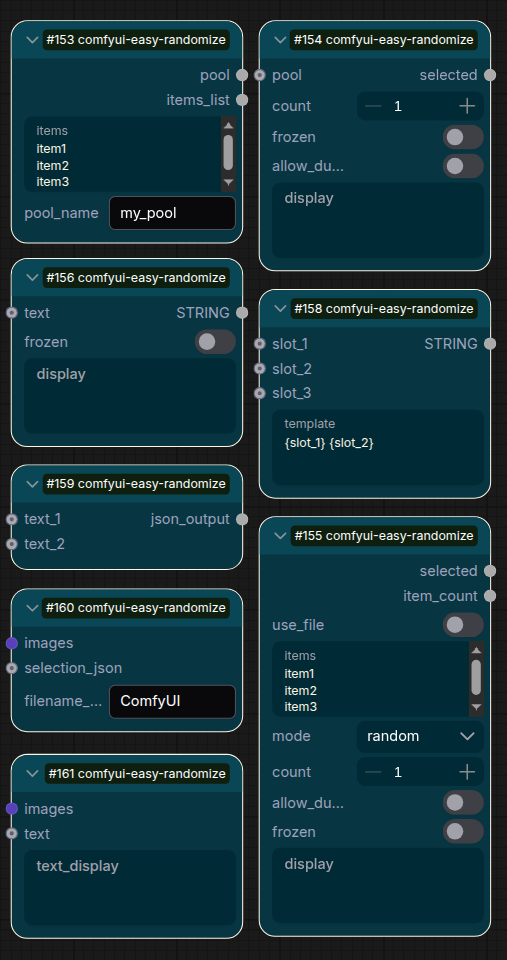
| Node | Purpose | |------|---------| | Item Pool | Store a pool of items (one per line) | | Random Selector | Pick random items from a pool | | Smart Selector | Combined pool + selector with freeze, supports file loading | | Freezable Input | Single string input that can be frozen | | Freezable String Combiner | Combine up to 10 freezable inputs | | String Joiner | Join multiple strings with separator | | Template Filler | Fill template slots with values | | Selection Recorder | Record selections as JSON | | Save Image (with Selections) | Save image with selection metadata | | Preview Image + Text | Preview image with synced text display |
Installation
-
Clone or download to
ComfyUI/custom_nodes/:cd ComfyUI/custom_nodes git clone https://github.com/Ckrest/comfyui-easy-randomize.git -
Restart ComfyUI
-
Nodes appear under Easy Randomize category
Quick Start
See QUICK_START.md for a 5-minute tutorial.
The Freeze Workflow
- Set up pools - Create Item Pool nodes with your options
- Connect to selectors - Use Random Selector or Smart Selector
- Run the workflow - See what gets selected
- Freeze what you like - Check the
frozencheckbox on good selections - Run again - Frozen values stay, others get new random picks
- Iterate - Keep freezing until you have the perfect combination
License
MIT License - See LICENSE