
ComfyUI-PixelArt-Unfaker
A powerful custom node for ComfyUI that transforms fake or blurry AI-generated pixel art into true, crisp, mathematically perfect pixel art.
ComfyUI Pixel Art Unfaker
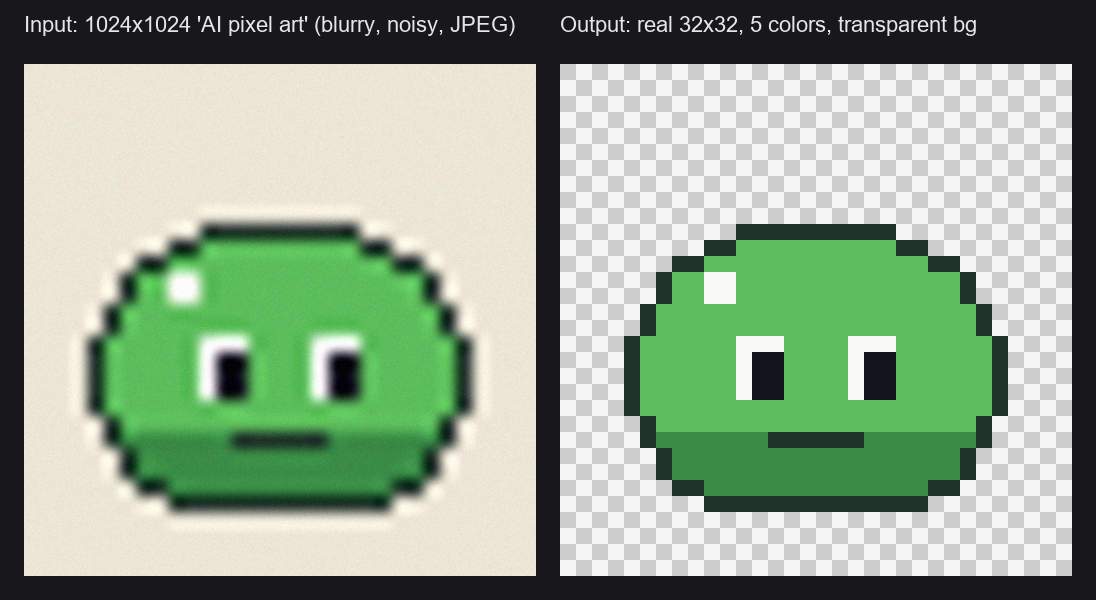
A custom node for ComfyUI that transforms "fake" or blurry AI-generated pixel art into true, crisp pixel art: one pixel per art pixel, aligned to the grid, with a limited palette and a transparent background.
Based on the algorithm from unfake.js and inspired by the early adaptation ComfyUI-Unfake-Pixels.
Features
- Exact Target Resolution: Get exactly
32x32,64x64,48x32... Works with any input size, even when the "big pixels" of the AI image are not a whole number of real pixels, without stretching or half-pixels. - Grid Alignment: The sampling grid is snapped to the edges of the art, so every output pixel reads the center of an art pixel.
- Edge-Aware Scale Detection: Leave the target size at
0to auto-detect the pixel size of clean, upscaled pixel art. - Smart Background Removal: Detects the background color from the image border and removes only the regions connected to it, so similar colors inside the sprite are kept.
- Color Quantization: Reduces the palette (median cut + k-means). Transparent pixels never waste palette slots.
- Similar Color Merging: Merges the near-identical shades that AI noise creates, so flat areas come out flat instead of speckled.
- Optional Stray Pixel Cleanup: Removes isolated noise pixels without introducing new colors (off by default).
- Batch Support: Process animation frames in one go. The pixel size detected on the first frame is reused for the rest.
- Ready-to-save outputs: Real-size image (with alpha), a nearest-neighbor upscaled copy, the transparency mask and a JSON manifest with the detected grid and palette.
Installation
ComfyUI Manager: search for Pixel Art Unfaker and install.
Manual:
cd ComfyUI/custom_nodes/
git clone https://github.com/CalaKuad1/ComfyUI-PixelArt-Unfaker.git
cd ComfyUI-PixelArt-Unfaker
pip install -r requirements.txt
(Windows portable: ..\..\..\python_embeded\python.exe -m pip install -r requirements.txt)
Restart ComfyUI. The node is in image/postprocessing as Unfake Pixel Art (AI to Real).
Quick start (example workflow)
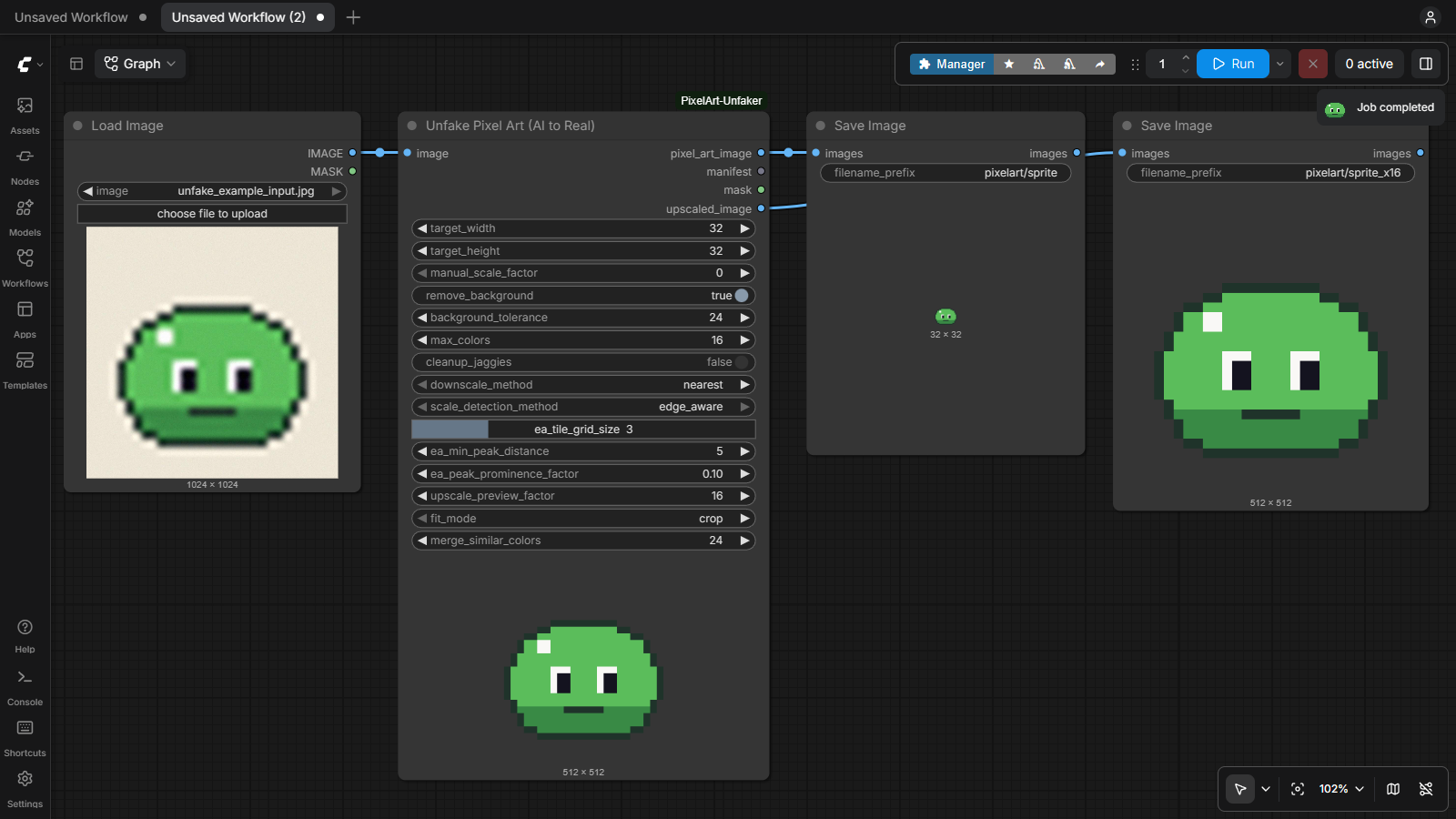
- In ComfyUI open Workflow → Browse Templates, choose ComfyUI-PixelArt-Unfaker → unfake_pixel_art_basic.
(Or drag
example_workflows/unfake_pixel_art_basic.jsononto the canvas.) - Copy
example_workflows/unfake_example_input.jpgintoComfyUI/input/, or load your own image in Load Image. - Press Run (called Queue in older ComfyUI versions). You get the real 32x32 sprite and a 16x upscaled copy in
ComfyUI/output/pixelart/.

It also works right after a KSampler / VAE Decode: plug the decoded image into the node.
Tips
- Which target size? Count the "big pixels" across the AI image (or guess: most AI pixel art is drawn as 32, 48, 64 or 128 pixels wide) and use that as
target_width. Settarget_heightto0to keep the aspect ratio. - Leftover background around the sprite: raise
background_tolerance(20–40 for noisy / JPEG images). - Speckled / blotchy areas: raise
merge_similar_colors(30–40). If subtle shading disappears, lower it. - Still noisy: try
downscale_method = dominant. cleanup_jaggiesis off by default because it can remove intentional 1-pixel details (eyes, highlights). Turn it on only if there are lone stray pixels left.- No target size at all: set both targets to
0(auto-detect) or setmanual_scale_factorto the size of one art pixel. Auto-detection works on integer upscales; for AI images, a target size is more reliable.
How it works
- Background removal: the background color is estimated from the image border and the regions connected to the border are made transparent.
- Grid size: taken from the target size, from
manual_scale_factor, or auto-detected from the spacing of the edges in the image. - Grid alignment: the grid is shifted so its lines fall on the edges of the art.
- Downscale: one output pixel per grid cell (
nearestordominantcolor). - Quantization: the opaque pixels are reduced to at most
max_colorscolors, then near-identical colors are merged. - Cleanup (optional): isolated stray pixels are replaced with the color of their neighbors.
Node Parameters
| Parameter | Description |
|---|---|
| target_width / target_height | Exact output size in art pixels. One of them 0 = keep aspect ratio. Both 0 = use manual_scale_factor or auto-detect. |
| manual_scale_factor | Size of one art pixel in input pixels (e.g. 16 turns 1024 into 64). 0 = auto-detect. |
| remove_background | Make the border-connected background transparent. |
| background_tolerance | Max per-channel difference (0–255) from the background color. |
| max_colors | Maximum palette size. 0 = keep all colors. |
| cleanup_jaggies | Replace isolated stray pixels with their neighbors' color. Off by default. |
| downscale_method | nearest: center pixel of each cell (cleanest in most cases). dominant: most common color of each cell (for very noisy images). |
| scale_detection_method, ea_* | Tuning for auto-detection (tile grid, minimum edge distance, edge strength). |
| upscale_preview_factor | Upscale for the node preview and the upscaled_image output (capped at 4096px). |
| fit_mode | When the aspect ratio differs from the target: crop (fill and cut), pad (fit with transparent borders) or stretch. |
| merge_similar_colors | Merge palette colors closer than this RGB distance (default 24). Removes noise shades; 0 = off. |
Outputs
| Output | Description |
|---|---|
| pixel_art_image | Real-size pixel art. RGBA when the background is removed or padding is added, RGB otherwise. |
| manifest | JSON with the pixel size, grid offset, output size and palette (hex). |
| mask | Transparent area in ComfyUI convention (1 = transparent, same as Load Image). |
| upscaled_image | Nearest-neighbor upscaled copy, ready to save or preview. |
Changelog
1.1.0
- Example workflow and example image (Browse Templates).
- Exact target sizes without stretching, new
fit_mode(crop / pad / stretch). - Batch support, new
maskandupscaled_imageoutputs, JSON manifest. - Better grid alignment, background removal and
dominantdownscale on noisy AI images. - Quantization ignores transparent pixels; new
merge_similar_colorsremoves noise shades. cleanup_jaggiesis now off by default and never adds new colors.- No more scikit-learn dependency; much faster processing.
1.0.0
- First release.
Credits & Acknowledgements
- jenissimo for the original unfake.js library and algorithm.
- tauraloke for ComfyUI-Unfake-Pixels, the foundational inspiration for bringing this into ComfyUI.
License
MIT License