
comfyui-musicflamingo
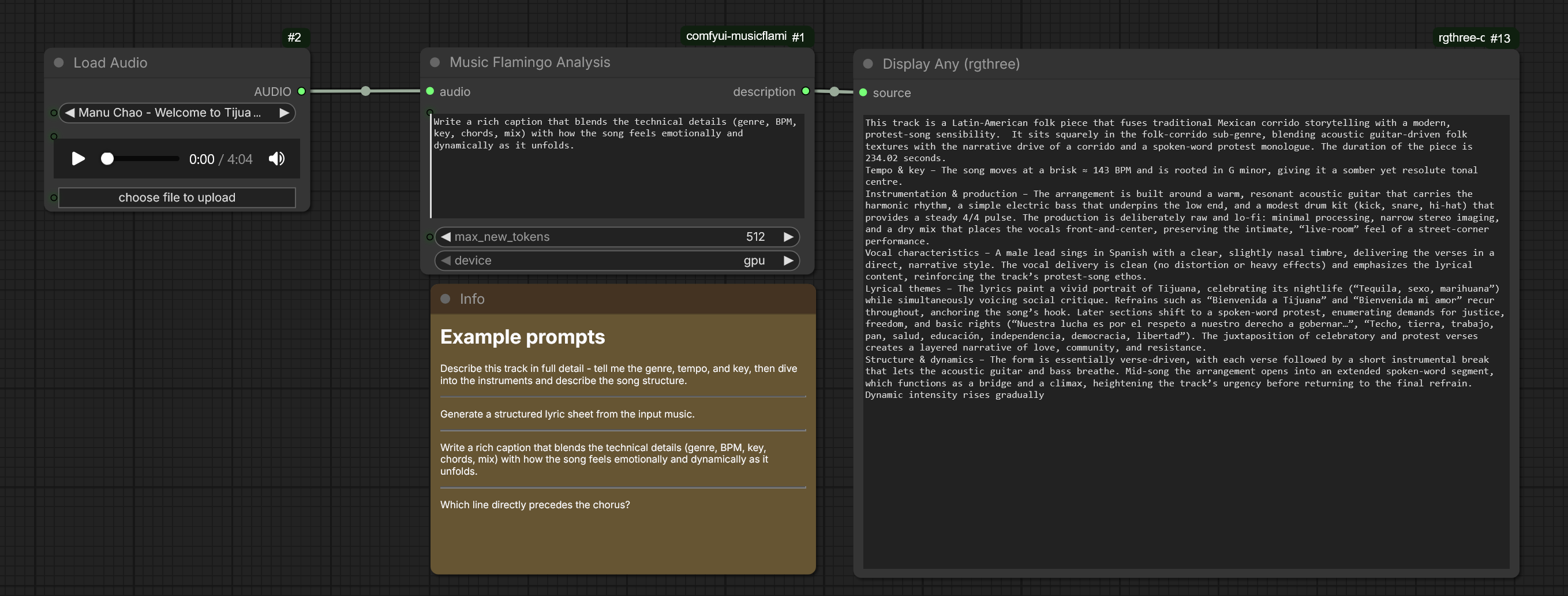
Custom node for ComfyUI that allows you to analyze songs using NVIDIA's Music Flamingo.
ComfyUI Custom Node for Music Flamingo
Custom node for ComfyUI that allows you to analyze songs using NVIDIA's Music Flamingo.
Installation
- Clone this repo into
custom_modules:cd ComfyUI/custom_nodes git clone https://github.com/C0untFloyd/comfyui-musicflamingo - Install dependencies:
(Requirespip install -r requirements.txttransformers>=5.0.0,torch,torchaudio,bitsandbytes,accelerate)
Quantization & Performance
The Music Flamingo Analysis node includes a quantization input:
none(default): Runs in FP16/BF16 (~15GB VRAM required).8-bit: Uses BitsAndBytes INT8 quantization (~8GB VRAM).4-bit: Uses BitsAndBytes NF4 4-bit quantization (~4.5GB VRAM).
Offline Pre-Quantization (Recommended for Instant Startup)
By default, if no local quantized checkpoint is found, the node will quantize the model on-the-fly on first load.
To eliminate first-load delay and avoid storing full-precision models on disk, you can pre-quantize and save the checkpoint once using the included export script:
# Export 8-bit checkpoint
python custom_nodes/comfyui-musicflamingo/export_quantized.py --bits 8

# Or export 4-bit checkpoint
python custom_nodes/comfyui-musicflamingo/export_quantized.py --bits 4
The script saves the quantized weights to:
ComfyUI/models/checkpoints/musicflamingo/music-flamingo-8bit/ (or 4bit/).
Once exported, ComfyUI will automatically detect and load the pre-quantized model directly from disk whenever 8-bit or 4-bit is selected in the node!
Export via Google Colab:
If you don't have enough local bandwidth or GPU VRAM to run the export locally, open export_quantized_colab.ipynb in Google Colab (with a free T4 GPU). It will download, quantize, and package the weights into a ZIP or save them directly to your Google Drive / Hugging Face Hub.