
ComfyUI_Text2PixelCharacter
A custom ComfyUI node for generating cozy fantasy JRPG-style pixel characters from text prompts.
ComfyUI_Text2PixelCharacter
This is my FIRST formal project !!!!!!

A custom ComfyUI node for generating cozy fantasy JRPG-style pixel characters from text prompts.
LIKE THIS:
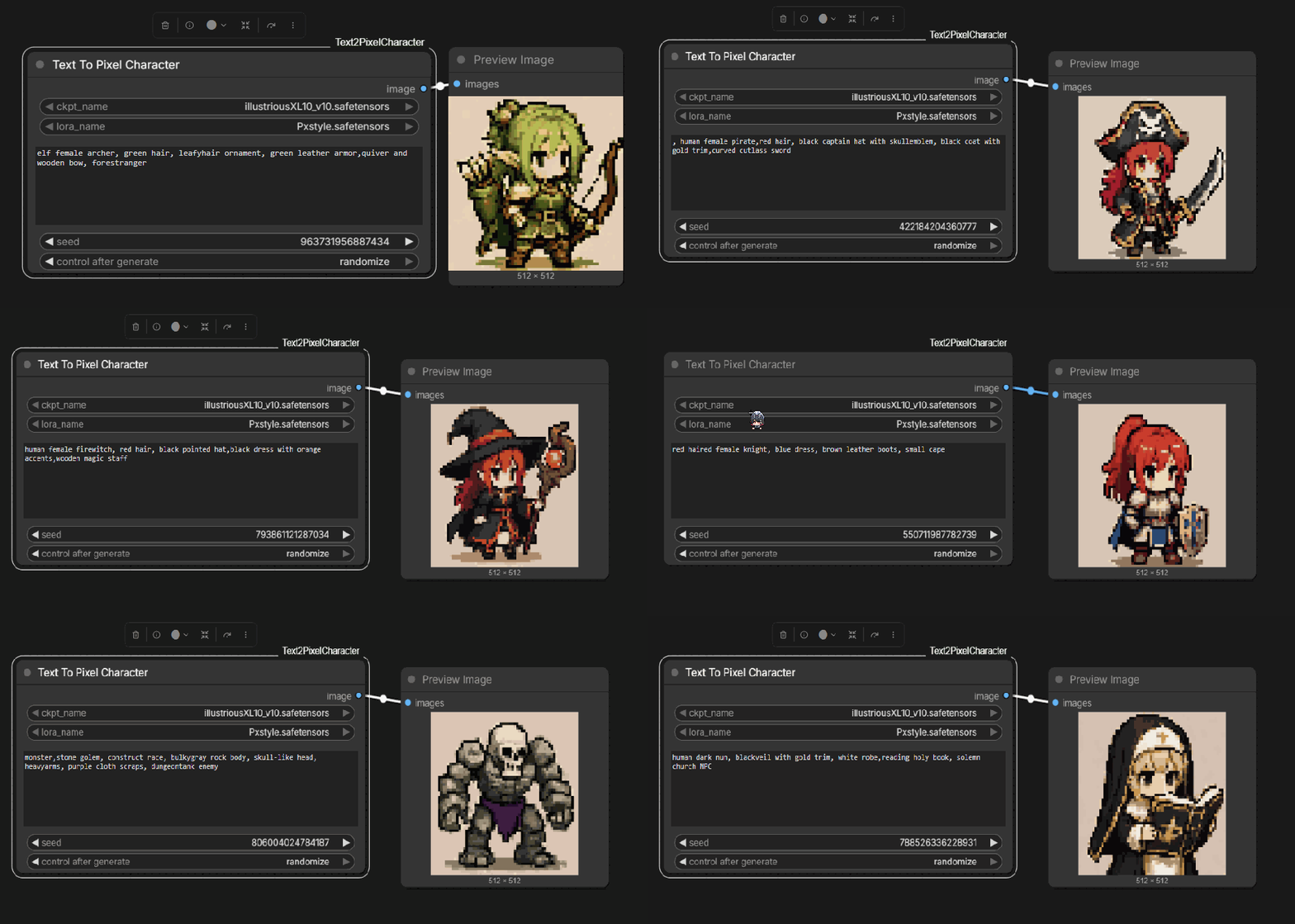
This node automatically:
- Loads checkpoint and LoRA
- Generates a character from prompt
- Converts the result into pixel art
- Applies palette-based color matching
- Quantizes to 32 colors
- Upscales with nearest-neighbor scaling
Designed for consistent RPG sprite generation workflows.
Features
- One-node workflow
- Hidden internal style prompts
- Built-in pixel art post-processing
- Automatic palette color matching
- 32-color quantization
- Built-in nearest-neighbor upscale
- Uses local checkpoints and LoRAs from the node folder
- Minimal user setup
Installation
1. Clone into ComfyUI custom_nodes
cd ComfyUI/custom_nodes
git clone https://github.com/YOUR_USERNAME/ComfyUI_Text2PixelCharacter.git
2. Install requirements
cd ./ComfyUI_Text2PixelCharacter
pip install -r requirements.txt
3. Restart ComfyUI
After restarting, search for:
Text To Pixel Character
Usage
Minimal workflow:
Text To Pixel Character
↓
Save Image
Node Parameters
| Parameter | Description | |---|---| | ckpt_name | Checkpoint model | | lora_name | LoRA model | | character_prompt | Character description | | seed | Generation seed |
Example Prompt
red haired female knight, blue dress, brown leather boots, small cape
Internal Processing Pipeline
The node internally performs:
Text Prompt
↓
SDXL Generation
↓
256x256 Latent Sampling
↓
VAE Decode
↓
Resize to 64x64
↓
Color Match
↓
32 Color Quantization
↓
Nearest Neighbor Upscale to 512x512
Palette
The node uses:
palette.png
located in the project root as the color reference image.
You can replace it with your own palette reference image to change the overall visual style.
Requirements
numpy
Pillow
torch
Recommended Models
Works best with:
- SDXL checkpoints
- Pixel-art LoRAs
- Chibi fantasy character datasets
Notes
- This project is intended for stylized RPG sprite generation.
- Final output style depends heavily on checkpoint and LoRA selection.
- Different checkpoints may produce different proportions and rendering styles.
License
MIT License