
H3 Ref2VA Accelerator
Production-oriented quality-first block accelerator for native ComfyUI MiniMax H3 Ref2VA
ComfyUI MiniMax H3 Ref2VA Accelerator
Quality-first block-cache acceleration for native ComfyUI MiniMax H3 Ref2VA workflows.
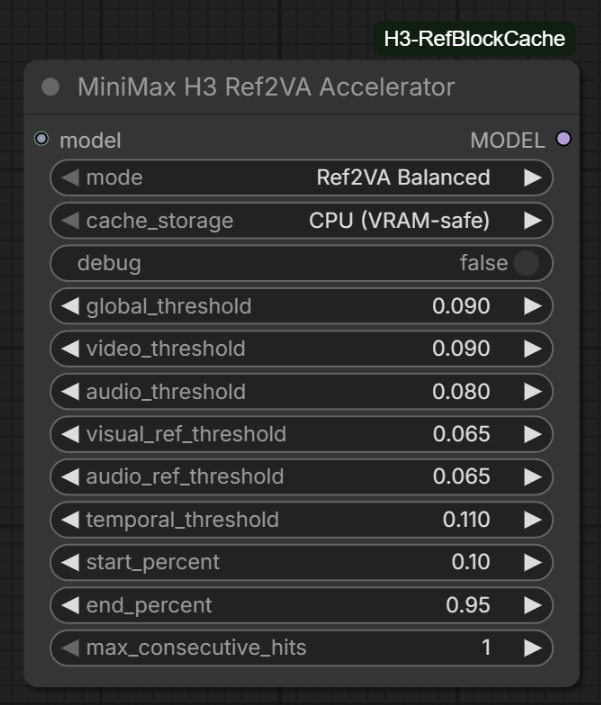
Version 0.4.2 is the production-cleanup release. It keeps the v0.4 robustness work and the explicit v0.4.1 tail selector, but makes the experimentally validated production path unmistakable: Balanced + CPU (VRAM-safe) + Safe CPU + tail_rescale OFF. Experimental tail controls remain available under Advanced for benchmarking and research. The original ComfyUI node class ID is preserved, so workflows created with v0.1–v0.4.1 upgrade in place.
[!IMPORTANT] This is an approximate accelerator, not bit-identical inference. For exact native behavior, bypass the node or use Observe Only (no caching).
Production defaults
For the validated quality-first BF16 workflow, use:
- Mode: Ref2VA Balanced
- Cache storage: CPU (VRAM-safe)
- CPU tail compute: Safe CPU (v0.3 behavior)
- tail_rescale: OFF
- debug: OFF
These defaults preserve maximum VRAM headroom while retaining the measured block-cache speedup. The Auto GPU Fast Path and tail rescale controls are retained under Advanced for experiments, not as recommended production settings.
Highlights
- Built specifically for native ComfyUI
MiniMaxH3ModelRef2VA layouts. - Uses Ref2VA-aware global, video, audio, reference, and temporal guards, all accumulated in fp32.
- Runs transformer block 0 every step and conditionally reuses the blocks 1-49 residual.
- Prevents consecutive cache hits in every built-in quality preset.
- Defaults to the validated production path for VRAM-constrained BF16 workflows: CPU cache storage + Safe CPU tail compute.
- Detects incompatible DiT/block-cache patches instead of silently stacking them.
- Preserves compatibility with object-level attention patches such as SageAttention.
- Reports clearly when it is idle (no Ref2VA payload) or when a required guard metric is unavailable, and keeps loading even if
comfy.model_prefetchdisappears in a future ComfyUI. - Ships a headless test suite (
python tests/test_runtime.py; no ComfyUI or GPU required).
Tested performance
Primary test: 10-second Ref2VA generation, 32 GB RTX 5090, pruned BF16 MiniMax H3, Sage-style attention, 20-step RES Multistep.
| Mode | Sampling time | Cached steps | Guidance | | --- | ---: | ---: | --- | | Native | ~14:43 | 0/20 | Exact native trajectory | | Ref2VA Conservative | ~12:06 | 4/20 | Smaller observed differences | | Ref2VA Balanced | ~11:05 | 5/20 | Recommended production compromise | | Ref2VA Aggressive | ~10:32 | 6/20 | Experimental; more visible drift |
These figures describe one tested workflow, not a universal benchmark. Hardware, checkpoint, video length, resolution, sampler, offloading, and input content all affect results.
Installation
ComfyUI Manager
Once the node is listed in ComfyUI Registry/Manager, search for H3 Ref2VA Accelerator, install it, and restart ComfyUI.
Manual installation
From your ComfyUI custom_nodes directory:
git clone https://github.com/BMB12d3/ComfyUI-H3-Ref2VA-Accelerator.git
Restart ComfyUI after installation. The node has no additional Python dependencies beyond ComfyUI and PyTorch.
Upgrading from an older ZIP install
Existing workflows remain compatible because the original ComfyUI node class ID is preserved. If you previously installed a legacy ZIP whose folder is named ComfyUI-H3-RefBlockCache, remove or rename that old folder before installing/cloning ComfyUI-H3-Ref2VA-Accelerator. Do not keep both copies in custom_nodes, because both register the same node class ID.
Quick start
- Add MiniMax H3 Ref2VA Accelerator from
MiniMax H3 > optimization. - Connect the H3 model pipeline to the node's
modelinput. - Leave
modeat Ref2VA Balanced. - Use CPU (VRAM-safe) for pruned/offloaded BF16 checkpoints.
- Leave
cpu_tail_computeat Safe CPU (v0.3 behavior) for the production baseline. - Connect the patched
MODELoutput to the guider and scheduler/model-sampling path used by the workflow. - Queue the workflow and review the console summary after sampling.
Recommended placement:
H3 diffusion model
  -> Memory Efficient Sage Attention (optional)
  -> ModelSamplingMiniMaxH3 / H3 sigma shift
  -> MiniMax H3 Ref2VA Accelerator
  -> Basic Guider + Basic Scheduler
  -> RES Multistep sampler
Modes
| Mode | Best for | Notes | | --- | --- | --- | | Ref2VA Balanced | Normal production work | Recommended default | | Ref2VA Conservative | Keeper shots and higher fidelity | Trades some speed for smaller trajectory changes | | Ref2VA Ultra Safe | Especially sensitive shots | Narrowest built-in cache profile | | Ref2VA Aggressive | Previews and experiments | Faster in testing; more visible deviations | | Observe Only | Diagnostics and calibration | Collects metrics without caching | | Custom | Advanced tuning | Enables the threshold and window controls |
The advanced threshold values visible on the node are Custom-mode controls only. Built-in presets always use their documented internal values, even when different numbers remain visible in the widgets.
Cache storage
- CPU (VRAM-safe): recommended for pruned BF16 or otherwise offloaded H3 checkpoints. It preserves VRAM headroom by holding the persistent tail residual in system RAM.
- GPU (faster, uses VRAM): consider only when a smaller/quantized checkpoint leaves comfortable VRAM headroom. Benchmark it for your workflow.
When cache_storage is CPU, cpu_tail_compute controls how full-step tail residuals are formed:
- Safe CPU (v0.3 behavior): default/recommended for pruned BF16. Stages block-0 output to CPU immediately and forms the tail there, maximizing VRAM headroom.
- Auto GPU Fast Path: advanced benchmark option. If a VRAM-headroom check passes, temporarily keeps block-0 output on GPU so the tail can be formed with one device-to-host copy. On the validated RTX 5090 + pruned BF16 workflow it engaged on 15/15 full steps but improved an ~11 minute sampler run by only about 2 seconds, so Safe CPU remains the production recommendation.
Experimental: tail rescale
tail_rescale remains available as an advanced experimental control and defaults off. In fixed-seed testing it produced slightly different output but no clear quality advantage. Production recommendation: leave it off.
Do not stack trajectory accelerators
Do not place this node in the same model branch as Spectrum MiniMax H3, generic MiniMax H3 FirstBlockCache, TeaCache/EasyCache-style transformer caching, CacheDiT, T8 Block Cache, or another double_block/DiT replacement.
Compatibility
Designed for native ComfyUI MiniMaxH3Model and Ref2VA layouts as of August 2026. Tested with native H3 pruned BF16 and pruned INT8 ConvRot checkpoints, Sage attention patching, DynamicVRAM/AIMDO, and RES Multistep.
Documentation
See the User Manual for setup, every control, preset values, troubleshooting, and quality guidance. Release changes are recorded in CHANGELOG.md.
License
No license has been selected yet. Until a license file is added, copyright law reserves all rights to the author.