
Advanced Model Manager
Advanced Model Manager for ComfyUI — browse, search and download models from HuggingFace and GitHub workflows directly from the ComfyUI interface.
Nodes (1)
📦 Advanced Model Manager for ComfyUI
A powerful model browser, downloader and manager built directly into ComfyUI. Browse hundreds of HuggingFace repositories, search across every file in every repo instantly, download models straight to the right folder, manage GitHub workflows, and track everything you have installed — all without leaving ComfyUI.
✨ Features at a Glance
| Feature | Description |
|---|---|
| 🧩 Workflow models | Pick a ComfyUI template (or your open graph) and download every model it needs in one click |
| 🔗 Paste a link | Paste any HuggingFace, GitHub or direct URL — the file type is recognised and it lands in the right folder |
| ➜ Move files | Landed in the wrong folder? Move it from the Downloaded tab, with a searchable folder picker |
| 🔍 Cross-repo file search | Find a filename across repos in seconds — no index to build first |
| 📁 Repository browser | Repos grouped by author with model-family badges (WanVideo, Flux, LTX, etc.) |
| ⬇️ One-click download | Files go straight to the correct ComfyUI model subfolder automatically |
| 📋 Workflow browser | Browse and download ComfyOrg + Kijai example workflow JSONs from GitHub |
| 💾 Downloaded tab | See every model you have installed, delete files, open folders |
| 🌐 HuggingFace live search | Search HuggingFace directly to discover repos that aren't tracked |
| 📊 Node widget | Shows live model counts (Diffusion, Text Encoders, VAE, LoRAs) on the graph node |
| ⌨️ Keyboard shortcut | Ctrl + Shift + M to open/close the panel from anywhere |
🖼️ Screenshots
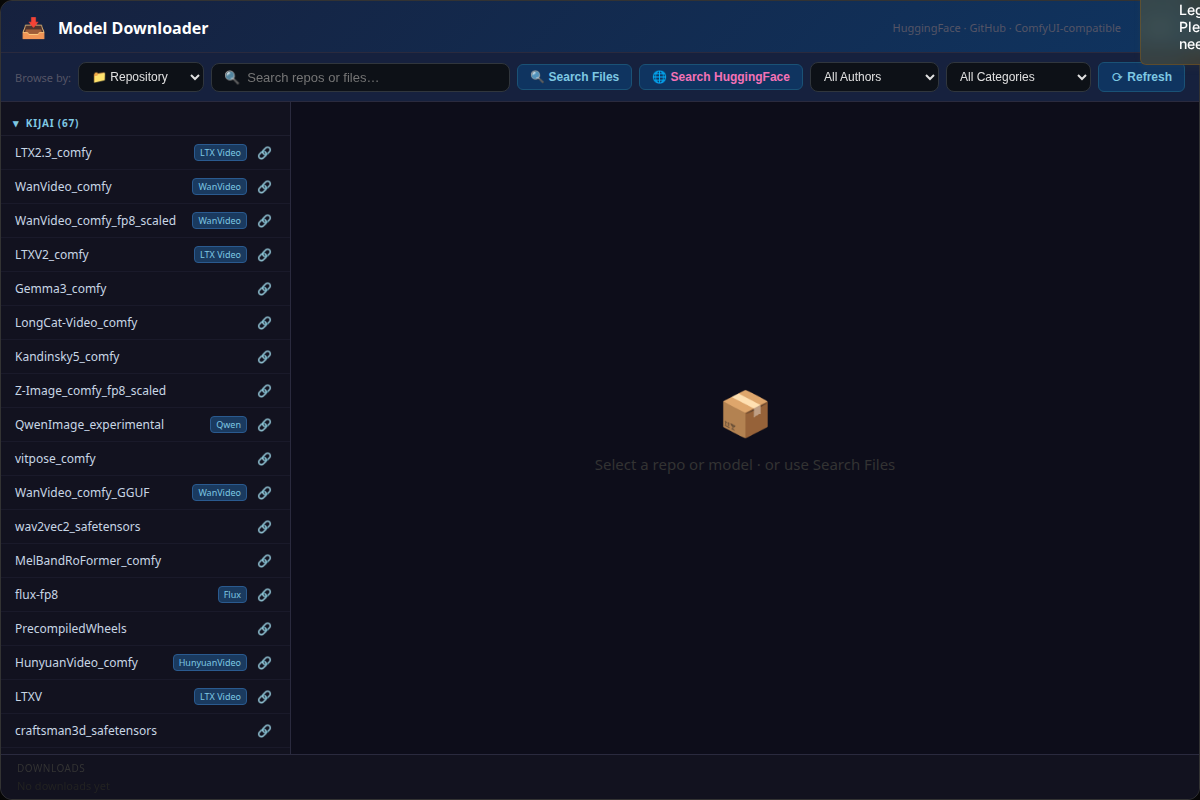
Browse Repositories — newest models first
Every tracked HuggingFace author, grouped and tagged by model family. The list is sorted newest-first and refreshes itself, so new releases (here, the whole LTX-2.5 family) appear on their own.
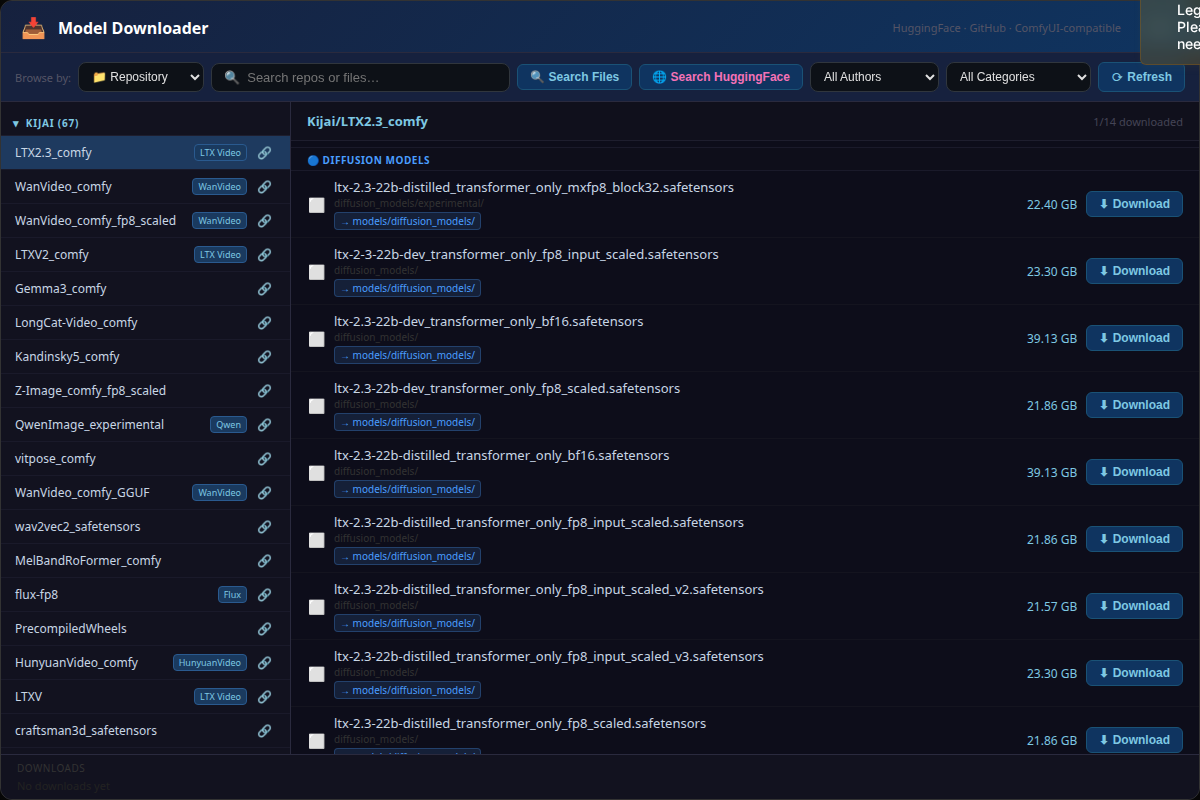
View & Download Files
Pick a repo to see each file with its size, its path inside the repo, and the ComfyUI folder it will land in. Files already on disk are marked.
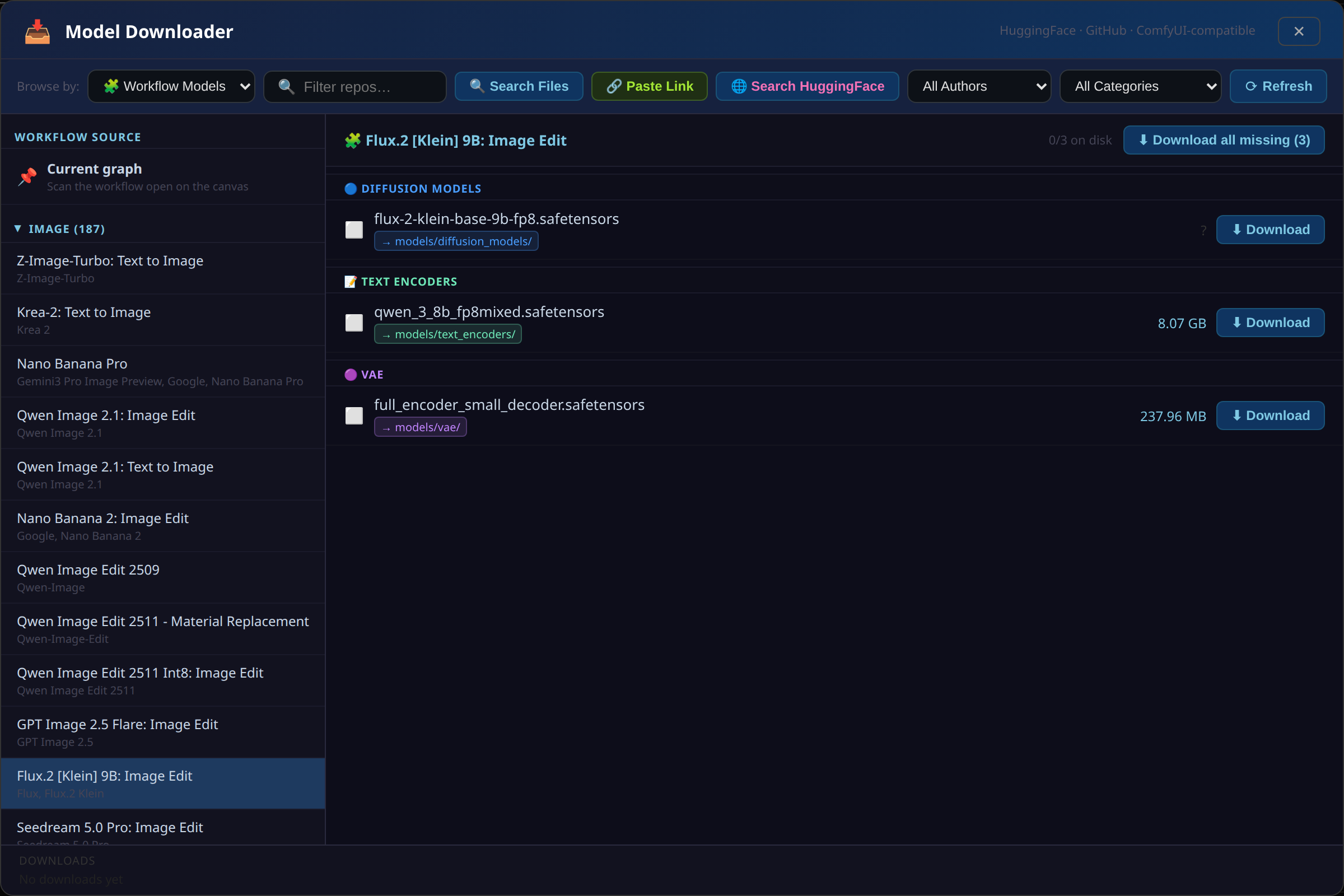
🧩 Workflow Models — everything a template needs, in one click
Choose a ComfyUI template (or scan the graph you have open) and the tool reads the download links embedded in it. Models are grouped by type with sizes and destinations, and Download all missing fetches the ones you don't have.
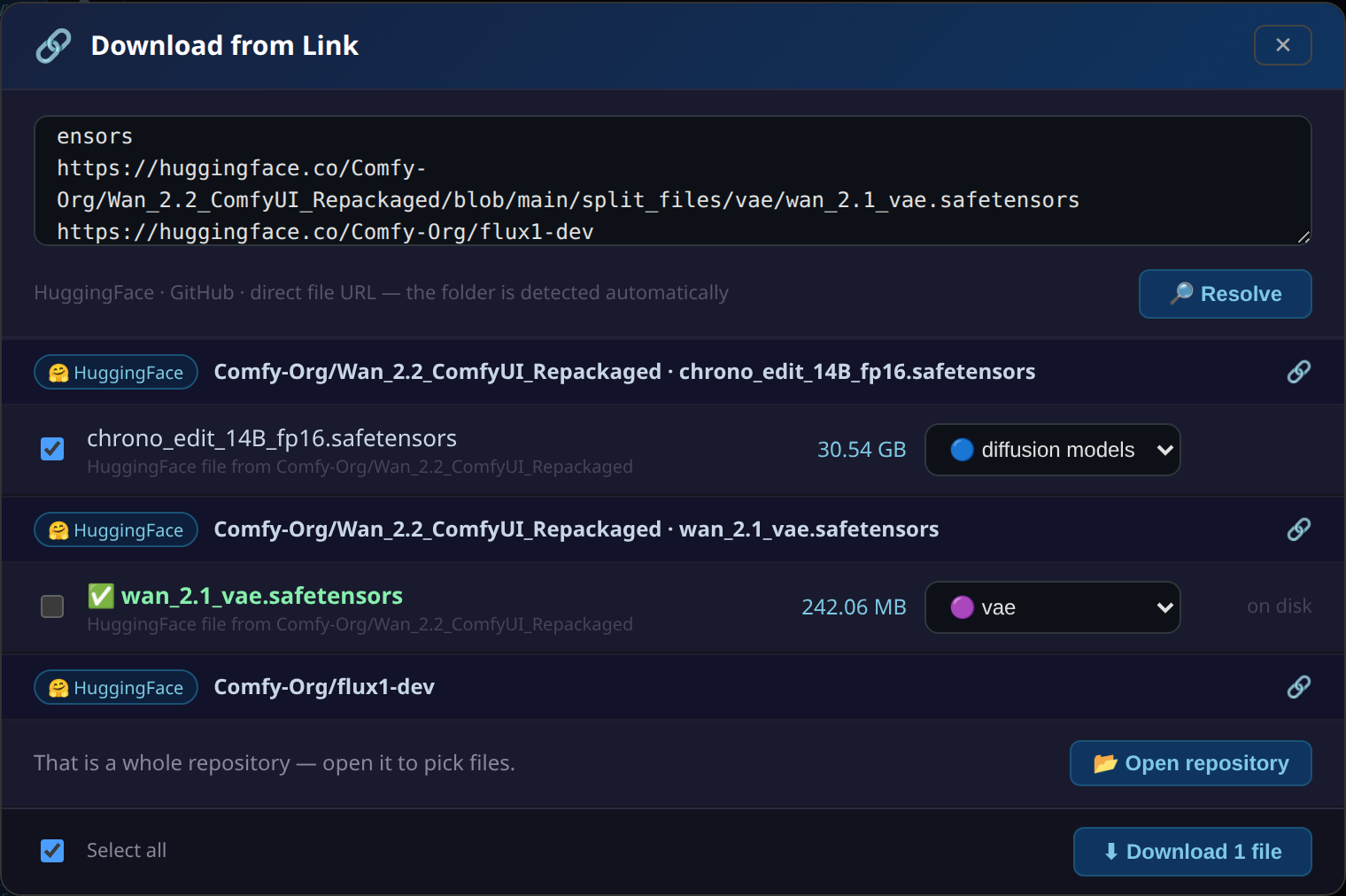
🔗 Paste a Link
Paste HuggingFace, GitHub or direct URLs — one per line. Each is resolved to a file, its size looked up and its destination detected, with a dropdown to override. Files already on disk are marked and skipped; a whole repo link offers to open it instead.
➜ Move a File to the Right Folder
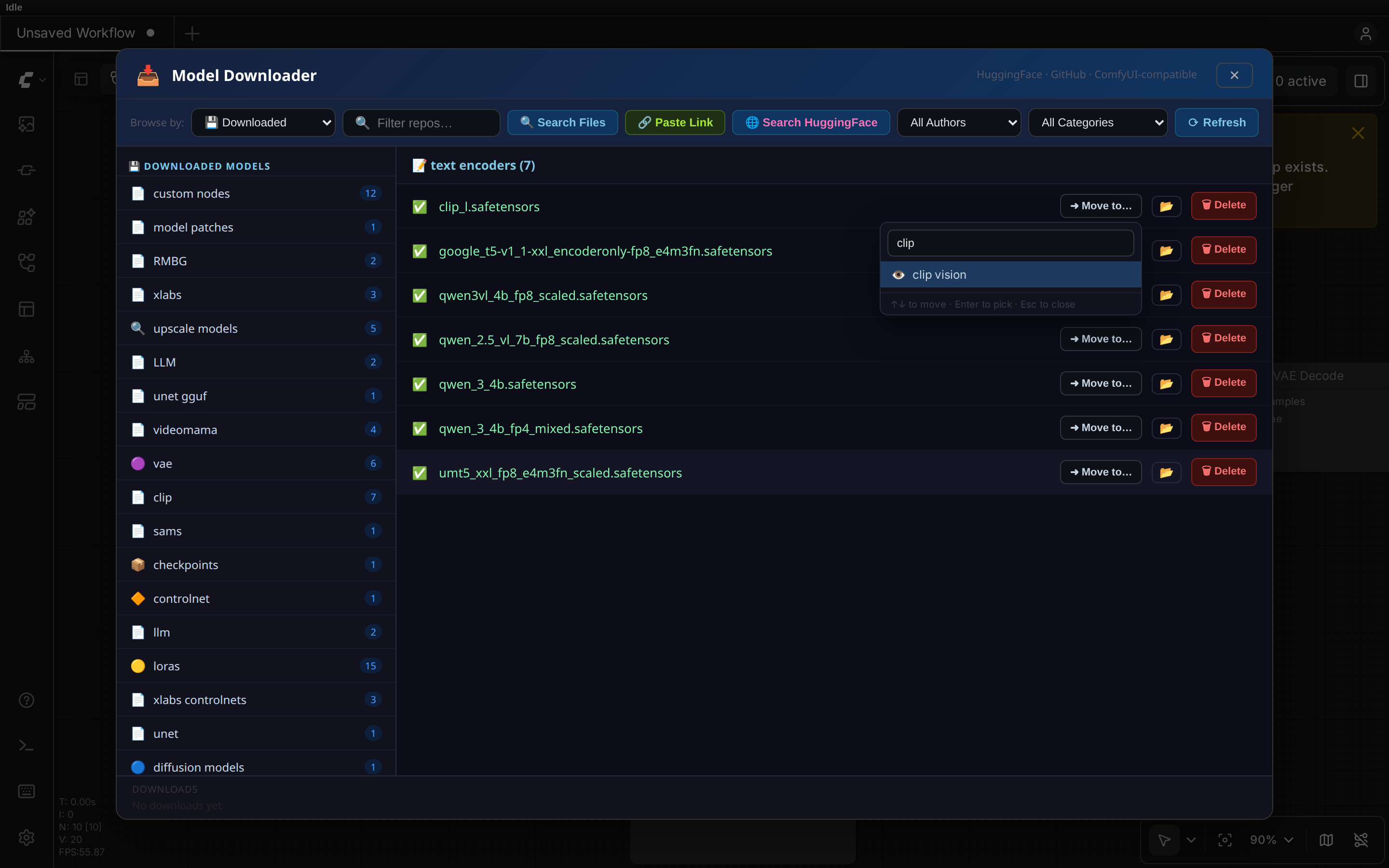
Downloaded into the wrong place? Move it from the Downloaded tab. The picker has a search box, so you type instead of scrolling — and it matches old folder aliases too, so unet finds diffusion_models.
Search Across All Repos
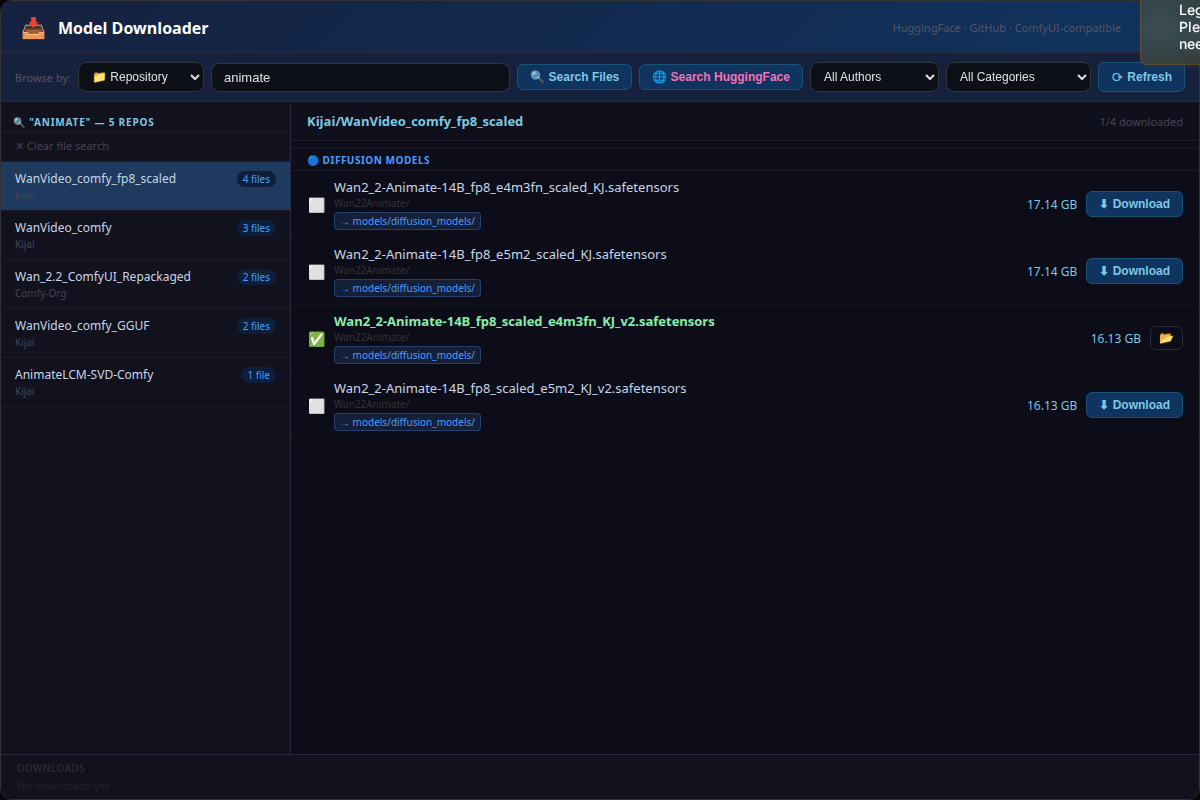
Search filenames across repos without any prebuilt index — the query narrows the candidate repos first, so results come back in seconds.
🚀 Installation
Option 1 — ComfyUI Manager (Recommended)
- Open ComfyUI Manager → Install Custom Nodes
- Search for Advanced Model Manager
- Click Install and restart ComfyUI
Option 2 — Manual
cd ComfyUI/custom_nodes
git clone https://github.com/BISAM20/ComfyUI-advanced-model-manager
cd ComfyUI-advanced-model-manager
pip install -r requirements.txt
Restart ComfyUI.
🎮 How to Use
Adding the node to your graph
Double-click on an empty area of the ComfyUI canvas to open the node search, type Advanced Model Manager, then click the result to place it.
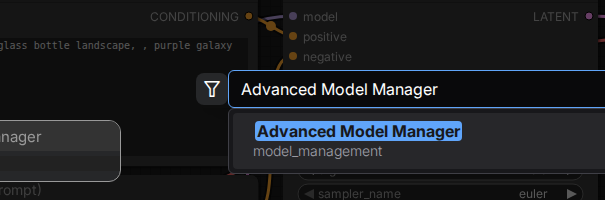
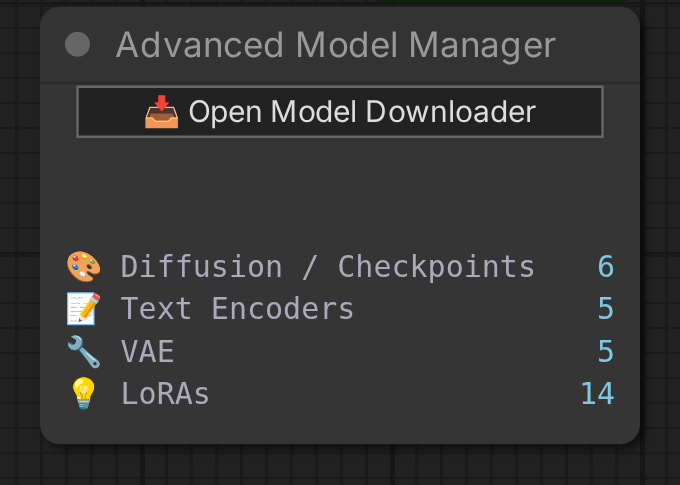
Once placed, the node shows a live count of all your installed models and a button to open the manager panel:
Browsing & Downloading Models
- The left panel lists all HuggingFace repos by author
- Click any repo name to load its files on the right
- Each file shows its size and whether it is already downloaded (✓ checkmark)
- Click ↓ Download to save a file — it goes to the correct ComfyUI subfolder automatically (e.g.
models/diffusion_models/,models/loras/, etc.)
Downloading from a Link (🔗 Paste Link)
Found a model somewhere else? Click 🔗 Paste Link, paste the URL, and press Resolve (or Ctrl+Enter). The file is identified, its size is looked up, and the correct ComfyUI folder is picked automatically — then click Download.
Recognised link types:
| You paste | What happens |
|---|---|
| https://huggingface.co/<repo>/blob/main/path/file.safetensors | That single file, classified by path + repo README |
| https://huggingface.co/<repo>/resolve/main/… | Same — ?download=true suffixes are fine |
| https://huggingface.co/<repo> | Opens the repo in the normal file browser |
| Comfy-Org/flux1-dev | Bare repo ids work too |
| https://github.com/<owner>/<repo>/blob/<branch>/file.json | Downloaded via raw.githubusercontent.com |
| Any direct .safetensors / .gguf / .ckpt / .pt / .json URL | Filename taken from the URL or Content-Disposition |
You can paste several links at once, one per line. Every row has a destination dropdown, so if the auto-detection guesses wrong you can correct it before downloading. Files already on disk are marked and skipped.
Searching Across All Repos
The box next to Browse by filters whatever is on screen as you type. To search filenames across repos, type a query and click 🔍 Search Files:
ltx 2.5→ every LTX-2.5 file, grouped by repowan fp8→ finds Wan FP8 files even if the name uses underscores likeWan_fp8ltx lora→ multi-word, both words must be present, order doesn't matter
Search is case-insensitive and normalises underscores, dashes and dots to spaces. There is no index to build — the query narrows the candidate repos by name first, then loads only those file lists, so results arrive in seconds.
HuggingFace Live Search
Click 🌐 Search HuggingFace to search HuggingFace live for repos that aren't in the tracked list. Results are clickable and load their file list exactly like local repos.
Workflow Models Tab (🧩)
ComfyUI's built-in templates embed the download link and target folder for every model they need. Switch to 🧩 Workflow Models and the tool reads that metadata for you — no copying links by hand.
Pick a source in the left panel:
- 📌 Current graph — scans the workflow open on your canvas right now
- Any ComfyUI template — all 364 bundled templates, grouped by category (Image, Video, Audio, 3D Model, Utility…). Type in the search box to filter by title, description or model name.
The right panel then lists every model the workflow needs, grouped by type, showing its size, its destination folder, and whether it is already on disk. Download them individually, or hit ⬇ Download all missing to fetch everything you don't have in one click.
Models inside subgraphs are found too — several newer templates keep their loaders nested there, where a surface-level scan would miss them entirely.
Not every template declares model metadata (roughly 162 of the bundled ones do). If a workflow has none, the tab says so and points you at 🔗 Paste Link instead.
Workflows Tab
Switch to 📋 Workflows mode to browse and download workflow JSON files from:
- ComfyOrg official example workflows
- Kijai WanVideoWrapper example workflows
Workflows are saved directly to your ComfyUI/user/default/workflows/ folder.
Downloaded Tab (💾)
Switch to the 💾 Downloaded tab to see all models currently on disk, organised by category. From here you can:
- Pick ➜ Move to… to move a file into a different model folder
- Click 📂 to open the containing folder in your file manager
- Click 🗑️ to delete a file
Moving a File to the Right Folder
Auto-classification occasionally guesses wrong — a LoRA can land in diffusion_models/, or a text encoder in checkpoints/. Rather than digging through the filesystem, open the 💾 Downloaded tab, find the file, and click ➜ Move to…. Confirm the destination and it's moved.
Finding the destination. The picker opens with a search box, so you can type instead of scrolling a long list:
vae→vae,vae_approxup mod→upscale_models,latent_upscale_models— multi-word, order-independent↑↓to move,Enterto pick,Escto close
Search also matches old folder aliases, so habits still work: typing unet finds diffusion_models, and clip finds text_encoders. Hover any entry to see the real directory it writes to.
Which folders are offered. Only directories inside your ComfyUI/models/ folder, plus anything on a separate drive configured through extra_model_paths.yaml. Non-model locations — custom_nodes/, per-node asset directories, configs/, user/default/workflows/ — are never offered. Folder types that ComfyUI aliases to the same directory (diffusion_models / unet / unet_gguf, or clip / text_encoders) collapse into one entry, so a destination never appears twice. Workflow .json files have no Move button, since there is nowhere sensible to send them.
How the move behaves.
- Moves within the same drive are instant and never duplicate the file.
- Moving onto a different drive (e.g. a path from
extra_model_paths.yaml) is necessarily a copy, so progress is shown in the row. The original is only deleted once the copy has fully landed, and an interrupted or cancelled move leaves your source file untouched with no partial file at the destination. - If a file of the same name already exists at the destination, the move is refused rather than overwriting it.
- Files kept in subfolders (
models/loras/flux/mylora.safetensors) can be moved and deleted like any other.
Category Filter
Use the All Categories dropdown to filter the repo list and search results to a specific type: Checkpoints, LoRAs, VAE, Text Encoders, Upscalers, etc.
Refresh
Click Refresh to re-fetch the repo list from HuggingFace, newest first. It takes a few seconds. The list also refreshes itself automatically every six hours, so newly released models show up without being asked for.
📊 Graph Node
Add the Advanced Model Manager node to your workflow graph to get a live dashboard showing how many models of each type you have installed. Click Open Model Downloader on the node to open the full panel.
Model counts update automatically every 8 seconds.
📂 Where Files Are Saved
The tool automatically classifies files and saves them to the right folder:
| File type | Saved to |
|---|---|
| .safetensors, .ckpt checkpoint files | models/checkpoints/ or models/diffusion_models/ |
| LoRA files | models/loras/ |
| VAE files | models/vae/ |
| Text encoder / CLIP files | models/text_encoders/ or models/clip/ |
| Upscaler files | models/upscale_models/ |
| ControlNet files | models/controlnet/ |
| Embeddings / textual inversions | models/embeddings/ |
| Hypernetworks | models/hypernetworks/ |
| Workflow .json files | user/default/workflows/ |
Any path you have configured in extra_model_paths.yaml is respected. When downloading from a pasted link you can override the detected destination before confirming.
⚙️ Requirements
- ComfyUI (any recent version)
- Python 3.10+
huggingface_hub >= 0.20.0requests >= 2.28.0
🔑 Tokens (Optional)
HuggingFace
For downloading gated models (e.g. Meta Llama), set your HuggingFace token in your environment:
export HF_TOKEN=hf_your_token_here
Or log in via the CLI:
huggingface-cli login
📄 License
MIT License — see LICENSE for details.
🙏 Credits
Built for the ComfyUI community. Repos and models sourced from HuggingFace. Workflow JSONs from ComfyOrg and Kijai.