
⚡️ Honda Nodes
A specialized node pack heavily focused on secure image metadata editing and manipulation, supported by a suite of JSON, text, and file system automation tools. Optimized for the V3 API (Nodes 2.0).
Nodes (45)
Your prompt list minus the duplicates and the junk
ComfyUI has no loop, so here's the next best thing
Your separator is literal, not a regex
Pluck one line out of a list, including from the end
Exact membership, not a substring search
The check that stops an empty list from wrecking a run
Counting lines, and the blank one you didn't know was there
Chop a long list into batches without deleting anything
Going back to one string, and picking the right glue
PngText vs UserComment, translated before it's lost
The node that quietly doesn't run
Recursive, silent, and it will not ask twice
The boring cleanup node that saves you a terabyte
The node whose entire job is to be a path you can wire
Pull models from a URL inside the graph, and mind the tokens
Read the workflow back out of any image or video
Is this actually the same file? SHA-256 says so
Width and height as numbers a workflow can use
Surgery on a metadata blob, with jq underneath
One jq filter, straight into a prompt
Fold two JSON blobs into one, the way jq would
Read the metadata blob as a tree, copy the jq path, move on
Change one field inside a JSON blob, keep everything else
The cheap guard that stops a broken blob failing your save
Turn a folder into a list your graph can actually iterate
The loader that hands you the metadata as JSON
File cleanup as a step in the graph, not a chore afterwards
Stop hardcoding C:\\Users\\you\\ in your workflows
Clean up the path string before it bites you
See the picture and keep the wire alive
Seeing what a string actually contains
Get a prompt, a caption or a JSON blob off disk and into the graph
Fix the name after the fact, inside the same run
Three formats, injected metadata, and one trap on by default
The boring node that stops you typing the same prompt five times
A switch statement for prompts, written in plain text
Build a filename (or a prompt) out of 99 sockets
A yes/no on a string, with or without regex
Read the string on the canvas instead of in a terminal
Strip the junk out of prompts and filenames
Turn one comma-separated string into a batch of prompts
One prompt socket, two strings, a boolean in charge
Your logo goes on at save time, not into the image tensor
Yes, it can say your name — but your font size may be a lie
Putting your name in a JPEG's EXIF without leaving ComfyUI
⚡️ Honda Nodes
A specialized node pack for ComfyUI, focused on image metadata editing and manipulation, and fully optimized for the new ComfyUI V3 API (Nodes 2.0).
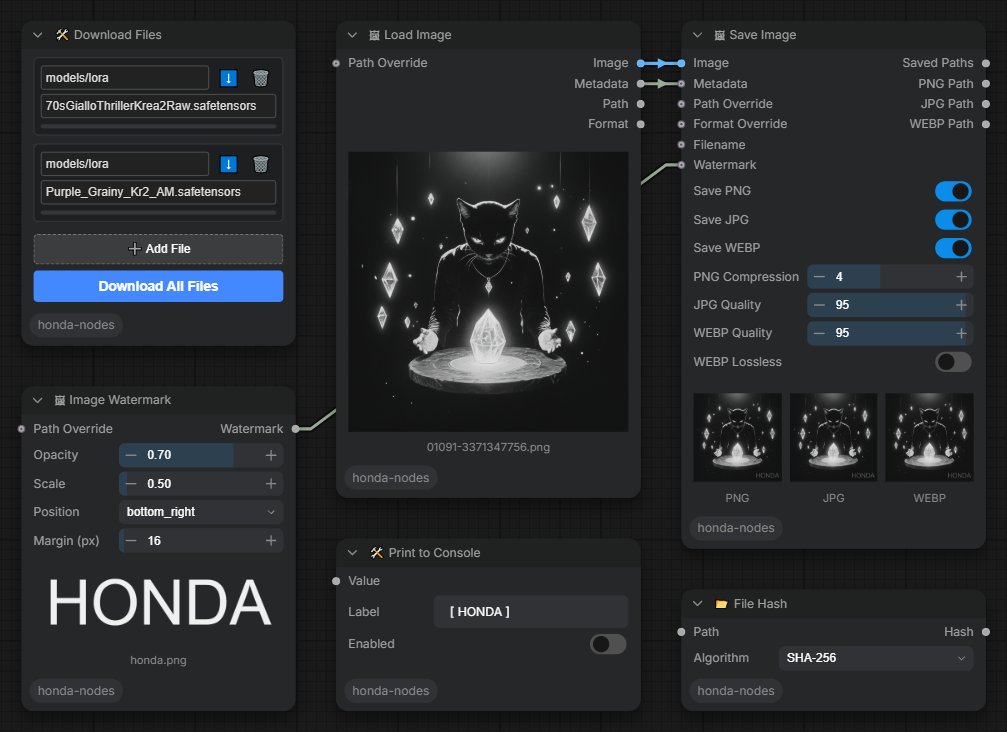
At its core, this project is built around the integrated IME tool for secure, lossless metadata operations. Think of the other nodes (JSON parsing, text manipulation, file system operations, and future logic components) as foundational building blocks. They exist to support the core metadata tools, allowing you to orchestrate complex automation pipelines, process data effectively, and perform format conversions directly within your workflows.
✨ Features
- Metadata (Core): Extract, write, and convert image metadata securely without touching image pixels. Native integration with the fast
imebackend. - Image: Custom Image Load and Save nodes with built-in metadata support and watermarking capabilities.
- JSON: Powerful JSON parsing and manipulation to handle complex metadata structures (Get/Set/Delete keys, Merge objects, Validate, Preview).
- Text: Advanced text manipulation for formatting prompts and tags (Concatenate, Replace, Split, Switch, Case Switch, Regex Match, Preview).
- File System: Native file and directory operations for managing batches (List Files, Move, Rename, Delete, Read, Path Normalization).
- Tools: Bulk file downloading directly from the node graph.
- Logic: Control flow and automation logic nodes (TODO: coming soon!).
📦 Installation
Method 1: ComfyUI Manager (Recommended)
This package is officially available in the ComfyUI Registry.
- Open ComfyUI and click on Extensions.
- From the dropdown menu in Nodes Manager, select Node Pack.
- Search for
Honda Nodes(orhonda-nodes). - Click Install.
- Restart ComfyUI.
Method 2: Manual
-
Clone this repository into your
ComfyUI/custom_nodes/directory.git clone --depth 1 https://github.com/Avaray/honda-nodes.git -
Open a terminal inside the
honda-nodesdirectory and use your ComfyUI Python environment to execute the setup installer:..\..\..\python_embeded\python.exe install.py -
Restart ComfyUI.
📝 License
This project is licensed under the MIT License.