
ComfyUI-Captionator-Qwen35
ComfyUI Qwen 3.5 Prompting nodes (captionate image, improve prompt, etc)
Nodes (2)
ComfyUI Captionator Qwen3.5
Simple ComfyUI custom node for running multimodal Qwen3.5 image captioning.
Node
- Name:
CaptionatorQwen35 - Description:
ComfyUI Qwen 3.5 Prompting nodes - Category:
Captionator - Optional input image:
IMAGE - Output caption:
STRING - Output full_output:
STRING
Features
- Scans
models/text_encoders,models/llm, andmodels/LLMusingfolder_paths - Loads standalone Qwen3.5
.safetensorsusing ComfyUI's native loader, generation, quantized operations, and memory management - Keeps a Transformers backend for full Hugging Face model directories
- Offers download options for full HF Qwen3.5 2B, 4B, and 9B directories alongside local models
- Sends prompt plus optional image to the model
- Supports text-only generation when no image is connected
- Supports
seed - Supports
thinkmode - Supports optional resize via
resize_to - Supports configurable output length via
max_new_tokens - Splits visible caption from full reasoning output when
thinkis enabled - Includes a prompt improver node with optional image input
- Unloads models after each request by default; optionally retains one model for repeated requests
- Reports model and inference errors as node failures, preventing error messages from becoming downstream prompts
Installation
Place this folder into your ComfyUI custom_nodes directory.
Install dependencies in the same Python environment used by ComfyUI:
pip install -r requirements.txt
For standalone models, update ComfyUI and its own dependencies. The native backend requires
comfy.text_encoders.qwen35, CLIP.generate, and model_management.unload_model_and_clones.
INT8 ConvRot additionally requires native int8_tensorwise operations and a
comfy_kitchen INT8 layout whose parameters support convrot. The node checks these
capabilities before loading; it does not install or replace ComfyUI's runtime dependencies.
For full Hugging Face directories, install the optional Transformers dependencies:
pip install -r requirements-transformers.txt
The equivalent package extra is pip install '.[transformers]'. GPU loading of ordinary HF
checkpoints uses bitsandbytes NF4; already quantized HF checkpoints retain their own quantization
configuration. A quantization failure stops the node rather than retrying with full-precision weights.
Model placement
Put your Qwen3.5 model in one of these folders:
ComfyUI/models/text_encodersComfyUI/models/llmComfyUI/models/LLM
There are two loading paths, selected automatically:
| Model source | Backend | Requirements |
| --- | --- | --- |
| Standalone Qwen3.5 BF16/FP16 .safetensors | Native ComfyUI | Complete checkpoint in the native loader's Qwen3.5 key layout |
| Standalone Qwen3.5 with ComfyUI quantization metadata, including INT8 ConvRot | Native ComfyUI | Compatible ComfyUI and quantized operations for the recorded formats |
| Full Qwen3.5 Hugging Face directory | Transformers | Config, tokenizer, weights, and processor files for image input |
For example, put a file from
Winnougan/Qwen-3.5-INT8-Convrot-Comfy
in models/text_encoders, then select it in either Captionator node. Separate HF configuration
or tokenizer downloads are not needed for the native path: ComfyUI provides the architecture and tokenizer.
The checkpoint's quantization metadata and scales are passed through its native loader.
Standalone detection supports the native dense Qwen3.5 0.8B, 2B, 4B, 9B, and 27B layouts. Architecture is identified from tensor keys and dimensions, not the filename. This is not a claim of GPU-tested compatibility for every size or quantization. Unknown architectures, incomplete shards, and INT8 files without the required quantization metadata are rejected. Other quantization formats are delegated to the installed ComfyUI operations, without conversion to NF4.
For Transformers, the model directory must contain the usual Hugging Face configuration and tokenizer. Text-only generation can work without processor files. Image input requires a processor and vision weights. Download completion checks include all indexed weight shards and their recorded lengths.
Inputs
image: optional input image; leave disconnected for text-only generation frompromptmodel: standalone Qwen3.5 checkpoint or full HF model directory; supported sources are detected from their contents- Download actions for Qwen3.5 2B, 4B, and 9B into
models/llmremain available even when local models exist prompt: multiline instruction for the modelresize_to: longest image side before inference;0disables resizingmax_new_tokens: maximum number of generated output tokensseed: random seed for reproducible samplingthink: enables thinking mode when supported by the installed processorkeep_model_loaded: defaults tofalse, releasing the model after generation. When enabled, at most one model is retained; switching models unloads the previous one. Native models stay registered with ComfyUI's memory manager and can be offloaded. Transformers models retain their allocations until released or replaced.imageaccepts one image per request; split batches before the node
Outputs
caption: final text with a returned thinking prefix removed. Unfinished thinking or an empty final answer fails the node with instructions to increase the token budget or disable thinking.full_output: generated text including reasoning when present, with surrounding whitespace and terminal chat markers removed
Usage Examples
Simple workflow:
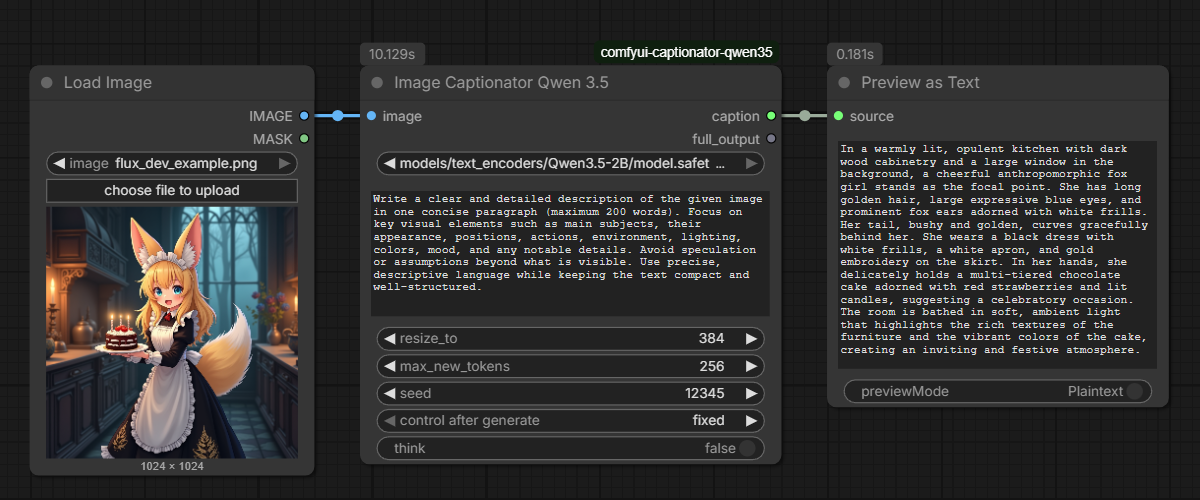
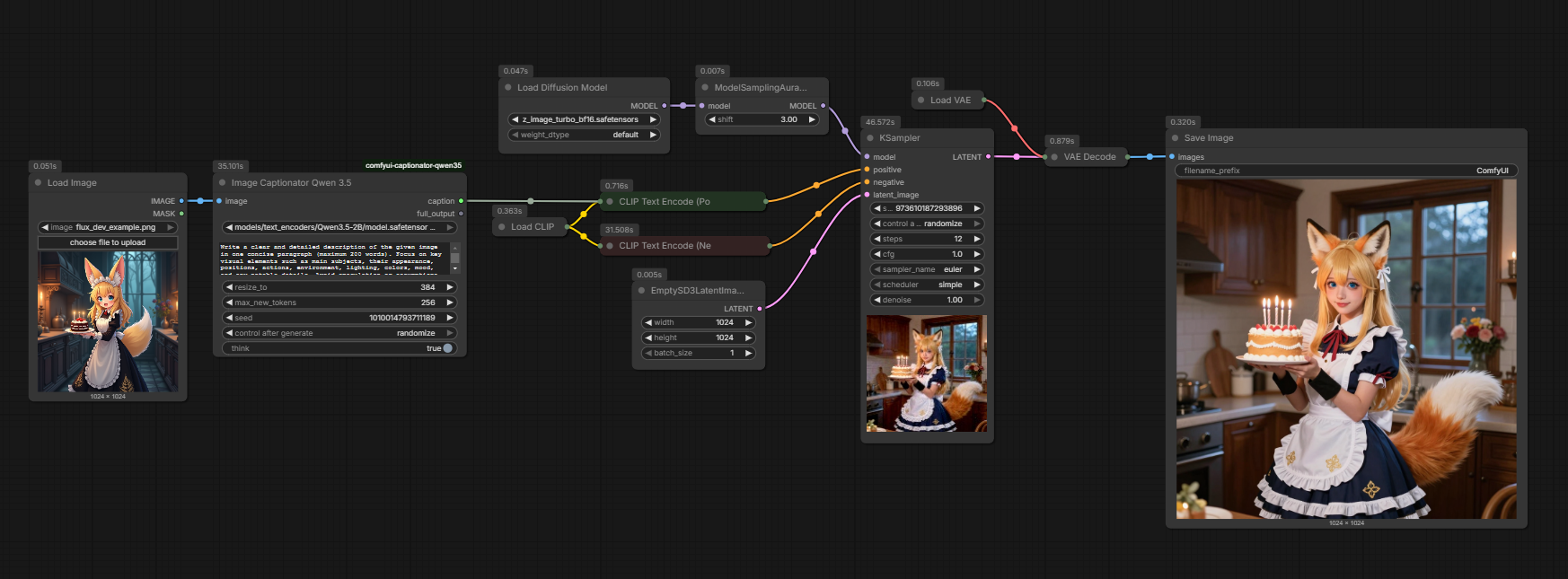
Image -> prompt -> image workflow for Z-Image:
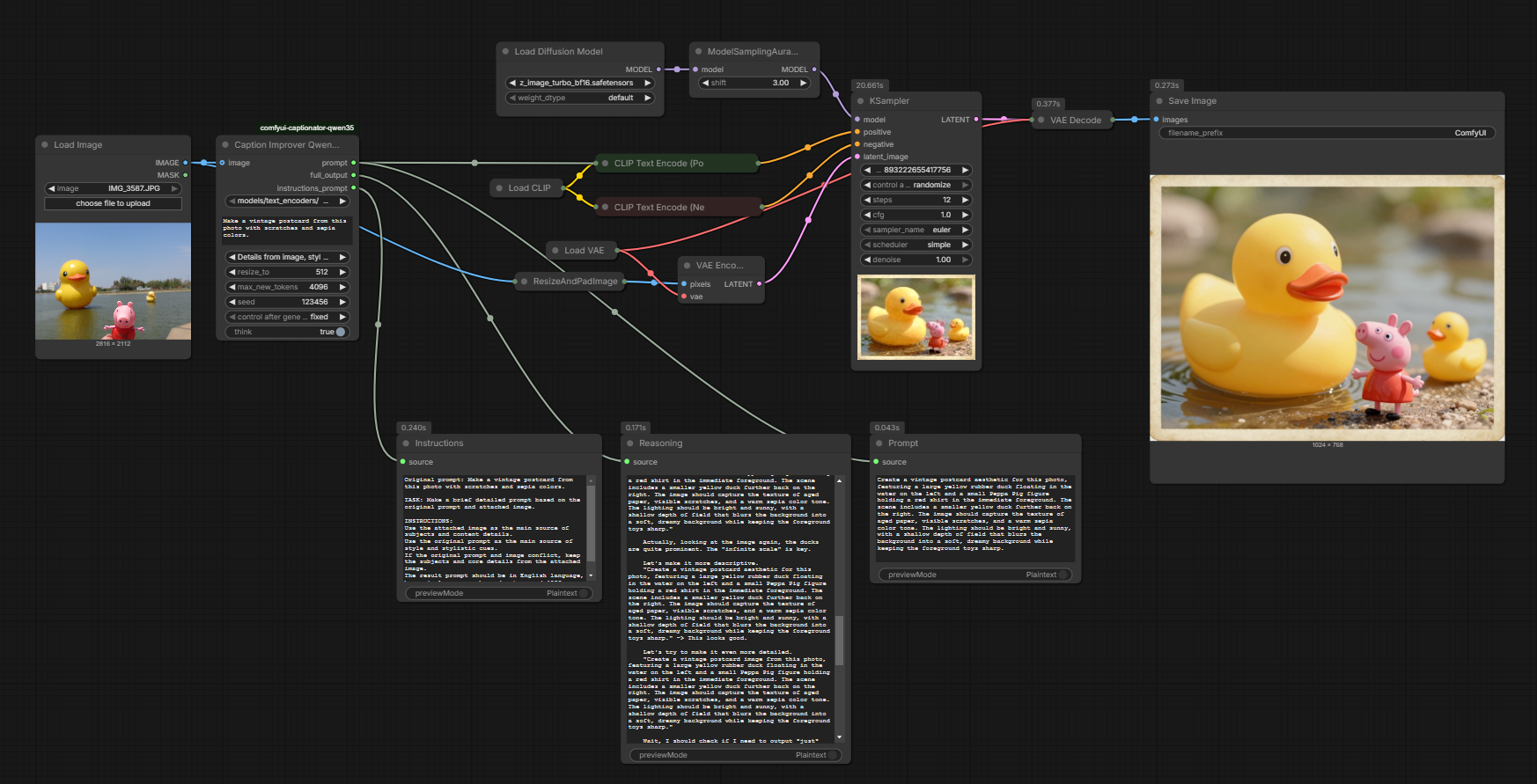
Caption Improver
- Name:
Caption Improver Qwen 3.5 - Optional input image:
IMAGE - Output prompt:
STRING - Output full_output:
STRING - Output instructions_prompt:
STRING - Reuses the same model, prompt, resize, token limit, seed, and think settings
- Includes a mode dropdown to choose whether details/style come mainly from the prompt, the image, or both
- Builds an instruction that improves the original prompt, optionally using the attached image for style/detail guidance
- If both prompt and image are provided, the selected mode controls which source has priority for details and style
- Returns a single-paragraph English prompt and the raw model output
Prompt Improver workflow example:
Notes
- Restart ComfyUI after changing code or installing dependencies.
- If
thinkis not supported by your installed processor version, the node falls back automatically. - Large images and large token counts can increase VRAM use.
max_new_tokensincludes reasoning and final text. Completed answers that hit the limit generate a truncation warning in the log.- GGUF is not supported.
Development
Run the unit tests without a ComfyUI installation or model checkpoint:
python -m unittest discover -s tests -v
Install numpy, Pillow, and safetensors to run the tests. They use real, small safetensors fixtures
and mocked ComfyUI/Transformers runtimes, and do not perform GPU inference or downloads.
They cover model detection, native API arguments, ConvRot capability checks, lifecycle and error cleanup,
partial downloads, device placement, single-image validation, and thinking output handling.
GitHub Actions runs the same suite on Linux with Python 3.10, 3.12, and 3.13, and on Windows
with Python 3.13, on every push and pull request.
Registry publishing runs from master after the test matrix passes. A push changing pyproject.toml
publishes only when project.version differs from the version before that push; dependency-only
changes skip publishing. Use a SemVer version such as 0.3.0. The workflow requires the repository
secret COMFY_REGISTRY_TOKEN. Manual dispatch from master can retry a failed release without
another version change. If a force-push removes the previous commit from the fetched history, the
automatic version check fails explicitly; use manual dispatch to retry.
For real native inference, use the Python environment that runs ComfyUI:
python tests/smoke_comfy.py --comfy-root /path/to/ComfyUI --model /path/to/qwen3.5_2b_int8_convrot.safetensors --image /path/to/image.png
The smoke check performs image captioning twice with a text-only request between them, checking model
reuse and managed unload/reload. Add --think to check reasoning. It prints generated text and CUDA
memory counters; it does not download models. To validate coexistence with diffusion, also run a ComfyUI
workflow with Captionator, image generation, and a second Captionator request, using your actual VRAM settings.
The ComfyUI node layer is separated from model inference through a small backend contract.
ComfyBackend delegates loading, generation, and offload to ComfyUI; TransformersBackend owns
HF loading and inference. Image normalization and model inspection are shared.