
ComfyUI-TRELLIS-HiCache
Training-free TRELLIS image-to-3D acceleration: forecast the flow-matching velocity on skipped DiT steps (HiCache Hermite / HiCache++ DMD, via hicache-pp) across both the sparse-structure and SLaT stages. The README reports historical RTX 5090 results but does not establish current-commit GPU validation. Drop between the TRELLIS loader and sampler.
ComfyUI-TRELLIS-HiCache
<p> <a href="https://github.com/Archerkattri/ComfyUI-TRELLIS-HiCache/releases"><img alt="Release" src="https://img.shields.io/github/v/release/Archerkattri/ComfyUI-TRELLIS-HiCache?color=1f6feb"></a> <a href="https://registry.comfy.org/nodes/comfyui-trellis-hicache"><img alt="Comfy installs" src="https://img.shields.io/badge/dynamic/json?url=https%3A%2F%2Fapi.comfy.org%2Fnodes%2Fcomfyui-trellis-hicache&query=%24.downloads&label=comfy%20installs&color=4b8bbe"></a> <a href="https://registry.comfy.org/publishers/archerkattri/nodes/comfyui-trellis-hicache"><img alt="Comfy Registry" src="https://img.shields.io/badge/Comfy%20Registry-comfyui--trellis--hicache-4b8bbe"></a> <a href="LICENSE"><img alt="License" src="https://img.shields.io/github/license/Archerkattri/ComfyUI-TRELLIS-HiCache?color=0d9488"></a> </p>Training-free acceleration for TRELLIS image-to-3D in ComfyUI. It forecasts
the flow-matching velocity on skipped DiT steps instead of running the
transformer, on both TRELLIS stages (sparse-structure and SLaT), via the
hicache-pp library.
Pairs with smthemex/ComfyUI_TRELLIS
(the MODEL_TRELLIS pipeline type). Same idea as
ComfyUI-HiCache for Hunyuan3D.
Runtime path
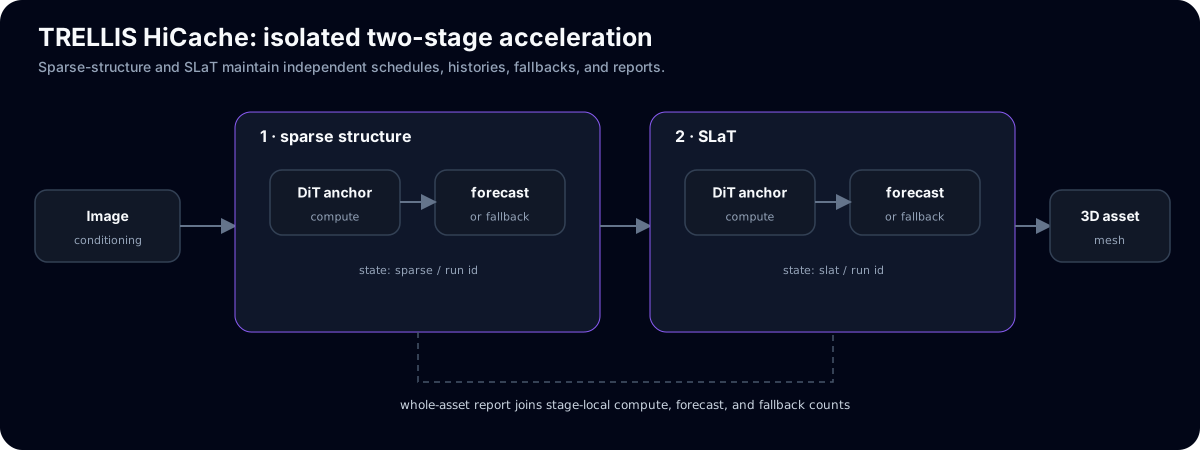
Sparse-structure and SLaT keep independent cache state and schedules. Each stage can compute, forecast, or fall back without leaking state into the other stage.
What it does
TRELLIS samples each stage with a flow-Euler loop that calls a DiT once (or twice, under classifier-free guidance) per step. TRELLIS HiCache Accelerate replaces the two flow DiTs with a wrapper that runs the transformer on a schedule and forecasts the velocity on the steps in between:
hermite— HiCache (dual-scaled physicist's Hermite polynomial, arXiv:2508.16984).dmd— HiCache++ (Dynamic Mode Decomposition / Prony exponential basis).auto— holdout-selected per step.
Two TRELLIS-specific details are handled correctly: the timestep schedule runs
1 -> 0 (so run boundaries are detected by direction reversal, not a fixed
threshold), and classifier-free guidance issues the conditional and unconditional
forwards separately inside a guidance interval, so the patch keeps two parallel
forecast states and routes each forward to the right one. The SLaT stage returns a
sparse tensor whose active-voxel layout is fixed during a run, so the forecast
runs on its .feats and the sparse tensor is rebuilt from the last computed step.
Historical measured result (not reproduced by this CPU gate)
The following table is README-reported evidence from an earlier RTX 5090 run; it is not a current-commit or release claim. Re-run the GPU gate below with a fixed input, seed, checkpoint, and synchronized timing before using these figures.
Setup: TRELLIS-image-large, demo image, 25+25 steps.
| config | speedup | Chamfer vs stock (unit-cube units) |
|---|---|---|
| interval=2, both stages | 2.1x | 0.0059 (near-lossless) |
| interval=3, both stages | 2.5x | 0.0145 (more aggressive) |
interval=2 is the default. Chamfer is the symmetric mean nearest-neighbour
distance between the stock and accelerated Gaussian point clouds; the object spans
~1.0, so 0.0059 is ~0.6% of its extent. The gaussian count shifts more than the
surface does, because TRELLIS' active-voxel threshold is sensitive near the
boundary — surface fidelity is the metric that matters and is what the Chamfer
column reports.
Install
In ComfyUI: install via the ComfyUI Manager (search "TRELLIS HiCache"), or:
cd ComfyUI/custom_nodes
git clone https://github.com/Archerkattri/ComfyUI-TRELLIS-HiCache
pip install hicache-pp
Use
Trellis_LoadModel -> TRELLIS HiCache Accelerate -> Trellis_Sampler
Set enabled = Off to bypass and restore the stock DiTs. The node never mutates
the pipeline it is given (copy-on-patch), so a cached node output always owns its
own configuration.
First-result acceptance checklist
Use a fixed small input and record the ComfyUI, smthemex wrapper, TRELLIS checkpoint, node commit, seed, method, interval, stages, and torch/CUDA versions. Treat a run as accepted only after these checks:
- Run a baseline with
enabled = Offand retain the output and stock forward counts. - Run the same input and seed with acceleration enabled. If the host can pass
identity markers, pass
hicache_run_idandhicache_branch_idto the patched model; the markers are consumed by the wrapper and never forwarded to the DiT. Inspect each stage patch'srun_id,stage_id,branch_id, andtelemetryfor actual full/forecast, method, and fallback counts. - Cover both stages, sparse-only, and SLaT-only. For SLaT, confirm skipped outputs remain sparse tensors with the same active layout.
- Retry with a fresh run ID and the same initial timestep; confirm the first decision is full and no prior branch/template is reused. The legacy stock sampler path remains supported: repeated timesteps are interpreted as its unconditional CFG call, while explicit IDs disambiguate retries.
- Compare baseline and accelerated outputs, and retain raw per-run telemetry. GPU timing/quality and a clean-host smthemex workflow import are separate gates; this package's CPU tests make no speed or quality claim.
Validation
tests/test_patch.py unit-tests the patch logic with a dummy DiT (no ComfyUI, no
GPU). tests/validate_gpu.py is the future end-to-end GPU check (loads a real
TRELLIS pipeline, applies the patch, compares geometry and wall-clock against
stock); it is not run by this CPU packet. No accepted smthemex workflow JSON is
present in the checkout, so an invented graph is not included.
Apache-2.0.
Current release status
The current adapter includes the shared HiCache++ runtime bridge, explicit cache identity, timing and fallback accounting. Its CPU contract suite passes 15 tests. Real TRELLIS model/CUDA workflow and output-quality comparisons remain unmeasured.