
pyiqa-toolbox
ComfyUI nodes wrapping pyiqa (IQA-PyTorch) quality metrics: one loader over the whole registry, generic FR/NR score nodes, plus dedicated nodes for Q-ReAlign, FGResQ, FID and CLIP Score.
Nodes (10)
Did the image actually show what your prompt asked for?
The node that will actually tell you which image is better
A 0-to-1 quality grade for one image, no original needed
Is my generated batch actually as real-looking as the training set?
Get a number for 'is my restored image closer to the original?'
One loader for every image-quality metric pyiqa knows
Rate a picture with nothing to compare it against
The 9B vision-language judge, and the int8 build that fits
Quality and aesthetics from a vision-language judge
The one-cable node that gets 11 GiB back
ComfyUI-pyiqa-toolbox
<p align="center"> <img width="100%" alt="pyiqa-toolbox: an AI judge node comparing a sharp photo of an alpine lake against a degraded copy of the same scene, five gold stars versus one red star" src="https://raw.githubusercontent.com/AnsteinHuynh/ComfyUI-pyiqa-toolbox/main/assets/pyiqa-toolbox-banner.jpg"> </p>Hello~!
Ever wanted a way to tell if one picture is better than another? Or whether a batch of images beats this other, slightly different batch?
pyiqa is the answer! I've built durable, reliable nodes around it, so you get ratings instead of having to strain your eyes comparing picture 1 with picture 2.
There are 2 ways of rating a picture:
-
NR (No-Reference): You give a judge just one picture, and they give a score. The judge doesn't know anything else other than that one picture.
-
FR (Full-Reference): you hand the judge two pictures; the one being judged, and the original to compare it against.
Different judges care about different things: one might rate the picture quality, another the aesthetics.
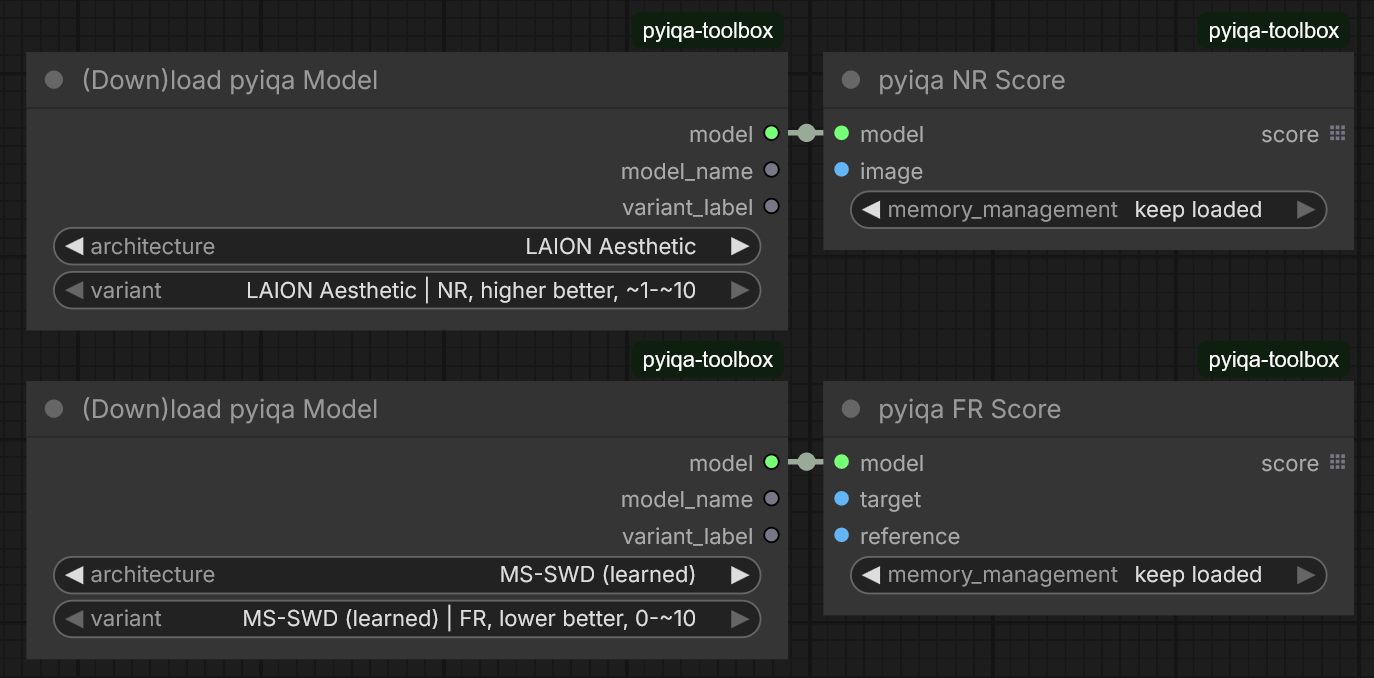
I've made these nodes easy to use (just a loader and a score node!), while also staying compatible as pyiqa adds new architectures. You can see which way is better, and what range to expect, just from the labels.
My recommendations, in no particular order: TOPIQ (CFANet), FGResQ, A-FINE, LPIPS+ (VGG, semantic weighting), FSIM, and - if you have the compute - Q-ReAlign Pro 9B. Those are the names as they appear in the loader's dropdowns.
They come from my own blind A/B tests and personal benchmarks, plus their standing on pyiqa's benchmark tables.
I've also quantized Q-ReAlign so mini/lite/pro are cheaper in VRAM and compute (Pro 9B: 17.5 → 11.55 GiB).
The quickest way to see a score: Install and then use two ready-made workflows that ship with the pack - Workflow → Browse Templates → ComfyUI-pyiqa-toolbox.
Every score is produced by the metric object pyiqa itself builds
(pyiqa.create_metric) — the nodes only convert ComfyUI's image format and
format the outputs, so results match the library exactly.
Install
ComfyUI Manager: Install Custom Nodes → search pyiqa-toolbox, or use
Install via Git URL with the repository URL. Manual:
cd ComfyUI/custom_nodes
git clone https://github.com/AnsteinHuynh/ComfyUI-pyiqa-toolbox
python -m pip install -r ComfyUI-pyiqa-toolbox/requirements.txt
Restart ComfyUI; the ten nodes appear under the pyiqa category. Existing
workflows keep working across display-name changes (a workflow stores node class
keys, not labels), but this revision does remove three nodes — see Breaking
changes in Nodes below before re-running an older graph.
What the install pulls in. The pack pins only pyiqa; pyiqa's own metadata
then requires torch, torchvision, transformers>=5.0, accelerate,
bitsandbytes, openai-clip and friends. Two consequences worth knowing before
you install:
transformerscan be installed or upgraded to 5.x. Q-ReAlign and the FGResQ transformers-5 weight fix need that, but other custom nodes pinned to transformers 4.x may break. Install where that is acceptable, or pin those packs deliberately. See Notes for the exact version the pack checks.- Weights download on first use into
ComfyUI/models/pyiqa(plus any pyiqa folder you register inextra_model_paths.yaml) — nothing is bundled. See Weights: where they live.
Requirements: ComfyUI (the pack uses folder_paths, model_management and the
V1 node schema) and Python >= 3.10.
Nodes
FR nodes take target (pyiqa's x, the distorted/candidate side) and
reference (pyiqa's ref); NR nodes take image. All loader nodes emit a model
for the matching score node(s). Sizes are per-image unless noted. Every score
node loads its inputs lazily — see Lazy evaluation below.
| Node | Inputs | Outputs | Direction / range | Order |
|---|---|---|---|---|
| (Down)load pyiqa Model | architecture (53), variant (that architecture's registry entries, every registered metric reachable, plus its custom checkpoints from models/pyiqa/<architecture>/) | model, model_name, variant_label | — | — |
| pyiqa FR Score | model, target, reference | score | per the selected variant | per the selected variant |
| pyiqa NR Score | model, image | score | per the selected variant | NR |
| CLIP Score | model, image, caption (multiline: one line for all, or one line per image) | score | ~0-2.5, higher better | NR |
| FGResQ NR Score | model, image | score | 0-1, higher better | NR |
| FGResQ FR Score | model, target, reference | target_score, reference_score, rank (INT 0=reference better / 1=target better / 2=similar), verdict (STRING), rank_prob | 0-1 | order-sensitive |
| (Down)load Q-ReAlign | model_name (int8_convrot entries first, then mini-0.8B / lite-4B / pro-9B, + customs from models/pyiqa/Q-ReAlign/), dtype | model, model_name, variant_label | — | — |
| QReAlign NR Score | model, image, task (quality IQA / aesthetic IAA) | score | 0-1, higher better | NR |
| FID Score | model (from (Down)load pyiqa Model, architecture FID: fid / sFID / fid_dinov2), target (IMAGE set, multiple wires), reference (IMAGE set, multiple wires), resize_mode | score (one value) | lower better, unbounded; 2+ images per side, ~16+ to mean anything (see FID is set-level) | set-level |
| Unload Pyiqa Models | empty_cuda_cache, passthrough (any) | passthrough | fully unloads every cached metric (VRAM + RAM) | — |
Every dropdown entry explained: METRICS.md — all 100 weights
choices that score per image, plus the set-level and text-conditioned ones, each
with the pyiqa name behind it, its direction and its scale. Generated from the
pack's own catalog by tools/gen_metrics_doc.py, so it cannot drift from the
code (the smoke test fails if it does).
Ten nodes, not one per metric. Every registry metric is reached through
(Down)load pyiqa Model + pyiqa FR Score / pyiqa NR Score. Only four things
keep nodes of their own, because they are not "one image in, one float out":
FGResQ (its NR model and its pair API share one architecture, and the pair call
returns four values), Q-ReAlign (int8/snapshot builds, and a scoring task that is
not a weight choice), FID (set-level, folder-based) and CLIP Score (needs a
caption - the one input no generic score node can ask for). A new pyiqa metric,
or a whole new architecture, needs no change here: it appears in the loader's
dropdowns with the mode, direction and range pyiqa's own table declares. What a
per-metric node used to tell you — direction, range, order behaviour — is in the
variant label and in this table:
| You want | Pick architecture | Mode / direction / range | Order |
|---|---|---|---|
| TOPIQ | TOPIQ (CFANet) | FR + NR variants (3 face heads, 2 aesthetic IAA heads); ~0-1 higher better, iaa 1-10 | FR variants order-sensitive (~0.8%) |
| LPIPS / ST-LPIPS | LPIPS, ST-LPIPS | FR only; lower better, 0-1 | exact for lpips/stlpips; lpips+/lpips-vgg+ ~0.1% |
| DISTS / MS-SWD | DISTS, MS-SWD (learned) | FR only; lower better; dists 0-1, msswd 0-~10 | order-independent |
| A-FINE | A-FINE | FR + NR; lower better, ~-2..2 | order-independent |
| MUSIQ | MUSIQ | NR only; higher better; AVA 1-10, others ~0-100 | NR |
| CLIP-IQA / QualiCLIP | CLIP-IQA, QualiCLIP | NR only; 0-1, higher better | NR |
| LAION Aesthetic | LAION Aesthetic | NR only; ~1-10, higher better | NR |
| WaDIQaM | WaDIQaM | FR + NR; ~-1..1 | FR order-sensitive (~2%) |
| Classic FR (SSIM, MS-SSIM, PSNR, VIF, GMSD, MAD (L1), FSIM, CW-SSIM, NLPD, VSI) | one architecture each: SSIM, MS-SSIM, … | FR; higher better except MAD (L1) and gmsd | order-independent except vif (~1.5%) |
| Q-Align | Q-Align | NR only, 1-5; ~15 GiB of weights (fp16) — the 4-bit/8-bit variants need bitsandbytes and are ~4-8 GiB | NR |
| FGResQ | FGResQ | NR + FR pair (one arch, both modes); 0-1 higher better | pair order-sensitive |
| Q-ReAlign | Q-ReAlign | NR only (mini 0.8B / lite 4B / pro 9B, plain or int8_convrot) — via its own loader, the generic entry is a signpost | NR |
| FID / sFID / fid_dinov2 | FID | set-level (two image sets), lower better, unbounded — via FID Score | set-level |
| CLIPScore | CLIP Score | image + caption, ~0-2.5 higher better — via CLIP Score | NR + caption |
Metrics without a row are all NR — ARNIQA, BRISQUE, NIQE, MANIQA, NIMA, LIQE, TReS, UNIQUE, HyperIQA, … — and are picked the same way; the variant label states mode, direction and range. The set-level FID / sFID are the exception (they score two image sets, not an image) and have their own node.
Breaking changes, both revisions (once each). The first revision removed 23
nodes: the (Down)load and score nodes for A-FINE, CLIP-IQA, DISTS, LAION
Aesthetic, LPIPS, MUSIQ, QualiCLIP, TOPIQ, WaDIQaM and Classic FR. Their metrics
moved to the generic loader + score nodes — same metrics, same numbers, same
guards, one loader instead of ten. This revision removes three more and renames
one display name:
L1 Scoreis gone. pyiqa has nol1metric in its registry; its nearest one ismad, now labelledMAD (L1)(same folder,models/pyiqa/MAD/), reached through the generic loader +pyiqa FR Score. If you need pyiqa'sL1Lossclass exactly, it is not a registry metric and was never reachable through the variant dropdown.(Down)load FIDis gone. FID / sFID / fid_dinov2 are now normal variants of(Down)load pyiqa Model(architectureFID), soFID Scoreis fed by the same loader as everything else.(Down)load FGResQis gone. FGResQ's two metrics are variants of(Down)load pyiqa Model(architectureFGResQ) — the checkpoint surgery and the weight resolution are unchanged, they simply happen in the generic loader's registered builder now. Both entries load the same net (the bundle is cached per weights, so the two variants share one copy) and either one drives bothFGResQ NR ScoreandFGResQ FR Score: each node asks the bundle for the metric it needs, so the old "one loader, both score nodes" wiring still works.- The loader's display name gained the
(Down)loadprefix (Load pyiqa Model→(Down)load pyiqa Model). Display-name only: saved workflows keep working, since a workflow stores the node's class key and its input names, not the label. - Everything else in an existing workflow still runs - a saved graph only needs the removed nodes re-picked.
- Also: pyiqa registers
qrealign-minias a second name for the same weights asqrealign; the duplicate is now folded away (one entry, not two), and the Q-ReAlign / Inception Score architectures are listed as signposts — one dropdown entry whose label says which node to use instead of loading something that would fail.
Every node sits in the pyiqa menu: pyiqa/Generic (the loader, FR/NR score,
CLIP Score and FID Score), pyiqa/FGResQ, pyiqa/QReAlign, pyiqa/Utilities.
Loader display names follow the KJNodes (Down)load {Name} convention
((Down)load CLIPSeg-style — they download weights when absent). Every score
node also takes a memory_management combo (see below).
The generic loader is a two-combo hierarchy. architecture picks one of the
53 architectures (LPIPS, TOPIQ (CFANet), ARNIQA, NIMA, …) and variant picks
that architecture's entry — labeled with the axes a human chooses between
(FR · KADID-10k (ResNet50) - FR, higher better, ~0-1), generated from pyiqa's
own DEFAULT_CONFIGS table, so every registered metric stays reachable without
a 100+-entry flat list. Custom checkpoints in models/pyiqa/<architecture>/ are
listed in the same variant combo (labeled with the variant they load onto) —
a fine-tune is just another choice of weights, not a separate widget. The
variant dropdown filters to the selected architecture via this pack's web
extension (web/js/pyiqaAnyLoader.js); the values themselves are arch-prefixed,
so headless/API use — and any client without the extension — still works off the
full list. Mode (FR/NR) is a property of the variant (topiq_fr is FR,
topiq_nr is NR), which is why each variant label carries its mode and the
score nodes keep their mode guard.
Nothing pyiqa ships is hidden. The five metrics that cannot be scored per
image are listed too, with a label that says where to go instead:
fid/sfid/fid_dinov2 (two image sets → FID Score) and clipscore (needs a
caption → CLIP Score) load normally and are refused at score time by
pyiqa FR Score/pyiqa NR Score with that pointer — pyiqa labels all of them
"NR", so without this guard a FID model would be handed to a per-image scorer and
fail somewhere deep inside pyiqa. inception_score needs a single image set and
has no node yet, so it is a signpost: one entry that explains instead of
loading. Q-ReAlign is a signpost for the same reason — the int8_convrot builds,
the dtype choice and the snapshot folders live in its own loader.
Any loader can feed any compatible score node. Every loader emits model
plus model_name (the pyiqa registry name, e.g. topiq_fr — stable, so it is
what you want in filenames or logs) and variant_label (the human label as
shown in the dropdown). Model sockets are union types: the generic loader emits
PYIQA_ANY, and the family score nodes accept "<their family>,PYIQA_ANY", so a
Q-ReAlign model goes into QReAlign NR Score whichever loader produced it, and an
FGResQ model works in both of its nodes plus pyiqa NR Score (one architecture
serves two pyiqa metrics over one net, and each node asks the loaded bundle for
the metric it needs — so either FGResQ variant drives either FGResQ node). A
mismatch that slips through wiring (an LPIPS model into FGResQ FR Score) fails at
run time with a message naming the node that would have worked, instead of a
shape error deep inside pyiqa. The names those messages can suggest are read from
the registered node classes, so a message can never point at a node that no
longer exists.
No resolution input anywhere. Score nodes adapt the image to what the model needs: sides are made divisible by 32 where an architecture asserts it (A-FINE) and size-mismatched pairs are harmonized for pixel-wise metrics; batch-1 architectures (A-FINE, Compare2Score, Q-Align, the TOPIQ face heads) are scored one image at a time automatically, and the FR nodes size the reference to the target's geometry before chunking. There is nothing to tune, and nothing that silently pads a metric's input. An image with an alpha channel (e.g. from Qwen Image's RGBA output) is scored on its RGB channels — pyiqa takes 1-or-3-channel input only, so the alpha is dropped before scoring.
Order sensitivity in the table above is MEASURED, not assumed: each FR metric was scored as f(a,b) vs f(b,a) on identical inputs. Order-sensitive: FGResQ FR (its rank label and the two per-side scores swap), TOPIQ FR (~0.8%), WaDIQaM FR (~2%), vif (~1.5%: its variance model treats the two sides differently). Nominal-but-tiny (~0.1%): lpips+, lpips-vgg+. Everything else, including A-FINE FR despite its "you cannot switch dis/ref" docstring and the newly added gmsd/vsi/cw_ssim, is exactly order-independent.
FR inputs are target + reference (pyiqa's argument order). Score
outputs are per-image/per-pair lists (OUTPUT_IS_LIST), so each value flows
downstream as its own datum and scalar consumers run once per image.
Lazy evaluation (every score node). ComfyUI runs any node whose outputs are not consumed by another node — i.e. every score node is executed, regardless of where it sits on the canvas. That is why a loader (e.g. QReAlign Pro 9B) used to load before the SDXL checkpoint and OOM a generation-plus-scoring workflow: the loader is a dependency of a terminal score node. Every score node now uses ComfyUI's lazy evaluation:
- its image inputs and its
modelinput are markedlazy, andcheck_lazy_statusrequests one at a time, in order — image(s) first, then the model. The loader feedingmodelis not evaluated until the image exists, so a big metric loads after the generator/decoder (and after any memory-cleanup node the image passes through), not before it.
ComfyUI collects the names returned by check_lazy_status into a set, so
requesting image and model together would lose the ordering and could still load
the model early; the mixin therefore returns exactly one name per call. If a lazy
input is never produced the node still runs with it as None, and the score
function returns empty outputs — the batch-size and FR/NR mode checks are skipped
in that case, so an unloaded node can never raise.
Memory relief before a big load. pyiqa metrics are built outside
comfy.model_management, so ComfyUI does not know how much VRAM they hold and
will not free memory for them. The architectures big enough to need it —
Q-ReAlign (0.8B-9B), Q-Align (8.2B, ~15 GiB at fp16) and FID's InceptionV3 —
free ComfyUI's own cache before allocating, the same eviction ComfyUI performs
when loading one of its own models, so scoring right after a generation does not
OOM against a still-resident SDXL checkpoint. This happens inside the
architecture's builder or its pre-load gate, so it applies whichever loader you
used. ComfyUI reloads its models on demand on the next run.
Q-Align is gated, because it is the one metric that can eat a whole card.
pyiqa's qalign is q-future/one-align, an 8.2-billion-parameter mPLUG-Owl2
model: ~15 GiB of weights at fp16, ~4-8 GiB for the 4-bit/8-bit variants. Two
consequences the pack handles instead of leaving to a surprise:
- the 4-bit/8-bit variants quantize only when
bitsandbytes(andaccelerate) can run. pyiqa's own behaviour without them is to warn and load the full fp16 model, so a 4-bit pick made to fit a small card would silently need ~15 GiB instead. The pack refuses that load with the fix in the message; install the missing package, or pick fp16 on purpose. - the size is logged before the load, so a slow first run says why.
Releasing memory after a score — memory_management (every score node).
Because our metric is invisible to ComfyUI, ComfyUI will never free its VRAM;
without help it sits on the card and the next generation can OOM against it.
Each score node therefore takes a memory_management combo with two strict
modes — memory management is deliberately the user's job, so each mode does
exactly what its label says, immediately, no cleverness:
unload model (VRAM + RAM)(default) — after scoring, the metric is gone: weights gutted in place, nothing left in VRAM or RAM, only the file on disk. The next score reloads it (seconds for small models, ~30 s for Q-ReAlign Pro). Re-queuing a workflow just works: if ComfyUI hands a score node a previously-unloaded model, it is rebuilt transparently from its cached recipe. Works identically for int8_convrot models.keep loaded— leave the metric on the GPU. Fastest to re-score, but it holds its VRAM between runs.
(There is deliberately no "park in RAM" middle mode: CPU residency proved
unreliable — pyiqa keeps plain tensor attributes that .to() does not move,
so a restored model can crash on a device mismatch or silently run on the
CPU — and int8 weights corrupt outright. Unloading is the only release path.)
Caveat: when several score nodes share one loader (e.g. a QReAlign model
feeding a quality and an aesthetic node), unload on each makes the shared
model reload between them. Use keep loaded on the earlier nodes in that
case, or unload only on the last one — or place a single
Unload Pyiqa Models node at the end.
int8_convrot Q-ReAlign (a third less size and VRAM)
The (Down)load Q-ReAlign node's model_name dropdown lists the int8 entries
first, then each plain variant — e.g. qrealign-mini-0.8B (int8_convrot) and
qrealign-mini-0.8B. The int8 entries
load a quantized copy of the model in ComfyUI's native int8_tensorwise +
ConvRot format — the same recipe as Comfy-Org's official int8_convrot text
encoders (per-channel int8 weights with a group-256 Hadamard rotation applied
to weights and activations, so int8 matmuls run on tensor cores without an
accuracy cliff). The rotation and the int8 matmul are handled entirely by
ComfyUI's tensor-subclass dispatch (comfy.quant_ops + comfy_kitchen) — the
model's forward is untouched. That is the whole UI: no extra combos.
- Where: resolved from the registered
pyiqafolders asQ-ReAlign-<variant>-int8-convrot/(at the pyiqa folder root, or moved intoQ-ReAlign/where the custom-checkpoint convention puts snapshot models — both are found, and neither is listed twice), else downloaded from the release repo (defaultAnsteinHuynh/Q-ReAlign-int8-convrot, one variant folder per repo root; override with thePYIQA_TOOLBOX_INT8_REPOenv var) viasnapshot_downloadscoped withallow_patternsto the one variant folder — only that variant's ~9 files land inmodels/pyiqa/, never the whole repo. - Sizes (
models/pyiqa/): Pro 9B 17.5 → 11.55 GiB, Lite 4B 9.7 → 6.28 GiB, Mini 0.8B 2.1 → 1.56 GiB. Kept in bf16:lm_head, the visual merger, the linear-attention a/b gate projections,k_proj/v_proj, and the entire first + last decoder blocks (the "keep bundle" — small layers with outsized influence; the big MLP projections carry the size win). - Accuracy (8 real photos, per-image |Δ| vs bf16): Pro mean 0.0008 / max
0.0040 — near-lossless; Mini mean 0.0031 / max 0.0081; Lite mean 0.0085 /
max 0.0208. No ranking flips on the probe set. Note Pro's vision tower is
bf16 by construction (hidden 1152 not divisible by the 256 rotation group),
which is likely why it tracks bf16 so closely; Mini/Lite vision towers
(768/1024) ARE quantized. Protocol:
tools/validate_int8_variant.py. - Making your own:
tools/quantize_qrealign_int8_convrot.pyquantizes any Q-ReAlign variant (or custom fine-tune) into this format:python tools/quantize_qrealign_int8_convrot.py --src <bf16 snapshot> --out <dest folder>. It meta-builds the model, quantizes every eligible Linear (ConvRot requires hidden dims divisible by the group size; Pro/Lite/Mini all qualify) and writes the ComfyUI-standard checkpoint: int8<name>.weight+ float<name>.weight_scale+ a<name>.comfy_quantmarker per layer, plus_quantization_metadatain the safetensors header. - Uploading to HuggingFace (so other machines auto-download from the loader):
The folder name at the repo root must matchhuggingface-cli upload AnsteinHuynh/Q-ReAlign-int8-convrot \ <models>/pyiqa/Q-ReAlign-Mini-0.8B-int8-convrot \ Q-ReAlign-Mini-0.8B-int8-convrot --repo-type model # repeat the last two arguments per variant (Lite-4B, Pro-9B)Q-ReAlign-<variant>-int8-convrot— that is the name the loader looks for after download.
Unload Pyiqa Models (pyiqa/Utilities) — a passthrough node that releases
the whole metric cache on demand: every metric fully unloaded (VRAM + RAM,
reload from disk next score), plus an empty_cuda_cache toggle. Wire any
value through it; the value is returned unchanged, so it can sit on the image
wire before the score nodes or at the end of a pipeline. It touches only this
pack's metrics — ComfyUI's own models are left to ComfyUI, and Edit > Unload
Models does the same full unload for ours.
Resolution is automatic (A-FINE): A-FINE asserts sides divisible by 32 (CLIP ViT-B/32 patches). The score nodes resize up to the next multiple — the graceful handling A-FINE's own forward intends but cannot reach — with the overshoot clamped back to [0,1]. A-FINE is also scored one image at a time internally: its forward's squeeze/unsqueeze assume batch size 1 and corrupt larger batches. Both facts are applied without a widget (see No resolution input anywhere).
FID is set-level, so it is the wrong tool for one picture against one
picture. pyiqa's FID/sFID are folder-based (Inception features over two
folders, then a Fréchet distance). The node takes IMAGE batches, stages them as
temporary 8-bit PNG folders and calls pyiqa's own folder API — the same code path
as the CLI, so values match a folder-based run; images are 8-bit, as files are.
It returns ONE score for the two sets (not per image). resize_mode is pyiqa's
own clean / legacy_pytorch / legacy_tensorflow. The weights are loaded by
(Down)load pyiqa Model (architecture FID: fid, sFID, fid_dinov2) — the
node refuses a model that is not one of those three, and the per-image score
nodes refuse these three in the other direction, so the only way to get a
sensible pair is the one the labels describe.
Why one image per side cannot work: the Fréchet distance compares a feature
mean and covariance, and a single image has no covariance at all — the matrix
is degenerate and pyiqa's own sqrtm errors out on it, which is why the node
refuses anything below 2 per side instead of letting that crash reach you. The
sample covariance in InceptionV3's 2048 dimensions has at most rank n-1, so
below ~16 images per side the number is dominated by how many images you
wired rather than by image quality; the node still scores it (you are in
charge) but says so, and FID numbers should only be compared across runs with
similar set sizes. The original FID used 50k real images against 10k generated
ones.
For one image against one image, use a pairwise metric: LPIPS, DISTS, A-FINE
FR, SSIM, MS-SSIM, … through (Down)load pyiqa Model + pyiqa FR Score, or FGResQ FR
Score for its rank and verdict. The FID node's error message says the same when
you wire too few images.
CLIP Score answers a different question: does this image match this text?
pyiqa's clipscore (OpenAI CLIP ViT-B/32 with the paper's 2.5× scaling, ~0-2.5,
higher better) measures image-to-caption alignment, not quality — a sharp photo
and a blurry one score alike if both show what the caption says. Load it as
architecture CLIP Score in (Down)load pyiqa Model, then wire CLIP Score
with the images and the caption:
- One caption line applies to every image in the batch (the usual case: the prompt you generated from).
- One line per image pairs them up in order, so a batch can be judged against several prompts.
- Any other count is refused with both numbers in the message. Blank lines are ignored, because a trailing newline in a text box is not a caption; pairing the wrong caption with the wrong image would produce a plausible number that means nothing, so the node stops instead of guessing.
It needs the clip module, which pyiqa gets from its own openai-clip
dependency (a normal pip install pyiqa already provides it; only if a trimmed
environment is missing it does the error name it — then
pip install openai-clip) and downloads ViT-B/32 (~350 MB) on first use.
References: Q-Align (arXiv:2312.17009) / Q-ReAlign; FGResQ (AAAI 2026, https://github.com/sxfly99/FGResQ); TOPIQ (AAAI 2023, CFANet); A-FINE; MUSIQ (ICCV 2021); CLIP-IQA (AAAI 2023); QualiCLIP (2023); WaDIQaM (Bosse et al.); LPIPS (CVPR 2018) / ST-LPIPS; DISTS (ICLR 2021); FID / clean-FID.
Custom checkpoints (models/pyiqa/<architecture>/)
The architecture is the folder. Custom weights go in a folder named after the architecture they belong to, and appear as extra entries in that loader's combo (after a ComfyUI refresh — no restart):
<ComfyUI>/models/pyiqa/
    LPIPS/
        lpips-vgg-myft.safetensors      ->  "LPIPS | custom: lpips-vgg-myft.safetensors"
        some-experiment.pt              ->  listed once per LPIPS variant
    TOPIQ/
        topiq_nr-spaq-myft.pth          ->  only the SPAQ (ResNet50) NR variant
    Q-ReAlign/
        My-Quality-Tune/                ->  snapshot dir: config.json + weights
            config.json                 ->  one entry, the directory name is the label
            model.safetensors
    FGResQ/
        FGResQ-trained-on-X.pth
- The file name is used for one thing only: if it starts with a registry
variant's name (
topiq_nr-spaq-…,lpips-vgg-…), that variant is the base it loads onto and the entry is labeled with it. Otherwise the entry is offered once per variant of that architecture, and you pick the base from the combo — you never have to guess how a file must be named. - Containers:
.pth .pt .ckpt .binare passed to the architecture's own loader (pyiqa'spretrained_model_pathcontract, so each arch's own format — plain state dict,{'params': …}wrapper, A-FINE's multi-part dict, the classical.matSVMs — is honored);.safetensorsis read by this pack (state_dict, withmodule.andparams/state_dictwrappers unwrapped) and merged into the freshly built architecture, so a safetensors fine-tune works even though pyiqa itself only reads checkpoints withtorch.load. The safetensors path isstrict=False, with the number of matched tensors logged and a hard error when nothing matches (wrong architecture, or an HF-format model rather than a bare state dict) — the failure names the variant you should have picked instead of dying inside pyiqa. - A directory with a
config.jsonis a snapshot-style model (from_pretrained), for the architectures that support it — Q-ReAlign (any quantization layout, including the int8_convrot builds) is the one today. The directory name is the label; the pack's own downloaded/int8 folders are recognized and never listed twice. - Only files inside an architecture folder count. Anything loose in the pyiqa
folder is ignored — that is where pyiqa's own default weights live, so they
can never masquerade as customs, and it is why the old
custom_checkpoint+custom_base_metricpair is gone. - The
{architecture}/folders are created at startup for the architectures that take custom weights (A-FINE, CLIP-IQA, DISTS, FGResQ, LAION Aesthetic, LPIPS, MS-SWD, MUSIQ, Q-ReAlign, QualiCLIP, ST-LPIPS, TOPIQ, WaDIQaM) in the install-localmodels/pyiqaand in every yaml-registeredpyiqafolder that is not a download cache (nothing is created inside~/.cache/huggingface/hubor the torch hub cache, which hold pyiqa's own downloads). Folder matching is normalized (case and punctuation insensitive:A-FINE,afineandA FINEall land in the same place), and several names address the same architecture on purpose (TOPIQ/andCFANet/,HyperIQA/andHyperNet/,LAION Aesthetic/andLAIONAes/). Accepted names are keyed by metric, not by pyiqa's internal class name, and none is ever removed: a pyiqa release that renames an architecture cannot rename the folder your checkpoints are in, and cannot make an existing folder stop being found. The model lookup also searches one level down, so weights already moved into an architecture folder are found and never re-downloaded. - pyiqa's metric table (
default_model_configs.DEFAULT_CONFIGS) is what supplies the architecture list, FR/NR mode, direction and score range. It is read defensively: an entry whose shape changed is skipped with a warning instead of taking the nodes down, and if the table cannot be read at all the pack still lists a built-in set of long-standing metrics — their labels say the mode and range are unknown and the FR/NR guards stop judging, so you can keep scoring and read one clear error rather than face an empty node menu.
Sub-note for architectures that load a checkpoint through pyiqa's own
pretrained_model_path: the base variant is chosen explicitly (see above)
rather than inferred from the name, because a file name cannot say which head
(FR/NR) or training set the fine-tune was trained with.
Weights: where they live (single copy)
The loaders resolve weights through the registered ComfyUI pyiqa model
folder(s). Each registered folder is checked for two layouts:
- plain —
<folder>/Q-ReAlign-Mini-0.8B/snapshot-style dirs,FGResQ.pth,FGResQ_Degradation.pth; - HF hub cache —
models--q-future--Q-ReAlign-*/snapshots/<hash>/(complete snapshots only; incomplete ones fall back to finishing the download).
Point the folder at any weight stores you already have via
extra_model_paths.yaml (nothing is duplicated or re-downloaded), e.g.
reusing the HuggingFace and torch-hub caches pyiqa already downloads into:
    pyiqa: |
        C:/Users/<you>/.cache/huggingface/hub
        C:/Users/<you>/.cache/torch/hub/pyiqa
Without a yaml entry, <ComfyUI>/models/pyiqa is used as the folder. Every
registered pyiqa folder — yaml-redirected or fallback — is created if
missing at startup, so pyiqa: models/pyiqa/ under a base_path makes that
folder materialize and become the drop-off place for weights (snapshot-style
Q-ReAlign-*/ dirs, FGResQ.pth, FGResQ_Degradation.pth, and the
<architecture>/ folders for custom checkpoints — see Custom checkpoints
above). Absent weights auto-download through pyiqa/HuggingFace on first use.
Memory management
Loaded metrics are cached under a per-loader key, and metrics sharing a key
evict each other: (Down)load pyiqa Model owns a single slot, so switching
architecture or variant unloads the previous metric — FGResQ and FID weights
included, since the generic loader builds those too now — while the one
dedicated loader (Q-ReAlign) keeps its own slot. ComfyUI's Edit > Unload
Models and
Edit > Unload Models and Execution Cache both funnel through
comfy.model_management.unload_all_models(), which this pack wraps (this
ComfyUI version has no callback API), so they release the cached metrics the
same way — a full unload, VRAM and RAM, identical to the pack's own
Unload Pyiqa Models node and to the score nodes' default
memory_management mode. The next score rebuilds the metric from disk.
ComfyUI's own models are unloaded by ComfyUI's original function, which always
runs first, so nothing else about that menu item changes.
Notes
- transformers ≥ ~5.6 fix (FGResQ): the published FGResQ checkpoints were
saved with transformers 4 and carry a
vision_model.key prefix that transformers ≥ ~5.6 CLIPVisionModel no longer has — pyiqa only warns, so the fine-tuned backbone silently fails to load and you score with the stock HF CLIP. The FGResQ architecture's builder detects this layout and reloads both checkpoints with the prefix stripped (verified clean; scores change accordingly). No-op on transformers ≤ 5.5.4 where the checkpoint loads as-is. - Weights auto-download on first use (pyiqa release/HF mirror for FGResQ;
q-future/Q-ReAlign-*HF repos for Q-ReAlign). Q-ReAlign additionally needstransformers>=5.0— deliberately not in requirements.txt (forcing that upgrade on every install can break other packs); the QReAlign Loader checks the version at load time and raises with the exact pip command to fix it. - Startup logs one line —
(pyiqa-toolbox) v0.2.1 | pyiqa 0.1.15.post28 | transformers 5.15.0 | torch 2.12.1+cu130 | 53 architectures, 103 variants— so any bug report says which versions were running. The pack version is read frompyproject.toml, so it cannot drift from what the registry publishes. - A new metric in a pyiqa release, or a whole new architecture, needs no code
here: it appears in
(Down)load pyiqa Modelunder its architecture with the mode, direction and score range taken from pyiqa's own table. Only architectures that need special handling keep a module of their own — FGResQ's checkpoint surgery, Q-ReAlign's int8/snapshot path, FID's folder API, CLIP Score's caption. - One table per architecture, and only overrides in it. Everything the pack
knows about an architecture lives in that architecture's row of
metric_catalog._ARCH_RULES(label, folder names, sides-divisible-by-32, batch-of-one, snapshot loader) and reaches the rest of the code through theArchitectureobject built from it; an architecture with no row is a plain registry metric, which is the common case. Hard requirements that are not metadata — Q-Align's size and quantization, FGResQ's weight surgery — are pre-load gates / builders registered per architecture (nodes/arch_gates.py,_common.register_arch_builder), run in one place (_common.run_arch_gate, called bybuild_metric) for everything(Down)load pyiqa Modelcan reach, Q-Align, FGResQ and FID included. The only path that builds outside it is Q-ReAlign's own loader, whose requirements (int8/snapshot builds) live inside its builder. targetandreferencemust share a batch size in the pair node.- Adding a node is rarely the right answer here: a metric or architecture from a
new pyiqa release is already usable (see above). Extra code is only for an
architecture that needs something the generic path cannot express — register a
builder with
_common.register_arch_builder("<ArchLabel>", fn)(that is all Q-ReAlign and FGResQ do) instead of adding a loader/score pair. l1is not in pyiqa's metric registry. pyiqa does shippyiqa.losses.losses.L1Loss, but it is a loss, not a registry metric: it has no config row, so it has no mode, direction or score range and cannot be picked from a registry-driven dropdown (the old node had to special-case it). It is gone;mad— labelledMAD (L1)— measures the same thing and is reached like every other metric.
Dev layout
nodes/ (node modules + arch_gates.py, the per-architecture pre-load gates),
utility/ (shared helpers + metric_catalog.py, the catalog and the
per-architecture rule table), web/js/ (client extension: the generic loader's
dependent variant combo; exported via WEB_DIRECTORY), tools/ (smoke test,
calibration checks, and gen_metrics_doc.py, which writes METRICS.md),
example_workflows/ (two runnable templates, picked up by ComfyUI's template
browser: pyiqa-example-FR-workflow.json compares a target against a reference
with LPIPS+ and FGResQ FR, pyiqa-example-NR-workflow.json scores a batch with
A-FINE, FGResQ NR and Q-ReAlign aesthetic; both need only core ComfyUI and this
pack).
Deployed to ComfyUI via directory junctions into each install's custom_nodes.
tools/ is development-only and is not part of the published registry
archive (see .comfyignore): clone the repository to run the smoke suite,
calibra_check.py or the int8 tooling. Their machine-specific paths come from
PYIQA_TOOLBOX_ROOT/_COMFY/_MODELS/_IMAGES/_HF_CACHE, or from
tools/dev_paths_local.py (gitignored) - never from the committed code.
About this document
The introduction at the top is my own writing. The reference sections that follow
it were drafted with AI assistance and reviewed by me - and the technical claims
are not taken on trust: tools/smoke_test.py fails if the documented surface
drifts from the code, and METRICS.md is generated from the pack's own catalog,
so labels, directions, ranges and registry names cannot go stale.