
Qwen VAE Triton W8A8
Quality-focused Triton W8A8 implicit-GEMM Conv3D acceleration for the Qwen-Image/Wan VAE in ComfyUI, optimized for faster first workflow runs and resolution changes. PuppetVisionAI: https://www.youtube.com/@PuppetVisionAI | LinkedIn: https://www.linkedin.com/in/allen-b-3a35505a/ | Website: https://puppetvision.nl
ComfyUI-Qwen-VAE-Triton
[!TIP] Project release video: Watch the release video on YouTube
[!IMPORTANT] AMD Triton must be installed and available for this node. This project accelerates selected Qwen-Image/Wan VAE decoder
CausalConv3dlayers with custom Triton W8A8 implicit-GEMM kernels. GPU-specific environment tuning can materially affect performance, so configure your environment for your actual GPU rather than blindly copying another architecture's settings.The primary use case is reducing the unusually expensive first workflow run and runs immediately after changing image resolution. Benchmark results are shown first below; ROCm/FlashAttention and AMD Triton installation guidance is provided in the installation section below.
Release: v0.2.3
The release uses the validated mixed-precision Aggressive policy established during pre-release testing and exposes a deliberately minimal interface: Preset + disable toggle only.
Benchmarks
Benchmark source: benchmarks/benchmarks.csv
Test workflow recorded in the CSV:
- UNet:
krea2_turbo_int8_convrot.safetensors - CLIP:
qwen3vl_4b_bf16.safetensors - VAE:
qwen_image_vae.safetensors - 8 steps
- seed 208
- Triton enabled
- Text-to-Image
First workflow run — 1024×1024
The first-run measurements are CSV rows 2–5. The unpatched VAE took 257.675 seconds in the measured VAE load/decode phase and 343 seconds for the complete workflow.
| Preset | VAE phase | VAE reduction | VAE speedup | Workflow | Workflow saved | End-to-end gain | |---|---:|---:|---:|---:|---:|---:| | Node bypassed | 257.675 s | — | 1.00× | 343 s | — | — | | Conservative | 240.153 s | 6.8% | 1.07× | 327 s | 16 s | 4.7% | | Balanced | 216.396 s | 16.0% | 1.19× | 301 s | 42 s | 12.2% | | Aggressive | 208.415 s | 19.1% | 1.24× | 291 s | 52 s | 15.2% |
Headline: Aggressive removed 52 seconds from the first 1024×1024 workflow run while cutting the measured VAE phase by 49.260 seconds.
343 s → 291 s total workflow
257.675 s → 208.415 s VAE phase
52 seconds saved end-to-end
15.2% faster workflow
19.1% lower measured VAE time
Resolution-change run — 1024×1024 → 840×1256
The resolution-change sequence spans CSV rows 5–9. Row 5 is the 1024×1024 Aggressive run immediately before the changed-resolution block; rows 6–9 record the 840×1256 runs.
At 840×1256, the bypassed node required 222.573 seconds in the measured VAE phase and 263 seconds for the workflow. Balanced and Aggressive both completed the full workflow in 220 seconds.
| Preset | VAE phase | VAE reduction vs bypass | VAE speedup | Workflow | Workflow saved | End-to-end gain | |---|---:|---:|---:|---:|---:|---:| | Node bypassed | 222.573 s | — | 1.00× | 263 s | — | — | | Conservative | 201.960 s | 9.3% | 1.10× | 242 s | 21 s | 8.0% | | Balanced | 179.776 s | 19.2% | 1.24× | 220 s | 43 s | 16.35% | | Aggressive | 179.447 s | 19.38% | 1.24× | 220 s | 43 s | 16.35% |
Headline: after the resolution change, Aggressive reduced the measured VAE phase by 43.126 seconds, while both Balanced and Aggressive removed 43 seconds from total workflow execution.
263 s → 220 s total workflow
222.573 s → 179.447 s VAE phase (Aggressive)
43 seconds saved end-to-end
16.35% faster workflow
19.38% lower measured VAE time
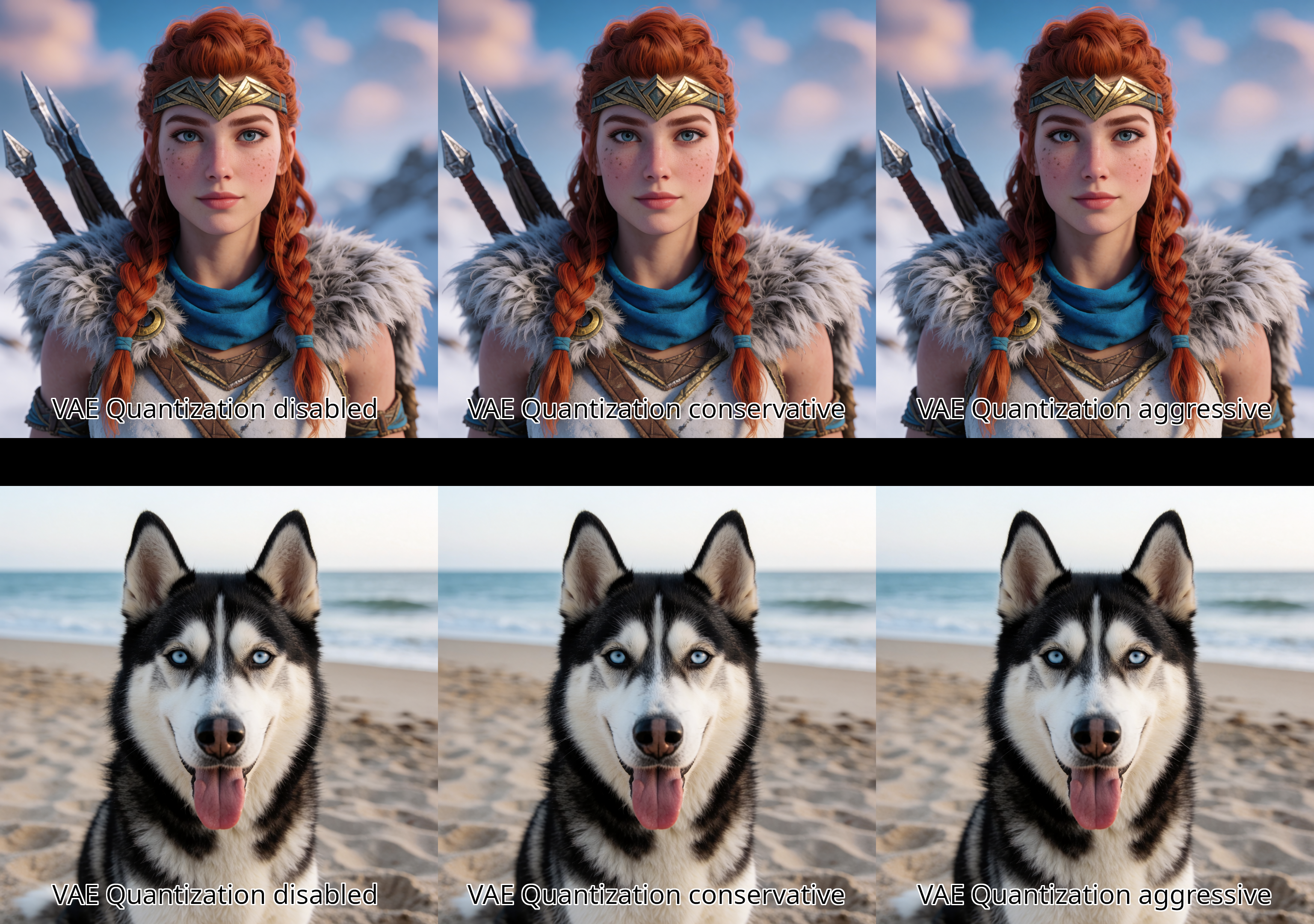
Balanced essentially matched Aggressive at the changed resolution while preserving more native-precision decoder layers. That is why the node exposes all three presets: users can select the quality/performance point that best matches their workflow.
These are measured results from the supplied benchmark workflow, not a guarantee of identical gains on every GPU, resolution, model, driver, or ComfyUI build.
Example output
Example workflows
Two importable ComfyUI workflows are included:
workflows/text_2_image_example_workflow.json
workflows/style_reference_2_image_example_workflow.json
Drag either JSON file into ComfyUI or use Workflow → Open. These are the current project workflows supplied with this release. Model filenames and optional third-party nodes may need to be adjusted for your installation.
Installation and GPU setup
1. Install the custom node
Place this repository under your ComfyUI custom_nodes directory so that the package root looks like:
ComfyUI/custom_nodes/ComfyUI-Qwen-VAE-Triton/
├── __init__.py
├── nodes.py
├── selection.py
├── triton_w8a8.py
└── README.md
Restart ComfyUI after installation.
Clone directly from GitHub:
cd ~/ComfyUI-Docker/rocm7/storage-nodes/custom_nodes
sudo git clone https://github.com/AllenCraigBarnard/ComfyUI-Qwen-VAE-Triton.git
sudo docker restart comfyui-rocm7
For the ROCm7 Docker layout used during development, a release ZIP can be installed from the Docker host with:
sudo rm -rf ~/ComfyUI-Docker/rocm7/storage-nodes/custom_nodes/ComfyUI-Qwen-VAE-Triton
sudo mkdir -p ~/ComfyUI-Docker/rocm7/storage-nodes/custom_nodes/ComfyUI-Qwen-VAE-Triton
sudo unzip -q ~/Downloads/ComfyUI-Qwen-VAE-Triton-v0.2.3.zip \
  -d ~/ComfyUI-Docker/rocm7/storage-nodes/custom_nodes/ComfyUI-Qwen-VAE-Triton
sudo docker restart comfyui-rocm7
Install ROCm\FlashAttention and AMD Triton
Follow the instructions in this markdown file https://huggingface.co/PuppetVision/krea-2-amd-rocm-optimized-comfy-triton/docs/ROCM_FLASH_ATTENTION_INSTALLATION_PROMPT.md.
Workflow integration
Use the node between the normal VAE loader and decoder:
VAELoader
   │
   ▼
Patch Qwen VAE Triton W8A8
   │
   ▼
VAEDecode
The node outputs a normal ComfyUI VAE, so no custom decode node is required.
The UI intentionally exposes only:
Preset
Disable Node
Enable disable_node to pass the VAE through unchanged for A/B benchmarking.
Presets
All presets use the same fixed W8A8 implementation:
Weights:     symmetric INT8, per-output-channel scaling
Activations: dynamic symmetric INT8
Compute:     INT8 × INT8 with INT32 accumulation
Rescale:     FP32
Output:      incoming activation dtype
Internal production settings are fixed in this release:
activation clip ratio = 1.0
weight clip ratio     = 1.0
channels_last         = enabled
fallback_on_error     = enabled
per-layer profiling   = disabled
Conservative
Quantizes only the highest eligible decoder channel tier.
For the tested Qwen Image VAE topology this corresponds to the deepest 384-channel tier and patches approximately 15 of 28 eligible Conv3D layers.
Use this when quality conservatism matters more than maximum first-run acceleration.
Balanced
Quantizes the highest two eligible decoder channel tiers.
For the tested Qwen Image VAE topology this patches approximately 22 of 28 eligible Conv3D layers, leaving the lowest 96-channel tier native.
Balanced delivered a strong performance/precision compromise in testing and matched Aggressive's 220-second end-to-end time after the tested resolution change.
Aggressive
Quantizes every eligible decoder channel tier except the two U14 layers proven to introduce unacceptable noise when quantized.
These remain in native precision:
decoder.upsamples.14.residual.2
decoder.upsamples.14.residual.6
The built-in exclusion is:
^decoder\.upsamples\.14\.residual\.(2|6)$
On the tested Qwen Image topology this yields approximately 26 W8A8 layers and 2 native eligible layers.
Aggressive produced the fastest first-run result in the supplied benchmark while preserving the validated U14 quality fix.
License and attribution
This project is distributed under the GNU General Public License v3.0 only (GPL-3.0-only). See LICENSE.
The design and portions of the implementation were informed by the GPL-3.0 licensed kijai/ComfyUI-KJNodes Patch Triton VAE implementation, particularly its INT8 implicit-GEMM Conv3D strategy, Qwen/Wan causal-convolution handling, and ComfyUI object-patcher integration. See NOTICE.md for attribution details.
This repository is an independent project and is not endorsed by Krea, Qwen/Alibaba, ComfyUI, AMD, or the KJNodes author.
Work with me / More projects
If this repository saved you some VRAM, debugging time, or helped make a demanding AI workflow more practical, there is a lot more where this came from.
I’m currently looking for full-time opportunities as an AI Systems Engineer, particularly work involving model optimization, inference systems, GPU acceleration, quantization, generative AI infrastructure, and the engineering needed to make large models run reliably in real-world environments. If your team is hiring and this kind of work is relevant, please reach out to me on LinkedIn.
Want to see more of what I build? Visit PuppetVisionAI on YouTube for more projects, experiments, and practical AI systems work, or visit puppetvision.nl for my website.
Disclaimer
This software is provided as-is, without warranty of any kind. GPU kernels, quantization, ROCm/Triton configuration, environment overrides, custom nodes, and model-runtime modifications can cause crashes, incorrect output, instability, corrupted workflows, or data loss when used incorrectly or in unsupported environments.
You are responsible for validating compatibility with your own hardware, drivers, models, workflows, and data. Keep backups of important workflows, models, configuration files, and output before testing custom or experimental GPU software. Do not use benchmark or environment settings from this repository as a substitute for checking the requirements of your own GPU and software stack.
To the maximum extent permitted by applicable law, the authors and contributors are not responsible for misuse, loss of data, lost work, hardware or software damage, business interruption, loss of profits, or other direct or indirect damages arising from use of this software. The GPL-3.0 license also contains the project's formal no-warranty and limitation-of-liability terms.