
ComfyUI TS CosyVoice RU Edition
TS CosyVoice3 - Advanced Text-to-Speech nodes for ComfyUI. Features zero-shot voice cloning, cross-lingual synthesis, instruction-based control, and voice conversion using the CosyVoice3 model family. Supports 9 languages and 18+ Chinese dialects with automatic model downloading and caching.
Nodes (7)
One voice, nine languages, same timbre
Write a script, get a four-voice scene with every speaker on its own track
10 seconds of a voice, any text, and a line about how it should sound
The TS CosyVoice Model Loader is the front door to Alibaba's CosyVoice3 — and yes, the model downloads itself
Turn a 10-second voice clip into a permanent .pt preset
The node you'll actually use for a whole podcast season
Take a recording, hand it a different voice, keep the performance
🎙️ TS CosyVoice for ComfyUI
Клонируйте голос. Меняйте эмоции. Локализуйте на 9 языков. Соберите многоголосый диалог одним нодом — прямо в ComfyUI.




🇷🇺 Русский · 🇬🇧 English
</div>🎯 Что это и зачем
TS CosyVoice — это семь нод для ComfyUI, которые превращают модель CosyVoice 3 в удобный инструмент озвучки. Подключаете загрузчик к нужной ноде синтеза — и работаете как с обычным графом ComfyUI, без танцев с командной строкой и .yaml-конфигами.
[!TIP] Если коротко: подсунули 5–15 секунд чистого голоса → получили любой текст этим голосом, при необходимости — на другом языке, с другой эмоцией или в формате диалога.
✨ Что умеет пакет
<table> <tr> <td width="50%" valign="top">🎤 Клонирование голоса
Любой текст — голосом из вашего референса (5–15 секунд аудио).
🎭 Управление эмоциями
12+ готовых пресетов или ваша собственная инструкция: «говори тепло и медленно», «звучи возбуждённо» и так далее.
🌍 Кросс-язык (9 языков)
Голос на русском читает английский текст. Или наоборот. Тембр сохраняется.
</td> <td width="50%" valign="top">🔊 Voice-to-Voice
Превратите запись одного голоса в запись другого голоса — с поддержкой длинного аудио через умный chunking.
🗣️ Многоголосый диалог
Скрипт SPEAKER A: ... SPEAKER B: ... → готовая сцена с отдельными дорожками каждого спикера.
💾 Speaker presets
Сохраняйте часто используемые голоса один раз — переиспользуйте бесконечно.
</td> </tr> </table>⚡ Быстрый старт за 5 шагов
# 1. Установите зависимости (внутри ComfyUI Python)
pip install -r requirements.txt
# 2. Установите ОДИН ONNX Runtime — на выбор, не оба
pip install onnxruntime-gpu
[!IMPORTANT] ONNX Runtime намеренно не входит в
requirements.txt.onnxruntimeиonnxruntime-gpu— два разных дистрибутива, которые предоставляют один и тот же модуль, и ONNX Runtime поддерживает только один вариант в окружении. Если бы пак требовал CPU-сборку, она встала бы рядом с вашейonnxruntime-gpu, и какая из них победит — не определено.
- NVIDIA GPU:
pip install onnxruntime-gpu(для CUDA 13 нужна версия 1.27+)- CPU или Apple Silicon:
pip install onnxruntimeЕсли ORT не установлен, загрузчик скажет об этом прямо. А если torch видит CUDA, но у ORT нет
CUDAExecutionProvider, вы получите предупреждение — иначе ONNX Runtime молча уходит на CPU, и кодирование референсного аудио выполняется на процессоре при наличии GPU.
torchиtorchaudioтоже не объявлены: их ставит сам ComfyUI согласованной парой под конкретную сборку CUDA/ROCm/MPS, и строка с версией в паке позволила бы pip эту сборку заменить.
# 3. Перезапустите ComfyUI
# 4. Найдите ноды в категории "TS CosyVoice3" через Add Node → search
# 5. Постройте граф:

   ┌─────────────────────┐         ┌──────────────────────┐         ┌──────────┐
   │ TS CosyVoice        │  model  │ TS CosyVoice         │  audio  │ Save     │
   │ Model Loader        │────────►│ Text to Voice        │────────►│ Audio    │
   └─────────────────────┘         └──────────────────────┘         └──────────┘
                                            ▲
                                            │ reference_audio
                                            │
                                       ┌────┴──────┐
                                       │ Load      │
                                       │ Audio     │
                                       └───────────┘
[!NOTE] Модель
Fun-CosyVoice3-0.5B(~1.5 ГБ) скачается автоматически при первом запускеModel LoaderвComfyUI/models/cosyvoice/.
[!IMPORTANT] Один клип за раз. Ноды обрабатывают одну AUDIO-дорожку. Batch из нескольких клипов отклоняется с явной ошибкой — раньше он молча сокращался до первого клипа, и остальные исчезали без следа в логе. Разделите batch до нод или запустите граф по клипу.
🧩 Каталог нод
| Нода | Категория | Что делает | Когда использовать |
|------|-----------|------------|---------------------|
| 🚀 Model Loader | Loaders | Качает и держит модель в памяти | Всегда первой |
| 🎤 Text to Voice | Synthesis | TTS с референсом и эмоцией | Озвучка одного персонажа |
| 💾 Save Speaker | Utilities | Сохраняет голос как .pt пресет | Библиотека постоянных голосов |
| 🎭 Speaker Text To Voice | Synthesis | TTS из пресета + эмоция | Один персонаж в разных настроениях |
| 🌍 Cross-Language | Synthesis | Текст на другом языке голосом референса | Локализация |
| 🔊 Voice To Voice | Synthesis | Источник + целевой тембр → новый микс | Конвертация длинных записей |
| 🗣️ Dialog | Synthesis | Многоголосый диалог из скрипта | Сцены, визуальные новеллы |
📸 Как ноды выглядят в ComfyUI
<table> <tr> <td width="33%" align="center"> <img src="./img/text-to-voice.png" alt="Text to Voice"><br> <sub><b>🎤 Text to Voice</b></sub> </td> <td width="33%" align="center"> <img src="./img/save-speaker.png" alt="Save Speaker"><br> <sub><b>💾 Save Speaker</b></sub> </td> <td width="33%" align="center"> <img src="./img/speaker-text-to-voice.png" alt="Speaker Text To Voice"><br> <sub><b>🎭 Speaker Text To Voice</b></sub> </td> </tr> <tr> <td width="33%" align="center"> <img src="./img/cross-language.png" alt="Cross-Language"><br> <sub><b>🌍 Cross-Language</b></sub> </td> <td width="33%" align="center"> <img src="./img/voice-to-voice.png" alt="Voice To Voice"><br> <sub><b>🔊 Voice To Voice</b></sub> </td> <td width="33%" align="center"> <img src="./img/dialog-voice.png" alt="Dialog"><br> <sub><b>🗣️ Dialog</b></sub> </td> </tr> </table> <details> <summary><b>🚀 1. TS CosyVoice Model Loader</b> — главная входная точка</summary>Что делает: скачивает модель из HuggingFace или ModelScope, валидирует целостность файлов, загружает на CUDA или CPU, опционально включает fp16.
Параметры:
| Параметр | Тип | По умолчанию | Что меняет |
|----------|-----|--------------|------------|
| model_version | combo | Fun-CosyVoice3-0.5B | Версия модели |
| download_source | combo | HuggingFace | Откуда качать |
| device | combo | auto | CUDA или CPU (см. «Платформы») |
| fp16 | bool | false | Половинная точность (экономит VRAM) |
| llm_checkpoint | combo | standard | reinforcement-learning берёт llm.rl.pt (GRPO post-training) из той же папки модели |
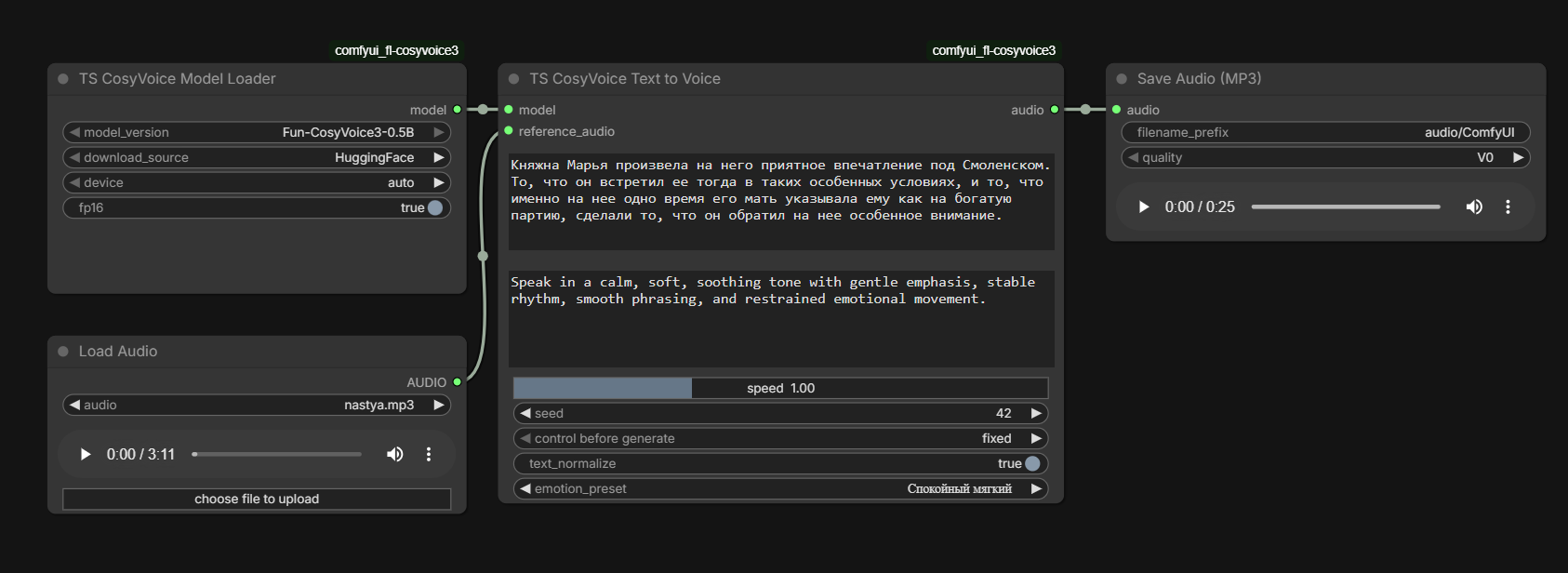
</details> <details> <summary><b>🎤 2. TS CosyVoice Text to Voice</b> — основная TTS нода</summary>[!TIP]
device = autoвозьмёт CUDA, если она есть, и иначе CPU. Рантайм CosyVoice реализует только эти два варианта:mpsи прочие ускорители сводятся к CPU с записью в лог — подробнее в разделе «Платформы».
Что делает: превращает текст в речь голосом из референсного аудио, с возможностью задать эмоцию через текстовую инструкцию или пресет.
Хорошо для:
- 🎬 Озвучка одного персонажа
- 📚 Аудиокниги и подкасты
- 🎮 TTS для NPC в играх
- 💬 Эмоциональная TTS из обычного текста
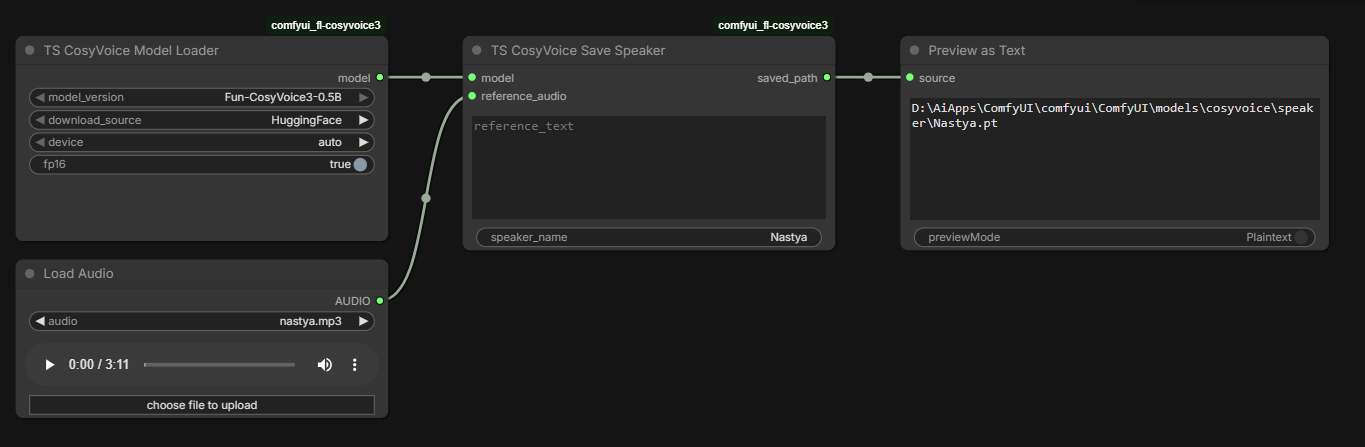
</details> <details> <summary><b>💾 3. TS CosyVoice Save Speaker</b> — пресеты голосов</summary>[!TIP] Используйте чистый референс 5–15 секунд без музыки и реверберации. Длинные референсы (>30 c) автоматически обрезаются.
Что делает: извлекает speaker features из референсного аудио и сохраняет их в .pt файл в ComfyUI/models/cosyvoice/speaker/. Если reference_text пустой — Whisper автоматически расшифрует аудио.
Хорошо для:
- 🎭 Библиотека персонажей сериала / подкаста
- 🚀 Быстрый повторный синтез без re-loading'а референса
- 📁 Версионирование «канонических» голосов проекта
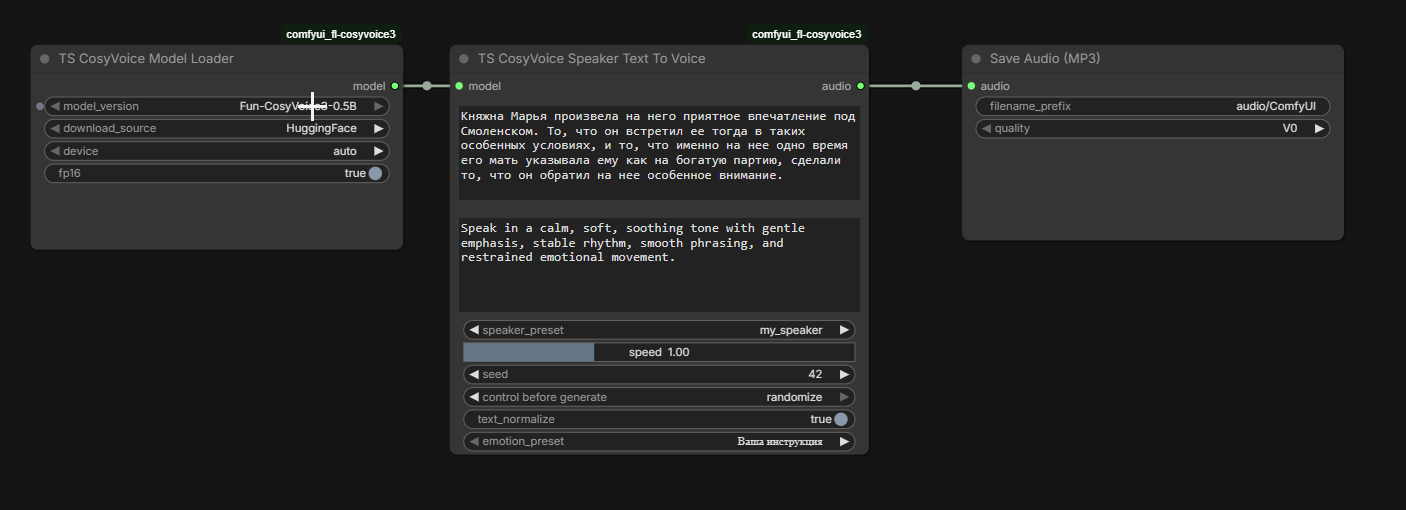
</details> <details> <summary><b>🎭 4. TS CosyVoice Speaker Text To Voice</b> — пресет + эмоция</summary>[!TIP] Используйте говорящие имена:
narrator_female_warm,villain_male_deep,kid_neutral_v2.
Что делает: берёт сохранённый ранее speaker_preset и синтезирует новый текст, накладывая эмоциональную инструкцию. Тембр стабилен между запусками — меняется только подача.
Хорошо для:
- 🎬 Один персонаж в разных эмоциональных состояниях
- 🎙️ Дубляж с разной манерой речи
- 🔁 Стабильность голоса между сессиями
</details> <details> <summary><b>🌍 5. TS CosyVoice Cross-Language</b> — кросс-языковая озвучка</summary>[!TIP] Это, пожалуй, самая удобная нода в паке для длинных проектов: голос фиксирован, а эмоцию можно менять от реплики к реплике.
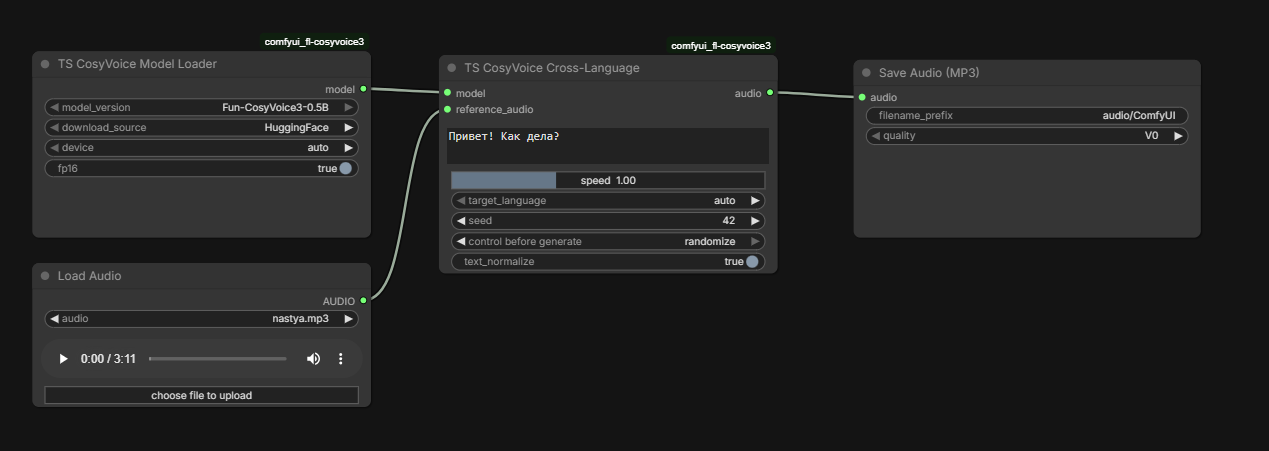
Что делает: референс на одном языке, текст — на другом. На выходе — речь на языке текста, но тембром референса.
Поддерживаемые языки: auto, zh, en, ja, ko, de, es, fr, it, ru.
Хорошо для:
- 🌐 Локализация: один актёр озвучивает все языки
- 🌍 Мультиязычные персонажи в играх
- 🔬 A/B сравнение голоса между языками
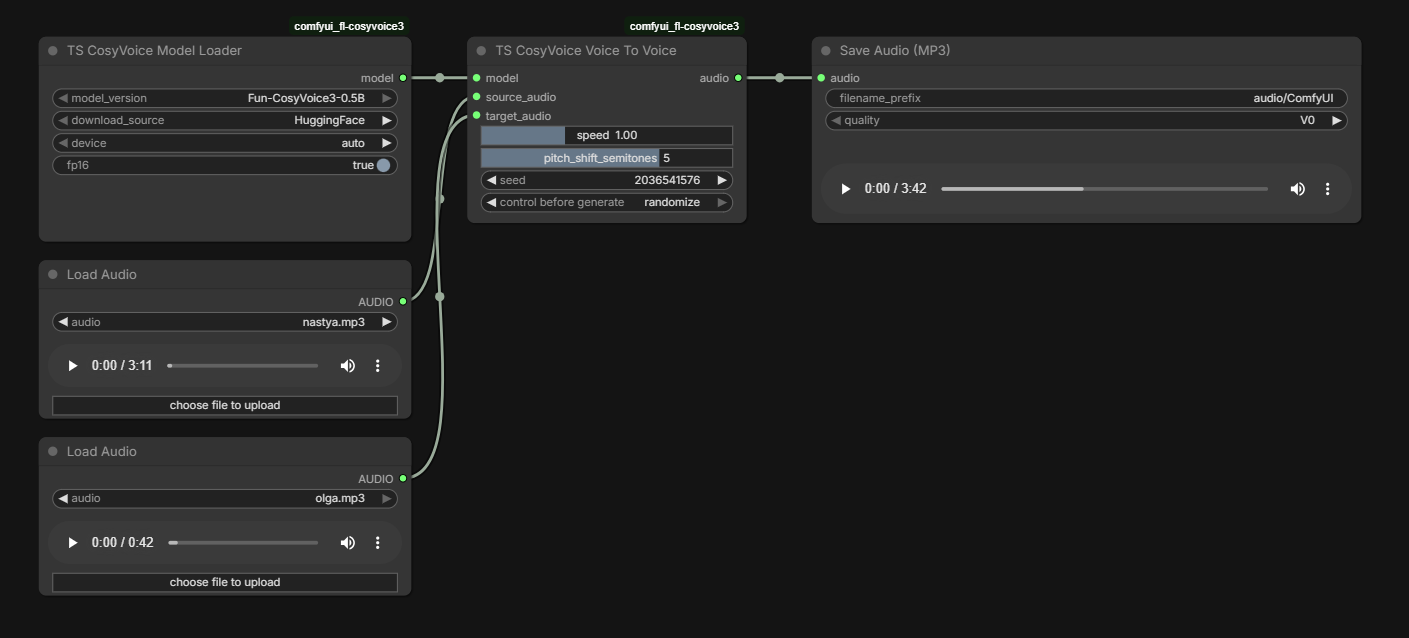
</details> <details> <summary><b>🔊 6. TS CosyVoice Voice To Voice</b> — конвертация тембра</summary>[!TIP] Не уверены в языке текста? Оставьте
target_language = auto— модель определит сама.
Что делает: заменяет тембр в существующей записи. На входе — source_audio (что говорить) и target_audio (как звучать). На выходе — source_audio, но «голосом» target_audio.
Особенности:
- ✂️ Автоматический chunking длинных записей по тишине, с перекрытием в 1 секунду
- 🌊 Стыки чанков выравниваются по перекрытию (SOLA) и склеиваются кроссфейдом — без провалов и щелчков
- 🎚️ Опциональный pitch shift (
-12до+12полутонов), формантно-сохраняющий (WORLD) - ⚙️
diffusion_stepsиguidance_strength— качество против времени - 📏 Опциональная нормализация громкости выхода по RMS
Хорошо для:
- 🎙️ Смена голоса в уже записанной речи
- 📼 Постпродакшен длинных дублей
- 🎭 Anonymization
</details> <details> <summary><b>🗣️ 7. TS CosyVoice Dialog</b> — многоголосый диалог</summary>[!IMPORTANT]
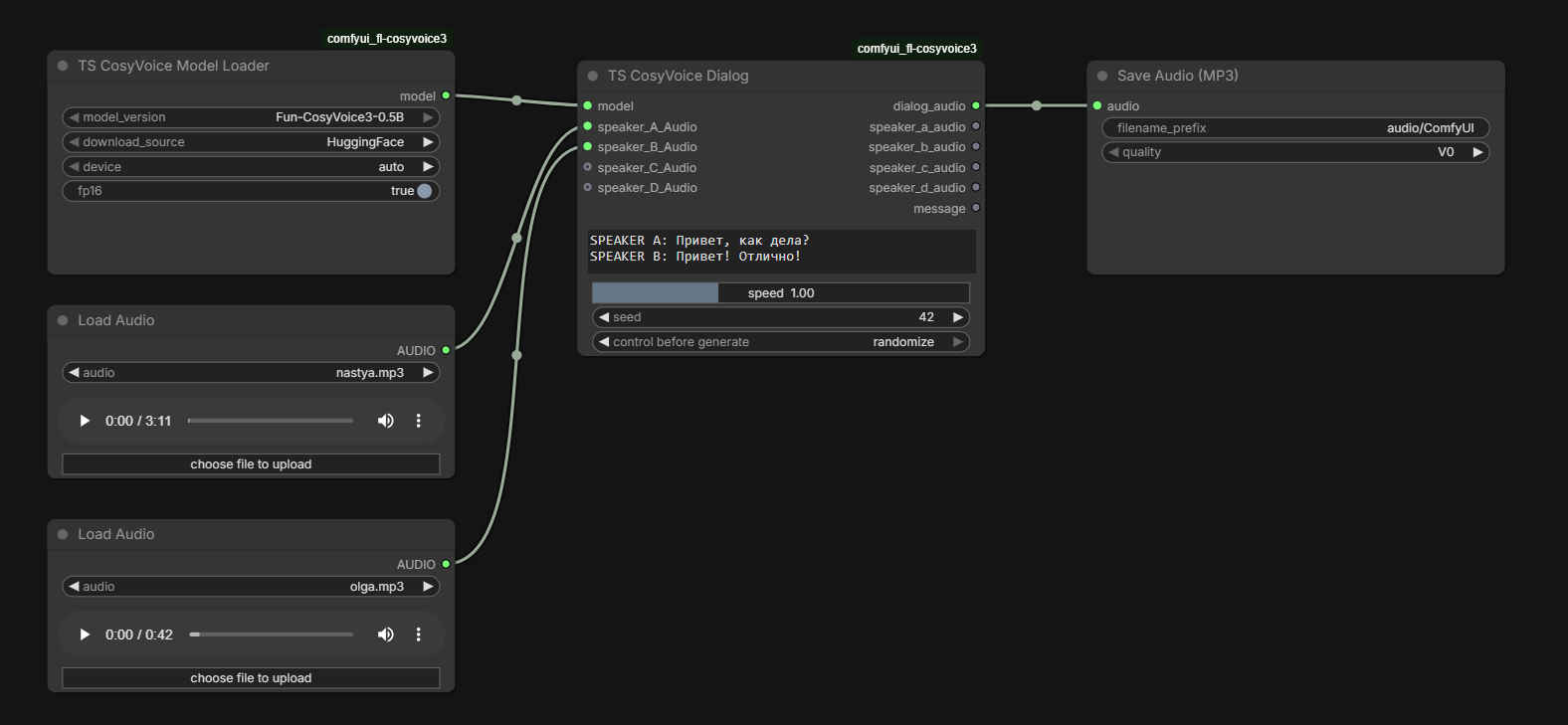
target_audioвсегда обрезается до 30 секунд,source_audio— без ограничений (режется по тишине на куски ≤24 c).
Что делает: парсит скрипт вида SPEAKER A: ... / SPEAKER B: ... и собирает диалог из 2–4 разных голосов. Возвращает и общую дорожку, и каждого спикера отдельно (для микширования в DAW).
Пример входа:
SPEAKER A: Привет! Как у тебя дела?
SPEAKER B: Отлично, спасибо что спросила!
SPEAKER A: Чем сегодня занималась?
SPEAKER B: Записывала новый эпизод подкаста.
Выходы:
dialog_audio— финальный миксspeaker_a_audio/speaker_b_audio/speaker_c_audio/speaker_d_audio— отдельные дорожкиmessage— статус-строка с диагностикой
Хорошо для:
- 🎮 Visual novels и интерактивные диалоги
- 🎬 Сцены для роликов
- 📻 Радиопостановки и подкасты-имитации
- 🧪 Тесты взаимодействия голосов
</details>[!NOTE]
SPEAKER CиSPEAKER Dопциональны. Для двухголосого диалога достаточноAиB.
📦 Готовые рецепты подключения
🎤 Простая TTS с клонированием
Model Loader → Text to Voice → Save Audio
🎭 Стабильный голос с эмоциями (для сериала)
Model Loader ─┬─→ Save Speaker (один раз)
              └─→ Speaker Text To Voice → Save Audio (много раз)
🌍 Локализация на 9 языков
Model Loader → Cross-Language (target_language = en/ja/de/...)
🔊 Перевод записанного голоса в другой тембр
Model Loader → Voice To Voice → Save Audio
🗣️ Диалог из 4 персонажей
              ┌── speaker_a_audio
Model Loader  ├── speaker_b_audio
       │      ├── speaker_c_audio
       ▼      ├── speaker_d_audio
   Dialog ────┤
              └── dialog_audio (микс)
💡 Лайфхаки и хорошие практики
[!TIP] Качество референса > длина референса. Чистые 5 секунд почти всегда лучше шумных 30. Один говорящий, одна интонация, без музыки и реверберации.
[!TIP] Whisper автотранскрипция в
Save Speakerэкономит время, но если язык редкий или речь невнятная — лучше задатьreference_textвручную.
[!TIP]
fp16экономит ~30% VRAM на CUDA. Включайте, если упёрлись в память — на качестве почти не сказывается.
[!WARNING] Voice Conversion на CPU работает очень медленно. На 10-минутном аудио CPU может думать часами. Запускайте на GPU.
[!WARNING] Не забывайте про
seed = -1для случайной генерации. Фиксированный seed даёт детерминизм, но и некоторую «механистичность» интонаций при повторных запусках.
🛠️ Установка
Через ComfyUI Manager
- Откройте
Manager→Install Custom Nodes - Найдите
TS CosyVoiceилиcomfyui-ts-cosyvoice - Нажмите
Install→ перезапустите ComfyUI
Вручную
cd ComfyUI/custom_nodes
git clone https://github.com/AlexYez/comfyui-ts-cosyvoice.git
cd comfyui-ts-cosyvoice
pip install -r requirements.txt
[!IMPORTANT] Для CUDA-сборки убедитесь, что
torch>=2.0.0+cu...установлен до установки зависимостей пакета, иначе pip может подтянуть CPU-вариант.
Платформы
| Платформа | Ускорение | Замечания |
|-----------|-----------|-----------|
| Windows / Linux + NVIDIA | CUDA | Основной сценарий. fp16 работает |
| Windows / Linux без GPU | CPU | Работает; voice conversion долгий |
| macOS (Apple Silicon и Intel) | только CPU | См. ниже |
[!WARNING] macOS: ускорения на GPU нет. В рантайме CosyVoice отсутствует бэкенд Metal/MPS — все места выбора устройства делают
cuda if available else cpu(cosyvoice/cli/model.py,cosyvoice/cli/frontend.py). Пак на macOS работает, но считает на CPU, какой бы вариант вы ни выбрали вdevice; неподдерживаемые значения сводятся к CPU с записью в лог. Это ограничение upstream, а не пакета.fp16там же принудительно выключается.Практический вывод: подбирайте настройки на коротком фрагменте.
Text to Voiceна пары предложений вполне терпим, а voice conversion десятиминутной записи на CPU может считаться часами.
Опциональные компоненты
| Компонент | Для чего | Как поставить |
|-----------|----------|---------------|
| openai-whisper + ffmpeg в PATH | Авторасшифровка референса в reference_text (Save Speaker, Dialog) | pip install openai-whisper · ffmpeg: macOS brew install ffmpeg · Linux apt install ffmpeg · Windows обычно уже есть в сборке ComfyUI |
| pyworld | Формантно-сохраняющий питчшифт (WORLD) в Voice To Voice | pip install pyworld |
| librosa | Питчшифт последней надежды (за pyworld и torchaudio) | pip install librosa |
[!NOTE] Ни один из компонентов не обязателен — синтез, клонирование и voice conversion работают без них.
Без whisper или без
ffmpegпресет всё равно сохраняется, но с пустымreference_text: в лог уйдёт предупреждение, а качество клона будет заметно хуже — впишите текст руками. Безpyworldпитчшифт использует фазовый вокодер.Почему whisper и librosa вынесены из обязательных. Оба зависят от
numba, аnumbaотказывается загружаться с NumPy 2.2 и новее — при этом актуальный ComfyUI поставляется с NumPy 2.5. Жёсткая зависимость означала бы либо откат NumPy у всей вашей сборки ComfyUI, либо неработающий пак. Единственное, что vendored-код брал из этих пакетов на пути синтеза, — два мел-спектрограммных фильтрбанка; теперь пак считает их сам (utils/ts_mel.py), поэтому потолок на NumPy не нужен.pyworldвынесен по другой причине: он публикует колёса только под Windows, и на macOS его сборка требует Xcode Command Line Tools — жёсткая зависимость превращала бы отсутствие компилятора в провал установки всего пакета.
Что скачивается автоматически
| Файл | Размер | Куда | Когда |
|------|--------|------|-------|
| Fun-CosyVoice3-0.5B | ~1.5 ГБ | ComfyUI/models/cosyvoice/ | При первом запуске Model Loader |
| Whisper base | ~140 МБ | ComfyUI/models/whisper/ | При первом авто-транскрибировании в Save Speaker |
📁 Структура файлов на диске
ComfyUI/
├── models/
│   ├── cosyvoice/
│   │   ├── Fun-CosyVoice3-0.5B/    ← модель (скачивается автоматически)
│   │   └── speaker/                ← ваши .pt пресеты голосов
│   └── whisper/                    ← кэш Whisper (для авто-транскрипции)
└── custom_nodes/
    └── comfyui-ts-cosyvoice/       ← этот пак
⚠️ Что нужно знать заранее
- 📦 Используется
Fun-CosyVoice3-0.5B(публичная версия, ~0.5 миллиарда параметров). - 🎙️ Качество = качество референса. Магии нет: что подадите — то и услышите.
- 🔇 Сильный шум, музыка, эхо в референсе → заметно хуже результат.
- 🐢 Voice Conversion на длинном аудио = долго (особенно без GPU).
- 🌍 9 языков и 18+ китайских диалектов — но качество сильно разное между языками.
🆕 Что нового в 0.7.0
[!NOTE] Полная миграция на ComfyUI V3 schema (
IO.ComfyNode+define_schema+IO.NodeOutput, привязано кcomfy_api.v0_0_2). Всеnode_id, имена входов/выходов и их порядок сохранены — ваши workflow JSON-ы продолжают работать без изменений.
Подробности: CHANGELOG.md.
Минимальная версия ComfyUI: >=0.3.40.
🔗 Ссылки
- 🏠 Репозиторий: https://github.com/AlexYez/comfyui-ts-cosyvoice
- 🤗 Модель: FunAudioLLM/Fun-CosyVoice3-0.5B-2512
- 📜 Лицензия: MIT — покрывает только код этого пакета. Vendored код в
cosyvoice/(Apache-2.0) иmatcha/(MIT, другой правообладатель) остаётся под своими лицензиями: полные тексты и атрибуция — в THIRD_PARTY_NOTICES.md иlicenses/. - 🏗️ Upstream: CosyVoice by Alibaba
- 💬 Сообщество: Timesaver VFX
<div align="center">
🇬🇧 English
🇷🇺 Русский · 🇬🇧 English
</div>🎯 What is this and why
TS CosyVoice is a pack of seven ComfyUI nodes that turns the CosyVoice 3 model into a comfortable production tool. Wire the loader into any synthesis node and you get a clean ComfyUI graph — no command-line incantations, no .yaml editing.
[!TIP] In short: drop in 5–15 seconds of a clean voice → get any text spoken in that voice, optionally in a different language, with a different emotion, or as a multi-speaker dialogue.
✨ What the pack does
<table> <tr> <td width="50%" valign="top">🎤 Voice cloning
Any text spoken in the voice from your reference audio (5–15 seconds is enough).
🎭 Emotion control
12+ ready-made presets, or your own free-form instruction: "speak warmly and slowly", "sound excited", and so on.
🌍 Cross-language (9 languages)
A Russian voice reading English text. Or vice versa. Timbre is preserved.
</td> <td width="50%" valign="top">🔊 Voice-to-Voice
Convert one person's recording into another person's voice, with smart chunking for long audio.
🗣️ Multi-speaker dialogue
A SPEAKER A: ... SPEAKER B: ... script becomes a finished scene with separate per-speaker tracks.
💾 Speaker presets
Save your favourite voices once — reuse them forever.
</td> </tr> </table>⚡ Quick start in 5 steps
# 1. Install dependencies (use ComfyUI's Python)
pip install -r requirements.txt
# 2. Install ONE ONNX Runtime - pick a side, not both
pip install onnxruntime-gpu
[!IMPORTANT] ONNX Runtime is deliberately not in
requirements.txt.onnxruntimeandonnxruntime-gpuare separate distributions that provide the same module, and ONNX Runtime supports exactly one variant per environment. Requiring the CPU build here would install it beside youronnxruntime-gpuand leave which one wins undefined.
- NVIDIA GPU:
pip install onnxruntime-gpu(CUDA 13 needs 1.27 or newer)- CPU or Apple Silicon:
pip install onnxruntimeIf it is missing, the loader says so plainly. And if torch reports CUDA while ONNX Runtime has no
CUDAExecutionProvider, you get a warning — otherwise ONNX Runtime silently falls back to the CPU and encodes your reference audio there on a machine that has a GPU.
torchandtorchaudioare absent for the same reason: ComfyUI installs them as a matched pair built for a specific CUDA/ROCm/MPS runtime, and a version specifier here would let pip replace that build.
# 3. Restart ComfyUI
# 4. Search "TS CosyVoice" in the Add Node menu
# 5. Build your graph:

   ┌─────────────────────┐         ┌──────────────────────┐         ┌──────────┐
   │ TS CosyVoice        │  model  │ TS CosyVoice         │  audio  │ Save     │
   │ Model Loader        │────────►│ Text to Voice        │────────►│ Audio    │
   └─────────────────────┘         └──────────────────────┘         └──────────┘
                                            ▲
                                            │ reference_audio
                                            │
                                       ┌────┴──────┐
                                       │ Load      │
                                       │ Audio     │
                                       └───────────┘
[!NOTE] The
Fun-CosyVoice3-0.5Bmodel (~1.5 GB) is downloaded automatically intoComfyUI/models/cosyvoice/the first time you run Model Loader.
[!IMPORTANT] One clip at a time. These nodes process a single AUDIO clip. A batch of more than one is refused with an explicit error — it used to be silently reduced to the first clip, with the rest disappearing without a trace at any default log level. Split the batch upstream, or run the graph once per clip.
🧩 Node catalog
| Node | Category | What it does | Best for |
|------|----------|--------------|----------|
| 🚀 Model Loader | Loaders | Downloads and holds the model in memory | Always first |
| 🎤 Text to Voice | Synthesis | TTS with reference voice + emotion | Single-character narration |
| 💾 Save Speaker | Utilities | Saves a voice as a .pt preset | Building a reusable voice library |
| 🎭 Speaker Text To Voice | Synthesis | TTS from preset + emotion | Same character, different moods |
| 🌍 Cross-Language | Synthesis | Text in another language, your reference's timbre | Localization |
| 🔊 Voice To Voice | Synthesis | Source + target timbre → new mix | Converting long recordings |
| 🗣️ Dialog | Synthesis | Multi-speaker scene from a script | Visual novels, scenes |
📸 What the nodes look like in ComfyUI
<table> <tr> <td width="33%" align="center"> <img src="./img/text-to-voice.png" alt="Text to Voice"><br> <sub><b>🎤 Text to Voice</b></sub> </td> <td width="33%" align="center"> <img src="./img/save-speaker.png" alt="Save Speaker"><br> <sub><b>💾 Save Speaker</b></sub> </td> <td width="33%" align="center"> <img src="./img/speaker-text-to-voice.png" alt="Speaker Text To Voice"><br> <sub><b>🎭 Speaker Text To Voice</b></sub> </td> </tr> <tr> <td width="33%" align="center"> <img src="./img/cross-language.png" alt="Cross-Language"><br> <sub><b>🌍 Cross-Language</b></sub> </td> <td width="33%" align="center"> <img src="./img/voice-to-voice.png" alt="Voice To Voice"><br> <sub><b>🔊 Voice To Voice</b></sub> </td> <td width="33%" align="center"> <img src="./img/dialog-voice.png" alt="Dialog"><br> <sub><b>🗣️ Dialog</b></sub> </td> </tr> </table> <details> <summary><b>🚀 1. TS CosyVoice Model Loader</b> — entry point</summary>What it does: downloads the model from HuggingFace or ModelScope, validates file integrity, loads it on CUDA or CPU, optionally enables fp16.
Parameters:
| Param | Type | Default | What it changes |
|-------|------|---------|-----------------|
| model_version | combo | Fun-CosyVoice3-0.5B | Model variant |
| download_source | combo | HuggingFace | Where to download from |
| device | combo | auto | CUDA or CPU (see “Platforms”) |
| fp16 | bool | false | Half precision (saves VRAM) |
| llm_checkpoint | combo | standard | reinforcement-learning loads llm.rl.pt (GRPO post-trained) from the same model folder |
</details> <details> <summary><b>🎤 2. TS CosyVoice Text to Voice</b> — main TTS node</summary>[!TIP]
device = autotakes CUDA when present and CPU otherwise. The CosyVoice runtime implements only those two:mpsand other accelerators are reduced to CPU and logged — see “Platforms”.
What it does: turns text into speech using a reference voice, with emotion control via free-form instruction or preset.
Best for:
- 🎬 Single-character narration
- 📚 Audiobooks and podcasts
- 🎮 NPC TTS in games
- 💬 Emotional TTS from plain text
</details> <details> <summary><b>💾 3. TS CosyVoice Save Speaker</b> — voice presets</summary>[!TIP] Use a clean 5–15 second reference without music or reverb. Longer references (>30 s) are clipped automatically.
What it does: extracts speaker features from reference audio and saves them as a .pt file into ComfyUI/models/cosyvoice/speaker/. If reference_text is empty, Whisper auto-transcribes the audio.
Best for:
- 🎭 Character library for a series / podcast
- 🚀 Faster repeated synthesis (no reference reload)
- 📁 Versioning the "canonical" voices of a project
</details> <details> <summary><b>🎭 4. TS CosyVoice Speaker Text To Voice</b> — preset + emotion</summary>[!TIP] Use descriptive names:
narrator_female_warm,villain_male_deep,kid_neutral_v2.
What it does: uses a previously-saved speaker_preset and synthesizes new text with an emotional instruction layered on top. Voice identity stays stable across runs — only the delivery changes.
Best for:
- 🎬 One character in different emotional states
- 🎙️ Expressive dubbing
- 🔁 Voice consistency across long projects
</details> <details> <summary><b>🌍 5. TS CosyVoice Cross-Language</b> — multilingual generation</summary>[!TIP] This is arguably the most useful node in the pack for long projects: voice is fixed, emotion is per-line.
What it does: reference in one language, text in another. Output: speech in the target language with the reference's timbre.
Supported languages: auto, zh, en, ja, ko, de, es, fr, it, ru.
Best for:
- 🌐 Localization: one actor voicing every locale
- 🌍 Multilingual game characters
- 🔬 A/B comparing how a voice behaves across languages
</details> <details> <summary><b>🔊 6. TS CosyVoice Voice To Voice</b> — timbre conversion</summary>[!TIP] Not sure of the text language? Leave
target_language = auto— the model figures it out.
What it does: swaps the timbre of an existing recording. source_audio decides what is said; target_audio decides how it sounds.
Highlights:
- ✂️ Automatic silence-aware chunking for long recordings, with a 1-second overlap
- 🌊 Chunk seams are aligned on that overlap (SOLA) and crossfaded — no dropouts, no clicks
- 🎚️ Optional pitch shift (
-12to+12semitones), formant-preserving (WORLD) - ⚙️
diffusion_stepsandguidance_strength— quality against time - 📏 Optional RMS level normalisation of the output
Best for:
- 🎙️ Voice swaps in pre-recorded speech
- 📼 Post-production of long takes
- 🎭 Voice anonymization
</details> <details> <summary><b>🗣️ 7. TS CosyVoice Dialog</b> — multi-speaker scenes</summary>[!IMPORTANT]
target_audiois always trimmed to 30 seconds;source_audiohas no length limit (it's split on silences into ≤24-second chunks).
What it does: parses a SPEAKER A: ... / SPEAKER B: ... script and assembles a dialogue using 2–4 different voices. You get both the combined mix and each speaker on a separate track (great for DAW mixing).
Example input:
SPEAKER A: Hi, how are you?
SPEAKER B: I'm great, thanks for asking!
SPEAKER A: What did you do today?
SPEAKER B: Recorded a new podcast episode.
Outputs:
dialog_audio— final mixspeaker_a_audio/speaker_b_audio/speaker_c_audio/speaker_d_audio— per-speaker tracksmessage— status string with diagnostics
Best for:
- 🎮 Visual novels and interactive dialogue
- 🎬 Scene production
- 📻 Mock radio plays and podcasts
- 🧪 Voice interaction tests
</details>[!NOTE]
SPEAKER CandSPEAKER Dare optional. Two-voice scenes need onlyAandB.
📦 Wiring recipes
🎤 Quick reference-based TTS
Model Loader → Text to Voice → Save Audio
🎭 Stable voice with emotions (for series production)
Model Loader ─┬─→ Save Speaker (once)
              └─→ Speaker Text To Voice → Save Audio (many times)
🌍 Localization across 9 languages
Model Loader → Cross-Language (target_language = en/ja/de/...)
🔊 Convert recorded voice to a new timbre
Model Loader → Voice To Voice → Save Audio
🗣️ 4-character dialogue
              ┌── speaker_a_audio
Model Loader  ├── speaker_b_audio
       │      ├── speaker_c_audio
       ▼      ├── speaker_d_audio
   Dialog ────┤
              └── dialog_audio (mix)
💡 Tips and good practices
[!TIP] Reference quality beats reference length. A clean 5-second sample is almost always better than a noisy 30-second one. One speaker, one tone, no music, no reverb.
[!TIP] Whisper auto-transcription in
Save Speakersaves time, but if the language is rare or speech is mumbled — typereference_textmanually.
[!TIP]
fp16saves ~30% VRAM on CUDA. Enable it if you're memory-bound — quality stays nearly identical.
[!WARNING] Voice Conversion on CPU is very slow. A 10-minute file can take hours. Run on GPU.
[!WARNING] Don't forget
seed = -1for randomized takes. A fixed seed gives reproducibility but can make repeated runs feel mechanical.
🛠️ Installation
Via ComfyUI Manager
- Open
Manager→Install Custom Nodes - Search
TS CosyVoiceorcomfyui-ts-cosyvoice - Click
Install→ restart ComfyUI
Manual
cd ComfyUI/custom_nodes
git clone https://github.com/AlexYez/comfyui-ts-cosyvoice.git
cd comfyui-ts-cosyvoice
pip install -r requirements.txt
[!IMPORTANT] For CUDA builds, make sure
torch>=2.0.0+cu...is installed before running pip on this pack, otherwise pip may pull a CPU-only build.
Platforms
| Platform | Acceleration | Notes |
|----------|--------------|-------|
| Windows / Linux + NVIDIA | CUDA | The primary target. fp16 works |
| Windows / Linux without a GPU | CPU | Works; voice conversion is slow |
| macOS (Apple Silicon and Intel) | CPU only | See below |
[!WARNING] macOS: there is no GPU acceleration. The CosyVoice runtime has no Metal/MPS backend — every device decision in it is
cuda if available else cpu(cosyvoice/cli/model.py,cosyvoice/cli/frontend.py). The pack runs on macOS, but on the CPU whicheverdeviceyou select; unsupported values are reduced to CPU and the node logs that it did. This is an upstream limitation, not a pack one.fp16is likewise forced off there.Practical consequence: find your settings on a short clip.
Text to Voiceon a couple of sentences is tolerable; voice conversion of a ten-minute recording on CPU can take hours.
Optional components
| Component | What it enables | How to install |
|-----------|-----------------|----------------|
| openai-whisper + ffmpeg on PATH | Auto-transcribing the reference into reference_text (Save Speaker, Dialog) | pip install openai-whisper · ffmpeg: macOS brew install ffmpeg · Linux apt install ffmpeg · Windows usually bundled with ComfyUI |
| pyworld | Formant-preserving (WORLD) pitch shift in Voice To Voice | pip install pyworld |
| librosa | Last-resort pitch shift, behind pyworld and torchaudio | pip install librosa |
[!NOTE] None of these is required — synthesis, cloning and voice conversion all work without them.
Without whisper or without
ffmpeg, a preset is still saved but with an emptyreference_text: a warning goes to the log and the clone is noticeably worse, so type the text in yourself. Withoutpyworldthe pitch shift uses a phase vocoder.Why whisper and librosa are not hard requirements. Both depend on
numba, andnumbarefuses to load against NumPy 2.2 or newer — while current ComfyUI ships NumPy 2.5. Requiring them would either drag your whole ComfyUI install's NumPy backwards or leave the pack unable to load a model. The only thing the vendored code took from them on the synthesis path was two mel filterbanks, and the pack now computes those itself (utils/ts_mel.py), so no NumPy ceiling is needed.pyworldis optional for a different reason: it publishes wheels for Windows only, and building it on macOS needs the Xcode Command Line Tools — as a hard dependency, a missing compiler would fail the install of the whole pack.
Auto-downloaded files
| File | Size | Location | When |
|------|------|----------|------|
| Fun-CosyVoice3-0.5B | ~1.5 GB | ComfyUI/models/cosyvoice/ | First run of Model Loader |
| Whisper base | ~140 MB | ComfyUI/models/whisper/ | First auto-transcription in Save Speaker |
📁 On-disk layout
ComfyUI/
├── models/
│   ├── cosyvoice/
│   │   ├── Fun-CosyVoice3-0.5B/    ← model (auto-downloaded)
│   │   └── speaker/                ← your .pt voice presets
│   └── whisper/                    ← Whisper cache (auto-transcription)
└── custom_nodes/
    └── comfyui-ts-cosyvoice/       ← this pack
⚠️ What to know upfront
- 📦 Backed by
Fun-CosyVoice3-0.5B(public release, ~0.5B parameters). - 🎙️ Output quality = reference quality. No magic here.
- 🔇 Heavy noise, music, or reverb in the reference → noticeably worse results.
- 🐢 Voice Conversion on long audio is slow (especially on CPU).
- 🌍 9 languages and 18+ Chinese dialects supported — quality varies across languages.
🆕 What's new in 0.7.0
[!NOTE] Full migration to ComfyUI V3 schema (
IO.ComfyNode+define_schema+IO.NodeOutput, pinned tocomfy_api.v0_0_2). Allnode_idstrings, input/output names and ordering are preserved — your existing workflow JSONs keep working without modification.
Details: CHANGELOG.md.
Minimum ComfyUI: >=0.3.40.
🔗 Links
- 🏠 Repository: https://github.com/AlexYez/comfyui-ts-cosyvoice
- 🤗 Model: FunAudioLLM/Fun-CosyVoice3-0.5B-2512
- 📜 License: MIT — covers this package's own code only. The vendored trees keep their own licences:
cosyvoice/is Apache-2.0 andmatcha/is MIT under a different copyright holder. Full texts and attribution are in THIRD_PARTY_NOTICES.md andlicenses/. - 🏗️ Upstream: CosyVoice by Alibaba
- 💬 Community: Timesaver VFX
<div align="center">
Made with ❤️ by Timesaver VFX · Powered by CosyVoice 3
</div>