
ComfyUI-H3-AudioRefine
Audio-only refinement pass for MiniMax H3: freeze the video stream of a sampled latent and run extra denoising steps on the audio only, with an optional frozen-video KV cache that makes those steps several times cheaper.
Nodes (3)
ComfyUI-H3-AudioRefine
Audio-only refinement pass for MiniMax H3 packed AV latents.
Freeze the video stream of a sampled H3 latent (e.g. from a 4-step Turbo pass) and run additional denoising steps on the audio stream only. The intended use is Turbo-LoRA workflows where 4-step video is acceptable but 4-step audio is not: pay for a few extra audio steps instead of raising the whole joint pass to 8-20 steps.
For how the cache actually works internally -- the packed layout, the ComfyUI hooks, the approximation, the cost model, and notes for modifying it -- see TECHNICAL.md.
Example output -- 1376x768, 10s, 4-step turbo pass natively, followed by 6 audio-only refinement steps with and without freezing the cache:
https://github.com/user-attachments/assets/e62f5618-5be3-477f-aaff-dbb7844e8f1c
Install
ComfyUI Manager (recommended): open Manager, search for ComfyUI-H3-AudioRefine,
click Install, restart ComfyUI.
Manual: clone into your custom_nodes directory and restart ComfyUI.
cd ComfyUI/custom_nodes
git clone https://github.com/Adudeguyman/ComfyUI-H3-AudioRefine.git
There are no Python dependencies to install -- the pack uses only torch, numpy, and ComfyUI's own internals.
How it works
ComfyUI's native MiniMax H3 support already contains a masked-inpaint path for
the packed AV latent (MiniMaxH3.scale_latent_inpaint /
_denoise_mask_conds in comfy/model_base.py), and the sampler accepts a
per-stream noise_mask as a NestedTensor. This pack builds that mask
(video = 0.0 preserve, audio = 1.0 generate) and runs a partial-denoise pass:
- Each step, the frozen video slice is injected at the visual cond timestep (0.999) -- the same treatment keyframe conditioning gets -- so the model denoises the audio in the context of the finished video.
- The sampler's final masked blend returns the video slice bit-identical to
the input (at
video_denoise0.0). - The audio stream rides ComfyUI's ModelSamplingAV carry, so its effective sigma stays on the trained dual-schedule relationship. No custom sampler.
Compute expectation: H3 is a single-stream transformer over one packed token sequence. Frozen video tokens remain in the sequence as attention context, so each audio refinement step still costs close to a full forward pass. The saving is step arithmetic (4 turbo + 4-6 audio ~= 8-10 full-cost steps vs 20), not per-step cost.
⚠️ Disk caching is OFF by default — read this before turning it on
The
diskbackend writes the entire cache to your drive on every build — around 10 GB per run on the clip measured below, and again every time the cache is invalidated (new seed, new prompt, or everyrefresh_intervalsteps).That adds up fast. Thirty renders in an evening is roughly 300 GB written. Doing that daily is ~110 TB a year — a large fraction of a typical consumer NVMe's rated endurance (often 600–1200 TBW), spent entirely on scratch data that is thrown away.
The
allow_disktoggle on the node exists so this can never happen by accident. With it off, the node raises a clear error rather than quietly falling back to disk when the cache does not fit in VRAM or RAM. Before enabling it, prefer:cache_contents=hiddenwithprecision=int4(the smallest configuration), or simply bypassing the node — the refinement pass works fine without a cache, it is just slower.If you do enable it, point ComfyUI's temp directory at a drive you do not mind wearing out (
--temp-directory), ideally a spinning disk or a scratch SSD rather than your system drive.
Example workflow
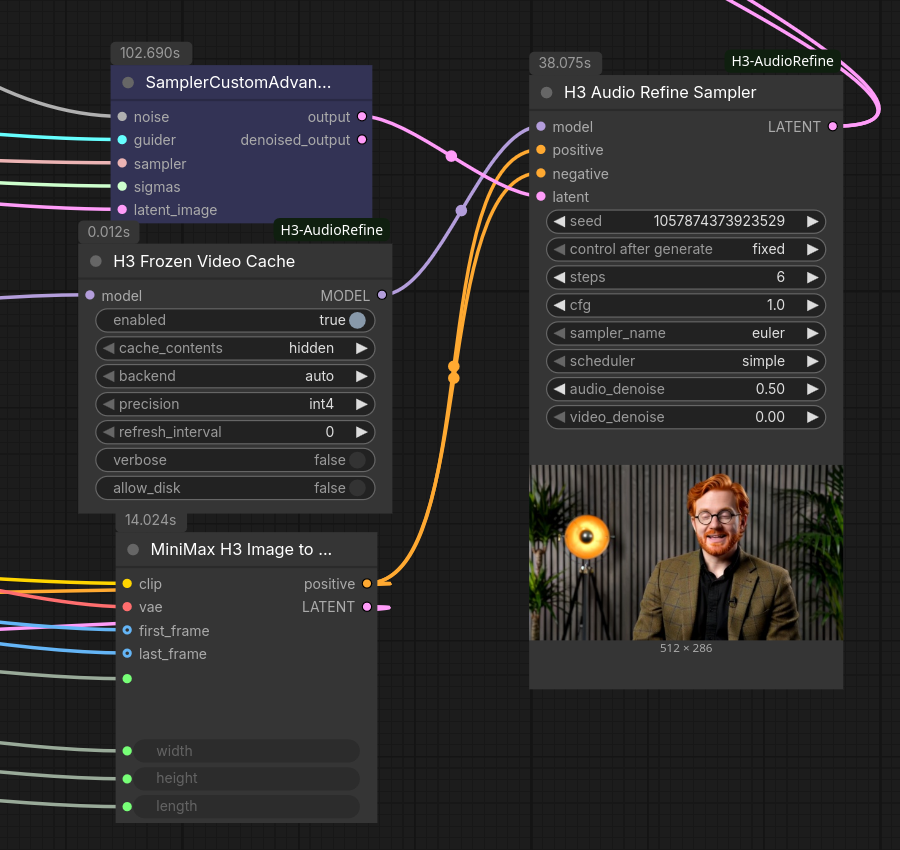
A ready-to-use graph is included:
example_workflow/mmh3_audio_refiner_basic_t2v.json
-- drag it into ComfyUI. It uses a couple of common utility nodes (math expression,
resolution selector); if they show as missing, install them via ComfyUI Manager.
SamplerCustomAdvanced runs the turbo pass; its LATENT goes to H3 Audio Refine Sampler, which takes its MODEL from H3 Frozen Video Cache. Note the refine branch
comes off the model before the turbo LoRA: pass 1 runs with the turbo LoRA, the
refinement runs without it, so the extra audio steps use the undistilled weights -- the
audio quality you were missing is exactly what the turbo LoRA took away. positive is
wired into negative as well: H3 is a distilled model that runs at cfg 1.0, so the
uncond branch is never evaluated and the negative input is unused. The clip at the top of
this README is the output of this graph.
Measured
Three runs of the same graph, from the console (75,216 packed rows, 9.7 GB cache at
hidden/int4 in system RAM):
| | steps | refinement pass | whole prompt | |---|---|---|---| | Turbo only, no refinement | 4 | -- | 137.3s | | + refinement, frozen cache | 4 + 6 | 44.6s (26.5s build, then 3.6s/step) | 184.6s | | + refinement, cache bypassed | 4 + 6 | 124.0s (20.7s/step) | 263.4s |
So on this machine: 5.7x per cached step (20.7s -> 3.6s), 2.8x on the refinement pass as a whole once the build is counted, and 1.4x on the end-to-end job -- 79 seconds saved on a 263-second render.
Only the first refinement step builds the cache. So you will notice that first step taking an additional few seconds compared to a normal step (26.5s vs 20.7s), because the cache is built AND the first audio denoise step is processed. Every step after it reads the cache instead of recomputing, and drops to 3.6s (or longer depending on target generation length). So a 6-step refinement is one 26.5s step followed by five at 3.6s, not six expensive ones:
without cache   20.7 + 20.7 + 20.7 + 20.7 + 20.7 + 20.7  = 124.0s
with cache      26.5 +  3.6 +  3.6 +  3.6 +  3.6 +  3.6  =  44.6s
                 ^^^^ builds the cache
The more refinement steps you run, the more the one expensive step is diluted -- it pays for itself after roughly 1.3 steps.
Worth noting too: refinement steps are not free without the cache. At 20.7s each against 23.0s for a full turbo step, freezing the video saves almost nothing by itself, because the frozen rows still run through every block. That gap is the entire reason this cache exists.
The verbose log shows where the time goes -- on cached steps here, block loop 3.59s
of a 3.65s model call, so essentially all of it is the transformer and almost none is
overhead.
These numbers are from one machine and are not a promise. They were measured on an
RTX 5090 (32 GB) with the cache in system RAM at hidden/int4, on one clip at one
resolution. Both the absolute times and the ratios will move with your GPU, your
resolution and frame count, where the cache ends up living (VRAM, RAM, or disk), and
whether the model itself fits in VRAM or is being streamed. On a setup where weight
streaming dominates the step, the saving will be much smaller than this table suggests --
the cache only removes compute, and it cannot help with time that is not being spent on
compute. Measure your own with verbose rather than working from these.
Do I want the frozen cache?
Both paths produce the same kind of result. They differ in what they spend.
Without the cache (bypass the node, or just don't add it) the refinement pass is resource-free -- no extra RAM, no extra VRAM, nothing on disk -- and it is exact, with no approximation anywhere. The cost is time: because H3 packs video and audio into one sequence with full bidirectional attention, every refinement step re-runs the entire video stream through all 50 blocks even though the video is frozen and its output is discarded. So each audio-only step costs about the same as a full generation step. Six refinement steps costs roughly what six more generation steps would.
With the cache, the frozen rows' per-block state is computed once and reused, so later
steps only compute the audio rows. Refinement steps get substantially cheaper, at three
costs: a chunk of RAM/VRAM/disk to hold the cache (around 10 GB at hidden/int4 for the clip
measured above, more at kv or lower compression, scaling with resolution and frame
count), a first refinement step at full price to build
it, and a mild approximation -- the frozen rows stop reacting to the evolving audio
between rebuilds (see refresh_interval).
Rough guidance:
- Memory is tight. Skip the cache. This is the real deciding question, not step count. A refinement pass without it is slower but costs nothing beyond what generation already uses, and it is exact.
- You can spare the memory. Use the cache from about 2 refinement steps upward. On the measurements above the build pays for itself after roughly 1.3 steps, so even short refinement runs come out ahead; longer ones come out far ahead.
- Not sure whether it is helping. Turn on
verboseand compare a run with the node bypassed against one with it active. The per-step log tells you where the time went rather than leaving you to infer it.
Nodes
H3 Audio Refine Sampler (all-in-one)
Inputs: model, positive, negative, latent (the sampled AV latent),
seed, steps, cfg, sampler_name (default euler), scheduler (default
simple), audio_denoise (default 0.5), optional video_denoise (default 0.0).
Wire the first pass's sampler LATENT output straight into latent, reuse the
same model stack (including the Turbo LoRA) and conditioning, and take the
refined LATENT to your existing VAE decode nodes. audio_denoise controls how
far the audio is re-noised before refinement:
- 0.3-0.6: keep pass-1 audio content, clean up noise floor / artifacts.
- 1.0: regenerate the audio from scratch against the frozen video.
steps runs KSampler-style at that denoise depth (the schedule is
steps / audio_denoise long and only the tail executes).
H3 Audio Refine Mask (composable)
Takes the sampled LATENT, attaches the freeze-video / generate-audio noise
mask, outputs LATENT. Feed it to a stock SamplerCustomAdvanced (with
BasicScheduler at denoise = desired audio re-noise depth) or a stock
KSampler with denoise < 1.0. Use this variant to control the refinement
schedule/guider yourself or to A/B against the all-in-one node.
Optional video_denoise > 0.0 partially opens the video stream to the
refinement pass instead of freezing it exactly.
Suggested starting point (Turbo 4-step)
- Pass 1: your existing 4-step Turbo graph, unchanged.
- H3 Audio Refine Sampler: steps 4-6, audio_denoise 0.5, euler / simple, same conditioning as pass 1, and the model branched off before the Turbo LoRA.
- Decode as usual.
A/B against a straight 6-8 step Turbo run at matched total step count -- that is the honest baseline this approach has to beat.
Requirements
- ComfyUI with native MiniMax H3 support including the AV masked path
(0.33.x verified against master as of 2026-08-21; the per-stream
denoise-mask handling in
CFGGuider.sampleandMiniMaxH3.scale_latent_inpaintmust be present). - No extra Python dependencies. No monkeypatching: only public
comfy.sample/noise_maskAPIs are used.
Startup flags worth knowing about (NVIDIA)
If you are on ComfyUI 0.34 or newer and see aimdo memory compile error, update this
pack -- 1.0.3 handles it by disabling the model compiler for the refinement pass only.
--disable-comfy-compiler disables it globally, which is also worth trying if 0.34 made
your normal generation slower.
There is a known CUDA driver bug in ComfyUI's dynamic VRAM streaming. ComfyUI
maintainers have reported it to NVIDIA and documented two flags that work around it --
--cuda-device 0 (or a higher index) to restrict ComfyUI to a single GPU, and
--disable-pinned-memory. See
ComfyUI issue #15255.
They are listed there as alternatives, but they address different things and running both together works well on a single-GPU machine:
python main.py --cuda-device 0 --disable-pinned-memory
Use --disable-pinned-memory on its own only if you need more than one GPU visible,
since --cuda-device hides the others.
OOM errors have been reported while using this pack that trace back to that bug rather than to the cache. A refinement pass moves a lot of data between system RAM and the GPU, which makes it a good way to run into it. If you hit OOM here, try these flags before assuming the cache is at fault -- neither is required, and neither is specific to this pack.
--disable-pinned-memory
ComfyUI normally uses pinned (page-locked) system memory to move model weights to the
GPU faster. Pinned pages cannot be swapped out by the OS, and allocating them is slow and
requires contiguous physical memory. On some setups that backfires: allocations fail or
crash inside CUDA even though there appears to be free memory, particularly at higher
resolutions or when system RAM is already committed. Users have hit this with WSL, GGUF
loaders and heavy VRAM offloading, and disabling the feature resolved it. Transfers get
somewhat slower, but the failures go away. This is also the workaround to use instead of
--cuda-device if you need more than one GPU visible.
--cuda-device 0
Restricts ComfyUI to a single GPU. Users report this improving memory behaviour even on single-GPU machines. The likely reason: it makes that card the only visible device, so nothing in the stack has to reason about other adapters -- integrated graphics, a headless second adapter, or a container runtime -- when allocating and streaming. It also makes the memory numbers in the logs unambiguous.
Harmless on a single-GPU box, and worth trying alongside --disable-pinned-memory if
refinement passes are crashing. On a multi-GPU machine, set the index of the card you
actually want rather than assuming 0.
Notes / limits
- Taking the refinement branch off the model before the Turbo LoRA is the recommended setup, and it is what the example workflow does. Pass 1 gets turbo's speed for the video; the refinement steps run on undistilled weights, so the audio quality the LoRA cost you is what the extra steps recover. This is not a risky configuration: the refine pass builds its own sigma schedule rather than continuing pass 1's, so the base model denoises from a partially-noised latent in the ordinary way, and the frozen video conditions it identically regardless of which weights produced it.
latentmust be a sampled H3 AV latent (nested video+audio). Plain latents are rejected with a clear error.- Conditioning with keyframes/refs is passed through untouched; the frozen video mask stacks with them via the native pooled-mask path.
Changelog
1.0.4
- Fix
NameError: name 't_call' is not definedon every activated call withverboseenabled (1.0.3 only). The per-call timestamp was a local of one closure while the verbose summary that reads it lives in a sibling closure. Reported by @sethharris-cpu (issue #2).verbose=Falsewas unaffected.
1.0.3
- The RAM backend now keeps the cache in pageable host memory instead of pinned. Pinned blocks are retained by PyTorch's caching host allocator for the life of the process and are not reused across rebuilds of differing shape, which leaked tens of GiB over a session. Thanks to @gabxav (PR #1).
- RAM sizing recalibrated for that change: the host footprint is now ~1.0x the packed
cache (measured 20.6 GB packed -> 20.0 GB RSS), so the overhead factor drops from 1.5 to
1.1. The old value made
autodemand ~11 GB more than a 20 GB cache actually needs and refuse RAM unnecessarily. The build log now printsactual/estimatedso the factor can be checked against your own runs. - ComfyUI 0.34 compatibility: from 0.34 the DiT forward is recorded into an aimdo
"malloc graph" by the Comfy model compiler, which assumes a repeatable allocation
pattern. This cache is the opposite (a multi-GB build allocation, eviction requests
mid-forward, a different shape again on cached steps), so it surfaced as
RuntimeError: aimdo memory compile error. The node now switches the model compiler off for the duration of sampling on its own model -- the same thing--disable-comfy-compilerdoes globally -- and restores the setting afterwards, including on error. No effect on older ComfyUI, and a user-supplied--disable-comfy-compileris left alone. - New
free_after_passinput (appended last; default off): release the cache when the sampling run ends instead of holding it for a possible warm re-queue.
1.0.2
-
The node now asks comfy's
free_memory()to make room before allocating the cache (VRAM working buffers + packed cache for the vram backend, RAM for the ram backend), so weights are evicted deliberately instead of colliding with an untracked allocation. -
Build log reports the full expected resident footprint (packed + working buffers), not just the packed size.
-
RAM backend now requests comfy's pin budget (freeing comfy's own pinned staging) sized at a measured 1.5x overhead factor, and auto's RAM fit test uses the same factor.
-
The VRAM room request is repeated on every cached step, not just at build, and the dequant working buffers are released between calls (~4 GB back to comfy's pool).
-
New
vram_margin_gbinput (appended last; default 1.0): extra VRAM added to every room request, for when the estimate undershoots on a given clip. -
Backend selection and room requests now account for the transient activations of the step itself (the full-forward MLP intermediate at build time, ~8 GB at 75k rows), sized in fp32 to match what
int8_linearactually allocates.autono longer picks VRAM for a cache that fits on its own but leaves no room for the forward building it. -
VRAM frees now report device memory instead of host RSS.
-
1.0.0: Initial release. H3AudioRefineMask, H3AudioRefineSampler.
H3 Frozen Video Cache
Accelerates the refinement pass. On the first refinement step it runs the model normally while recording every block's post-rope attention K/V for the frozen rows (text, cond/ref, video). On every later step it computes only the audio rows (~1% of the sequence), attending against the cached K/V, instead of re-running ~37k video tokens through all 50 blocks.
enabled turns the cache off without rewiring: the model is returned completely
unpatched, no wrapper, no block patches, no memory allocated -- identical to bypassing the
node. Refinement then runs at full price per step. Use it to A/B a cached run against an
uncached one without touching the graph.
Wiring: place after your LoRA/patch stack, feed the patched MODEL into the refine
sampler (H3 Audio Refine Sampler or a stock sampler fed by H3 Audio Refine Mask).
The patch self-gates: it only activates when the model is called with the video stream
fully frozen and the audio stream still generating. On the first refinement step it logs
building cache | rows=... size=... backend=... to the console -- if you never see that
line, the cache is not engaging and the pass is running at stock speed. Pass-1 sampling, partial video masks, and audio-mask workflows
pass through the stock path bit-for-bit, so the same patched MODEL is safe to wire
anywhere.
What it costs (honesty section):
- This is an approximation: between rebuilds, the frozen rows stop reacting to the
evolving audio.
refresh_interval Nrebuilds the cache every N steps (each rebuild is one full-price step) if you want to periodically re-open that feedback path.0= build once. - The first refinement step is always full price — it builds the cache.
- Cached steps are not free: model weights still stream per step if your model is offloaded to RAM, and the cache itself streams from wherever it lives. Expect cached steps to cost roughly (weight streaming) + (cache transfer) + (tiny audio compute), not zero.
- The latent preview will show garbage video during cached refinement steps (video rows are not computed; the sampler's mask blend restores the real video in the output). The final latent is unaffected.
Cache contents (cache_contents input): the storage/compute dial.
hidden(default) — stores each block's post-norm hidden states (5376/row) and rebuilds K/V on the fly each cached step. ~2.7x smaller thankv; cached steps keep ~30% of the per-block video matmul work (the qkv projection), so expect roughly ~3x faster refinement steps. This is the config that fits a RAM-starved box where the model offload pool already owns most of system memory.kv— stores post-rope K/V directly (14336/row). Cached steps are nearly compute-free, but you need the room to hold it.
Backends (backend input): where the cache lives.
auto— picks the first of vram / ram / disk that fits with a 4 GB margin, and prints the choice and the reason to the console. It will only consider disk ifallow_diskis on; otherwise it raises an error explaining what did not fit rather than falling back.vram/ram/disk— force a placement. Selectingdiskwithoutallow_diskis an error, not a silent downgrade. Disk caches live under the ComfyUI temp directory and are deleted when replaced.allow_disk— off by default. See the disk wear warning at the top of this README. Cache size is printed on every build before allocation, and that log line is the authoritative number. It scales linearly with clip length and resolution: at 1344×768 / 24fps,hidden/int4costs roughly 1 GB per second of clip (135 KB per packed row across the 50 blocks);kvis 2.7x that;fp8doubles andbf16quadruples any cell. For one worked example -- a ~5.2s clip at 1344×768 (~38k rows):
| | bf16 | fp8 | int4 |
|---|---|---|---|
| kv | ~55 GB | ~27 GB | ~14 GB |
| hidden | ~21 GB | ~10.4 GB | ~5.3 GB |
Sizes scale linearly with row count.
Other memory the cache uses (not part of the number above):
- Working VRAM during cached steps:
kvholds two full-sequence dequant buffers (~1.1 GB at full canvas);hiddenholds one (~0.4 GB) plus the transient full-sequence qkv activation (~1.6 GB peak). - The disk backend stages through two double-buffered pinned blocks (~0.5 GB RAM for
kv/int4, ~0.2 GB forhidden/int4). - The RAM backend uses pageable host memory, so a freed cache is actually returned to the OS (see the note on pinned-allocator retention below).
Precision (precision input): int4 (group-128 symmetric; default — smallest and
fastest to stream), fp8 (per-row scaled e4m3), bf16 (exact). Verified cached-step
deviation on the test model, both contents modes: bf16 ~0, fp8 ~4e-4 relative, int4
~2e-3 relative — small against the approximation itself, and hidden does not amplify
quantization error through the rebuilt projection (measured 0.0022 vs 0.0020 for kv
at int4).
Diagnosing a refinement pass (verbose input): logs one line per model call:
cached step | blocks: 50 cached, 0 built, 0 stock (of 50) | block loop 2.1s | whole model call 15.4s | outside blocks 13.3s
Read it as follows. 0 of 50 blocks touched (plus a warning) means the block replacement
never ran and the cache cannot take effect at all. A high block loop time with 50 blocks
cached means the transformer is still the bottleneck and the cache is not saving what it
should. A small block loop next to a large outside blocks means the step's time is
being spent outside the transformer entirely -- patchify, text refiner, final layer, or
memory management -- in which case no amount of caching inside the blocks will help.
Every build also logs why it rebuilt (no cache yet, video latent changed,
conditioning changed, layout changed, refresh_interval reached). If you see a build
line on every step, the cache is never being reused and the pass is running slower
than stock -- the reason field says what is invalidating it.
Coexisting with ComfyUI's memory manager: the cache is not tracked by comfy's
accounting, so before allocating, the node asks free_memory() to clear the room it
needs -- comfy then evicts model weights deliberately instead of colliding with an
allocation it cannot see. This works on both sides: a VRAM request for the working
buffers (plus the packed cache on the vram backend), and on the ram backend a pin
budget request sized at ~1.5x the packed cache -- the measured real footprint of a pinned
host allocation, not the optimistic packed size -- which makes comfy free its own pinned
staged weights against actually-available RAM. The auto-backend fit test uses the same
1.5x figure, so auto no longer chooses RAM on headroom that would not survive the
allocation. The build log reports the packed cache size, the VRAM working
buffers on top of it, and the rough total resident footprint. The request is repeated on every
cached step (comfy's picture of free VRAM moves between our calls as weights stream back
in), and the dequant working buffers are released between calls so comfy's own
allocations can use that VRAM while a step is not running. If you still hit CUDA OOM
during refinement, raise vram_margin_gb on the node -- it is added to every room
request, making comfy evict more before the cache allocates. No launch flags needed.
Why auto may refuse VRAM even when the cache would fit. The cache has to coexist
with the transient activations of the step running alongside it. Those are large at high
row counts: the MLP intermediate alone is rows x ffn*2 in fp32 -- about 8 GB at ~75k
rows -- and the build step runs a full forward, so it pays that in full. A 10 GB cache
plus an 8 GB transient plus ~16 GB of resident int8 weights does not fit in 32 GB, so
auto picks ram instead and says so in the log. Forcing backend: vram at that size
will OOM inside the build.
Measured vs estimated memory: every build logs what it predicted against what it actually cost:
cache built | estimated 9.7 GB | process RSS 21.3 GB -> 31.4 GB (+10.1 GB) | MemAvailable 18.2 GB -> 7.6 GB (-10.6 GB)
The pre-allocation estimate comes from MemAvailable, which is a kernel guess at what
could be reclaimed under pressure, not a measurement -- it counts reclaimable page cache
and slab, so it reads optimistically. process RSS is what the cache really cost. If
those two disagree badly on your machine, trust RSS.
The ram backend keeps the cache in pageable host memory, so freeing it actually
returns the memory to the OS. It previously used pinned (page-locked) memory for faster
transfers, but PyTorch's pinned-host caching allocator retains freed blocks for the life
of the process -- and since each rebuild at a different resolution or clip length asks for
different block sizes, those blocks are never reused either. That leaked tens of GiB
across a session. Pageable transfers are somewhat slower; predictable release is worth
more. (Fix contributed by @gabxav, PR #1.)
free_after_pass releases the cache the moment a sampling run ends rather than
holding it for the next one. Default off, which keeps the current behaviour: re-queueing
the same pass-1 latent then skips the rebuild. Note that a randomized seed invalidates
the cache anyway, so if you randomize between runs you are holding several GB between
generations for a warm start you will not get -- turn this on. The cost is one full-price
build step on every run. It hooks ComfyUI's OUTER_SAMPLE wrapper, so it also fires on
error and on interrupt, which is when releasing the memory matters most.
Lifecycle: the cache persists across queue runs on purpose (re-queueing the same refine skips the rebuild) and is invalidated automatically by a new video latent (new seed), a layout change, or eviction (2 slots max). Disk caches live under the ComfyUI temp directory: stale directories are swept on the next build, orphans are cleared by ComfyUI's own temp cleanup at startup, and an interrupted build is discarded rather than left half-written (verified: a post-interrupt run rebuilds cleanly).
Compatibility: the cache reuses ComfyUI core's own kernels (fused RMSNorm+rope, optimized attention, swiglu) so the build step reproduces the stock forward exactly (verified bit-identical on CPU against core). Core internals are structurally checked at patch time and per step; any mismatch falls back loudly to the exact path rather than producing wrong output. If your attention backend cannot handle cross-length q/kv (audio queries vs full-sequence keys), switch attention backends for the refine pass.