
comfyui_AcademiaSD
Official set of custom nodes of AcademiaSD.
Nodes (45)
The Academia SD Fast Switch · Counter
Two model slots, one output — the node that plugs into any loader you own
Stop bypassing groups by hand — flip the lever
A vision model loader that downloads its own weights
A batch image loader that speaks dataset — index in, image and path out
Download checkpoints and LoRAs without leaving the canvas
Hand an image to Gemini from inside ComfyUI
AcademiaSD H3 RefMod Character
AcademiaSD H3 RefMod Encode
The local captioner that pairs with the pack's model loader
A loop counter that won't double-count inside a single queue
Keyframe an LTX video with images, not spaghetti
Film grain exactly where you want it — masked, feathered, and honest
Eight sockets, one winner, and the unwired ones sit it out
Draw the boxes instead of writing 'headline top left' and hoping
Reverse-engineer a picture into boxes
Moviola is the part of a chained-video workflow that actually cuts the film
Pin the previous take to frame 0 without a VAE round trip
The last frame of take five is the first frame of take six
Keep the motion, not just the last PNG
Ten reference images into one Qwen-Edit prompt, minus the Load Image spaghetti
Six LoRAs in one node — stack them without spaghetti
Drive video prompts per-frame — one list, one index
The red negative box that remembers your history — and runs the stock encoder underneath
A seed box with memory — undo, history, and roll in one node
One number in, INT and FLOAT out — the converter you keep re-drawing
History, favorites, presets — same encoder as stock
One name in, four paths out — the node that keeps a chained workflow's files in one folder
An LLM prompt enhancer that costs you zero extra VRAM
A resolution selector that never hands you a non-multiple of 8
Stop hand-typing resolutions — set megapixels and a ratio instead
Put the input and output sizes on the canvas where you can see them
Save your image, then one click to send it back into the workflow
Write captions next to your training images, automatically
One switch for any cable, and it only runs the branch you picked
Frames and fps finally agree — a pocket calculator for video workflows
First frame, last frame, and the loop in between — keyframe-driven video without the cable spaghetti
A whole workflow in a grid — switch flavours with one click on a mode
Repoint every loader in your workflow with one click
Caption your whole training dataset with a local VLM — no API key, no per-image bill
A zero-output switchboard that bypasses other nodes from one tiny box
A counter that survives restarts, because it lives in a file — perfect for dataset loops
Turn 12 into frame_00012_.png — the file-naming glue for dataset frames
One node, a whole stack of prompts — swap a line per queue
Hit reset on your batch counter without touching any files
comfyui_AcademiaSD
Academia SD Custom Nodes for ComfyUI
A collection of custom nodes designed for Academia SD, created to optimize workflows, save downloading time, and improve the user experience (UX) in ComfyUI while maintaining 100% native compatibility.
ComfyUI and ForgeWebUI tutorial in my Youtube channel @Academia SD
Academia SD Automatic Downloader for ComfyUI ⬇️ v1.02
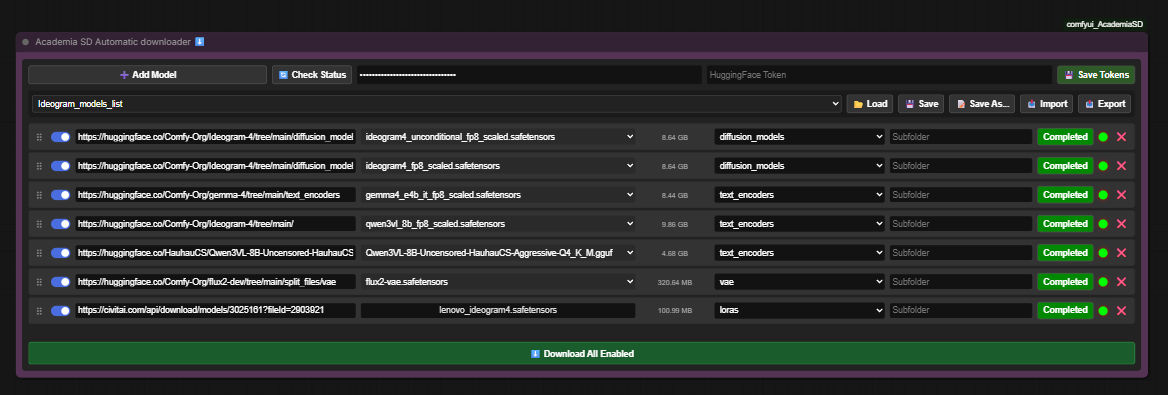
A highly integrated download manager designed for ComfyUI. Download checkpoints, LoRAs, VAEs, and other models directly inside your workspace without leaving the canvas.
This tool scans your ComfyUI directories (including secondary paths defined in extra_model_paths.yaml) to verify existing models, manages downloads in non-blocking background threads, and handles authorization tokens for private or gated models on Civitai and HuggingFace.
Key Features
- ⚡ Non-Blocking Background Downloads: Downloading large models does not freeze ComfyUI. The application runs downloads in secondary threads.
- 🔒 Models only, into model folders only: downloads are limited to model files (
.safetensors,.gguf,.ckpt,.pt,.pth,.bin,.onnx,.sft) and to ComfyUI's model folders.custom_nodesand paths that try to leave the models directory are refused, so a link can never drop code into your installation. - 🔄 Dual Platform Support: Paste direct download URLs from Civitai or HuggingFace.
- 📦 Automatic HuggingFace Repository Parsing: When pasting a HuggingFace repository link, it automatically fetches and displays a dropdown list of available model files (e.g.,
.safetensors,.gguf,.ckpt). - 💾 Local Duplicate Detection: Automatically checks if the file already exists in your local folders or shared directories (e.g., Automatic1111/Forge) using ComfyUI’s path resolution system.
- 🔒 Gated & Private Model Support: Securely save your Civitai API Keys and HuggingFace Tokens to download restricted, NSFW, or private files.
- 📁 Custom Subfolders: Define subfolder paths dynamically (e.g., download a LoRA directly into
loras/style/anime/). - 📑 Presets Management: Save your favorite model lists, export them as JSON, or import shared lists from other users.
- 🧬 Visual Drag & Drop Reordering: Organize your download queue by dragging and dropping items within the node.
Status Indicators (LEDs)
Each model row features a real-time status light:
- 🟢 Green: Model is already downloaded and present in your folders.
- 🟡 Yellow: Download in progress (displays a real-time progress percentage).
- 🔴 Red: Model is not found locally. Ready to download.
- 🟣 Magenta: API Token required to access this file.
- 🟠 Orange: Actively communicating with the server / Checking status.
Academia SD Advanced CLIP Text Encode (Positive & Negative) 🟢🔴
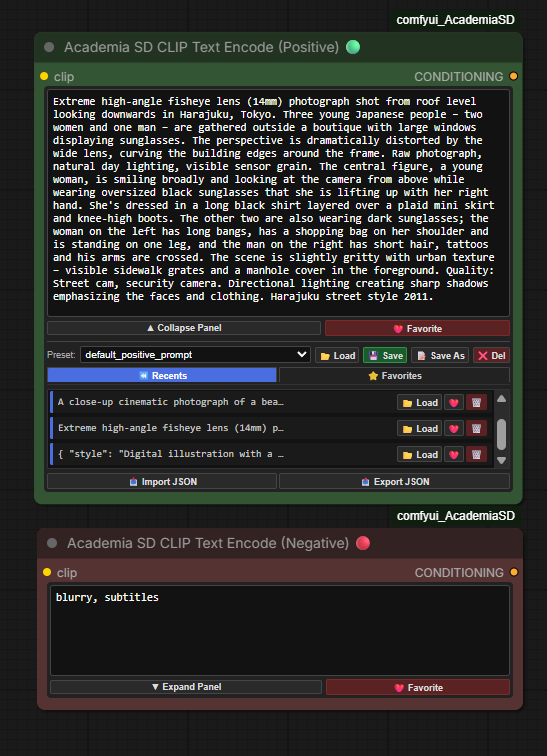
An ultra-sleek, highly responsive custom CLIP Text Encode implementation for ComfyUI. Designed to act as a direct, drop-in replacement for the native CLIP Text Encode node, it introduces a dynamic, collapsible utility tray for managing prompt history, favorites, and custom prompt lists—all while maintaining an incredibly small, pixel-perfect footprint on your canvas.
Key Features
- 📐 Fluid Responsive Layout (
flex: 1): The primary prompt text area utilizes a fully fluid layout. Stretch, widen, or scale the node manually in any direction; the editor box will dynamically expand to fill 100% of the available vertical space. - 🧠 Independent State Sizing (Size Memory): The node intelligently remembers your manually adjusted dimensions separately for both collapsed and expanded modes. Toggling between them fluidly snaps the node to your preferred width and height without resetting or forcing generic dimensions.
- 🧹 Zero-Overlap DOM Injection: Completely isolates and overrides ComfyUI's native multiline
<textarea>element at the DOM level (display: none !important). This guarantees no duplicate text render overlays, no layout breaks, and a clean interface from the millisecond the node is created. - ⏪ Auto-Queueing Recent Prompts (Last 10): Generates and keeps a real-time rolling list (FIFO) of your last 10 queued prompts. Duplicate entries are automatically cleaned up and pushed to the top.
- ❤️ Favorites Vault: Save your absolute best prompts directly to a dedicated Favorites list by clicking the heart button. They are styled as independent cards with quick-action utilities to load or delete them.
- 🔍 Scrollable Hover Preview: Hovering a Recents or Favorites card pops up a floating panel with the entire prompt, line breaks intact and scrollable when it overflows. It stays open while the pointer is inside it, so long multi-line prompts can actually be read and scrolled — unlike a native tooltip, which truncates to a single strip and vanishes the moment you reach for it.
- 📂 Multi-Preset Saving & Loading: Create custom preset files (e.g.,
landscapes.json,portraits.json). Supports saving, creating copies (Save As), and deleting presets directly from the node. - ⚡ Default File Auto-Loading:
- The Positive Node automatically loads
default_positive_prompt.jsonon startup. - The Negative Node automatically loads
default_negative_prompt.jsonon startup.
- The Positive Node automatically loads
- 📤 Import / Export JSON: Easily import custom prompt libraries or backup your favorites lists to standard JSON files.
Interface Layout & Sizing Bounds
- Collapsed (Compact) Mode (Height:
120px): Shows only the active prompt box and the control bar. Completely hides the lists to keep your canvas clear. - Expanded Mode (Height:
>= 275px): Reveals preset controls, tab selectors, scrollable card lists, and file utilities. - Minimum Width: Locked at
420pxto maintain pristine, legible button alignments.
Folder Structure
All prompt list files are stored locally within your custom node directory.
custom_nodes/comfyui_AcademiaSD/prompt_lists/
Academia SD Advanced Seed Generator for ComfyUI 🎲
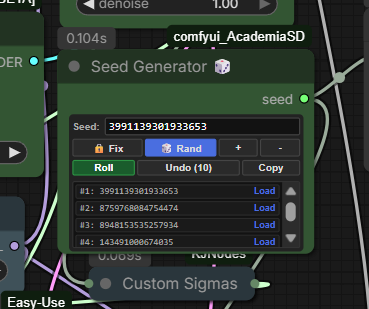
An ultra-compact, high-performance seed generator node built specifically for ComfyUI. Designed to replace the native, pixel-perfect HTML interface that minimizes canvas clutter while introducing advanced seed history management.
Key Features
- 📐 Extreme Space Compression: Measures only
230pxin width with a dynamically adjusting height. It sits snug right below the title bar, aligning your primary input rows directly with theseedoutput connector to eliminate wasted empty space. - ⏪ Pure Non-Destructive Undo: Safely backtrack through your seed history queue (up to the last 10 seeds) without shifting index arrays in real time. Perfect for recovering that one specific generation you accidentally skipped.
- 📋 Interactive History Tray: Displays a visual panel list containing your last 10 seeds. Hovering and clicking any seed instantly loads it back into active status and locks the mode to "Fixed".
- 🎲 Fast "Roll" Action: Instantly roll a new random seed on-the-fly directly inside the node widget without needing to queue a new generation prompt.
- 🔒 Standard & Advanced Generation Modes:
🔒 Fix: Locks the active seed.🎲 Rand: Automatically rolls a new seed on every queue execution.➕ Increment: Increments the active seed value by+1on every generation.➖ Decrement: Decrements the active seed value by-1on every generation.
- 🧹 Built-in Interface Cleanup: Robust frontend cleaning algorithms actively remove ComfyUI's native duplicates, hidden input connectors, or extra output connectors. Only one clean, highly-compatible output port (
seed) remains visible. - 💾 Session Serialization: All seed history and configuration states are serialized natively. Your history persists even after saving, closing, or reloading your ComfyUI workflow JSON.
Interface Layout & Button Controls
| Element | Description |
| :--- | :--- |
| Seed Input | A monospace text field displaying the active seed. Supports manual numerical entry (safe range up to 9007199254740991). |
| 🔒 Fix | Locks the current seed so it remains unchanged during generation. |
| 🎲 Rand | Generates a new randomized seed automatically when queuing a prompt. |
| ➕ / ➖ | Increments or decrements the current seed value automatically when queuing a prompt. |
| Roll | Generates a new random seed instantly and locks the mode to 🔒 Fix. |
| Undo (X) | Steps backward through your local seed history sequentially. |
| Copy | Copies the active seed value to your clipboard with temporary visual feedback. |
| History Panel | An expandable bottom tray that opens automatically when history items exist. Click any row to reload a past seed. |
💊 Academia SD Multi-LoRA v0.8
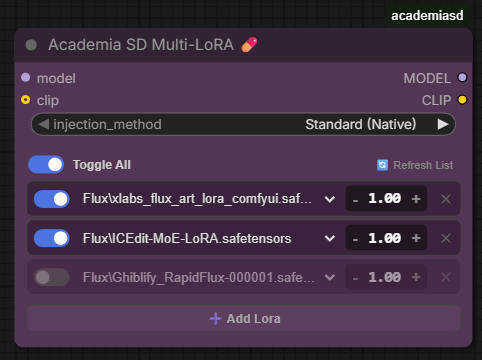
Load multiple LoRAs in a hyper-compact space without cluttering your workflow with dozens of chained nodes.
- Global & Individual Toggles: Enable or disable LoRAs with a single click for quick testing without disconnecting cables.
- Drag to Reorder: Grab a LoRA by its
⠿handle and drop it above or below another one. LoRAs are applied in list order. - On-the-fly Metadata: Hover your mouse over a LoRA in the menu and a floating tooltip will appear showing the base model, training resolution, and the Top 15 Trigger Words.
- Agnostic & Native: Uses ComfyUI's official injection engine. 100% compatible with SD1.5, SDXL, Flux, and complex video architectures. Allows "Model Only" injection to bypass text errors in video models.
🔢 Academia SD Numeric Input
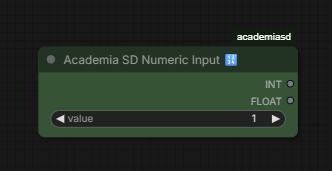
Dual data converter for maximum compatibility.
- Enter a single integer value (e.g.,
1024). - The node outputs two simultaneous cables: A pure
INT(1024) and aFLOATwith decimals (1024.0). - Avoid using additional converter nodes when connecting the same value to parameters that require strict data types in Python.
💾🚀 Academia SD Image Save & Send v0.3
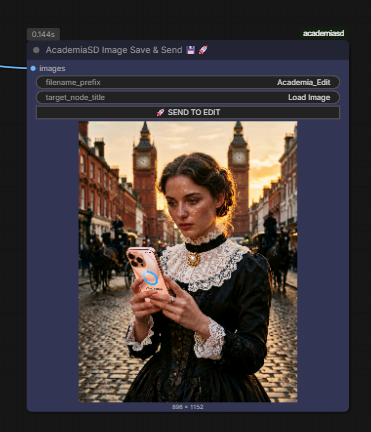
End circular connections and easily build cyclic image editing workflows.
- Standard Saving: Safely saves your images in the
outputfolder. - "Send to Edit" Button: Send your rendered image directly to the beginning of the workflow with a single click. When pressed, the node performs a silent copy to the
input/Academia_Editsfolder and instantly refreshes your sourceLoad Imagenode. Perfect for Inpainting and Image-to-Image workflows.
🖥️ Academia SD Resolution Selector v0.9
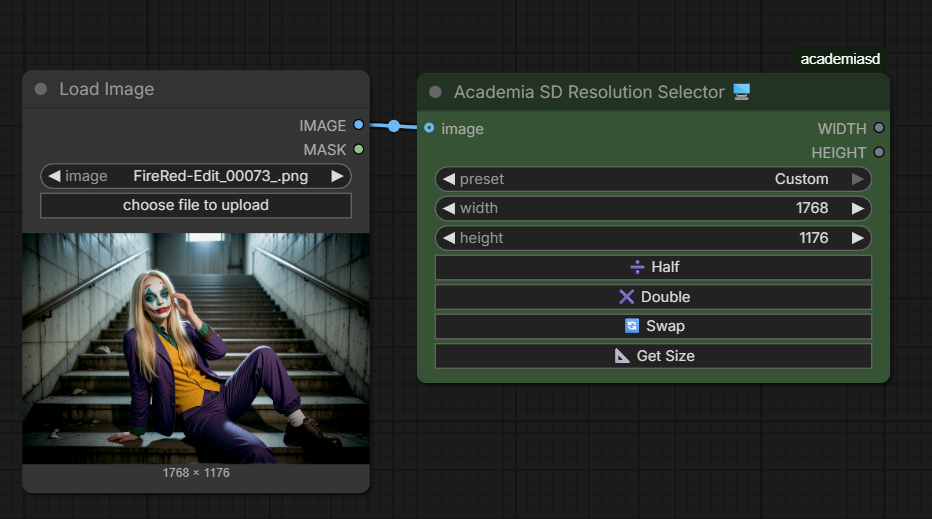
Absolute control over resolution with mathematical precision.
- Tensor Safety: Every number entering and leaving this node is mathematically forced to be a multiple of 8, ensuring the generation process doesn't throw errors (Ideal for Flux and LTX-Video).
- Quick Controls: Integrated grid buttons (Half, Double, Swap) to modify the axes without typing.
- Get Image Size: Connect a
Load Imagenode to the side cable, press the 📐 button, and the node will automatically adopt the exact resolution of the original image.
Academia SD VL Model Loader (Qwen3-vl) & captions nodes
This set of nodes is designed to automate the process of image captioning and dataset preparation using Vision Language Models (VLM).
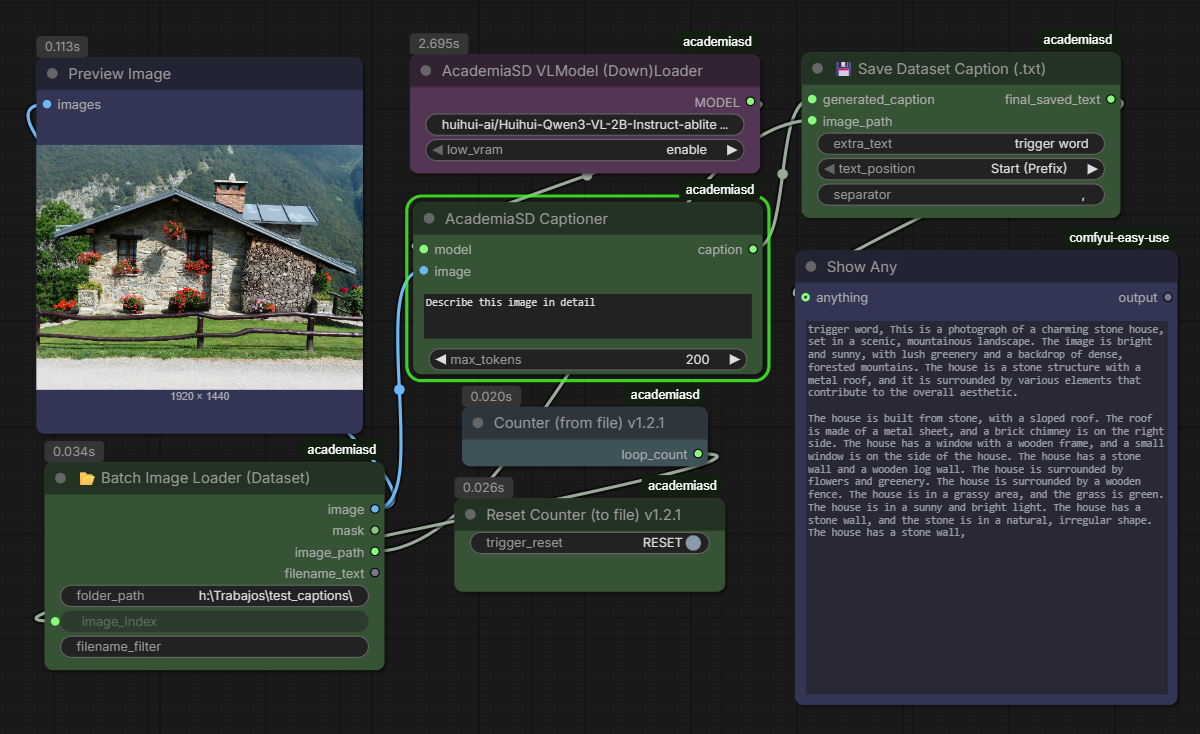
1. AcademiaSD VLModel (Down)Loader
This node handles the acquisition and initialization of Vision Language Models directly from HuggingFace.
- Inputs:
model_repo: The HuggingFace repository ID (e.g.,huihui-ai/Huihui-Qwen3-VL-2B-Instruct-ablite).low_vram: Toggle to enable memory-efficient loading for GPUs with limited VRAM.
- Outputs:
MODEL: The loaded VLM model ready for inference.
- Safety: code shipped inside a model repository is never executed. Use models that
transformerssupports natively (Qwen2-VL, Qwen2.5-VL, Qwen3-VL and their fine-tunes).
2. AcademiaSD Captioner
The core engine for image interrogation. It uses the loaded model to analyze visual content based on a natural language prompt.
- Inputs:
model: Connection to the VLModel Loader.image: The image to be analyzed.prompt: Text instruction for the model (e.g., "Describe this image in detail").max_tokens: Limit for the generated text length.
- Outputs:
caption: A string containing the generated description of the image.
3. Batch Image Loader (Dataset)
A specialized loader for dataset management that iterates through local directories.
- Features: It expects images to be named with consecutive numbering. You don't need to specify filenames, only the folder path and the current index.
- Inputs:
folder_path: Directory containing your dataset.image_index: The specific number of the image to load.
- Outputs:
image: The loaded image tensor.image_path: The full path string (essential for synchronization with the saver node).filename_text: The name of the file being processed.
4. Counter (from file) & Reset Counter
A state-management system to track progress during batch processing.
- Counter (from file): Creates and updates a
loops.jsonfile in the ComfyUIoutputfolder. It increments its value by 1 every time the workflow is executed. Perfect for driving theimage_indexof the Batch Loader. - Reset Counter (to file): Contains a
trigger_resetbutton that immediately sets the value inloops.jsonback to 0.
5. 💾 Save Dataset Caption (.txt)
Automates the creation of sidecar text files for model training datasets.
- Features: It uses the path from the Image Loader to ensure the
.txtfile is saved in the same location and with the same name as the image. - Inputs:
generated_caption: The text from the Captioner.image_path: Reference from the Loader to determine the save destination.extra_text: Allows adding a "trigger word" or custom tags.text_position: Choose if the trigger word appears as a Prefix (Start) or Suffix (End).separator: Character used to separate the trigger word from the caption (e.g., a comma).
- Outputs:
final_saved_text: The complete string saved to the disk.

Bypass nodes by value
This node acts as a central control hub to manage the execution state (Active vs. Bypass) of up to 5 connected nodes. It is especially useful for modular workflows where you want to toggle stages on or off dynamically.
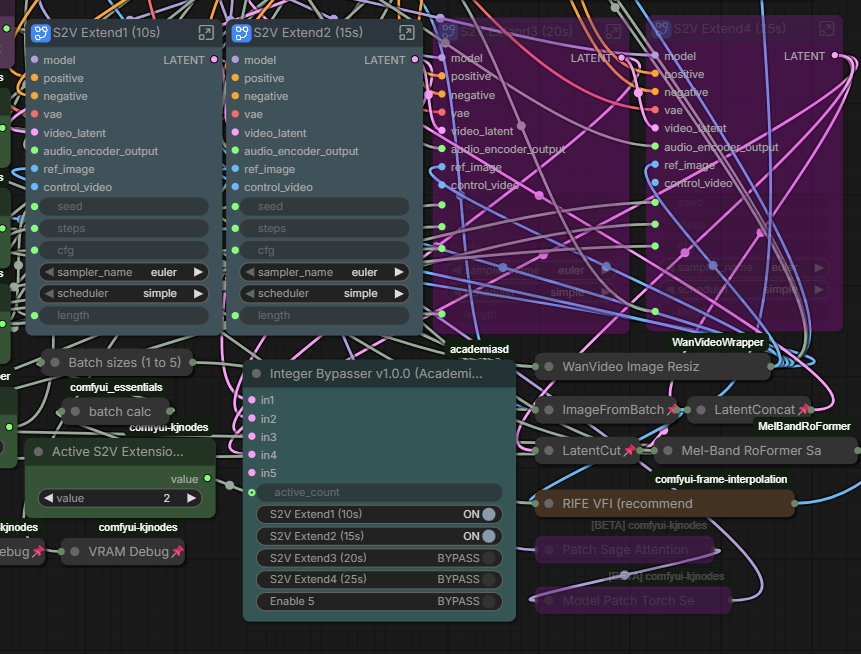
- How it works:
- Manual Control: You can manually toggle each connected node between
ONandBYPASSusing the individual switches in the UI. - Sequential Control (
active_count): By connecting an integer to theactive_countinput, you can automate the bypass logic. For example, ifactive_countis set to 3, the first three connected nodes will be activated, and the rest will be bypassed automatically.
- Manual Control: You can manually toggle each connected node between
- Features:
- Dynamic Labels: The switches in the node UI automatically rename themselves based on the title of the nodes connected to the inputs (
in1toin5), making it easy to identify what you are controlling.
- Dynamic Labels: The switches in the node UI automatically rename themselves based on the title of the nodes connected to the inputs (
- Inputs:
in1toin5: Connect the nodes you wish to control here.active_count: (Optional) Integer input to determine the number of nodes to keep active sequentially.
Instructions and workflow in the video https://www.youtube.com/watch?v=4Ya_NuEB0Rs
Gemini Vision 1.1.2
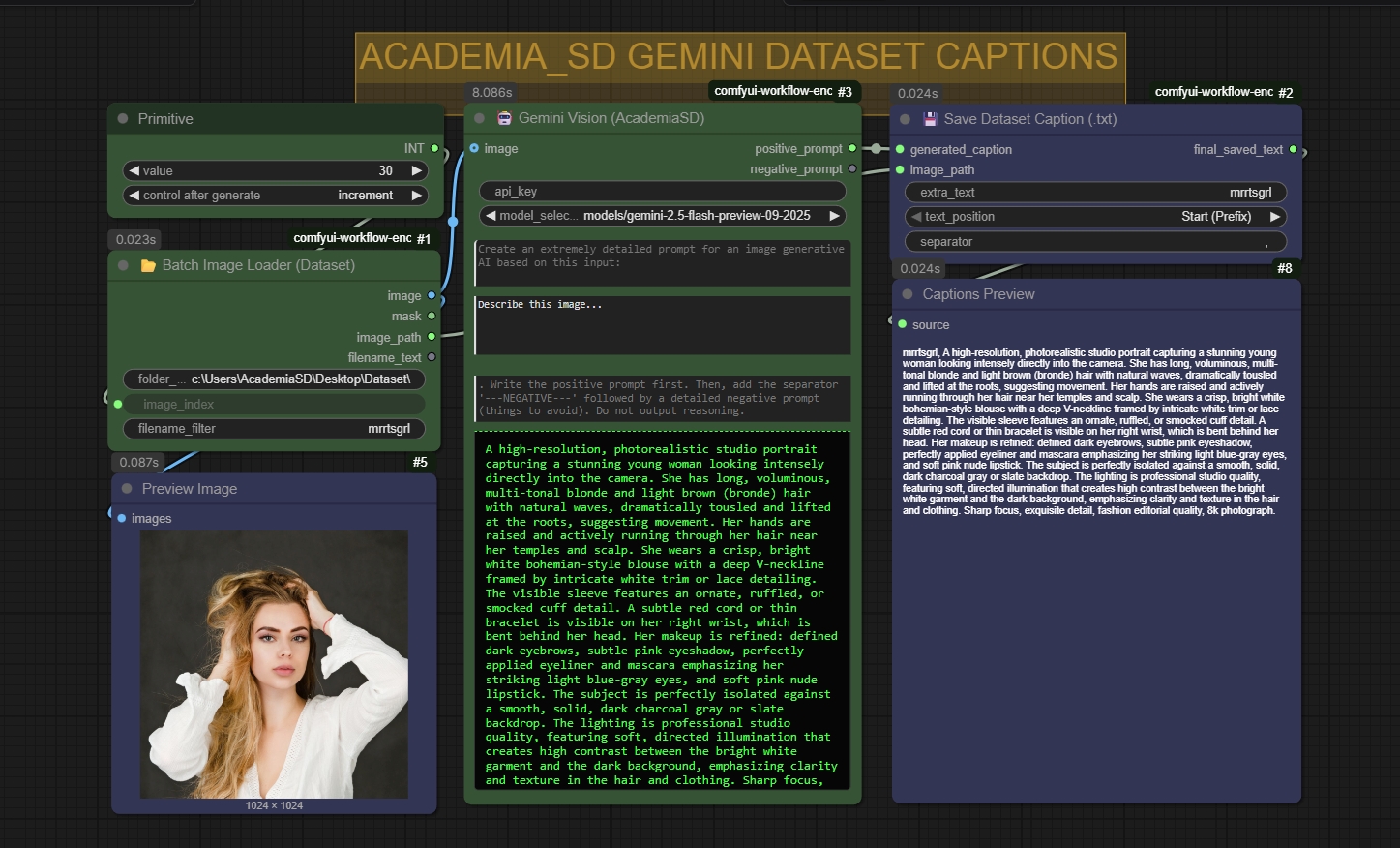
Instructions in the video https://www.youtube.com/watch?v=7WJanKUaSEE Dataset captions included
Academia SD Masked Noise
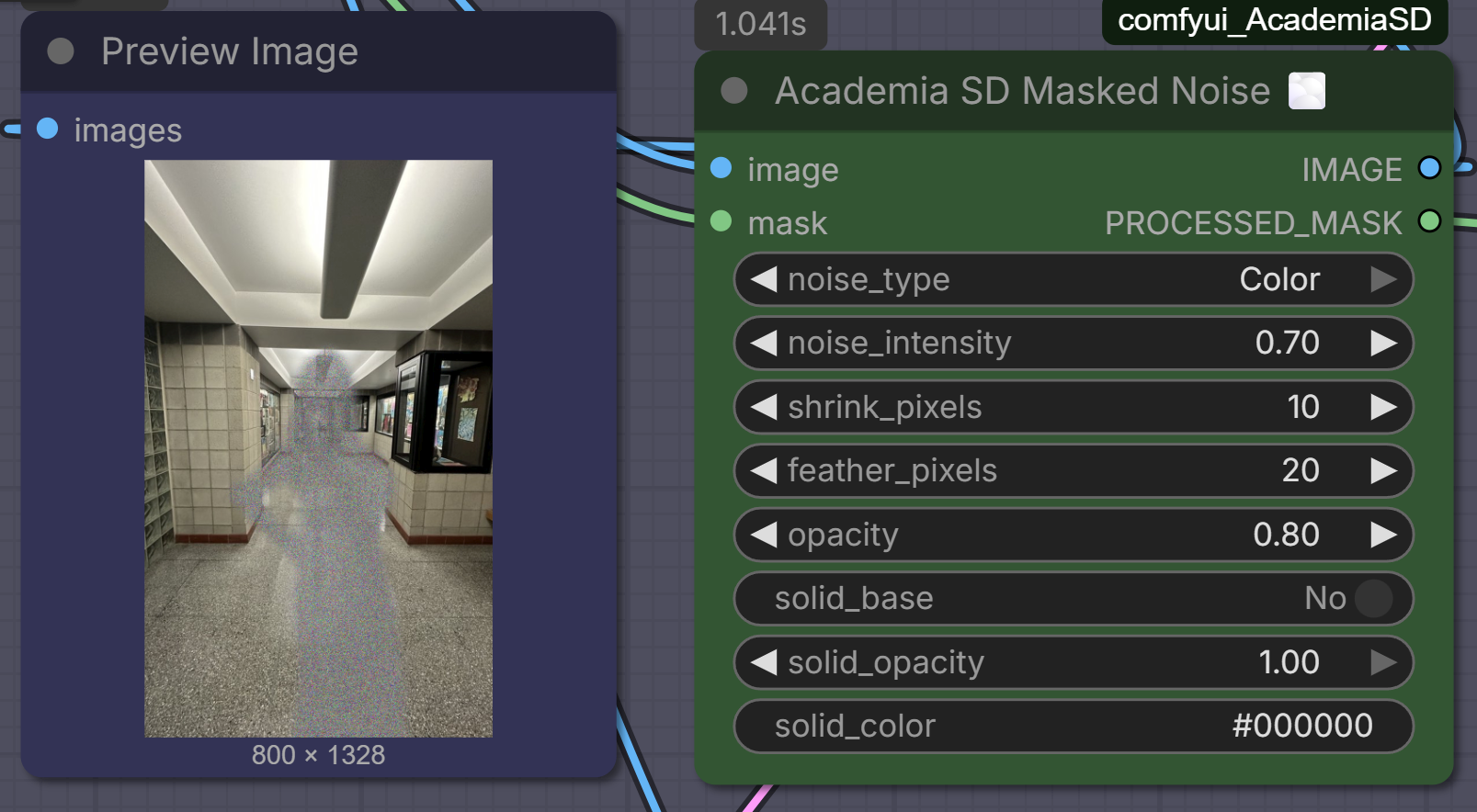
Add cinematic film grain and organic noise exclusively to specific areas of your image using a mask.
- True Additive Noise: Unlike nodes that just fade your image into a static picture, this node uses additive mathematics. The
noise_intensityslider softens or sharpens the grain structure without making it transparent, preserving the full opacity of the effect over your image. - Solid Base Generator: Optionally apply a solid background color underneath the noise. Includes an interactive color picker with an eyedropper tool and an independent
solid_opacityslider to give your noise masks volume and presence over complex backgrounds. - Dual Noise Generation: Choose between chromatic digital grain (
Color) or classic cinematic film grain (Black & White). - Mask Adjustments on the Fly: Forget external masking nodes. Includes built-in sliders to shrink the mask away from edges (
shrink_pixels) and apply professional Gaussian edge-blurring (feather_pixels) for seamless transitions. - Master Opacity & Mask Output: Use the global
opacityslider to fine-tune how strongly the final masked effect blends into your composition. It also outputs a secondaryPROCESSED_MASKcable, allowing you to route the perfectly feathered and shrunk mask directly into your Inpainting or ControlNet pipelines.
🧮 Academia SD Resolution Calc
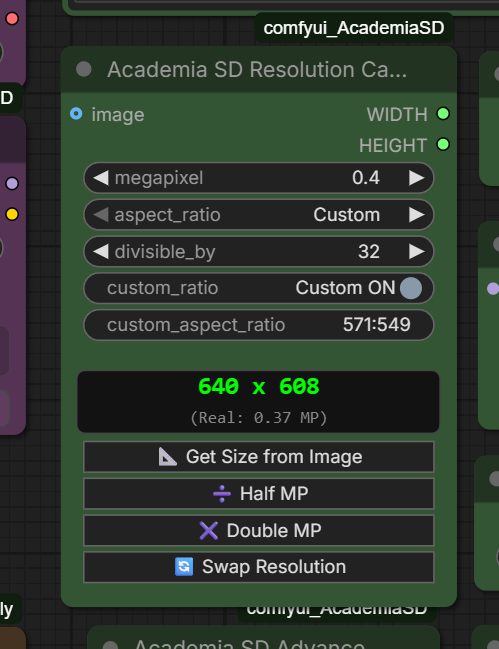
A modern resolution calculator tailored for Megapixel-based models (like SDXL and Flux).
- Megapixel-Driven: Instead of guessing widths and heights, set your target Megapixels (e.g.,
1.0for SDXL or2.0for Flux) and let the node do the complex math. - Or type the size straight in:
widthandheightsit under the readout and can be written or dragged. What you write is squared todivisible_byand the megapixels and the proportion are recalculated from it, so the two ways of asking meet in the middle. Write777withdivisible_byat32and the field snaps to768in front of you: what you read is what will render. The pair is interface only — they carry no value in your saved workflow and are recomputed when it loads, which is exactly what lets them be added without moving a single stored widget. - Extensive Ratio Library: Comes pre-loaded with an exhaustive list of cinematic and standard aspect ratios (from
1:1 Perfect Squareup to32:9 Extreme Ultrawide). - 📐 Get Size from Image: Point the
imageinput at a reference picture and the node adopts its real megapixels and locks its proportion. Lower the megapixels afterwards and the shape is preserved — the way to say "this image, but smaller". The ratio is shortened to something you can read and then matched against the library:736×1104becomes the2:3preset, and so does1920×1279, which used to fall through toCustomover a difference of less than a tenth of a percent. Shortening never moves the proportion by more than 1.5%, so an odd1672×941keeps167:94and still selects theCustomentry rather than collapsing into a17:9that is a 6% different picture. - Custom Ratio Override: Type any exotic aspect ratio (e.g.,
14:9) incustom_aspect_ratio. The dropdown carries aCustomentry and thecustom_ratioswitch stays in step with it in both directions, so the dropdown always states the ratio actually in use rather than showing a preset the node is ignoring. Ratios are shortened to two digits a side where that costs under 1.5% of drift —259:227reads26:23— and whilecustom_ratiois off the field shows1:1instead of whatever it last held, since a leftover number there reads as if it were still doing something. - 🔄 Swap Resolution: Flips the current resolution between portrait and landscape, keeping the megapixels and the divisibility. On a preset it selects the mirrored preset (
16:9→9:16) and stays on presets; on a manual ratio it inverts that. Inverting a ratio is a width/height swap, so1936 x 1088becomes exactly1088 x 1936. - ➗ / ✖️ Half & Double MP: One click to halve or double the target megapixels while the proportion holds.
RESOLUTIONoutput: The same megapixels said as the side of the square that would cover that area:1.0 MPis1024,2.0 MPis1448. It is the number models call their base resolution. It reads the megapixels you asked for rather than the roundedWIDTH × HEIGHT, so it holds still when you change the ratio or the divisibility. It is the third output, added afterWIDTHandHEIGHTon purpose: saved links point at slots by number, so nothing you already have wired needs touching.- Divisibility Safety: Easily lock the output to be strictly divisible by
8,16,32, or64to prevent tensor dimension errors during inference. - Real-time LED Screen: Instantly preview the exact mathematically calculated
widthandheightin a sleek green display as you change settings, without needing to queue a prompt. Under it sits the real megapixel count after divisibility rounding — which is not the same as the target you asked for and appears nowhere else — plus the reference size while the proportion still matches it. Outputs standardINTvariables ready to connect to your Empty Latent nodes.
🖼️ Academia SD Multi Image Reference
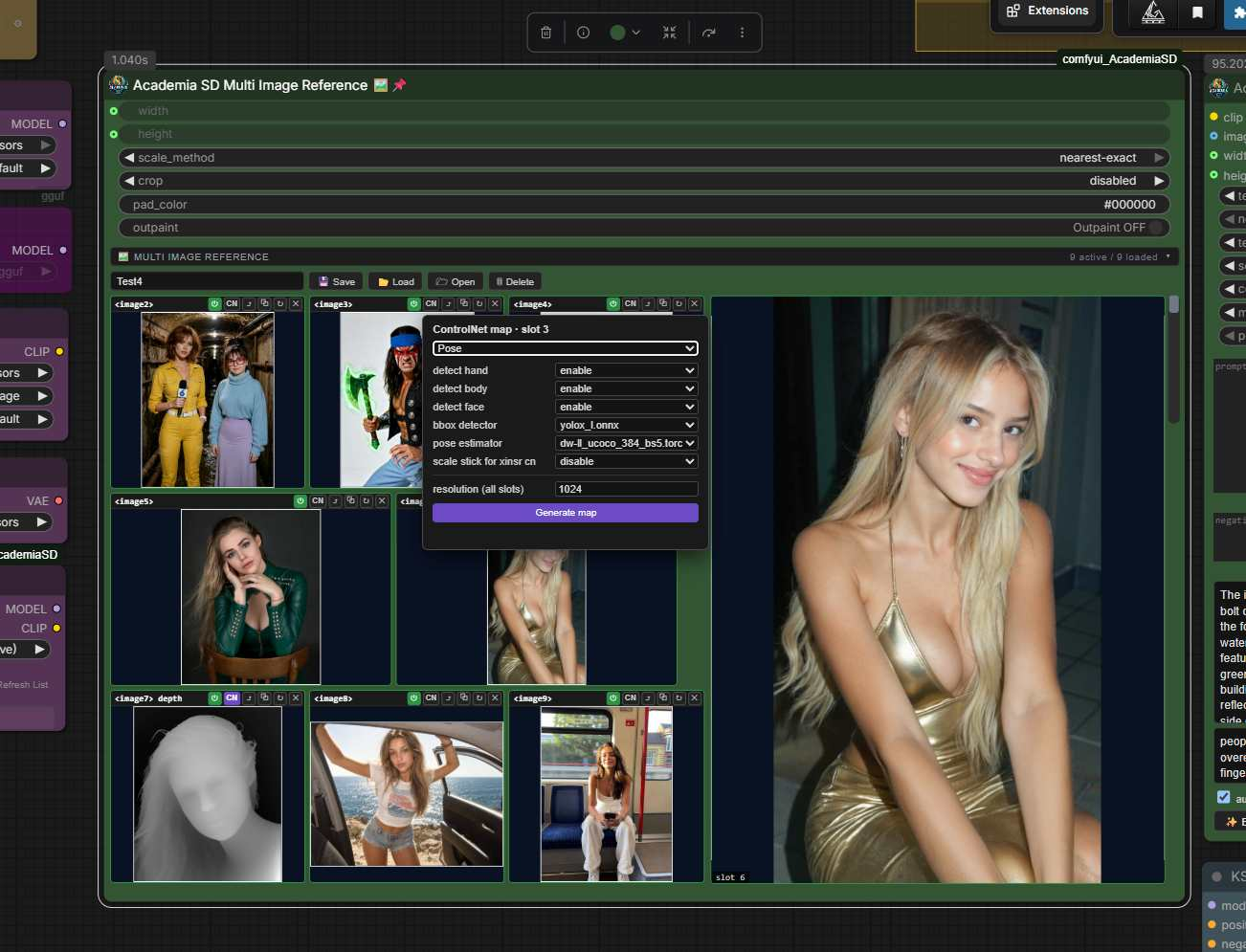
Ten reference images in one node, for Text Encode Qwen Image 2.1 and anything else that takes several references at once. Neither the node nor its file carries a model name on purpose: what it holds are images.
- Every slot is a switch. Turning one off sends
Nonedown the same wire, which is exactly what the encoder drops with itsif image is None: continue. Bypassing a reference needs no rewiring, no reroute and no second node. Loaded and active reads green, loaded and bypassed reads red. - The tag on each card is the one the encoder will really use. Qwen numbers
<imageN>by position in the list after the empty ones are dropped, so turning slot 1 off makes slot 2 become<image1>. Printing the slot number instead would lie the moment you bypass one in the middle, and you would find out in the picture rather than in a message. - A missing file stops the prompt rather than being skipped quietly, for the same reason: losing one reference shifts every tag behind it.
- Image 1 carries the resize, which takes an Upscale and a Get Image Size out of the graph. It is the only one whose size matters -- the encoder builds its latent from the first reference it receives -- and there are four ways to reach the target:
centercrops to fill,customcrops with the window dragged where you want it,padfits the whole image and fills the rest withpad_color,stretchdistorts.centerandstretchstay delegated tocomfy.utils, so anything already using them returns the same pixels as before. - The panel shows what will happen, it does not describe it. The white rectangle is the real crop window, computed with the same arithmetic as
common_upscale. Inpadyou see the destination canvas with the image placed inside it, and with Outpaint on you drag that image, scale it by the corner or the wheel, and put a face at the top of a 9:16 canvas without leaving the node. Reference_activecounts the references that actually reach the encoder -- on and with a file -- so it always matches the number of<imageN>tags in play.- ControlNet maps per slot. The CN button runs one of nine
comfyui_controlnet_auxprocessors -- Canny, Depth, Pose, Lineart, Soft edge, Scribble, Normal, Segmentation, MLSD -- with its own options and a node-wide resolution, queued on its own instead of by running the workflow. The map is kept next to its image asname_canny.pngand becomes what that slot outputs; switching back and forth costs nothing, because nothing is regenerated. - Projects. Save, load and delete a set of references in
input/<name>, one file per slot. A project also carries the text of the Academia Positive and Negative prompt nodes and the maps made inside it, so it restores a state and not just a pile of pictures. Open shows the folder in the file explorer. - The panel earns its space. Loaded slots share out the height of image 1 and the width of their row; empty ones close to a small square. Nothing is ever cropped to fill a card -- a reference has to be seen whole to know it is the right one -- and hovering a thumbnail shows it large in the image 1 box. Drop a file on a slot, or click it to browse.
- Slots move. Swap any slot with image 1 from its button, swap two by dragging a title bar, and copy a slot into the next empty one.
- Academia SD Multi Image Reference Out is a companion that exists only in the browser: link it by title and, on queue, it redirects its outputs to the source node's. It is there so ten cables do not have to cross the graph from wherever the panel happens to sit.
✨ Academia SD Prompt Enhancer
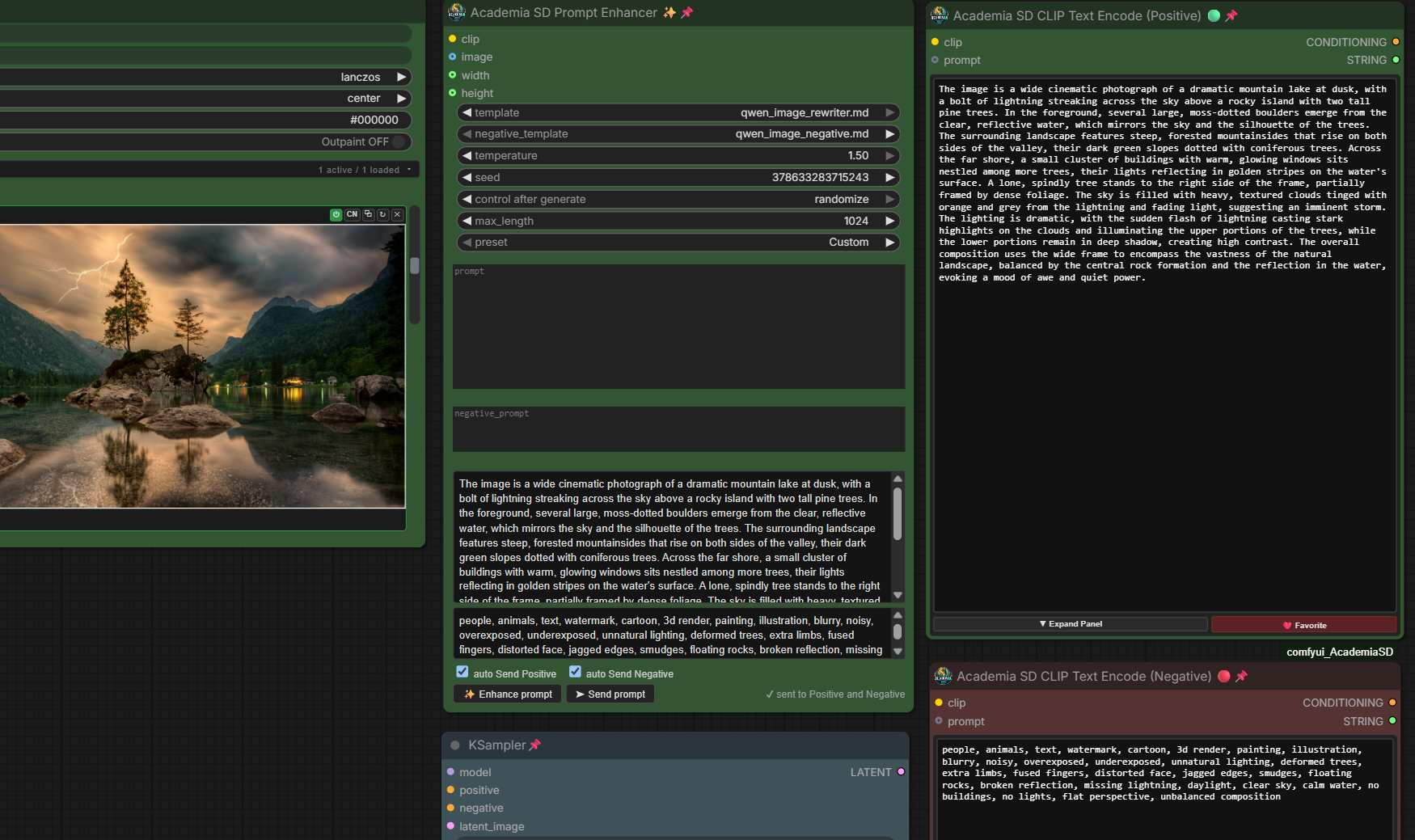
Rewrites a prompt with the same Qwen3-VL text encoder the image model already has loaded. No second model to download, nothing extra in VRAM.
- Prompt, image, or both. With an image it describes what it sees; with a prompt it expands it; with both it rewrites the prompt against the picture.
- It runs on its own. The Enhance prompt button queues this node by itself: the workflow does not run and nothing is sampled. Rewriting a line of text should not cost a generation.
- Send prompt writes the result where it belongs, into the Academia Positive and Negative nodes.
Send PositiveandSend Negativedo it by themselves as soon as each result is ready. - A real negative prompt, written from its own template and placed after whatever terms you typed, so yours are never dropped. It is a second execution on purpose: producing both in one pass hit a CUDA device-side assert.
- Edit requests keep their instruction and every
<imageN>tag. Rewriting "make the shirt in<image2>red" must not lose which image it was talking about. - The system template is a
.mdfile inenhancer_templates/, one for the positive and one for the negative. Drop another one in and it appears in the list: the behaviour is text, not code. A template can end with a<!-- variation ... -->block ofkey: option | option | ...lines: the node picks one option per line from theseedand passes them as suggestions, so similar requests do not all come out alike (the request always wins, and the model never sees the block). bbox_jsonwrites a structured caption with bounding boxes for Ideogram 4 / 4.5 and FLUX.3 Image: background, style and one element per subject or text, each with its box and colours.bbox_json_detailedalso splits every subject into parts (face, nose, ears, hands, garments...), so an edit can target just one of them. The node puts the result in the official order (bboxas[y1, x1, y2, x2]in 0-1000, uppercase hex colours), drops duplicates and repairs JSON cut off at the end. Setmax_lengthto 3072-4096 for these templates: a busy scene does not fit in less.- Presets above the prompt box -- Custom, Describe image1, Enhance prompt, Enhance prompt Flux3, Describe image Flux3, Edit image Flux3, Enhance prompt Moss (Amateur), Enhance prompt Moss (Pro photo), Enhance prompt Moss (Design). Each one also picks its pair of templates; Custom leaves them as they are.
- Enhance prompt Moss (Amateur) rewrites your idea, or describes the image, as an amateur snapshot for MOSS-Image: a cheap phone, an old digicam, a camcorder or film, with noise, grain, blur, flash and odd framing as part of the look. Its negative (
MossImage_enhance_neg) names the polished look (studio light, airbrushed skin, renders...) and never the imperfections the prompt asks for. Write the idea in the box, not an instruction to the enhancer. Tested with Qwen3-VL-4B as theclip. - Enhance prompt Moss (Pro photo) writes a professional photograph: a genre chosen from the subject, a named lighting setup, lens and aperture, deliberate composition and color grading. Its negative (
MossImage_pro_neg) names the amateur flaws (noise, motion blur, on-camera flash, tilted horizon...). - Enhance prompt Moss (Design) plays to MOSS-Image's strength, text and layout: posters, infographics, flyers, covers, menus, slides. It describes the piece top to bottom, quotes every text exactly (keeping your wording and its line breaks, and writing concise text when the request needs some), and gives the typography, palette and grid. Its negative (
MossImage_design_neg) targets text and layout failures and the "photo of a poster" look. Connectwidthandheightso it designs for the right canvas. - The three Moss presets vary by
seed(lighting, color and composition for Pro photo; style, palette, layout, typography and imagery for Design), so leave the seed on randomize to get different takes on the same idea. - FLUX.3 prompt upsampler. Load
qwen3.5_9b_flux3_prompt_upsampleras theclipand pick a Flux3 preset.Flux3Klein_enhanceandFlux3Klein_editare the official upsampler system prompts for text-to-image and for editing;Flux3Klein_describefollows the same caption rules to describe an image. Each comes with its own negative (_neg). The node sends these templates the request as it is, with theTARGET CANVAS: W:Hline taken fromwidthandheight(not for edits, whose size comes from the first reference), which is the input format the upsampler is trained on. Enhance and Edit keep your text in the box: write the idea or the change, not an instruction to the enhancer. - Up to 10 references for FLUX.3.
image_2...image_10reach the Flux3Klein templates, so an edit that takes a garment from the second image or puts three people in one scene is written by a model that sees all of them, in order. Each one is scaled to about 1 MP for the upsampler. The Qwen templates keep looking at the first image only. widthandheightare inputs, so the rewrite can be told the shape it is writing for, andaspect_ratiocomes back out.temperature,seedandmax_lengthare there for when it has to be reproducible, or longer.
⏱️ Academia SD Time Calculator
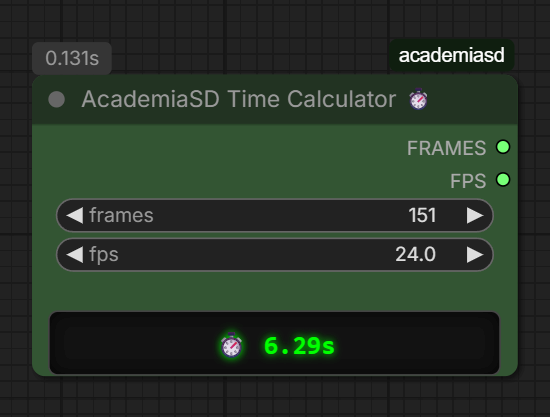
A pocket-sized, real-time video duration calculator for animation workflows.
- Instant Visual Feedback: Displays the exact video duration in seconds on a sleek, green LED-style digital screen the moment you type or change a value, without needing to run the queue.
- Workflow Integration: Outputs the
FRAMES(INT) andFPS(FLOAT) values so you can plug them directly into your Video Samplers or Video Combine nodes. Use it as your unified master control for video length! - Decimal FPS Support: Fully supports standard animation and cinematic framerates like
23.9or29.97FPS. - Ultra-Compact Design: Meticulously designed to take up the absolute minimum space on your canvas (down to 180px width), making it the perfect, unobtrusive sidekick for your LTX-Video or Stable Video Diffusion setups.
🖼️ Academia SD LTXV Multi-Frames
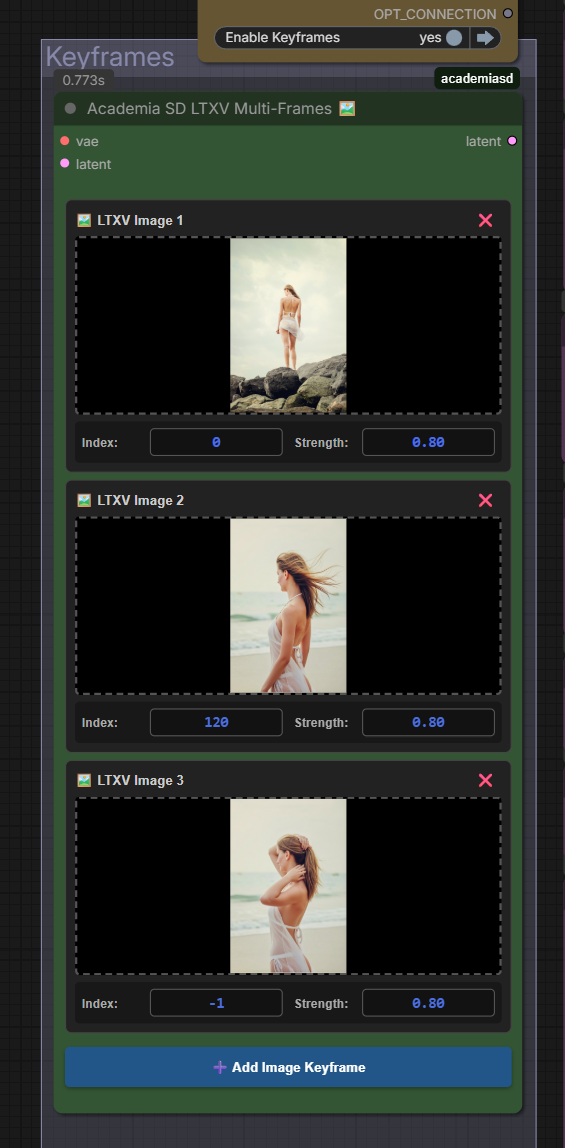
An all-in-one, cable-free image injector designed specifically for LTX-Video Image-to-Video workflows.
- Drag & Drop Interface: Upload and manage multiple reference images directly inside the node's UI. No need for messy
Load Imagenodes cluttering your workspace. - Smart Indexing: Automatically sets the first frame to index
0and newly added frames to-1(last frame by default), keeping your animation loops mathematically sound. - Per-Frame Strength Control: Precisely adjust the injection strength for each individual keyframe to guide the video generation.
- In-Place Latent Injection: Encodes and injects the images directly into the latent space and noise mask, perfectly conditioning the LTX-Video architecture without external spaghetti wiring.
Acknowledgments: The core latent injection and masking logic of this node is built upon the fantastic work from Kijai's ComfyUI-LTXVideo wrapper (specifically adapted from the
LTXVImgToVideoInplaceKJnode).
🎚️ Academia SD Fast Switch (A/B)
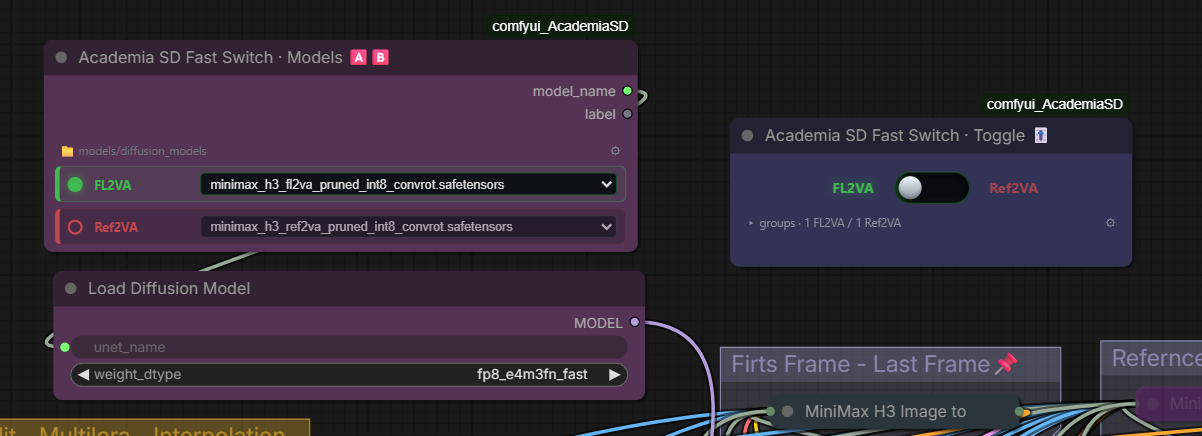
A pair of nodes for workflows that exist in two flavours — switching a pipeline from FL2VA to Ref2VA, for instance. Instead of hunting down every group to bypass and every loader to re-point, you flip one physical switch.
🅰️🅱️ Fast Switch · Models
Two model slots fed from the same folder. The active one is the one that leaves the node.
- 🟢 🔴 Active vs. asleep at a glance: The live slot is drawn in green and the sleeping one in red. Nothing to read — you can tell which model is armed from across the canvas.
- 🔌 Plugs into any loader: The
model_nameoutput connects straight into theunet_nameof a Load Diffusion Model, and just as well intolora_name,ckpt_nameorvae_name. It uses a wildcard type, so a single node covers every loader instead of one variant per model kind. - 📁 Any models folder: Defaults to
models/diffusion_models. The ⚙ gear lists every folder ComfyUI knows about (models/loras,models/vae,models/text_encoders…) to pick with one click, or lets you type a path by hand. - ✏️ Renameable labels: Double-click
AorBand type over it. Call themFL2VAandRef2VA— the names are yours. - 🏷️ Secondary
labeloutput: ASTRINGcarrying the active label, handy as a filename prefix so your renders say which branch produced them.
🎚️ Fast Switch · Toggle
The switch itself, and the part that moves everything else.
- 🎛️ A lever, not a checkbox: Drag the knob left or right, or click for it to snap across. The active side lights up green while the other dims to red.
- 🔀 Groups on one side, bypassed on the other: Assign each group to
A,Bor–. That third state is the whole point:–means this switch never touches that group, so a branch can arm what it needs without you having to declare the entire workflow. - 📸 One-click setup: Leave the workflow exactly as you want it for one branch, flip the lever to that side and press 📸. Every group that is currently on gets assigned to this side and everything bypassed to the other. No walking down a list of checkboxes.
- 📡 Drives its Models nodes without a cable: Every Fast Switch · Models node carries a 🔗 chip saying which switch commands it, and you set it from either end — the chip on the Models node, or the switch's own ⚙ menu. Drop a single switch on the canvas and new Models nodes attach to it on their own. It works in reverse too: clicking a slot on a linked Models node asks its switch to flip.
- 🔒 One switch, one scope: Two Fast Switches in the same graph never interfere. Each owns its group assignments and its own followers, so flipping one never moves the other or touches its groups. The lever shows a 🔗 counter of how many Models nodes obey it.
- 🤏 Folds down to almost nothing: The group list collapses away, leaving just the lever and a one-line summary. Unfold it only when you need to reassign something.
- ⚙️ Options: Bypass or Mute for the off side, apply the active side on workflow load, and label push — rename
FL2VAonce on the switch and the Models nodes that follow it pick the name up.
🔢 Fast Switch · Counter
The Toggle's sibling for "how many": a stepped slider OFF, 1, 2, 3… that turns groups on by level. Built for reference images and RefMods — one group per image or character, and the slider decides how many are in play.
- 🔴 OFF / 🟢 ON: at 0 the left label reads
OFFin red; at 1 or more it turns intoONin green, and the right side shows the count (3/8). Both words can be renamed (double-click the label, or ⚙). - 🎚️ Stepped slider: drag it and it snaps to each step, click anywhere on the track to jump there, or use the mouse wheel for ±1. Click the label to go OFF and back to the last value; click the number for +1.
- 📋 Levels, not sides: fold the panel open and give each group a level (
–, 1, 2, 3…).–means this counter never touches the group. Type a filter (e.g.Ref) and press 🔢 to number the visible groups 1, 2, 3… in one go. - ➕ Cumulative or exact: Cumulative (default) — value 3 turns on levels 1, 2 and 3 and bypasses the rest. Exact — value 3 turns on only level 3, to pick one option among several.
- ⚙️ Options: number of steps (up to 32), Bypass or Mute for the off groups, apply on workflow load, rename, re-apply, unassign all.
- 🔌
valueoutput (INT): the current number, in case you want to wire it somewhere.
🗺️ Academia SD MOSS Layout
A box editor for MOSS-Image's layout prompts: place text, objects and characters on a canvas and the node writes the JSON the model understands.
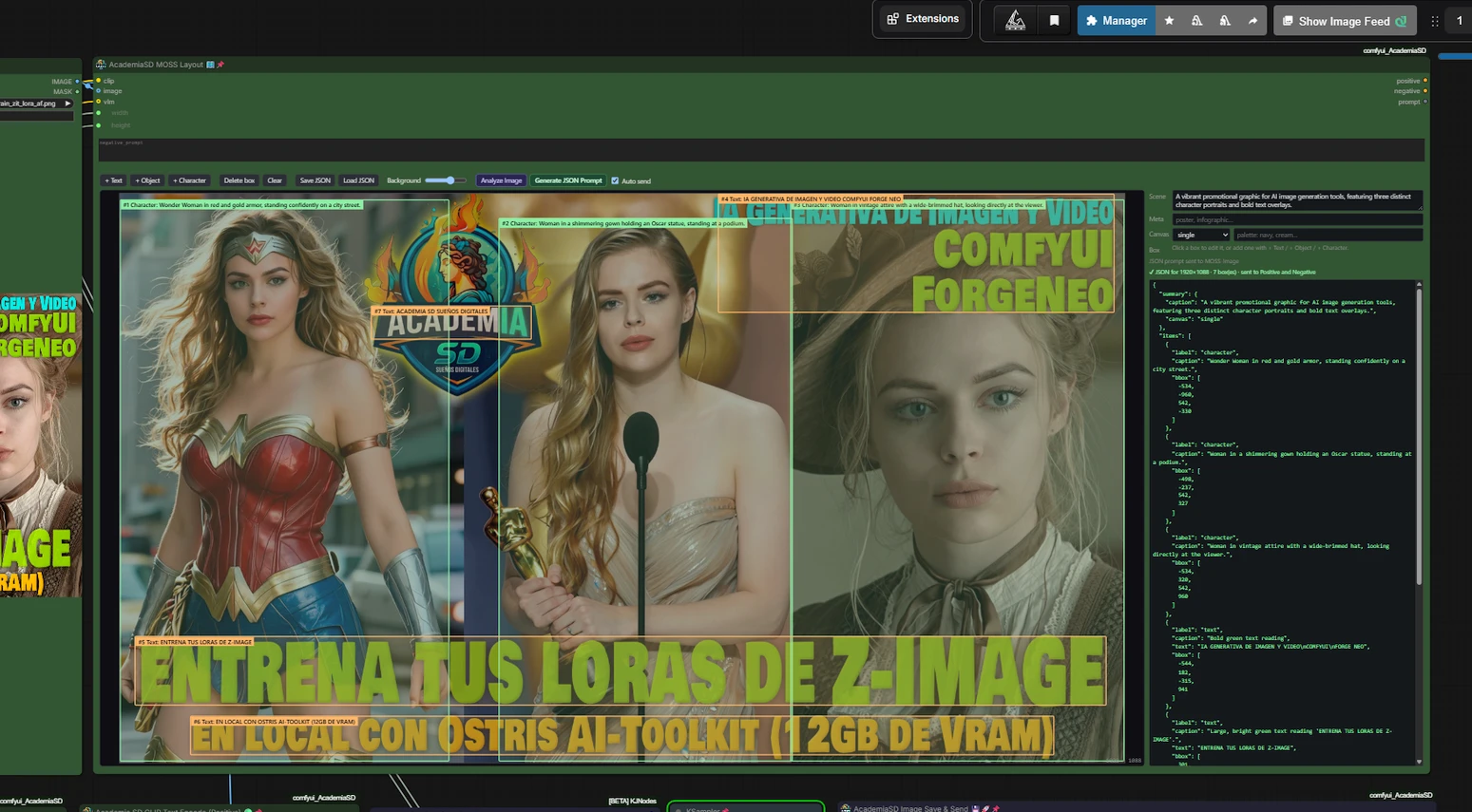
- Canvas with the real proportions: it follows
widthandheight, also when they come from a Resolution Calc, and fits whatever size you give the node. - Three kinds of box, the ones MOSS-Image accepts: Text (exact wording, line breaks kept), Object and Character. Drag to move, drag the corners to resize; each box has a description, plus optional tags and palette. A Scene field holds the global description (with meta tags, canvas type and palette).
- Background image: connect an
image(a Load Image shows up at once; anything else after the first run) and set its opacity to place the boxes over a reference. It never reaches the model. - Analyze Image: connect a Qwen3-VL to
vlm(a Load CLIP, the same kind the Prompt Enhancer uses) and press the button: it looks at the background image and places a box for every character, object and text block it finds, with descriptions and the exact text, plus a description of the whole scene. It runs only that analysis (the helper nodeAcademiaSD MOSS Layout Analyze); if there are boxes already, it asks whether to replace them or add the new ones. Box placement depends on the model: Qwen3-VL 8B is much more precise than 4B, and abliterated or heavily quantized versions lose precision. - Auto send: on, every change rebuilds the JSON and writes it into the
Academia SD CLIP Text Encode (Positive)node, and the negative prompt into the(Negative)one, as the Prompt Enhancer does (with several, select the one to send to). Generate JSON Prompt sends both again. The text lands in their boxes, so you can still edit it there; no need to wire thepromptoutput (a wired Positive locks its box). Off, the JSON panel is used as it is, so you can edit it by hand, and nothing is sent. - Save JSON / Load JSON: save the layout (boxes, scene fields and JSON) under a name in
comfyui_AcademiaSD/moss_layouts/and load it back from a list. The editor also keeps the last state inmoss_layouts/current.json: a new MOSS Layout node starts from it, and it appears first in the Load list. - Generate JSON Prompt shows the JSON in the panel on the right, with a line confirming how many boxes went in. Boxes are stored as fractions of the canvas, so changing the resolution keeps them in place; on each run they become pixels for the real size, exactly as OpenMOSS's own
compile_prompt.pydoes (centered coordinates,yxyx). - The JSON looks compact on purpose: one line, no spaces, as in the official pipeline, because that is what the model was trained on. The panel shows it indented to read it.
- Outputs:
positiveandnegativeCONDITIONING (encoded with theclipinput; the negative is plain text and can stay empty, as in the official pipeline) andprompt(the JSON). Every box goes into the JSON; one without a description gets a generic one ("An object", "A character"). Only text boxes without text are left out, since there is nothing to render.
🔀 Academia SD Switch Any
Picks one of several inputs of any type (latent, CFG, model, image...), a replacement for the Impact Pack switch.
- Three
selectinputs: the chosen input is the largest select that arrives; with none, input 1. A select coming from a bypassed node does not arrive and does not count, so a Fast Switch group can raise the choice to 2 without another branch having to lower it. - Inputs grow as you connect them: there is always one free input after the last connected one, up to 10.
- Only the chosen branch runs: the inputs are lazy, so the branches you do not pick are never computed.
- Forgiving: if the chosen number has nothing connected, it uses the closest connected input below it and says so in the console.
- 🔌 Outputs:
output(the chosen value),selected(its number) andvalue_text(the value as text when it is an integer or a float, empty otherwise: wire it to a Preview Any while testing). - 👁️ Result on the node: after each run the node shows the chosen input and its value at the bottom, e.g.
input_2 → 8.
🎭 Academia SD H3 RefMods (multi-character)
Two nodes for using several MiniMax H3 RefMods in one shot without the faces blending, one character being cloned, or the voices swapping.
Why it happens. A classic RefMod is added to the conditioning after text encoding: the DiT attends its latents, but the text encoder (Qwen) never sees the subject. With one RefMod that is enough. With two or three, nothing tells the model which one is which — the prompt cannot cite <Video 1> because that label does not exist in the sequence.
1. AcademiaSD H3 RefMod Character
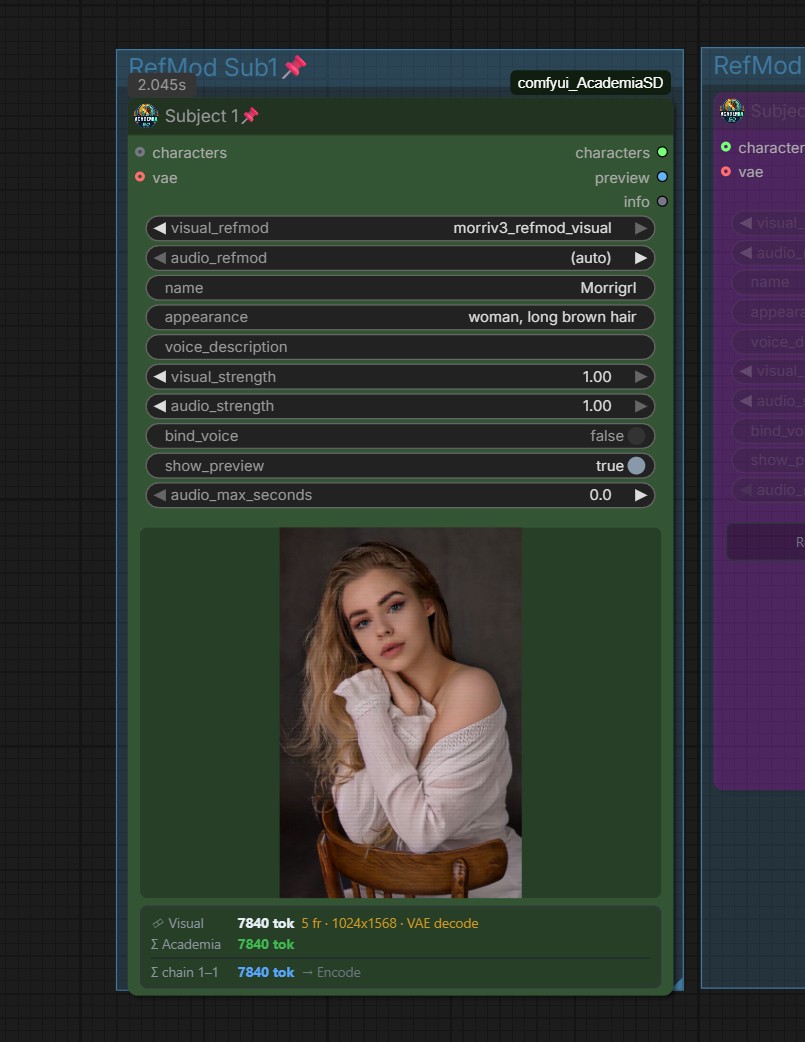
One node per character; chain them through the characters input.
-
🧮 Token panel (under the picture): after each run the node shows what this character adds to the DiT sequence — visual tokens (frames · canvas · stored pictures or VAE decode), audio tokens (seconds, after
audio_max_seconds), the character's total, and the chain total up to this node (the last node of the chain shows exactly what reaches the Encode). A strength of 0 shows asoffand does not count. Reference tokens are paid on every sampling step, so this is the number to watch when a render gets slow. -
visual_refmod— any RefMod: LoRAlab, ComfyUI-MiniMaxH3Mod, bundles, old or new. -
audio_refmod—(auto)takes the bundle's audio or the siblingname_audiofile that LoRAlab writes. -
name/appearance/voice_description— write inappearancewhat sets this character apart from the others ("oval face" vs "square jaw"). No negatives: H3 is distilled and ignores them. -
bind_voice(experimental) — puts the voice and the face in one nativevideo_audioblock (shared temporal origin), the way H3 saw faces and voices together in training. Off by default and unvalidated: that block claims picture n goes with audio instant n, and a RefMod is scattered stills. Compare the same seed with and without it. -
audio_max_seconds— trims the voice to its first N seconds (0 = all). Give every character a voice of the same length: the longer one tends to win and leak into the others. -
show_preview— shows the first encoded picture of the subject. New RefMods carry it inside the file; older ones need the H3 videovaeconnected.
2. AcademiaSD H3 RefMod Encode
Drop-in replacement for MiniMax H3 Reference to Video: it has the same native inputs (ref_image_0…8, ref_video_0…2 + ref_video_audio_0…2, ref_audio_0…2, audio_vae, ref_image_size) plus characters. With no characters it produces exactly the same conditioning as the official node (verified tensor by tensor). Order: native images and videos first — so existing prompts citing <Picture 1> by hand keep working — then the characters, then native standalone audios (last, so they never sit right before a character's face). It also replaces MiniMax H3 Image to Video (FL2VA): its first_frame / last_frame inputs do exactly what the official node does — <Picture 1> / <Picture 2> for the text encoder plus keyframes at the first and last frame (verified tensor by tensor) — and they combine with RefMods. A workflow can therefore keep one Encode in the Ref2VA branch and another in the FL2VA branch, both fed by the same characters.
Replaces MiniMax H3 Reference to Video. It already carries the references: connect positive and latent straight to the sampler, with no RefMod Apply.
- Presents each RefMod to Qwen with its native label (
<Video n>,<Picture n>,<Audio n>) in the same order as the DiT blocks. stack_pictures— how many pictures of each RefMod Qwen sees.up_to_n(default,stack_pictures_n= 8) andallgive each picture its own block;every_4th_pairsis the lightest. More pictures = less bleed, slower encode.auto_subject_block— writessubject_definitionsandretention_analysiswith the right numbering if the prompt does not have them.- Aliases — never hand-write
<Audio 1>,<Video 1>or(S1). Those numbers follow the order of the characters, so reordering them makes the prompt itself ask the model to swap the voices. Write@Name(→<Subject n> Name),@Name.voice(→ their<Audio n>),@Name.video(→ their<Video n>) and@Name.S(→Sn).reference_mapflags any hand-written label that contradicts the mapping. vae— only needed for RefMods without stored pictures (older ones): their frames are decoded for Qwen. They work, but Qwen sees a worse image than with a new RefMod.h3_mods— optionally takes themodsoutput of ComfyUI-MiniMaxH3Mod's loader.final_promptandreference_mapshow exactly what was sent and which label belongs to whom.
⚠️ Experimental — two voices in the same shot are not reliable yet. In our tests with two characters and two audio RefMods, the voices came out swapped in most configurations (consistently per configuration, not per seed). Use these nodes for several faces; for dialogue, one speaker per shot is the safe option for now.
RefMods created with LoRAlab Trainer Studio from this version on store the source pictures (JPEG) next to the latents, so Qwen sees the real photos with no VAE decode. The files stay compatible with every other RefMod loader.
🎞️ Moviola Nodes
A chained-generation system for MiniMax-H3: each take starts where the last one ended, every take gets its own prompt, and the finished takes cut together into one film. Five nodes that only make sense together.
| node | role | |---|---| | Project Paths 📁 | one project name, and the output paths that derive from it | | Multi-Prompt 📝 | one prompt per pass, plus a header they all share | | Moviola In | serves the previous take's last frame and the pass number | | Moviola Guide | anchors that frame at frame 0 of the new clip | | Moviola Out | saves the new take's last frame and its latent | | Moviola 🎞️ | joins the takes, or deletes the last one |
Project Paths ──project_name──► Multi-Prompt ──prompt──► Reference/Image to Video
              ├──path──────────► Moviola In ──next_index──► Multi-Prompt
              │                             └──image──────► first_frame  (never a reference slot)
              ├──vid_path──────► video saver
              └──vid_int_loop──► video saver (interpolated)

Moviola Guide ──positive──► sampler ──► Moviola Out ──latent_frames──► Moviola 🎞️
frames_back, and why the last frame is the wrong one
Moviola Out saves a frame for the next pass to start from, and the obvious choice — the last one — is wrong. The next clip does not begin where this one ended; it begins earlier and arrives there. Measured across five seams of three series, frame 4 of the new clip is the one reproducing the previous last frame, so its frame 0 corresponds to four frames before the end.
Feeding first_frame the last frame therefore says frame 0 is something the
keyframe places at frame 4 — two orders pulling against each other. The offset
makes them agree.
-1, the default, derives it from latent_frames: the keyframe takes the first
lf tokens of the new clip, where token 0 decodes one frame and the rest four, so
the answer is frames_back = _fotogramas_de(lf) - 1 — 0, 4, 8 for one, two and
three. Verified at two of those points against where the dip actually landed. A
number forces it, 0 included, which keeps the last frame.
Moviola In's image output is a first frame, never a reference
It carries the frame the pass starts from, and it exists for one input in
particular: first_frame on MiniMaxH3ImageToVideo. There the image is frame 0
and nothing more, so chaining through it is exactly right -- and it is the only
route that works for a first/last-frame workflow, where there is no reference
list at all.
Do not wire it into a ref_images slot. A reference carries no temporal
position: it is attended across the whole clip and pulls the ending back to
that composition, so the take moves and finishes where it began. Measured across
a chained pair -- the second take moved more than the first (8.86 against 6.00
mean frame delta) and still ended 2.78/255 away from where it started. It also
occupies a slot and shifts the <Picture N> numbering, because a null slot
leaves no gap: the node skips nulls and the rest move up.
Down the reference route nothing needs this wire. Guide already provides the continuity, building the keyframe from the latent on disk without a PNG in between, so the reference slots stay free for what they are for -- the subjects.
check_resolution, when the graph upscales between passes
A common workflow generates at low resolution, upscales the latent, and saves the upscaled take. From the next pass on, the anchor Guide receives no longer matches the geometry the sampler is about to work at, and the pass fails.
The switch on Guide decides what happens then, and it is off by default:
| position | behaviour |
|---|---|
| fit (default) | the anchor is interpolated to the target geometry and the pass continues |
| check | a mismatch raises, naming both geometries |
fit is the default because the alternative ends up worse. Anchoring the
pre-upscale latent removes the error too, but the montage joins the upscaled
clips, so the anchor no longer matches what came before and the seam jumps.
Re-rendering a long video at the low resolution just to anchor it costs more
than the interpolation does. Turn check on when a geometry mismatch means
something is wired wrong and you want to hear about it rather than have it
quietly smoothed over.
Emptying the Multi-Prompt
Delete All Prompts sits next to Delete Selected Prompt, deliberately the same size and shape: the pair is one decision, and hiding the destructive half behind a smaller control does not make it safer, only harder to find. It clears the global prompt as well -- a new series rarely wants the previous series' header -- and touches nothing on disk. Deleting takes is Moviola's job and lives on the other node.
Why the loop needs this many nodes
The shape of the graph forces it. ComfyUI's graph is acyclic, and this pipeline keeps running into that wall — every split below exists because something would otherwise have to depend on what it helps produce.
In and Out cannot be one node. The reference is needed before generating and the last frame only exists after.
Guide is separate from In. In feeds Multi-Prompt and the references, so it sits upstream of the conditioning; consuming the conditioning too would close the loop.
The paths are not on Multi-Prompt. Moviola In computes next_index from disk
and that index feeds Multi-Prompt, so nothing Multi-Prompt produces can go back to
Moviola In. Project Paths has no inputs at all, which is the point: what
depends on nothing can feed everything.
Why a keyframe, and why the latent
Only minimax_keyframes carries resolved_frame_index. A reference —
ref_images, a RefMod — tells the model what the subject looks like and is
attended across the whole sequence with no temporal position. With references the
identity holds but the takes do not join.
And the anchor is the latent, not an image. H3's video VAE compresses time as
FRAME_PER_TOKEN = (1, 4, 4, 4, 4): every latent frame but the first encodes
four real frames, so the last one is not a still — it carries the direction
and the speed of the motion. An encoded PNG does not, and the difference is
visible: a plane receding at the end of one take comes back in reverse at the
start of the next. latent_frames extends this; at 2 the model gets about eight
real frames of trajectory.
The native Add Guide builds keyframes too, but takes IMAGE and calls
vae.encode() internally, forcing a trip through an 8-bit PNG every pass. Moviola
Guide passes the saved latent straight through and the VAE round trip leaves the
loop.
References and keyframes work together
MiniMaxH3ReferenceToVideo was ruled out early because the joins would not hold,
but the node was never the problem: back then the anchor depended on the
references. It works, and it is designed to — ReferenceToVideo writes only
minimax_refs, Moviola Guide writes only minimax_keyframes, and in
PackedLayout the keyframe lands at cursor + FRAME_RESCALE * resolved_frame_index where cursor already includes the references' spans —
the same cursor the target video and audio start from. The anchor does not drift
however many references are attached.
So a chained project can use reference images, videos, audio and RefMods, and
gets the audio_vae input that MiniMaxH3ImageToVideo does not have.
When you name a reference in the prompt, use the labels the tokenizer actually emits —
<Picture 1>,<Video 1>,<Audio 1>, 1-based per type. The connector names (ref_video_0) are ComfyUI's and never reach the model.
Project Paths 📁
Type the project name once. Everything else derives from it:
| output | value |
|---|---|
| project_name | sanitized name, for Multi-Prompt |
| path | project/loop — latents and frames |
| vid_path | project/vid_loop — the video saver |
| vid_int_loop | project/vid_int_loop — the interpolated saver |
The name is filtered through an allow-list (letters, digits, space, dash,
underscore) because it lands in a disk path: ../../etc/passwd becomes
etcpasswd. Everything resolves under output/, and a path that escapes it is
refused.
Multi-Prompt 📝
One prompt per pass, indexed by Moviola In's next_index. Past the last one it
holds on the last prompt rather than going blank.
A filmstrip on top and one wide editor below, rather than a stack of boxes
that grows without end. Each card carries the frame its take starts from — the
previous take's last — so the anchor sits next to the prompt written for it.
Click to switch, + to add, and the wheel scrolls the strip sideways.
The strip is where the state of a project lives, instead of the console:
- The border says where the series is. Green once that take exists on disk, yellow while it is being generated, red when it is not there yet. Selection moved to a ring, since the border now carries the state and only one of the two messages fitted there.
- Two numberings, on purpose. A card SHOWS the frame it starts from,
loop_{N-1}, while its state and its clip are its own result,N. That is what makes deleting a take read correctly: the following card loses its picture and the one before it turns red, which is exactly what happened on disk. Deleting or joining in the Moviola node tells the strip to re-read the folder, so the cards never stay green over files that are gone. - Card 1 shows its own first frame. It has no previous take to borrow a start from, so it used to fall back to the base image -- which is what the model departs from, not what is on screen when the series begins -- or to a black gap in a series that started from the prompt alone. A route decodes frame 0 of that take's clip and returns it in the response, writing nothing: the project folder belongs to the user and should not fill with thumbnails nobody asked for. It sends a 512-wide thumbnail, since full size was most of the clip's own weight to draw a tenth of it.
- Resting the pointer on a card plays that take, muted and looping, in place of the still. It waits 250 ms first, so sweeping the strip does not fire one download per card.
- Each card says how long its clip runs, read from the container header
rather than by decoding. Nothing forces every take to last the same —
lengthcan change between them — and a series of uneven takes should be readable without opening the folder. - The card takes the clip's shape, reported with the rest. Landscape project, landscape cards; vertical project, vertical cards. The alternative was choosing between cropping, which makes a vertical take useless in a strip, and shrinking to fit, which wastes half the card.
The split is deliberate. A row of side-by-side cards looks tidy until a 1,500-character prompt goes in one: navigating and editing want opposite shapes, so each gets its own. The node's height no longer depends on how many loops there are.
- Global Prompt — written once, placed in front of every pass. It is the header a series shares: who the subject is, the look. Holding ten copies of it means holding it wrong the moment one gets edited.
- Save / Load Project — stores the prompts and the global header as JSON in
prompt_projects/, next to the node rather than underoutput/: it is the series' recipe, not generated material, and emptyingoutput/should not take it. Written atomically. Saving over an existing name asks first. - Loading a project writes the name upstream, into Project Paths, so the output folders follow. Switching project switches everything or nothing.
- The Project header names the project the buttons act on, with a
⇠when that name is coming from Project Paths upstream rather than from the node's own field. Not decoration: one of the buttons deletes. - 🗑 Delete Project — removes the project the node is pointing at: its
prompts file and its whole
output/<project>/folder, takes, latents, videos, interpolated clips and the finished cut included. A project lives in two places and removing one half orphans the other — prompts pointing at nothing, or a folder of takes that can no longer be selected from the node. It asks first, and the warning names both halves with what they weigh — the prompts file (6 loops) and the output folder "BAG_V2" — 47 files, 1.8 GB — because a button that deletes without saying how much is a formality, not a warning. Nothing goes to a recycle bin. It refuses while a run is in progress, and if a file is held open by another process it removes what it can, keeps the prompts file so the project stays in the list and can be retried, and says which file stopped it. Afterwards the node moves to the next project in the list, or to the previous one when the deleted project was the last; with none left the name becomesMoviola_test, since an empty name makes Project Paths return the bare suffixes and the next take would land straight inoutput/. The server receives a name, never a path, and rebuilds both locations with the same rule that wrote them.
Moviola 🎞️ — the editor
Takes path and latent_frames (link it from Moviola Out so it cannot fall out
of step) and does two jobs on demand. It does not montage on execution:
joining ten clips is minutes of ffmpeg, and firing it every pass would rebuild the
whole cut nine times to throw eight away.
- 🎬 Auto Film Edit — joins
vid_loop_*intoproject_final.mp4and, if they exist,vid_int_loop_*intoproject_final_int.mp4. With one clip or none it says so. - 🗑 Delete Last Loop — removes the highest take: its latent, its videos and every file numbered with it. Press again to walk further back.
- 🗑 Delete All Loops — walks every take back, and takes the saved
loop_00000_base image with it, leaving the folder empty. Otherwise that one file survives a full wipe and the Multi-Prompt strip keeps showing it as the first frame of a series that no longer exists. Delete Last Loop never touches it. - 📂 Open Folder — opens the project folder and lists what is in it,
each file tagged with what it is to Moviola:
take,video,interp,cut, orotherwhen nothing claims it. That last tag is the clue when a video saver is wired under a different name and nothing appears to turn up. Opening is Windows only and happens on the machine running ComfyUI, not the one holding the browser — which is why the listing prints either way, and why the absolute path is the first line. It resolves the same path the delete buttons act on, so it doubles as a check before pressing one. - 🔄 Refresh — re-reads the whole project from disk.
Four settings sit above them:
deflicker—per clipcorrects each seam with one gain for the whole clip.smoothinstead corrects every frame, aiming it at a ten-second moving average of the montage's own brightness, which removes the sawtooth and each clip's own drift together; seam continuity then comes for free, since both sides are corrected toward the same curve. The gain is taken from luminance and applied to all three channels, so the correction can move brightness and never hue: aiming each channel at its own curve turned a brightness stabiliser into a colour one, shifting the hue by up to 8 % where the scene genuinely changed colour. It is not free of side effects — a moving average cannot tell a sawtooth from a real change of light, so a fade the footage actually makes gets flattened. Worth it when the sawtooth is large, not when it is small. Off by default, and the console says which case you are in.auto_trim—automeasures every seam.fixedhands the two numbers below through, ignoring them inautorather than clearing them, so values under test survive a round trip.trim/trim_int— a forced trim per track,-1to measure. Two of them because one number cannot serve both: interpolation inserts frames rather than duplicating them, so a 124-frame clip comes out at 247 and a trim of n here is 2n−1 there — 5 pairs with 9, not with 10.
A player appears once a cut exists, with tabs for the plain and the interpolated file when both are there. Finishing the process by sending people to hunt for the file in a folder is a silly barrier at the very last step.
Both delete buttons name the project in the confirmation, and the console reports what actually remains after the fact, read back from disk.
The path is re-resolved before every action and never remembered. It would be convenient to cache it, but it stops being true the moment the project changes — and what reads it is a button that deletes.
How the cut is measured
The new clip does not start where the old one ended: it starts earlier. The model receives the trajectory and redraws it before carrying on, so the overlap is a rewind, not a repeated frame — which is why looking only at frame 0 cannot see it.
- Trim. Compare the last frame of A against the first twenty of B. The
profile comes out as a V whose bottom is the frame that repeats, and the cut
goes after it. Not one frame after, though: the cut is searched for, taking
whichever of the next few frames moves about as much as an ordinary frame of
that stretch. Where the V is sharp that is the frame right after the bottom,
the long-standing rule; where the bottom is a plateau, one frame on is still
sitting on the repeat and the join falls short.
A seam too still to show a V copies the median of the others, since the rewind
lasts the same across the series. With no V anywhere,
latent_framesis the fallback — that is all it is used for. - Blend, where no cut exists. Some seams have no frame that joins. The first one systematically: the first clip is the only one generated without a keyframe, so the second reproduces its ending imprecisely and the profile has a plateau rather than a V. Every cut point was tried on one series — 4 through 13 — and the best still moved 2.41× a normal frame against 1.02 and 1.34 at the other seams. Choosing better was not on offer; the frame does not exist. A seam that jumps more than 1.6× therefore blends across four frames instead of cutting. The blend costs nothing: the frames it crosses with are the rewind, discarded anyway, so the join lasts exactly as long as before. And it does not cross two moments of the action — it crosses two renderings of the same moment, which is why four frames suffice and it does not read as a transition. Never longer than that seam's trim, since those are the frames feeding it.
- Exposure. Every take is generated separately and the level drifts: the
same +2.5 % per seam whether the scene sits at 22 or at 143 of brightness.
That is gain, not content, so it is corrected with a per-channel gain — not an
offset, which would lift the blacks — measured against the frame that
survives the trim, and accumulated down the series.
That matches each seam exactly and does nothing about the drift inside a
clip, so the brightness sawtooths: it falls through a clip and climbs again
just past the join. The value is continuous there, the slope is not, and that
reads as a pulse rather than a step.
deflickerdecides what to do about it, and the console measures the jump so the choice is not guesswork. - Audio. The discarded frames are a rewind, so their sound covers the same
instant as the previous clip's tail. Crossfading them shifts nothing, because
the overlap was already there. Clips arrive ~26 ms shorter in audio than in
picture and that is absorbed with
atempo, never by padding with silence. Projects saved without sound join fine: the audio track is asked for, not inferred from the filename.
tools/DATOS_MONTAJE.md records every measurement behind all of this —
including the approaches that did not work and why, which is the part usually
lost.
File layout
output/<project>/
    loop_00000_.png             the base image         (Moviola In)
    loop_00001_.safetensors     latent anchor          (Moviola Out)
    loop_00001_.png             last frame             (Moviola Out)
    vid_loop_00001.mp4          the take               (video saver)
    vid_int_loop_00001.mp4      interpolated take      (video saver)
    <project>_final.mp4         the joined film        (Moviola 🎞️)
Numbering is read as an integer, not alphabetically — _00010_ would sort
before _00009_ as soon as the loop passed nine.
Zero is the base image, written the first time Moviola In serves it. It
completes the strip — take 1 starts from something too — and records which
image the series was made from, which nothing did before. It is inert: _ultimo
starts at 0 and demands a higher number, so it is never served as an anchor, and
deleting takes walks while n > 0 and never touches it.
A series can also start with no image at all: Moviola In then serves nothing
and the first take is plain text-to-video. None is valid downstream —
ReferenceToVideo skips null references and ImageToVideo's first_frame is
optional — so only the first card of the strip stays empty.
New in 2.4.5. Measured and working end to end, but young: the numbers above come from around fifteen series of clips, not from one lucky run. Updating from an earlier version needs a ComfyUI restart and Fix node (recreate) on Multi-Prompt, Moviola Out and the CLIP Text Encode nodes — all three changed their inputs or outputs, and nodes already saved in a workflow do not know it.