
Comfyui_PDuse
A comprehensive collection of custom nodes for ComfyUI, focusing on image processing, text handling, and workflow optimization. Includes nodes for image blending, text overlay, batch processing, image resizing, and advanced save operations.
Nodes (99)
A caption bar that never touches a single pixel of your image
Del_EmptyLine: nukes the blank lines at the top of your text
Add Background — the 'give my transparent PNG a solid backdrop' node
Image_and_Text: build the before/after comparison sheet in one node
Image Blend V1: a real layer-blend node hiding in a utility pack
Image Grid: cut a 3x3 emoji sheet into individual images
The two-second left/right splitter you'll stop thinking about
The folder loader that tells you everything about each file
A folder loader that hands you filenames too
Select_Mask: keep only the biggest (or smallest) blob in your mask
Separate your labeled and unlabeled training images
Banana imagesize by ratio: shove any image into an SDXL-era size bucket
Strip black borders off a whole folder of images
Put a photo inside a fridge-magnet frame
Batch-edit captions stored as JSON
Pull the caption out of a JSON blob
Auto-crop the black border off a single image
Tight-crop to a mask's bounding box
Delete a keyword from your prompt text
Collapse a text dump into clean one-line-per-item blocks
Pull one frame out of a batch
GetImageRatio: tell me the aspect ratio as a string, not a math problem
GetImageSize — the node that finally tells you what size that image actually is
If — a real boolean AND gate for workflows that need a brain
Image centerCrop — the crop where W and H mean 'how much to shave', not target size
Image Compress — get a PNG under X KB without losing transparency
Imageconcante_V1 — stitch two images side by side without a Photoshop tab
Image Crop_ratio — crop a fixed fraction of the frame, and take the mask with you
Image Crop_custom — pixel-exact edge crops that carry the mask along
COVER_SAVER — the saver that overwrites instead of numbering up forever
Image Crop Location — pixel-exact crops with a hidden 8-pixel favor
PD Image Crop Location_V2 — trim one edge by N pixels and get a matching mask for free
PD双图批处理(列表输入) — pair up your _R and _T image sets without eyeballing filenames
PDimage_dual_batch_v1 — load two folders and get aligned _R/_T pairs out the other side
PD:aitookitTraining v1 — sort your training folder into R/T buckets by filename keyword
ImageCombine — the batch-friendly two-image stitcher
PD Image List Sort — be honest with yourself about what this one can actually sort
PD Image List Sort (With Metadata) — the sorter that actually uses your filenames
LongerSize — scale the long edge to a target, keep the ratio, done
PDImageResize — the Swiss-army resize with stretch, pad, crop, and a 8x safety
PD_image resize by ratio — center-crop to an aspect ratio, then fit the long edge
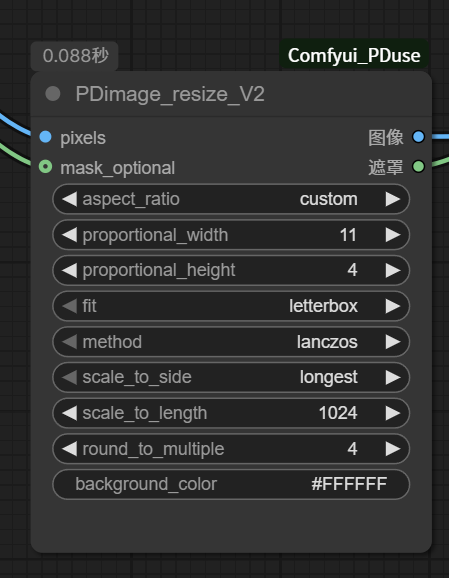
PDimage_resize_V2 — aspect-ratio resizing with letterbox, crop, and a transparency safety
Exact-pixel resize that keeps your mask in lockstep
Rotate an image any angle you like — without losing the corners
Save images anywhere, with the filename format you actually want
Search a folder by filename and pull the matches — text files included
It does NOT caption your image
Glue two text boxes together with a newline — the plumbing you'll actually use
Rearrange every node in a workflow JSON into a tidy diagonal stack
Batch-edit the group colors and titles across a folder of workflows
Load an image and get the prompt, model, and LoRAs that made it
Load every image in a folder as a list — masks included
Load Image, but it also tells you the filename and format
Load an image and dump its entire workflow as readable text
Dump a folder of captions into a list — sorted, capped, paired with names
Unzip a caption pack in the browser and read every text file
A LoRA loader that hands you back the name and strength as text
Split a sticker sheet or meme grid into individual images
Fill the holes in a mask so inpaint regions stay solid
Sweep the specks and dust out of a mask
Two masks in, the smaller one wins — an A/B picker for regions
Pick the Nth object out of a mask — the third sticker in the sheet
Picking one object out of a sticker sheet without touching a brush
A LoRA loader that also tells you what it loaded
Moving a keyword to the front (or back) of your filenames, in bulk
The kitchen-sink batch renamer that also resizes and converts your images
Fixing 'T_1, T_2, T_10' filename sorting in one click
Spinning up prompt variations without a second thought
One node that hands your workflow the right image for the current aspect ratio
The ratio-to-pixels calculator every multi-ratio workflow needs
Scrubbing unwanted words out of every caption file in a folder
The no-model magic wand
Getting a usable mask out of a white-background image, no model needed
Rename, resize, and convert a folder of images in one pass
Stripping a keyword out of every image filename — in place or into a new folder
Fitting any image into a fixed canvas with padding, not cropping
A save node that writes where you want, with the workflow embedded
Writing a list of captions out to individually named text files
Swapping a whole asset group when the aspect ratio changes
The debugging node that puts text back on the canvas
The two-string joiner with a delimiter you control
A plain text source node with a socket on the output
How many items are on this wire? It tells you.
PDselector-string makes canvas math boring
Turn caption text into caption+lang JSON, with the language sniffed for you
A ratio string adapter that quietly saves you from combo dropdowns
Dataset prep that copies, renames and filters your training folder — despite the scary name
PD文本列表打包 is your batch feed
PD文本列表排序 fixes file_10-before-file_2, the one sort people actually need
A batch search-and-replace for your captions, prefixes, suffixes and all
PD文本列表解包 pulls one caption out of a batch by index — the loop's best friend
Burn text onto an image at a pixel-exact spot — the annotation node ComfyUI forgot
Save text to numbered files without fighting ComfyUI's cache
Keying gold text and red seals off a checkerboard — a color-key knife, not a magic AI
Photoshop-threshold for black-background white logos — PDtools_Filter_WPNG_v1
Soft alpha plus unpremultiply, no more halo fringes
Find a word in filenames, swap it out — PD_ReplaceWord is your rename bat
The compositing fix for flames and glows saved on black
Dump images, text and audio into a zip without leaving the graph
🚀 特色和节点介绍:
- Comfyui PDuse 制作是方便处理一些 常用的图像 json 和txt 各种繁琐python操作集成到comfyui节点里面,后续有空会持续维护。
⚡ 安装方法
方法一:Git克隆
cd ComfyUI/custom_nodes
git clone https://github.com/your-username/Comfyui_PDuse.git
cd Comfyui_PDuse
pip install -r requirements.txt
方法二:手动下载
- 从releases下载ZIP文件 or 网盘 PD源代码备份:https://pan.quark.cn/s/ac4cf8544857#/list/share
- 解压到
ComfyUI/custom_nodes/ - 安装依赖:
pip install -r requirements.txt
📖 节点说明
Logic/条件判断
PD:if
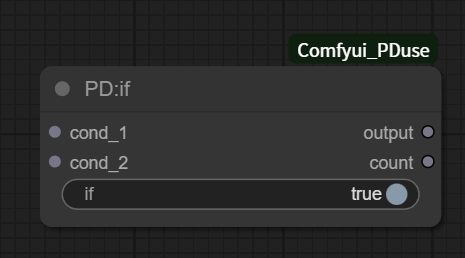
条件判断节点,将输入的
if、cond_1、cond_2做逻辑判断,输出布尔结果,同时输出执行计数。
输入:
- if(BOOLEAN):条件开关
- cond_1(any):任意类型输入(会进行
bool(cond_1)判断) - cond_2(any):任意类型输入(会进行
bool(cond_2)判断)
输出:
- output(BOOLEAN):
bool(if) and bool(cond_1) and bool(cond_2) - count(INT):执行成功输出
1,异常输出0
说明:
- ✅ 输入端口顺序:if → cond_1 → cond_2
- ✅ 输出端口顺序:output → count
文本处理
PD Show Text
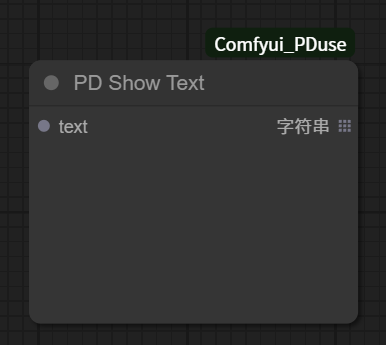
文本显示节点,用于在ComfyUI界面中显示文本信息,通常用于显示处理结果、状态报告或调试信息。
- text:要显示的文本内容(支持来自其他节点的文本输出)
PD:Image_and_Text
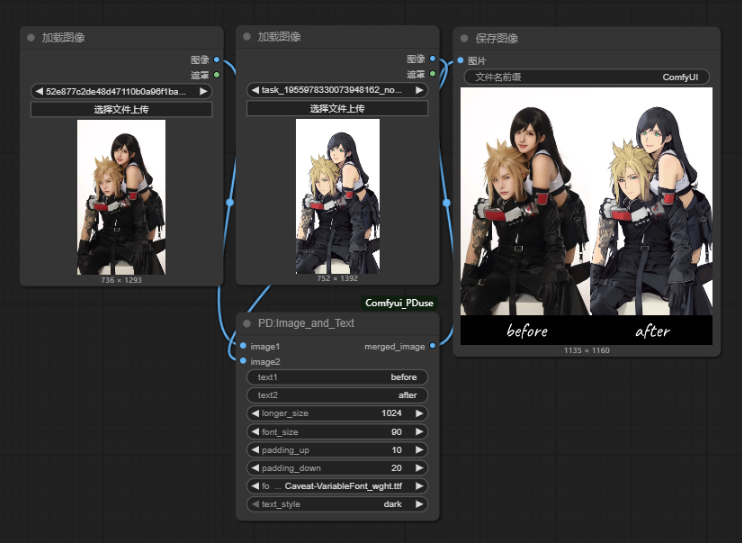
字体文件可以放入文件夹fonts 。 将两张图片左右合并,并在底部添加文字标注的ComfyUI节点。
- image1+ image2 :尽量要求同样尺寸,如果不同,会自动等比例缩放对齐
- text1 + text2 :支持中文,需字体文件包含中文编码,可输入如"效果图":"原图"之类
- font_size:小于20可能看不清,大于90可能超出画布
- padding_up:文字上方的留白高度,10-30
- padding_down:文字下方的留白高度 10- 1000 ,可以往下扩多一些方便排版
- font_file 选择字体样式, 需将.ttf/.otf文件放入插件目录的fonts文件夹
- longer_size : 单张图的最长边尺寸限制
PD_Text Overlay Node

给图片添加文字,并且指定位置贴上去。
- image:要处理的输入图片
- text:需要叠加的文字内容
- font_size:字体大小
- font_color:文字颜色,使用HEX格式,如#000000
- position_x:文字水平位置(0到1,0是左,1是右)
- position_y:文字垂直位置(0到1,0是上,1是下)
- letter_gap:字符间距(可为负数,负数使字母靠近)
- font_name:使用的字体文件名(从fonts目录中选择)
PD_Add Label
在图像四边添加标签文字,支持百分比定位和多方向添加。
- 位置控制: text_x(1-100) 和 text_y(1-100) 百分比定位
- 标签尺寸: height(1-1000) 控制标签区域大小
- 文字样式: font_size(8-200) 和 font 选择
- 颜色模式:
- light = 白底黑字
- dark = 黑底白字
- 添加方向: up/down/left/right 四个方向
PD加载文本文件夹(输出列表)

批量读取文件夹内的文本文件(.txt, .json等),输出内容列表。
- directory_path:文件夹路径
- limit_count:读取数量限制
PD加载文本ZIP(输出列表)
.png)
上传ZIP压缩包,自动解压并批量读取其中的文本文件。
- zip_file_upload:ZIP文件上传
- 输出:文本内容列表、拼接文本
PD保存文本(路径+文件名)
批量保存文本文件节点,接收文本内容列表和文件名列表,按对应关系将文本保存到指定目录。与 PD加载文本文件夹 节点配套使用。
- output_directory:输出文件夹路径(必填)
- text_list:文本内容列表(列表输入)
- filename_text:文件名列表(多行文本,每行一个文件名)
功能特点:
- ✅ 支持批量文本文件保存
- ✅ 自动创建输出目录(如果不存在)
- ✅ 按输入顺序一一对应保存(filename[0] → text_list[0])
- ✅ 自动添加 .txt 扩展名(如果文件名没有扩展名)
- ✅ UTF-8 编码保存,完美支持中文
- ✅ 详细的保存报告和错误处理
- ✅ 数量不匹配时自动取最小值保存
使用场景:
- 批量保存图像标注文本
- 批量保存提示词文件
- 文本内容的批量导出
- 配合加载文本节点进行文本处理流程
对应关系示例:
text_list = ["内容1", "内容2", "内容3"]
filename_text = "10_R.txt\n11_R.txt\n12_R.txt"

保存结果:
- 10_R.txt → 保存"内容1"
- 11_R.txt → 保存"内容2"
- 12_R.txt → 保存"内容3"
PDTool系列(主要解决的是一些算法上问题,以及功能复刻)
抠图专用:
PDtools Filter 抠图节点
PDtools_Filter_WPNG_v1
用于黑白图、黑底白字、黑白 logo 的阈值二值化处理,思路接近 Photoshop 的“阈值”。
- 输入:
image - 参数:
threshold,范围0.0 - 1.0 - 输出:黑白二值
image和同款mask - 规则:像素亮度
>= threshold变白,进入 mask;像素亮度< threshold变黑,不进入 mask。 - 调低 threshold:保留更多灰色笔触和细节,也可能带入噪点。
- 调高 threshold:结果更干净,只保留更亮的白色区域,但灰色笔触可能丢失。
PDtools_Filter_WPNG_v2
- 用于黑底发光、虚化边缘、带光晕的素材。它按亮度生成软 alpha,并尽量恢复被黑底预乘过的发光颜色。
- black_threshold:黑场过滤阈值。数值越低,保留更多暗部发光;数值越高,黑底去得更狠,但弱光边缘可能丢失。
- 适合白色发光字、彩色发光字、黑底光效素材。
PDtools_Filter_GodenPNG_v1
用于灰底、棋盘格、马赛克底上的金色文字、红色印章类素材。
- 阈值:越大就是可行度高,抠的越多内容。
- remove_white=true:那种灰底马赛克图,会把白色块删干净,内部的白色也会跟着删除。
- remove_white=false:会更保留金色文字里的白色高光,内部白色保留,可能会抠不干净。
PD text_list_string_add word
批量为字符串添加词语,支持前缀、后缀、替换、插入等多种操作,适用于文本批处理。
PD文本列表打包
将多个文本内容和对应的文件名打包成列表格式,可与文本加载、排序等节点配合使用。
- text_1~5:文本内容输入(最多5个,可选)
- filename_1~5:对应的文件名(可选)
- input_text_list:直接输入文本列表(可选)
- input_filename_text:与列表配套的文件名(可选)
输出:
- text_list:文本列表
- filename_text:文件名列表(多行文本)
- count:文本数量
PD文本列表解包
从文本列表中提取单个文本项,与文本列表打包节点配套使用。
PD文本列表排序
对文本列表和对应的文件名进行排序整理。
PD:imageconcante_V1
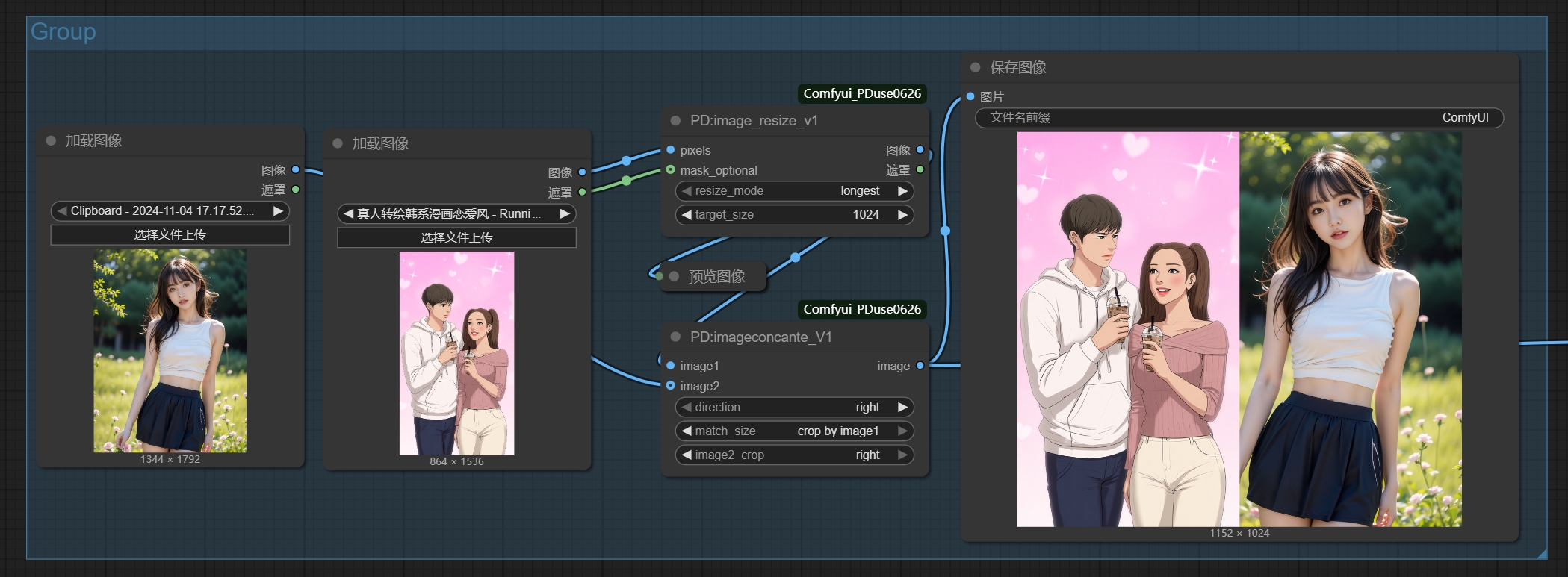
两张图片按指定方向拼接合并。
- image1:输入图片1(必填)
- image2:输入图片2(可选,不填时只输出image1)
- direction:合并方向(right/down/left/up)
- match_size:尺寸对齐方式(longest/crop by image1)
- image2_crop:裁切位置(center/top/bottom/left/right)
image处理
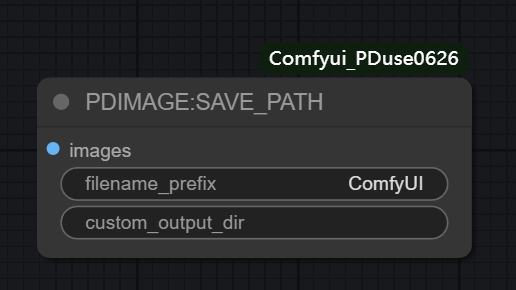
PD_save path
自定义路径保存图片节点。支持自定义输出目录、文件名前缀、文件名数字位置等,并可输出保存结果(成功/数量)。
输入:
- images(IMAGE):待保存图片
- filename_prefix(STRING):文件名前缀
- custom_output_dir(STRING):自定义输出目录(可空)
- format(png/jpg):保存格式
- numberfront(BOOLEAN):数字在前/在后
- separator(STRING):分隔符
- show_preview(BOOLEAN):是否显示保存预览
- refresh_each_run(BOOLEAN):每次运行强制刷新(避免缓存,确保每次都重新保存)
输出:
- success(BOOLEAN):本次保存成功(保存数量 > 0)
- saved_count(INT):本次保存数量
说明:
- ✅ 当
show_preview=True时,节点会返回预览UI,同时仍然输出success/saved_count - ✅ 当
refresh_each_run=True时,会强制节点每次运行都重新执行保存逻辑
PDIMAGE:Load_Images
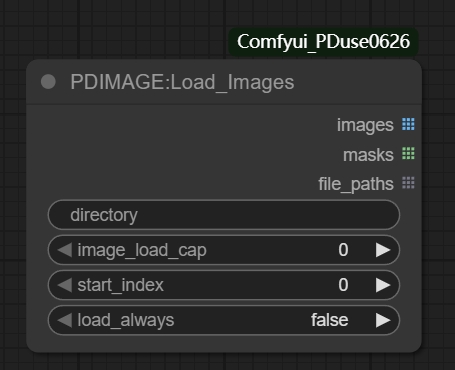
批量图片加载节点,从指定目录中加载多张图片,支持多种加载选项和缓存控制。
- directory:图片文件夹路径(必填)
- image_load_cap:加载数量限制(0为无限制)
- start_index:起始索引(从第几张开始加载)
- load_always:强制重新加载(True时忽略缓存)
PDIMAGE_SAVE_PATH
图片保存路径管理节点,设置和管理图片的保存路径,支持自定义文件名格式。
- save_path:保存路径设置
- filename_format:文件名格式(支持前缀、后缀)
- create_subdirs:是否创建子目录
PDIMAGE_SAVE_PATHV2
增强版图片保存路径管理节点,支持多种图片格式、时间令牌和智能文件命名。
- filename_prefix:文件名前缀(支持时间令牌)
- custom_output_dir:自定义输出目录路径
- filename_delimiter:文件名分隔符
- filename_number_padding:数字填充位数
- extension:文件格式选择
- quality:图像质量控制(1-100)
- embed_metadata:元数据嵌入控制
- overwrite_mode:覆盖模式选择
PD:Image Blend V1

将两张图片进行混合,支持多种混合模式、透明度控制和位置调整。
- background_image:背景图像(必填)
- layer_image:图层图像(必填)
- blend_mode:混合模式(normal/multiply/screen/overlay等)
- opacity:透明度(0-100)
- x_percent/y_percent:位置百分比(50为居中)
- scale:缩放比例(0.01到10)
- align_mode:对齐模式
- layer_mask:可选图层遮罩
- invert_mask:是否反转遮罩
PD:Image Ratio Crop

根据指定比例和最长边长度进行中心裁切,支持自定义比例和输出尺寸。
- image:输入图像张量
- ratio_a:比例A(1-100)
- ratio_b:比例B(1-100)
- max_size:输出图像的最长边长度
PD:longgersize
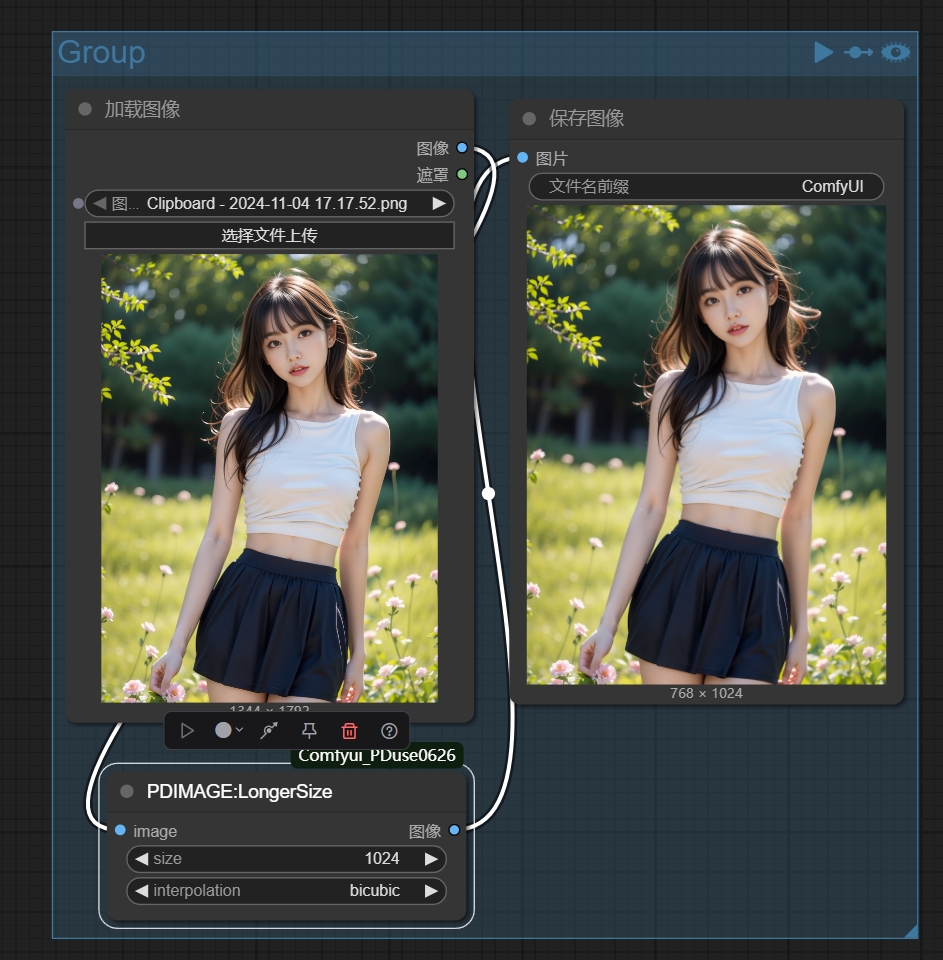
将图像的长边缩放到指定尺寸,同时保持宽高比,短边按比例缩放。
- image:输入图像
- size:目标长边尺寸
- interpolation:插值方式
PD:image_resize_v1
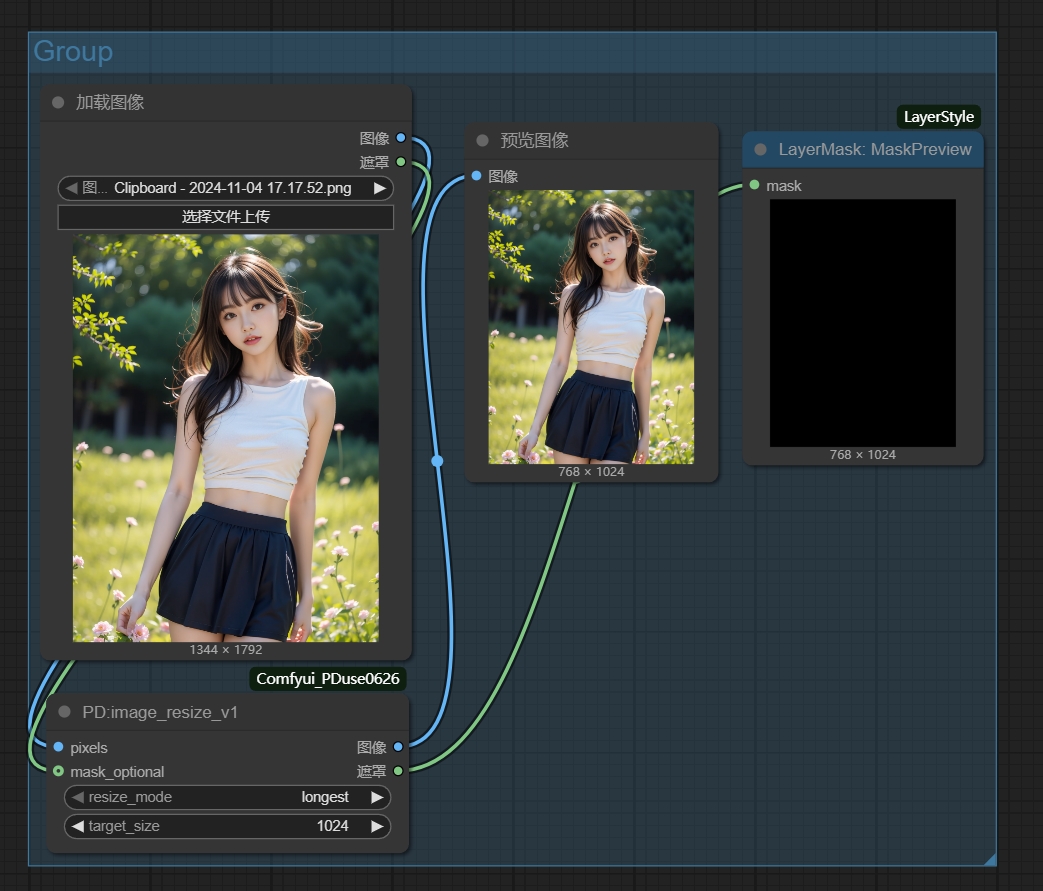
图片缩放节点,支持通过最长边或最短边缩放图片,输出缩放后的图片和mask。
- pixels:输入图片张量
- resize_mode:缩放模式(longest/shortest)
- target_size:目标尺寸(64-8192)
- mask_optional:可选的mask输入
PD:imagesize_v2
图片缩放裁切节点V2,支持三种处理模式:纯缩放、比例裁切、强制拉伸。
- pixels:输入图片张量
- resize_mode:缩放模式(longest/shortest)
- target_size:目标尺寸(64-8192)
- crop_mode:裁切模式(none/crop/stretch)
- ratio_a/ratio_b:目标比例(1-100)
- horizontal_align:水平对齐方式
- vertical_align:垂直对齐方式
- mask_optional:可选的mask输入
PD:ratio selector
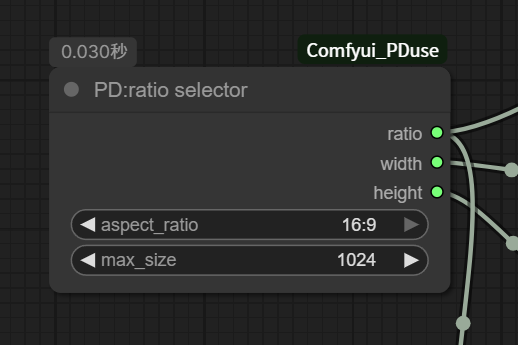
很简单的逻辑,主要是处理输出尺寸,比例 方便后续出图控制比例的流程。 RETURN_TYPES = ("STRING", "INT", "INT") any thing输入 都可以怼进去,适合调整尺寸。
- max_size:最长边尺寸(256-4096,默认1024)
- aspect_ratio:宽高比选择 只输出需要的 ratio (字符串), width (整数), height (整数)
本次新增/调整节点
PD:ratio selector
按比例和 max_size 计算画布尺寸。
- 输入:
aspect_ratio、max_size - 输出:
ratio / width / height / filename_prefix / max_size filename_prefix示例:image=2x3-680x1024- 本次新增:
max_size也作为 string 输出
PDimage_resize_V2
图片按比例缩放、裁切或补边。
scale_to_side只保留:longest / shortest / width / height- 正常有内容的图片和 mask 保持原来的处理逻辑
- 透明 PNG 必须把
Load Image.MASK接到mask_optional - 如果
mask_optional全 1,说明整张图完全透明,节点会直接原样输出,避免后续合成出现白边/黑边
PDselector-string
原节点名:
PD:string-selector
按比例选择字符串/整数值。
- 输入:
aspect_ratio、2:3、1:1、3:2 - 默认值:
2:3=768、1:1=680、3:2=1024 - 输出:
string / int
PDselector-image
原节点名:
PD:ratio-image-selector
按比例选择图片。
- 输入:
2:3必填,1:1 / 3:2可选,aspect_ratio控制选择 - 输出:
image / ratio / width / height - 未接入对应比例图片时,回退输出
2:3
PD-selector-sum-T3
按比例选择一整组素材。
- 映射:
2:3 / 3:4 / 9:16第 1 组,1:1第 2 组,3:2 / 4:3 / 16:9第 3 组 - 第 1 组必填:
front1 / mask1 / back1 - 第 2、3 组可选:
front2 / mask2 / back2、front3 / mask3 / back3 - 参数:
int1 / int2 / int3 / X1 / Y1 / X2 / Y2 / X3 / Y3 - 输出:
front / mask / back / int / ratio / width / height / X / Y - 选中组未接完整时,回退第 1 组
- 参数区顺序:
aspect_ratio -> int1 -> int2 -> int3 -> X1 -> Y1 -> X2 -> Y2 -> X3 -> Y3
PD:string-to-ratio-combo
把普通比例字符串转成 combo 输出。
- 输入:
string / fallback - 输出:
combo - 支持:
1:1 / 3:4 / 4:3 / 2:3 / 3:2 / 9:16 / 16:9
透明图合成提示

透明 PNG 进 PDimage_resize_V2 时,image 和 mask 要一起接:
Load Image.IMAGE -> PDimage_resize_V2.pixels
Load Image.MASK  -> PDimage_resize_V2.mask_optional

PDimage_resize_V2.图像 -> PD:Image Blend V1.layer_image
PDimage_resize_V2.遮罩 -> PD:Image Blend V1.layer_mask
PD_CropBorder
智能图像边框裁切节点,自动检测并移除图片边缘的黑色或白色边框。
-
image:输入图像张量
-
border_color:要移除的边框颜色(black/white)
-
threshold:颜色检测阈值(0-255)
-
padding:裁切后保留的边距像素(0-100)
-
output_path:输出路径(可选,不填则覆盖原图)
PD_BatchCropBlackBorder
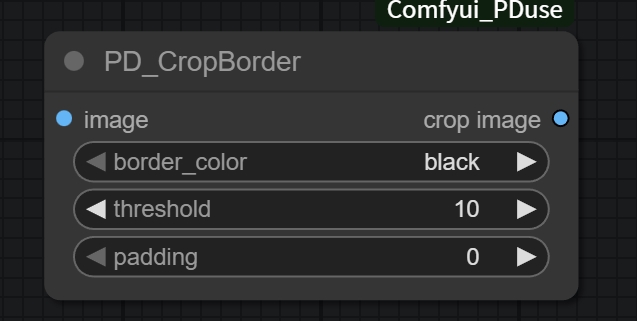
批量图像边框裁切节点,批量处理文件夹中的所有图片,自动检测并移除边框。
- input_path:输入图片文件夹路径(必填)
- border_color:要移除的边框颜色(black/white)
- threshold:颜色检测阈值(0-255)
- padding:裁切后保留的边距像素(0-100)
- output_path:输出路径(可选,不填则覆盖原图)
PDcrop: Image Grid
将图片按行列分割成网格,并输出为图像批量(Batch)。适用于处理表情包或九宫格图片。
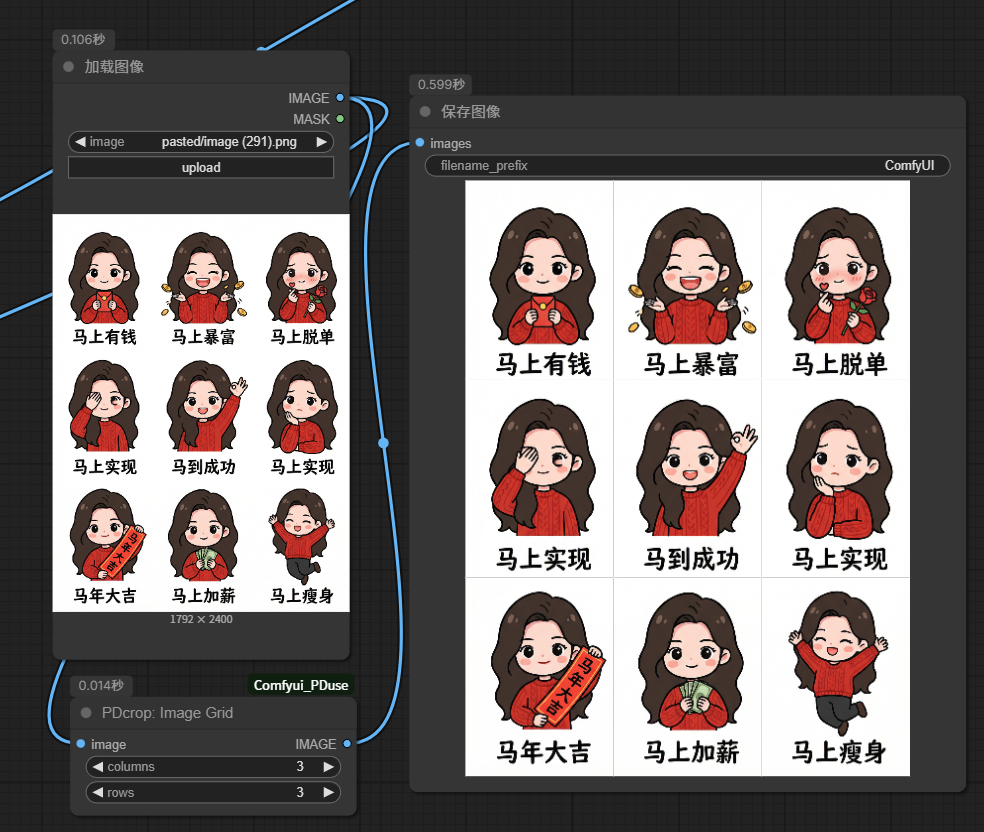
- image:输入待分割图片(IMAGE)
- columns:列数(INT,默认3)
- rows:行数(INT,默认3)
功能特点:
- ✅ 支持自定义行列分割
- ✅ 自动计算切片大小
- ✅ 输出为图像 Batch,可并发执行后续处理
- ✅ 适用于 3x3 表情包、九宫格等场景
PD:Mask Fenkai
按 mask 的黑色前景区域定位物体外接矩形,并将一张图里的多个表情包/物体按顺序拆分成多个
images和masks。适合你这种 2x3 表情包拼图,输出顺序保持“从上到下、从左到右”。![[Pasted image 20260410193322.png]]
输入:
- image:输入图像张量
- mask:输入遮罩张量,当前版本按“黑色 = 前景、白色 = 背景”处理
- min_area:最小连通域面积,小于这个值的区域会被忽略
- row_tolerance:同一行判定阈值,用来把 2x3 这类多行贴图按行分组排序
- split_iterations:分割前的腐蚀次数。0 表示不做预处理;如果贴纸之间有轻微粘连,可以适当调大
- bbox_padding:bbox 外扩像素数。数值越大,裁图留白越多,越不容易切掉头顶、耳朵等边缘
输出:
- images:按顺序输出的多个裁剪图像列表
- masks:与
images一一对应的多个裁剪 mask 列表
使用建议:
- 你的这种表情包 sheet,通常可以先用
split_iterations=0、bbox_padding=8~16、min_area=10 - 如果表情之间有细小连边,再把
split_iterations调到1~3 - 如果一行里被分错组,调
row_tolerance;如果裁图太紧,调大bbox_padding
PD:remove_background
智能背景移除节点,去除图像中的黑色背景,输出原图和透明度掩码,支持阈值调节和边缘平滑。
- image:输入图像张量(必填)
- threshold:黑色检测阈值(0.0-1.0,默认0.9)
- smooth_edges:是否平滑边缘(可选,默认True)
- invert_mask:是否反转掩码(可选,默认True)
输出:
- image:原始图像(保持输入尺寸不变)
- mask:透明度掩码(白色=保留区域,黑色=透明区域)
PDJSON_Group
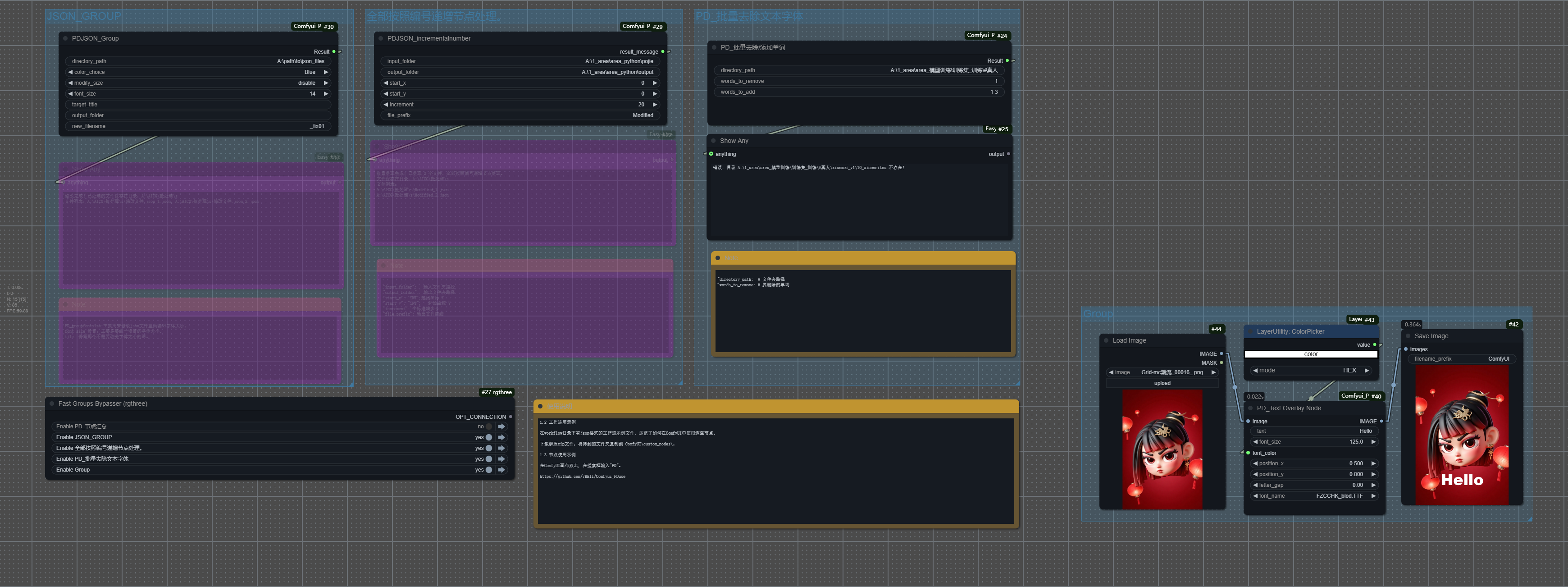
JSON文件输出路径和格式设置节点。
- directory_path:JSON文件输出目录路径
- color_choice:颜色选择
- modify_size:尺寸修改选项
- font_size:字体大小
- target_title:目标标题
- output_folder:输出文件夹
- new_filename:新文件名
PD加载图片ZIP(输出列表)
.png)
上传ZIP压缩包,自动解压并批量读取其中的图片文件。
- zip_file_upload:ZIP文件上传
- 输出:图片列表、文件名列表
PD双图批处理(列表输入)
.png)
基于文件名的图片列表智能匹配节点,支持前后缀匹配。
- image1_list/image2_list:两组输入图片
- name1_list/name2_list:两组对应的文件名
- 匹配模式:支持后缀(_T/_R)或前缀匹配,自动对齐两组图片
文件处理
PD aitookit training redux
AI训练数据分类整理节点,将配对的图片和文本文件与未配对的文件自动分类到不同文件夹,方便整理训练数据集。
- source_folder:源文件夹路径(必需)
- paired_folder_name:配对文件的子文件夹名称(默认"paired_files")
- unpaired_folder_name:未配对文件的子文件夹名称(默认"unpaired_files")
- image_extensions:图片扩展名(默认".png,.jpg,.jpeg,.webp")
- text_extension:文本扩展名(默认".txt")
功能特点:
- ✅ 智能识别图片和文本的配对关系
- ✅ 按文件名自动分类(如1_R.png + 1_R.txt为配对)
- ✅ 源文件保持不动,仅复制到子文件夹
- ✅ 自动创建分类子文件夹
- ✅ 详细的处理报告和统计信息
- ✅ 支持多种图片格式
工作原理:
- 配对文件(有图有文本)→ 复制到
paired_files/ - 未配对文件(只有图或只有文本)→ 复制到
unpaired_files/
使用场景:
- 整理AI训练数据集
- 分离已标注和未标注的数据
- 检查数据集完整性
- 准备训练数据
示例:
源文件夹/
  ├── 1_R.png + 1_R.txt  → paired_files/
  ├── 1_T.png           → unpaired_files/
  └── 2_R.png + 2_R.txt  → paired_files/
PD:number_start
文件排序重命名节点,将"T_1", "T_2", "T_3"格式的文件名重命名为"1_T", "2_T", "3_T",T参数可以自定义为其他单词,直接执行重命名操作。
- folder_path:目标文件夹路径(必填)
- target_prefix:目标前缀词(默认为"T",可自定义为其他单词)
功能特点:
- ✅ 智能识别
前缀_数字格式的文件名 - ✅ 按数字顺序重命名,保持正确排序
- ✅ 支持任意文件扩展名 (.jpg, .png, .txt 等)
- ✅ 详细的操作报告,包含成功/失败/跳过的文件统计
- ✅ 错误处理,避免覆盖已存在的文件
使用示例:
- 输入文件:
T_1.jpg,T_2.png,T_10.txt - 输出文件:
1_T.jpg,2_T.png,10_T.txt
PD:replace_word
文件名关键词替换/删除节点,在文件夹中查找包含指定关键词的文件,将关键词替换为新的关键词或删除关键词。支持格式筛选,严格匹配(区分大小写)。
- folder_path:目标文件夹路径(必填)
- old_keyword:要替换/删除的关键词(默认为"R")
- new_keyword:新的关键词(默认为"start",留空则删除关键词)
- file_format:文件格式筛选(默认为"full"不限制,可选:jpg/png/txt/jpeg/bmp/gif/webp)
功能特点:
- ✅ 智能检索包含指定关键词的文件
- ✅ 严格匹配模式,只替换完全一致的关键词(区分大小写)
- ✅ 支持关键词替换和删除两种操作模式
- ✅ 支持格式筛选,可指定只处理特定格式的文件
- ✅ 详细的操作报告,包含成功/失败/跳过的文件统计
- ✅ 错误处理,避免覆盖已存在的文件
- ✅ 自动跳过无需更改的文件
使用示例:
- 原文件:
1_R.jpg,2_R.png,test_R.txt - 设置:old_keyword="R", new_keyword="start", file_format="full"
- 结果文件:
1_start.jpg,2_start.png,test_start.txt
格式筛选示例:
- 原文件:
1_R.jpg,2_R.png,test_R.txt - 设置:old_keyword="R", new_keyword="start", file_format="jpg"
- 结果文件:
1_start.jpg(只处理jpg文件),2_R.png,test_R.txt(png和txt文件被跳过)
关键词删除示例:
- 原文件:
1_temp.jpg,2_temp.png,test_temp.txt - 设置:old_keyword="temp", new_keyword=""(留空), file_format="full"
- 结果文件:
1_.jpg,2_.png,test_.txt(删除temp关键词)
PD-Excel
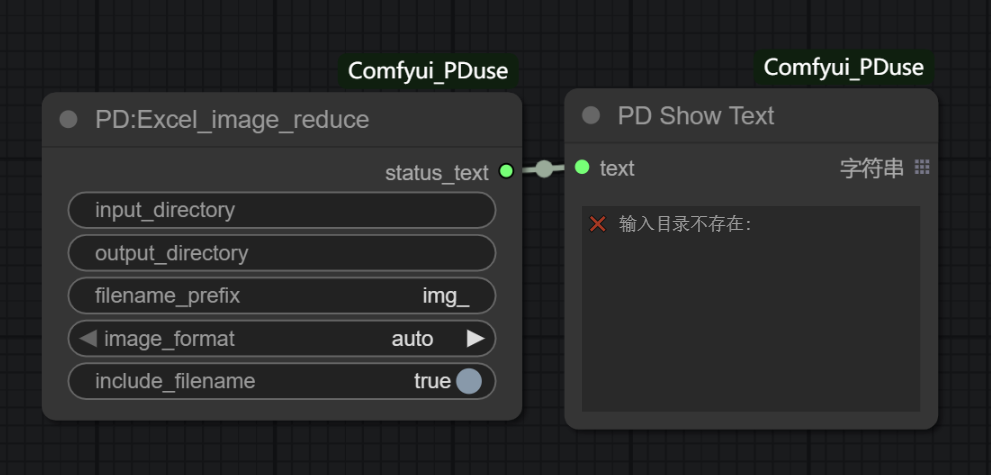
Excel数据处理节点,用于在ComfyUI中处理Excel文件数据,支持读取、写入和数据转换操作。
- excel_file:Excel文件路径(必填)
- sheet_name:工作表名称(可选,默认为第一个工作表)
- operation:操作类型(read/write/convert)
功能特点:
- ✅ 支持Excel文件的读取和写入操作
- ✅ 支持多种数据格式转换
- ✅ 支持工作表选择和数据筛选
- ✅ 提供详细的数据处理报告
- ✅ 支持批量数据处理
使用场景:
- 处理图像标注数据
- 批量文件信息整理
- 数据统计和报表生成
- 工作流参数配置管理
🎯 应用工作流:workflow
在img目录下有json格式的工作流示例文件,示范了如何在ComfyUI中使用这些节点。
批量打标:
📋 依赖项
xlrd
openpyxl
scipy
numpy
Pillow
torch
torchvision
opencv-python
版本: v3.3
更新日期: 2024-11-21
ComfyUI兼容性: 最新版本
📝 更新日志
v3.4 (2026-01-25)
- ✅ 新增:PDcrop: Image Grid - 将九宫格/表情包图片分割为 Batch 图像
- ✅ 改进:优化了节点加载逻辑
v3.3 (2024-11-21)
- ✅ 新增:PD 字符串转json(语言自动检测)- 支持批量文本转JSON格式
- ✅ 新增:PD_CaptionJSON编辑器 - 批量编辑JSON格式的caption
- ✅ 新增:PD_CaptionJSON解析器 - 快速解析JSON提取内容
- ✅ 新增:PD text_list_string_add word - 批量字符串添加词语节点
- ✅ 新增:PD aitookit training redux - AI训练数据分类整理工具
- ✅ 改进:所有新节点均支持列表批处理,保持输入输出顺序一致