
Emulsion
JSON-preset color grading for ComfyUI (Lightroom-preset style) — replaces a chain of post-processing nodes with a single node, plus a preset extraction node.
Nodes (2)
ComfyUI-Emulsion
JSON-preset color grading, Lightroom-preset style. Two nodes under
image/postprocessing:
- Emulsion Grade applies a preset in a single pass: levels, tone curve,
contrast, white balance, HSL,
.cubeLUT, clarity, bloom, halation, vignette, grain, and more. - Emulsion Extract does the reverse: from a before/after pair, it recovers the grading parameters by optimization and writes a JSON preset reusable by Emulsion Grade.
Installation
cd ComfyUI/custom_nodes
git clone https://github.com/24latents/ComfyUI-Emulsion.git
Restart ComfyUI. No dependencies to install (torch is provided by ComfyUI).
Usage
Add the Emulsion Grade node, connect an image, pick a preset:
- preset — a file from
presets/*.json. The folder is rescanned on browser refresh: no restart needed for a new preset to show up. - strength — 0 = original image, 1 = full grade, > 1 = extrapolation (clamped to 0-1).
- seed — reproducible grain.
On an invalid preset or a missing LUT, the error is logged to the console and the image passes through unchanged (the workflow never crashes).
Emulsion Extract
Connect image_source (ungraded) and image_target (the same image, graded);
the node fits by gradient descent (Adam, pure torch, CPU or GPU) a 6-point
tone curve per RGB channel, saturation and an optional vignette, then
estimates grain from the residual high-frequency noise. Per-channel curves
capture color casts — e.g. a vintage look that lifts red blacks while
crushing the blue channel; when the three fitted curves agree, they are
collapsed into a single shared curve in the written preset.
- preset_name — the
"name"stored in the JSON; the file itself is written under a slugified version of it (My Look!→my_look.json). - iterations — optimization budget (default 400). More iterations = tighter fit but slower. The fit stops early on its own once the error stops improving for 50 iterations, so high values only cost time when they actually help: ~100 for a quick draft, 400 for most grades, 800-2000 for stubborn ones. The console shows the final RMSE and the number of iterations actually run.
- fit_vignette — also fit a vignette (amount, radius, feather). Turn it
off when the pair has no vignette, so the optimizer cannot abuse it to
compensate for other differences (e.g. a naturally darker corner). The preset is written
to
presets/<slugified_name>.json(with a_2,_3… suffix on collision) and returned as a STRING; it shows up in the Emulsion Grade dropdown on browser refresh. The JSON only contains the significantly non-neutral parameters, plus the achieved RMSE indescription. The two images may have different resolutions (e.g. an upscaled target) as long as the aspect ratio matches: the target is resampled to the source before fitting.
Technical note: during the fit, the tone curve is evaluated with piecewise
linear interpolation between the 6 points (differentiable); at render time,
grading.py applies a Catmull-Rom spline through those same points. This
controlled linear-fit / spline-render gap is on the order of the fit noise
(the reported RMSE is measured on the spline render, at native resolution).
Example workflows
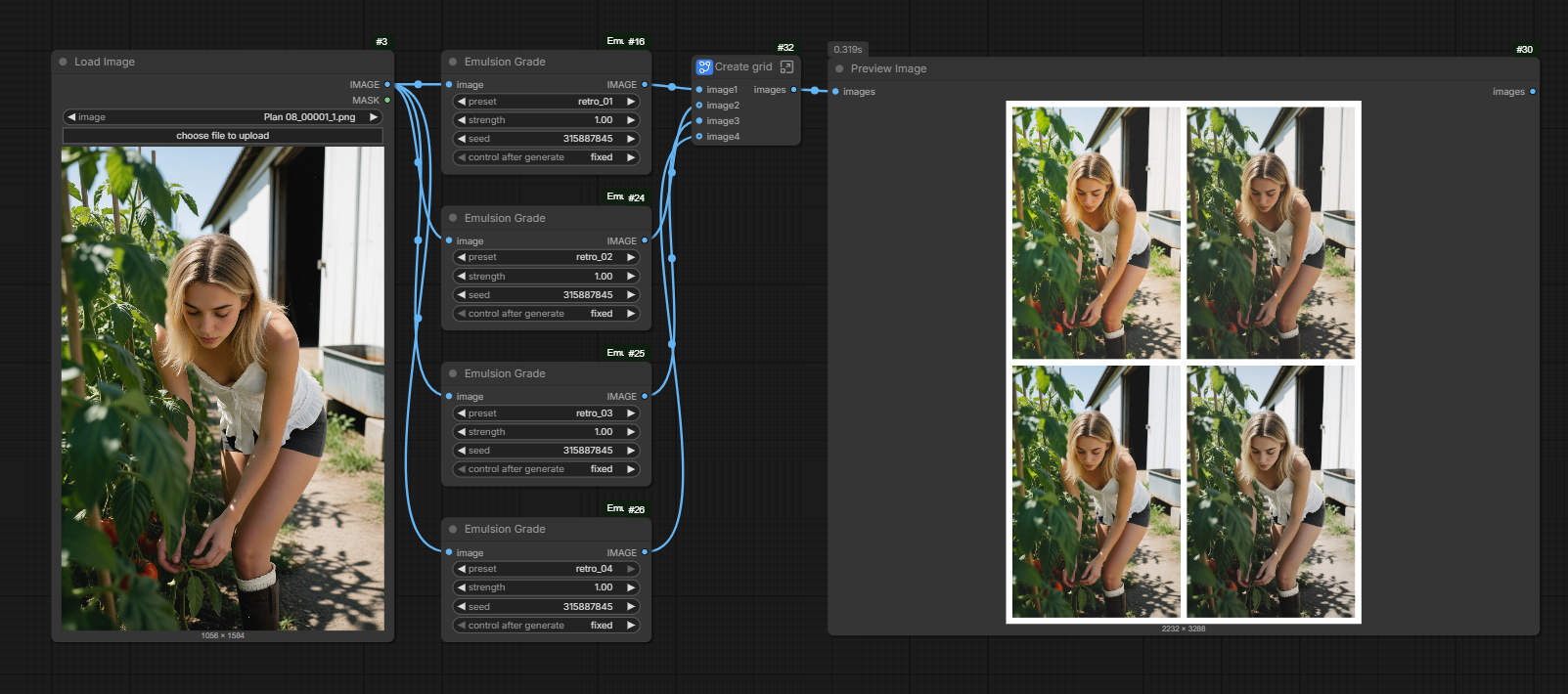
Two ready-to-use workflows ship in example_workflows/ — they also show up in ComfyUI's template browser (Workflow → Browse Templates → ComfyUI-Emulsion):
- emulsion_grade.json — one image graded with four presets side by side (screenshot above).
- emulsion_extract.json — extracts
a preset from a before/after pair; load your own two images into the
LoadImage nodes. The
Display Anynode (from rgthree-comfy) only shows the returned JSON and can be removed if you don't have it installed.
Preset format
All fields are optional (absent = neutral). The full schema is documented in the grading.py docstring. Minimal example (presets/moody_garden.json):
{
  "name": "Moody Garden",
  "levels": {"input_black": 57, "input_white": 217, "gamma": 1.04,
             "output_black": 38, "output_white": 210},
  "contrast": 1.15, "contrast_pivot": 0.5,
  "saturation": 0.96,
  "grain": {"amount": 0.008, "size": 1.0, "mono": true},
  "strength": 1.0
}
"tone_curve" accepts either a single list of points (applied to all
channels) or a per-channel form {"R": [...], "G": [...], "B": [...]};
out values may go below 0 / above 255 to crush or clip a channel.
.cube LUTs referenced by a "lut" field are looked up in presets/luts/.
Tests
pytest tests/
The real-image regression tests expect tests/A.png and tests/B.PNG
(not versioned); they are skipped when absent.
License
MIT — see LICENSE.