
ComfyUI-ModelResolver
Detect and resolve models missing from the active ComfyUI workflow graph, with multi-source resolution (Civitai / Hugging Face) and checksum-verified downloads.
ComfyUI-ModelResolver
Detects models that are actually missing in the active workflow graph (muted, bypassed and disconnected nodes are ignored) and resolves them via Civitai, Hugging Face and manual sources — with exact-filename matching and SHA256/MD5 verification.
Unlike the built-in "missing models" dialog, this only offers to download what the workflow really needs, distinguishes "missing" from "present but just named differently", and verifies every download by checksum before it lands in your models folder.
Demo
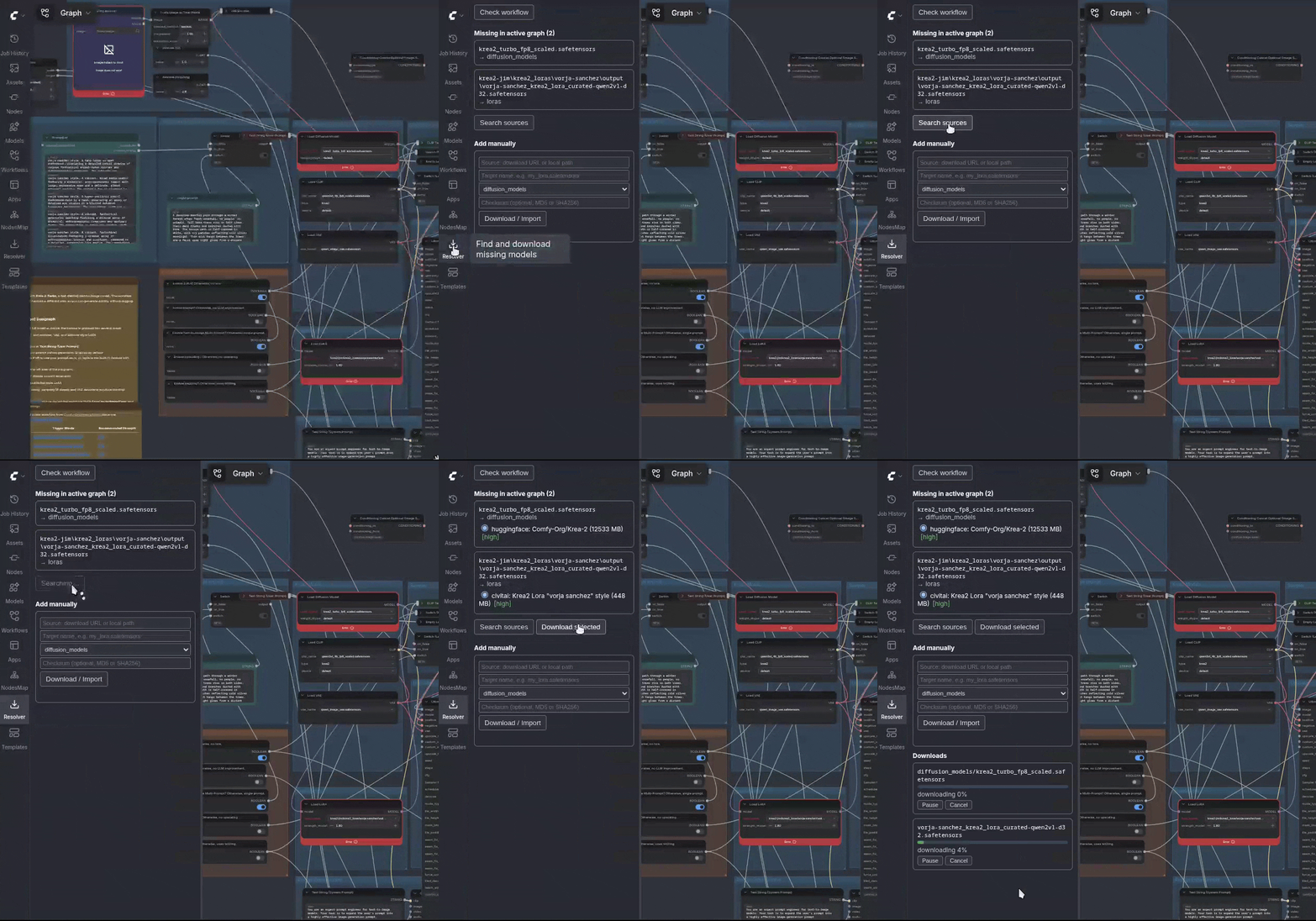
Scanning the active graph, resolving each missing file against Hugging Face and Civitai, and downloading with checksum verification.
Features
- Accurate analysis — walks the active graph (reachable from outputs),
ignores muted/bypassed nodes, and detects model references
generically via each node's
INPUT_TYPES, so custom-node loaders work too. - Multi-source resolution — searches Civitai (with optional NSFW opt-in) and Hugging Face, verifies candidates by exact filename and file type, and de-duplicates identical files across sources by SHA256.
- Verified downloads — resumable (HTTP range), streaming SHA256/MD5, checksum verified before the file is moved into place. Civitai token and Hugging Face token handled per host.
- Manual add / import — download from any URL or import a local file (e.g. a browser download), with checksum verification and folder selection.
- Present-but-renamed detection — recognises files you already have that
the workflow references under a browser/OS duplicate name (e.g.
(2)), and lets you verify identity by hash instead of re-downloading. - Not-connected reporting — models referenced by nodes that have no path to an output are listed separately instead of being silently dropped. ComfyUI still marks such a node red, so without this the panel would appear to have missed something.
Installation
Copy the ComfyUI-ModelResolver folder into ComfyUI/custom_nodes/ and
restart ComfyUI. No extra dependencies (uses aiohttp, shipped with ComfyUI).
Configuration
On first start a config.json is created in the extension folder:
| Key | Default | Description |
|---|---|---|
| civitai_api_key | "" | For Civitai downloads (create at civitai.com/user/account) |
| hf_token | "" | Optional, only needed for gated Hugging Face repos |
| include_nsfw | false | Opt-in, searches Civitai with nsfw=true |
| sources.civitai | true | Toggle Civitai as a resolution source |
| sources.huggingface | true | Toggle Hugging Face as a resolution source |
| search_limit | 20 | Max results fetched per query and source |
| request_timeout | 20 | HTTP request timeout in seconds |
| max_parallel_downloads | 2 | Concurrent downloads (1–8) |
Never commit config.json — it contains your API key and is git-ignored.
The file is re-read on every request, so changes take effect without
restarting ComfyUI.
Usage
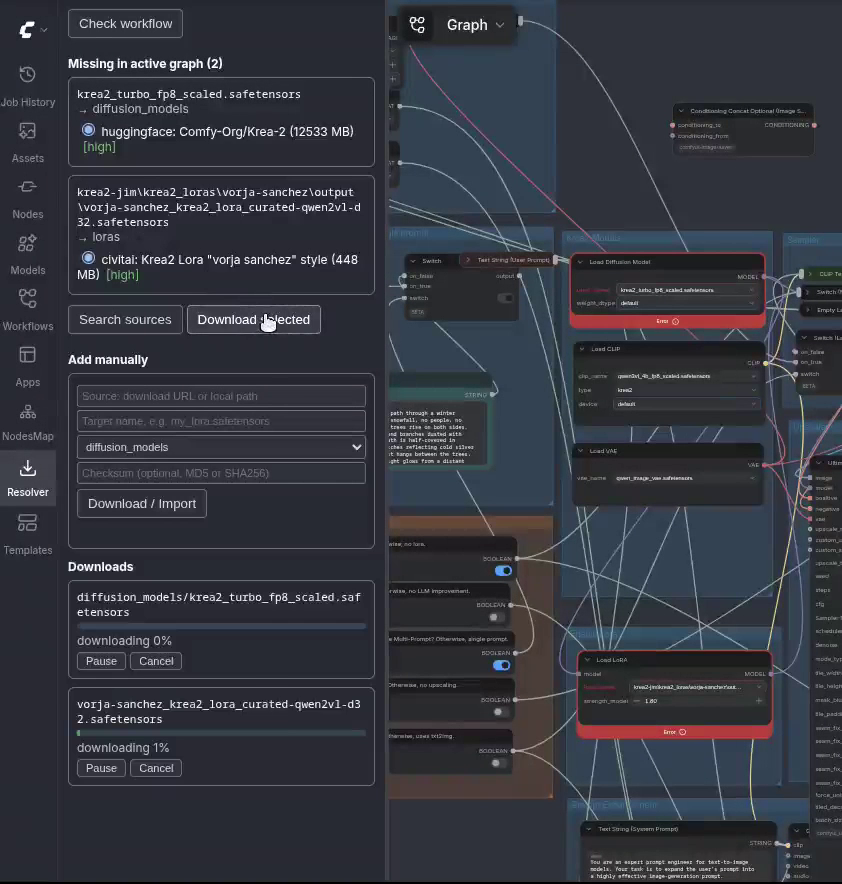
Open a workflow. The Model Resolver sidebar tab shows what's missing. Click Search sources, pick candidates, Download selected. Files are verified and placed in the correct folder.
After a download finishes, the node is not updated automatically. Refresh
the node list (press R on the canvas, or reload) and then pick the newly
downloaded file in the loader node's dropdown — the red "Error" on the node
clears once a valid file is selected. This is a ComfyUI behaviour: adding a
file to a folder doesn't change what a node currently points to.
Running downloads can be paused, resumed or cancelled from the download list. Pausing keeps the partial file (it resumes where it left off); cancelling discards it.
Add manually
Some files aren't on Civitai or Hugging Face — for example models hosted only on ModelScope, RunningHub or a mirror found via CivArchive. For these, use the Add manually section:
- Source — a direct download URL, or a local file path (to import a file you already downloaded in your browser; the original is copied, not moved).
- Target name — the exact filename the workflow expects.
- Folder type — where it goes (the list is populated from your actual model folders, including custom-node folders; it is preselected from the missing entry when possible).
- Checksum (optional) — an MD5 or SHA256 (auto-detected by length). If given, the download is verified against it before being placed; a mismatch is rejected and nothing broken lands in your folder.
When a search comes up empty, the panel also offers direct CivArchive and RunningHub search links for the distilled filename, so you can grab the URL and checksum and drop them straight into Add manually.
Already have the file under a different name?
If the workflow references a file you already have but under a browser/OS
duplicate name (e.g. model (2).safetensors), it appears under Present, just
named differently rather than as missing — no download needed, just select
your existing file in the node. Verify identity via hash confirms it really
is the same file.
How it works
Graph analysis
Analysis operates on ComfyUI's API/prompt format (the same one produced by "Save (API Format)"), which already reflects execution state — muted nodes are absent and bypass is wired through. From there:
- Reachability — walks backward from every
OUTPUT_NODE; only nodes reachable from an output generate download requirements, so disconnected ("dead island") branches never trigger a download. - Widget detection — evaluates
INPUT_TYPES()per node class. Any combo input whose option list matches afolder_pathsfile list is treated as a model reference, which also identifies the target folder type generically, without hardcoding node names. - Missing vs. present vs. renamed — a value not in the current option
list is checked against your actual files: same basename under a
different registered path → present, differently named; same basename
after stripping local duplicate suffixes (
(2),copy,- Kopie) → present, renamed; otherwise → missing. - Not connected — nodes that are present in the prompt but unreachable from any output are reported in their own section, with folder type and whether the file exists locally. They are never downloaded; the section exists to explain why ComfyUI flags such a node red while nothing is reported as missing.
Query distillation & search
Civitai and Hugging Face search match model names, not filenames, so each
missing filename is distilled into staged queries: the full stem, then a
"core" version with version/format noise tokens stripped (v2, fp16,
gguf, scaled, …), then the single longest remaining token. Queries run in
order and stop at the first one that returns a verified hit.
A candidate only counts on an exact filename match (case-insensitive,
noted separately) within a model's file list — search relevance alone is
never enough. The target folder type from analysis further filters false
hits (e.g. a loras reference won't surface an unrelated checkpoint).
Confidence & deduplication
- Candidates found on multiple sources with the same SHA256 are merged into one entry with all sources listed.
- High confidence — exact filename match with no type contradiction.
- Medium confidence — exact filename match or type match, not both.
- Low confidence — neither.
Verified downloads
Downloads stream to a .part file while computing SHA256/MD5 on the fly.
Resuming re-hashes the existing partial content first, then continues via
HTTP Range requests. The file is only renamed to its final name after
a checksum match — on mismatch, the partial file is kept under .badsha for
inspection instead of being silently discarded. Civitai auth is passed as a
?token= query parameter (a plain Authorization header breaks when Civitai
redirects to object storage); Hugging Face auth uses a standard header.
Troubleshooting
Node still shows a red error after a successful download. Expected —
ComfyUI doesn't auto-refresh a node's dropdown when a new file appears on
disk. Press R on the canvas or reload, then pick the file manually.
A node is red, but the panel reports no missing models. Check the Not connected — not executed section. If the node has no path to an output it will never run, so nothing is downloaded for it; ComfyUI marks it red purely because the selected value isn't in its dropdown. Connect the node to an output and scan again to have it resolved.
A model I know exists on Civitai isn't found. Search matches on the model's name, not the filename, and requires an exact filename match within that model's files. Very generic or heavily abbreviated filenames may not distill into a query that finds the right model — use Add manually with a direct URL instead.
NSFW models don't show up in search results. Enable include_nsfw in
config.json (opt-in by design).
Download fails with a checksum mismatch. The partial file is kept as
<filename>.badsha next to the target rather than deleted, so you can
inspect it. This means the source served different bytes than the reported
hash — usually a transient CDN/mirror issue; retrying often resolves it.
Hugging Face download fails with "HTTP 403 during download". This is
almost always a gated repo, not a tool problem: your hf_token is valid,
but you haven't been granted access to that specific repo yet. Visit the
model page on huggingface.co, accept the license / click "Agree and access
repository", wait for approval (often instant, sometimes manual), then
retry the download with the same token.
Roadmap
- CivArchive as an automatic resolution source (archived/mirrored models)
- LoRA-tag parsing from prompt text (e.g.
<lora:name:1.0>) - Special-case support for loader nodes like rgthree's Power Lora Loader
License
MIT