
ComfyUI-RefineNode
Provides model-agnostic ComfyUI nodes for local repainting, detail repair, product/logo/text refinement, and paste-back compositing.
Nodes (9)
Split it or merge it in one click
Rotate a product to match its reference shot's angle, no math required
Merge generated images the way Paste Back does, but without touching the original
The paste-back node that puts your refinement back where it belongs
The node that does the actual prep work in local refinement
Stop Qwen-Image-Edit from eating mismatched inputs
Find a mask on the crop, then put it back on the original image
Rotate an image by hand — with no scaling, and honest black corners
Slice one product mask into a grid, or line up two views of the same product
ComfyUI-RefineNode
ComfyUI-RefineNode provides a small set of model-agnostic ComfyUI nodes for local repainting, detail repair, product/logo/text refinement, and paste-back compositing.
RefineAnything targets region-specific image refinement: given an input image and a user-specified region (e.g., scribble mask or bounding box), it restores fine-grained details--text, logos, thin structures--while keeping all non-edited pixels unchanged. It supports both reference-based and reference-free refinement.
Installation
Clone this repository into your ComfyUI custom_nodes directory:
cd ComfyUI/custom_nodes
git clone https://github.com/1Kynx/ComfyUI-RefineNode.git
Restart ComfyUI after installation.
Example Workflows
The included example workflows use the Qwen Image Edit model together with the RefineAnything LoRA.
RefineAnything LoRA: limuloo1999/RefineAnything
You can try different options in the Edit Model Reference Method node, but it is best to avoid index_timestep_zero because it can introduce a noticeable color shift.
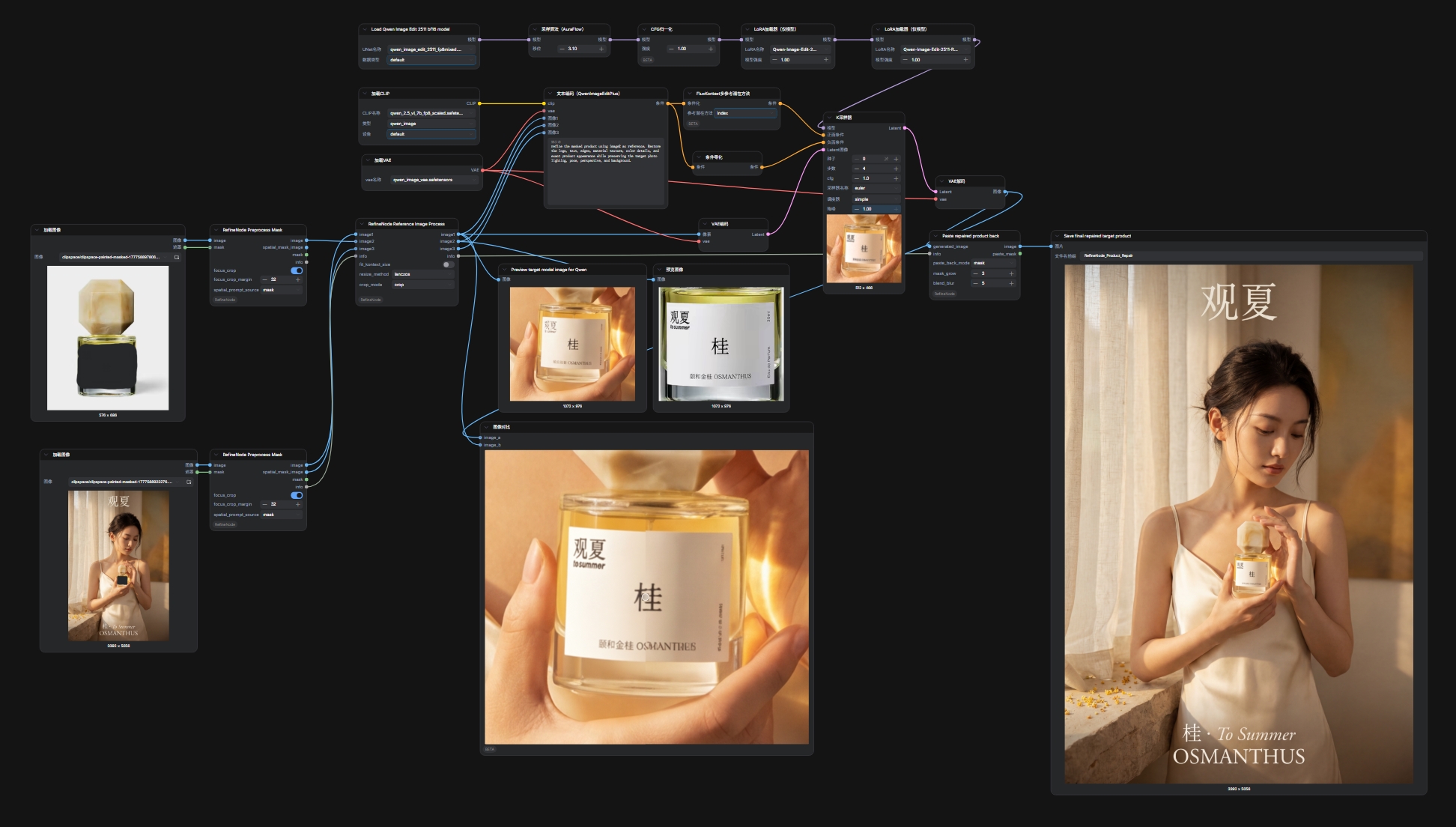
example_workflows/Reference-based Logo Refinement.json
- Reference-based workflow for refining logos, text, or product details with a clean reference image.
- In reference-based mode, connect the target refinement image to
image1, the reference image toimage2, and the target refinement mask/spatial mask image toimage3.
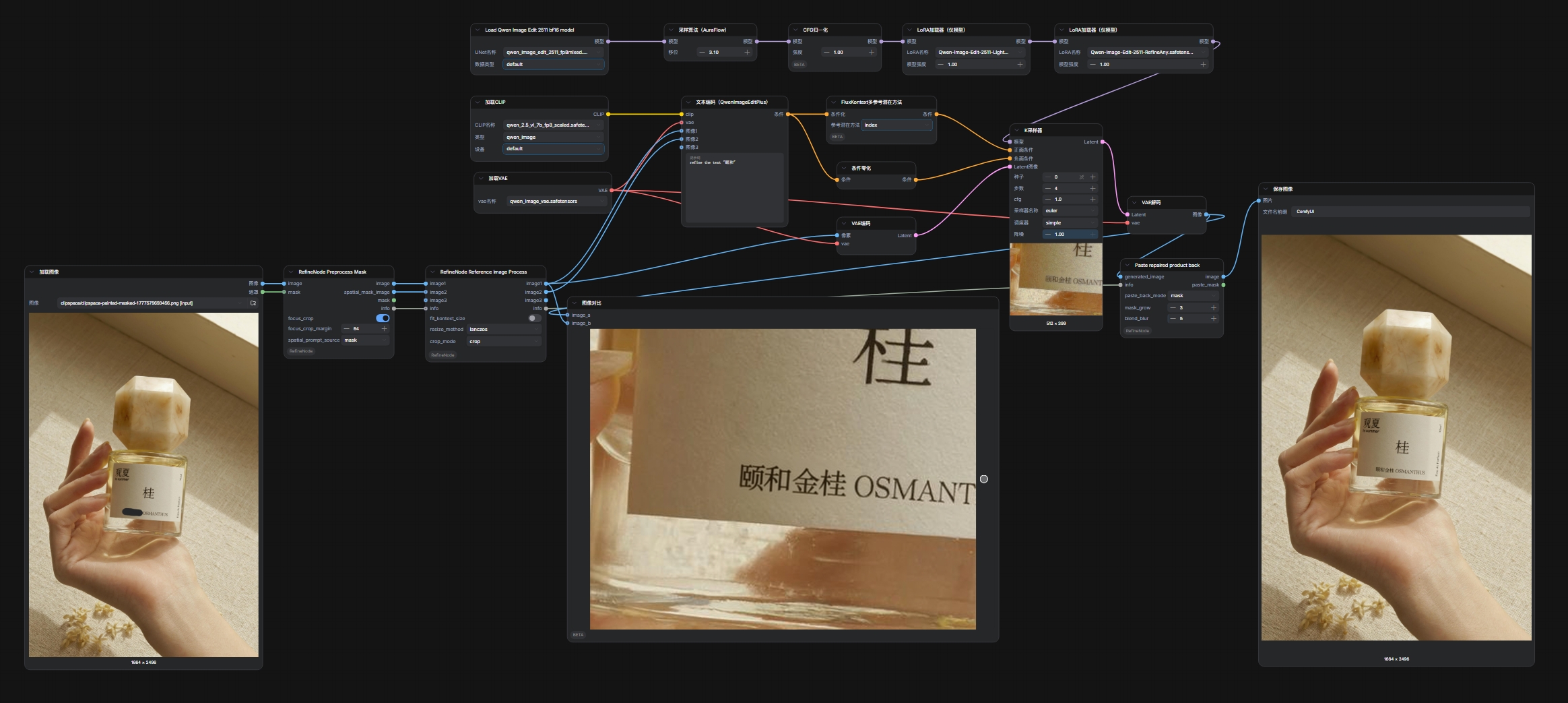
example_workflows/Reference-free Text Refinement.json
- Reference-free workflow for refining local text details from the target image and mask only.
Node Details
RefineNode Mask Batch Process
Prepares a MASK tensor before it is sent into RefineNode Preprocess Mask.
Inputs:
mask: Input mask. This can be a normal mask, a batched mask, or a ComfyUI mask list.combined_mask: When disabled, each disconnected painted island is split into a separate mask in the output batch. When enabled, all incoming masks are unioned into one mask.
Outputs:
mask: A processedMASKbatch.
Use this node when a single Load Image mask contains multiple separated painted regions and you want either one refinement job per region or one combined refinement job.
RefineNode Slice And Match Masks
Slices a single mask set or aligns two mask groups that describe the same product across different views, sizes, or proportions. The node uses the whole filtered product mask bbox as the anchor, then applies the same normalized row/column bbox grid to the second mask group. Each group's original image size is preserved.
Inputs:
mask1: Optional first mask group. Output order is anchored to this group when both inputs are connected.mask2: Optional second mask group to match againstmask1.output_mode:maskkeeps the original product mask shape inside each bbox slice.bboxoutputs full rectangular bbox slices for the most stable spatial correspondence. Default isbbox.min_area_ratio: Removes tiny disconnected components before grouping and matching, with0.01step precision. Default is0.01;0.0disables filtering. Values are relative to the largest disconnected component in the same input group, so0.02removes components smaller than 2% of that largest component's foreground area.rows: Number of equal-height bbox grid rows. Default is4.columns: Number of equal-width bbox grid columns. Default is1.auto_match_orientation: Automatically makes the longer split direction follow the longer side of themask1product bbox. Default is enabled.match_mode: Controls how multiple input masks are paired.unionunions both sides into one product,repeat_mask1repeats one sharedmask1reference for everymask2product,pair_by_indexpairs individual products by input order, andpair_by_positionpairs products by normalized spatial position. Default isunion.
Outputs:
mask1: First sliced/grouped mask batch.mask2: Second mask batch aligned tomask1. When only one input is connected, this is an empty placeholder batch.
The node splits disconnected painted islands internally, removes components below min_area_ratio, unions the remaining regions into one product mask, and slices that product bbox into a row-major grid: top to bottom, left to right. When auto_match_orientation is enabled, the larger of rows and columns follows the longer side of the product bbox: rows=4, columns=1 stays 4x1 for vertical products and becomes 1x4 for horizontal products, while rows=1, columns=3 becomes 3x1 for vertical products and stays 1x3 for horizontal products. In repeat_mask1 mode, mask2 is not unioned into one bbox; each mask2 product gets its own matched output set using the same shared mask1 reference slices. In pair_by_index mode, mask1[i] is paired with mask2[i], and the last mask on the shorter side is reused when counts differ. In pair_by_position mode, products are paired by relative position inside each mask group's union bbox, making it the recommended mode when SAM or detection nodes return multiple product masks in inconsistent order. In mask mode, empty mask1 cells are skipped and mask2 keeps the same remaining cell positions. In bbox mode, the full rows × columns rectangular grid is preserved. Use multiple rows and columns for two-dimensional local regions.
RefineNode Match Product Angle
Rotates one product image to match the main mask angle of a reference product mask. The node rotates the whole source image without scaling, rotates the source mask with the same angle, and crops the result to the rotated source mask bbox.
Inputs:
image: Source product image to rotate.source_mask: Product mask for the source image.reference_mask: Product mask whose angle should be matched.canvas_expand: Expands the output crop from the rotated product bbox toward the full rotated canvas.0.0keeps the tight product bbox crop;1.0keeps the full rotated canvas.
Outputs:
image: Rotated RGB image cropped to the rotated source mask bbox.mask: Rotated source mask cropped to the same bbox.angle: Applied rotation angle in degrees.
The angle is estimated from each mask's foreground principal axis. Empty source or reference masks return the original source image, the source mask, and angle=0. The node does not scale, perform perspective correction, or distinguish 0 degrees from 180 degrees.
RefineNode Rotate Image
Rotates an image by a manually specified angle.
Inputs:
image: Image to rotate.angle: Rotation angle in degrees.
Outputs:
image: Rotated RGB image.
The image is rotated without scaling. The output canvas expands to contain the full rotated image, and newly exposed pixels are filled with black.
RefineNode Preprocess Mask
Prepares the target image and optional mask before model inference, and creates the info data required for accurate paste-back.
Inputs:
image: The image to refine or use as a reference.mask: Optional mask. If disconnected, the node uses an empty mask and does not raise an error.focus_crop: When enabled, crops around the masked region to reduce unrelated image area before generation.focus_crop_margin: Extra context retained around the mask crop.spatial_prompt_source: Controls thespatial_mask_imageoutput.maskkeeps the original mask shape, whilebboxuses the mask bounding box.
Outputs:
image: Processed model input image.spatial_mask_image: Spatial mask image for image-editing nodes such as Qwen Image Edit Plus.mask: Mask aligned with the outputimage.info: Metadata containing the original image, crop position, mask, and paste-back coordinates. Pass this to downstream paste-back nodes.
Mask behavior:
RefineNode Preprocess Maskno longer decides whether masks should be split or combined.- A batched
MASKinput is treated as the exact refinement job list: one output image-list item per incoming mask, using the existing image/mask batch assignment rules. - Use
RefineNode Slice And Match Masksbefore this node when you need to split painted islands, combine all masks, group nearby mask regions, or align two mask groups.
RefineNode Reference Image Process
Resizes and aligns the target image, reference image, and mask image to exactly the same size. This is useful for multi-image reference workflows and Qwen Image Edit Plus style inputs.
Inputs:
image1: Required. Usually the target refinement image.image2: Optional. Usually the reference image.image3: Optional. In reference-based mode, usually the target refinement mask orspatial_mask_image.info: OptionalREFINENODE_INFOfromRefineNode Preprocess Mask. When connected, the node records its resize, crop, or fill transform soRefineNode Paste Backcan restore the generated image to the correct original position.fit_kontext_size: When enabled, uses the ComfyUI/Flux Kontext-style target size. When disabled, uses an approximately1024 x 1024target area rounded to multiples of 8.resize_method: Shared resize method for all connected images. The default islanczos.crop_mode:cropcenter-crops to the target aspect ratio,disableresizes directly, andfillpreserves aspect ratio then pads with black to the target size.
Outputs:
image1: Processed target refinement image.image2: Processed reference image. If the input is disconnected, this output is a blank placeholder image.image3: Processed mask image or third reference image. If the input is disconnected, this output is a blank placeholder image.info: Updated paste-back metadata.
When image1 or image3 comes from a multi-mask RefineNode Preprocess Mask image list, ComfyUI processes each list item sequentially. A single connected reference image in image2 is reused for all list items.
Reference-based mode reminder:
- Connect the target refinement image to
image1. - Connect the reference image to
image2. - Connect the target refinement mask/spatial mask image to
image3.
RefineNode Restore Mask To Original
Restores a mask detected on a cropped or resized RefineNode image back to the original image coordinate space.
Inputs:
mask: Mask detected afterRefineNode Preprocess Maskand, optionally,RefineNode Reference Image Process.info:REFINENODE_INFOfromRefineNode Preprocess Maskor the updatedinfofromRefineNode Reference Image Process.
Outputs:
mask: Restored mask in the original image size and position.
Use this when you first crop a product with RefineNode Preprocess Mask, run another mask detector on the cropped/model image, and then need that newly detected mask to line up with the original uncropped image. If the image also passed through RefineNode Reference Image Process, the node reverses that resize/crop/fill transform before restoring the mask through the original crop_box.
When the connected mask input contains multiple masks, such as the output from RefineNode Slice And Match Masks, every mask is restored. If there is only one info item, that same coordinate transform is reused for all mask outputs.
RefineNode Paste Back
Composites the generated result back into the original image and returns both the final image and the actual paste mask.
Inputs:
generated_image: Image generated by the model.info: Paste-back metadata fromRefineNode Preprocess MaskorRefineNode Reference Image Process.paste_back_mode:maskpastes using the original mask, whilebboxpastes using the mask bounding box.mask_grow: Expands the paste mask before compositing. Useful for reducing tiny uncovered edges.blend_blur: Blurs and feathers the paste mask to soften seams.
Outputs:
image: Final pasted-back image.paste_mask: Actual mask used for compositing, useful for previewing and debugging the paste area.
When generated_image and info arrive as ComfyUI lists, all generated refinement results that belong to the same original source image are pasted back sequentially into that original image. The node returns one final image and one combined paste mask per source image.
RefineNode Merge Generated Images
Combines generated image results without saving or compressing them. This is the counterpart to RefineNode Paste Back: Paste Back restores generated results into the original image, while this node scales the original-image background into generated-result coordinates and composites the generated pixels on top.
Inputs:
generated_image: Image list or batch generated by the model.info: Paste-back metadata fromRefineNode Preprocess MaskorRefineNode Reference Image Process.mask_source:maskcomposites using the mapped mask, whilebboxcomposites using the mapped mask bounding box.mask_grow: Expands the paste mask before compositing.blend_blur: Blurs and feathers the paste mask.show_full_image: When disabled, returns the final paste-mask crop. When enabled, returns the full scaled source-image canvas.
Outputs:
image: Merged image in scaled generated-result coordinates.paste_mask: Combined mask for the generated regions in the returned image size.
Generated patches are not resized when their entry scale matches the group scale. The node uses Reference Image Process geometry to place each patch: crop mode offsets by the model source_content_box, while fill mode only composites the generated target_content_box content and ignores padding. Paste masks are expanded and feathered in model space before being mapped to generated-patch space, matching the RefineNode Paste Back compositing order more closely. If multiple entries in one source group have different scales, the node uses the group median scale and resamples only the entries that need it so they can share one output canvas. In disable crop mode, the node uses an approximate single scale and may resample the patch to fit the shared canvas when x/y scaling differs. The node uses mask_source for the mask/bbox choice; older workflows that still pass paste_back_mode are accepted as a compatibility fallback. The number of generated images must match the number of info.items.
Citation
If you use this repository, please cite:
@article{zhou2026refineanything,
  title={RefineAnything: Multimodal Region-Specific Refinement for Perfect Local Details},
  author={Zhou, Dewei and Li, You and Yang, Zongxin and Yang, Yi},
  journal={arXiv preprint arXiv:2604.06870},
  year={2026}
}