
ComfyUI-Persona-Director
A visual state machine for consistent character generation. It intelligently maintains character identity, outfits, and locations across multiple generations using LLM-driven state management.
ComfyUI-Persona-Director
The Visual State Machine for Consistent Character Generation — now for both tag (SDXL / Pony) and natural-language (DiT: Anima, FLUX, SD3…) models.



Demo
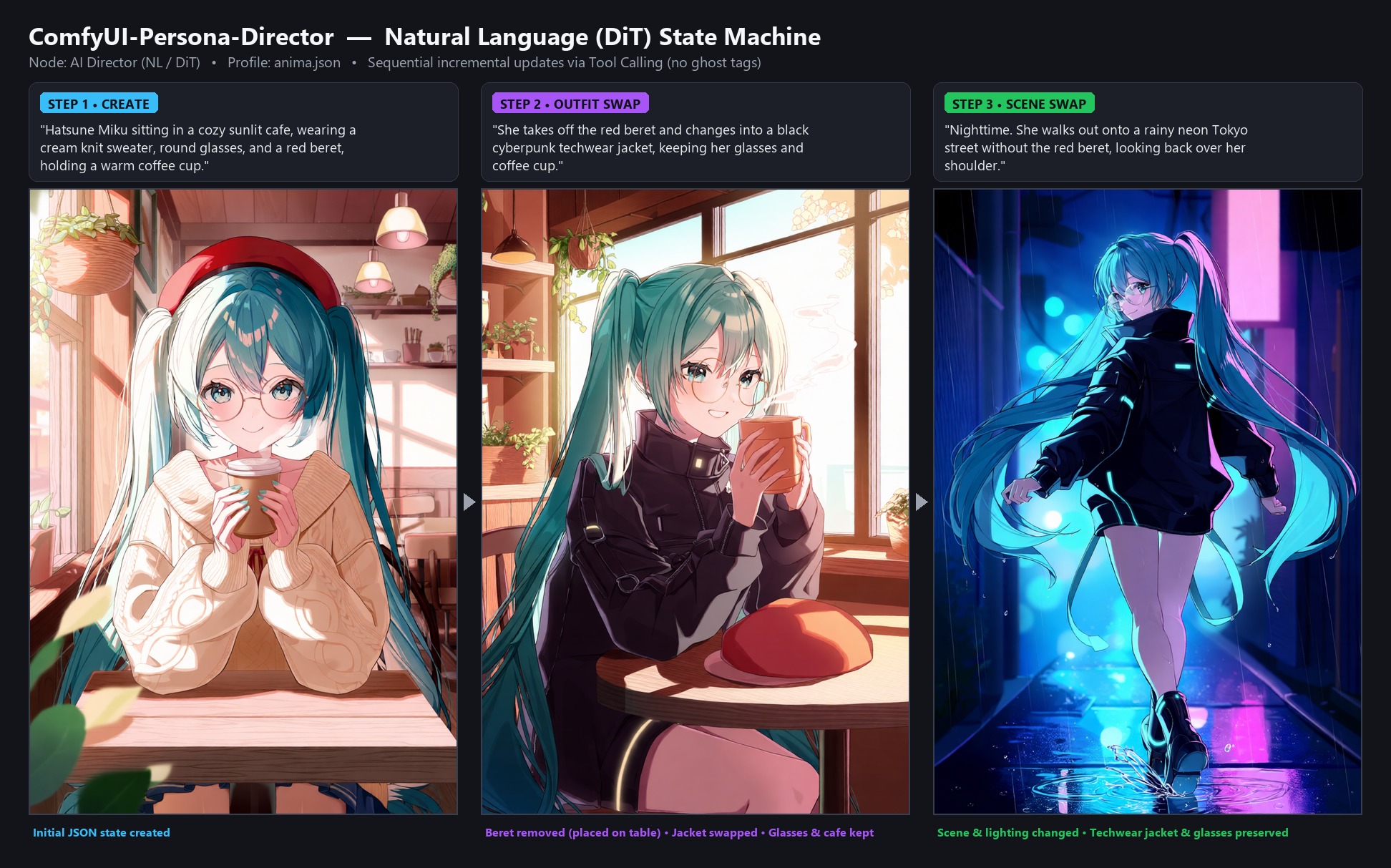
Natural Language (DiT / FLUX / Anima)
Incremental state updates via Tool Calling. (Swap outfits or scenes without losing details or leaving ghost tags.)
Tags (SDXL / Pony)
Watch consistency in action. (The character identity and outfit persist perfectly while the pose changes.)
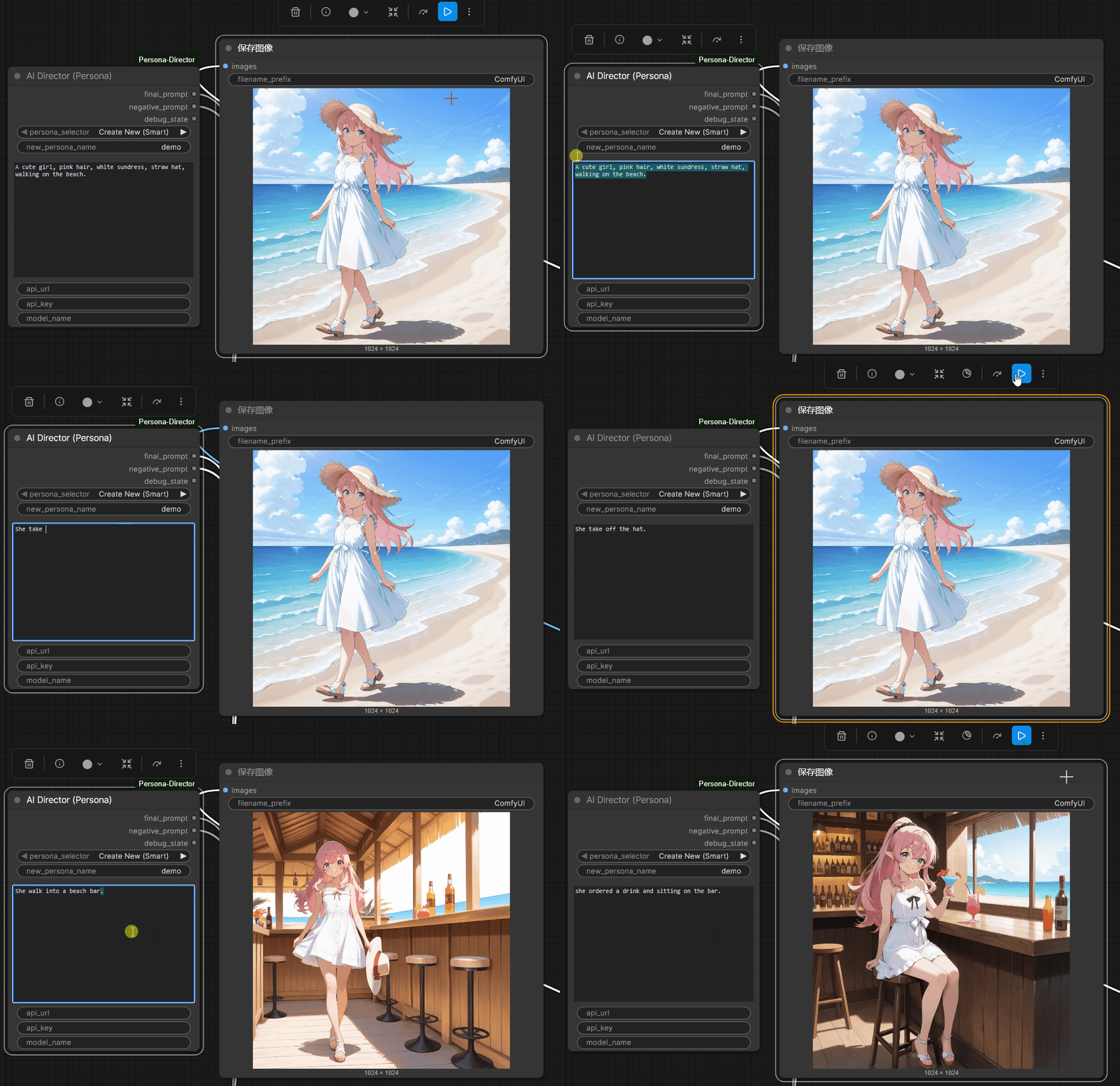
"She takes off the hat." > — The Agent intelligently removes the
straw hatfrom the outfit list, but keeps thewhite sundressand character identity exactly the same.
Two Nodes
| Node | Output | For | | :--- | :--- | :--- | | AI Director (Tags) | Danbooru / SDXL tags | SDXL, Pony | | AI Director (NL / DiT) | Natural language | Anima, FLUX, SD3, and other natural-language DiT models |
Both share one engine — the state schema and prompt style are driven by a configs/*.json profile, so you can add your own models or fields without touching code.
Why This Node?
In standard Stable Diffusion workflows, changing a prompt often changes the entire character (random seed chaos). Persona Director fixes this with a config-driven deterministic state machine:
- Identity, outfit, action, location, composition, style — each is a field in a JSON state. Change the pose without losing the clothes.
- The field list is not hardcoded — it lives in
configs/*.json, so you can add / rename fields (e.g.lighting,color,moodfor natural-language models) without touching code. - State is saved to
.json— pause and resume days later.
Tool Calling (higher accuracy)
The LLM updates the state via function calling: it emits only the fields that change, validated against a JSON schema — no more re-echoing the whole JSON.
- Capable models → tool call (faster, more accurate).
- Low-capability / local models without tool support → automatically falls back to JSON echo.
- Switch manually with the
tool_modedropdown:auto/tool/json_only.
Installation
Method 1: Via ComfyUI Manager (Recommended)
The easiest way to install.
- Open ComfyUI Manager.
- Click "Install Custom Nodes".
- Search for:
Persona Director(orComfyUI-Persona-Director). - Click Install.
- Restart ComfyUI.
(Dependencies like openai will be installed automatically if you use the Manager.)
Method 2: Manual Installation
Use this if you prefer the terminal or want to contribute to the code.
-
Navigate to your ComfyUI custom nodes directory:
cd ComfyUI/custom_nodes -
Clone this repository:
git clone https://github.com/18yz153/ComfyUI-Persona-Director.git -
Install dependencies:
pip install openai -
Restart ComfyUI.
Configuration (Auto-Setup)
Protect your keys! We use a secure local config file so you don't leak API keys in workflow screenshots.
- Run the node once: Just try to generate an image. The node will automatically create a
config.jsonfile in the folder for you and show an error to remind you. - Edit the file: Open
ComfyUI/custom_nodes/ComfyUI-Persona-Director/config.jsonand fill in your details:
{
    "api_url": "https://api.openai.com/v1",
    "api_key": "sk-proj-xxxxxxxxxxxxxxxxxxxxxxxx",
    "model_name": "gpt-4o"
}
Supported Providers / Models
The node speaks the standard OpenAI-compatible protocol, so anything that exposes it works out of the box:
| Provider | Notes |
| :--- | :--- |
| OpenAI | gpt-4o, etc. |
| Google Gemini | via the OpenAI-compatible /openai/ endpoint |
| DeepSeek / Claude | via OpenRouter (or compatible endpoints) |
| LM Studio / Local LLM | api_url = http://localhost:1234/v1 — also Ollama, vLLM |
For local / DiT natural-language work, point the AI Director (NL / DiT) node at your local endpoint with the nl.json profile.
Quick Start (Drag & Drop)
Get started immediately! Download the image below (Save As...), then drag and drop it directly into ComfyUI. It contains the full node setup and metadata.
<img src="assets/workflow_basic.png" width="600" alt="Basic Workflow">Alternative: If the image doesn't load, you can download the Raw Workflow JSON here and load it manually.
(Note: Ensure you have set up your config.json before running)
How to Use
1. Create a Character
- Selector: Choose
Create New (Smart). - Instruction: "A cyberpunk girl, blue neon jacket, holding a katana."
- Generate: The node creates
New_Character.json.
2. Update the Scene (The Magic)
- Selector: Keep it on
Create New (Smart)(It automatically detects existing files). Or, refresh comfyUI and select the json - Instruction: "She is crouching on a rooftop."
- Result: The
blue neon jacketandkatanaare preserved. Only the pose and background change.
3. Advanced Logic
- Remove Items: "She puts away her weapon." -> AI removes
katana. - Environment: "It starts raining." -> AI adds
rainto location. - Tag Injection: For precise control, use the
tag:(...)syntax to force specific tags into the prompt.- Input: "She is eating. tag:(hamburger, open_mouth)"
4. Natural-Language (DiT) Models
- Pick the AI Director (NL / DiT) node and the
nl.jsonprofile — same workflow, prose output for Anima / FLUX / SD3 and other natural-language models.
5. Tool Mode
- Leave
tool_modeonautofor normal use. - Set it to
json_onlyfor models that do not support function calling (many small / older local models).
Troubleshooting
- Error: 404 Not Found:
- Check your
api_url. If using Google, it must end with/openai/. If using OpenRouter/OneAPI, it usually ends with/v1. - Check your
model_name. OpenRouter often requires the vendor prefix (e.g.,google/gemini-pro).
- Check your
- Error: 401 Unauthorized: Check your API Key.
- "The wind blows her hat away" but the hat stays?:
- The model prioritizes consistency. Try being more explicit: "The wind blows her hat away, removing it."
- Local model (LM Studio / Ollama) misbehaves on tool calls?
- Tool calling is only reliable for models that support it. Set
tool_mode = json_onlyto force the JSON-echo path. tool_choiceis sent as a plain string (LM Studio rejects the object form) — already handled by the node.
- Tool calling is only reliable for models that support it. Set
Enjoying Persona Director? If this node saved you time, consider giving it a ⭐ on GitHub — it helps other ComfyUI users discover the project!
License
Apache 2.0 License. Free for commercial and non-commercial use.