
ComfyUI-QwenASR
A lightweight ComfyUI custom node pack for Qwen3-ASR, providing simple speech‑to‑text workflows with local model caching and optional timestamp output. Supports Qwen/Qwen3‑ASR‑1.7B and 0.6B, with HuggingFace/ModelScope download options and clean integration for ComfyUI pipelines.
Nodes (3)
ComfyUI-QwenASR
ComfyUI custom nodes for Qwen3-ASR (Automatic Speech Recognition). This pack focuses on simple, reliable speech-to-text and subtitle workflows with local model caching and long-audio support.
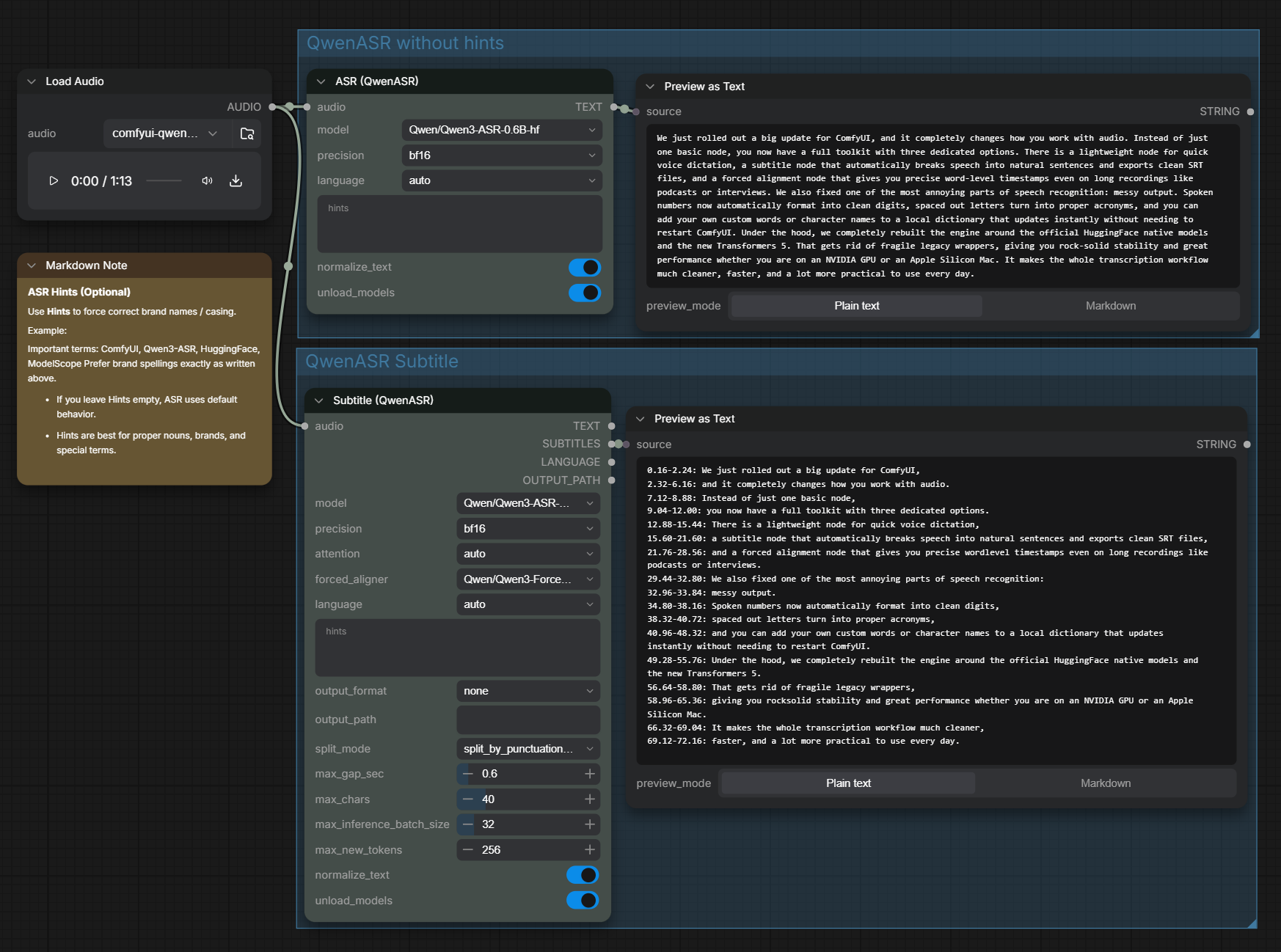
What's New in v1.1.0
1. A Comprehensive Three-Node Speech Toolkit
This update enriches the suite from basic speech recognition into a complete audio workflow:
- ASR (QwenASR): Fast, lightweight speech-to-text transcription for quick audio prompts and notes.
- Subtitle (QwenASR): Generates timestamped sentences ready to export directly as
.srtor.txtsubtitle files. - Forced Align (QwenASR): High-precision word-level aligner built specifically for long-form speech (podcasts, videos, lectures), keeping every word synchronized without cutting off at arbitrary boundaries.
2. Cleaner, More Accurate, and Production-Ready Output
Raw speech-to-text often produces acoustic noise and awkward phrasing. Version 1.1.0 introduces smart Inverse Text Normalization (ITN):
- Clean Digits & Percentages: Spoken numerals are automatically converted into natural, readable digits (e.g.
一百二十八→128,一点七→1.7,百分之九十九→99%). - Acronym Clean-Up: Spaced-out letters from verbatim transcribing are merged into standard abbreviations (e.g.
A S R→ASR,U S B→USB,A P I→API). - Multi-Language Term & Phonetic Correction: Built-in rules correct common spoken tech and AI terms across English, Chinese, Japanese, Korean, and French (e.g.
ChatGPT,OpenAI,DeepSeek,ComfyUI). - Idiom Protection: Cultural idioms and fixed expressions are safeguarded so numbers inside phrases are never mistakenly converted.
3. Major Architectural Upgrade: Official Native Models & Transformers 5
- Full Migration to Official Hugging Face Native Models: Exclusively uses official native checkpoints (
Qwen3-ASR-1.7B-hf,0.6B-hf,ForcedAligner-0.6B-hf). Legacy un-suffixed checkpoints are now deprecated in favor of official standard pipelines. - Upgraded to
transformers >= 5.13.0: Integration with Transformers 5 eliminates obsolete bundled code, delivering pure PyTorch multimodal execution, lower VRAM consumption, and significantly faster inference.
4. New Features to Get the Exact Results You Need
- One-Click Transcription & Alignment: In the Forced Align node, simply connect your audio and leave the text box blank. The node automatically transcribes the speech and generates word-level timestamps in a single step.
- Zero-Restart Custom Dictionary: Need to add your own names, industry terms, or specialized vocabulary? Edit
itn_rules.jsonand changes take effect immediately on your very next run — no ComfyUI restart needed. - Out-of-the-Box Mac Support: Seamless, crash-free execution on Apple Silicon (M-series) Macs with built-in precision guards.
- Dual Download Mirrors via
config.json: Effortlessly configure your preferred download mirror (HuggingFace or ModelScope) inconfig.jsonfor dependable, fast downloads worldwide.
Features
- Three complementary nodes: simple STT, timestamped subtitles, and iterative forced aligner for long audio
- Transformers native support: official
-hfmodels with native Hugging Face pipeline (transformers >= 5.13.0) - Long audio handling: automatic chunking and speaking-rate based iterative alignment
- Forced aligner: word-level timestamping and subtitles
- Local model cache: under
ComfyUI/models/Qwen3-ASR/ - HuggingFace / ModelScope: configurable download sources in
config.json
Nodes
ASR (QwenASR)
- Input: AUDIO
- Output: TEXT
- Use case: quick speech-to-text
- Options: model, precision, language, hints, normalize_text, unload_models
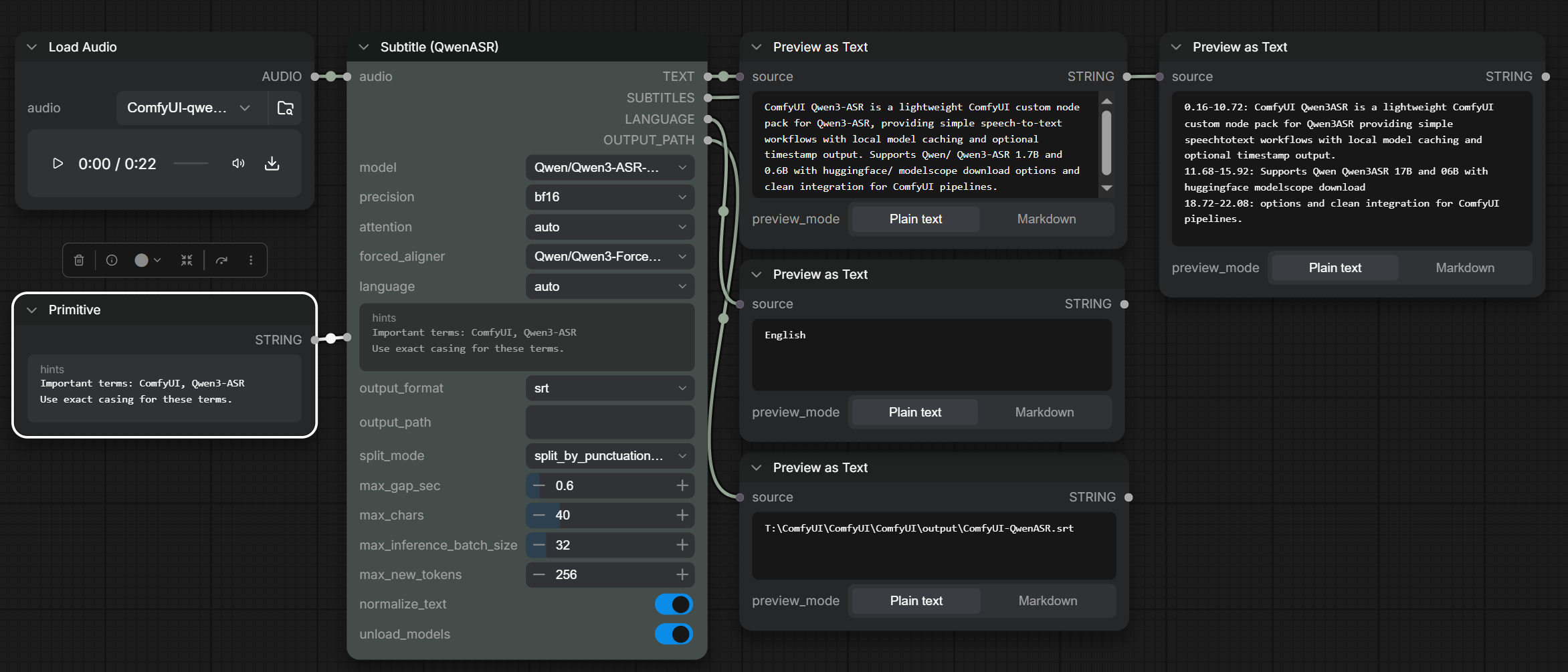
Subtitle (QwenASR)
- Input: AUDIO
- Output: TEXT, SUBTITLES, LANGUAGE, OUTPUT_PATH
- Use case: subtitle generation with timestamps
- Options: model, precision, attention, forced_aligner, language, hints, output_format, output_path, split_mode, max_gap_sec, max_chars, max_inference_batch_size, max_new_tokens, normalize_text, unload_models
- Output format: none / txt / srt (controls file save only)
- Output path: optional file save location (default:
ComfyUI/output/ComfyUI-QwenASR/) - Split mode: default is punctuation + pause + length (balanced for subtitles)
Forced Align (QwenASR)
- Input: AUDIO (required), TEXT (optional transcript; if left blank, speech is auto-transcribed first)
- Output: WORD_TIMESTAMPS
- Use case: iterative safe-zone forced alignment for long audio (with known transcript or automatic transcription)
- Options: text, language, forced_aligner, precision, attention, chunk_audio_sec, min_tail_sec, backoff_words, normalize_text, unload_models
Tip: in ComfyUI search, type ASR to find these nodes quickly.
Installation
- Install the custom node:
cd ComfyUI/custom_nodes

git clone https://github.com/1038lab/ComfyUI-QwenASR.git
- Install dependencies (requires
transformers >= 5.13.0for native model pipelines):
cd ComfyUI/custom_nodes/ComfyUI-QwenASR

pip install -r requirements.txt
- Restart ComfyUI.
Models
Supported models (Official Hugging Face Native):
Qwen/Qwen3-ASR-1.7B-hf(Recommended)Qwen/Qwen3-ASR-0.6B-hf(Fast & lightweight)Qwen/Qwen3-ForcedAligner-0.6B-hf(For subtitles and word-level timestamps)
Downloaded models are stored in:
ComfyUI/models/Qwen3-ASR/
config.json (defaults & model list)
You can edit config.json in the repo root to change defaults (e.g. default model, source)
or to add/remove model repo entries.
Example:
{
  "defaults": {
    "source": "ModelScope",
    "repo_id": "Qwen/Qwen3-ASR-0.6B-hf"
  }
}
Tip: If you are in mainland China, using ModelScope as the source is usually faster and more reliable.
Custom model locations (extra_model_paths.yaml)
If you keep models outside the default folder, add the parent directory to ComfyUI’s extra_model_paths.yaml.
This node will also search those paths for Qwen3-ASR models.
itn_rules.json (Text Normalization & Multi-Language Custom Rules)
Located at the root of this repository, itn_rules.json provides Inverse Text Normalization (ITN) and user-defined phonetic/spelling corrections across any language.
Key Capabilities:
- Number & Digit Formatting: Spoken numerals and decimals are automatically converted to digits (e.g.
一百二十八→128,一点七→1.7,百分之九十九→99%). - Acronym Cleanup: Merges spaced letters from verbatim transcription (e.g.
A S R→ASR,U S B→USB,A P I→API). - Multi-Language Phonetic & Term Corrections: Add phonetic corrections and brand names for English, Chinese, Japanese, Korean, etc.
- Protected Idioms: Prevents Chinese idioms from being converted into digits (e.g. preserves
五颜六色,万无一失). - Hot-Reloading: Edits to
itn_rules.jsontake effect immediately on the next generation — no ComfyUI restart required.
Example:
{
  "custom_replacements": {
    "chat gpt": "ChatGPT",
    "open a i": "OpenAI",
    "g p t four": "GPT-4",
    "deep seek": "DeepSeek",
    "クウェン": "Qwen",
    "コムフィーユーアイ": "ComfyUI",
    "컴피UI": "ComfyUI"
  },
  "enable_number_conversion": true,
  "enable_acronym_cleanup": true
}
Tip: Each node features a normalize_text toggle (default: True) right above unload_models. You can turn it off anytime to output raw verbatim transcription.
Usage
STT
LoadAudio → ASR (QwenASR) → ShowText
Subtitles
LoadAudio → Subtitle (QwenASR) → ShowText / SaveText
Long Audio Forced Alignment
LoadAudio + Text Transcript → Forced Align (QwenASR) → ShowText
Notes
- Official
-hfcheckpoints (Qwen3-ASR-*-hf) are required. Legacy un-suffixed checkpoints are deprecated and no longer supported undertransformers >= 5.0.0. - Long audio is automatically chunked inside the model pipeline.
- Subtitle timestamps require the forced aligner to be available.
- Apple Silicon Mac (MPS) is fully supported with automatic precision fallback (fp16) and SDPA acceleration.
- If you switch machines or want manual control, extra model paths are supported.
License
- Code: GPL-3.0
- Models: Qwen3-ASR (Apache-2.0)