
ComfyUI-MiniMax-H3-Promptor
ComfyUI-Minimax-H3-Promptor custom node for ComfyUI provides automation suite for generating MiniMax H3 prompts.
Nodes (4)
The H3 prompt editor for people who'd rather write it themselves
Proofread your MiniMax H3 prompt before the sampler does
The Name Is a Lie — This Node Calls No MiniMax API
The node that turns your reference shots into MiniMax H3's picky prompt format
ComfyUI MiniMax H3-Promptor
A powerful, node-based automation suite for generating cinema-production-grade prompts explicitly formatted for the MiniMax H3 Video Generation System.
This project provides a robust, decoupled architecture separating multimodal visual analysis from pure text-based prompt structuring, allowing for extreme customizability, precise scene description, and low API operating costs.
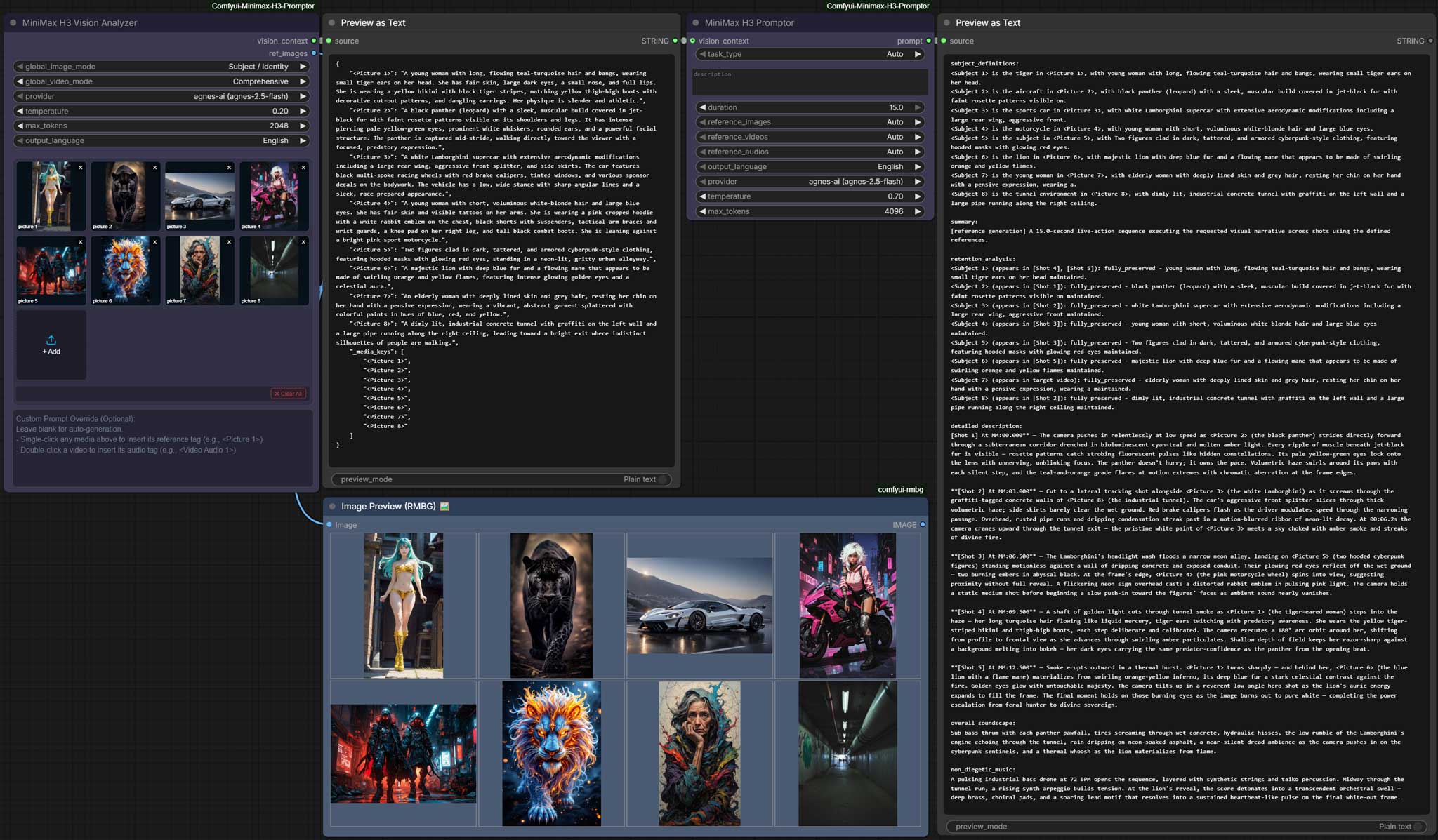
What's New in V1.5.1 (2026/09/12)
Native VRAM Unloading & Isolation for Local Models
- Automatic VRAM Release: Local models (
ComfyUI-QwenVL,Ollama,LM Studio,llama.cpp) now immediately unload from GPU memory after inference, preventing downstream MiniMax video generation crashes (OOM). - ComfyUI Model Protection: Isolates local LLM release without evicting ComfyUI's internal diffusion or VAE models.
- Configurable: Enabled by default; easily toggled via the API Management settings panel (
Editprovider).
👉 Read the full v1.5.1 Release Notes & Technical Details (updates.md)
What's New in V1.5.0 (2026/09/03)
✍️ All-New Manual Prompt Composer & Cinematic Visual Upgrades
V1.5.0 introduces the MiniMax H3 Manual Prompt Composer, a dedicated workspace for prompt engineering and rapid scripting, alongside an upgraded MiniMax H3 Prompt Preview & Edit node and a complete cinematic syntax color system.
Key Highlights & Enhancements
- Dedicated Manual Composer (
H3_PromptComposer): Switch and load 8 official task mode starter scaffolds (T2VA, I2VA, FL2VA, Ref2VA, V2VA, L2VA, A2V, etc.). Type@,<, or[anywhere in the editor to trigger instant floating autocomplete tag menus. - Centered Refine Modal Viewport (
H3_PromptEditor&H3_PromptComposer): Elegant centered frosted-glass modal overlay supporting fine-grained optimization for the entire prompt, text selections, individual shots ([Shot N]), individual subjects (<Subject N>), or specific sections with adaptive height. - Unified Syntax Highlighting & Color System: Cohesive dark matte palette with clear visual hierarchy across all suite nodes.
🪄 Targeted & Global AI Prompt Refinement
<img width="2361" height="1365" alt="image" src="https://github.com/user-attachments/assets/ac9f92dc-c134-4d36-832c-294e7f59846d" />Inside both H3_PromptEditor (Preview & Edit) and H3_PromptComposer (Manual Composer), clicking the ✨ Refine button in the toolbar opens a centered frosted-glass modal to rewrite, polish, and elevate prompts in seconds:
1. What Can It Do?
- Precision Targeted & Global AI Polishing: Polish an entire prompt, a highlighted text snippet, an individual shot, a specific subject character, or a soundscape/music section without having to re-run expensive upstream workflows.
2. Available Scopes & Model Selection
- Target Scopes:
🌟 Entire Prompt: Executive Director perspective coordinating multi-section revisions (e.g. wardrobe, scene pacing, mood shifts) across the entire text.🎬 [Shot N]: Hollywood DP/Cinematographer perspective specializing in camera kinematics, optical depth of field, volumetric lighting, and tactile physical dynamics.👤 <Subject N>: Lead Concept Artist perspective specializing in costume fabrics, anatomy, facial features, and worn props (strictly without camera movements).📑 Section: Foley Artist / Composer perspective specializing in acoustic resonance and musical emotion.📝 Current Selection: In-line precision polishing for highlighted phrases or sentences.
- LLM Provider Switcher: Dynamically switch between configured LLM providers (Claude, GPT-4o, Gemini, DeepSeek, local Qwen, etc.) directly in the bottom-left dropdown.
3. Core Features & Directing Principles
- Safe In-Modal Preview & 3-State Actions: Refined results render with a green highlight preview inside the modal, supporting
[ Discard ](restores original preview without exiting),[ 🔄 Retry ](re-runs generation from the original base), and[ ✓ Apply ](commits to node). - Instant A/B Version Toggle: After applying, the node toolbar activates a prominent gold
[ ↩ Restore Original ]button to instantly revert to the original prompt, and toggle between versions for effortless comparison. - Structural & Timestamp Freezing: Shot headers (e.g.
[Shot 1: 00:00.000 – 00:02.800]) and subject tags (<Subject 1> is) are isolated and protected by the system, ensuring the LLM only polishes descriptive text without corrupting brackets or timestamps. - Semantic Transposition & Fallback: Cross-domain instructions (e.g., describing mountain scenery while refining a character) are transposed into character attire and lighting reflections. Nonsensical/irrelevant inputs automatically fall back to standard cinematic polishing without breaking the prompt.
4. How It Helps You
- Rapid Iteration: Fix a single shot or phrase in seconds without re-running entire workflows.
- Schema Compliance Guarantee: Structural headers and timing windows are preserved, ensuring prompts run seamlessly through MiniMax video samplers without syntax errors.
- Risk-Free Experimentation: Double safety loop (in-modal preview/discard + 1-click A/B restore) allows experimentation with complete peace of mind.
Read the full v1.5.0 Release Notes and Detailed Features here (updates.md)
V1.4.0 (2026/08/26)
Cross-Node Collaboration: Local Qwen & GGUF Integration via ComfyUI-QwenVL
V1.4.0 marks our first exploratory milestone in cross-node ecosystem collaboration: seamlessly bridging Comfyui-Minimax-H3-Promptor with ComfyUI-QwenVL.
By pairing these two custom nodes, you can now run local Qwen multimodal & LLM models (including lightweight quantized .gguf weights) completely offline at zero API cost—handling visual perception in H3_Vision and cinematic directing in H3_Promptor.
- Prerequisite: Requires ComfyUI-QwenVL installed in your
custom_nodesfolder. Models downloaded via QwenVL's downloader and catalog JSONs are automatically synchronized with zero manual configuration. - Modular Node Collaboration Vision: This is our first experiment with cross-node synergy. If well-received by the community, we plan to expand collaborative bridges with more specialized nodes, unlocking greater flexibility and modular extensibility across ComfyUI workflows.
Key Highlights & Enhancements
- Unified
H3_VisionNode: Combines dynamicAutogrowmedia connectors (Image, Video, Audio) with drag-to-reorder card galleries and live previews. - Prompt Guardrails & Scene Direction: Auto-injected FL2VA first/last frame anchors,
<d>[Language]...</d>dialogue extraction, and(S1)~(S20)shorthand standardization. - Thinking Mode Control: Added instant
Disable Thinking (Fast)toggles in Settings for Gemini, OpenAI-compatible, and Claude providers to eliminate latency and token overhead.
Read the full v1.4.0 Release Notes and Detailed Features here (updates.md)
V1.3.0 (2026/08/18)
Hollywood AI Director & Full-Reference Architecture
- Two-Stage Hollywood AI Director & Screenwriter Engine: Transforms prompt generation into an authentic film production workflow (Stage 1: Director Blueprint & Global Vibe -> Stage 2: Cinematic Storyboard & Dialogue), generating evenly paced 4-beat timelines covering up to 15.0s.
- Official MiniMax Dialogue & Voice Acting Syntax: Native support for
<Subject N> (SN) [emotion] says: <d>[Language] "..."</d>for vivid character voices and live acting. - Custom Prompt as Supreme Mandate: User creative wishes are prioritized as the highest directive, orchestrating all uploaded cast, vehicles, and props to execute your vision.
- All-New Vision Analyzer V2 Drop-Zone Panel: Native HTML/JS drag-and-drop panel right on the node surface; original images pass through zero-deformation
OUTPUT_IS_LISTlist expansion. - Pipeline Polish & Fine-Tuning: Alphabetical provider sorting with smart default pinning, customizable
Max Batch Imagessub-batching, chunk positional fallback, and regex word-boundary entity recognition.
Read the full v1.3.0 Release Notes and Detailed Features here (updates.md)
What's New in V1.2.0 (Settings Hub & Core Architecture Overhaul)
- Global Native Settings Panel: Manage all LLM providers (including API Keys and Hot-Reload toggles) seamlessly via the native ComfyUI Gear Icon settings.
- L2VA Mode & I2VA Frame Anchoring: Added strict zero-second first-frame anchoring, and the new reverse L2VA mode to conclude exactly on a target pose.
- Full-Reference Script Automation: Programmatically injects exact schema structural tags (
summary:,retention_analysis) and expands LLM word budgets without hallucination in complex multimodal setups. - Audio-First Token Syncing: Introduces dedicated
<Audio N>tracking tags and(Sx)conversational ID parsing to align lip movements properly to sound inputs. <img width="50%" alt="minimax-h3-setting" src="https://github.com/user-attachments/assets/81eda3f3-084c-4ac9-9e99-446afa1009dc" />
Read the full v1.2.0 Release Notes and Bug Fixes here (updates.md)
Previous Updates: V1.1.0 (Refined Architecture)
- Zero-Hallucination Inline Tagging: The Prompt LLM now natively embeds
<Picture X>references directly inside the narrative action lines, guaranteeing 100% compliance with official MiniMax tag-binding requirements. - Sequential Multi-Modal Processing: Upgraded the Vision Analyzer to process inputs sequentially. This eliminates Multi-Modal LLM context bleeding and guarantees proxy API limits are never exceeded.
- Flawless 6-Part Official Syntax Compliance: Our structural generation has been de-patched. The Promptor now strictly assembles the mandatory 6-part string array (
subject_definitions,summary,retention, etc.) in the exact sequence HuggingFace mandates. - Audio Pipeline Fix: Completely restored routing logic for Native Audio paths (Audio-to-Video and Image-to-Audio).
- Custom Node Theming: Added native UI coloring support for ComfyUI (
appearance.js).
Core Architecture & Node Reference
The pipeline consists of two nodes working in tandem to handle extreme complexity without duplicating LLM vision costs:
1. H3_Vision (MiniMax H3 Vision)
A highly configurable multimodal vision perception engine. This node acts as your virtual Director of Photography, analyzing input imagery, video, and audio based on explicit presets.
- Dual Input Modality: Accepts media from upstream workflow nodes via dynamic
io.Autogrowconnectors (image_X,video_X,audio_X) or via direct in-node drag-and-drop / click uploads. - Drag-to-Reorder Gallery: Freely reorder cards with strict category partitioning (
All Images -> All Videos -> All Audios). Cards and<Picture 1>,<Picture 2>,<Video 1>tags dynamically update and synchronize 100% with backend tensor batching. - Live Upstream Previews: Connected inputs automatically resolve and render real upstream thumbnails with clean labels and
linkedstatus badges. - Intelligent Port Management: Automatically trims excess unused empty input slots once the media cap is reached (9 images, 3 videos, 3 audios).
- Targeted Custom Overrides: Use the
custom_prompt_overridebox to surgically override specific frames (e.g.<Picture 2>: Focus entirely on the background). Single-click cards to insert reference tags; double-click video cards to insert audio tags (<Video Audio N>). - Invisible Heavy VRAM Management: Automatically unloads local models (
Ollama, etc.) after analysis to free up VRAM for video generation. - Outputs: Produces a structured JSON-backed
vision_contextthat is sent to the Promptor node, and passesref_imagesthrough zero-deformation list output.
Vision Node Inputs
| Parameter | Type | Description |
|-----------|------|-------------|
| ref_images | IMAGE | Connect pipeline images; dynamically grows (image_X). Up to 9 images. |
| ref_videos | IMAGE | Connect video tensor sequences; dynamically grows (video_X). Up to 3 videos. |
| ref_audios | AUDIO | Connect audio streams; dynamically grows (audio_X). Up to 3 audios. |
| global_image_mode | COMBO | Selects the global fallback analysis logic from vision_prompts.json for all images. |
| global_video_mode | COMBO | Selects the global fallback analysis logic from vision_prompts.json for all videos. |
| custom_prompt_override| STRING | A multi-line box to surgically override specific media logic. E.g: <Picture 2>: focus on the lighting. |
| output_language | COMBO | Language for the analysis output (English or Chinese). |
| provider | COMBO | Synchronizes with Settings. Pick agnes-ai, openai, anthropic, gemini, ollama etc. |
| temperature | FLOAT | Sampling temperature. Default 0.2 for precise factual analysis. |
| max_tokens | INT | Maximum response tokens (256-8192). |
Vision Node Outputs
| Output | Type | Description |
|--------|------|-------------|
| VISION_CONTEXT | STRING | Structured JSON text report for H3_Promptor. |
| REF_IMAGES | IMAGE | Zero-deformation list output containing all reference images. |
2. H3_Promptor (MiniMax H3 Promptor)
The core screenplay and directing engine. It operates at blazing speeds because it takes the user's description and the Vision node's text report to format the final H3 Prompt—meaning it does not need to repeatedly analyze heavy images.
The "Auto" Multimodal Routing System
The H3_Promptor uses an intelligent backend algorithm to instantly detect your intended generation mode without manual configuration. When left on Auto, the system evaluates the number of images, videos, and audio streams present in the vision_context and routes the formatting logic automatically:
| Connected Media | Triggered Mode | Description |
|---|---|---|
| None | T2V | Pure Text-to-Video. No physical media anchors are generated. |
| 1 Image | I2V | First-Frame conditioning. The provided image acts as the 0.00-second start state. |
| 1 Image + Audio | I2VA | Image-to-Video with Audio reference. Perfect for lip-syncing a portrait. |
| 1 Image (Manual) | L2VA | Last-Frame Anchor. Select L2VA manually in the dropdown to reverse-engineer a video that ends exactly on your image. |
| 2 Images | FL2VA | First & Last Frame. Calculates the exact duration boundary to smoothly transition from state A to state B. |
| 3+ Images / Any + Video | Ref2VA | Omni-Reference. Uses dynamic high-budget word allowances to construct complex multi-angle or object retention scenes. |
| 1 Video | V2V | Video-to-Video editing. Inherits motion properties completely. |
| Audio only | A2V | Audio-to-Video. Directs characters to speak or dance exclusively based on the target audio file. |
(If you wish to force a mode, such as L2VA which requires 1 image but acts as the ending frame, simply select it from the dropdown to override the Auto system).
- Language Selection: Output the final cinematic prompt strictly in Chinese (简体中文) or English, seamlessly bridging international setups.
- Duration Syncing & Frame Calculation: Define how long your video is (4.0-15.0s), and the LLM will rigorously pace the structural shot-list to match that exact timeframe.
Promptor Inputs
| Parameter | Type | Description |
|-----------|------|-------------|
| task_type | COMBO | The generation mode (Auto, T2V, I2V, FL2VA, etc.). Auto is recommended. |
| description | STRING | Your main creative description of the video scene. |
| duration | FLOAT | Desired video length (4.0-15.0 seconds). |
| vision_context | STRING | Connect the output of H3_Vision here. Leave unconnected for pure T2V. |
| output_language | COMBO | Output the resulting prompt in English or Chinese. |
| provider | COMBO | Synchronizes with Settings. Pick agnes-ai, openai, anthropic, gemini, ollama etc. |
| temperature | FLOAT | Sampling temperature. Default 0.7 for creative writing. |
| max_tokens | INT | Maximum response tokens (256-8192). |
Promptor Outputs
| Output | Type | Description |
|--------|------|-------------|
| PROMPT | STRING | The generated Hollywood-grade MiniMax H3 prompt. |
| DURATION | FLOAT | Target video duration in seconds (direct pass-through for downstream Sampler/Audio nodes). |
| LENGTH | INT | Calculated frame count aligned with % 17 == 5 model specification (max(5, round(duration * 24))). |
Supported LLM Providers & Local Model Setup
Both cloud and local offline providers are supported natively. Ollama and LM Studio are enabled by default for zero-friction local workflows!
| Provider | Type | Default Endpoint | Default Model | Notes / Auth |
|---|---|---|---|---|
| LM Studio | Local (openai) | http://localhost:1234/v1 | Loaded Model | Enabled by default; no API key required |
| Ollama | Local (ollama) | http://localhost:11434 | llama3.2 / llama3.2-vision | Enabled by default; auto-unloads VRAM |
| OpenAI | Cloud (openai) | https://api.openai.com/v1 | gpt-5 / gpt-4o | Requires OpenAI API Key |
| Gemini | Cloud (gemini) | Google AI Studio | gemini-2.5-flash | Requires Google AI API Key |
| Anthropic | Cloud (claude) | Anthropic API | claude-3-5-sonnet-latest | Requires Anthropic API Key |
Running Completely Offline / Locally (Ollama, LM Studio & llama.cpp)
-
LM Studio:
- Start LM Studio and load any Vision or Text LLM (e.g. Qwen2.5, MiniCPM-V, Llama-3.2).
- Start the local server in LM Studio (default port
1234), then chooselmstudiofrom theproviderdropdown in ComfyUI.
-
Ollama:
- Run
ollama serveand pull your model (e.g.,ollama run llama3.2-visionorollama run llama3.2). - Select
ollamafrom theproviderdropdown. (Automatic VRAM clearing is handled internally to save GPU memory).
- Run
-
llama.cpp (
llama-server):- Start
llama-serverwith 8k+ context and GPU offload:./llama-server -m your_model.gguf -c 8192 -ngl 99 -fa --host 0.0.0.0 --port 8080
- Start
-
LAN / Multi-Machine & Remote Setup:
- If running the LLM server on another PC in your local network, ensure the server is started with
--host 0.0.0.0. - In ComfyUI Settings Hub -> MiniMax H3, set the API Base URL to your LAN IP (e.g.
http://192.168.1.100:8080/v1).
- If running the LLM server on another PC in your local network, ensure the server is started with
[!TIP] Local Inference Optimization:
- Context Size: H3 Promptor uses a multi-stage prompt engine. Always launch
llama-serverwith-c 8192(or higher) and-ngl 99to avoid context overflow errors and ensure fast GPU inference.- Faster Generation: On the
H3_Promptornode, lowermax_tokensfrom4096to1024or2048for significantly faster response times with local models.
Workflow Recipes & Tutorials
Want to learn how to do Lip-Syncing, Character Interaction, Video Style Transfer, or High-End Product Commercials?
- Click here to view the Master Workflow Tutorials (tutorials.md)
- 点击这里查看 8 大经典实战工作流教程 (中文版) (tutorials_zh.md)
Installation & Setup
- Clone the Repository:
Clone this repo into your
ComfyUI/custom_nodesfolder:cd ComfyUI/custom_nodes git clone https://github.com/1038lab/Comfyui-Minimax-H3-Promptor.git - Install Dependencies:
pip install -r requirements.txt - Configuration (Native): Once ComfyUI launches, click the Gear Icon (Settings) and navigate to MiniMax H3. From there, you can Add Custom Providers, enter API Base URLs, and set Default Models through the graphical interface natively!
Modding & Customization
The vision_prompts.json Ecosystem
Upon the first boot of V1.0.0, a vision_prompts.json file is generated in the root folder. You can open this JSON file to modify or add completely new analysis strategies:
{
    "image_prompts": {
        "Subject / Identity": "Focus exclusively on describing the main subject's appearance...",
        "Color Palette & Texture": "Focus exclusively on the dominating colors..."
    }
}
Add your own custom keys — changes take effect after a ComfyUI restart.
The System Templates
Want to alter how the backend formats the [SCENE] blocks?
Open the templates/ directory. The system_base.txt controls global rules, while the other text files (e.g., i2v.txt) control the exact formatting structure based on the mode you selected.
Credits & Resources
- Developed by 1038lab.
- Special Thanks & Acknowledgement: Special thanks to duckyshell/ComfyUI-MiniMaxH3-Prompt-Writer for inspiring valuable UI layout concepts and MiniMax cinematic prompt structuring workflows.
- MiniMax H3 Specifications: Designed specifically to interface with the core structural requirements given by MiniMax.
License
GPL-3.0