
ComfyUI-Lotus-2
A fast, standalone ComfyUI custom node for Lotus & Lotus 2 (Generative Depth and Surface Normal estimation).
Nodes (2)
ComfyUI-Lotus-2
An elegant, high-performance ComfyUI dual-engine node suite for Lotus and Lotus-2 (Generative SOTA Monocular Disparity Depth and Surface Normal estimation).
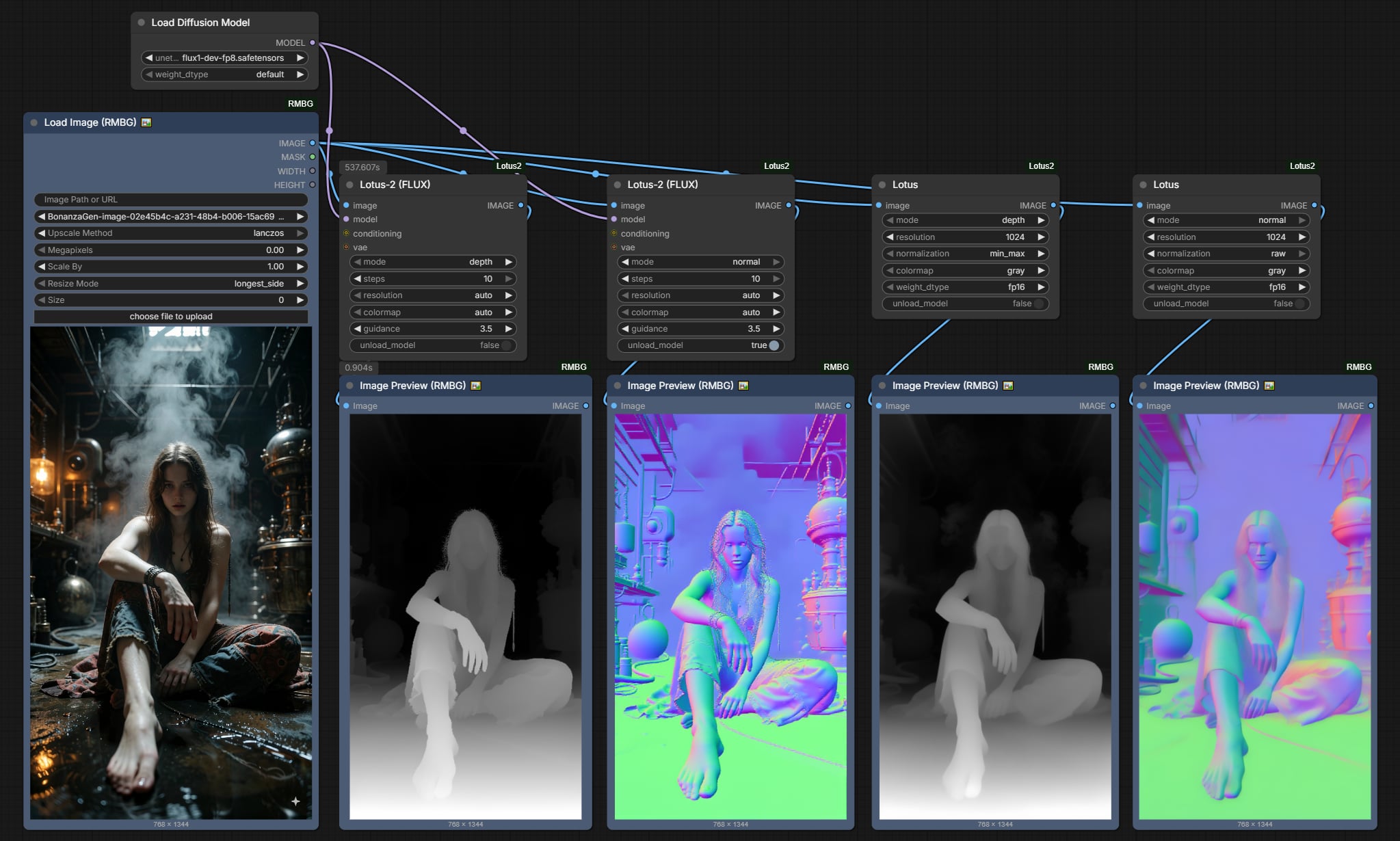 Unified under Category:
 🧪AILab/Geometry.
💡 Design Philosophy: Subtracting Clutter, Adding Intelligence
Traditional research implementations of Lotus-2 require dragging 5~7 nodes onto your canvas (Base Model Loader + Model LoRA Patcher + DualCLIPLoader + CLIPTextEncode("") + VAELoader + Sampler + Colorizer).
ComfyUI-Lotus-2 radically re-engineers this experience:
- 2 Wires Plug-and-Play: You only connect
imageandmodel. That's it! - Zero CLIP Clutter (Precomputed Empty Prompt): Built-in 2MB authentic FLUX empty-prompt vector (
flux_empty_embed.pt). No need to drag a 10GB T5 CLIP loader just to feed an empty string! - Automatic VAE Resolution: Detects and caches your local
ae.safetensorsin VRAM. Zero redundant VAE nodes required. - Smart
colormap: auto: Automatically outputs standard 3D Normal vectors when innormalmode, and ControlNet-ready grayscale depth when indepthmode. - Single
IMAGEOutput: No confusing duplicate RAW pins. One pin feeds directly into ControlNet, Preview, or Save nodes.
📊 Dual-Engine Comparison: Choose the Right Tool
| Feature | Lotus (SD2.1 Fast Engine) | Lotus-2 (FLUX) (SOTA Detail Engine) |
| :--- | :--- | :--- |
| Node Name | Lotus | Lotus-2 (FLUX) |
| Category | 🧪AILab/Geometry | 🧪AILab/Geometry |
| Base Architecture | Stable Diffusion 2.1 (UNet) | FLUX.1-dev (12B DiT) |
| Model Size | ~1.7 GB (self-contained) | Reuses existing FLUX model + 1.43GB LoRA |
| Typical Speed | ~1.5 seconds | ~13 seconds (1-step on GGUF / FP8) |
| VRAM Footprint | ~4 GB – 8 GB | Fits 8GB – 16GB with GGUF / FP8 |
| Best For | Real-time preview, video batches, ControlNet | Hairline micro-details, complex occlusion, PBR |
| Inputs Required | image | image, model |
🎯 Steps Guide: How Many Steps Should You Use?
Lotus-2 is a two-stage deterministic pipeline (Stage 1: Core Predictor + LCM; Stage 2: Detail Sharpener).
1. mode: depth (Disparity Depth Estimation)
- Recommended:
steps = 1(Instant Mode, ~13s on GGUF) - Stage 1 Core Predictor mathematically distills global physical disparity in a single forward pass.
- 99% of depth workflows (ControlNet Depth, 3D parallax, background defocus) achieve full production quality at
steps = 1. Running more steps provides negligible depth gain.
2. mode: normal (Surface Normal Vector Estimation)
- Smooth surfaces, vehicles, architecture, skin, furniture:
- Recommended:
steps = 1. Surfaces are smooth, clean, and instant.
- Recommended:
- Curly hair, fur, micro-textures, delicate lace:
- Recommended:
steps = 2 ~ 4. - Why? FLUX processes latents in $2 \times 2$ pixel patches. On ultra-high-frequency textures like wavy red hair, single-step inference can show faint patch grid lines. Setting
steps: 2 ~ 4activates the Stage 2 Detail Sharpener, which specifically smooths away patch grid boundaries and sharpens individual hair strands!
- Recommended:
🎨 colormap Guide: What Does auto Do?
| colormap Setting | In mode: depth | In mode: normal |
| :--- | :--- | :--- |
| auto (Default) | ControlNet-Ready Grayscale (Normalized 0~1: White = Near, Black = Far). | Standard 3D Surface Normal Map (RGB = XYZ direction vectors). |
| gray | Grayscale depth map. | Normal map. |
| spectral | Thermal rainbow heatmap (Red = Near, Yellow = Mid, Blue = Far). | Normal map. |
| turbo | High-contrast rainbow heatmap. | Normal map. |
📦 Installation
Clone into your ComfyUI custom_nodes directory:
cd ComfyUI/custom_nodes
git clone https://github.com/1038lab/ComfyUI-Lotus2.git
Clean Dependencies: Only standard PyTorch and ComfyUI built-in dependencies are required. Zero external bloat.
🚀 Quick Start Workflows
Minimal 2-Wire Setup:
- Add
Load Diffusion Model(orUnet Loader (GGUF)). Selectflux1-dev-fp8.safetensorsor GGUF (e.g.Q4_K/Q5_K). - Add
Lotus-2 (FLUX). - Connect:
model➔Lotus-2 (FLUX)image➔Lotus-2 (FLUX)
- Connect
IMAGEoutput toPreview ImageorApply ControlNet.
(Optional sockets for conditioning and vae are available if you wish to override defaults with custom inputs).
📁 Model Storage Directory
All weights are downloaded into standard ComfyUI directories (never polluting C: drive):
ComfyUI/models/geometry_estimation/
├── lotus-depth-g-v2-1-disparity-fp16.safetensors  (1.73 GB - Lotus 1 Depth)
├── lotus-normal-g-v1-1-fp16.safetensors          (1.73 GB - Lotus 1 Normal)
├── lotus-2_core_predictor_depth.safetensors      (1.43 GB - Lotus 2 Core Depth)
├── lotus-2_core_predictor_normal.safetensors     (1.43 GB - Lotus 2 Core Normal)
├── lotus-2_detail_sharpener_depth.safetensors    (1.43 GB - Lotus 2 Sharpener Depth)
├── lotus-2_detail_sharpener_normal.safetensors   (1.43 GB - Lotus 2 Sharpener Normal)
└── lotus-2_lcm_depth.safetensors                 (39 KB   - Lotus 2 LCM)
📜 Acknowledgements
- Lotus-2 Research (EnVision-Research / 1038lab): Original Lotus & Lotus-2 research papers and weights.
- Black Forest Labs: FLUX.1 base architecture.
- ComfyUI: Modular generative AI framework.