
ComfyUI-Depth-Anything-3
An all-in-one, ultra-fast ComfyUI custom node for Depth Anything 3 (DA3).
ComfyUI Depth Anything 3 (DA3)
<p align="center"> <img src="https://img.shields.io/badge/ComfyUI-Custom--Node-blue?style=for-the-badge&logo=comfyui" alt="ComfyUI"> <img src="https://img.shields.io/badge/Depth%20Anything-V3-orange?style=for-the-badge" alt="DA3"> <img src="https://img.shields.io/badge/PyTorch-%3E=2.0-red?style=for-the-badge&logo=pytorch" alt="PyTorch"> <img src="https://img.shields.io/badge/HuggingFace-Models-yellow?style=for-the-badge&logo=huggingface" alt="HuggingFace"> </p>English | 中文
An all-in-one, ultra-fast ComfyUI custom node for Depth Anything 3 (DA3) by ByteDance Seed. Designed specifically for generating temporally stable, geometrically accurate Depth Video Sequences and single-frame depth maps to guide modern AI Video Generation pipelines (such as Wan 2.1, CogVideoX, HunyuanVideo, Stable Video Diffusion, and ControlNet Depth).
News & Updates
- 2026/10/02: Initial Official Release of ComfyUI-Depth-Anything-3 v1.0.0 ( update.md )
- All-in-One DA3 Architecture: Seamless support for
small,base,mono_large, andmetric_largemodels with automatic Hugging Face downloading. - Pure PyTorch Vectorized Colormap (Zero Matplotlib): GPU-native LUT eliminates CPU-GPU transfers and accelerates video batch rendering.
- Temporal Consistency for Video: High-contrast, geometrically stable depth sequence output designed to guide video diffusion models (Wan 2.1, CogVideoX, HunyuanVideo, SVD, and ControlNet Depth).
- Ultra-Lean Dependencies: Only requires
huggingface_hub(pre-bundled in standard ComfyUI portable packages). - Optimized Memory Management: Enhanced cache cleanup across CUDA and Apple Silicon (MPS) with safe model unloading (
unload_model).
- All-in-One DA3 Architecture: Seamless support for
Why This Node? Supercharging AI Video Generation
Generating coherent video with AI models (e.g. Wan 2.1, CogVideoX, SVD) often suffers from critical spatial issues:
- Structural morphing: Limbs deform, faces melt, and objects shift unrealistically across frames.
- Spatial flickering & depth collapse: Backgrounds wobble and fail to maintain consistent perspective when cameras move.
- Lost edge boundaries: Thin structures like hair, fingers, branches, and poles blend into the background.
The Solution: Accurate Depth Maps as 3D Structural Anchors
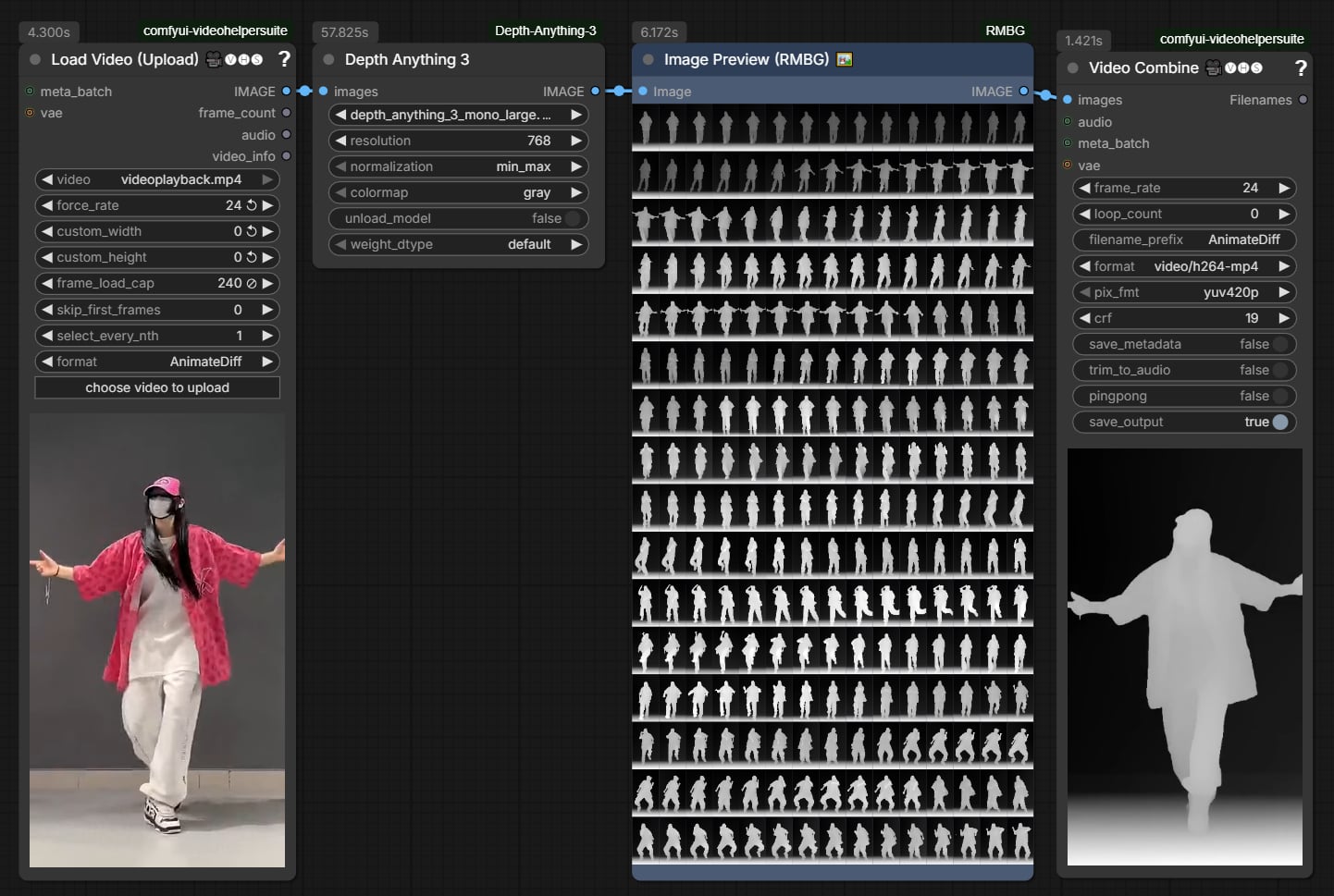
By passing video frames through this node, you obtain a temporally consistent, high-contrast Depth Video Sequence:
- Precise 3D Geometry: Locks down object bounds, character silhouettes, and true depth planes.
- Rock-Solid Camera Motion: Provides rigid geometric conditioning for Depth-to-Video models, eliminating background warping.
- Streamlined One-Node Experience: No need to chain separate loaders, preprocessors, and renderers. Plug your video in, select a model, and get your depth stream ready for generation!
Model Comparison: Why Depth Anything 3?
Depth Anything 3 marks a fundamental paradigm shift from previous disparity-based depth models:
| Feature | Depth Anything V1 / V2 | Video-Depth-Anything | Depth Anything 3 (DA3) |
| :--- | :---: | :---: | :---: |
| Depth Representation | Disparity (Inverse Depth) | Disparity + Temporal Conv | Unified Depth-Ray (True Metric & Relative) |
| Physical Geometry | Prone to non-linear distortion | Moderate distortion | True Euclidean depth with natural perspective |
| Edge & Thin Structures | Blurry around hair & fingers | Moderate blurring | Razor-sharp edge preservation |
| Model Footprint | Large (>300M) | Heavy (Multi-component) | Small (80M) / Base (120M) ultra-lightweight |
| Auto-Download | Manual download needed | Manual download needed | 100% Automatic Hugging Face integration |
| ComfyUI Integration | Multi-node pipeline | Multi-node pipeline | Single all-in-one node (IMAGE in, IMAGE out) |
Model Zoo & Selection Guide
All models are automatically downloaded on first run from 1038lab/Depth-Anything-3 directly into ComfyUI/models/geometry_estimation/.
| Model (model) | Parameters | VRAM Footprint | Inference Speed | Recommended Application |
| :--- | :---: | :---: | :---: | :--- |
| depth_anything_3_small.safetensors | 0.08B | ~2.8 GB | Ultra Fast | Ideal for long video batches, real-time preview, and low-VRAM GPUs. |
| depth_anything_3_base.safetensors | 0.12B | ~3.6 GB | Fast | Best everyday balance of speed, low VRAM, and geometric fidelity. |
| depth_anything_3_mono_large.safetensors | 0.35B | ~5.5 GB | Standard | Top Recommendation for Video Generation Guiding: Maximum detail on silhouettes, complex textures, and facial features. |
| depth_anything_3_metric_large.safetensors | 0.35B | ~5.5 GB | Standard | True Real-World Metric Units (meters): Essential for 3D reconstruction, VFX compositing, and camera tracking. |
Node Parameters Explained
The node is built with simple, intuitive terms and built-in interactive tooltips for every parameter:
| Parameter | Type | Default | Options | What it does (Plain English) |
| :--- | :---: | :---: | :---: | :--- |
| images | IMAGE | Required | Image / Video frames | The input video frame batch or single image. Connect directly from Load Video (e.g. VHS Video Helper Suite) or Load Image. |
| model | COMBO | small | Small / Base / Mono-Large / Metric-Large | Which DA3 model to run. Auto-downloads from Hugging Face if not found on your machine. |
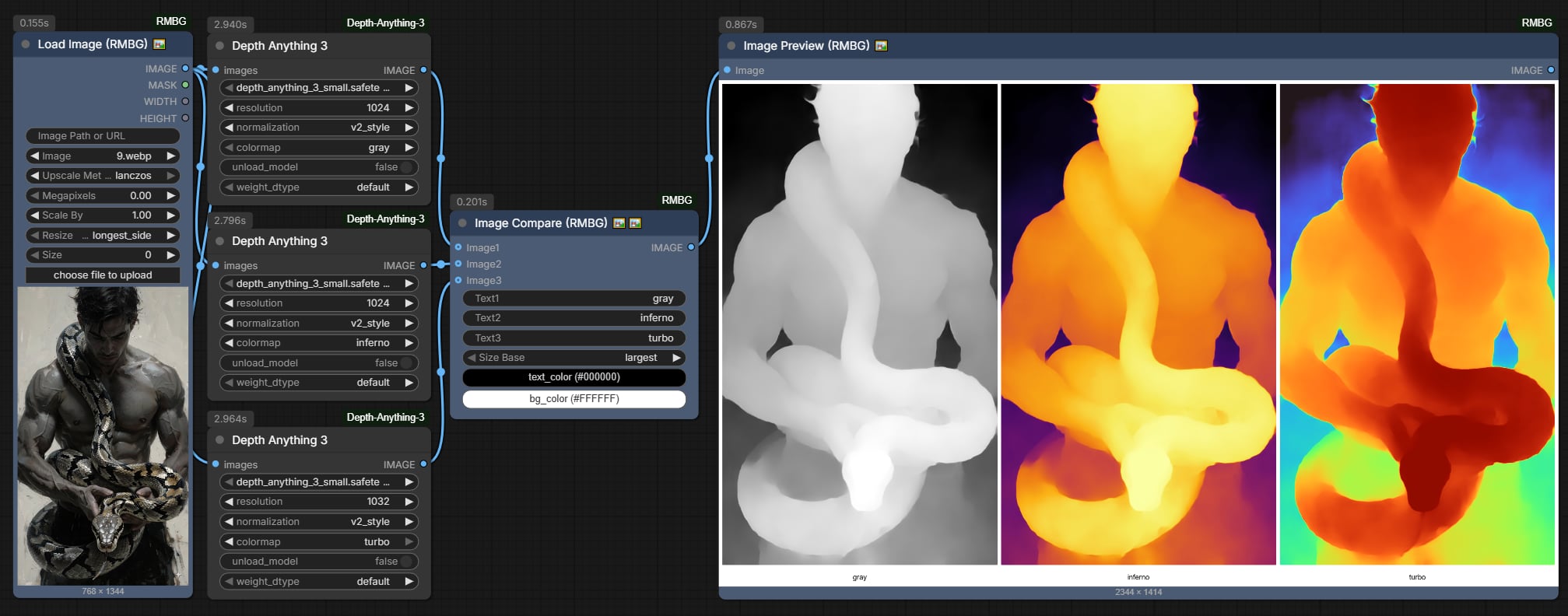
| resolution | INT | 504 | 140 ~ 2520 (step 14) | Internal processing size (longest side). 504 is fast and lightweight. Increase to 756 or 1008 for finer edge details. |
| normalization | COMBO | min_max | min_max, v2_style, raw | Depth normalization mode:<br>• min_max: Standard 0–1 depth (White=Near, Black=Far). Always use this for AI Video Generation & ControlNet!<br>• v2_style: Enhanced perceptual contrast with sky suppression.<br>• raw: Preserves physical unscaled depth numbers. |
| colormap | COMBO | gray | gray, inferno, turbo | Visual color style:<br>• gray: Standard grayscale. Required for Video Gen, ControlNet, and Depth-to-Video.<br>• inferno: Orange-purple heatmap for human inspection.<br>• turbo: Rainbow spectrum preview. |
| unload_model | BOOLEAN | False | True / False | Memory management: Unloads the DA3 model and cleans VRAM caches immediately after execution. Highly recommended when chaining into heavy video generation models (Wan 2.1, CogVideoX, HunyuanVideo). |
| weight_dtype | COMBO | default | default, fp16, bf16, fp32 | Calculation precision:<br>• fp16: Recommended for Nvidia GPUs (cuts VRAM in half and runs much faster).<br>• bf16: Best for RTX 30xx/40xx series.<br>• fp32: Full precision. |
Output:
IMAGE: Standard ComfyUI image batch containing depth frames matching the exact frame count, aspect ratio, and timing of your input. Connect directly toVideo Combine,Preview Image, or your video generation model.
Quick-Start Settings for Beginners
For the best results with Video-to-Video or Depth-to-Video generation:
model:depth_anything_3_mono_large.safetensors(for maximum detail) ordepth_anything_3_small.safetensors(for fast iterations)resolution:504(or756for 1080p source)normalization:min_maxcolormap:grayweight_dtype:fp16
Installation
Clone this repository into your ComfyUI custom_nodes folder:
cd ComfyUI/custom_nodes
git clone https://github.com/1038lab/ComfyUI-Depth-Anything-3.git
If using a portable or custom Python environment, install required dependencies:
pip install -r requirements.txt
(Standard ComfyUI portable packages already include all required libraries)
Restart ComfyUI and search for Depth Anything 3 in your node menu.
Workflows
Ready-to-use ComfyUI workflow JSON files are available in the example_workflows/ directory:
DA3_depthmap.json: Single image depth extraction and visualization workflow.DA3_video_depth.json: High-contrast, temporally consistent video depth sequence extraction workflow for video diffusion models.
If this custom node helps you or you like my work, please give me ⭐ on this repo! It's a great encouragement for my efforts!
License & Acknowledgments
- Depth Anything 3 architecture & weights developed by ByteDance Seed.
- Safetensors model checkpoints hosted by 1038lab.
- Model Licensed under the Apache 2.0 License.
- GPL-3.0 License