
ComfyUI Extension
ComfyUI-Blip
A lightweight and high-speed ComfyUI custom node for generating image captions using BLIP models. Optimized for both GPU and CPU environments to deliver fast and efficient caption generation.
1038lab/ComfyUI-Blip
Nodes—
On cloudLocal install
Stars13
Updatedabout a year ago
Readme
ComfyUI-Blip
A lightweight and high-speed ComfyUI custom node for generating image captions using BLIP models. Optimized for both GPU and CPU environments to deliver fast and efficient caption generation.
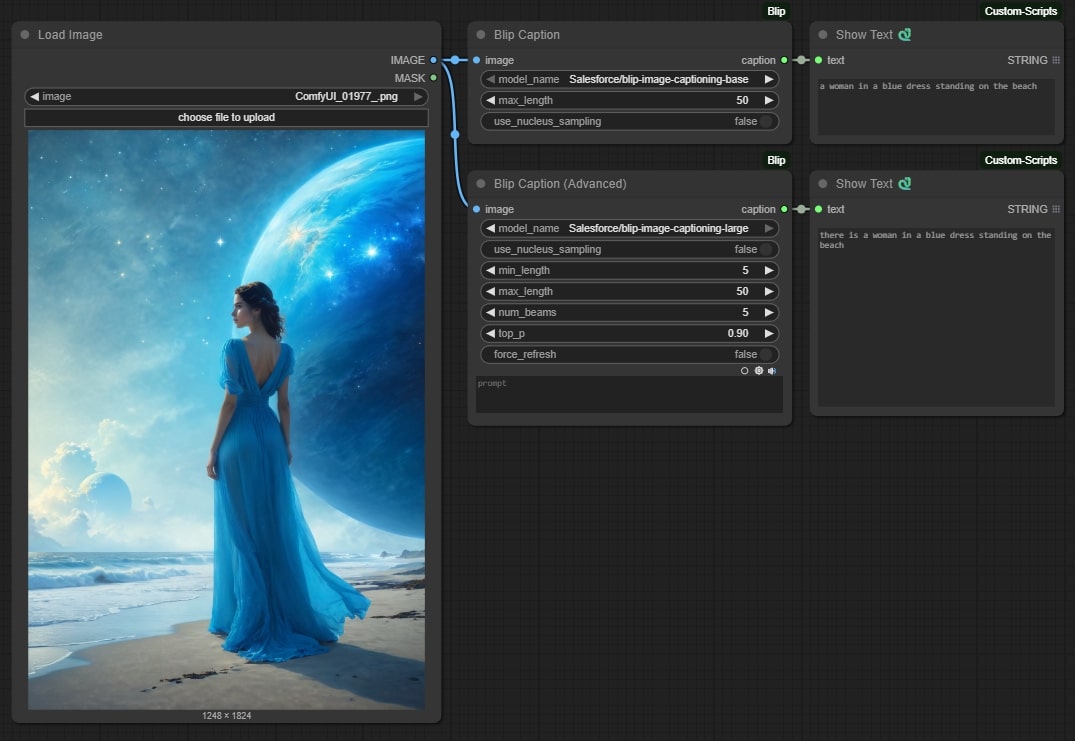
Features
- Generate captions for images using BLIP models
- Support for both base and large BLIP models
- Simple and advanced captioning options
- Automatic model downloading and caching
- High performance on both GPU and CPU
Installation
- Navigate to your ComfyUI custom nodes directory:
cd ComfyUI/custom_nodes/
- Clone this repository:
git clone https://github.com/1038lab/ComfyUI-Blip.git
- Install required dependencies:
pip install -r requirements.txt
Manual Model Download
If automatic download fails, you can manually download the models:
- Base model:
https://huggingface.co/Salesforce/blip-image-captioning-base/tree/main
- Large model:
https://huggingface.co/Salesforce/blip-image-captioning-large/tree/main
Download the following files and place them in the corresponding directories:
pytorch_model.binconfig.jsonpreprocessor_config.jsonspecial_tokens_map.jsontokenizer_config.jsontokenizer.jsonvocab.txt
Usage in ComfyUI
Basic Node
- Add the "Blip Caption" node to your workflow
- Connect an image input to the node
- Configure the following parameters:
model_name: Choose between base (faster) or large (more detailed) BLIP modelmax_length: Maximum length of the generated caption (1-100)use_nucleus_sampling: Enable for more creative captions
Advanced Node
- Add the "Blip Caption (Advanced)" node to your workflow
- Connect an image input to the node
- Configure the following parameters:
- All basic node parameters
min_length: Minimum caption lengthnum_beams: Number of beams for beam searchtop_p: Top-p value for nucleus samplingforce_refresh: Force reload model from disk
License
This repository's code is released under the GPL-3.0 License. - see the LICENSE file for details.