
ComfyUI-Agnes-AI
ComfyUI custom nodes for the Agnes AI API — a free, cloud-based AI generation platform. Generate images, create videos, enhance prompts, and analyze visuals — all without a local GPU. Zero extra Python dependencies.
Nodes (3)
ComfyUI Agnes-AI
ComfyUI custom nodes for the Agnes AI API — a free, cloud-based AI generation platform. Generate images, create videos, enhance prompts, and analyze visuals — all without a local GPU. Zero extra Python dependencies.
News & Updates
- 2026/09/17: Update ComfyUI-Agnes-AI to v1.2.1 ( updates.md )
- Enabled HTTPS certificate verification by default; fixed API key management in Settings Panel.
- 2026/09/15: Update ComfyUI-Agnes-AI to v1.2.0 ( updates.md )
- Upgraded to next-gen Agnes AI models:
agnes-3.0-flash,agnes-image-2.5-flash, andagnes-video-2.5-flash. - Dynamic Input Slots: Nodes start clean with a single input point (
image_0,ref_image_0,ref_audio_0) and automatically add new slots as you connect wires. - Zero Required Ports: All media connection points are fully optional; text-to-image and text-to-video work with prompt alone.
- Comprehensive Video Resolutions: Added
480P,720P,1080P,1K, and2Koptions with automatic Flash 720P safeguard. - Reference Video Support: Added dedicated
ref_videoinput foragnes-video-2.5standard model. - Native Progress & Interruption: Integrated ComfyUI real-time progress bar and instant cancellation.
- Upgraded to next-gen Agnes AI models:
- 2026/07/29: Update ComfyUI-Agnes-AI to v1.1.0 ( updates.md )
v1.0.0
Initial release with Agnes-AI Image, Video, Text, and Config nodes.
Why Agnes AI?
| | | |---|---| | Free | No token billing, no credit system — get a key and use it | | No GPU needed | All computation runs on Agnes servers, your ComfyUI stays lightweight | | One API, many models | Image gen, video gen, chat, vision — all through a single key | | Dynamic Input Slots | Clean initial nodes that automatically add slots as you connect wires | | Multi-modal Reference| Up to 5 images, 3 audio tracks, and 1 video reference for video generation | | Smart text presets | Prompt enhancement, translation, art style extraction, image description |
Get a free API key: platform.agnes-ai.com
Features
- Image Generation (
agnes-image-2.5-flash) — Text2img / img2img with ComfyUI 3.0 Autogrow reference images (starts withimage_0, up to 4 images). Auto-detects mode based on inputs. 1K / 2K / 3K / 4K resolution. - Video Generation (
agnes-video-2.5-flash/agnes-video-2.5) — Text-to-video, image-to-video, first-and-last-frame animation, and multimodal reference (up to 5 images, 3 audios, 1 video). 480P–2K resolution tiers with Flash auto-safeguard, real-time progress bar, and frame/audio extraction. - Prompt Enhancement (
agnes-3.0-flash) — 4 built-in presets: enhance, translate, extract art style, describe image. 512K context with multimodal support. - Settings Panel — Configure API key, select default models, all from ComfyUI's built-in Settings Panel. Supports multiple backup keys with automatic failover.
Installation
Method 1: ComfyUI-Manager
Search Agnes-AI in ComfyUI-Manager and install.
Method 2: Git Clone
cd ComfyUI/custom_nodes
git clone https://github.com/1038lab/ComfyUI-Agnes-AI
Restart ComfyUI.
Method 3: Manual Install
Download the latest release, extract to ComfyUI/custom_nodes/ComfyUI-Agnes-AI/, restart ComfyUI.
No pip install needed — zero additional dependencies.
API Key Setup
Open ComfyUI Settings (⚙️ gear icon) → search "Agnes-AI" → enter your API key.
- Supports multiple backup keys (one per line or comma-separated) with automatic failover
- Alternatively, set the
AGNES_API_KEYenvironment variable - Key is saved to
agnes_config.jsonand persists across restarts
Priority: env var (AGNES_API_KEY) > saved config (Settings Panel).
Nodes
🖼️ Agnes-AI Image
Generate images from text, or compose new images from up to 4 reference images with agnes-image-2.5-flash.
- Starts cleanly showing only
image_0; automatically adds next slots as images are connected. - Auto-detects text2img (no images connected) vs img2img (images connected).
- When images are connected without a text prompt, automatically defaults to merging them into a cohesive composition.
- Supports 1K / 2K / 3K / 4K with configurable aspect ratios. All connection points are optional.
🎬 Agnes-AI Video
Powered by agnes-video-2.5-flash (and agnes-video-2.5 / agnes-video-v2.0). Four generation modes:
- Text To Video — generate video purely from prompt (no inputs required)
- Image To Video — animate starting from
first_image - First and Last frame — interpolate smoothly between
first_imageandend_frame - Reference (Images/Audio/Video) — generate video using multi-image, audio, and video reference materials
Inputs (All Connection Points Optional):
- mode —
Text To Video,Image To Video,First and Last frame,Reference (Images/Audio/Video). - prompt — Description of the video to generate.
- quality —
480P,720P,1080P,1K,2K. (Note: Flash model automatically downgrades to 720P per official specification). - aspect_ratio —
auto,16:9,9:16,1:1,4:3,3:4,21:9. - duration (4–12s), seed.
- first_image — Start frame or primary reference image.
- end_frame — End frame for keyframe mode.
- ref_image_0 — Reference image slot (Autogrow: starts with
ref_image_0, expands up to 5 images as connected). - ref_audio_0 — Reference audio track slot (Autogrow: starts with
ref_audio_0, expands up to 3 tracks as connected). - ref_video — Reference video input (supported on standard
agnes-video-2.5).
Outputs:
- video — Generated video file path.
- last_frame — Automatically extracted last frame of the video (
IMAGE). - frames — Full sequence of extracted video frames as a batched
IMAGEtensor (requires localffmpeg). - audio — Extracted audio track as a standard ComfyUI
AUDIOwaveform (requires localffmpeg).
✏️ Agnes-AI Text
Powered by agnes-3.0-flash. Process prompts through 8 built-in production presets:
| Preset | Needs Image | Use Case | |--------|:-----------:|----------| | Prompt Enhance | No | Expand brief prompts with vivid visual context | | Translate to English | No | Translate prompts while preserving visual details | | Script Writing | No | Structured short film/video scripts (3–5 scenes) with dialogue & action | | Storyboard Creation | No | Cinematic shot breakdown with shot sizes, camera motion, framing & audio | | Image Detailed Description | Yes | Generate detailed AI-ready prompts from images | | Image Analysis | Yes | Structured 6-dimension visual critique, quality score & suggestions | | Extract Art Style from Image | Yes | Analyze artistic style from a reference image | | Image Edit Prompt | No (Optional) | Modular edit analysis producing unified prompts for diffusion edit models |
Extensible Presets:
All presets are externalized in presets/styles.json. You can customize them or drop any .json / .md preset files into the presets/ folder for automatic loading. Custom system prompt overrides are also supported on the node.
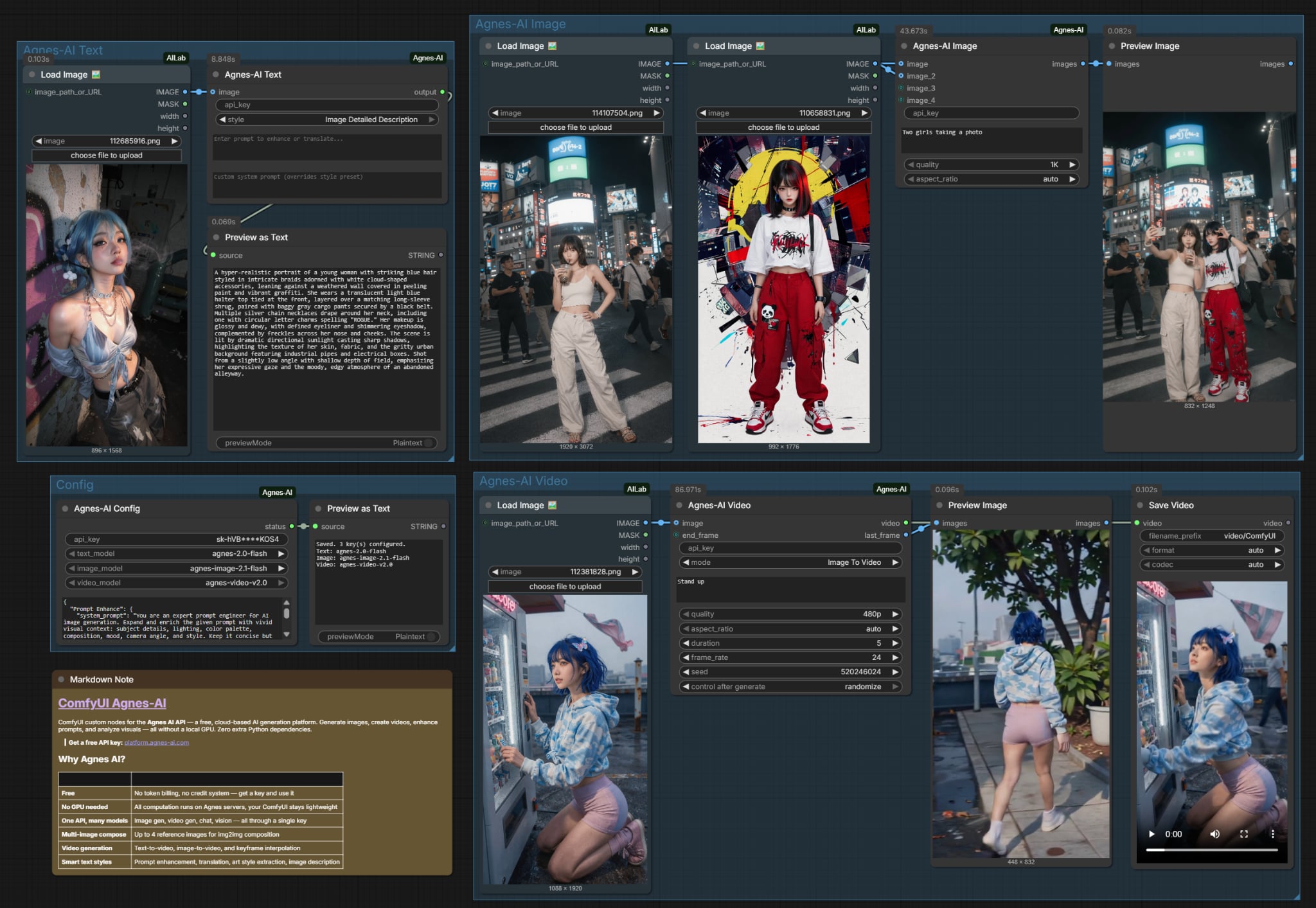
Example Workflows
Ready-to-use workflows are available in the example_workflows directory:
-
01_Text_to_Image_and_Fusion.json — Text-to-image generation and multi-image fusion with
Agnes-AI Image. <img src="example_workflows/01_Text_to_Image_and_Fusion.jpg" width="350" > -
02_Text_and_Image_to_Video.json — Text-to-video and start-frame keyframe animation with
Agnes-AI Video. <img src="example_workflows/02_Text_and_Image_to_Video.jpg" width="350" > -
03_Prompt_Enhance_and_Vision.json — Prompt expansion and image reverse-prompt description with
<img src="example_workflows/03_Prompt_Enhance_and_Vision.jpg" width="350" >Agnes-AI Text.
Simply drag and drop any of these .json files into ComfyUI to get started immediately!
Credits
- Agnes AI — Free API and model infrastructure. Get your key at platform.agnes-ai.com
- Created by AILab
License
GPL-3.0
If this custom node helps you, please ⭐ the repo!