
ComfyUI-OOP
ComfyUI Node to create Object-Oriented Prompts
Nodes (12)
A wolf, purple, playing — one node instead of a tag battle
Top, bottom and two colors — dress your character without tag surgery
Time of day and weather as two dropdowns — mood, without the guesswork
Eye shape and color from clean dropdowns — no more hazel vs. hazle
Hair color and style as dropdowns, not a 40-word tag gamble
Put your scene somewhere and drop one object in it — from dropdowns
Mouth shape, size and openness as enums — expression without the typos
The node that turns the whole OOP prompt into actual conditioning
The character sheet node — bundle gender, age, body and all your OOP parts
Stop typing pose prompts — pick body, hands and legs from dropdowns
Stack two art styles from dropdowns — PhotoRAW, meet Cyberpunk
Camera angle, shot type and bokeh in one node — framing without the guesswork
ComfyUI-OOP
Object-Oriented Prompting nodes for ComfyUI — build rich, structured, reproducible prompts from modular attribute nodes, then encode them into conditioning for your workflow.

ComfyUI-OOP turns prompt building into a composable graph: pick or randomize attributes (person, style, camera, lighting, scene, and more), assemble them into a clean key:value prompt, and feed the result into any compatible text encoder/conditioning pipeline.
✨ Example
Generated with ComfyUI-OOP (Krea 2 Turbo workflow):
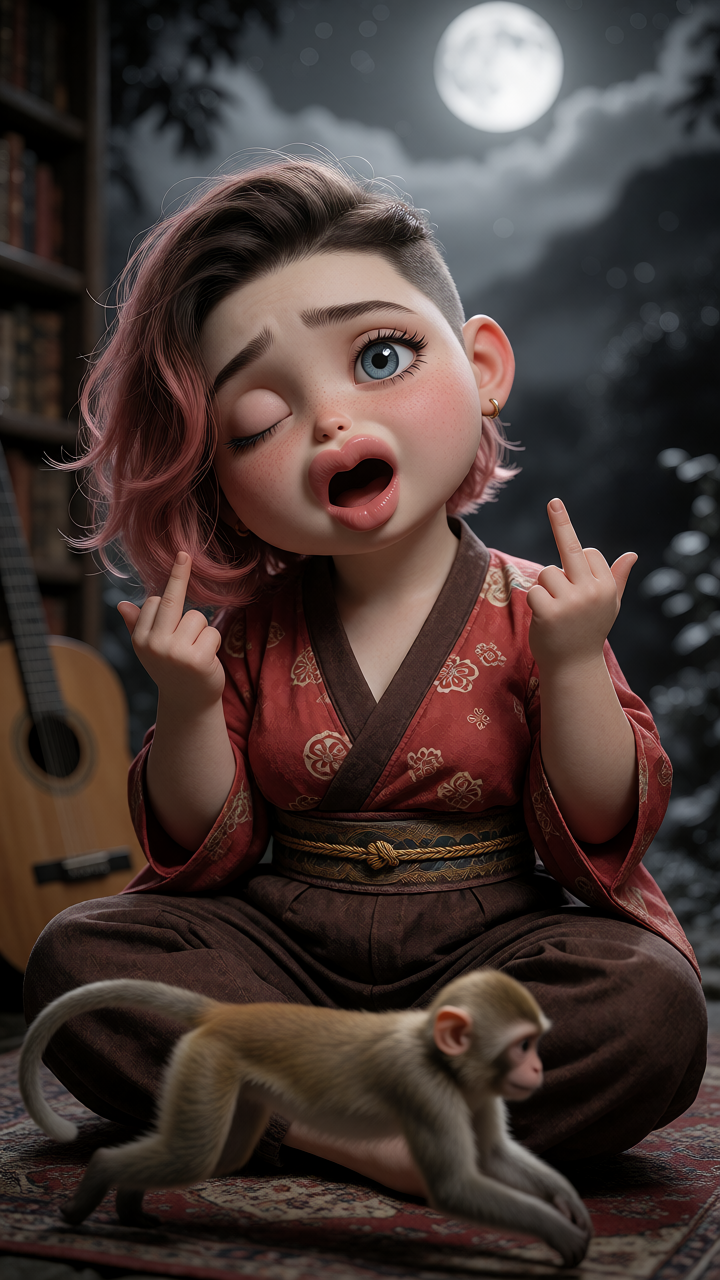
Style: base_style:Surrealist, second_style:Watercolor
Perspective: shot:Portrait, angle:EyeLevel, background:Blur
Person:
*  BodyShape: Chubby
*  Gender: Female
*  Age: 20-29 Years
*  Ethnicity: Latino
*  Hair: color:Rose Brown, style:Undercut
*  Eyes: shape:Round, color:Blue
*  Mouth: shape:Heart, size:Large, opening:Wide
*  Expression: emotion:Sad, intensity:Mild, gaze:ClosedEyes
*  Clothes: top_garment:Kimono, top_color:Red, bottom_garment:Trousers, bottom_color:Brown
*  Poses: body:HeadTilt, hands:MiddleFinger, legs:IndianStyle
Animal: type:Monkey, color:Beige, action:Galloping
Location: location:Library, object:Guitar
Environment: time:Morning, mood:FullMoon
Lighting: type:Soft, direction:Top, intensity:Dim
Background: setting:Outdoor, detail:Bokeh, color_mood:Monochrome
Highlights
- Modular prompt building: compose prompts from focused nodes instead of one giant text box
- Structured output: readable, labeled sections (
Style,Perspective,Person,Animal,Location,Environment,Lighting,Background) - Person aggregation: nest character details (hair, eyes, mouth, expression, clothing, pose, etc.) under a single
Personblock - Randomize controls: many nodes can redraw values per run for fast exploration
- Model-agnostic assembly:
OOP Nodeencodes with the connected CLIP/text encoder and works across common model stacks (SD1.5/SDXL/Flux-family/Krea-style pipelines, depending on your setup) - Optional by design: blank values (
" ") and disconnected sections are omitted cleanly from the final prompt - Krea 2 sample workflow: includes a real Krea 2 Turbo–oriented demo graph with clean node bundles
Included nodes
| Node | Purpose | Output / Section |
|---|---|---|
| OOP Style 🎨 | Base/secondary visual style (+ randomize) | Style: |
| OOP View 📐 | Shot type, camera angle, background blur (+ randomize) | Perspective: |
| OOP Person 👤 | Aggregates person attributes into a bullet block | Person: |
| OOP Hair 🦰 | Hair style and primary/secondary colors (+ randomize) | Person > Hair |
| OOP Eyes 👀 | Eye shape and color (+ randomize) | Person > Eyes |
| OOP Mouth 👄 | Mouth shape, size, opening (+ randomize) | Person > Mouth |
| OOP Expression 🙂 | Emotion, intensity, gaze (+ randomize) | Person > Expression |
| OOP Clothing 🥼 | Top/bottom garment types and colors (+ randomize) | Person > Clothes |
| OOP Pose 🧍 | Body, hand, and leg pose (+ randomize) | Person > Poses |
| OOP Animal 🐾 | Animal type, color, action (+ randomize) | Animal: |
| OOP Location 🌍 | Scene location and key object (+ randomize) | Location: |
| OOP Environment ⛅ | Time of day and mood (+ randomize) | Environment: |
| OOP Lighting 💡 | Light type, direction, intensity (+ randomize) | Lighting: |
| OOP Background 🖼️ | Background setting, detail, color mood (+ randomize) | Background: |
| OOP Node 💫 | Assembles all connected sections and encodes conditioning | CONDITIONING + STRING |
How it works
- Leaf nodes emit
key:valuepairs (joined with,, in fixed field order). OOPPersonNodecollects person sub-sections and formats them as bullet lines:* Hair: ...* Expression: ...(optional)
OOPNodeprefixes connected sections with labels and joins them with newlines to produce the final prompt, then encodes it via the connectedCLIP.- Blank values use a single-space sentinel (
" ") and are omitted from output; if a section becomes empty, it is dropped.
Prompt format notes
- Section labels used by
OOPNode:Style,Perspective,Person,Animal,Location,Environment,Lighting,Background OOPNode.clip_skipdefaults to0(keep the layer loaded by the checkpoint/model). Set a negative value only when you intentionally want to re-encode from a specific CLIP layer.- All section inputs are optional — connect only what you need.
Sample workflow
A demo workflow is included at:
workflow/ComfyUIOOP.json
The provided sample is arranged with clean node bundles (model bundle, OOP scene/person builders, prompt assembly, sampling/decode/save) and is oriented around a Krea 2 Turbo text-to-image setup while showcasing the OOP nodes and the new Expression, Lighting, and Background sections.
Workflow dependencies
OOP nodes themselves: no extra Python dependencies beyond ComfyUI.
Demo workflow may use nodes outside this package:
| Node in demo graph | Source | Notes |
|---|---|---|
| ShowText|pysssss | comfyui-custom-scripts (ComfyUI Manager / Registry) | Optional prompt preview; remove/replace if not installed |
| UNETLoader, CLIPLoader, VAELoader, LoraLoaderModelOnly, ModelSamplingFlux, CFGGuider, SamplerCustomAdvanced, KSamplerSelect, BasicScheduler, RandomNoise, EmptyLatentImage, VAEDecode, SaveImage, ConditioningZeroOut | Core ComfyUI | Required for the included Krea 2 sample pipeline |
Krea 2 model files (for the included sample workflow)
Place the referenced files in your ComfyUI model folders (filenames can be adjusted in the loader nodes):
diffusion_models/krea2_turbo_int8_convrot.safetensorstext_encoders/qwen3vl_4b_fp8_scaled.safetensors(CLIP type:krea2)vae/qwen_image_vae.safetensorsloras/krea2_style_reference.safetensors(optional, strength1.0in sample)
Installation
ComfyUI Manager
Install/search for ComfyUI-OOP (if available in your manager index), then restart ComfyUI.
Manual install
cd ComfyUI/custom_nodes
git clone https://github.com/0xRavenBlack/ComfyUI-OOP
License
This project is licensed under the MIT License - see the LICENSE file for details.
MIT — see LICENSE.