
ComfyUI-SocialMediaExport
A ComfyUI output node that takes a full-quality master image (any resolution, any aspect ratio) and emits platform-ready derivatives with the minimum possible cropping and a controlled, high-fidelity encode.
ComfyUI · SocialMediaExport
[!IMPORTANT] This repository is no longer maintained. This node has been ported to ComfyUI-BCNodes and all further development happens there. Install that pack instead of this one.
| Node here | Node in BCNodes | | --- | --- | |
SocialMediaExport|BC_SocialMediaExport|The registration key changes, so a workflow saved against this pack has to be re-wired to the
BC_node once. Everything below is kept for reference only; no fixes or new features will land here.
A ComfyUI output node that takes a full-quality master image (any resolution, any aspect ratio) and emits platform-ready derivatives with the minimum possible cropping and a controlled, high-fidelity encode.
It is a parallel export node. It does not replace or touch your normal master-save node — wire your master image into both. Your saver keeps the archival file with full provenance; this node produces the third-party-facing derivatives.
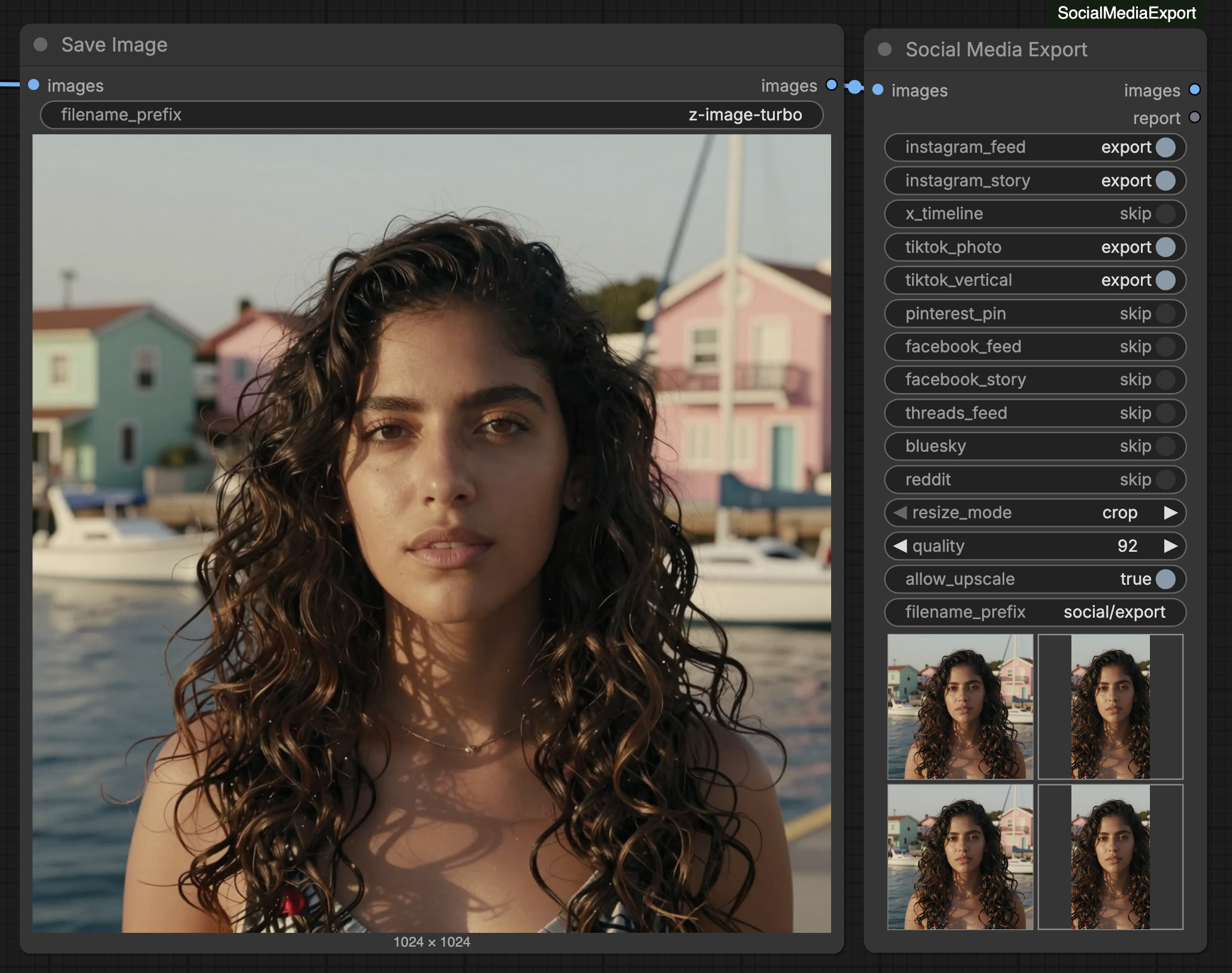
The whole point: make the platform do as little as possible to your image. When you upload a raw, oversized, wrong-shaped file, the platform runs it through its own pipeline — aggressive re-compression, downscaling, cropping, and quality reduction you don't control. By handing each platform a file that already matches its aspect ratio, pixel size, colour space, and byte budget, there is nothing left for it to "fix" — so it serves your image (nearly) untouched instead of degrading it.
                       ┌─────────────────────┐
   master IMAGE ──┬───▶│  Save Image (yours) │──▶ archival master (+ metadata)
                  │     └─────────────────────┘
                  │     ┌─────────────────────┐
                  └────▶│  Social Media Export│──▶ output/social/…_instagram_feed_00001_.jpg
                        │  ☑ ig  ☑ x  ☐ …    │──▶ output/social/…_x_timeline_00001_.jpg
                        └─────────────────────┘──▶ report (STRING) + IMAGE passthrough
Why another "social preset" node?
Every existing social-preset node forces the image to a fixed WxH, which crops far more than necessary. Platforms actually accept a range of aspect ratios inside a pixel envelope. This node treats each platform as an aspect-ratio band:
- If your master's aspect ratio already falls inside the band → zero crop, scale only.
- If it falls outside → crop the minimum amount on a single axis to reach the nearest band edge. Never crop to a preset.
resize_mode — how a mismatched shape is handled
A 16:9 landscape master targeted at a 9:16 story can't keep every pixel and fill the frame. One simple choice decides which you'd rather give up — the node never errors or blocks the graph:
| resize_mode | behaviour |
|---|---|
| crop (default) | Trim the edges (minimum amount, on a single axis) to fill the platform's shape. No bars; a little of the image may be cut. |
| pad | Do not crop. Fit the whole frame centered onto a blurred, cover-scaled copy of itself (Gaussian radius ≈ 4% of target width). Nothing is cut; soft bars are added, never flat black. |
If your master's aspect ratio already falls inside a platform's band, no crop or pad happens either way — the node just scales.
Install
cd ComfyUI/custom_nodes
git clone https://github.com/0xbeycan/ComfyUI-SocialMediaExport
# Pillow is the only dependency and ships with ComfyUI. If needed:
# pip install "Pillow>=9.5.0"
Restart ComfyUI. The node appears as Social Media Export under
image/social.
Inputs
| input | type | default | notes |
|---|---|---|---|
| images | IMAGE | — | Master image(s). Batches are handled per-image. |
| per-platform checkboxes | BOOLEAN | instagram_feed, instagram_story on | One export/skip toggle per platform, auto-generated from social_specs.json. Tick the platforms you want. |
| resize_mode | crop/pad | crop | How to match a platform's shape — see the table above. |
| quality | INT | 92 | Starting JPEG/WebP quality (1–100). |
| allow_upscale | BOOLEAN | False | Allow scaling up toward the envelope / min_w. |
| filename_prefix | STRING | social/export | Standard ComfyUI prefix; subfolders are created. |
Always-on (not exposed as widgets), because they are simply the best-quality
choice: 4:4:4 chroma (subsampling=0), progressive JPEG, and a slightly
top-weighted crop anchor (0.4) that keeps faces in portrait crops.
Outputs
images(IMAGE) — the input, passed through untouched (chain it onward).report(STRING) — one aligned line per (image, platform): input dims → crop dims → output dims, crop %, strategy applied, final quality, and file size. This is the debugging surface.
  #  platform               input ->        crop ->      output   crop%  mode  qual fmt       size  notes
  0  instagram_feed     3840x2160 ->   3840x2160 ->    1440x810    0.0%  scale q92  jpg    184.0KB
  0  instagram_story    3840x2160 ->   3840x2160 ->   1080x1920    0.0%  pad   q92  jpg    223.0KB  letterboxed (blurred bg), no crop
  0  bluesky            3840x2160 ->   3840x2160 ->   2000x1125    0.0%  scale q92  jpg    348.8KB
Selecting no platform raises immediately, asking you to tick at least one.
Encode
Verified against Pillow (12.x). These behaviours are deliberate:
- 4:4:4 chroma. Pillow writes 4:2:0 subsampling at every quality level
(including 100) unless
subsampling=0is passed. Withchroma_444on, it is. - sRGB ICC profile (588 bytes) is built once at import and embedded via
icc_profile=. - Metadata is stripped. Files are built from pixels only — no workflow/prompt EXIF or PNG chunks reach the third-party derivative. (Your master saver keeps provenance.)
- JPEG:
quality,subsampling=0(when 4:4:4),optimize=True,progressive,icc_profile. WebP:quality,method=6,icc_profile. - Resampling is LANCZOS; downscale-only unless
allow_upscale. - Byte caps. If a platform sets
max_bytesand the encode exceeds it, quality steps down in increments of 5 (floor 70) until it fits. The final quality is recorded in the report; if it still cannot fit at the floor, the line is flagged (>max_bytes …) — never silently exceeded.
Note:
optimize/progressiveJPEG encoding of large frames requires a large output buffer or libjpeg raises "Suspension not allowed here". The node raises Pillow'sImageFile.MAXBLOCKto cover each frame, so 4K masters encode fine.
Specs are data, not code
Platform requirements live in social_specs.json, loaded
fresh on every execution — edit the file and the next run picks it up, no
ComfyUI restart. Keys beginning with _ (e.g. _comment, _schema) are
metadata and are ignored (not selectable platforms).
Schema per platform:
"instagram_feed": {
  "ar_min": 0.8, "ar_max": 1.91,
  "max_w": 1440, "max_h": 1800,
  "min_w": 1080,
  "format": "jpg",
  "max_bytes": 8388608,
  "_source": "https://developers.facebook.com/…",
  "_verified": "2026-07-23"
}
min_w and max_bytes are optional. A single-point band (ar_min == ar_max,
e.g. 9:16 stories) means "this is a fixed format — crop/pad everything to it".
Verification status
Every number was checked against the platform's own developer/help
documentation where reachable. Values that could not be confirmed from an
official page are marked below and carry a _note (and _source: "UNVERIFIED"
where the core geometry is a guess).
| platform | AR band | dims | byte cap | status |
|---|---|---|---|---|
| instagram_feed | ✅ 4:5–1.91:1 | ✅ w 320–1440 | ✅ 8 MB | Verified — Instagram Graph API media reference |
| instagram_story | ✅ 9:16 | ✅ 1080×1920 | ➖ reuses IG 8 MB | Verified — Meta reel/story 9:16 |
| x_timeline | ✅ 3:4–2:1 "display in full" | ⚠️ est. 2048 | ⚠️ est. 5 MB | AR + formats verified; dims/bytes estimated (dev media pages returned HTTP 402/403) |
| tiktok_photo | ✅ 1/2.2–2.2 | ⚠️ est. 1080×1920 | — none | AR verified (Content Posting API); dims estimated |
| pinterest_pin | ✅ 2:4.2–2:3 | ✅ 1000×1500 | ✅ 20 MB | Verified — Pin specs + truncation rule |
| facebook_feed | ✅ 4:5–1.91:1 | ✅ 1440×1800 | ✅ 30 MB | Verified — Meta ads/feed image specs |
| facebook_story | ✅ 9:16 | ✅ 1080×1920 | ✅ 30 MB | Verified — Meta Stories placement |
| threads_feed | ✅ 0.01:1–10:1 | ⚠️ est. 1080×1920 | ✅ 8 MB | AR/format/bytes/sRGB verified; pixel dims estimated (Threads publishes none) |
| bluesky | ⚠️ est. 0.5–2.0 | ⚠️ est. 2000 | ✅ 1,000,000 B | Byte cap verified (hard limit); AR/dims estimated (AT Proto sets no limit) |
| reddit | ⚠️ estimate | ⚠️ estimate | — none | UNVERIFIED — no accessible official image-post spec |
✅ verified · ⚠️ best estimate · ➖ borrowed from the same platform's other limit
Edit any value you have a better source for; the _note fields explain each
decision.
Tests
Pure-Python, no ComfyUI or torch import:
pip install pytest Pillow
pytest tests/test_planner.py -v
The planner and encoder live in core.py with zero ComfyUI/torch
imports; __init__.py is a thin adapter (tensor ↔ PIL, file I/O). Tests cover
zero-crop-inside-band, single-axis minimum crop to the band edge (±0.5%), anchor
top/center/bottom, no-upscale invariant, the error/pad/crop budget behaviour,
4:4:4 + ICC round-trip, and the byte-cap stepping loop.
ComfyUI API note
This node uses the classic V1 node API (INPUT_TYPES / RETURN_TYPES /
OUTPUT_NODE / NODE_CLASS_MAPPINGS, returning {"result": …}). Current
ComfyUI has a newer V3 io.ComfyNode schema for its built-ins, but V1 remains
fully supported and loads across the widest range of ComfyUI versions — so this
node is portable. (The design brief's interface is itself specified in V1 terms.)
Non-goals
- No generation-side resolution/latent presets — this runs on finished pixels.
- No upscaling models, sharpening, or other enhancement.
- No posting/upload/API integration. Files on disk is the contract.
- Does not touch your master save node.
License
MIT